Chapter 10: The Internet Database Environment Modern Database Management 6 th  Edition Jeffrey A. Hoffer, Mary B. Prescott, Fred R. McFadden
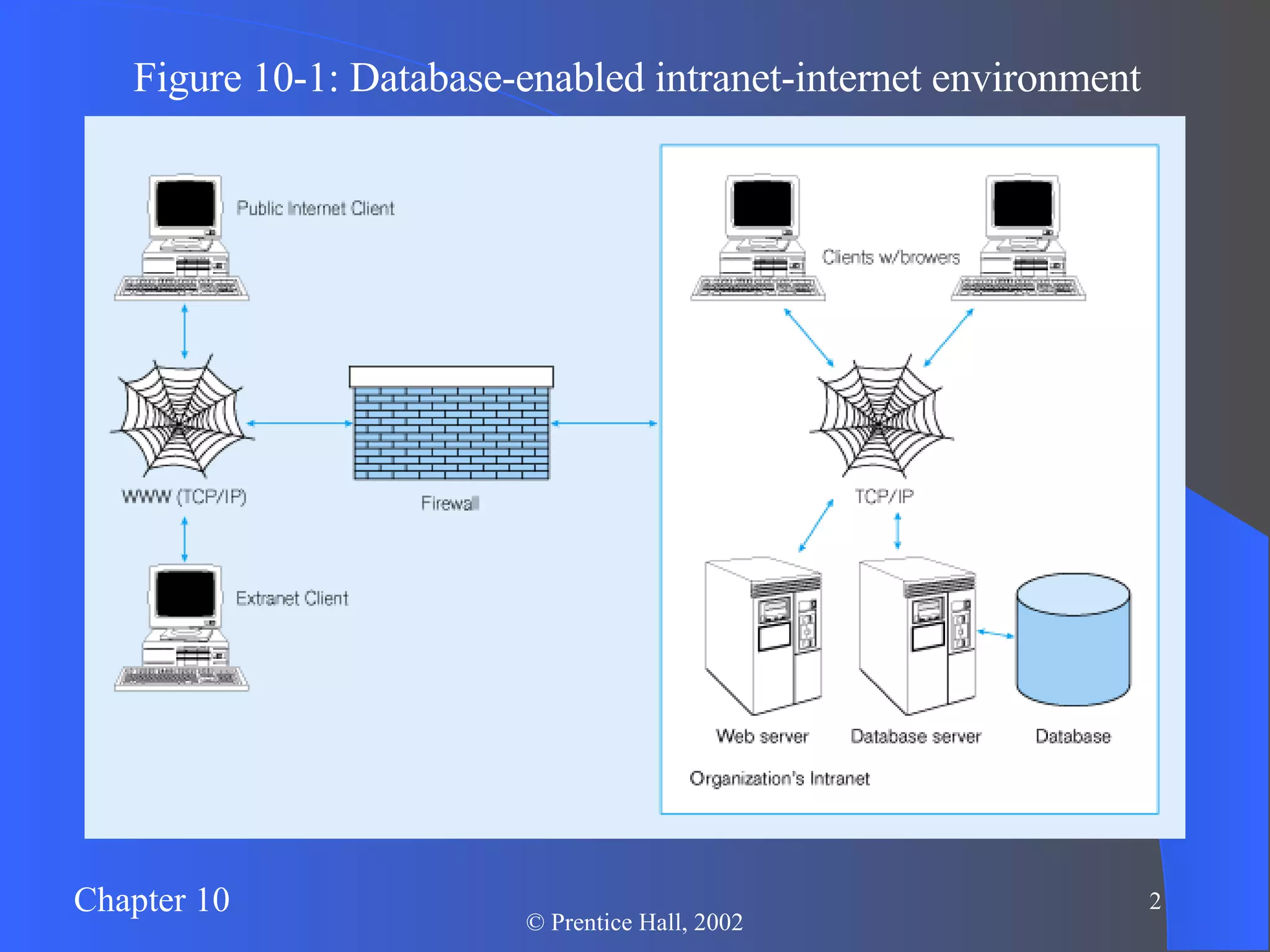
Figure 10-1: Database-enabled intranet-internet environment
Business on the Internet Electronic Business (e-business) Development of integrated relationship with customers and suppliers via the Internet Business-to-Consumer (B2C) – retail Business-to-Business (B2B) – interaction with suppliers and vendors Electronic Commerce (e-commerce) Business transactions, including: Order processing/fulfillment Customer relations Electronic data interchange (EDI) Bill payments
Web-Related Terms World Wide Web (WWW) The total set of interlinked hypertext documents residing on Web servers worldwide Browser Software that displays HTML documents and allows users to access files and software related to HTML documents Web Server Software that responds to requests from browsers and transmits HTML documents to browsers Web pages – HTML documents Static Web pages – content established at development time Dynamic Web pages – content dynamically generated, usually by obtaining data from database
Communications Technology IP Address 4 numbers that identify a node on the internet E.g.  131.247.152.18 Hypertext Transfer Protocol (HTTP) Communication protocol used to transfer pages from Web server to browser HTTPS is a more secure version Uniform Resource Locator (URL) Mnemonic Web address corresponding with IP address Also includes folder location and html file name Figure 10-2: Typical URL
Internet-Related Languages Hypertext Markup Language (HTML) Markup language specifically for Web pages Standard Generalized Markup Language (SGML) Markup language standard Extensible Markup Language (XML) Markup language allowing customized tags XHTML XML-compliant extension of HTML Java Object-oriented programming language for applets JavaScript/VBScript   Scripting languages that enable interactivity in HTML documents Cascading Style Sheets (CSS) Control appearance of Web elements in an HML document Standards and Web conventions established by World Wide Web Consortium (W3C)
Web Servers Provide HTTP service Passing plain text via TCP connection Serve many clients at once Therefore, multithreaded and multiprocessed Load balancing approaches: Domain Name Server (DNS) balancing One DNS = multiple IP addresses Software/hardware balancing Request at one IP address is distributed to multiple servers Reverse proxy Intercept client request and cache response
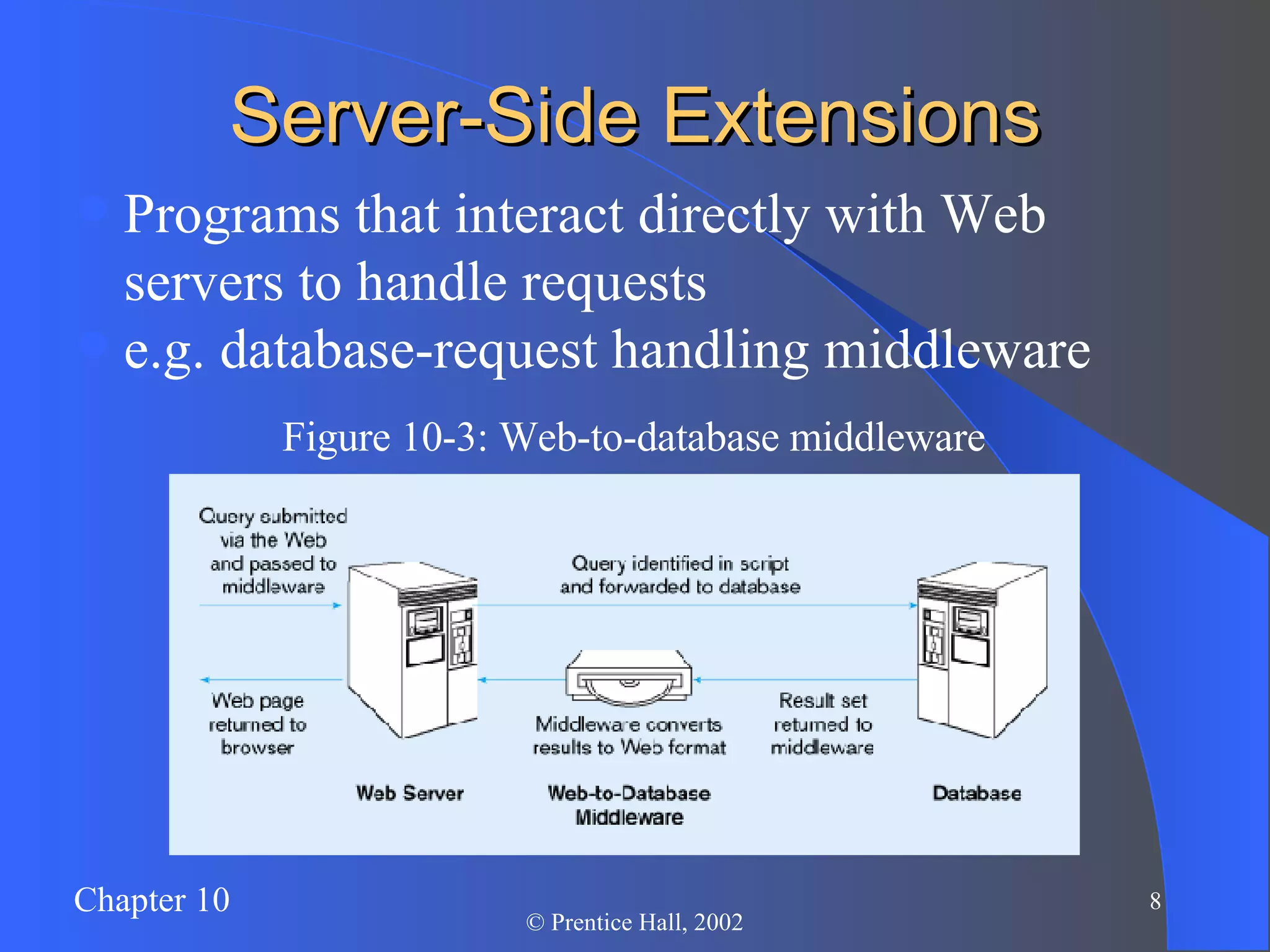
Server-Side Extensions Programs that interact directly with Web servers to handle requests e.g. database-request handling middleware Figure 10-3: Web-to-database middleware
Client-Side Extensions Add functionality to the browser Plug-ins hardware./software modules that extend browser capabilities by adding features (e.g. encryption, animation, wireless access) ActiveX Microsoft COM/OLE components that allow data manipulation inside the browser Cookies Block of data stored at client by Web server for later use
Web Server Interfaces Common Gateway Interface (CGI) Specify transfer of information between Web server and CGI program Performance not very good Security risks Application Program Interface (API) More efficient than CGI Shared as dynamic link libraries (DLLs) Java Servlets Like applets, but stored at server Cross-platform compatible More efficient than CGI
Web-to-Database Tools Active Server Pages (ASP) Microsoft server-side scripting language Generates dynamic Web pages Interfaces to databases in MS Windows-based Web servers Cold-Fusion Uses special server-side markup language CFML Modeled after HTML Interfaces to databases Embedded SQL SQL embedded in 3GL programs Provides flexible interface Improves performance Improves database security
Figure 10-4: A  global.asa  file for an ASP application ASP applications include HTML extensions and additional scripting (usually in VBScript, or in JavaScript) ASP code embedded in <%  %> tags are executed on the server, instead of the client. This is how dynamic Web pages can be created
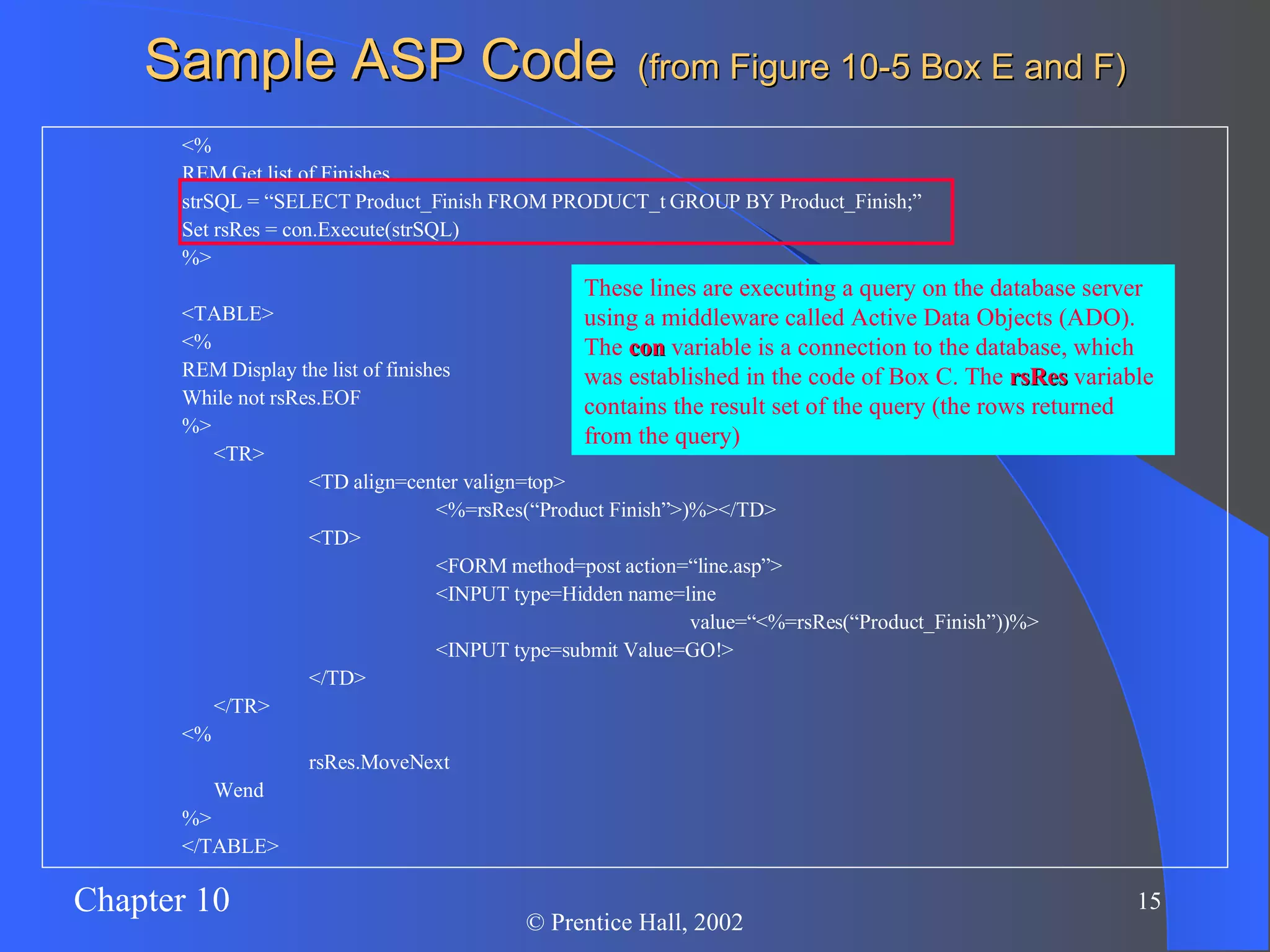
Sample ASP Code   (from Figure 10-5 Box E and F) <% REM Get list of Finishes strSQL = “SELECT Product_Finish FROM PRODUCT_t GROUP BY Product_Finish;” Set rsRes = con.Execute(strSQL) %> <TABLE> <% REM Display the list of finishes While not rsRes.EOF %> <TR> <TD align=center valign=top> <%=rsRes(“Product Finish”>)%></TD> <TD> <FORM method=post action=“line.asp”> <INPUT type=Hidden name=line  value=“<%=rsRes(“Product_Finish”))%> <INPUT type=submit Value=GO!> </TD> </TR> <% rsRes.MoveNext Wend %> </TABLE>
Sample ASP Code   (from Figure 10-5 Box E and F) <% REM Get list of Finishes strSQL = “SELECT Product_Finish FROM PRODUCT_t GROUP BY Product_Finish;” Set rsRes = con.Execute(strSQL) %> <TABLE> <% REM Display the list of finishes While not rsRes.EOF %> <TR> <TD align=center valign=top> <%=rsRes(“Product Finish”>)%></TD> <TD> <FORM method=post action=“line.asp”> <INPUT type=Hidden name=line  value=“<%=rsRes(“Product_Finish”))%> <INPUT type=submit Value=GO!> </TD> </TR> <% rsRes.MoveNext Wend %> </TABLE> Code is within the <% %> tags are executed on the server, not the client…these are interacting with the database and creating dynamic Web content
Sample ASP Code   (from Figure 10-5 Box E and F) <% REM Get list of Finishes strSQL = “SELECT Product_Finish FROM PRODUCT_t GROUP BY Product_Finish;” Set rsRes = con.Execute(strSQL) %> <TABLE> <% REM Display the list of finishes While not rsRes.EOF %> <TR> <TD align=center valign=top> <%=rsRes(“Product Finish”>)%></TD> <TD> <FORM method=post action=“line.asp”> <INPUT type=Hidden name=line  value=“<%=rsRes(“Product_Finish”))%> <INPUT type=submit Value=GO!> </TD> </TR> <% rsRes.MoveNext Wend %> </TABLE> These lines are executing a query on the database server using a middleware called Active Data Objects (ADO). The  con  variable is a connection to the database, which was established in the code of Box C. The  rsRes  variable contains the result set of the query (the rows returned from the query)
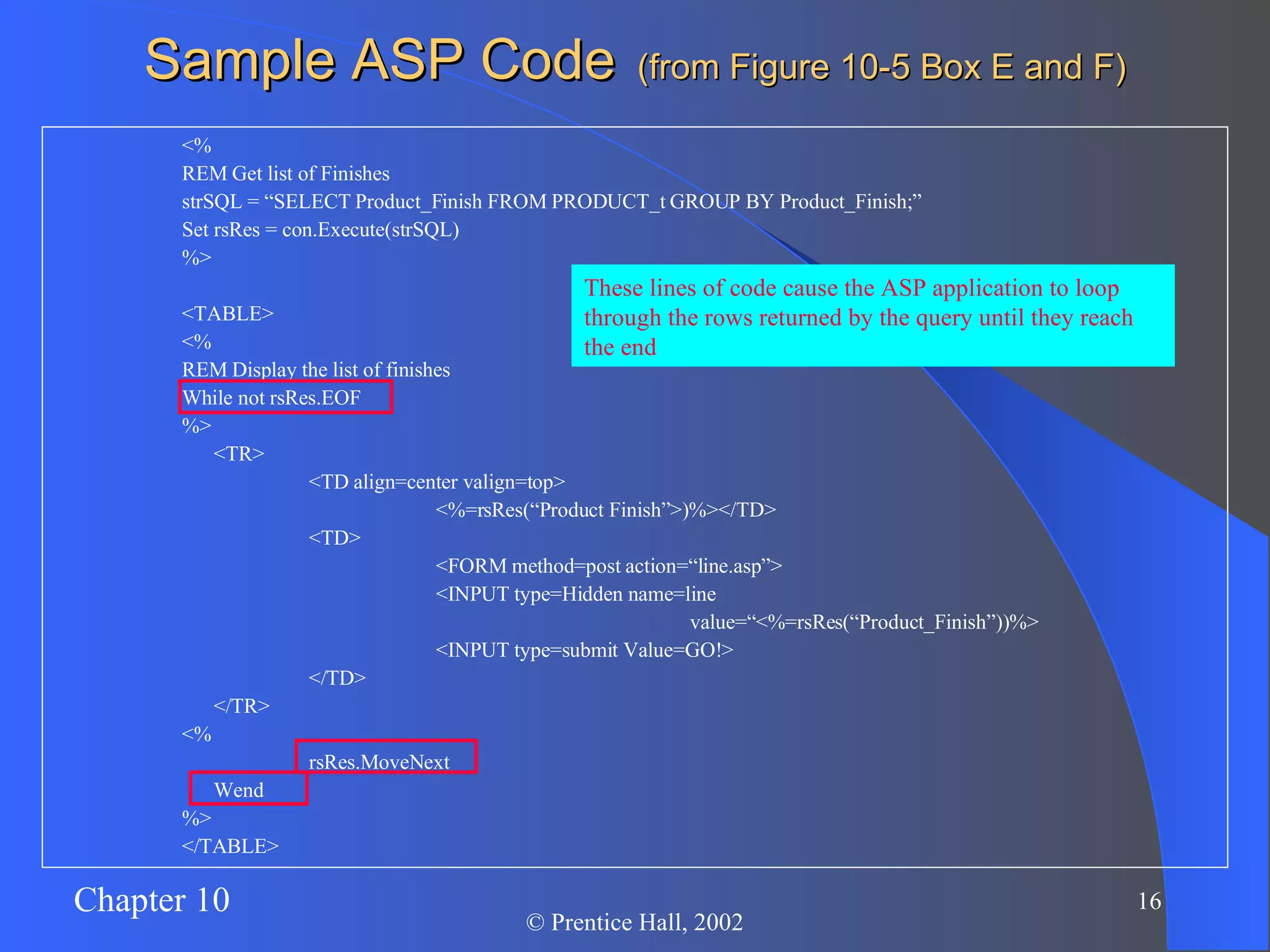
Sample ASP Code   (from Figure 10-5 Box E and F) <% REM Get list of Finishes strSQL = “SELECT Product_Finish FROM PRODUCT_t GROUP BY Product_Finish;” Set rsRes = con.Execute(strSQL) %> <TABLE> <% REM Display the list of finishes While not rsRes.EOF %> <TR> <TD align=center valign=top> <%=rsRes(“Product Finish”>)%></TD> <TD> <FORM method=post action=“line.asp”> <INPUT type=Hidden name=line  value=“<%=rsRes(“Product_Finish”))%> <INPUT type=submit Value=GO!> </TD> </TR> <% rsRes.MoveNext Wend %> </TABLE> These lines of code cause the ASP application to loop through the rows returned by the query until they reach the end
Sample ASP Code   (from Figure 10-5 Box E and F) <% REM Get list of Finishes strSQL = “SELECT Product_Finish FROM PRODUCT_t GROUP BY Product_Finish;” Set rsRes = con.Execute(strSQL) %> <TABLE> <% REM Display the list of finishes While not rsRes.EOF %> <TR> <TD align=center valign=top> <%=rsRes(“Product Finish”>)%></TD> <TD> <FORM method=post action=“line.asp”> <INPUT type=Hidden name=line  value=“<%=rsRes(“Product_Finish”))%> <INPUT type=submit Value=GO!> </TD> </TR> <% rsRes.MoveNext Wend %> </TABLE> These lines of code are retrieving the values of the specified field from the current row of the query result
Sample ASP Code   (from Figure 10-5 Box E and F) <% REM Get list of Finishes strSQL = “SELECT Product_Finish FROM PRODUCT_t GROUP BY Product_Finish;” Set rsRes = con.Execute(strSQL) %> <TABLE> <% REM Display the list of finishes While not rsRes.EOF %> <TR> <TD align=center valign=top> <%=rsRes(“Product Finish”>)%></TD> <TD> <FORM method=post action=“line.asp”> <INPUT type=Hidden name=line  value=“<%=rsRes(“Product_Finish”))%> <INPUT type=submit Value=GO!> </TD> </TR> <% rsRes.MoveNext Wend %> </TABLE> The Web page is being dynamically created, with one HTML table row for each record obtained from the query. Also, each Web table row includes a button that will link to another ASP page
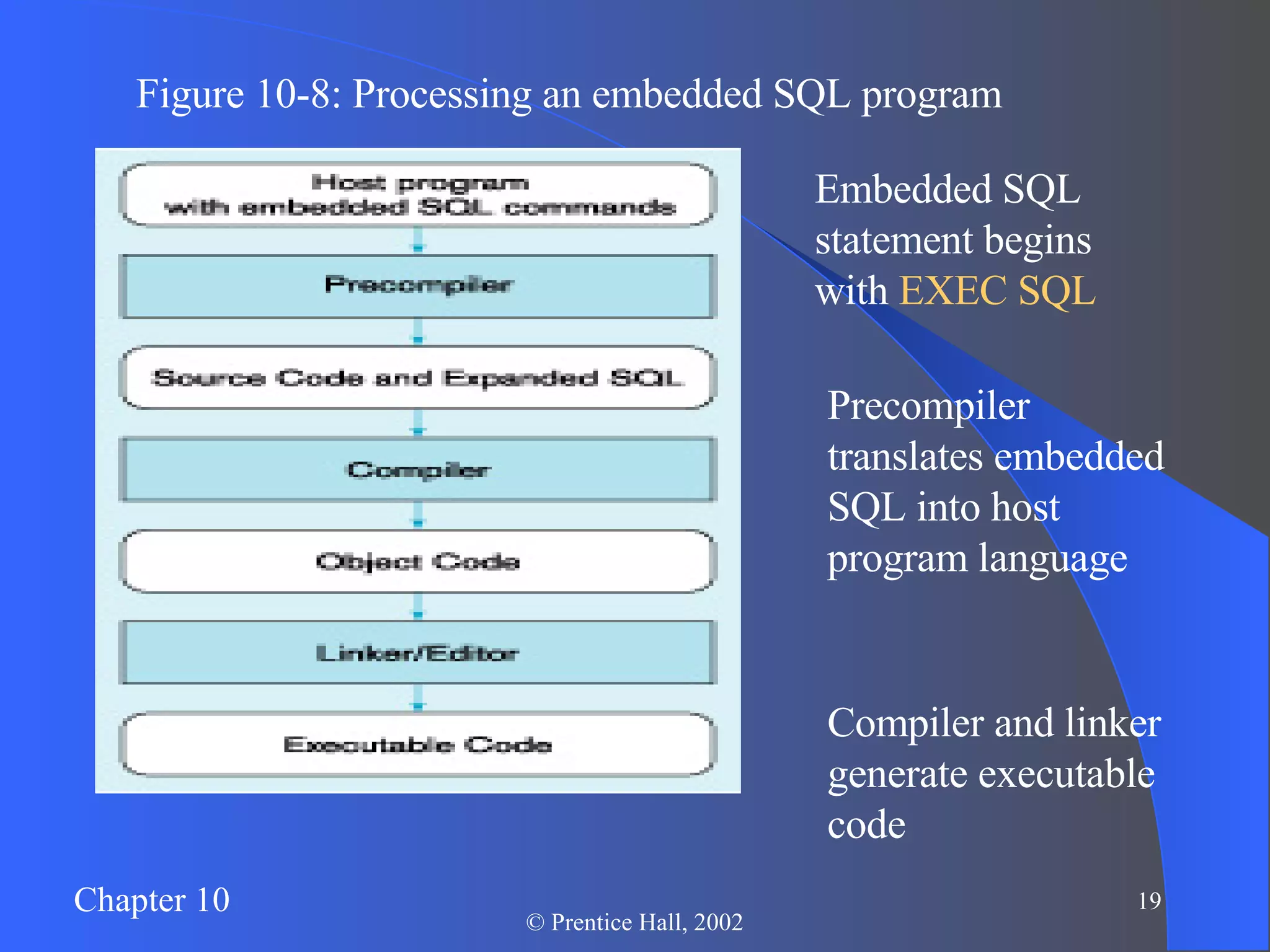
Figure 10-8: Processing an embedded SQL program Embedded SQL statement begins with  EXEC SQL Precompiler translates embedded SQL into host program language Compiler and linker generate executable code
Managing Website Data Web Security Issues Prevent unauthorized access and malicious destruction Privacy Issues Protect users’ privacy rights Internet Technology Rate-of-Change Issues Deal with rapid advances in technology
Website Security Planning for Web Security Risk assessment: nature, likelihood, impact, and motivation of security risks Network Level Security Web server and DB server on separate LAN from other business systems Minimize sharing of hard disks among network servers Regular monitoring of network and firewall logs Install probe-monitor software
Website Security (continued) Operating System Level Security Patch all known OS vulnerabilities Install anti-virus software with boot-time, file download time, and email reception time virus detection Monitor server logs for unauthorized activity Disable unrequired services to reduce risk of unauthorized access
Web Security (continued) Web Server Security Restrict number of users on Web server Restrict access (minimize number of open ports) http  and  https  only, if possible Remove unneeded programs Restrict CGI scripts to one subdirectory For Unix, only install minimum software for Web server
Website Security (continued) Firewall  – hardware/software security component that limits external access to company’s data Proxy server  – firewall component that manages Internet traffic to and from a LAN Router  – intermediate device that transmits message packets to correct destination over most efficient pathway Intrusion detection system (IDS)  – system that identifies attempt to hack or break into a system
Figure 10-9: Establishing Internet security Firewall to limit external access to data Routers to transmit message packets to correct destination IDS to monitor and recognize security breach attempts

Internet Environment

  • 1.
    Chapter 10: TheInternet Database Environment Modern Database Management 6 th Edition Jeffrey A. Hoffer, Mary B. Prescott, Fred R. McFadden
  • 2.
    Figure 10-1: Database-enabledintranet-internet environment
  • 3.
    Business on theInternet Electronic Business (e-business) Development of integrated relationship with customers and suppliers via the Internet Business-to-Consumer (B2C) – retail Business-to-Business (B2B) – interaction with suppliers and vendors Electronic Commerce (e-commerce) Business transactions, including: Order processing/fulfillment Customer relations Electronic data interchange (EDI) Bill payments
  • 4.
    Web-Related Terms WorldWide Web (WWW) The total set of interlinked hypertext documents residing on Web servers worldwide Browser Software that displays HTML documents and allows users to access files and software related to HTML documents Web Server Software that responds to requests from browsers and transmits HTML documents to browsers Web pages – HTML documents Static Web pages – content established at development time Dynamic Web pages – content dynamically generated, usually by obtaining data from database
  • 5.
    Communications Technology IPAddress 4 numbers that identify a node on the internet E.g. 131.247.152.18 Hypertext Transfer Protocol (HTTP) Communication protocol used to transfer pages from Web server to browser HTTPS is a more secure version Uniform Resource Locator (URL) Mnemonic Web address corresponding with IP address Also includes folder location and html file name Figure 10-2: Typical URL
  • 6.
    Internet-Related Languages HypertextMarkup Language (HTML) Markup language specifically for Web pages Standard Generalized Markup Language (SGML) Markup language standard Extensible Markup Language (XML) Markup language allowing customized tags XHTML XML-compliant extension of HTML Java Object-oriented programming language for applets JavaScript/VBScript Scripting languages that enable interactivity in HTML documents Cascading Style Sheets (CSS) Control appearance of Web elements in an HML document Standards and Web conventions established by World Wide Web Consortium (W3C)
  • 7.
    Web Servers ProvideHTTP service Passing plain text via TCP connection Serve many clients at once Therefore, multithreaded and multiprocessed Load balancing approaches: Domain Name Server (DNS) balancing One DNS = multiple IP addresses Software/hardware balancing Request at one IP address is distributed to multiple servers Reverse proxy Intercept client request and cache response
  • 8.
    Server-Side Extensions Programsthat interact directly with Web servers to handle requests e.g. database-request handling middleware Figure 10-3: Web-to-database middleware
  • 9.
    Client-Side Extensions Addfunctionality to the browser Plug-ins hardware./software modules that extend browser capabilities by adding features (e.g. encryption, animation, wireless access) ActiveX Microsoft COM/OLE components that allow data manipulation inside the browser Cookies Block of data stored at client by Web server for later use
  • 10.
    Web Server InterfacesCommon Gateway Interface (CGI) Specify transfer of information between Web server and CGI program Performance not very good Security risks Application Program Interface (API) More efficient than CGI Shared as dynamic link libraries (DLLs) Java Servlets Like applets, but stored at server Cross-platform compatible More efficient than CGI
  • 11.
    Web-to-Database Tools ActiveServer Pages (ASP) Microsoft server-side scripting language Generates dynamic Web pages Interfaces to databases in MS Windows-based Web servers Cold-Fusion Uses special server-side markup language CFML Modeled after HTML Interfaces to databases Embedded SQL SQL embedded in 3GL programs Provides flexible interface Improves performance Improves database security
  • 12.
    Figure 10-4: A global.asa file for an ASP application ASP applications include HTML extensions and additional scripting (usually in VBScript, or in JavaScript) ASP code embedded in <% %> tags are executed on the server, instead of the client. This is how dynamic Web pages can be created
  • 13.
    Sample ASP Code (from Figure 10-5 Box E and F) <% REM Get list of Finishes strSQL = “SELECT Product_Finish FROM PRODUCT_t GROUP BY Product_Finish;” Set rsRes = con.Execute(strSQL) %> <TABLE> <% REM Display the list of finishes While not rsRes.EOF %> <TR> <TD align=center valign=top> <%=rsRes(“Product Finish”>)%></TD> <TD> <FORM method=post action=“line.asp”> <INPUT type=Hidden name=line value=“<%=rsRes(“Product_Finish”))%> <INPUT type=submit Value=GO!> </TD> </TR> <% rsRes.MoveNext Wend %> </TABLE>
  • 14.
    Sample ASP Code (from Figure 10-5 Box E and F) <% REM Get list of Finishes strSQL = “SELECT Product_Finish FROM PRODUCT_t GROUP BY Product_Finish;” Set rsRes = con.Execute(strSQL) %> <TABLE> <% REM Display the list of finishes While not rsRes.EOF %> <TR> <TD align=center valign=top> <%=rsRes(“Product Finish”>)%></TD> <TD> <FORM method=post action=“line.asp”> <INPUT type=Hidden name=line value=“<%=rsRes(“Product_Finish”))%> <INPUT type=submit Value=GO!> </TD> </TR> <% rsRes.MoveNext Wend %> </TABLE> Code is within the <% %> tags are executed on the server, not the client…these are interacting with the database and creating dynamic Web content
  • 15.
    Sample ASP Code (from Figure 10-5 Box E and F) <% REM Get list of Finishes strSQL = “SELECT Product_Finish FROM PRODUCT_t GROUP BY Product_Finish;” Set rsRes = con.Execute(strSQL) %> <TABLE> <% REM Display the list of finishes While not rsRes.EOF %> <TR> <TD align=center valign=top> <%=rsRes(“Product Finish”>)%></TD> <TD> <FORM method=post action=“line.asp”> <INPUT type=Hidden name=line value=“<%=rsRes(“Product_Finish”))%> <INPUT type=submit Value=GO!> </TD> </TR> <% rsRes.MoveNext Wend %> </TABLE> These lines are executing a query on the database server using a middleware called Active Data Objects (ADO). The con variable is a connection to the database, which was established in the code of Box C. The rsRes variable contains the result set of the query (the rows returned from the query)
  • 16.
    Sample ASP Code (from Figure 10-5 Box E and F) <% REM Get list of Finishes strSQL = “SELECT Product_Finish FROM PRODUCT_t GROUP BY Product_Finish;” Set rsRes = con.Execute(strSQL) %> <TABLE> <% REM Display the list of finishes While not rsRes.EOF %> <TR> <TD align=center valign=top> <%=rsRes(“Product Finish”>)%></TD> <TD> <FORM method=post action=“line.asp”> <INPUT type=Hidden name=line value=“<%=rsRes(“Product_Finish”))%> <INPUT type=submit Value=GO!> </TD> </TR> <% rsRes.MoveNext Wend %> </TABLE> These lines of code cause the ASP application to loop through the rows returned by the query until they reach the end
  • 17.
    Sample ASP Code (from Figure 10-5 Box E and F) <% REM Get list of Finishes strSQL = “SELECT Product_Finish FROM PRODUCT_t GROUP BY Product_Finish;” Set rsRes = con.Execute(strSQL) %> <TABLE> <% REM Display the list of finishes While not rsRes.EOF %> <TR> <TD align=center valign=top> <%=rsRes(“Product Finish”>)%></TD> <TD> <FORM method=post action=“line.asp”> <INPUT type=Hidden name=line value=“<%=rsRes(“Product_Finish”))%> <INPUT type=submit Value=GO!> </TD> </TR> <% rsRes.MoveNext Wend %> </TABLE> These lines of code are retrieving the values of the specified field from the current row of the query result
  • 18.
    Sample ASP Code (from Figure 10-5 Box E and F) <% REM Get list of Finishes strSQL = “SELECT Product_Finish FROM PRODUCT_t GROUP BY Product_Finish;” Set rsRes = con.Execute(strSQL) %> <TABLE> <% REM Display the list of finishes While not rsRes.EOF %> <TR> <TD align=center valign=top> <%=rsRes(“Product Finish”>)%></TD> <TD> <FORM method=post action=“line.asp”> <INPUT type=Hidden name=line value=“<%=rsRes(“Product_Finish”))%> <INPUT type=submit Value=GO!> </TD> </TR> <% rsRes.MoveNext Wend %> </TABLE> The Web page is being dynamically created, with one HTML table row for each record obtained from the query. Also, each Web table row includes a button that will link to another ASP page
  • 19.
    Figure 10-8: Processingan embedded SQL program Embedded SQL statement begins with EXEC SQL Precompiler translates embedded SQL into host program language Compiler and linker generate executable code
  • 20.
    Managing Website DataWeb Security Issues Prevent unauthorized access and malicious destruction Privacy Issues Protect users’ privacy rights Internet Technology Rate-of-Change Issues Deal with rapid advances in technology
  • 21.
    Website Security Planningfor Web Security Risk assessment: nature, likelihood, impact, and motivation of security risks Network Level Security Web server and DB server on separate LAN from other business systems Minimize sharing of hard disks among network servers Regular monitoring of network and firewall logs Install probe-monitor software
  • 22.
    Website Security (continued)Operating System Level Security Patch all known OS vulnerabilities Install anti-virus software with boot-time, file download time, and email reception time virus detection Monitor server logs for unauthorized activity Disable unrequired services to reduce risk of unauthorized access
  • 23.
    Web Security (continued)Web Server Security Restrict number of users on Web server Restrict access (minimize number of open ports) http and https only, if possible Remove unneeded programs Restrict CGI scripts to one subdirectory For Unix, only install minimum software for Web server
  • 24.
    Website Security (continued)Firewall – hardware/software security component that limits external access to company’s data Proxy server – firewall component that manages Internet traffic to and from a LAN Router – intermediate device that transmits message packets to correct destination over most efficient pathway Intrusion detection system (IDS) – system that identifies attempt to hack or break into a system
  • 25.
    Figure 10-9: EstablishingInternet security Firewall to limit external access to data Routers to transmit message packets to correct destination IDS to monitor and recognize security breach attempts