




SQL Server CrashDumpAnalysisA brief tour withWinDbg and otheruglytoolsPablo Álvarez DovalDebugging & OptimizationTeam Leadpablod@plainconcepts.com
Who am I?
SessionObjectivesWhatisthissessionabout?Whatisn’tthissessionabout?
Who are you?
AgendaTools of theTradeBrief Windows ArchitectureRefresherSQL Server Post-mortem DebuggingHandling SQL Server dumpsAnalyzing SQL Server dumpsDebugging .NET Applicationswith SOS
Debugging Tools for WindowsFree download:http://www.microsoft.com/whdc/devtools/debuggingUpdated several times a yearDebuggers, extensions, tools and a great help file:windbg.exe, kd.exe, cdb.exegflags.exe, tlist.exe, etcdebugger.chmCan be installed via xcopy
Demo 0: … isitreally so ugly?
ThesaurusJust to keep with the forensics analogy:Corpse  Dump fileForensic Lab  WinDbgForensic Scientist  You!Gray’s Anathomy  Windows Internals 5th Ed. We are not going to get into details, but we will do a little refresher of some key concepts
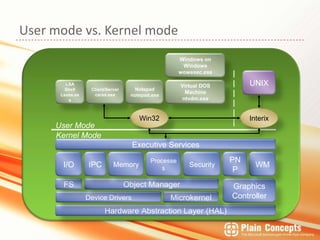
Usermode vs. KernelmodeWindows on Windowswowexec.exeUNIXLSA ShellLsass.exeClient/Servercsrss.exeNotepadnotepad.exeVirtual DOS Machinentvdm.exeWin32InterixUser ModeKernel ModeExecutiveServicesI/OIPCMemoryProcessesSecurityWMPNPGraphicsControllerObject ManagerFSDevice DriversMicrokernelHardware AbstractionLayer (HAL)
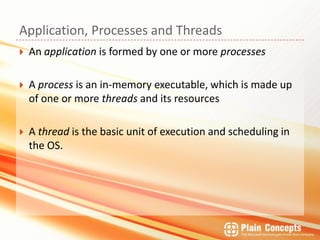
Application, Processes and ThreadsAn application is formed by one or more processesA process is an in-memory executable, which is made up of one or more threads and its resourcesA thread is the basic unit of execution and schedulingin the OS.
… isitreallyworthit?
Othergoodreasons…
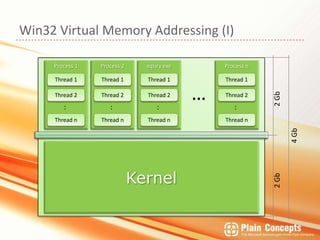
Win32 Virtual MemoryAddressing (I)sqlsrv.exeProcess nProcess 1Process 2Thread 1Thread 1Thread 1Thread 1Thread2Thread2Thread2Thread2…::::2 GbThread nThread nThread nThread n4GbKernel2 Gb
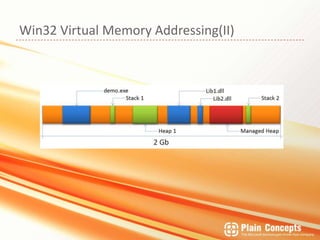
Win32 Virtual MemoryAddressing(II)
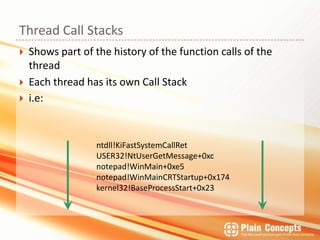
Thread Call StacksShows part of the history of the function calls of the threadEach thread has its own Call Stacki.e:ntdll!KiFastSystemCallRetUSER32!NtUserGetMessage+0xcnotepad!WinMain+0xe5notepad!WinMainCRTStartup+0x174kernel32!BaseProcessStart+0x23
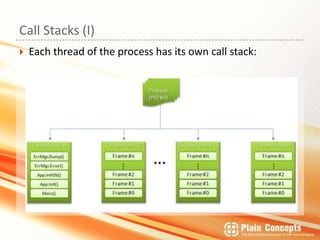
CallStacks (I)Eachthread of theprocess has itsowncallstack:
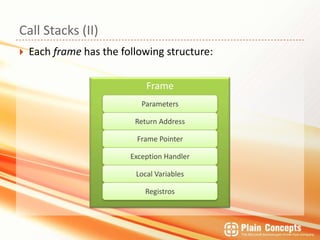
CallStacks (II)Eachframe has thefollowingstructure:FrameParametersReturnAddressFrame PointerExceptionHandlerLocal VariablesRegistros
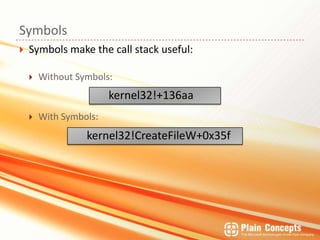
SymbolsSymbols make the call stack useful:Without Symbols:With Symbols:kernel32!+136aakernel32!CreateFileW+0x35f
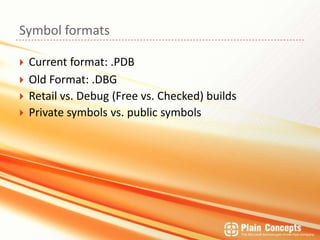
Symbol formatsCurrent format: .PDBOld Format: .DBGRetail vs. Debug (Free vs. Checked) buildsPrivate symbols vs. public symbols
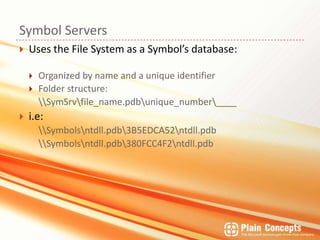
Symbol ServersUses the File System as a Symbol’s database:Organized by name and a unique identifierFolder structure:	\\SymSrv\file_name.pdb\unique_number\____i.e:\\Symbols\ntdll.pdb\3B5EDCA52\ntdll.pdb\\Symbols\ntdll.pdb\380FCC4F2\ntdll.pdb
Demo 1: Scheduler Non-Yielding
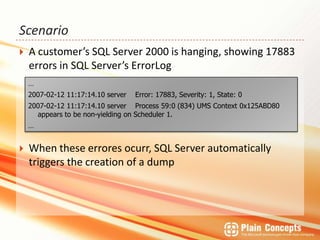
ScenarioA customer’s SQL Server 2000 ishanging, showing 17883 errors in SQL Server’sErrorLogWhenthese errores ocurr, SQL Server automaticallytriggersthecreation of a dump…2007-02-12 11:17:14.10 server    Error: 17883, Severity: 1, State: 02007-02-12 11:17:14.10 server    Process 59:0 (834) UMS Context 0x125ABD80 appears to be non-yielding on Scheduler 1.…
Demo 2: DBCC CHECKDB
Demo 3: ClusterResources
ManagedDebuggingwith .NETWinDbgis a nativedebuggerIn ordertodebug .NET codeweneedto use debuggerextensions:SOS.dll (untilframework .NET 3.5)CLR.dll (framework 4.0)Whyallthis? Isitworthit?
Demo 4: ManagedDebuggingwith SOS
Somecooltips…Didwereallygettothisslide in time?! Well.. enjoysome free tips! Using SOS from VS.NETMemorydumpanalysisfrominside VS2010
Resourcespablod@plainconcepts.com@Plain Conceptshttp://www.geeks.ms/blogs/palvarezhttp://www.geeks.ms/blogs/rcorralhttp://www.geeks.ms/blogs/luisguerrero@MSDN:http://blogs.msdn.com/tess/Books:Microsoft Windows Internals, 5th Ed. [Mark E. Russinovich and David A. Solomon]Microsoft Press.Debugging Applications for Microsoft .NET and Microsoft Windows[John Robbins]Microsoft Press.
AnyQuestions?Thanks! 

Sql Bits Sql Server Crash Dump Analysis