Scaling Data Analytics
Workloads on Databricks
Spark + AI Summit, Amsterdam
1
Chris Stevens and Bogdan Ghit
October 17, 2019
2
Bogdan Ghit
• Software Engineer @ Databricks - BI Team
• PhD in datacenter scheduling @ TU Delft
Chris Stevens
• Software Engineer @ Databricks - Serverless Team
• Spent ~10 years doing kernel development
3
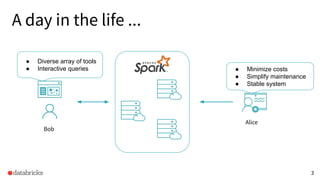
AliceBob
A day in the life ...
● Minimize costs
● Simplify maintenance
● Stable system
● Diverse array of tools
● Interactive queries
Bob
Alice
4
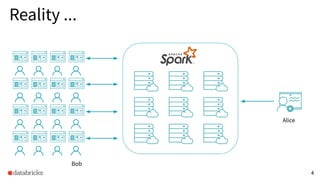
Reality ...
Alice
Alice
Bob
5
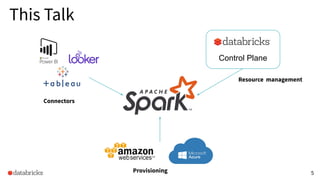
This Talk
Control Plane
Connectors
Resource management
Provisioning
6
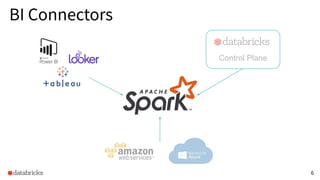
BI Connectors
Control Plane
7
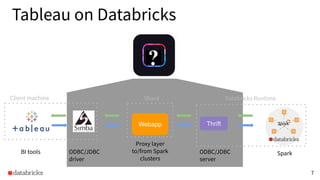
Tableau on Databricks
Client machine
BI tools SparkODBC/JDBC
driver
Webapp
Proxy layer
to/from Spark
clusters
Thrift
ODBC/JDBC
server
Shard Databricks Runtime
8
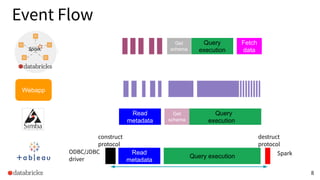
Event Flow
BI tools SparkODBC/JDBC
driver
ODBC/JDBC
server
Tableau session
Read
metadata
Query execution
construct
protocol
destruct
protocol
Read
metadata
Get
schema
Query
execution
Query
execution
Fetch
data
Get
schema
Webapp
9
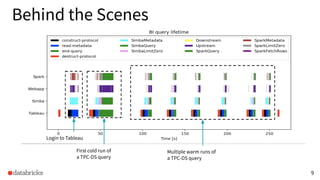
Behind the Scenes
Login to Tableau
First cold run of
a TPC-DS query
Multiple warm runs of
a TPC-DS query
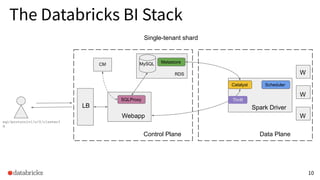
The Databricks BI Stack
10
Single-tenant shard
sql/protocolv1/o/0/clusterI
d
Control Plane
Webapp
LB
RDS
CM
Data Plane
W
W
W
Catalyst
Metastore
Scheduler
Spark Driver
SQLProxy
MySQL
Thrift
11
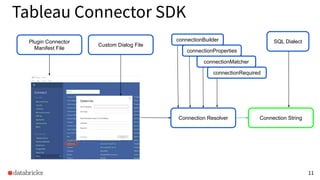
Tableau Connector SDK
Plugin Connector
Manifest File
Custom Dialog File
connectionBuilder
connectionProperties
connectionMatcher
connectionRequired
Connection Resolver
SQL Dialect
Connection String
12
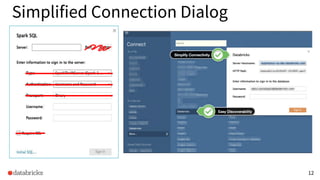
Simplified Connection Dialog
13
Controlling the Dialect
<function group='string' name='SPLIT' return-type='str'>
<formula> CASE
WHEN (%1 IS NULL) THEN
CAST(NULL AS STRING)
WHEN NOT (%3 IS NULL) THEN
COALESCE(
(CASE WHEN %3 &gt; 0 THEN SPLIT(%1, '%2')[%3-1]
ELSE SPLIT(
REVERSE(%1),
REVERSE('%2'))[ABS(%3)-1] END), '')
ELSE NULL END
</formula>
<argument type='str' />
<argument type='localstr' />
<argument type='localint' />
</function>
Achieved 100% compliance with TDVT standard testing
Missing operators: IN_SET, ATAN, CHAR, RSPLIT
Hive dialect wraps DATENAME in COALESCE operators
Strategy to determine if two values are distinct
The datasource supports booleans natively
CASE-WHEN statements should be of boolean type
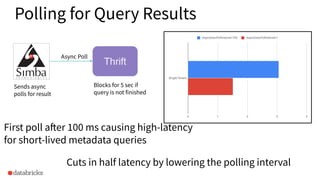
Polling for Query Results
First poll after 100 ms causing high-latency
for short-lived metadata queries
Blocks for 5 sec if
query is not finished
Thrift
Sends async
polls for result
Async Poll
Cuts in half latency by lowering the polling interval
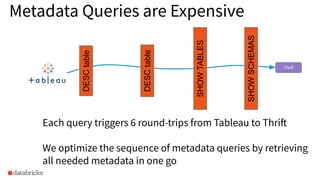
Metadata Queries are Expensive
Each query triggers 6 round-trips from Tableau to Thrift
We optimize the sequence of metadata queries by retrieving
all needed metadata in one go
SHOWSCHEMAS
SHOWTABLES
DESCtable
DESCtable
Thrift
16
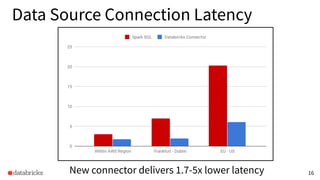
Data Source Connection Latency
New connector delivers 1.7-5x lower latency
17
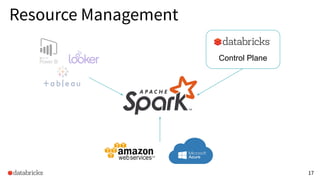
Resource Management
Control Plane
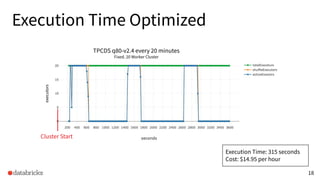
Execution Time Optimized
18
executors
TPCDS q80-v2.4 every 20 minutes
Fixed, 20 Worker Cluster
Execution Time: 315 seconds
Cost: $14.95 per hour
Cluster Start
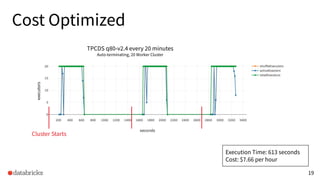
Cost Optimized
19
executors
TPCDS q80-v2.4 every 20 minutes
Auto-terminating, 20 Worker Cluster
Cluster Starts
Execution Time: 613 seconds
Cost: $7.66 per hour
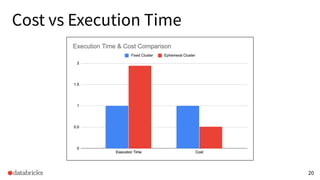
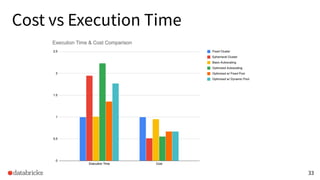
Cost vs Execution Time
20
21
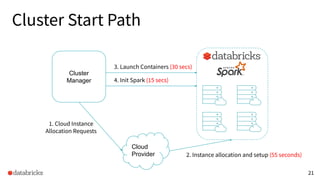
Cloud
Provider
Cluster Start Path
1. Cloud Instance
Allocation Requests
2. Instance allocation and setup (55 seconds)
3. Launch Containers (30 secs)
Cluster
Manager 4. Init Spark (15 secs)
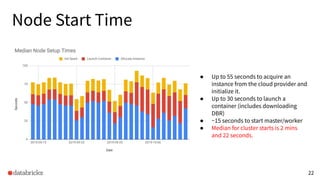
Node Start Time
22
● Up to 55 seconds to acquire an
instance from the cloud provider and
initialize it.
● Up to 30 seconds to launch a
container (includes downloading
DBR)
● ~15 seconds to start master/worker
● Median for cluster starts is 2 mins
and 22 seconds.
23
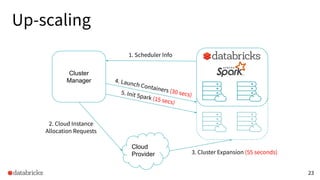
Cloud
Provider
Up-scaling
1. Scheduler Info
2. Cloud Instance
Allocation Requests
3. Cluster Expansion (55 seconds)
4. Launch Containers (30 secs)5. Init Spark (15 secs)
Cluster
Manager
24
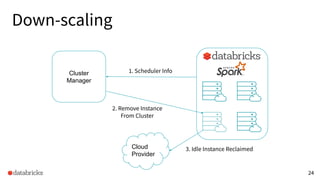
Cloud
Provider
Down-scaling
Cluster
Manager
1. Scheduler Info
2. Remove Instance
From Cluster
3. Idle Instance Reclaimed
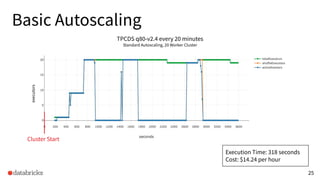
Basic Autoscaling
25
executors
TPCDS q80-v2.4 every 20 minutes
Standard Autoscaling, 20 Worker Cluster
Execution Time: 318 seconds
Cost: $14.24 per hour
Cluster Start
executors
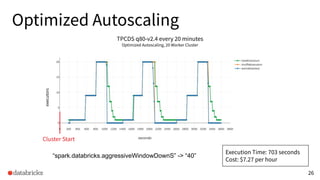
Optimized Autoscaling
26
executors
TPCDS q80-v2.4 every 20 minutes
Optimized Autoscaling, 20 Worker Cluster
“spark.databricks.aggressiveWindowDownS” -> “40”
Execution Time: 703 seconds
Cost: $7.27 per hour
Cluster Start
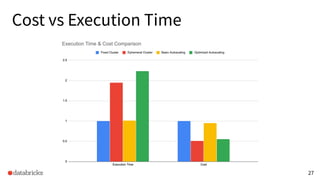
Cost vs Execution Time
27
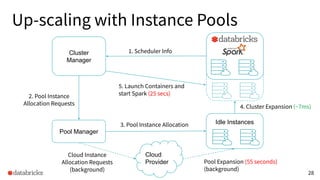
28
Cloud
Provider
Up-scaling with Instance Pools
Cluster
Manager
1. Scheduler Info
Idle Instances
Pool Manager
Cloud Instance
Allocation Requests
(background)
Pool Expansion (55 seconds)
(background)
2. Pool Instance
Allocation Requests
4. Cluster Expansion (~7ms)
3. Pool Instance Allocation
5. Launch Containers and
start Spark (25 secs)
29
Cloud
Provider
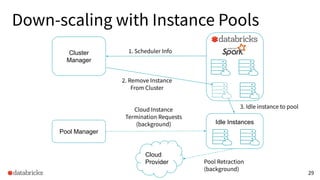
Down-scaling with Instance Pools
Cluster
Manager
1. Scheduler Info
Idle Instances
Pool Manager
Cloud Instance
Termination Requests
(background)
Pool Retraction
(background)
3. Idle instance to pool
2. Remove Instance
From Cluster
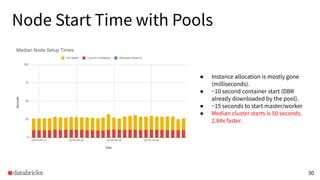
Node Start Time with Pools
30
● Instance allocation is mostly gone
(milliseconds).
● ~10 second container start (DBR
already downloaded by the pool).
● ~15 seconds to start master/worker
● Median cluster starts is 50 seconds.
2.84x faster.
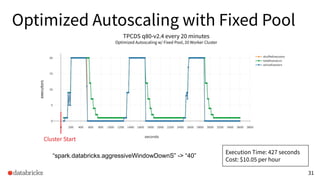
Optimized Autoscaling with Fixed Pool
31
executors
TPCDS q80-v2.4 every 20 minutes
Optimized Autoscaling w/ Fixed Pool, 20 Worker Cluster
“spark.databricks.aggressiveWindowDownS” -> “40”
Execution Time: 427 seconds
Cost: $10.05 per hour
Cluster Start
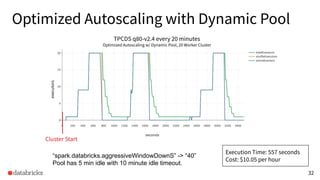
Optimized Autoscaling with Dynamic Pool
32
executors
TPCDS q80-v2.4 every 20 minutes
Optimized Autoscaling w/ Dynamic Pool, 20 Worker Cluster
“spark.databricks.aggressiveWindowDownS” -> “40”
Pool has 5 min idle with 10 minute idle timeout.
Execution Time: 557 seconds
Cost: $10.05 per hour
Cluster Start
Cost vs Execution Time
33
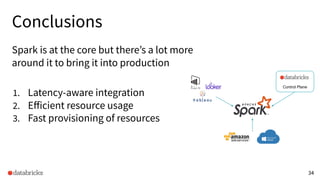
Conclusions
Spark is at the core but there’s a lot more
around it to bring it into production
1. Latency-aware integration
2. Efficient resource usage
3. Fast provisioning of resources
34
Control Plane
35
Thanks!
Chris Stevens - linkedin.com/in/chriscstevens
Bogdan Ghit - linkedin.com/in/bogdanghit
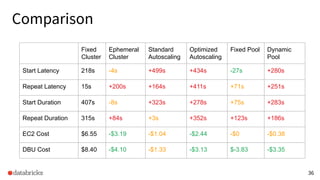
Comparison
36
Fixed
Cluster
Ephemeral
Cluster
Standard
Autoscaling
Optimized
Autoscaling
Fixed Pool Dynamic
Pool
Start Latency 218s -4s +499s +434s -27s +280s
Repeat Latency 15s +200s +164s +411s +71s +251s
Start Duration 407s -8s +323s +278s +75s +283s
Repeat Duration 315s +84s +3s +352s +123s +186s
EC2 Cost $6.55 -$3.19 -$1.04 -$2.44 -$0 -$0.38
DBU Cost $8.40 -$4.10 -$1.33 -$3.13 $-3.83 -$3.35

Scaling Data Analytics Workloads on Databricks

  • 1.
    Scaling Data Analytics Workloadson Databricks Spark + AI Summit, Amsterdam 1 Chris Stevens and Bogdan Ghit October 17, 2019
  • 2.
    2 Bogdan Ghit • SoftwareEngineer @ Databricks - BI Team • PhD in datacenter scheduling @ TU Delft Chris Stevens • Software Engineer @ Databricks - Serverless Team • Spent ~10 years doing kernel development
  • 3.
    3 AliceBob A day inthe life ... ● Minimize costs ● Simplify maintenance ● Stable system ● Diverse array of tools ● Interactive queries Bob Alice
  • 4.
  • 5.
  • 6.
  • 7.
    7 Tableau on Databricks Clientmachine BI tools SparkODBC/JDBC driver Webapp Proxy layer to/from Spark clusters Thrift ODBC/JDBC server Shard Databricks Runtime
  • 8.
    8 Event Flow BI toolsSparkODBC/JDBC driver ODBC/JDBC server Tableau session Read metadata Query execution construct protocol destruct protocol Read metadata Get schema Query execution Query execution Fetch data Get schema Webapp
  • 9.
    9 Behind the Scenes Loginto Tableau First cold run of a TPC-DS query Multiple warm runs of a TPC-DS query
  • 10.
    The Databricks BIStack 10 Single-tenant shard sql/protocolv1/o/0/clusterI d Control Plane Webapp LB RDS CM Data Plane W W W Catalyst Metastore Scheduler Spark Driver SQLProxy MySQL Thrift
  • 11.
    11 Tableau Connector SDK PluginConnector Manifest File Custom Dialog File connectionBuilder connectionProperties connectionMatcher connectionRequired Connection Resolver SQL Dialect Connection String
  • 12.
  • 13.
    13 Controlling the Dialect <functiongroup='string' name='SPLIT' return-type='str'> <formula> CASE WHEN (%1 IS NULL) THEN CAST(NULL AS STRING) WHEN NOT (%3 IS NULL) THEN COALESCE( (CASE WHEN %3 &gt; 0 THEN SPLIT(%1, '%2')[%3-1] ELSE SPLIT( REVERSE(%1), REVERSE('%2'))[ABS(%3)-1] END), '') ELSE NULL END </formula> <argument type='str' /> <argument type='localstr' /> <argument type='localint' /> </function> Achieved 100% compliance with TDVT standard testing Missing operators: IN_SET, ATAN, CHAR, RSPLIT Hive dialect wraps DATENAME in COALESCE operators Strategy to determine if two values are distinct The datasource supports booleans natively CASE-WHEN statements should be of boolean type
  • 14.
    Polling for QueryResults First poll after 100 ms causing high-latency for short-lived metadata queries Blocks for 5 sec if query is not finished Thrift Sends async polls for result Async Poll Cuts in half latency by lowering the polling interval
  • 15.
    Metadata Queries areExpensive Each query triggers 6 round-trips from Tableau to Thrift We optimize the sequence of metadata queries by retrieving all needed metadata in one go SHOWSCHEMAS SHOWTABLES DESCtable DESCtable Thrift
  • 16.
    16 Data Source ConnectionLatency New connector delivers 1.7-5x lower latency
  • 17.
  • 18.
    Execution Time Optimized 18 executors TPCDSq80-v2.4 every 20 minutes Fixed, 20 Worker Cluster Execution Time: 315 seconds Cost: $14.95 per hour Cluster Start
  • 19.
    Cost Optimized 19 executors TPCDS q80-v2.4every 20 minutes Auto-terminating, 20 Worker Cluster Cluster Starts Execution Time: 613 seconds Cost: $7.66 per hour
  • 20.
  • 21.
    21 Cloud Provider Cluster Start Path 1.Cloud Instance Allocation Requests 2. Instance allocation and setup (55 seconds) 3. Launch Containers (30 secs) Cluster Manager 4. Init Spark (15 secs)
  • 22.
    Node Start Time 22 ●Up to 55 seconds to acquire an instance from the cloud provider and initialize it. ● Up to 30 seconds to launch a container (includes downloading DBR) ● ~15 seconds to start master/worker ● Median for cluster starts is 2 mins and 22 seconds.
  • 23.
    23 Cloud Provider Up-scaling 1. Scheduler Info 2.Cloud Instance Allocation Requests 3. Cluster Expansion (55 seconds) 4. Launch Containers (30 secs)5. Init Spark (15 secs) Cluster Manager
  • 24.
    24 Cloud Provider Down-scaling Cluster Manager 1. Scheduler Info 2.Remove Instance From Cluster 3. Idle Instance Reclaimed
  • 25.
    Basic Autoscaling 25 executors TPCDS q80-v2.4every 20 minutes Standard Autoscaling, 20 Worker Cluster Execution Time: 318 seconds Cost: $14.24 per hour Cluster Start executors
  • 26.
    Optimized Autoscaling 26 executors TPCDS q80-v2.4every 20 minutes Optimized Autoscaling, 20 Worker Cluster “spark.databricks.aggressiveWindowDownS” -> “40” Execution Time: 703 seconds Cost: $7.27 per hour Cluster Start
  • 27.
  • 28.
    28 Cloud Provider Up-scaling with InstancePools Cluster Manager 1. Scheduler Info Idle Instances Pool Manager Cloud Instance Allocation Requests (background) Pool Expansion (55 seconds) (background) 2. Pool Instance Allocation Requests 4. Cluster Expansion (~7ms) 3. Pool Instance Allocation 5. Launch Containers and start Spark (25 secs)
  • 29.
    29 Cloud Provider Down-scaling with InstancePools Cluster Manager 1. Scheduler Info Idle Instances Pool Manager Cloud Instance Termination Requests (background) Pool Retraction (background) 3. Idle instance to pool 2. Remove Instance From Cluster
  • 30.
    Node Start Timewith Pools 30 ● Instance allocation is mostly gone (milliseconds). ● ~10 second container start (DBR already downloaded by the pool). ● ~15 seconds to start master/worker ● Median cluster starts is 50 seconds. 2.84x faster.
  • 31.
    Optimized Autoscaling withFixed Pool 31 executors TPCDS q80-v2.4 every 20 minutes Optimized Autoscaling w/ Fixed Pool, 20 Worker Cluster “spark.databricks.aggressiveWindowDownS” -> “40” Execution Time: 427 seconds Cost: $10.05 per hour Cluster Start
  • 32.
    Optimized Autoscaling withDynamic Pool 32 executors TPCDS q80-v2.4 every 20 minutes Optimized Autoscaling w/ Dynamic Pool, 20 Worker Cluster “spark.databricks.aggressiveWindowDownS” -> “40” Pool has 5 min idle with 10 minute idle timeout. Execution Time: 557 seconds Cost: $10.05 per hour Cluster Start
  • 33.
  • 34.
    Conclusions Spark is atthe core but there’s a lot more around it to bring it into production 1. Latency-aware integration 2. Efficient resource usage 3. Fast provisioning of resources 34 Control Plane
  • 35.
    35 Thanks! Chris Stevens -linkedin.com/in/chriscstevens Bogdan Ghit - linkedin.com/in/bogdanghit
  • 36.
    Comparison 36 Fixed Cluster Ephemeral Cluster Standard Autoscaling Optimized Autoscaling Fixed Pool Dynamic Pool StartLatency 218s -4s +499s +434s -27s +280s Repeat Latency 15s +200s +164s +411s +71s +251s Start Duration 407s -8s +323s +278s +75s +283s Repeat Duration 315s +84s +3s +352s +123s +186s EC2 Cost $6.55 -$3.19 -$1.04 -$2.44 -$0 -$0.38 DBU Cost $8.40 -$4.10 -$1.33 -$3.13 $-3.83 -$3.35