SAY THANK YOU TO OUR SPONSORS!
Sponsor Raffle!!!
Each sponsor stamp will opt you into their raffle prize and mailings
Collect 9+ sponsor stamps on your Badge to be eligible for the Xbox
Hand entire Badge/ ribbon back into registration desk at end of day
We will draw Badges for prizes at 5pm in Cromwell (if you are drawn and
do not have the pre-requisite stamp/s….. You lose!)
Social
Make sure you tweet on #spscambridge or #sqlsatcambridge
During the event we have Giant Jenga, Sack races and Conker Fights!
After event, join us for a post event SharePint/ SQLPint from our bar
Don’t forget to thank Sponsors, Volunteers and Speakers!
The event will close at 6.30pm
What’s it all about?
Using Office 365 securely
Knowing and protecting
your content
Complying with ISO and
GDPR
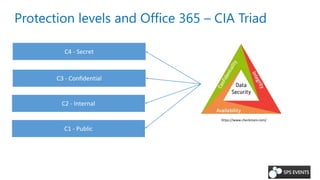
Protection levels and Office 365 – CIA Triad
C3 - Confidential
C4 - Secret
C2 - Internal
C1 - Public
https://www.checkmarx.com/
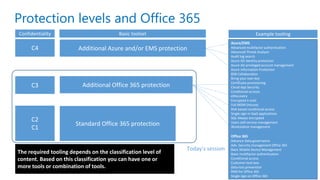
Protection levels and Office 365
Standard Office 365 protection
Additional Office 365 protection
Additional Azure and/or EMS protection
Data loss prevention
Data governance
Conditional access
Flow environments
Azure Information Protection
Rights Management
Advanced Threat Analysis
Risk based conditional access
The required tooling depends on the classification level of
content. Based on this classification you can have one or
more tools or combination of tools.
C2
C1
C3
C4
Confidentiality Basic toolset Example tooling
Azure/EMS
Advanced multifactor authentication
Advanced Threat Analysis
Audit log search
Azure AD identity protection
Azure AD privileged account management
Azure Information Protection
B2B Collaboration
Bring your own key
Certificate provisioning
Cloud App Security
Conditional accesss
eDiscovery
Encrypted e-mail
Full MDM (Intune)
Risk based conditional access
Single sign-in SaaS applications
SQL Always encrypted
Users self-service management
Workstation management
Office 365
Advance Data governance
Adv. Security management Office 365
Basic Mobile Device Management
Basic multifactor authentication
Conditional access
Customer lock-box
Data loss prevention
RMS for Office 365
Single sign-on Office 365
Today’s session
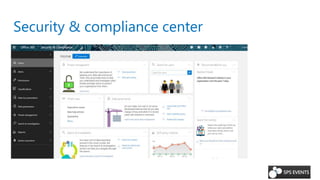
Security & compliance center
Not included in E1
• Data loss prevention
• eDiscovery export
• Manual retention/deletion policies
Not included in E1 or E3
• Adv. security management
• Adv. threat management
• Adv. data governance
• Adv. eDiscovery
Included in E5
• Everything 
https://technet.microsoft.com/en-us/library/dn933793.aspx
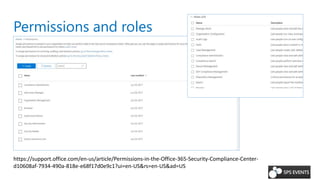
Permissions and roles
https://support.office.com/en-us/article/Permissions-in-the-Office-365-Security-Compliance-Center-
d10608af-7934-490a-818e-e68f17d0e9c1?ui=en-US&rs=en-US&ad=US
DEMO
Data governance
&
Classifications
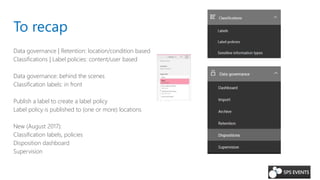
To recap
Data governance | Retention: location/condition based
Classifications | Label policies: content/user based
Data governance: behind the scenes
Classification labels: in front
Publish a label to create a label policy
Label policy is published to (one or more) locations
New (August 2017):
Classification labels, policies
Disposition dashboard
Supervision
DEMO
Data loss prevention
SharePoint Online
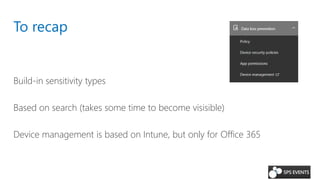
To recap
Build-in sensitivity types
Based on search (takes some time to become visisible)
Device management is based on Intune, but only for Office 365
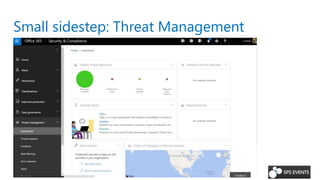
Small sidestep: Threat Management
Insights into e-mail threat and protection
Spam filtering
Malware detection
Enable/disable Dkim signing of e-mails
Quarantine: all e-mails seen as malware, spam, phish, or bulk
DEMO
Finding sensitive information
Searching the audit log
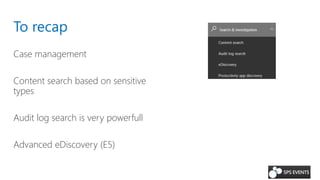
To recap
Case management
Content search based on sensitive
types
Audit log search is very powerfull
Advanced eDiscovery (E5)
DEMO
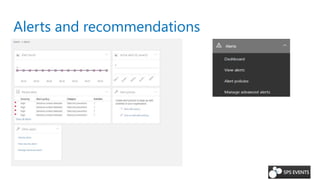
Using alerts and recommendations
Alerts and recommendations
DEMO
Using PowerShell with the Security &
Compliance center
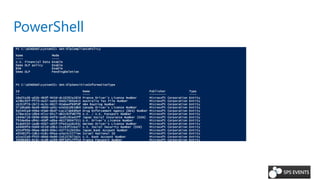
PowerShell
That’s about it
But there’s some more info….
More information
Office 365 security & compliance center
Security & compliance security roles
PowerShell cmdlets
Find sensitive data
Sensitive data queries
Data loss prevention
Thank you for your time….
Reach out to us on Twitter:
Or check out our blogs:
https://alberthoitingh.com
https://www.O365dude.com
@AlbertHoiting
h
@Laskewit
z

SPS Cambridge - Office 365 Security & Compliance

  • 2.
    SAY THANK YOUTO OUR SPONSORS!
  • 3.
    Sponsor Raffle!!! Each sponsorstamp will opt you into their raffle prize and mailings Collect 9+ sponsor stamps on your Badge to be eligible for the Xbox Hand entire Badge/ ribbon back into registration desk at end of day We will draw Badges for prizes at 5pm in Cromwell (if you are drawn and do not have the pre-requisite stamp/s….. You lose!)
  • 4.
    Social Make sure youtweet on #spscambridge or #sqlsatcambridge During the event we have Giant Jenga, Sack races and Conker Fights! After event, join us for a post event SharePint/ SQLPint from our bar Don’t forget to thank Sponsors, Volunteers and Speakers! The event will close at 6.30pm
  • 6.
    What’s it allabout? Using Office 365 securely Knowing and protecting your content Complying with ISO and GDPR
  • 7.
    Protection levels andOffice 365 – CIA Triad C3 - Confidential C4 - Secret C2 - Internal C1 - Public https://www.checkmarx.com/
  • 8.
    Protection levels andOffice 365 Standard Office 365 protection Additional Office 365 protection Additional Azure and/or EMS protection Data loss prevention Data governance Conditional access Flow environments Azure Information Protection Rights Management Advanced Threat Analysis Risk based conditional access The required tooling depends on the classification level of content. Based on this classification you can have one or more tools or combination of tools. C2 C1 C3 C4 Confidentiality Basic toolset Example tooling Azure/EMS Advanced multifactor authentication Advanced Threat Analysis Audit log search Azure AD identity protection Azure AD privileged account management Azure Information Protection B2B Collaboration Bring your own key Certificate provisioning Cloud App Security Conditional accesss eDiscovery Encrypted e-mail Full MDM (Intune) Risk based conditional access Single sign-in SaaS applications SQL Always encrypted Users self-service management Workstation management Office 365 Advance Data governance Adv. Security management Office 365 Basic Mobile Device Management Basic multifactor authentication Conditional access Customer lock-box Data loss prevention RMS for Office 365 Single sign-on Office 365 Today’s session
  • 9.
    Security & compliancecenter Not included in E1 • Data loss prevention • eDiscovery export • Manual retention/deletion policies Not included in E1 or E3 • Adv. security management • Adv. threat management • Adv. data governance • Adv. eDiscovery Included in E5 • Everything  https://technet.microsoft.com/en-us/library/dn933793.aspx
  • 10.
  • 11.
  • 12.
    To recap Data governance| Retention: location/condition based Classifications | Label policies: content/user based Data governance: behind the scenes Classification labels: in front Publish a label to create a label policy Label policy is published to (one or more) locations New (August 2017): Classification labels, policies Disposition dashboard Supervision
  • 13.
  • 14.
    To recap Build-in sensitivitytypes Based on search (takes some time to become visisible) Device management is based on Intune, but only for Office 365
  • 15.
    Small sidestep: ThreatManagement Insights into e-mail threat and protection Spam filtering Malware detection Enable/disable Dkim signing of e-mails Quarantine: all e-mails seen as malware, spam, phish, or bulk
  • 16.
  • 17.
    To recap Case management Contentsearch based on sensitive types Audit log search is very powerfull Advanced eDiscovery (E5)
  • 18.
    DEMO Using alerts andrecommendations
  • 19.
  • 20.
    DEMO Using PowerShell withthe Security & Compliance center
  • 21.
  • 22.
    That’s about it Butthere’s some more info….
  • 23.
    More information Office 365security & compliance center Security & compliance security roles PowerShell cmdlets Find sensitive data Sensitive data queries Data loss prevention
  • 24.
    Thank you foryour time…. Reach out to us on Twitter: Or check out our blogs: https://alberthoitingh.com https://www.O365dude.com @AlbertHoiting h @Laskewit z

Editor's Notes

  • #22 $UserCredential = Get-Credential $Session = New-PSSession -ConfigurationName Microsoft.Exchange -ConnectionUri https://ps.compliance.protection.outlook.com/powershell-liveid/ -Credential $UserCredential -Authentication Basic -AllowRedirection Import-PSSession $Session Get-DlpCompliancePolicy Get-DlpSensitiveInformationType Get-managementrole Get-compliancesearch
  • #24 Albert