Speech Recognition
Kimberlee A. Kemble
Program Manager, Voice Systems Middleware
Education
IBM Corporation

Presenter:
Sajana.A
S2-ELT
Agenda
•
•
•
•
•
•
•

What is speech Recognition??
Closer look
Terms & concepts
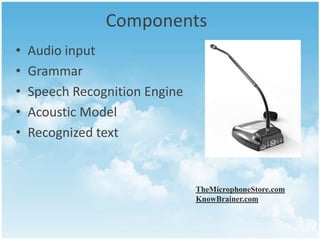
Components
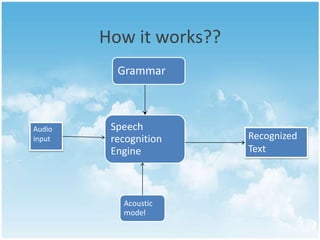
How it works??
Pros & cons
Applications
What is speech recognition?




Speech Recognition (SR) is the ability to translate a
dictation or spoken word to text.
Also known as “automatic speech recognition” (ASR),
“computer speech recognition”, or “speech to text”
(STT)
A Closer look!!!
• Speech recognition engine
1. Command and control application
The application can interpret the result of the
recognition as a command.
2.

Dictation application
Application handles the recognized text simply as
text.
Terms &Concepts
• Utterances
1.

An utterance is any stream of speech between
two periods of silence.
2. Silence delineates the start and end of an
utterance.
3. An utterance can be a single word, or it can
contain multiple words (a phrase or a sentence)
Continued..
• Pronunciations
Represents what the speech engine thinks a word
should sound like.
• Grammars


uses a particular syntax, or set of rules, to define the
words and phrases that can be recognized by the engine.
define the domain, or context, within which the
recognition engine works
Continued..
• Speaker-dependent systems
–
–
–
–

Require “training” to “teach” the individual System
More robust
But less convenient
And obviously less portable

• Speaker-independent systems
– Language coverage is reduced to compensate need to be
flexible in phoneme identification
– Clever compromise is to learn on the fly
Components
•
•
•
•
•

Audio input
Grammar
Speech Recognition Engine
Acoustic Model
Recognized text

TheMicrophoneStore.com
KnowBrainer.com
How it works??
Grammar

Audio
input

Speech
recognition
Engine

Acoustic
model

Recognized
Text
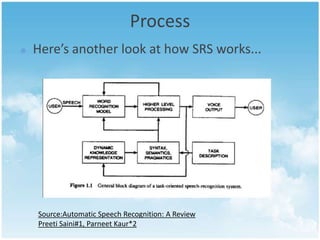
Process
Here’s another look at how SRS works...

Source:Automatic Speech Recognition: A Review
Preeti Saini#1, Parneet Kaur*2
Acceptance and Rejection
• An accepted utterance is one in which the
engine returns recognized text.
• confidence score along with the text to
indicate the likelihood that the returned text is
correct.
• Not all utterances that are processed by
the speech engine are accepted
What’s hard about that?
• Digitization
– Converting analogue signal into digital representation.

• Signal processing
– Separating speech from background noise.

• Phonetics
– Variability in human speech.

• Phonology
– Recognizing individual sound distinctions (similar phonemes.)

• Lexicology and syntax
– Disambiguating homophones.
– Features of continuous speech.

• Syntax and pragmatics
– Interpreting features.
– Filtering of performance errors (disfluencies).
The Uses
• Individuals With Disabilities – Assists those who have visual
impairment, hand immobility, dyslexia, etc.
• Medical Transcription – Reduces delays to write out
medical transcriptions

• Dictation - Converts words to text in emails or other word
documents (also helpful for English Language Learners).
• Access Menu Commands – Opens files using voice commands.
Applications of Speech Recognition
•

Speech recognition applications include





Voice dialling (e.g., "Call home"),
Call routing (e.g., "I would like to make a collect call"),
Simple data entry (e.g., entering a credit card number),
Preparation of structured documents (e.g., A radiology
report),
 Speech-to-text processing (e.g., word processors or
emails), and
 In aircraft cockpits (usually termed Direct Voice Input).
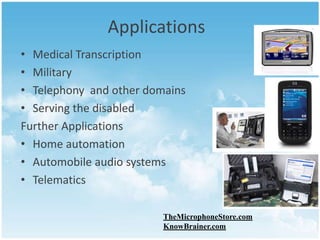
Applications
• Medical Transcription
• Military
• Telephony and other domains
• Serving the disabled
Further Applications
• Home automation
• Automobile audio systems
• Telematics
TheMicrophoneStore.com
KnowBrainer.com
Pros of Speech Recognition
•
•

•

•

Faster than “hand-writing”.
Allows for better spelling, whether it be in text
or documents.
Helpful for people with a mental or physical
disability .
Hands-free capability .
Cons of Speech Recognition
•

•

•

No program is 100% perfect
Factors that affect the accuracy of speech
recognition are: slang, homonyms, signal-tonoise ratio, and overlapping speech
Can be expensive depending on the program
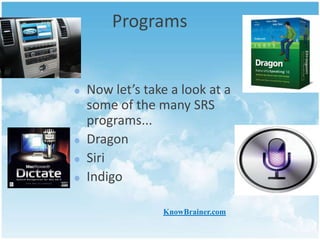
Programs

Now let’s take a look at a
some of the many SRS
programs...
Dragon
Siri
Indigo
KnowBrainer.com
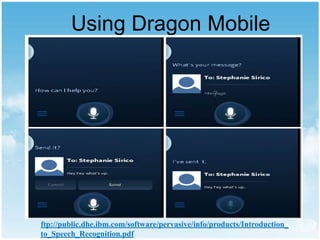
Using Dragon Mobile

ftp://public.dhe.ibm.com/software/pervasive/info/products/Introduction_
to_Speech_Recognition.pdf
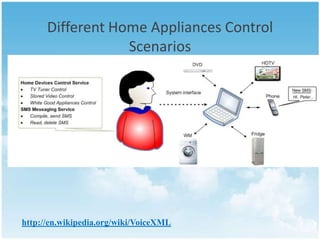
Different Home Appliances Control
Scenarios

http://en.wikipedia.org/wiki/VoiceXML
The Future of Assistive Technology
in Schools
•Students who need assistance in their writing skills because they have
stronger oral skills.
•Students who need were absent for a class, have poor memory, or
need assistance hearing the lesson.
•Students who need assistance during Guided Reading.
•Students who are English Language Learners.

•Students with visual/hearing impairments and learning disabilities
regarding reading/spelling/writing.
Conclusion
• Revolutionize the way people conduct
business over the Web and ,differentiate
world-class e-businesses.
• VoiceXML ties speech recognition and
telephony together
• voice-enabled Web solutions TODAY!
References
• Kai-Fu Lee, Hsiao-Wuen Hon, and Raj Reddy, An Overview
of the SPHINX Speech Recognition System. IEEE
Transactions on Acoustics, Speech and Signal Processing,
• Pellom, B., Sonic: The University of Colorado Continuous
Speech Recognition System.
• http://www.tldp.org/HOWTO/Speech-RecognitionHOWTO/index.html
• http://www.zachary.com/s/xvoice
• http://xvoice.sourceforge.net/Willie Walker, Paul Lamere,
Philip Kwok, Bhiksha Raj, Rita Singh, Evandro Gouvea,
• Peter Wolf, Joe Woelfel, Sphinx-4: A Flexible Open Source
Framework for SpeechRecognition.
• A. Hagen, D. A. Connors, B. L. Pellom, The Analysis and
Design of Architecture Systems
thank you!

Speech recognition An overview

  • 1.
    Speech Recognition Kimberlee A.Kemble Program Manager, Voice Systems Middleware Education IBM Corporation Presenter: Sajana.A S2-ELT
  • 2.
    Agenda • • • • • • • What is speechRecognition?? Closer look Terms & concepts Components How it works?? Pros & cons Applications
  • 3.
    What is speechrecognition?   Speech Recognition (SR) is the ability to translate a dictation or spoken word to text. Also known as “automatic speech recognition” (ASR), “computer speech recognition”, or “speech to text” (STT)
  • 4.
    A Closer look!!! •Speech recognition engine 1. Command and control application The application can interpret the result of the recognition as a command. 2. Dictation application Application handles the recognized text simply as text.
  • 5.
    Terms &Concepts • Utterances 1. Anutterance is any stream of speech between two periods of silence. 2. Silence delineates the start and end of an utterance. 3. An utterance can be a single word, or it can contain multiple words (a phrase or a sentence)
  • 6.
    Continued.. • Pronunciations Represents whatthe speech engine thinks a word should sound like. • Grammars  uses a particular syntax, or set of rules, to define the words and phrases that can be recognized by the engine. define the domain, or context, within which the recognition engine works
  • 7.
    Continued.. • Speaker-dependent systems – – – – Require“training” to “teach” the individual System More robust But less convenient And obviously less portable • Speaker-independent systems – Language coverage is reduced to compensate need to be flexible in phoneme identification – Clever compromise is to learn on the fly
  • 8.
    Components • • • • • Audio input Grammar Speech RecognitionEngine Acoustic Model Recognized text TheMicrophoneStore.com KnowBrainer.com
  • 9.
  • 10.
    Process Here’s another lookat how SRS works... Source:Automatic Speech Recognition: A Review Preeti Saini#1, Parneet Kaur*2
  • 11.
    Acceptance and Rejection •An accepted utterance is one in which the engine returns recognized text. • confidence score along with the text to indicate the likelihood that the returned text is correct. • Not all utterances that are processed by the speech engine are accepted
  • 12.
    What’s hard aboutthat? • Digitization – Converting analogue signal into digital representation. • Signal processing – Separating speech from background noise. • Phonetics – Variability in human speech. • Phonology – Recognizing individual sound distinctions (similar phonemes.) • Lexicology and syntax – Disambiguating homophones. – Features of continuous speech. • Syntax and pragmatics – Interpreting features. – Filtering of performance errors (disfluencies).
  • 13.
    The Uses • IndividualsWith Disabilities – Assists those who have visual impairment, hand immobility, dyslexia, etc. • Medical Transcription – Reduces delays to write out medical transcriptions • Dictation - Converts words to text in emails or other word documents (also helpful for English Language Learners). • Access Menu Commands – Opens files using voice commands.
  • 14.
    Applications of SpeechRecognition • Speech recognition applications include     Voice dialling (e.g., "Call home"), Call routing (e.g., "I would like to make a collect call"), Simple data entry (e.g., entering a credit card number), Preparation of structured documents (e.g., A radiology report),  Speech-to-text processing (e.g., word processors or emails), and  In aircraft cockpits (usually termed Direct Voice Input).
  • 15.
    Applications • Medical Transcription •Military • Telephony and other domains • Serving the disabled Further Applications • Home automation • Automobile audio systems • Telematics TheMicrophoneStore.com KnowBrainer.com
  • 16.
    Pros of SpeechRecognition • • • • Faster than “hand-writing”. Allows for better spelling, whether it be in text or documents. Helpful for people with a mental or physical disability . Hands-free capability .
  • 17.
    Cons of SpeechRecognition • • • No program is 100% perfect Factors that affect the accuracy of speech recognition are: slang, homonyms, signal-tonoise ratio, and overlapping speech Can be expensive depending on the program
  • 18.
    Programs Now let’s takea look at a some of the many SRS programs... Dragon Siri Indigo KnowBrainer.com
  • 19.
  • 20.
    Different Home AppliancesControl Scenarios http://en.wikipedia.org/wiki/VoiceXML
  • 21.
    The Future ofAssistive Technology in Schools •Students who need assistance in their writing skills because they have stronger oral skills. •Students who need were absent for a class, have poor memory, or need assistance hearing the lesson. •Students who need assistance during Guided Reading. •Students who are English Language Learners. •Students with visual/hearing impairments and learning disabilities regarding reading/spelling/writing.
  • 22.
    Conclusion • Revolutionize theway people conduct business over the Web and ,differentiate world-class e-businesses. • VoiceXML ties speech recognition and telephony together • voice-enabled Web solutions TODAY!
  • 23.
    References • Kai-Fu Lee,Hsiao-Wuen Hon, and Raj Reddy, An Overview of the SPHINX Speech Recognition System. IEEE Transactions on Acoustics, Speech and Signal Processing, • Pellom, B., Sonic: The University of Colorado Continuous Speech Recognition System. • http://www.tldp.org/HOWTO/Speech-RecognitionHOWTO/index.html • http://www.zachary.com/s/xvoice • http://xvoice.sourceforge.net/Willie Walker, Paul Lamere, Philip Kwok, Bhiksha Raj, Rita Singh, Evandro Gouvea, • Peter Wolf, Joe Woelfel, Sphinx-4: A Flexible Open Source Framework for SpeechRecognition. • A. Hagen, D. A. Connors, B. L. Pellom, The Analysis and Design of Architecture Systems
  • 24.