Sources of Information
What is information?
 knowledge gained through study (or)
knowledge communicated or received concerning a particular fact or subject.
 When information is entered into and stored in a computer, it is generally referred to
as data.
 In science, knowledge accumulates as individuals study phenomena in the natural
world.
 The researchers base their studies on the information contributed in the past
by others, and the results of the new studies provide new information or different
interpretations of the subjects under investigation.
The source of information can be divided into 3 types
1. Primary source
2. Secondary source
Important note:
The types of information that can be considered primary sources may vary
depending on the subject discipline, and also on how you are using the material.
Primary sources
Definition: Primary sources are original materials on which other research is based.
They are usually the first formal appearance of results in physical, print or electronic
format. They present original thinking, report a discovery, or share new information.
Primary sources include:
 Research papers in peer - reviewed journals;
 Research monographs;
 Conference proceedings;
 Doctoral theses kept in university libraries.
Secondary sources
Definition: They are interpretations and evaluations of primary sources. Secondary
sources are not evidence, but rather commentary on and discussion of evidence.
Secondary sources include:
 Textbooks;
 Edited books;
 Review articles.
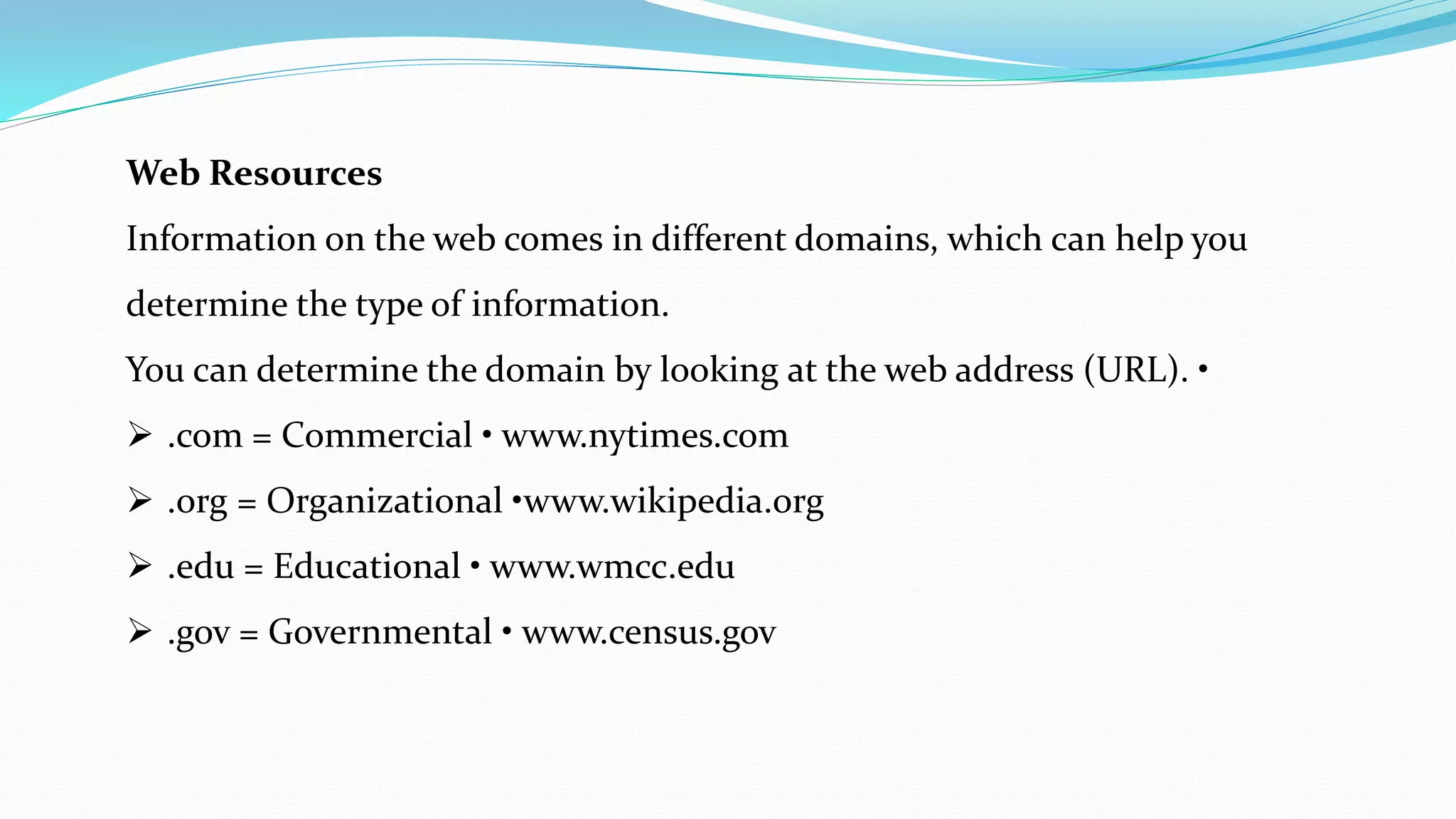
Comparison of Primary and Secondary Literature
Criteria PRIMARY LITERATURE SECONDARY LITERATURE
Peer Review peer reviewed may or may not be peer reviewed
Title very technical "cute”
Focus specific broader overview
Abstract usually no
Introduction to Topic Yes Yes
Methods Section Yes not usually
Results Section Yes not usually
Data in Figures and Tables Usually not usually
Discussion Section Yes the whole paper may be considered a
discussion
Literature Cited Always may or may not have
The Form of Publication article in a print or online journal a part of a book, a website
Examples of Publications Journal of Ecology Science News
Web Resources
Information on the web comes in different domains, which can help you
determine the type of information.
You can determine the domain by looking at the web address (URL). •
 .com = Commercial • www.nytimes.com
 .org = Organizational •www.wikipedia.org
 .edu = Educational • www.wmcc.edu
 .gov = Governmental • www.census.gov
PubMed (www.nlm.nih.gov)
Introduction
PubMed is a free resource that provides access to MEDLINE, the National Library of
Medicine database of citations and abstracts in the fields of medicine, nursing,
dentistry, veterinary medicine, health care systems, and preclinical sciences.
 Understand PubMed's scope and content.
 Understand how the Medical Subject Headings (MeSH) are used to describe
and retrieve citations.
 Build a search using MeSH and PubMed search tools.
 Manage your results and save records of interest.
 Save your search strategies.
 Link to or order full-text articles.
 Link to related resources.
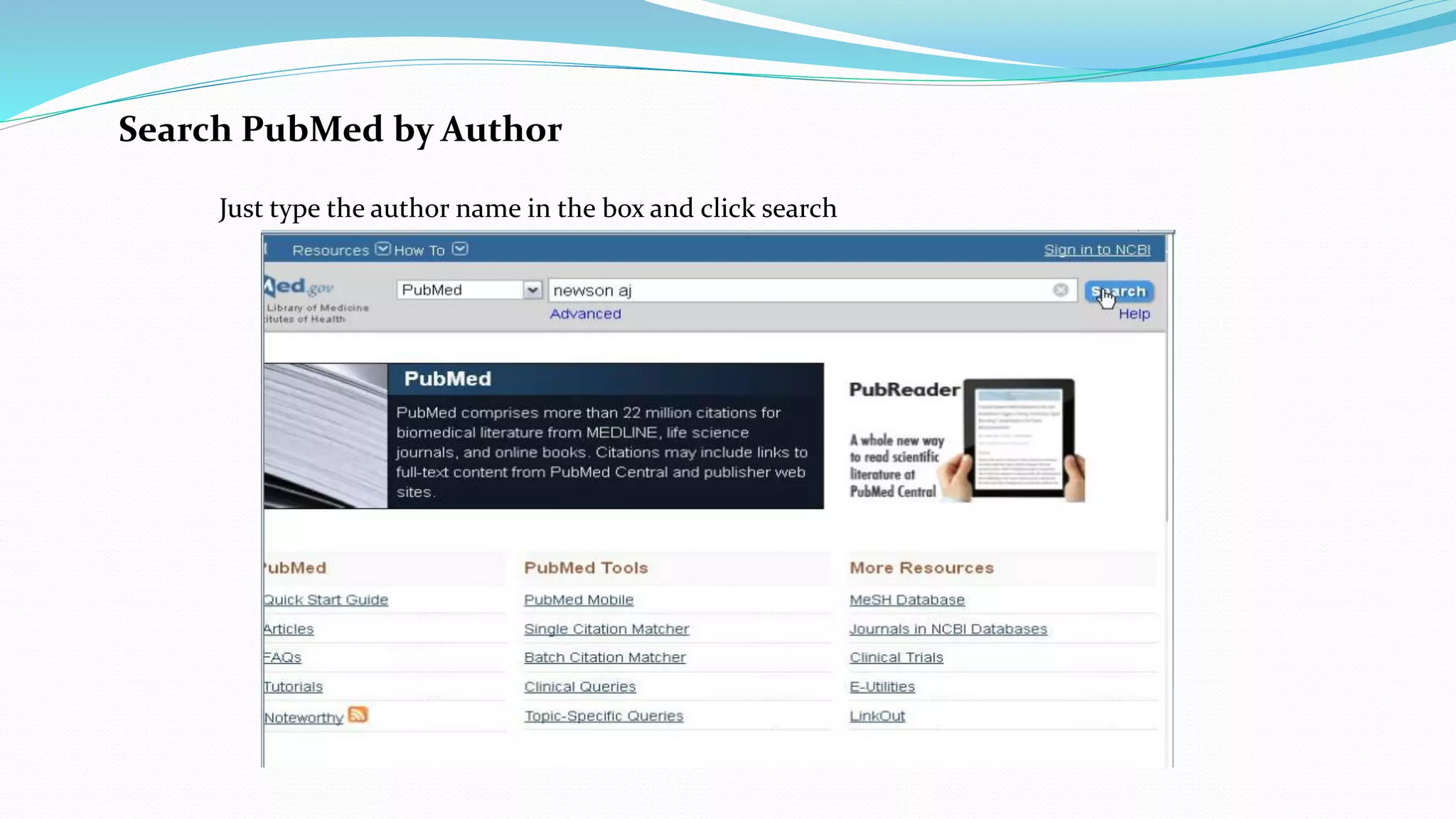
Search PubMed by Author
Just type the author name in the box and click search
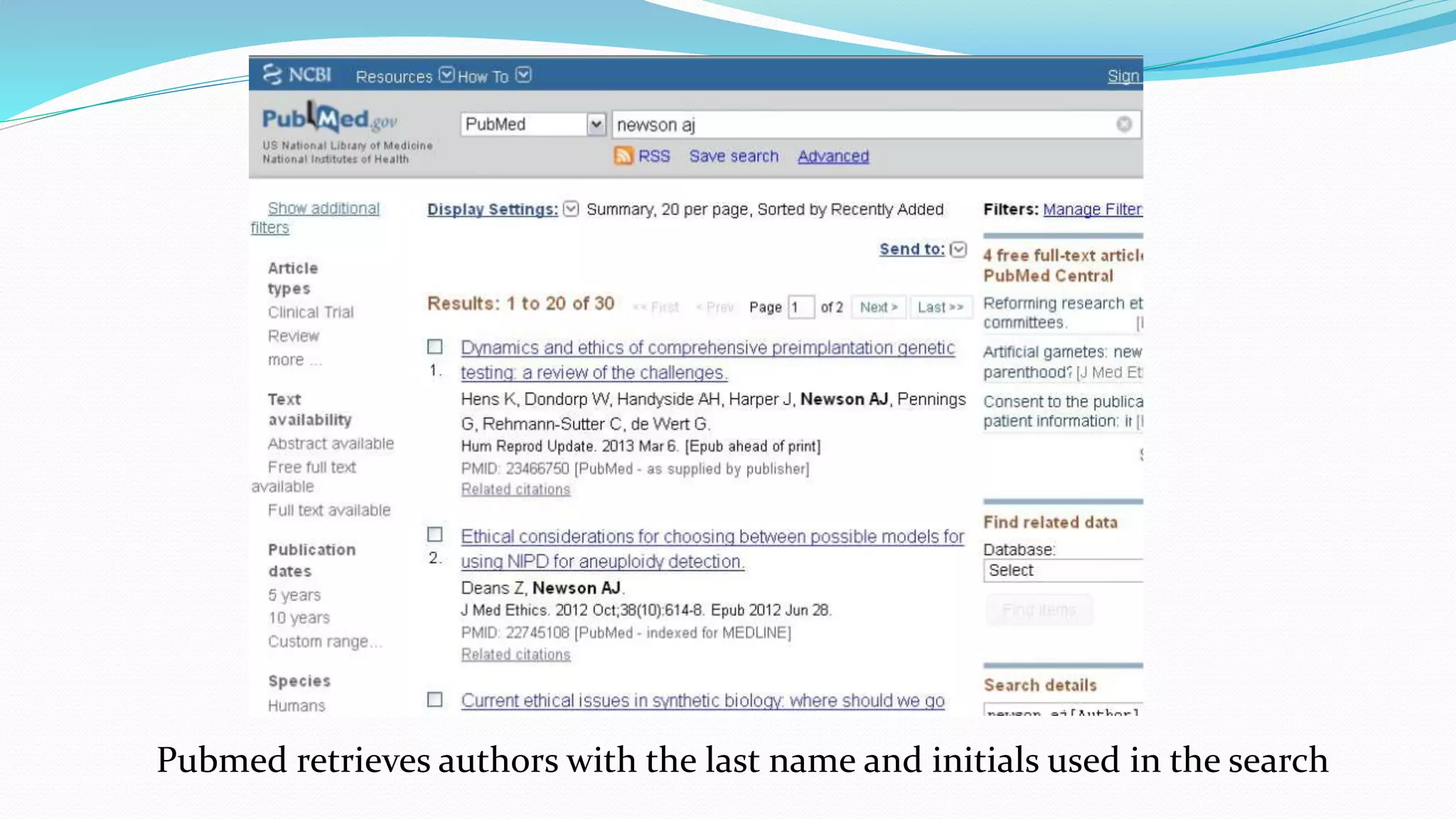
Pubmed retrieves authors with the last name and initials used in the search
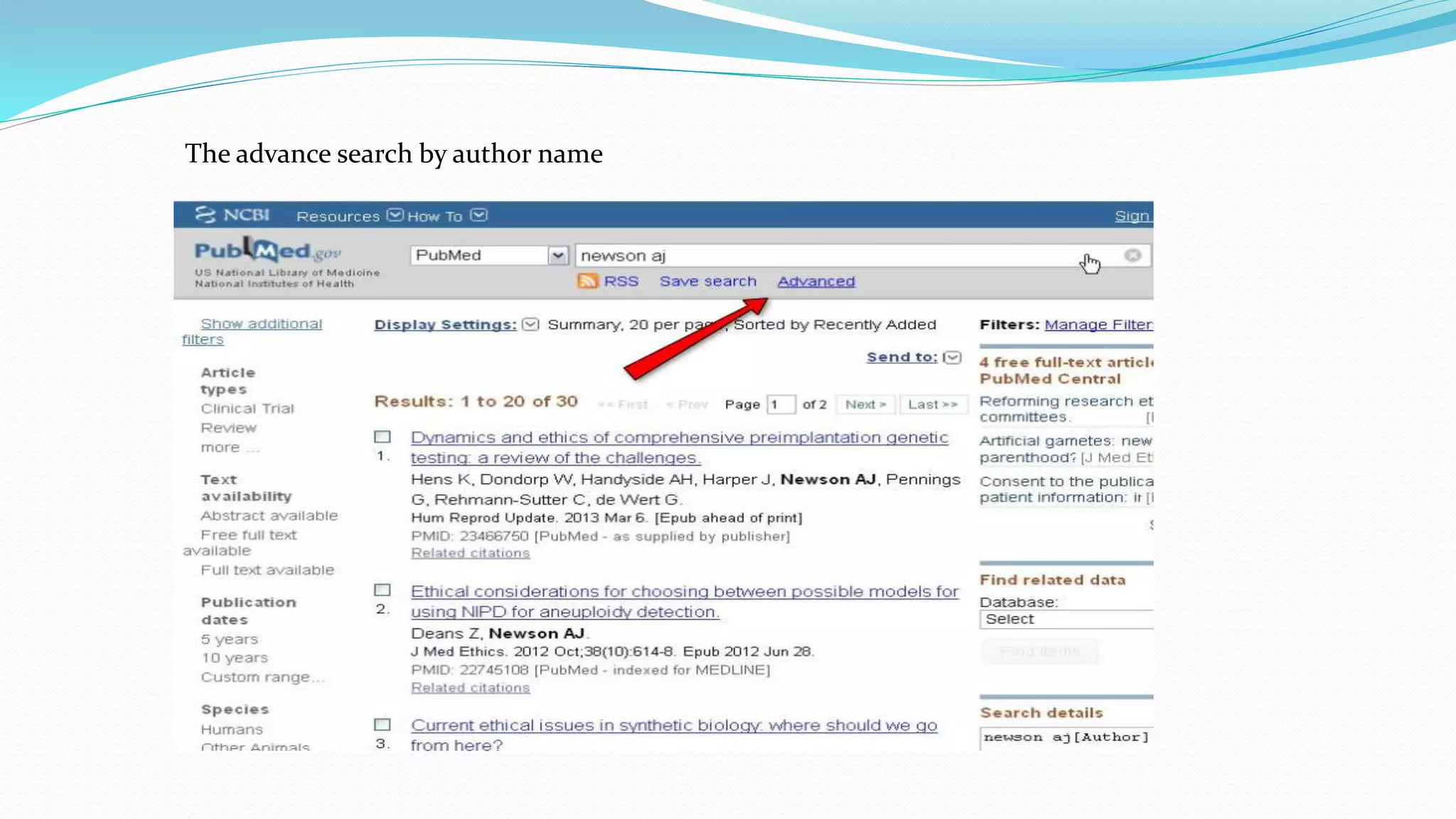
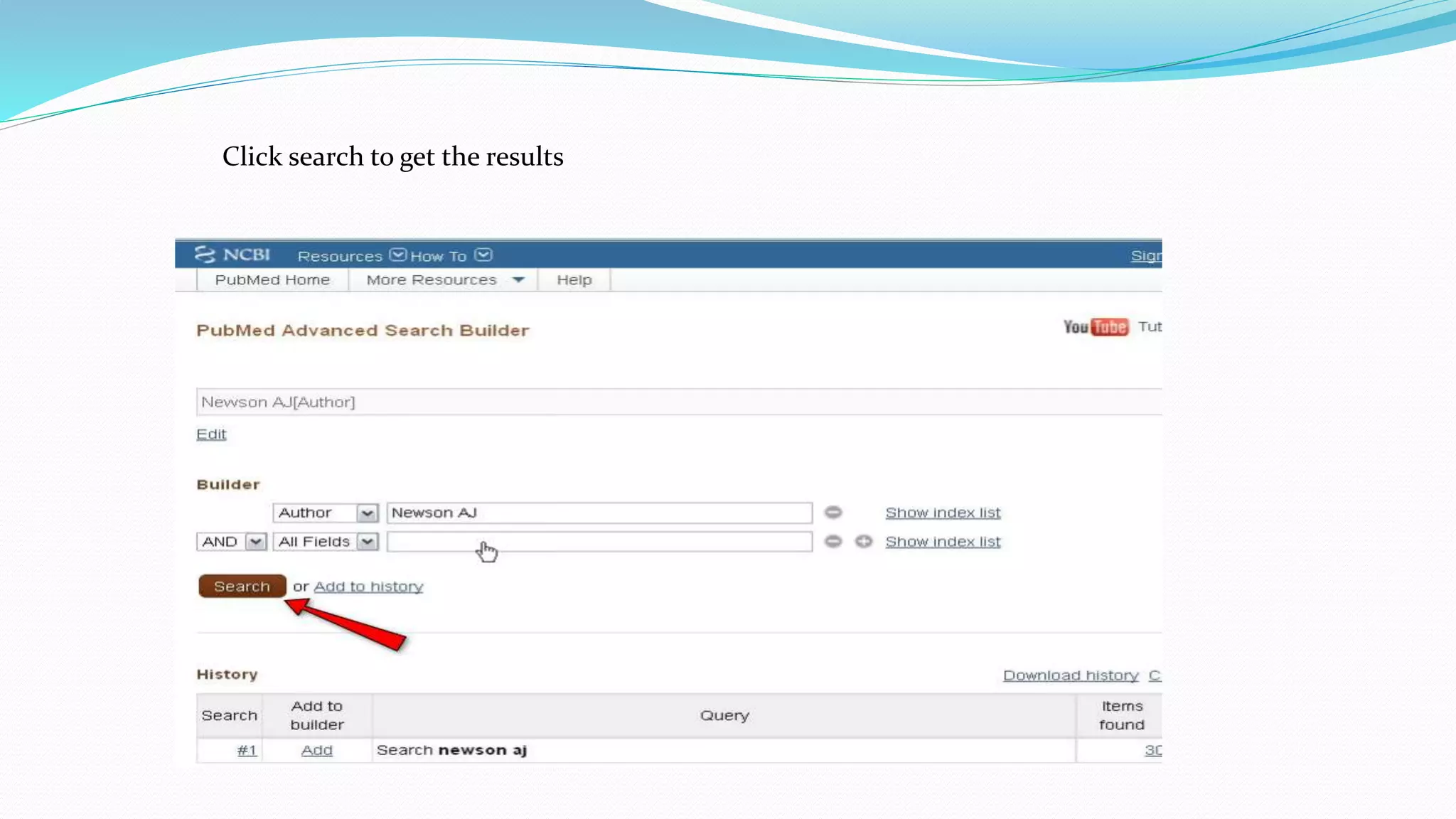
The advance search by author name
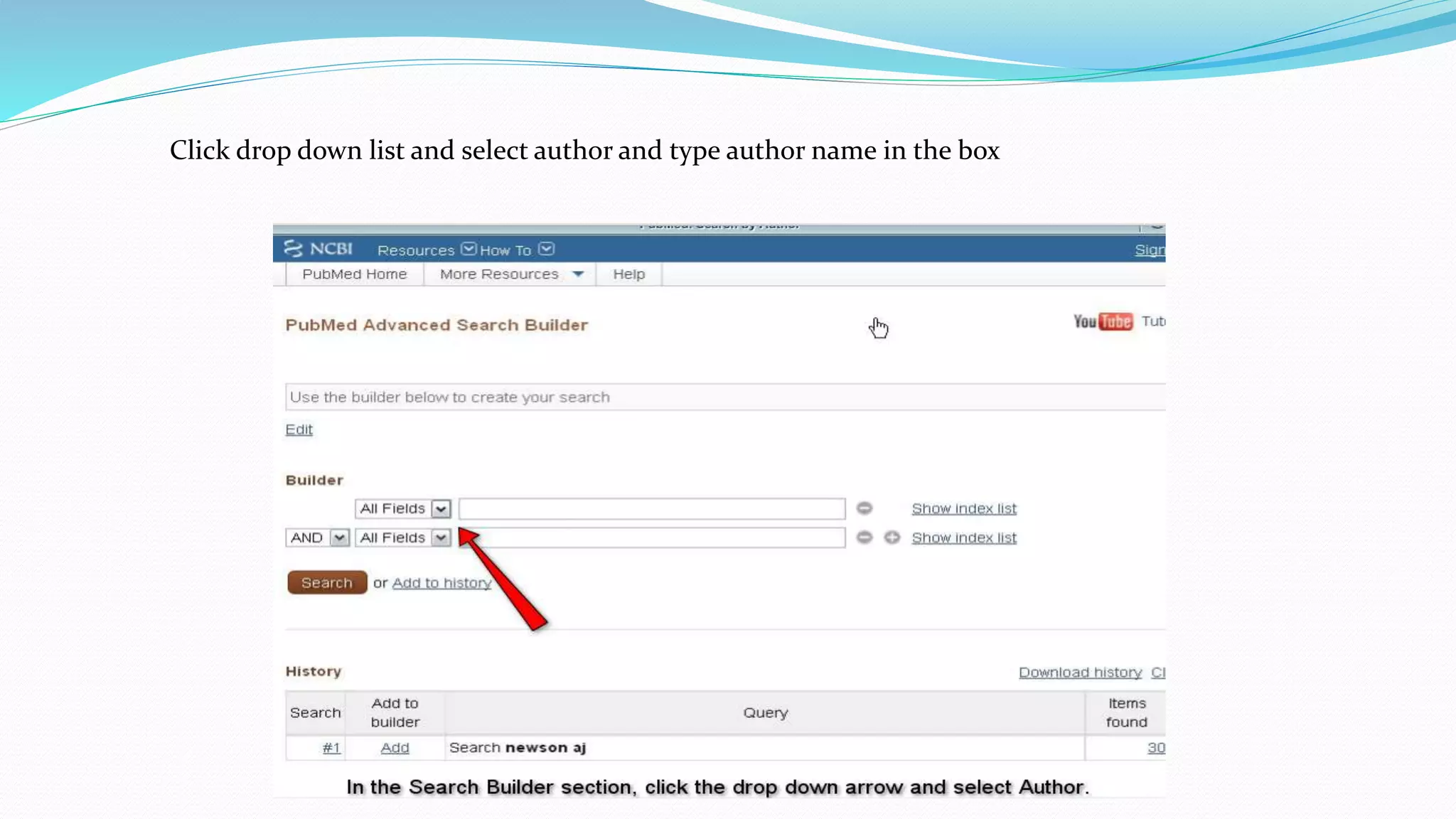
Click drop down list and select author and type author name in the box
Click search to get the results
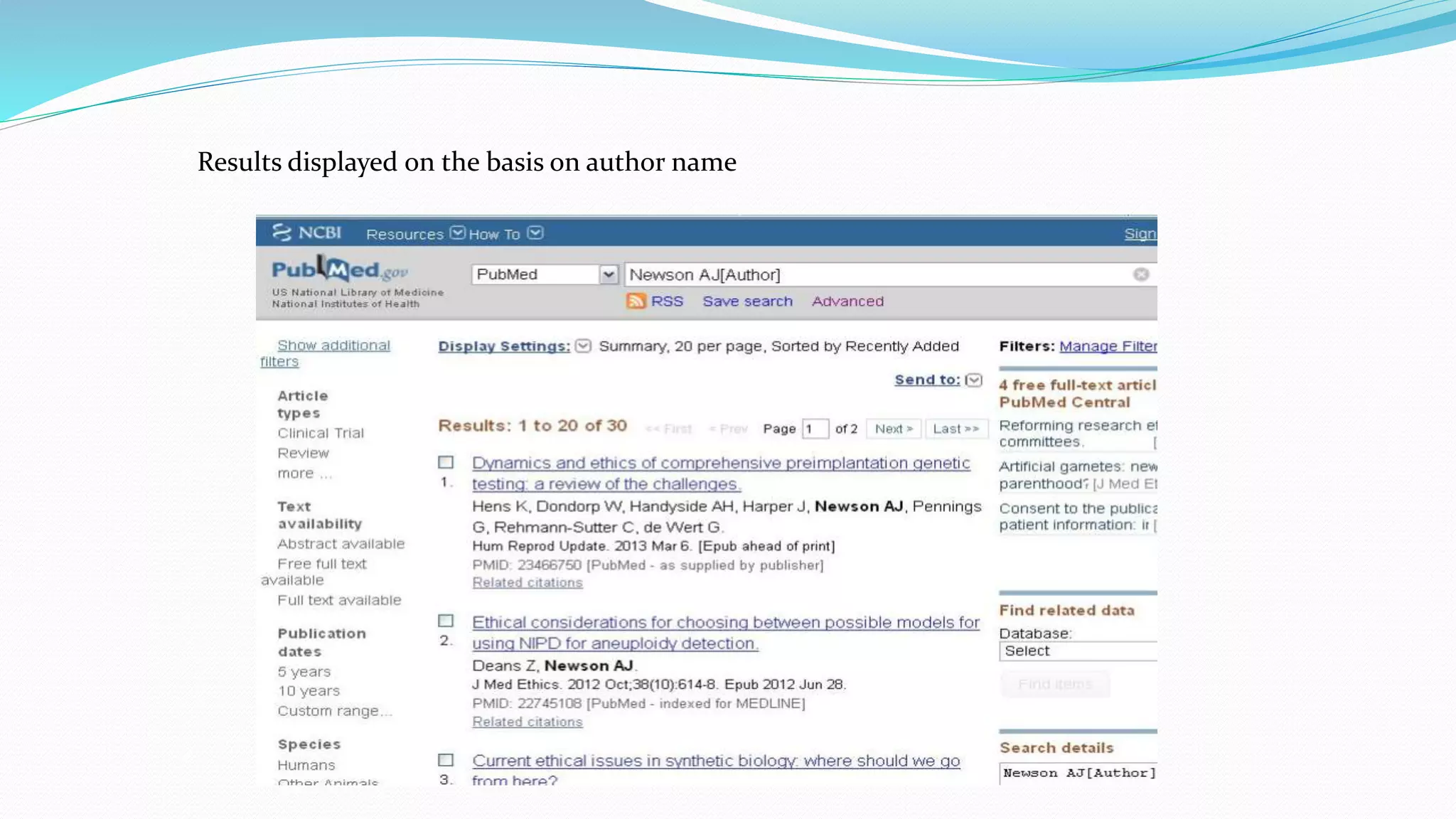
Results displayed on the basis on author name
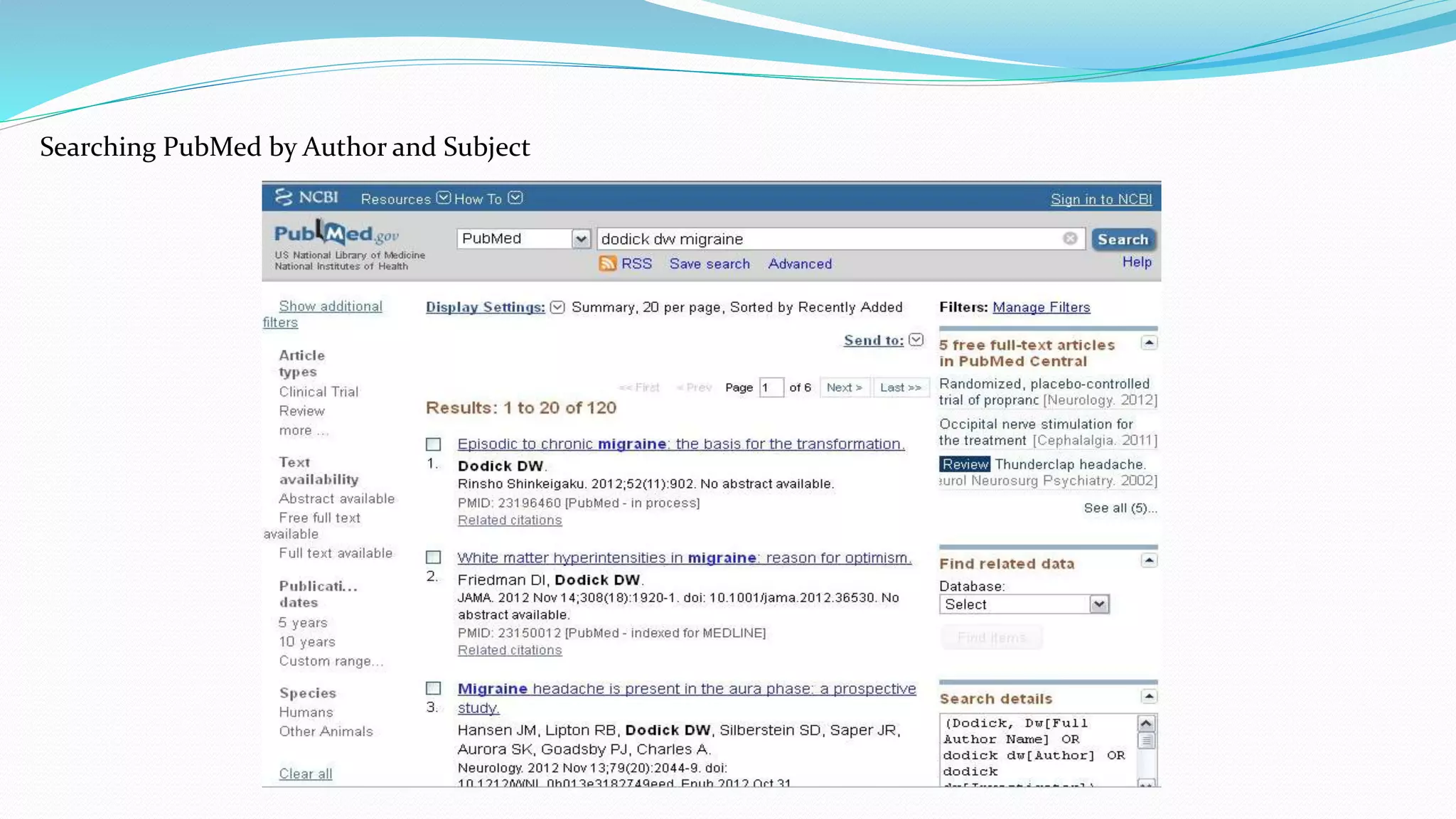
Searching PubMed by Author and Subject
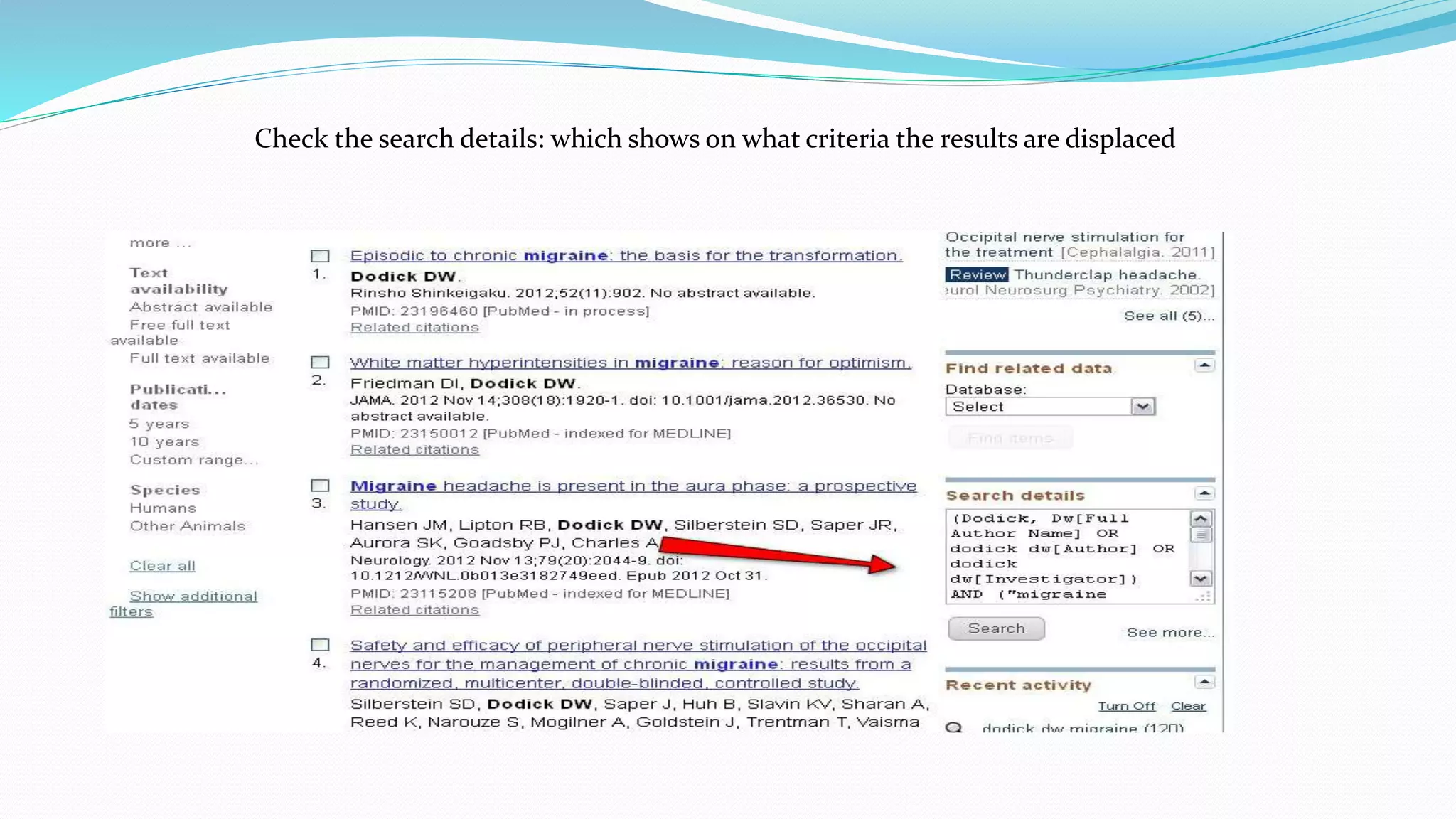
Check the search details: which shows on what criteria the results are displaced
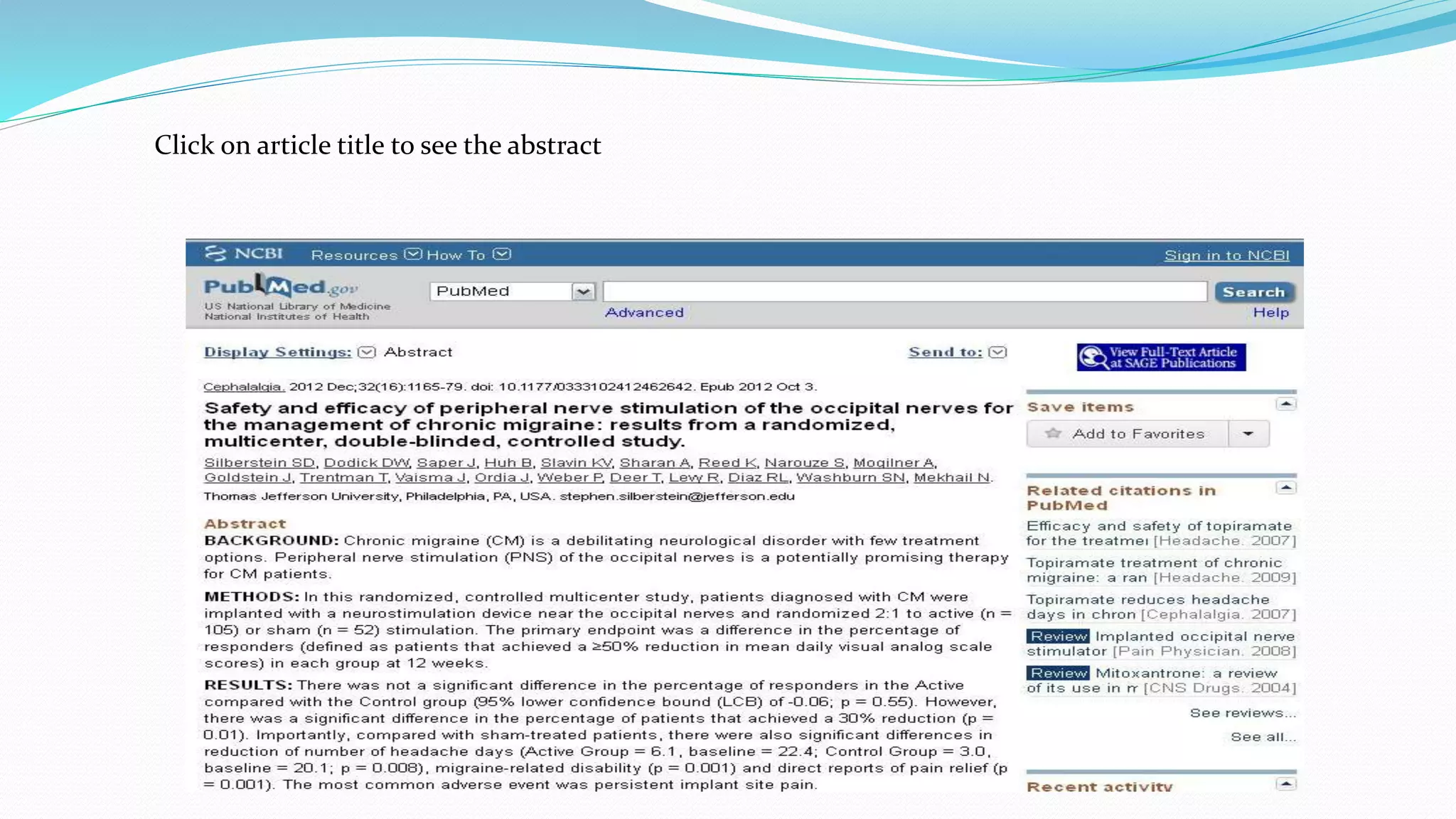
Click on article title to see the abstract
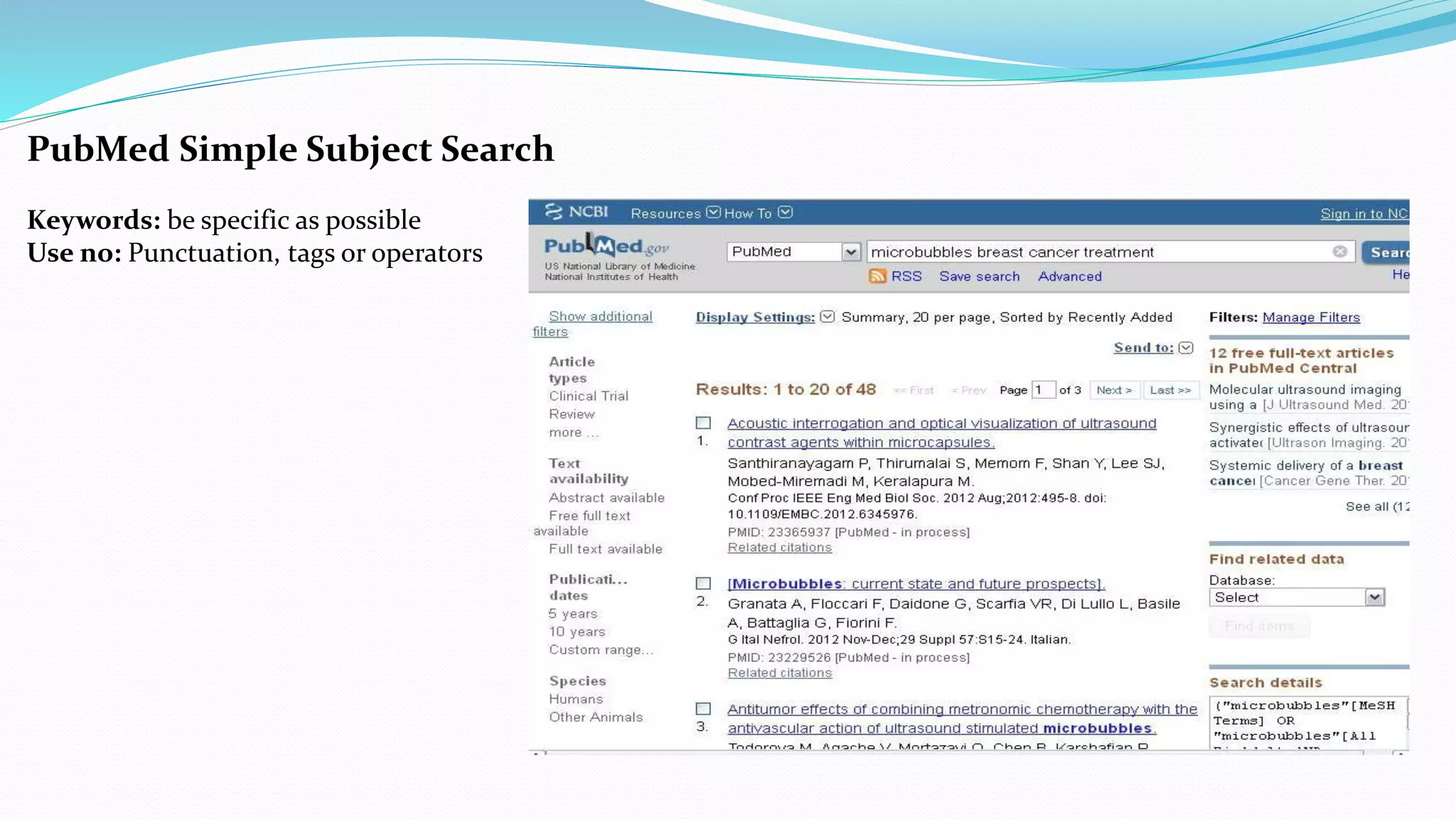
PubMed Simple Subject Search
Keywords: be specific as possible
Use no: Punctuation, tags or operators
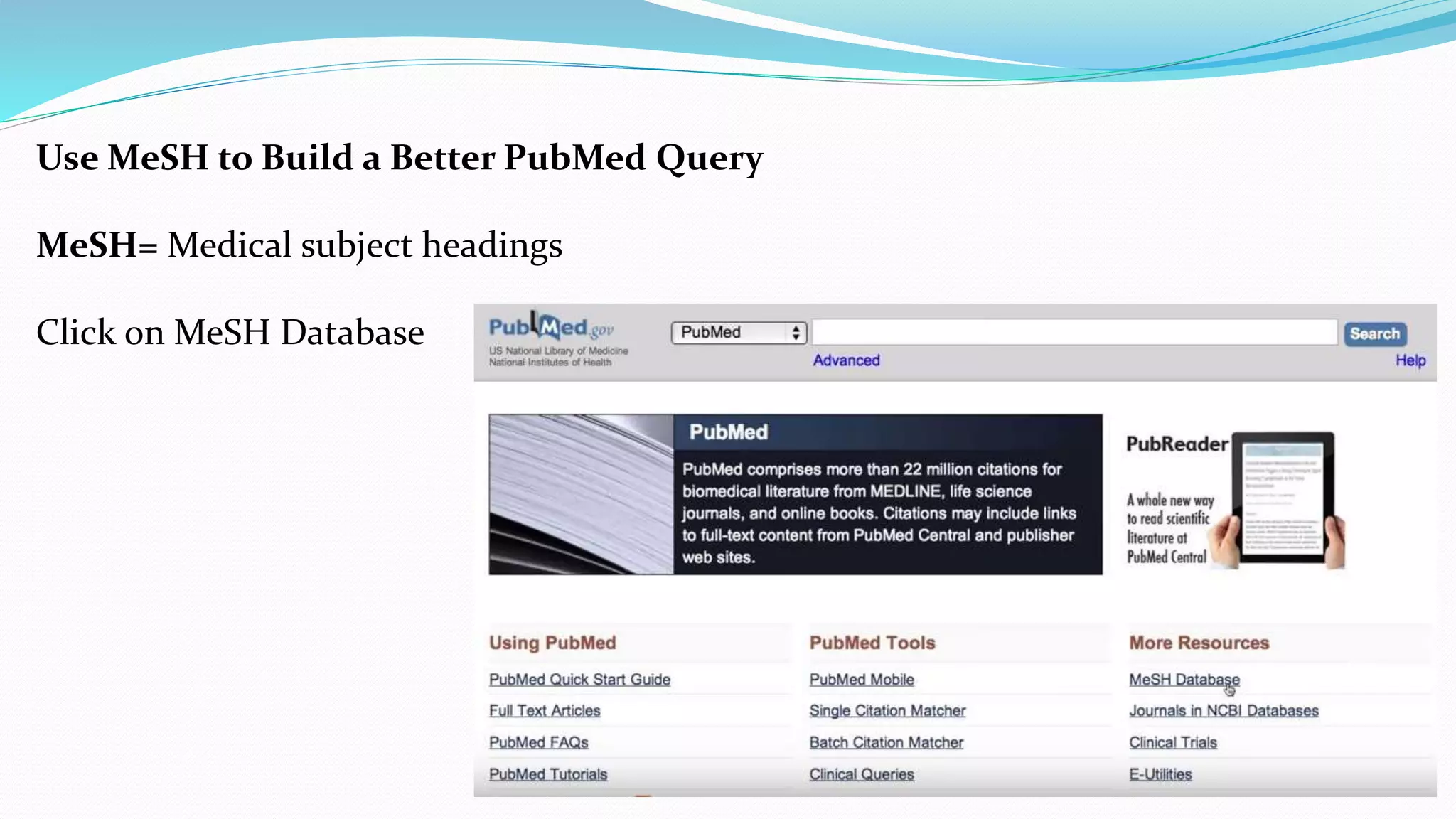
Use MeSH to Build a Better PubMed Query
MeSH= Medical subject headings
Click on MeSH Database
 This page opens upon clicking
MeSH database
 Type the keyword: flu vaccine
 This shows the definition of
keyword and sub heading
 Click on sub heading (or) type in
“MeSH search box above” and
click “add to search builder” to
narrow the result and then click
“search pubmed”.
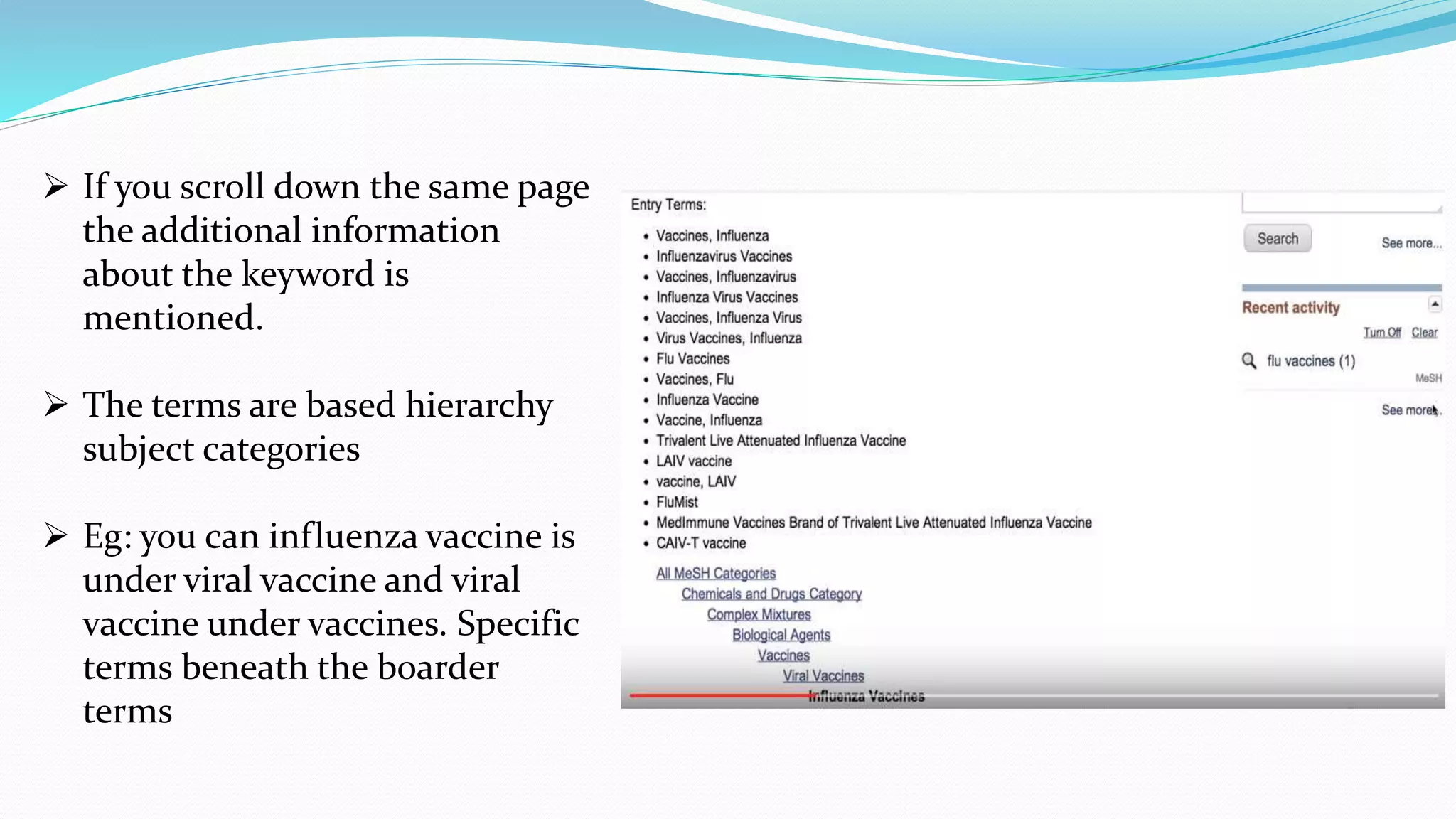
 If you scroll down the same page
the additional information
about the keyword is
mentioned.
 The terms are based hierarchy
subject categories
 Eg: you can influenza vaccine is
under viral vaccine and viral
vaccine under vaccines. Specific
terms beneath the boarder
terms
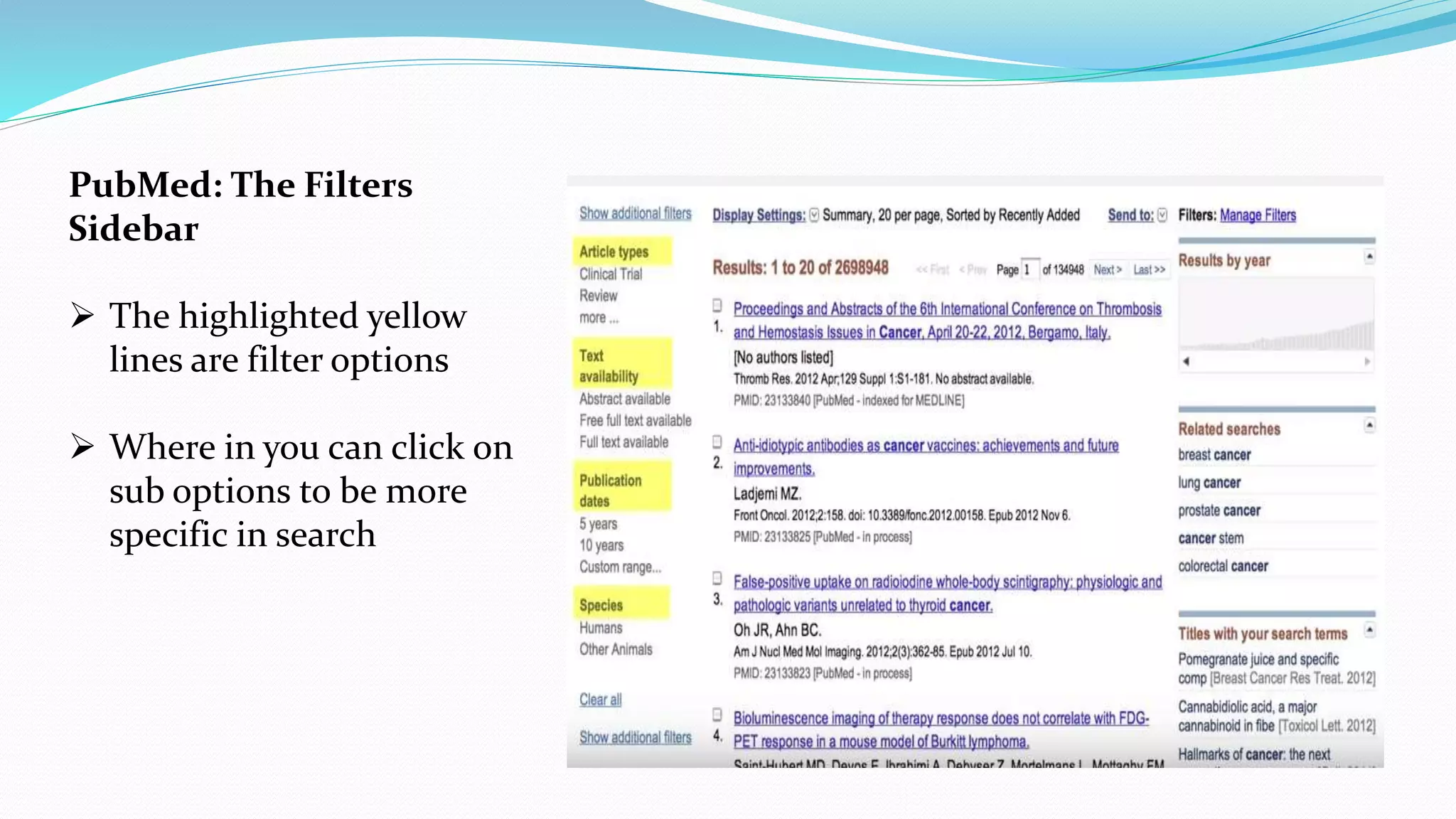
PubMed: The Filters
Sidebar
 The highlighted yellow
lines are filter options
 Where in you can click on
sub options to be more
specific in search
 There are additional filters
 Just click show additional filters
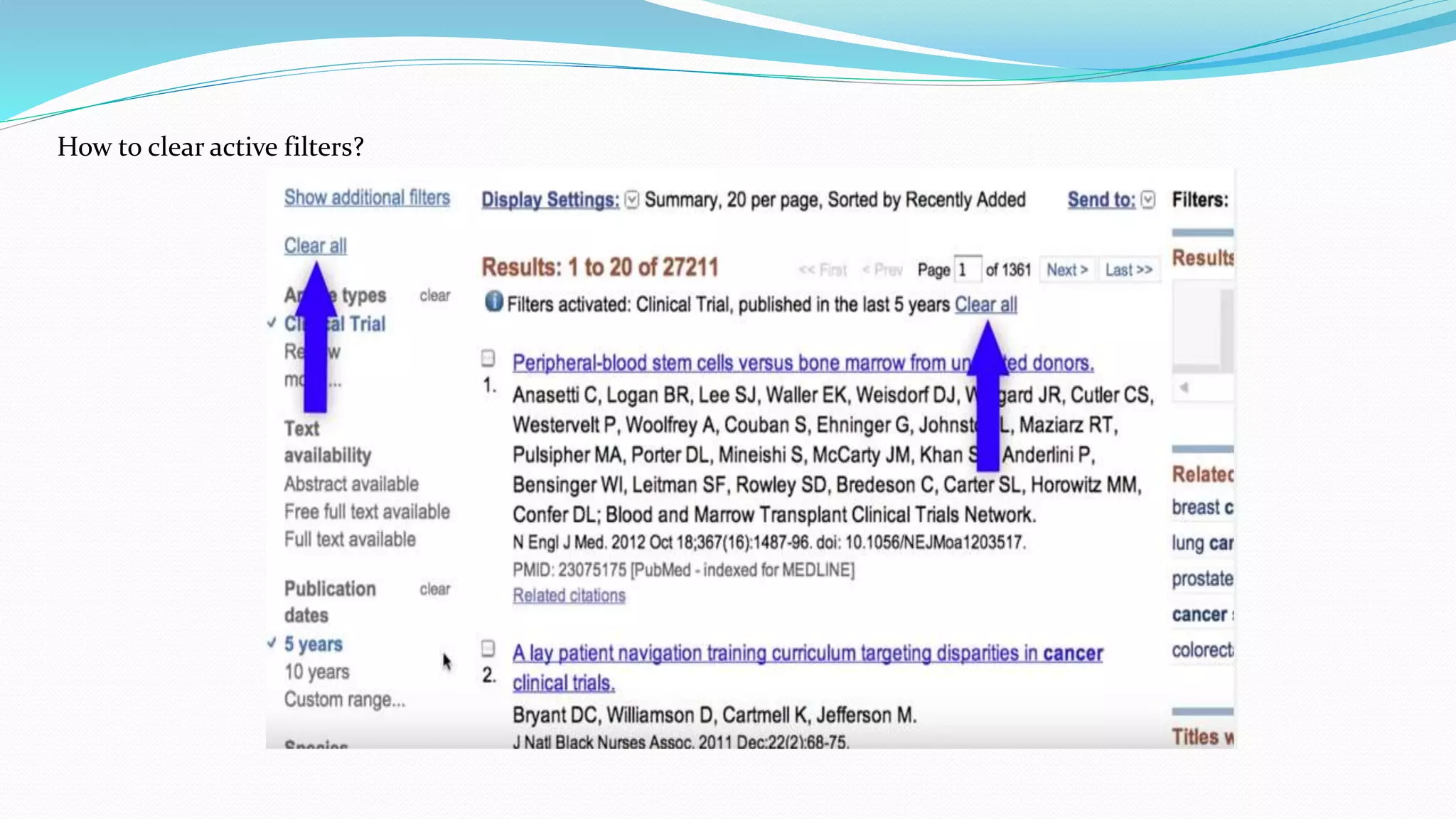
How to clear active filters?
More sub-filters under each filter
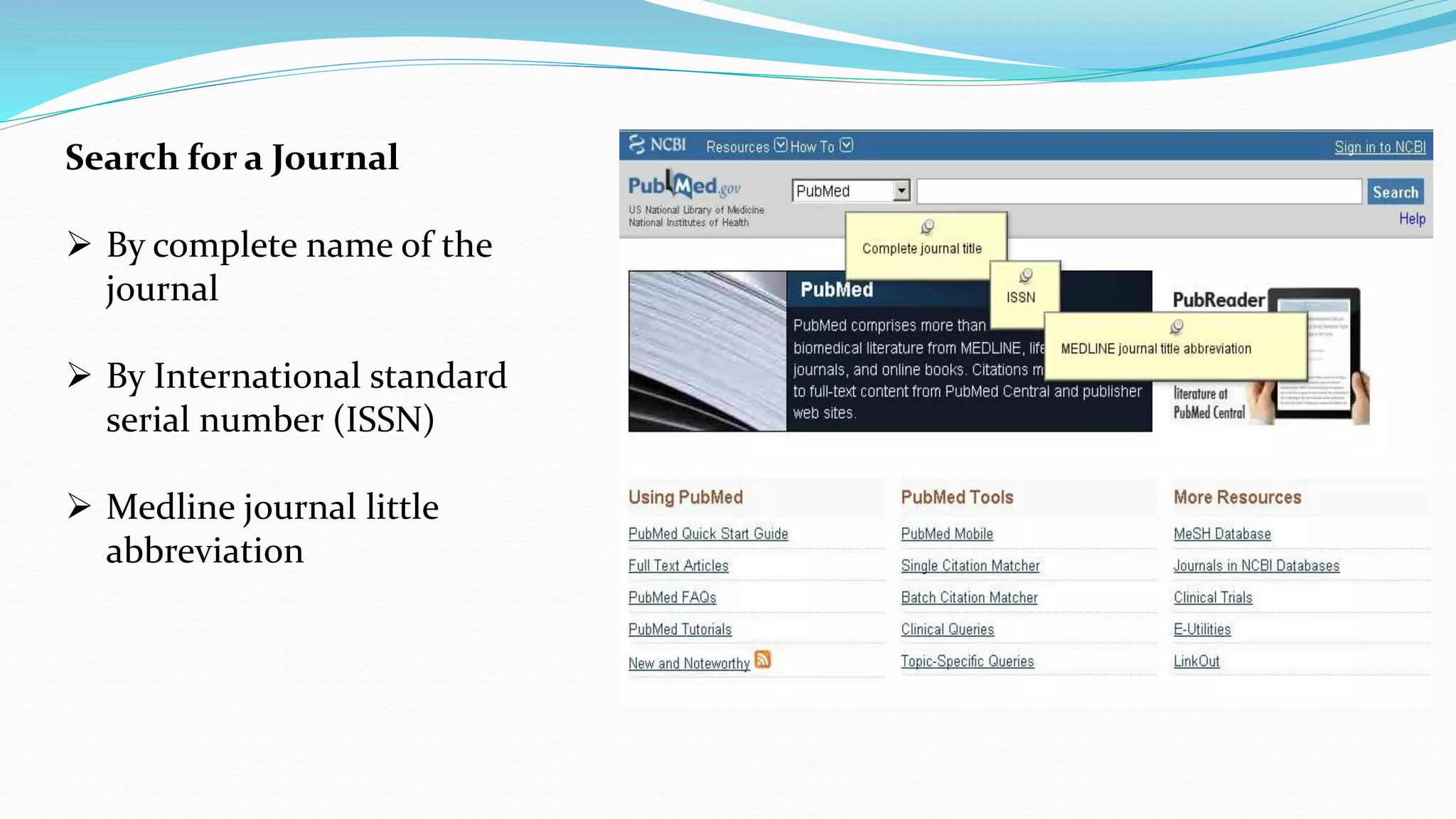
Search for a Journal
 By complete name of the
journal
 By International standard
serial number (ISSN)
 Medline journal little
abbreviation
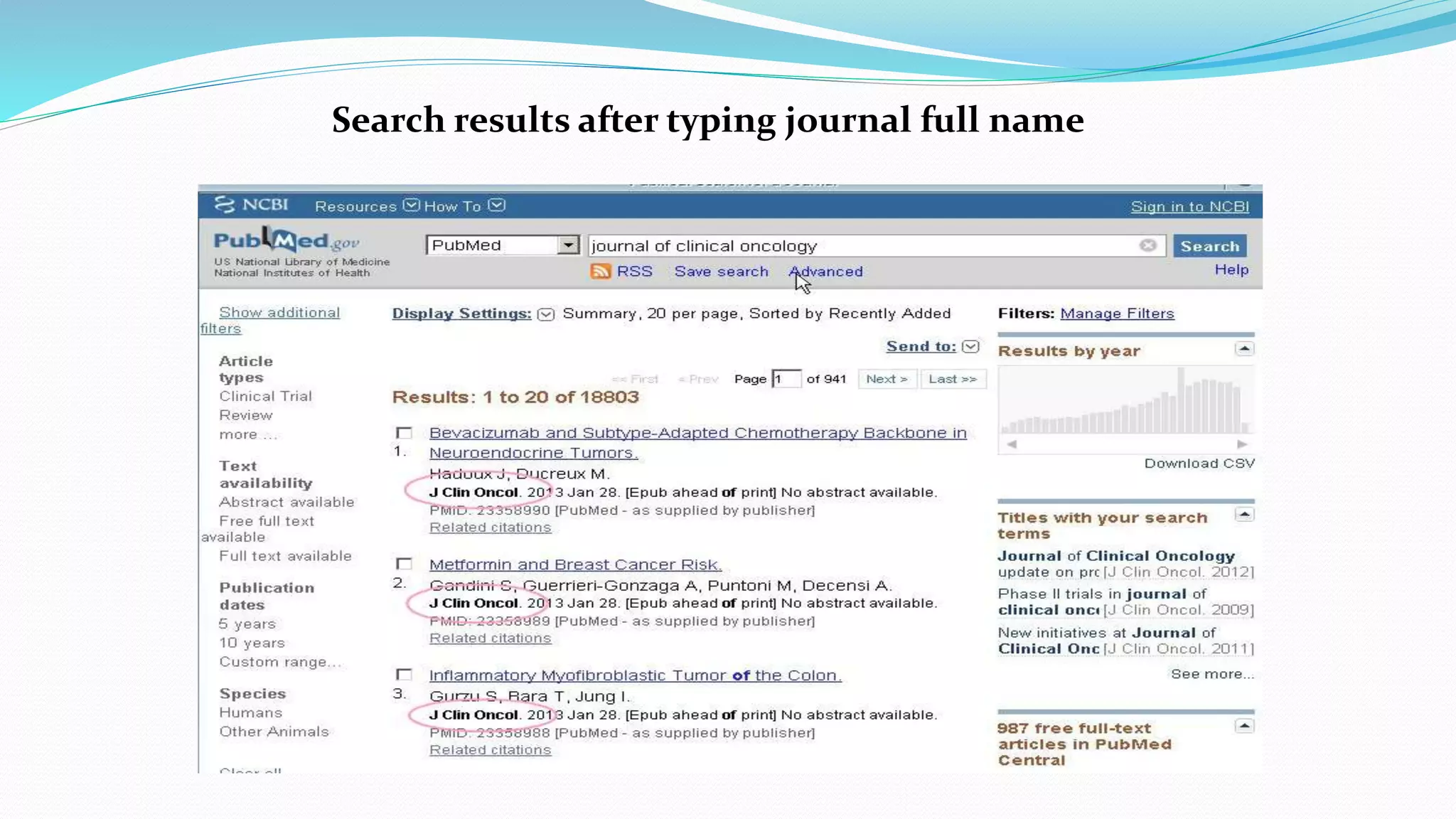
Search results after typing journal full name
If a journal title is also a subject term then type [ta]
 Eg: radiation oncology
don’t sound like journal
name but seems to
keyword for search.
 So type “ta” in brackets
 So that the search
should not take
 Journal name as
keyword
Single citation match up
 On home page of “Pubmed”
 Click “single citation match up”
Single citation match up
 Key in the details of the
journal
 And click search
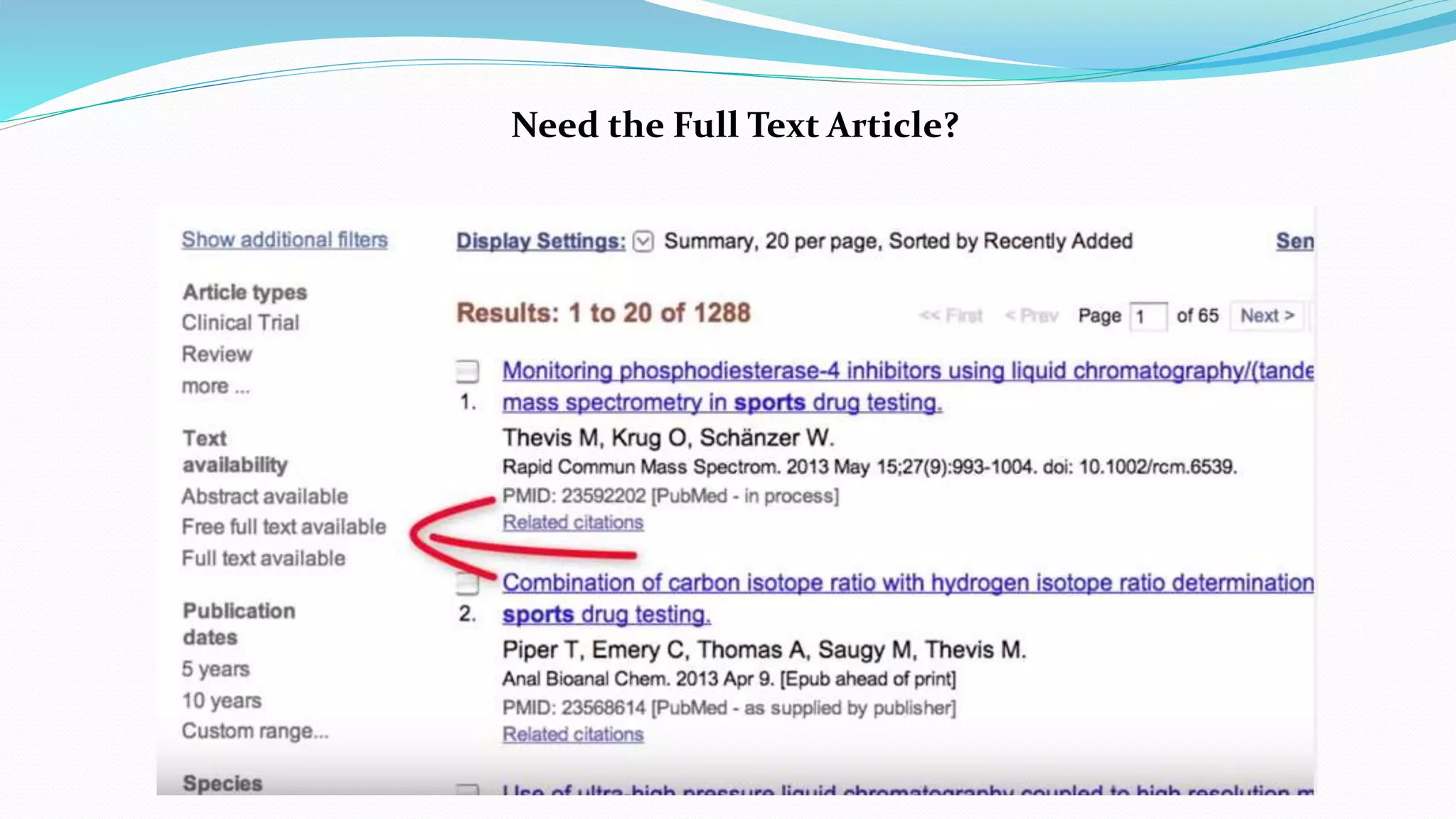
Need the Full Text Article?
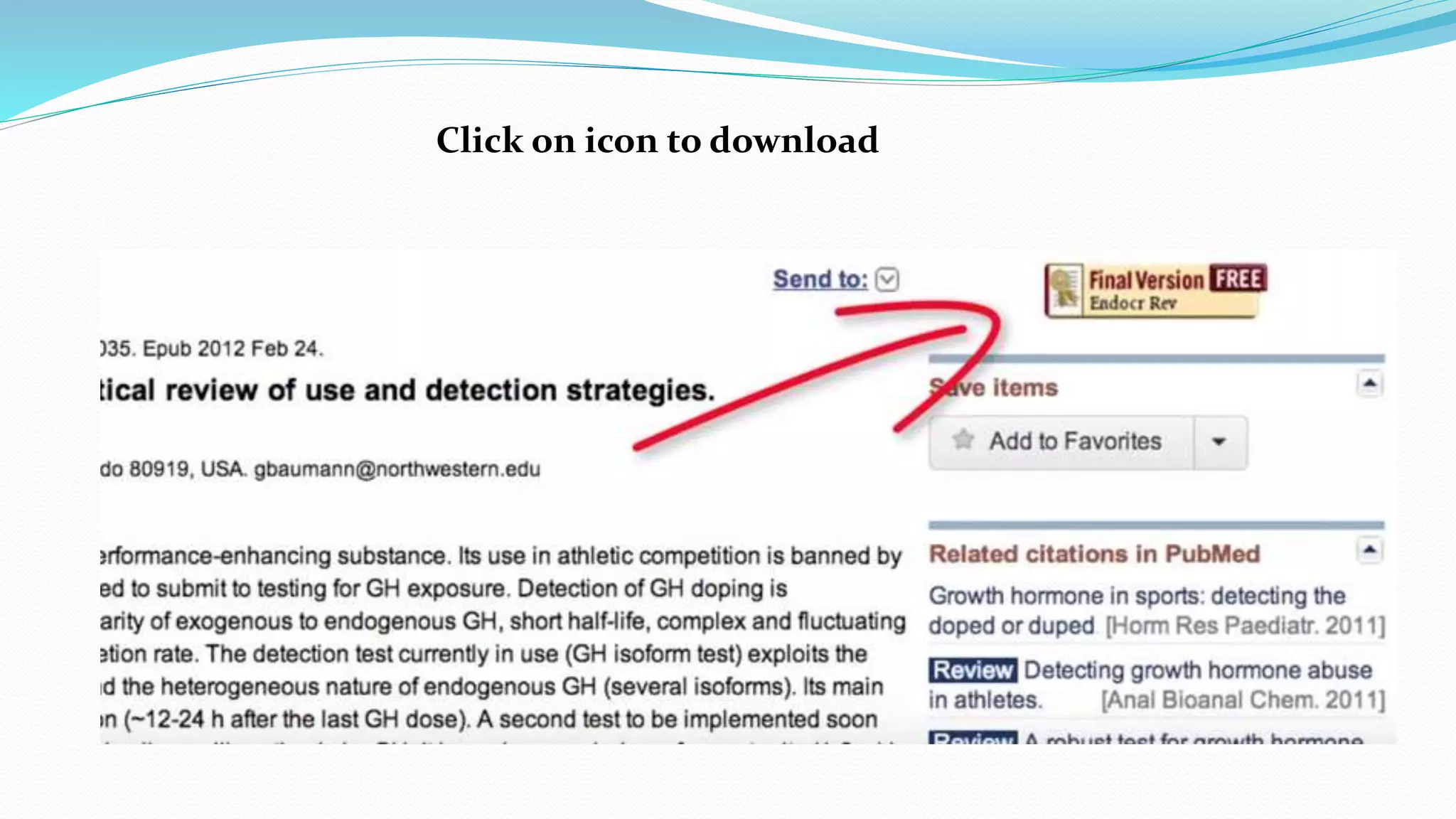
Click on icon to download
How to display your library icon in your search for free full text articles
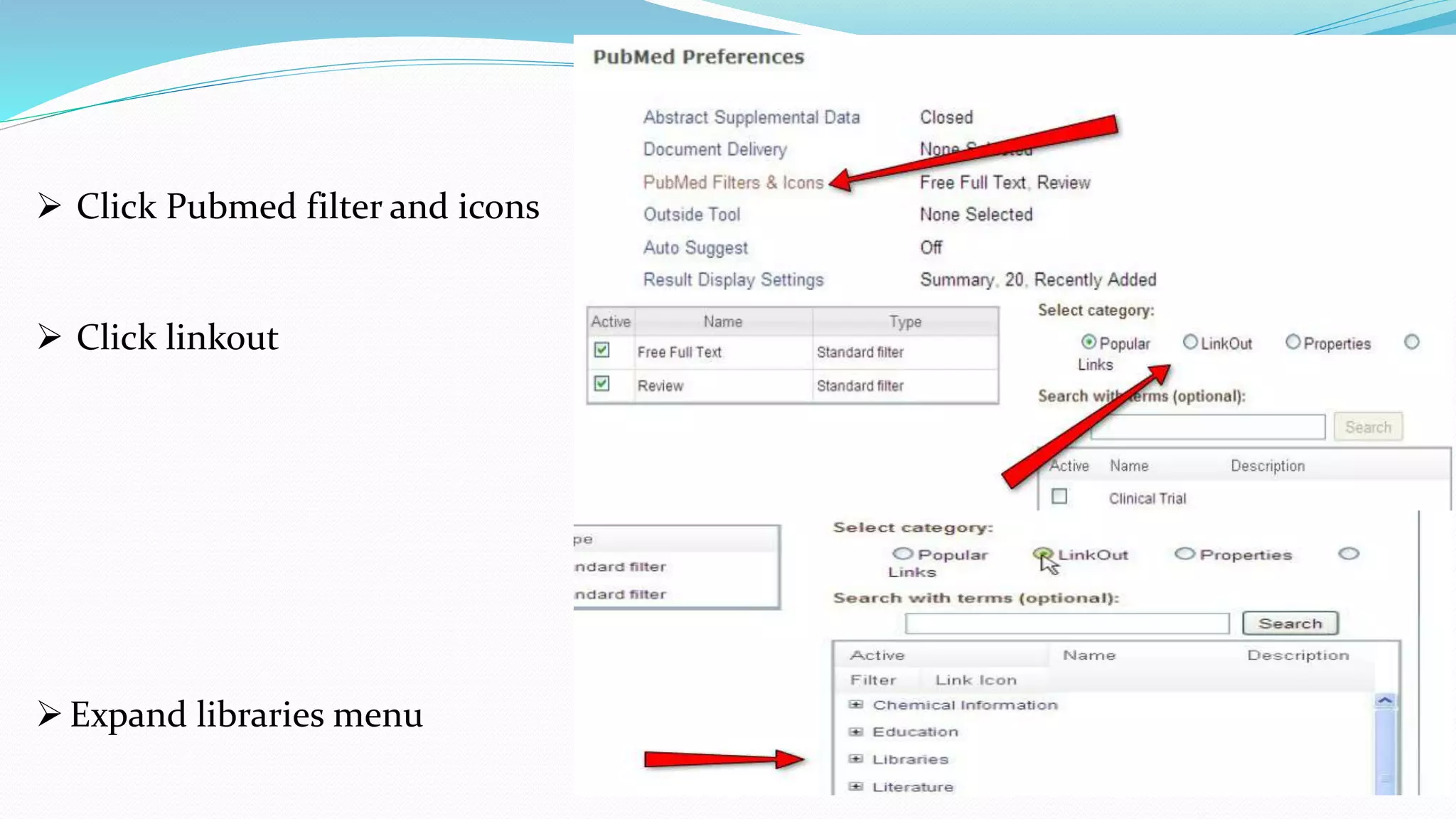
 Go to my NCBI page
 Click on NCBI site
preferences
 Click Pubmed filter and icons
 Click linkout
Expand libraries menu
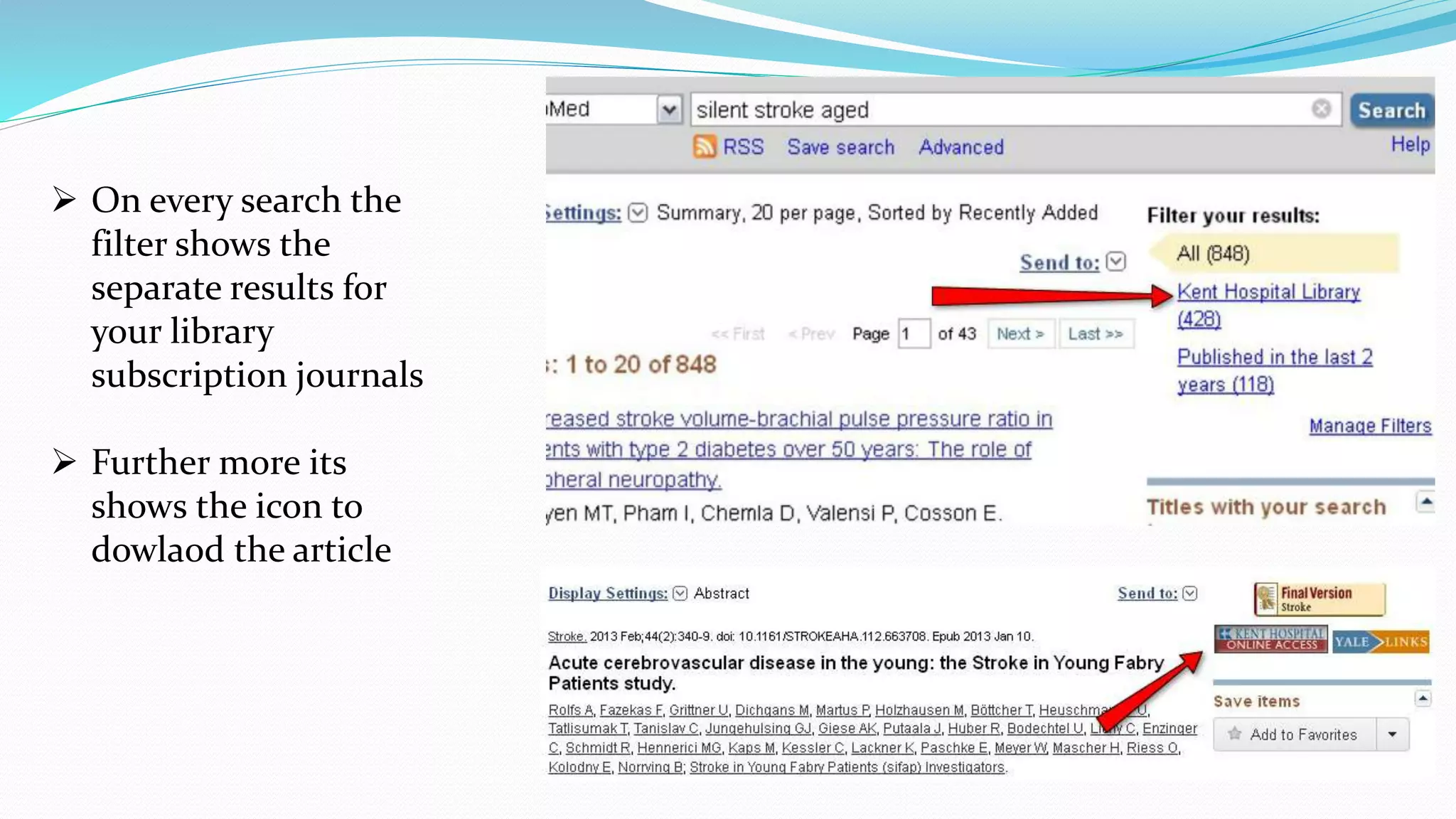
 Type your library name and
search
 Check the option for filter
and link icon
 On every search the
filter shows the
separate results for
your library
subscription journals
 Further more its
shows the icon to
dowlaod the article
Thank you

Sources of information

  • 1.
  • 2.
    What is information? knowledge gained through study (or) knowledge communicated or received concerning a particular fact or subject.  When information is entered into and stored in a computer, it is generally referred to as data.  In science, knowledge accumulates as individuals study phenomena in the natural world.  The researchers base their studies on the information contributed in the past by others, and the results of the new studies provide new information or different interpretations of the subjects under investigation.
  • 3.
    The source ofinformation can be divided into 3 types 1. Primary source 2. Secondary source Important note: The types of information that can be considered primary sources may vary depending on the subject discipline, and also on how you are using the material.
  • 4.
    Primary sources Definition: Primarysources are original materials on which other research is based. They are usually the first formal appearance of results in physical, print or electronic format. They present original thinking, report a discovery, or share new information. Primary sources include:  Research papers in peer - reviewed journals;  Research monographs;  Conference proceedings;  Doctoral theses kept in university libraries.
  • 5.
    Secondary sources Definition: Theyare interpretations and evaluations of primary sources. Secondary sources are not evidence, but rather commentary on and discussion of evidence. Secondary sources include:  Textbooks;  Edited books;  Review articles.
  • 6.
    Comparison of Primaryand Secondary Literature Criteria PRIMARY LITERATURE SECONDARY LITERATURE Peer Review peer reviewed may or may not be peer reviewed Title very technical "cute” Focus specific broader overview Abstract usually no Introduction to Topic Yes Yes Methods Section Yes not usually Results Section Yes not usually Data in Figures and Tables Usually not usually Discussion Section Yes the whole paper may be considered a discussion Literature Cited Always may or may not have The Form of Publication article in a print or online journal a part of a book, a website Examples of Publications Journal of Ecology Science News
  • 7.
    Web Resources Information onthe web comes in different domains, which can help you determine the type of information. You can determine the domain by looking at the web address (URL). •  .com = Commercial • www.nytimes.com  .org = Organizational •www.wikipedia.org  .edu = Educational • www.wmcc.edu  .gov = Governmental • www.census.gov
  • 8.
    PubMed (www.nlm.nih.gov) Introduction PubMed isa free resource that provides access to MEDLINE, the National Library of Medicine database of citations and abstracts in the fields of medicine, nursing, dentistry, veterinary medicine, health care systems, and preclinical sciences.  Understand PubMed's scope and content.  Understand how the Medical Subject Headings (MeSH) are used to describe and retrieve citations.  Build a search using MeSH and PubMed search tools.  Manage your results and save records of interest.  Save your search strategies.  Link to or order full-text articles.  Link to related resources.
  • 9.
    Search PubMed byAuthor Just type the author name in the box and click search
  • 10.
    Pubmed retrieves authorswith the last name and initials used in the search
  • 11.
    The advance searchby author name
  • 12.
    Click drop downlist and select author and type author name in the box
  • 13.
    Click search toget the results
  • 14.
    Results displayed onthe basis on author name
  • 15.
    Searching PubMed byAuthor and Subject
  • 16.
    Check the searchdetails: which shows on what criteria the results are displaced
  • 17.
    Click on articletitle to see the abstract
  • 18.
    PubMed Simple SubjectSearch Keywords: be specific as possible Use no: Punctuation, tags or operators
  • 19.
    Use MeSH toBuild a Better PubMed Query MeSH= Medical subject headings Click on MeSH Database
  • 20.
     This pageopens upon clicking MeSH database  Type the keyword: flu vaccine  This shows the definition of keyword and sub heading  Click on sub heading (or) type in “MeSH search box above” and click “add to search builder” to narrow the result and then click “search pubmed”.
  • 21.
     If youscroll down the same page the additional information about the keyword is mentioned.  The terms are based hierarchy subject categories  Eg: you can influenza vaccine is under viral vaccine and viral vaccine under vaccines. Specific terms beneath the boarder terms
  • 22.
    PubMed: The Filters Sidebar The highlighted yellow lines are filter options  Where in you can click on sub options to be more specific in search
  • 23.
     There areadditional filters  Just click show additional filters
  • 24.
    How to clearactive filters?
  • 25.
  • 26.
    Search for aJournal  By complete name of the journal  By International standard serial number (ISSN)  Medline journal little abbreviation
  • 27.
    Search results aftertyping journal full name
  • 28.
    If a journaltitle is also a subject term then type [ta]  Eg: radiation oncology don’t sound like journal name but seems to keyword for search.  So type “ta” in brackets  So that the search should not take  Journal name as keyword
  • 29.
    Single citation matchup  On home page of “Pubmed”  Click “single citation match up”
  • 30.
    Single citation matchup  Key in the details of the journal  And click search
  • 31.
    Need the FullText Article?
  • 32.
    Click on iconto download
  • 33.
    How to displayyour library icon in your search for free full text articles  Go to my NCBI page  Click on NCBI site preferences
  • 34.
     Click Pubmedfilter and icons  Click linkout Expand libraries menu
  • 35.
     Type yourlibrary name and search  Check the option for filter and link icon
  • 36.
     On everysearch the filter shows the separate results for your library subscription journals  Further more its shows the icon to dowlaod the article
  • 37.