



Solving the real-life scheduling problem
Learn how a new method of representing any value-adding process solves the intractable
real-life scheduling problem.
© 2017 Laxman C Marathe
Address: “Manisha Bunglow”, Plot No.: 49, C.S.No.: 251/1+2, Abhaynagar, Sangli – 416416,
Maharashtra, India
Email: laxman.marathe@gmail.com
Mobile: +91-9011098634 or +91-9910128634
Table of Contents
Dedication ............................................................................................................. 1
1.0 What is this scheduling problem?.............................................................................. 2
1.1 Why is scheduling important? ..................................................................... 3
1.2 Why scheduling solutions fail?..................................................................... 3
1.2.1 Manufacturing setups are on-going concerns ........................................................ 3
1.2.2 No feedback mechanism ................................................................................ 4
1.2.3 Drag and drop facility ................................................................................... 4
1.2.4 Schedule not actionable ................................................................................ 4
1.2.5 Round the clock work ................................................................................... 4
1.2.6 It must always be rescheduling in real-time ......................................................... 5
1.2.7 Future impact of decisions taken now ................................................................ 5
1.3 Our terminology ..................................................................................... 5
2.0 The component task diagram .................................................................................. 6
2.1 Parts of a CT diagram .............................................................................. 6
2.1.1 Concept of a task ........................................................................................ 6
2.1.2 Concept of a workstation ............................................................................... 7
2.1.3 Concept of a component................................................................................ 7
2.2 Creating CT diagram................................................................................ 8
2.2.1 Consumed components to left ......................................................................... 8
2.2.2 Created components to the right...................................................................... 8
2.2.1 Task-to-task & component-to-component linking not allowed.................................... 8
2.2.3 A component can be consumed by just one task .................................................... 8
2.2.4 A component can be created by one task only ...................................................... 9
2.2.5 Final product is not consumed by any task........................................................... 9
2.3 What a CT diagram represent ..................................................................... 9
2.3.1 The recipe................................................................................................. 9
2.3.2 Time needed to make a loaf of bread? ..............................................................10
2.3.3 Are all inputs needed at the same time .............................................................13
2.3.4 Change the output quantity ...........................................................................14
References............................................................................................................17
Dedication
This book is dedicated to my wife Manisha.
I lovingly call my wife “Manuka”. Manuka means currant in Marathi.
Thus the name of the system too is “ManukaLive”: it is both sweet and lively…
1.0 What is this scheduling problem?
The answer to one of the world‟s most complex problem of “scheduling” is as simple as specifying
“when what activity needs to be done” and “who or where or on what machine the activity should be
done”?
Simple jobs can be “scheduled” manually. However, the moment number of jobs, the activities in
each job and the number of machines increase, the problem immediately becomes notorious for its
complexity. Scientific literature is replete with references to the typical job shop scheduling problem
as being NP-hard. Meaning the problem has no solution that one may find and use in real life.
Those who work in manufacturing industry, especially where things are made-to-order will appreciate
how difficult it is to manage the day-to-day operations on the shop floor. One may assume, with such
advances in technology, “scheduling” should have been a solved problem long ago. An Industry Survey
conducted by PwC1
in 2016 echoes a similar opinion. They claim “The biggest challenge of industrial
leaders isn‟t technology - it is the people”. Enabling technology, the survey says, is available but the
industry leaders - the CEO, CTO, or CIO – represent and deal with organizations low on Digital IQ and
are thus unable to use the available technology to advantage.
On the contrary, Stephen F. Smith2
in a famous article titled “Is scheduling a solved problem?” argues
“with these mounting successes and advances (in computational technology), it might be tempting to
conclude that the chief technical hurdles underlying the scheduling problem have been overcome.
However, such a conclusion (at best) presumes a rather narrow and specialized interpretation of
scheduling, and (at worst) ignores much of the process and broader context of scheduling in most
practical environments.”
Pinedo3
also like Smith says “It is not clear how all this knowledge (about generic models and
methods) can be applied to scheduling problems in the real world. Such problems tend to differ
considerably from the stylized models studied by academic researchers."
So what is the truth: are the academicians oblivious to complexity of the real-world? Or is it so that
some great solutions exist, but industry leaders are unaware of their existence and are thus unable to
use it to advantage?
In my opinion the problem is on both sides. Academicians are aware of real-world complexity but are
unable to model all of it into a workable solution. As a trade-off they tend to oversimplify real-world
thereby making any proposed solution practically unusable. Industry leaders in all enthusiasm did try
the solutions offered them initially only to realize the hard way that they do not scale-up or fit the
real-work situation, making them cynical about any new offerings unless it is conclusively proven to
work.
The purpose of this book is to introduce you to a solution that works in the most complex real-life
situation. This book briefly elucidates how the solution works and you are always welcome to actually
download a one-PC working prototype to experience and evaluate the solution yourself; all this for
free and with no obligations whatsoever.
Here is the link to download the solution:
http://www.mediafire.com/download/q5q80a1o1ogp7qf/ManukaLiveSetup.rar
http://www.mediafire.com/download/tphuv0275qhi3ao/ManukaLiveSetup.zip
3
1.1 Why is scheduling important?
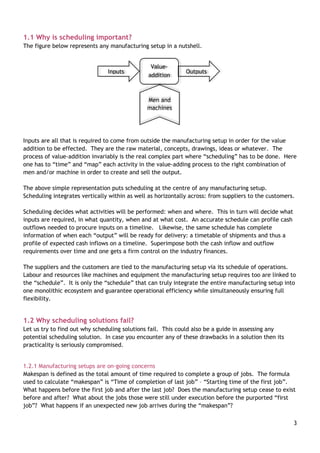
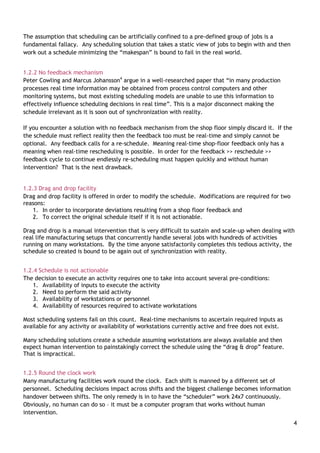
The figure below represents any manufacturing setup in a nutshell.
Inputs are all that is required to come from outside the manufacturing setup in order for the value
addition to be effected. They are the raw material, concepts, drawings, ideas or whatever. The
process of value-addition invariably is the real complex part where “scheduling” has to be done. Here
one has to “time” and “map” each activity in the value-adding process to the right combination of
men and/or machine in order to create and sell the output.
The above simple representation puts scheduling at the centre of any manufacturing setup.
Scheduling integrates vertically within as well as horizontally across: from suppliers to the customers.
Scheduling decides what activities will be performed: when and where. This in turn will decide what
inputs are required, in what quantity, when and at what cost. An accurate schedule can profile cash
outflows needed to procure inputs on a timeline. Likewise, the same schedule has complete
information of when each “output” will be ready for delivery: a timetable of shipments and thus a
profile of expected cash inflows on a timeline. Superimpose both the cash inflow and outflow
requirements over time and one gets a firm control on the industry finances.
The suppliers and the customers are tied to the manufacturing setup via its schedule of operations.
Labour and resources like machines and equipment the manufacturing setup requires too are linked to
the “schedule”. It is only the “schedule” that can truly integrate the entire manufacturing setup into
one monolithic ecosystem and guarantee operational efficiency while simultaneously ensuring full
flexibility.
1.2 Why scheduling solutions fail?
Let us try to find out why scheduling solutions fail. This could also be a guide in assessing any
potential scheduling solution. In case you encounter any of these drawbacks in a solution then its
practicality is seriously compromised.
1.2.1 Manufacturing setups are on-going concerns
Makespan is defined as the total amount of time required to complete a group of jobs. The formula
used to calculate “makespan” is “Time of completion of last job” – “Starting time of the first job”.
What happens before the first job and after the last job? Does the manufacturing setup cease to exist
before and after? What about the jobs those were still under execution before the purported “first
job”? What happens if an unexpected new job arrives during the “makespan”?
Value-
addition
Inputs Outputs
Men and
machines
4
The assumption that scheduling can be artificially confined to a pre-defined group of jobs is a
fundamental fallacy. Any scheduling solution that takes a static view of jobs to begin with and then
work out a schedule minimizing the “makespan” is bound to fail in the real world.
1.2.2 No feedback mechanism
Peter Cowling and Marcus Johansson4
argue in a well-researched paper that “in many production
processes real time information may be obtained from process control computers and other
monitoring systems, but most existing scheduling models are unable to use this information to
effectively influence scheduling decisions in real time”. This is a major disconnect making the
schedule irrelevant as it is soon out of synchronization with reality.
If you encounter a solution with no feedback mechanism from the shop floor simply discard it. If the
the schedule must reflect reality then the feedback too must be real-time and simply cannot be
optional. Any feedback calls for a re-schedule. Meaning real-time shop-floor feedback only has a
meaning when real-time rescheduling is possible. In order for the feedback >> reschedule >>
feedback cycle to continue endlessly re-scheduling must happen quickly and without human
intervention? That is the next drawback.
1.2.3 Drag and drop facility
Drag and drop facility is offered in order to modify the schedule. Modifications are required for two
reasons:
1. In order to incorporate deviations resulting from a shop floor feedback and
2. To correct the original schedule itself if it is not actionable.
Drag and drop is a manual intervention that is very difficult to sustain and scale-up when dealing with
real life manufacturing setups that concurrently handle several jobs with hundreds of activities
running on many workstations. By the time anyone satisfactorily completes this tedious activity, the
schedule so created is bound to be again out of synchronization with reality.
1.2.4 Schedule is not actionable
The decision to execute an activity requires one to take into account several pre-conditions:
1. Availability of inputs to execute the activity
2. Need to perform the said activity
3. Availability of workstations or personnel
4. Availability of resources required to activate workstations
Most scheduling systems fail on this count. Real-time mechanisms to ascertain required inputs as
available for any activity or availability of workstations currently active and free does not exist.
Many scheduling solutions create a schedule assuming workstations are always available and then
expect human intervention to painstakingly correct the schedule using the “drag & drop” feature.
That is impractical.
1.2.5 Round the clock work
Many manufacturing facilities work round the clock. Each shift is manned by a different set of
personnel. Scheduling decisions impact across shifts and the biggest challenge becomes information
handover between shifts. The only remedy is in to have the “scheduler” work 24x7 continuously.
Obviously, no human can do so – it must be a computer program that works without human
intervention.
5
1.2.6 It must always be rescheduling in real-time
A perfect scheduling solution must always re-schedule as fast as things change in real-time if the
“schedule” must remain perpetually in synchronization with changing reality. Any solution requiring
human intervention can never keep pace with the changing reality and thus will be incapable of
integrating the manufacturing setup.
Many argue why not create an overall master schedule with sufficient buffers for possible deviations
already considered and later create a fine schedule as required. This is a flawed approach for two
reasons. (1) Incorporating buffers means plant utilisation will be low. We artificially put a ceiling on
the factory throughput. (2) We have no way to know how micro-level scheduling decisions taken
have affected the macro-level plan. Are the macro-level plan still valid and if not where the
deviations are?
1.2.7 Future impact of decisions taken now
Real-time time scheduling has two aspects (1) deciding what to do now and (2) assessing impact of
having taken the decision to do something now on future outcome. As one marches ahead in time the
future impact will keep changing.
Predictions made by a static schedule will only come true if the reality confirms to the schedule.
Real life is never in our control but nothing stops us from rescheduling to know the impact. Any
scheduling solution must always be responsive to changing reality.
Most often predictions will remain unchanged if reality closely matches what was expected to happen,
unless the perturbations are severe enough to change predictions dramatically. However, how could
one be sure nothing has significantly changed unless a re-schedule is done?
Imagine seeing some still picture on a printed sheet and a television screen. The former is analogous
to a static schedule whereas the later (responsive re-scheduling) may appear still but is capable of
showing motion.
The solution you are being introduced to is the only one of its kind in the world that fulfils all above
requirements.
1.3 Our terminology
Scheduling literature is full of jargon. There is a great deal of confusion regarding terms and words
used frequently. For example words “planning” and “scheduling” are confused a lot. Many consider
them synonymous most are unsure about the real difference. Likewise, job, operation, activity too
are not clearly understood.
As we move into details we shall always first redefine words we use. A redefined word in our
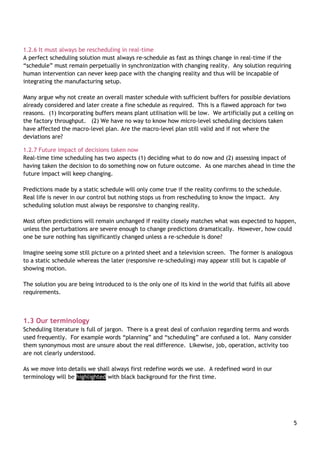
terminology will be highlighted with black background for the first time.
6
2.0 The component task diagram
The component task diagram or simply CT diagram is the basic concept of work breakdown structure
on which the entire system is based. It is a simple concept so let us begin understanding it.
2.1 Parts of a CT diagram
Most generally understand a “job” to means something that needs to be done. For us a job is a
collection of value-adding activities. The point to note is we can never do a job; we do the activities
that make a job. So a job is an abstraction. Doing a job is a result of having completed all activities
(defined later as tasks) contained in it. Obviously, a job must consist of at least one activity that
needs to be executed. For us a project too is a job. Even maintaining some machine is a job. Any
value-adding process, big or small, is a job.
Each job is represented by one CT diagram and vice versa. So, a CT diagram representation is
synonymous to a job. Let us now start defining parts of a CT diagram.
2.1.1 Concept of a task
We use the word task not activities or operations. A task is defined as an elemental and generic
value-adding activity. Put simply a task is an activity that is advisable and desirable to and can be
performed in one-go on one workstation. One may stop and resume executing a task but doing so is
an option not a compulsion. Likewise, one may split doing the tasks on several workstations as an
option not a compulsion. Tasks name is always a verb as it indicates some “action”.
A task can never be done on its own unless is executed on a workstation. Meaning we must assign a
task for execution to some workstation in time and space. This is the schedule?
In a kitchen freeze, boil, bake and cut could be considered tasks performed using workstations
refrigerator, stove, oven and cutting board. However, cook cannot be considered a task for the
Kitchen. It violates the “being elemental” condition. Here the kitchen itself is the complete factory
and we cannot consider the whole factory as one workstation.
However, if the kitchen is part of big hotel then the entire kitchen could be treated as a workstation.
Then, of course, “cook” does qualify to be an elemental task.
Likewise we cannot consider Bake Cake and Bake Pizza as two distinct tasks as it violates the “being
generic” condition. If two tasks can be performed on the same workstation then in all probability
they are alike. We are concerned with the generic action of baking not with what is being baked.
However, one could have workstations performing different generic actions. Like a Mixer grinder may
grind as well as knead.
We define our factory and the elemental tasks that can be performed in it. The idea is to go down to
as micro-level as possible in order to create an actionable schedule. Getting a macro picture is always
possible by aggregating micro level details. Doing it the other way round is impossible. To what micro
level one must drill down to is our choice? The idea is to get down to sufficient level of detail
necessary.
On a CT diagram a task is represented by a rectangle.
7
2.1.2 Concept of a workstation
A workstation is any combination of men, machines, space or time. A factory can have several
different types of workstations. Workstations need not always be present or seen on the shop floor
they could come into existence on demand.
What value-addition tasks a factory can do is actually decided by the workstations it has. For
example, a semiconductor chip maker will have a different set of workstations as compared to a sheet
metal fabrication shop. “Manukalive” can schedule any manufacturing setup. The solution is generic
and can be easily configured by User to suit a given manufacturing ecosystem.
Defining of the master factory database actually starts with listing of all workstations in a factory.
The second step is of identifying what tasks can be performed or executed on these workstations. In
short we create a mapping of what tasks can be executed on which workstations. Each workstation
should execute at least one generic task. If a workstation requires maintenance then it can execute
at least two tasks, the one it can perform and the other of maintaining it. For us maintenance too is
a valid task performed “by” the workstation as it keeps the workstation occupied for a certain period
of time.
Any activity for us is a task. So, the “buyer” too is a workstation performing task “Get input”. Of
course buyers‟ requires no maintenance per se so this workstation is not associated with a
maintenance task.
We never get to see workstations on a 2-dimensional CT diagram plotted on a computer screen as they
are blocked by the task rectangle itself. If one imagines a CT diagram as the flat table top then the
workstations on which a task can be executed appear to hanging vertically from a string below each
task rectangle, the order indicating the default preference. So, CT diagram is a 3-dimensional
representation of a job.
2.1.3 Concept of a component
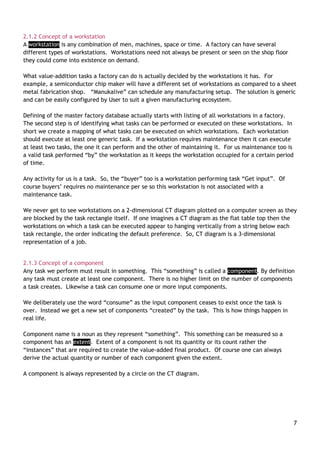
Any task we perform must result in something. This “something” is called a component. By definition
any task must create at least one component. There is no higher limit on the number of components
a task creates. Likewise a task can consume one or more input components.
We deliberately use the word “consume” as the input component ceases to exist once the task is
over. Instead we get a new set of components “created” by the task. This is how things happen in
real life.
Component name is a noun as they represent “something”. This something can be measured so a
component has an extent. Extent of a component is not its quantity or its count rather the
“instances” that are required to create the value-added final product. Of course one can always
derive the actual quantity or number of each component given the extent.
A component is always represented by a circle on the CT diagram.
8
2.2 Creating CT diagram
What we see on the CT diagram are the tasks and the components. We create the CT diagram by
linking the tasks to the components by lines. There are some rules that must be followed while doing
so.
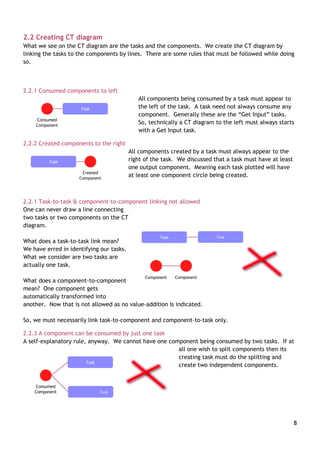
2.2.1 Consumed components to left
All components being consumed by a task must appear to
the left of the task. A task need not always consume any
component. Generally these are the “Get Input” tasks.
So, technically a CT diagram to the left must always starts
with a Get Input task.
2.2.2 Created components to the right
All components created by a task must always appear to the
right of the task. We discussed that a task must have at least
one output component. Meaning each task plotted will have
at least one component circle being created.
2.2.1 Task-to-task & component-to-component linking not allowed
One can never draw a line connecting
two tasks or two components on the CT
diagram.
What does a task-to-task link mean?
We have erred in identifying our tasks.
What we consider are two tasks are
actually one task.
What does a component-to-component
mean? One component gets
automatically transformed into
another. Now that is not allowed as no value-addition is indicated.
So, we must necessarily link task-to-component and component-to-task only.
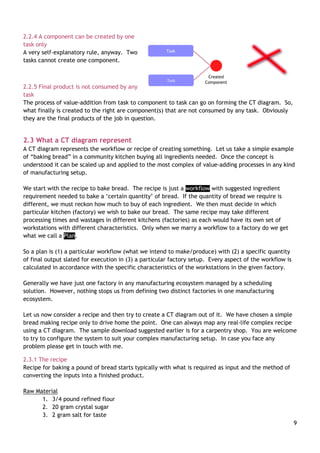
2.2.3 A component can be consumed by just one task
A self-explanatory rule, anyway. We cannot have one component being consumed by two tasks. If at
all one wish to split components then its
creating task must do the splitting and
create two independent components.
Task
Consumed
Component
Task
Created
Component
Task
Component
Task
Component
Task
Consumed
Component Task
9
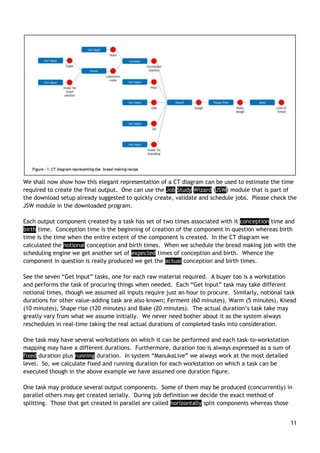
2.2.4 A component can be created by one
task only
A very self-explanatory rule, anyway. Two
tasks cannot create one component.
2.2.5 Final product is not consumed by any
task
The process of value-addition from task to component to task can go on forming the CT diagram. So,
what finally is created to the right are component(s) that are not consumed by any task. Obviously
they are the final products of the job in question.
2.3 What a CT diagram represent
A CT diagram represents the workflow or recipe of creating something. Let us take a simple example
of “baking bread” in a community kitchen buying all ingredients needed. Once the concept is
understood it can be scaled up and applied to the most complex of value-adding processes in any kind
of manufacturing setup.
We start with the recipe to bake bread. The recipe is just a workflow with suggested ingredient
requirement needed to bake a „certain quantity‟ of bread. If the quantity of bread we require is
different, we must reckon how much to buy of each ingredient. We then must decide in which
particular kitchen (factory) we wish to bake our bread. The same recipe may take different
processing times and wastages in different kitchens (factories) as each would have its own set of
workstations with different characteristics. Only when we marry a workflow to a factory do we get
what we call a Plan.
So a plan is (1) a particular workflow (what we intend to make/produce) with (2) a specific quantity
of final output slated for execution in (3) a particular factory setup. Every aspect of the workflow is
calculated in accordance with the specific characteristics of the workstations in the given factory.
Generally we have just one factory in any manufacturing ecosystem managed by a scheduling
solution. However, nothing stops us from defining two distinct factories in one manufacturing
ecosystem.
Let us now consider a recipe and then try to create a CT diagram out of it. We have chosen a simple
bread making recipe only to drive home the point. One can always map any real-life complex recipe
using a CT diagram. The sample download suggested earlier is for a carpentry shop. You are welcome
to try to configure the system to suit your complex manufacturing setup. In case you face any
problem please get in touch with me.
2.3.1 The recipe
Recipe for baking a pound of bread starts typically with what is required as input and the method of
converting the inputs into a finished product.
Raw Material
1. 3/4 pound refined flour
2. 20 gram crystal sugar
3. 2 gram salt for taste
Task
Created
ComponentTask
10
4. 10 ml vegetable oil
5. 5 gram powdered yeast.
6. 500 ml water for kneading
7. 50 ml water for fermenting solution
Method
Take 50 ml of water. Add sugar and heat until the sugar dissolves completely. Wait till it becomes
lukewarm. Add the powdered yeast and stir. Set aside for at least an hour.
Mix the flour, fermenting yeast solution, salt and oil in the kneading machine and add water to it
slowly. Ensure that the dough isn‟t too tight or too droopy. It must lump together into a ball and
must not stick to the kneading machine walls.
Remove the entire dough on a pre-oiled baking tray and shape into a loaf. Brush some oil on the loaf
to prevent it from drying. Cover with a clean wet cloth and allow it to rest in a warm corner of the
room for at least two hours until it rises to twice its original size. Remove the cloth and bake at 200
degree Celsius for 20 minutes. The crust hardens and gets a golden brown hue when fully baked.
Remove from oven and brush some oil over the crust for a shiny look.
2.3.2 Time needed to make a loaf of bread?
1. Assume time to get all ingredients from the market is an hour.
2. 1 hour 5 minutes – time to make fermenting yeast solution. Assume 5 minutes to warm the
water and an hour for the yeast to ferment. We need this solution before kneading all
ingredients together.
3. Assume 10 minutes to knead a pound of dough. Assume the dough we make is for one pound
loaf of bread. Let us assume we need 2 extra minutes to make an additional loaf dough)
4. 2 hours for the dough to rise
5. 20 minutes for the bread to bake
Now that adds up to five hours thirty five minutes. Assuming the community kitchen with its kneading
machine, its oven and a warm corner are all free only for us to bake a pound of bread then this is the
time required. However, to expect the community kitchen is free would be a mistake. There may be
someone else already cooking their own recipes. This is exactly what happens in real factories. The
actual bread making time will be much more. How much more? It is a complex function of the load
already present in the community kitchen and the load we intend to add to the community kitchen.
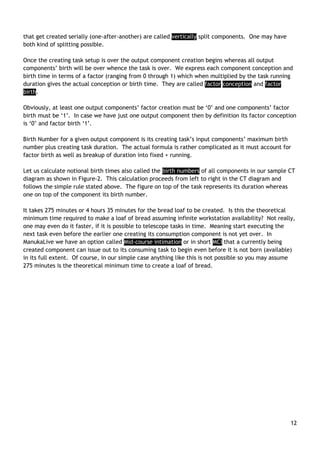
The basic CT diagram for the bread making recipe is depicted in Figure-1 below.
11
We shall now show how this elegant representation of a CT diagram can be used to estimate the time
required to create the final output. One can use the Job Study Wizard (JSW) module that is part of
the download setup already suggested to quickly create, validate and schedule jobs. Please check the
JSW module in the downloaded program.
Each output component created by a task has set of two times associated with it conception time and
birth time. Conception time is the beginning of creation of the component in question whereas birth
time is the time when the entire extent of the component is created. In the CT diagram we
calculated the notional conception and birth times. When we schedule the bread making job with the
scheduling engine we get another set of expected times of conception and birth. Whence the
component in question is really produced we get the actual conception and birth times.
See the seven “Get Input” tasks, one for each raw material required. A buyer too is a workstation
and performs the task of procuring things when needed. Each “Get Input” task may take different
notional times, though we assumed all inputs require just an hour to procure. Similarly, notional task
durations for other value-adding task are also known; Ferment (60 minutes), Warm (5 minutes), Knead
(10 minutes), Shape rise (120 minutes) and Bake (20 minutes). The actual duration‟s task take may
greatly vary from what we assume initially. We never need bother about it as the system always
reschedules in real-time taking the real actual durations of completed tasks into consideration.
One task may have several workstations on which it can be performed and each task-to-workstation
mapping may have a different durations. Furthermore, duration too is always expressed as a sum of
fixed duration plus running duration. In system “ManukaLive” we always work at the most detailed
level. So, we calculate fixed and running duration for each workstation on which a task can be
executed though in the above example we have assumed one duration figure.
One task may produce several output components. Some of them may be produced (concurrently) in
parallel others may get created serially. During job definition we decide the exact method of
splitting. Those that get created in parallel are called horizontally split components whereas those
12
that get created serially (one-after-another) are called vertically split components. One may have
both kind of splitting possible.
Once the creating task setup is over the output component creation begins whereas all output
components‟ birth will be over whence the task is over. We express each component conception and
birth time in terms of a factor (ranging from 0 through 1) which when multiplied by the task running
duration gives the actual conception or birth time. They are called factor conception and factor
birth.
Obviously, at least one output components‟ factor creation must be „0‟ and one components‟ factor
birth must be „1‟. In case we have just one output component then by definition its factor conception
is „0‟ and factor birth „1‟.
Birth Number for a given output component is its creating task‟s input components‟ maximum birth
number plus creating task duration. The actual formula is rather complicated as it must account for
factor birth as well as breakup of duration into fixed + running.
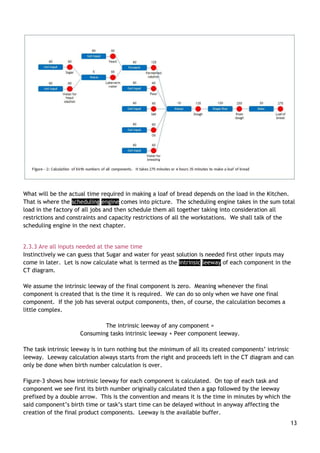
Let us calculate notional birth times also called the birth numbers of all components in our sample CT
diagram as shown in Figure-2. This calculation proceeds from left to right in the CT diagram and
follows the simple rule stated above. The figure on top of the task represents its duration whereas
one on top of the component its birth number.
It takes 275 minutes or 4 hours 35 minutes for the bread loaf to be created. Is this the theoretical
minimum time required to make a loaf of bread assuming infinite workstation availability? Not really,
one may even do it faster, if it is possible to telescope tasks in time. Meaning start executing the
next task even before the earlier one creating its consumption component is not yet over. In
ManukaLive we have an option called Mid-course intimation or in short MCI that a currently being
created component can issue out to its consuming task to begin even before it is not born (available)
in its full extent. Of course, in our simple case anything like this is not possible so you may assume
275 minutes is the theoretical minimum time to create a loaf of bread.
13
What will be the actual time required in making a loaf of bread depends on the load in the Kitchen.
That is where the scheduling engine comes into picture. The scheduling engine takes in the sum total
load in the factory of all jobs and then schedule them all together taking into consideration all
restrictions and constraints and capacity restrictions of all the workstations. We shall talk of the
scheduling engine in the next chapter.
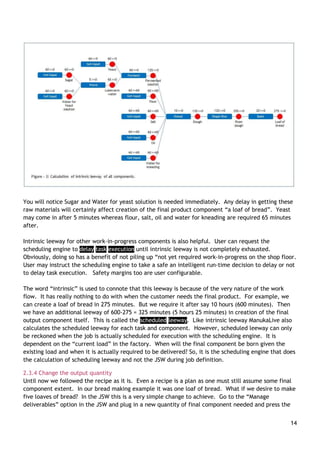
2.3.3 Are all inputs needed at the same time
Instinctively we can guess that Sugar and water for yeast solution is needed first other inputs may
come in later. Let is now calculate what is termed as the intrinsic leeway of each component in the
CT diagram.
We assume the intrinsic leeway of the final component is zero. Meaning whenever the final
component is created that is the time it is required. We can do so only when we have one final
component. If the job has several output components, then, of course, the calculation becomes a
little complex.
The intrinsic leeway of any component =
Consuming tasks intrinsic leeway + Peer component leeway.
The task intrinsic leeway is in turn nothing but the minimum of all its created components‟ intrinsic
leeway. Leeway calculation always starts from the right and proceeds left in the CT diagram and can
only be done when birth number calculation is over.
Figure-3 shows how intrinsic leeway for each component is calculated. On top of each task and
component we see first its birth number originally calculated then a gap followed by the leeway
prefixed by a double arrow. This is the convention and means it is the time in minutes by which the
said component‟s birth time or task‟s start time can be delayed without in anyway affecting the
creation of the final product components. Leeway is the available buffer.
14
You will notice Sugar and Water for yeast solution is needed immediately. Any delay in getting these
raw materials will certainly affect creation of the final product component “a loaf of bread”. Yeast
may come in after 5 minutes whereas flour, salt, oil and water for kneading are required 65 minutes
after.
Intrinsic leeway for other work-in-progress components is also helpful. User can request the
scheduling engine to delay task execution until intrinsic leeway is not completely exhausted.
Obviously, doing so has a benefit of not piling up “not yet required work-in-progress on the shop floor.
User may instruct the scheduling engine to take a safe an intelligent run-time decision to delay or not
to delay task execution. Safety margins too are user configurable.
The word “intrinsic” is used to connote that this leeway is because of the very nature of the work
flow. It has really nothing to do with when the customer needs the final product. For example, we
can create a loaf of bread in 275 minutes. But we require it after say 10 hours (600 minutes). Then
we have an additional leeway of 600-275 = 325 minutes (5 hours 25 minutes) in creation of the final
output component itself. This is called the scheduled leeway. Like intrinsic leeway ManukaLive also
calculates the scheduled leeway for each task and component. However, scheduled leeway can only
be reckoned when the job is actually scheduled for execution with the scheduling engine. It is
dependent on the “current load” in the factory. When will the final component be born given the
existing load and when it is actually required to be delivered? So, it is the scheduling engine that does
the calculation of scheduling leeway and not the JSW during job definition.
2.3.4 Change the output quantity
Until now we followed the recipe as it is. Even a recipe is a plan as one must still assume some final
component extent. In our bread making example it was one loaf of bread. What if we desire to make
five loaves of bread? In the JSW this is a very simple change to achieve. Go to the “Manage
deliverables” option in the JSW and plug in a new quantity of final component needed and press the
15
Update and then the validate option. All job calculations are redone. Meaning everything to the last
detail gets recalculated to suit the new order quantity.
Our recipe talked about 2 extra minutes kneading time for every additional pound of dough made.
For five loaves we are making four extra loaves vis-à-vis the recipe quantity. So our kneading time
becomes 10 + 4x2 = 18 minutes. Now that kneading task time changes, everything else like birth
number and intrinsic leeway will change and must be re-calculated.
2.4 How JSW recalculates in the CT diagram
There are several parameters that get recalculated. We just give a brief description of how JSW does
the recalculation.
In ManukaLive each task and component has some fixed system defined parameters (metadata).
Additionally user may define several attributes for each task and components. Read “How to create
the factory database” document available in the Help folder after the system is installed. This
document must be studied properly if you wish to configure ManukaLive to suit your manufacturing
setup.
One can define formulae to calculate literally everything in the JSW. Be it duration (fixed and
running separately), cost, wastage, etc. So our running duration formula will look like
Duration = 10 + 2 x (Extent – 1).
Substitute task extent of 5 and we get 18 minutes of kneading time. There is no limit on how complex
the formulae could be. One can use conditional statements, look-up tables and many more pre-
defined functions to make a complex formula.
All the formulae are defined in the factory database. Please refer the above document for all details.
……
Contact author for the remaining portion of the book
17
References
[1] PricewaterhouseCoopers LLP, PwC 2016
Global Industry 4.0 Survey - What we mean by
Industry 4.0 / Survey key findings / Blueprint
for digital success.
[2] “Is scheduling a solved problem?” - Stephen
F. Smith, Carnegie Mellon University, 5000
Forbes Avenue, Pittsburgh PA 15213 USA.
sfs@cs.cmu.edu.
[3] M. L. Pinedo. Scheduling: Theory,
Algorithms, and Systems. Springer, 4th edition,
2012. p. 431.
[4] Cowling, P.; Johansson, M. - Production,
Manufacturing and Logistics
Using real time information for effective
dynamic scheduling - Elsevier: European
Journal of Operational Research 139 (2002)
230–244

Solving the real life scheduling problem

  • 1.
    Solving the real-lifescheduling problem Learn how a new method of representing any value-adding process solves the intractable real-life scheduling problem. © 2017 Laxman C Marathe Address: “Manisha Bunglow”, Plot No.: 49, C.S.No.: 251/1+2, Abhaynagar, Sangli – 416416, Maharashtra, India Email: laxman.marathe@gmail.com Mobile: +91-9011098634 or +91-9910128634
  • 2.
    Table of Contents Dedication............................................................................................................. 1 1.0 What is this scheduling problem?.............................................................................. 2 1.1 Why is scheduling important? ..................................................................... 3 1.2 Why scheduling solutions fail?..................................................................... 3 1.2.1 Manufacturing setups are on-going concerns ........................................................ 3 1.2.2 No feedback mechanism ................................................................................ 4 1.2.3 Drag and drop facility ................................................................................... 4 1.2.4 Schedule not actionable ................................................................................ 4 1.2.5 Round the clock work ................................................................................... 4 1.2.6 It must always be rescheduling in real-time ......................................................... 5 1.2.7 Future impact of decisions taken now ................................................................ 5 1.3 Our terminology ..................................................................................... 5 2.0 The component task diagram .................................................................................. 6 2.1 Parts of a CT diagram .............................................................................. 6 2.1.1 Concept of a task ........................................................................................ 6 2.1.2 Concept of a workstation ............................................................................... 7 2.1.3 Concept of a component................................................................................ 7 2.2 Creating CT diagram................................................................................ 8 2.2.1 Consumed components to left ......................................................................... 8 2.2.2 Created components to the right...................................................................... 8 2.2.1 Task-to-task & component-to-component linking not allowed.................................... 8 2.2.3 A component can be consumed by just one task .................................................... 8 2.2.4 A component can be created by one task only ...................................................... 9 2.2.5 Final product is not consumed by any task........................................................... 9 2.3 What a CT diagram represent ..................................................................... 9 2.3.1 The recipe................................................................................................. 9 2.3.2 Time needed to make a loaf of bread? ..............................................................10 2.3.3 Are all inputs needed at the same time .............................................................13 2.3.4 Change the output quantity ...........................................................................14 References............................................................................................................17
  • 3.
    Dedication This book isdedicated to my wife Manisha. I lovingly call my wife “Manuka”. Manuka means currant in Marathi. Thus the name of the system too is “ManukaLive”: it is both sweet and lively…
  • 4.
    1.0 What isthis scheduling problem? The answer to one of the world‟s most complex problem of “scheduling” is as simple as specifying “when what activity needs to be done” and “who or where or on what machine the activity should be done”? Simple jobs can be “scheduled” manually. However, the moment number of jobs, the activities in each job and the number of machines increase, the problem immediately becomes notorious for its complexity. Scientific literature is replete with references to the typical job shop scheduling problem as being NP-hard. Meaning the problem has no solution that one may find and use in real life. Those who work in manufacturing industry, especially where things are made-to-order will appreciate how difficult it is to manage the day-to-day operations on the shop floor. One may assume, with such advances in technology, “scheduling” should have been a solved problem long ago. An Industry Survey conducted by PwC1 in 2016 echoes a similar opinion. They claim “The biggest challenge of industrial leaders isn‟t technology - it is the people”. Enabling technology, the survey says, is available but the industry leaders - the CEO, CTO, or CIO – represent and deal with organizations low on Digital IQ and are thus unable to use the available technology to advantage. On the contrary, Stephen F. Smith2 in a famous article titled “Is scheduling a solved problem?” argues “with these mounting successes and advances (in computational technology), it might be tempting to conclude that the chief technical hurdles underlying the scheduling problem have been overcome. However, such a conclusion (at best) presumes a rather narrow and specialized interpretation of scheduling, and (at worst) ignores much of the process and broader context of scheduling in most practical environments.” Pinedo3 also like Smith says “It is not clear how all this knowledge (about generic models and methods) can be applied to scheduling problems in the real world. Such problems tend to differ considerably from the stylized models studied by academic researchers." So what is the truth: are the academicians oblivious to complexity of the real-world? Or is it so that some great solutions exist, but industry leaders are unaware of their existence and are thus unable to use it to advantage? In my opinion the problem is on both sides. Academicians are aware of real-world complexity but are unable to model all of it into a workable solution. As a trade-off they tend to oversimplify real-world thereby making any proposed solution practically unusable. Industry leaders in all enthusiasm did try the solutions offered them initially only to realize the hard way that they do not scale-up or fit the real-work situation, making them cynical about any new offerings unless it is conclusively proven to work. The purpose of this book is to introduce you to a solution that works in the most complex real-life situation. This book briefly elucidates how the solution works and you are always welcome to actually download a one-PC working prototype to experience and evaluate the solution yourself; all this for free and with no obligations whatsoever. Here is the link to download the solution: http://www.mediafire.com/download/q5q80a1o1ogp7qf/ManukaLiveSetup.rar http://www.mediafire.com/download/tphuv0275qhi3ao/ManukaLiveSetup.zip
  • 5.
    3 1.1 Why isscheduling important? The figure below represents any manufacturing setup in a nutshell. Inputs are all that is required to come from outside the manufacturing setup in order for the value addition to be effected. They are the raw material, concepts, drawings, ideas or whatever. The process of value-addition invariably is the real complex part where “scheduling” has to be done. Here one has to “time” and “map” each activity in the value-adding process to the right combination of men and/or machine in order to create and sell the output. The above simple representation puts scheduling at the centre of any manufacturing setup. Scheduling integrates vertically within as well as horizontally across: from suppliers to the customers. Scheduling decides what activities will be performed: when and where. This in turn will decide what inputs are required, in what quantity, when and at what cost. An accurate schedule can profile cash outflows needed to procure inputs on a timeline. Likewise, the same schedule has complete information of when each “output” will be ready for delivery: a timetable of shipments and thus a profile of expected cash inflows on a timeline. Superimpose both the cash inflow and outflow requirements over time and one gets a firm control on the industry finances. The suppliers and the customers are tied to the manufacturing setup via its schedule of operations. Labour and resources like machines and equipment the manufacturing setup requires too are linked to the “schedule”. It is only the “schedule” that can truly integrate the entire manufacturing setup into one monolithic ecosystem and guarantee operational efficiency while simultaneously ensuring full flexibility. 1.2 Why scheduling solutions fail? Let us try to find out why scheduling solutions fail. This could also be a guide in assessing any potential scheduling solution. In case you encounter any of these drawbacks in a solution then its practicality is seriously compromised. 1.2.1 Manufacturing setups are on-going concerns Makespan is defined as the total amount of time required to complete a group of jobs. The formula used to calculate “makespan” is “Time of completion of last job” – “Starting time of the first job”. What happens before the first job and after the last job? Does the manufacturing setup cease to exist before and after? What about the jobs those were still under execution before the purported “first job”? What happens if an unexpected new job arrives during the “makespan”? Value- addition Inputs Outputs Men and machines
  • 6.
    4 The assumption thatscheduling can be artificially confined to a pre-defined group of jobs is a fundamental fallacy. Any scheduling solution that takes a static view of jobs to begin with and then work out a schedule minimizing the “makespan” is bound to fail in the real world. 1.2.2 No feedback mechanism Peter Cowling and Marcus Johansson4 argue in a well-researched paper that “in many production processes real time information may be obtained from process control computers and other monitoring systems, but most existing scheduling models are unable to use this information to effectively influence scheduling decisions in real time”. This is a major disconnect making the schedule irrelevant as it is soon out of synchronization with reality. If you encounter a solution with no feedback mechanism from the shop floor simply discard it. If the the schedule must reflect reality then the feedback too must be real-time and simply cannot be optional. Any feedback calls for a re-schedule. Meaning real-time shop-floor feedback only has a meaning when real-time rescheduling is possible. In order for the feedback >> reschedule >> feedback cycle to continue endlessly re-scheduling must happen quickly and without human intervention? That is the next drawback. 1.2.3 Drag and drop facility Drag and drop facility is offered in order to modify the schedule. Modifications are required for two reasons: 1. In order to incorporate deviations resulting from a shop floor feedback and 2. To correct the original schedule itself if it is not actionable. Drag and drop is a manual intervention that is very difficult to sustain and scale-up when dealing with real life manufacturing setups that concurrently handle several jobs with hundreds of activities running on many workstations. By the time anyone satisfactorily completes this tedious activity, the schedule so created is bound to be again out of synchronization with reality. 1.2.4 Schedule is not actionable The decision to execute an activity requires one to take into account several pre-conditions: 1. Availability of inputs to execute the activity 2. Need to perform the said activity 3. Availability of workstations or personnel 4. Availability of resources required to activate workstations Most scheduling systems fail on this count. Real-time mechanisms to ascertain required inputs as available for any activity or availability of workstations currently active and free does not exist. Many scheduling solutions create a schedule assuming workstations are always available and then expect human intervention to painstakingly correct the schedule using the “drag & drop” feature. That is impractical. 1.2.5 Round the clock work Many manufacturing facilities work round the clock. Each shift is manned by a different set of personnel. Scheduling decisions impact across shifts and the biggest challenge becomes information handover between shifts. The only remedy is in to have the “scheduler” work 24x7 continuously. Obviously, no human can do so – it must be a computer program that works without human intervention.
  • 7.
    5 1.2.6 It mustalways be rescheduling in real-time A perfect scheduling solution must always re-schedule as fast as things change in real-time if the “schedule” must remain perpetually in synchronization with changing reality. Any solution requiring human intervention can never keep pace with the changing reality and thus will be incapable of integrating the manufacturing setup. Many argue why not create an overall master schedule with sufficient buffers for possible deviations already considered and later create a fine schedule as required. This is a flawed approach for two reasons. (1) Incorporating buffers means plant utilisation will be low. We artificially put a ceiling on the factory throughput. (2) We have no way to know how micro-level scheduling decisions taken have affected the macro-level plan. Are the macro-level plan still valid and if not where the deviations are? 1.2.7 Future impact of decisions taken now Real-time time scheduling has two aspects (1) deciding what to do now and (2) assessing impact of having taken the decision to do something now on future outcome. As one marches ahead in time the future impact will keep changing. Predictions made by a static schedule will only come true if the reality confirms to the schedule. Real life is never in our control but nothing stops us from rescheduling to know the impact. Any scheduling solution must always be responsive to changing reality. Most often predictions will remain unchanged if reality closely matches what was expected to happen, unless the perturbations are severe enough to change predictions dramatically. However, how could one be sure nothing has significantly changed unless a re-schedule is done? Imagine seeing some still picture on a printed sheet and a television screen. The former is analogous to a static schedule whereas the later (responsive re-scheduling) may appear still but is capable of showing motion. The solution you are being introduced to is the only one of its kind in the world that fulfils all above requirements. 1.3 Our terminology Scheduling literature is full of jargon. There is a great deal of confusion regarding terms and words used frequently. For example words “planning” and “scheduling” are confused a lot. Many consider them synonymous most are unsure about the real difference. Likewise, job, operation, activity too are not clearly understood. As we move into details we shall always first redefine words we use. A redefined word in our terminology will be highlighted with black background for the first time.
  • 8.
    6 2.0 The componenttask diagram The component task diagram or simply CT diagram is the basic concept of work breakdown structure on which the entire system is based. It is a simple concept so let us begin understanding it. 2.1 Parts of a CT diagram Most generally understand a “job” to means something that needs to be done. For us a job is a collection of value-adding activities. The point to note is we can never do a job; we do the activities that make a job. So a job is an abstraction. Doing a job is a result of having completed all activities (defined later as tasks) contained in it. Obviously, a job must consist of at least one activity that needs to be executed. For us a project too is a job. Even maintaining some machine is a job. Any value-adding process, big or small, is a job. Each job is represented by one CT diagram and vice versa. So, a CT diagram representation is synonymous to a job. Let us now start defining parts of a CT diagram. 2.1.1 Concept of a task We use the word task not activities or operations. A task is defined as an elemental and generic value-adding activity. Put simply a task is an activity that is advisable and desirable to and can be performed in one-go on one workstation. One may stop and resume executing a task but doing so is an option not a compulsion. Likewise, one may split doing the tasks on several workstations as an option not a compulsion. Tasks name is always a verb as it indicates some “action”. A task can never be done on its own unless is executed on a workstation. Meaning we must assign a task for execution to some workstation in time and space. This is the schedule? In a kitchen freeze, boil, bake and cut could be considered tasks performed using workstations refrigerator, stove, oven and cutting board. However, cook cannot be considered a task for the Kitchen. It violates the “being elemental” condition. Here the kitchen itself is the complete factory and we cannot consider the whole factory as one workstation. However, if the kitchen is part of big hotel then the entire kitchen could be treated as a workstation. Then, of course, “cook” does qualify to be an elemental task. Likewise we cannot consider Bake Cake and Bake Pizza as two distinct tasks as it violates the “being generic” condition. If two tasks can be performed on the same workstation then in all probability they are alike. We are concerned with the generic action of baking not with what is being baked. However, one could have workstations performing different generic actions. Like a Mixer grinder may grind as well as knead. We define our factory and the elemental tasks that can be performed in it. The idea is to go down to as micro-level as possible in order to create an actionable schedule. Getting a macro picture is always possible by aggregating micro level details. Doing it the other way round is impossible. To what micro level one must drill down to is our choice? The idea is to get down to sufficient level of detail necessary. On a CT diagram a task is represented by a rectangle.
  • 9.
    7 2.1.2 Concept ofa workstation A workstation is any combination of men, machines, space or time. A factory can have several different types of workstations. Workstations need not always be present or seen on the shop floor they could come into existence on demand. What value-addition tasks a factory can do is actually decided by the workstations it has. For example, a semiconductor chip maker will have a different set of workstations as compared to a sheet metal fabrication shop. “Manukalive” can schedule any manufacturing setup. The solution is generic and can be easily configured by User to suit a given manufacturing ecosystem. Defining of the master factory database actually starts with listing of all workstations in a factory. The second step is of identifying what tasks can be performed or executed on these workstations. In short we create a mapping of what tasks can be executed on which workstations. Each workstation should execute at least one generic task. If a workstation requires maintenance then it can execute at least two tasks, the one it can perform and the other of maintaining it. For us maintenance too is a valid task performed “by” the workstation as it keeps the workstation occupied for a certain period of time. Any activity for us is a task. So, the “buyer” too is a workstation performing task “Get input”. Of course buyers‟ requires no maintenance per se so this workstation is not associated with a maintenance task. We never get to see workstations on a 2-dimensional CT diagram plotted on a computer screen as they are blocked by the task rectangle itself. If one imagines a CT diagram as the flat table top then the workstations on which a task can be executed appear to hanging vertically from a string below each task rectangle, the order indicating the default preference. So, CT diagram is a 3-dimensional representation of a job. 2.1.3 Concept of a component Any task we perform must result in something. This “something” is called a component. By definition any task must create at least one component. There is no higher limit on the number of components a task creates. Likewise a task can consume one or more input components. We deliberately use the word “consume” as the input component ceases to exist once the task is over. Instead we get a new set of components “created” by the task. This is how things happen in real life. Component name is a noun as they represent “something”. This something can be measured so a component has an extent. Extent of a component is not its quantity or its count rather the “instances” that are required to create the value-added final product. Of course one can always derive the actual quantity or number of each component given the extent. A component is always represented by a circle on the CT diagram.
  • 10.
    8 2.2 Creating CTdiagram What we see on the CT diagram are the tasks and the components. We create the CT diagram by linking the tasks to the components by lines. There are some rules that must be followed while doing so. 2.2.1 Consumed components to left All components being consumed by a task must appear to the left of the task. A task need not always consume any component. Generally these are the “Get Input” tasks. So, technically a CT diagram to the left must always starts with a Get Input task. 2.2.2 Created components to the right All components created by a task must always appear to the right of the task. We discussed that a task must have at least one output component. Meaning each task plotted will have at least one component circle being created. 2.2.1 Task-to-task & component-to-component linking not allowed One can never draw a line connecting two tasks or two components on the CT diagram. What does a task-to-task link mean? We have erred in identifying our tasks. What we consider are two tasks are actually one task. What does a component-to-component mean? One component gets automatically transformed into another. Now that is not allowed as no value-addition is indicated. So, we must necessarily link task-to-component and component-to-task only. 2.2.3 A component can be consumed by just one task A self-explanatory rule, anyway. We cannot have one component being consumed by two tasks. If at all one wish to split components then its creating task must do the splitting and create two independent components. Task Consumed Component Task Created Component Task Component Task Component Task Consumed Component Task
  • 11.
    9 2.2.4 A componentcan be created by one task only A very self-explanatory rule, anyway. Two tasks cannot create one component. 2.2.5 Final product is not consumed by any task The process of value-addition from task to component to task can go on forming the CT diagram. So, what finally is created to the right are component(s) that are not consumed by any task. Obviously they are the final products of the job in question. 2.3 What a CT diagram represent A CT diagram represents the workflow or recipe of creating something. Let us take a simple example of “baking bread” in a community kitchen buying all ingredients needed. Once the concept is understood it can be scaled up and applied to the most complex of value-adding processes in any kind of manufacturing setup. We start with the recipe to bake bread. The recipe is just a workflow with suggested ingredient requirement needed to bake a „certain quantity‟ of bread. If the quantity of bread we require is different, we must reckon how much to buy of each ingredient. We then must decide in which particular kitchen (factory) we wish to bake our bread. The same recipe may take different processing times and wastages in different kitchens (factories) as each would have its own set of workstations with different characteristics. Only when we marry a workflow to a factory do we get what we call a Plan. So a plan is (1) a particular workflow (what we intend to make/produce) with (2) a specific quantity of final output slated for execution in (3) a particular factory setup. Every aspect of the workflow is calculated in accordance with the specific characteristics of the workstations in the given factory. Generally we have just one factory in any manufacturing ecosystem managed by a scheduling solution. However, nothing stops us from defining two distinct factories in one manufacturing ecosystem. Let us now consider a recipe and then try to create a CT diagram out of it. We have chosen a simple bread making recipe only to drive home the point. One can always map any real-life complex recipe using a CT diagram. The sample download suggested earlier is for a carpentry shop. You are welcome to try to configure the system to suit your complex manufacturing setup. In case you face any problem please get in touch with me. 2.3.1 The recipe Recipe for baking a pound of bread starts typically with what is required as input and the method of converting the inputs into a finished product. Raw Material 1. 3/4 pound refined flour 2. 20 gram crystal sugar 3. 2 gram salt for taste Task Created ComponentTask
  • 12.
    10 4. 10 mlvegetable oil 5. 5 gram powdered yeast. 6. 500 ml water for kneading 7. 50 ml water for fermenting solution Method Take 50 ml of water. Add sugar and heat until the sugar dissolves completely. Wait till it becomes lukewarm. Add the powdered yeast and stir. Set aside for at least an hour. Mix the flour, fermenting yeast solution, salt and oil in the kneading machine and add water to it slowly. Ensure that the dough isn‟t too tight or too droopy. It must lump together into a ball and must not stick to the kneading machine walls. Remove the entire dough on a pre-oiled baking tray and shape into a loaf. Brush some oil on the loaf to prevent it from drying. Cover with a clean wet cloth and allow it to rest in a warm corner of the room for at least two hours until it rises to twice its original size. Remove the cloth and bake at 200 degree Celsius for 20 minutes. The crust hardens and gets a golden brown hue when fully baked. Remove from oven and brush some oil over the crust for a shiny look. 2.3.2 Time needed to make a loaf of bread? 1. Assume time to get all ingredients from the market is an hour. 2. 1 hour 5 minutes – time to make fermenting yeast solution. Assume 5 minutes to warm the water and an hour for the yeast to ferment. We need this solution before kneading all ingredients together. 3. Assume 10 minutes to knead a pound of dough. Assume the dough we make is for one pound loaf of bread. Let us assume we need 2 extra minutes to make an additional loaf dough) 4. 2 hours for the dough to rise 5. 20 minutes for the bread to bake Now that adds up to five hours thirty five minutes. Assuming the community kitchen with its kneading machine, its oven and a warm corner are all free only for us to bake a pound of bread then this is the time required. However, to expect the community kitchen is free would be a mistake. There may be someone else already cooking their own recipes. This is exactly what happens in real factories. The actual bread making time will be much more. How much more? It is a complex function of the load already present in the community kitchen and the load we intend to add to the community kitchen. The basic CT diagram for the bread making recipe is depicted in Figure-1 below.
  • 13.
    11 We shall nowshow how this elegant representation of a CT diagram can be used to estimate the time required to create the final output. One can use the Job Study Wizard (JSW) module that is part of the download setup already suggested to quickly create, validate and schedule jobs. Please check the JSW module in the downloaded program. Each output component created by a task has set of two times associated with it conception time and birth time. Conception time is the beginning of creation of the component in question whereas birth time is the time when the entire extent of the component is created. In the CT diagram we calculated the notional conception and birth times. When we schedule the bread making job with the scheduling engine we get another set of expected times of conception and birth. Whence the component in question is really produced we get the actual conception and birth times. See the seven “Get Input” tasks, one for each raw material required. A buyer too is a workstation and performs the task of procuring things when needed. Each “Get Input” task may take different notional times, though we assumed all inputs require just an hour to procure. Similarly, notional task durations for other value-adding task are also known; Ferment (60 minutes), Warm (5 minutes), Knead (10 minutes), Shape rise (120 minutes) and Bake (20 minutes). The actual duration‟s task take may greatly vary from what we assume initially. We never need bother about it as the system always reschedules in real-time taking the real actual durations of completed tasks into consideration. One task may have several workstations on which it can be performed and each task-to-workstation mapping may have a different durations. Furthermore, duration too is always expressed as a sum of fixed duration plus running duration. In system “ManukaLive” we always work at the most detailed level. So, we calculate fixed and running duration for each workstation on which a task can be executed though in the above example we have assumed one duration figure. One task may produce several output components. Some of them may be produced (concurrently) in parallel others may get created serially. During job definition we decide the exact method of splitting. Those that get created in parallel are called horizontally split components whereas those
  • 14.
    12 that get createdserially (one-after-another) are called vertically split components. One may have both kind of splitting possible. Once the creating task setup is over the output component creation begins whereas all output components‟ birth will be over whence the task is over. We express each component conception and birth time in terms of a factor (ranging from 0 through 1) which when multiplied by the task running duration gives the actual conception or birth time. They are called factor conception and factor birth. Obviously, at least one output components‟ factor creation must be „0‟ and one components‟ factor birth must be „1‟. In case we have just one output component then by definition its factor conception is „0‟ and factor birth „1‟. Birth Number for a given output component is its creating task‟s input components‟ maximum birth number plus creating task duration. The actual formula is rather complicated as it must account for factor birth as well as breakup of duration into fixed + running. Let us calculate notional birth times also called the birth numbers of all components in our sample CT diagram as shown in Figure-2. This calculation proceeds from left to right in the CT diagram and follows the simple rule stated above. The figure on top of the task represents its duration whereas one on top of the component its birth number. It takes 275 minutes or 4 hours 35 minutes for the bread loaf to be created. Is this the theoretical minimum time required to make a loaf of bread assuming infinite workstation availability? Not really, one may even do it faster, if it is possible to telescope tasks in time. Meaning start executing the next task even before the earlier one creating its consumption component is not yet over. In ManukaLive we have an option called Mid-course intimation or in short MCI that a currently being created component can issue out to its consuming task to begin even before it is not born (available) in its full extent. Of course, in our simple case anything like this is not possible so you may assume 275 minutes is the theoretical minimum time to create a loaf of bread.
  • 15.
    13 What will bethe actual time required in making a loaf of bread depends on the load in the Kitchen. That is where the scheduling engine comes into picture. The scheduling engine takes in the sum total load in the factory of all jobs and then schedule them all together taking into consideration all restrictions and constraints and capacity restrictions of all the workstations. We shall talk of the scheduling engine in the next chapter. 2.3.3 Are all inputs needed at the same time Instinctively we can guess that Sugar and water for yeast solution is needed first other inputs may come in later. Let is now calculate what is termed as the intrinsic leeway of each component in the CT diagram. We assume the intrinsic leeway of the final component is zero. Meaning whenever the final component is created that is the time it is required. We can do so only when we have one final component. If the job has several output components, then, of course, the calculation becomes a little complex. The intrinsic leeway of any component = Consuming tasks intrinsic leeway + Peer component leeway. The task intrinsic leeway is in turn nothing but the minimum of all its created components‟ intrinsic leeway. Leeway calculation always starts from the right and proceeds left in the CT diagram and can only be done when birth number calculation is over. Figure-3 shows how intrinsic leeway for each component is calculated. On top of each task and component we see first its birth number originally calculated then a gap followed by the leeway prefixed by a double arrow. This is the convention and means it is the time in minutes by which the said component‟s birth time or task‟s start time can be delayed without in anyway affecting the creation of the final product components. Leeway is the available buffer.
  • 16.
    14 You will noticeSugar and Water for yeast solution is needed immediately. Any delay in getting these raw materials will certainly affect creation of the final product component “a loaf of bread”. Yeast may come in after 5 minutes whereas flour, salt, oil and water for kneading are required 65 minutes after. Intrinsic leeway for other work-in-progress components is also helpful. User can request the scheduling engine to delay task execution until intrinsic leeway is not completely exhausted. Obviously, doing so has a benefit of not piling up “not yet required work-in-progress on the shop floor. User may instruct the scheduling engine to take a safe an intelligent run-time decision to delay or not to delay task execution. Safety margins too are user configurable. The word “intrinsic” is used to connote that this leeway is because of the very nature of the work flow. It has really nothing to do with when the customer needs the final product. For example, we can create a loaf of bread in 275 minutes. But we require it after say 10 hours (600 minutes). Then we have an additional leeway of 600-275 = 325 minutes (5 hours 25 minutes) in creation of the final output component itself. This is called the scheduled leeway. Like intrinsic leeway ManukaLive also calculates the scheduled leeway for each task and component. However, scheduled leeway can only be reckoned when the job is actually scheduled for execution with the scheduling engine. It is dependent on the “current load” in the factory. When will the final component be born given the existing load and when it is actually required to be delivered? So, it is the scheduling engine that does the calculation of scheduling leeway and not the JSW during job definition. 2.3.4 Change the output quantity Until now we followed the recipe as it is. Even a recipe is a plan as one must still assume some final component extent. In our bread making example it was one loaf of bread. What if we desire to make five loaves of bread? In the JSW this is a very simple change to achieve. Go to the “Manage deliverables” option in the JSW and plug in a new quantity of final component needed and press the
  • 17.
    15 Update and thenthe validate option. All job calculations are redone. Meaning everything to the last detail gets recalculated to suit the new order quantity. Our recipe talked about 2 extra minutes kneading time for every additional pound of dough made. For five loaves we are making four extra loaves vis-à-vis the recipe quantity. So our kneading time becomes 10 + 4x2 = 18 minutes. Now that kneading task time changes, everything else like birth number and intrinsic leeway will change and must be re-calculated. 2.4 How JSW recalculates in the CT diagram There are several parameters that get recalculated. We just give a brief description of how JSW does the recalculation. In ManukaLive each task and component has some fixed system defined parameters (metadata). Additionally user may define several attributes for each task and components. Read “How to create the factory database” document available in the Help folder after the system is installed. This document must be studied properly if you wish to configure ManukaLive to suit your manufacturing setup. One can define formulae to calculate literally everything in the JSW. Be it duration (fixed and running separately), cost, wastage, etc. So our running duration formula will look like Duration = 10 + 2 x (Extent – 1). Substitute task extent of 5 and we get 18 minutes of kneading time. There is no limit on how complex the formulae could be. One can use conditional statements, look-up tables and many more pre- defined functions to make a complex formula. All the formulae are defined in the factory database. Please refer the above document for all details. …… Contact author for the remaining portion of the book
  • 19.
    17 References [1] PricewaterhouseCoopers LLP,PwC 2016 Global Industry 4.0 Survey - What we mean by Industry 4.0 / Survey key findings / Blueprint for digital success. [2] “Is scheduling a solved problem?” - Stephen F. Smith, Carnegie Mellon University, 5000 Forbes Avenue, Pittsburgh PA 15213 USA. sfs@cs.cmu.edu. [3] M. L. Pinedo. Scheduling: Theory, Algorithms, and Systems. Springer, 4th edition, 2012. p. 431. [4] Cowling, P.; Johansson, M. - Production, Manufacturing and Logistics Using real time information for effective dynamic scheduling - Elsevier: European Journal of Operational Research 139 (2002) 230–244