MATLAB
1
Solution Process of Ordinary Differential Equations with
their Graphical Representation and Some Basic Plotting
Process Difference Using MATLAB
Presented By Md.Al-Amin
Presented By: Md. Al-Amin
Student Id:181202
Mathematics Discipline,
Khulna University, Khulna
Bangladesh
MATLAB
2
Overview
 Using MATLAB Software, Solution of
 1st order ODE Solution
 Higher Order ODE Solution
 System Of Linear Equation Solution
With graphical representation
 Meaning of Command “eval” in MATLAB
 Difference between MATLAB Code- plot, fplot, ezplot, ezsurf
Presented By Md.Al-Amin
MATLAB
3
Problem 1: Solve the ODE with figure
𝒅𝒚
𝒅𝒙
= 𝟐𝒙 ; 𝒘𝒉𝒆𝒓𝒆 𝒚 𝟏 = 𝟒
Using MATLAB eval Command.
MATLAB Code:
%To remove existing data from Command Window & workspace
clc,clear all
%Solution of ODE
disp('The solution of given ODE')
ode=dsolve('Dy=2*x','y(1)=4','x')
%The range of indepentdent variable
x=-10:1:10;
%Evaluation of a object as vectorize
y=eval(vectorize(ode));
%To plot the Solution
fig=figure('color','w');
plot(x,y,'b-o','LineWidth',1.5)
grid on
xlabel('------------> The values of x(X-axis) --------->')
ylabel('------------> The values of y(Y-axis) --------->')
axis([-10 10 0 105])
Presented By Md.Al-Amin
MATLAB
4
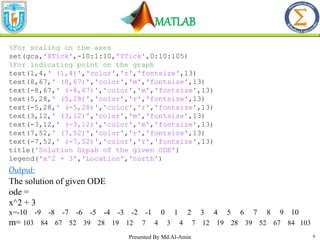
%For scaling on the axes
set(gca,'XTick',-10:1:10,'YTick',0:10:105)
%For indicating point on the graph
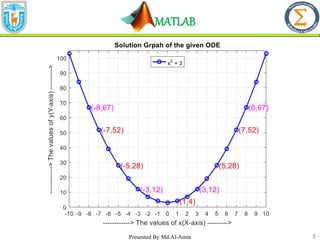
text(1,4,' (1,4)','color','r','fontsize',13)
text(8,67,' (8,67)','color','m','fontsize',13)
text(-8,67,' (-8,67)','color','m','fontsize',13)
text(5,28,' (5,28)','color','r','fontsize',13)
text(-5,28,' (-5,28)','color','r','fontsize',13)
text(3,12,' (3,12)','color','m','fontsize',13)
text(-3,12,' (-3,12)','color','m','fontsize',13)
text(7,52,' (7,52)','color','r','fontsize',13)
text(-7,52,' (-7,52)','color','r','fontsize',13)
title('Solution Grpah of the given ODE')
legend('x^2 + 3','Location','north')
Output:
The solution of given ODE
ode =
x^2 + 3
x=-10 -9 -8 -7 -6 -5 -4 -3 -2 -1 0 1 2 3 4 5 6 7 8 9 10
m= 103 84 67 52 39 28 19 12 7 4 3 4 7 12 19 28 39 52 67 84 103
Presented By Md.Al-Amin
MATLAB
5
Presented By Md.Al-Amin
MATLAB
6
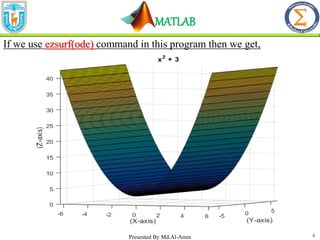
If we use ezsurf(ode) command in this program then we get,
Presented By Md.Al-Amin
MATLAB
7
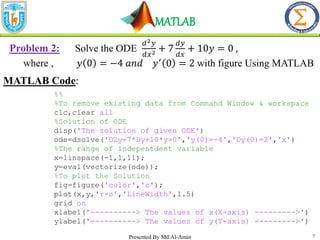
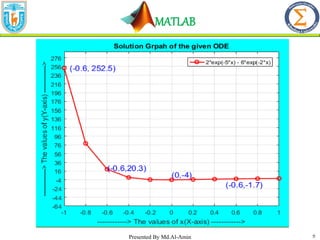
Problem 2: Solve the ODE
𝑑2𝑦
𝑑𝑥2 + 7
𝑑𝑦
𝑑𝑥
+ 10𝑦 = 0 ,
where , 𝑦 0 = −4 𝑎𝑛𝑑 𝑦′
0 = 2 with figure Using MATLAB
MATLAB Code:
%%
%To remove existing data from Command Window & workspace
clc,clear all
%Solution of ODE
disp('The solution of given ODE')
ode=dsolve('D2y+7*Dy+10*y=0','y(0)=-4','Dy(0)=2','x')
%The range of indepentdent variable
x=linspace(-1,1,11);
y=eval(vectorize(ode));
%To plot the Solution
fig=figure('color','c');
plot(x,y,'r-o','LineWidth',1.5)
grid on
xlabel('----------> The values of x(X-axis) --------->')
ylabel('----------> The values of y(Y-axis) --------->')
Presented By Md.Al-Amin
MATLAB
8
axis([-1 1 -64 290])
set(gca,'XTick',-1:0.2:1,'YTick',-64:20:290)
text(0,8,'(0,-4)','color','b','fontsize',13)
text(0.5,-14 ,'(-0.6,-1.7)','color','b','fontsize',13)
text(-0.6,24 ,'(-0.6,20.3)','color','b','fontsize',13)
text(-0.95,252.4920 ,'(-0.6, 252.5)','color','b','fontsize',13)
title('Solution Grpah of the given ODE')
legend('2*exp(-5*x) - 6*exp(-2*x)','Location','northeast')
Output:
The solution of given ODE
ode =
2*exp(-5*x) - 6*exp(-2*x)
Presented By Md.Al-Amin
MATLAB
9
Presented By Md.Al-Amin
MATLAB
10
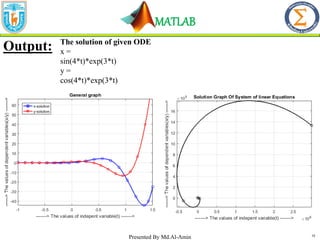
Problem 3: Solve the system of linear ODE
𝑑𝑥
𝑑𝑡
= 4𝑥 + 3𝑦,
𝑑𝑦
𝑑𝑡
=
4𝑦 − 3𝑥; 𝑤ℎ𝑒𝑟𝑒 𝑥 0 = 0 𝑎𝑛𝑑 𝑦 0 = 1 with figure using MATLAB
MATLAB Code:
%To remove existing data from Command Window &
workspace
clc,clear all
%system of ode
%for draw graph we should input conditions as then we
need to remove constant
%Denoting x and y are function of t
syms x(t) y(t)
ode1=diff(x,t)==3*x+4*y;
ode2=diff(y,t)==3*y-4*x;
cond1=x(0)==0;
cond2=y(0)==1;
cond=[cond1 cond2];
ode=[ode1 ode2];
disp('The solution of given ODE')
[x y]=dsolve(ode,cond)
Presented By Md.Al-Amin
MATLAB
11
%Drawing plot
fig=figure('color','w');
fplot(x,[-1 1.5],'linewidth',1.5,'marker','o','color', 'b')
hold on
fplot(y,[-1 1.5],'linewidth',1.5,'marker','s','color','r')
hold off
grid on
set(gca,'XTick',-1:0.5:1.5,'YTick',-100:10:60)
title('General graph')
xlabel('-------> The values of indepent variable(t) ------->')
ylabel('------> The values of dependent variables(x/y) ------->')
legend('x-solution','y-solution','location','northwest')
Presented By Md.Al-Amin
syms t
x=sin(4*t)*exp(3*t)
y=cos(4*t)*exp(3*t)
fplot(x,y,'color','k','linewidth',1.5,'marker','o')
grid on
xlabel('-------> The values of indepent variable(t) ------->')
ylabel('------> The values of dependent variables(x/y) ------>')
title('Solution Graph Of System of linear Equations');
MATLAB
Presented By Md.Al-Amin 12
The solution of given ODE
x =
sin(4*t)*exp(3*t)
y =
cos(4*t)*exp(3*t)
Output:
MATLAB
13
plot VS ezplot VS fplot
Basis For
Comparison
plot ezplot fplot
Range for
Independent
variable
Needed Not needed Not needed
By default range User defined
[-2𝜋, 2𝜋] /
[-6.2832,6.2832] [-5,5]
Validity for
“linspace”
command
Valid Not valid Not valid
In case of user
friendly
For using interval,it
is user friendly
Some limitation
exist also
User friendly from
MATLAB 2016
Execution time Most More Least
Presented By Md.Al-Amin
MATLAB
14
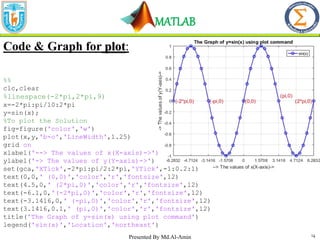
Code & Graph for plot:
%%
clc,clear
%linespace(-2*pi,2*pi,9)
x=-2*pi:pi/10:2*pi
y=sin(x);
%To plot the Solution
fig=figure('color','w')
plot(x,y,'b-o','LineWidth',1.25)
grid on
xlabel('--> The values of x(X-axis)->')
ylabel('-> The values of y(Y-axis)->')
set(gca,'XTick',-2*pi:pi/2:2*pi,'YTick',-1:0.2:1)
text(0,0,' (0,0)','color','r','fontsize',12)
text(4.5,0,' (2*pi,0)','color','r','fontsize',12)
text(-6.1,0,'(-2*pi,0)','color','r','fontsize',12)
text(-3.1416,0,' (-pi,0)','color','r','fontsize',12)
text(3.1416,0.1,' (pi,0)','color','r','fontsize',12)
title('The Graph of y=sin(x) using plot command')
legend('sin(x)','Location','northeast')
Presented By Md.Al-Amin
MATLAB
15
Code and Graph for ezplot :
%%
clc,clear
%To plot the Solution
syms x
fig=figure('color','w')
m=ezplot(sin(x))
set(m,'color','b','linewidth',1.5)
grid on
xlabel('-> The values of x(X-axis)->')
ylabel('-> The values of y(Y-axis)->')
axis([-2*pi 2*pi -1 1])
set(gca,'XTick',-2*pi:pi/2:2*pi,'YTick',-1:0.2:1)
text(0,0,' (0,0)','color','r','fontsize',12)
text(4.5,0,' (2*pi,0)','color','r','fontsize',12)
text(-6.1,0,'(-2*pi,0)','color','r','fontsize',12)
text(-3.1416,0,' (-pi,0)','color','r','fontsize',12)
text(3.1416,0.1,' (pi,0)','color','r','fontsize',12)
title('The Graph of y=sin(x) using ezplot command')
legend('sin(x)','Location','northeast')
Presented By Md.Al-Amin
MATLAB
16
Code and Graph for fplot
%To plot the Solution
syms x
fig=figure('color','w')
fplot(sin(x) ,'marker',
'o','color','m','linewidth',1.5)
grid on
xlabel('-> The values of x(X-axis) ->')
ylabel('-> The values of y(Y-axis)->')
set(gca,'XTick',-5:1:5,'YTick',-1:0.2:1)
text(0,0,' (0,-0)','color','r','fontsize',12)
text(-3.1416,0,' (-
pi,0)','color','r','fontsize',12)
text(3.1416,0.1,'
(pi,0)','color','r','fontsize',12)
title('The Graph of y=sin(x) using fplot command')
legend('sin(x)','Location','northeast')
Presented By Md.Al-Amin
MATLAB
17
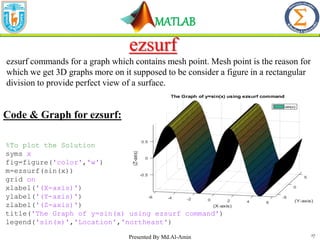
ezsurf
ezsurf commands for a graph which contains mesh point. Mesh point is the reason for
which we get 3D graphs more on it supposed to be consider a figure in a rectangular
division to provide perfect view of a surface.
%To plot the Solution
syms x
fig=figure('color','w')
m=ezsurf(sin(x))
grid on
xlabel('(X-axis)')
ylabel('(Y-axis)')
zlabel('(Z-axis)')
title('The Graph of y=sin(x) using ezsurf command')
legend('sin(x)','Location','northeast')
Code & Graph for ezsurf:
Presented By Md.Al-Amin
MATLAB
18
Thanks All
Presented By Md.Al-Amin

Solution Process of Ordinary Differential Equations with their Graphical Representation and Some Basic Plotting Process Difference Using MATLAB.pptx

  • 1.
    MATLAB 1 Solution Process ofOrdinary Differential Equations with their Graphical Representation and Some Basic Plotting Process Difference Using MATLAB Presented By Md.Al-Amin Presented By: Md. Al-Amin Student Id:181202 Mathematics Discipline, Khulna University, Khulna Bangladesh
  • 2.
    MATLAB 2 Overview  Using MATLABSoftware, Solution of  1st order ODE Solution  Higher Order ODE Solution  System Of Linear Equation Solution With graphical representation  Meaning of Command “eval” in MATLAB  Difference between MATLAB Code- plot, fplot, ezplot, ezsurf Presented By Md.Al-Amin
  • 3.
    MATLAB 3 Problem 1: Solvethe ODE with figure 𝒅𝒚 𝒅𝒙 = 𝟐𝒙 ; 𝒘𝒉𝒆𝒓𝒆 𝒚 𝟏 = 𝟒 Using MATLAB eval Command. MATLAB Code: %To remove existing data from Command Window & workspace clc,clear all %Solution of ODE disp('The solution of given ODE') ode=dsolve('Dy=2*x','y(1)=4','x') %The range of indepentdent variable x=-10:1:10; %Evaluation of a object as vectorize y=eval(vectorize(ode)); %To plot the Solution fig=figure('color','w'); plot(x,y,'b-o','LineWidth',1.5) grid on xlabel('------------> The values of x(X-axis) --------->') ylabel('------------> The values of y(Y-axis) --------->') axis([-10 10 0 105]) Presented By Md.Al-Amin
  • 4.
    MATLAB 4 %For scaling onthe axes set(gca,'XTick',-10:1:10,'YTick',0:10:105) %For indicating point on the graph text(1,4,' (1,4)','color','r','fontsize',13) text(8,67,' (8,67)','color','m','fontsize',13) text(-8,67,' (-8,67)','color','m','fontsize',13) text(5,28,' (5,28)','color','r','fontsize',13) text(-5,28,' (-5,28)','color','r','fontsize',13) text(3,12,' (3,12)','color','m','fontsize',13) text(-3,12,' (-3,12)','color','m','fontsize',13) text(7,52,' (7,52)','color','r','fontsize',13) text(-7,52,' (-7,52)','color','r','fontsize',13) title('Solution Grpah of the given ODE') legend('x^2 + 3','Location','north') Output: The solution of given ODE ode = x^2 + 3 x=-10 -9 -8 -7 -6 -5 -4 -3 -2 -1 0 1 2 3 4 5 6 7 8 9 10 m= 103 84 67 52 39 28 19 12 7 4 3 4 7 12 19 28 39 52 67 84 103 Presented By Md.Al-Amin
  • 5.
  • 6.
    MATLAB 6 If we useezsurf(ode) command in this program then we get, Presented By Md.Al-Amin
  • 7.
    MATLAB 7 Problem 2: Solvethe ODE 𝑑2𝑦 𝑑𝑥2 + 7 𝑑𝑦 𝑑𝑥 + 10𝑦 = 0 , where , 𝑦 0 = −4 𝑎𝑛𝑑 𝑦′ 0 = 2 with figure Using MATLAB MATLAB Code: %% %To remove existing data from Command Window & workspace clc,clear all %Solution of ODE disp('The solution of given ODE') ode=dsolve('D2y+7*Dy+10*y=0','y(0)=-4','Dy(0)=2','x') %The range of indepentdent variable x=linspace(-1,1,11); y=eval(vectorize(ode)); %To plot the Solution fig=figure('color','c'); plot(x,y,'r-o','LineWidth',1.5) grid on xlabel('----------> The values of x(X-axis) --------->') ylabel('----------> The values of y(Y-axis) --------->') Presented By Md.Al-Amin
  • 8.
    MATLAB 8 axis([-1 1 -64290]) set(gca,'XTick',-1:0.2:1,'YTick',-64:20:290) text(0,8,'(0,-4)','color','b','fontsize',13) text(0.5,-14 ,'(-0.6,-1.7)','color','b','fontsize',13) text(-0.6,24 ,'(-0.6,20.3)','color','b','fontsize',13) text(-0.95,252.4920 ,'(-0.6, 252.5)','color','b','fontsize',13) title('Solution Grpah of the given ODE') legend('2*exp(-5*x) - 6*exp(-2*x)','Location','northeast') Output: The solution of given ODE ode = 2*exp(-5*x) - 6*exp(-2*x) Presented By Md.Al-Amin
  • 9.
  • 10.
    MATLAB 10 Problem 3: Solvethe system of linear ODE 𝑑𝑥 𝑑𝑡 = 4𝑥 + 3𝑦, 𝑑𝑦 𝑑𝑡 = 4𝑦 − 3𝑥; 𝑤ℎ𝑒𝑟𝑒 𝑥 0 = 0 𝑎𝑛𝑑 𝑦 0 = 1 with figure using MATLAB MATLAB Code: %To remove existing data from Command Window & workspace clc,clear all %system of ode %for draw graph we should input conditions as then we need to remove constant %Denoting x and y are function of t syms x(t) y(t) ode1=diff(x,t)==3*x+4*y; ode2=diff(y,t)==3*y-4*x; cond1=x(0)==0; cond2=y(0)==1; cond=[cond1 cond2]; ode=[ode1 ode2]; disp('The solution of given ODE') [x y]=dsolve(ode,cond) Presented By Md.Al-Amin
  • 11.
    MATLAB 11 %Drawing plot fig=figure('color','w'); fplot(x,[-1 1.5],'linewidth',1.5,'marker','o','color','b') hold on fplot(y,[-1 1.5],'linewidth',1.5,'marker','s','color','r') hold off grid on set(gca,'XTick',-1:0.5:1.5,'YTick',-100:10:60) title('General graph') xlabel('-------> The values of indepent variable(t) ------->') ylabel('------> The values of dependent variables(x/y) ------->') legend('x-solution','y-solution','location','northwest') Presented By Md.Al-Amin syms t x=sin(4*t)*exp(3*t) y=cos(4*t)*exp(3*t) fplot(x,y,'color','k','linewidth',1.5,'marker','o') grid on xlabel('-------> The values of indepent variable(t) ------->') ylabel('------> The values of dependent variables(x/y) ------>') title('Solution Graph Of System of linear Equations');
  • 12.
    MATLAB Presented By Md.Al-Amin12 The solution of given ODE x = sin(4*t)*exp(3*t) y = cos(4*t)*exp(3*t) Output:
  • 13.
    MATLAB 13 plot VS ezplotVS fplot Basis For Comparison plot ezplot fplot Range for Independent variable Needed Not needed Not needed By default range User defined [-2𝜋, 2𝜋] / [-6.2832,6.2832] [-5,5] Validity for “linspace” command Valid Not valid Not valid In case of user friendly For using interval,it is user friendly Some limitation exist also User friendly from MATLAB 2016 Execution time Most More Least Presented By Md.Al-Amin
  • 14.
    MATLAB 14 Code & Graphfor plot: %% clc,clear %linespace(-2*pi,2*pi,9) x=-2*pi:pi/10:2*pi y=sin(x); %To plot the Solution fig=figure('color','w') plot(x,y,'b-o','LineWidth',1.25) grid on xlabel('--> The values of x(X-axis)->') ylabel('-> The values of y(Y-axis)->') set(gca,'XTick',-2*pi:pi/2:2*pi,'YTick',-1:0.2:1) text(0,0,' (0,0)','color','r','fontsize',12) text(4.5,0,' (2*pi,0)','color','r','fontsize',12) text(-6.1,0,'(-2*pi,0)','color','r','fontsize',12) text(-3.1416,0,' (-pi,0)','color','r','fontsize',12) text(3.1416,0.1,' (pi,0)','color','r','fontsize',12) title('The Graph of y=sin(x) using plot command') legend('sin(x)','Location','northeast') Presented By Md.Al-Amin
  • 15.
    MATLAB 15 Code and Graphfor ezplot : %% clc,clear %To plot the Solution syms x fig=figure('color','w') m=ezplot(sin(x)) set(m,'color','b','linewidth',1.5) grid on xlabel('-> The values of x(X-axis)->') ylabel('-> The values of y(Y-axis)->') axis([-2*pi 2*pi -1 1]) set(gca,'XTick',-2*pi:pi/2:2*pi,'YTick',-1:0.2:1) text(0,0,' (0,0)','color','r','fontsize',12) text(4.5,0,' (2*pi,0)','color','r','fontsize',12) text(-6.1,0,'(-2*pi,0)','color','r','fontsize',12) text(-3.1416,0,' (-pi,0)','color','r','fontsize',12) text(3.1416,0.1,' (pi,0)','color','r','fontsize',12) title('The Graph of y=sin(x) using ezplot command') legend('sin(x)','Location','northeast') Presented By Md.Al-Amin
  • 16.
    MATLAB 16 Code and Graphfor fplot %To plot the Solution syms x fig=figure('color','w') fplot(sin(x) ,'marker', 'o','color','m','linewidth',1.5) grid on xlabel('-> The values of x(X-axis) ->') ylabel('-> The values of y(Y-axis)->') set(gca,'XTick',-5:1:5,'YTick',-1:0.2:1) text(0,0,' (0,-0)','color','r','fontsize',12) text(-3.1416,0,' (- pi,0)','color','r','fontsize',12) text(3.1416,0.1,' (pi,0)','color','r','fontsize',12) title('The Graph of y=sin(x) using fplot command') legend('sin(x)','Location','northeast') Presented By Md.Al-Amin
  • 17.
    MATLAB 17 ezsurf ezsurf commands fora graph which contains mesh point. Mesh point is the reason for which we get 3D graphs more on it supposed to be consider a figure in a rectangular division to provide perfect view of a surface. %To plot the Solution syms x fig=figure('color','w') m=ezsurf(sin(x)) grid on xlabel('(X-axis)') ylabel('(Y-axis)') zlabel('(Z-axis)') title('The Graph of y=sin(x) using ezsurf command') legend('sin(x)','Location','northeast') Code & Graph for ezsurf: Presented By Md.Al-Amin
  • 18.