SOCIAL MEDIA WORKSHOP:
FACEBOOK
Presented by
Plaid Swan
FACEBOOK ALGORITHM’S CORE
VALUES
1. Friends and Family Always Come First
2. Posts that Inform are Prioritized
3. Posts that Entertain are Prioritized
4. Authentic Posts are Prioritized
The goal of Facebook’s algorithm is to show the right content
to the right people at the perfect moment, so they don’t miss
content they care about.
OVERVIEW
OF BEST
PRACTICES
• Keep Facebook posts between 40 and 80 characters. If you
must go longer, try not to exceed 120 characters.
• Questions actually perform well on Facebook; they prompt
discussion among your customers.
• Hashtags don’t do anything for engagement or metrics on
Facebook, so keep them to a minimum and use them for visual
emphasis only.
• Add an image or video to your post to see up to 2.3 times more
engagement.
• Clickbait or engagement-bait language, like “Share this post,”
“Tag 5 friends,” or “Comment with your favorite,” will be
penalized in the News Feed.
• The ideal video length for Facebook is two minutes or less.
• The ideal image size for Facebook posts is 1200 x 900 pixels.
TACTICS TO INCREASE
ENGAGEMENT ON FACEBOOK
Share Videos
 Square videos rank much higher than landscape videos.
 Most people watch videos without turning on the sound so make sure to use captions
 Use an eye-catching, custom thumbnail.
 Post the video natively on Facebook instead of posting a YouTube link.
 Add a descriptive title.
Encourage Engagement
 Don’t nag your followers into liking, sharing, and commenting on your content.
Use Facebook Advertising
 Use the power of paid ads in order for your posts to gain more reach.
 Boost a post that already performs well to get a better performance and higher reach.
FACEBOOK ANALYTICS OVERVIEW
Facebook’s total analytics are divided up
into three different analytics platforms.
 Facebook’s Page Insights—which shows you
detailed metrics on your Page and content
performance over time.
 Audience Insights—which can help you detect
trends in your Page’s audience, who they are and see
how it relates to other audiences on Facebook.
 Facebook’s Ads Manager—which provides you
with detailed information about how your paid ads
are performing on both Facebook and Instagram.
FACEBOOK PAGE INSIGHTS
Post engagement.
 What types of engagement are you getting? Even
more importantly, which types of posts are getting
you the most engagement?
Engagement rates.
 High engagement rates mean you have an
enthusiastic audience, and that your content is
hitting the sweet spot of what they’re looking for.
Reach.
 Your reach will tell you how many people are
seeing your content, which is a crucial metric to
watch carefully.
“Vanity metrics” might look important but don’t actually reflect the status of your campaigns.
FACEBOOK AUDIENCE
INSIGHTS
Under the audience insights, you can see the breakdown
among your audience of their:
 Location
 Age
 Gender
 Other Pages they like and interests they are drawn to on Facebook.
 Purchase behavior
 “Lifestyle types,” which are basically buyer personas created by Facebook.
This is data that’s meant to be useful, not data measuring progress. Instead,
check in on this data every so often to see who your on-platform audience is.
FACEBOOK
ADS
MANAGER
Relevance score.
 Your relevance score will directly affect the cost and
placements of your campaigns.
 Shoot for a score that is at least a 6 or higher.
Cost per result.
 Make sure that each result is worth what you’re paying.
Number of results you’re getting.
Frequency.
 Sometimes people need to see your ad a few times before
they decide to convert.
 If, however, your frequency creeps up higher than 3, it
means that people have crossed the point of no return and
are unlikely to convert on that offer.
WHAT IS THE FACEBOOK
PIXEL?
The Facebook Pixel is a snippet of code you can insert into the
back end of your website that helps drive and decode key
performance metrics generated by a particular platform.
Specifically, the Facebook Pixel helps a Facebook page
determine and improve the ROI from the world’s biggest
social network.
HOW DOES THE FACEBOOK PIXEL
WORK?
FACEBOOK PIXEL
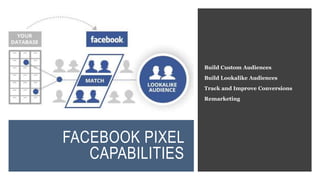
CAPABILITIES
Build Custom Audiences
Build Lookalike Audiences
Track and Improve Conversions
Remarketing
FACEBOOK
PIXEL
INSTALLATI
ON
For the Facebook retargeting pixel to work, it
needs to be installed on the back-end of all the
relevant pages you want to track, create
audiences, and remarket with. Once you’ve
implanted the Facebook retargeting pixel on
your relevant landing pages, audiences will be
continuously updated as people visit different
pages.

Social Media Workshop: Facebook Overview

  • 1.
  • 2.
    FACEBOOK ALGORITHM’S CORE VALUES 1.Friends and Family Always Come First 2. Posts that Inform are Prioritized 3. Posts that Entertain are Prioritized 4. Authentic Posts are Prioritized The goal of Facebook’s algorithm is to show the right content to the right people at the perfect moment, so they don’t miss content they care about.
  • 3.
    OVERVIEW OF BEST PRACTICES • KeepFacebook posts between 40 and 80 characters. If you must go longer, try not to exceed 120 characters. • Questions actually perform well on Facebook; they prompt discussion among your customers. • Hashtags don’t do anything for engagement or metrics on Facebook, so keep them to a minimum and use them for visual emphasis only. • Add an image or video to your post to see up to 2.3 times more engagement. • Clickbait or engagement-bait language, like “Share this post,” “Tag 5 friends,” or “Comment with your favorite,” will be penalized in the News Feed. • The ideal video length for Facebook is two minutes or less. • The ideal image size for Facebook posts is 1200 x 900 pixels.
  • 4.
    TACTICS TO INCREASE ENGAGEMENTON FACEBOOK Share Videos  Square videos rank much higher than landscape videos.  Most people watch videos without turning on the sound so make sure to use captions  Use an eye-catching, custom thumbnail.  Post the video natively on Facebook instead of posting a YouTube link.  Add a descriptive title. Encourage Engagement  Don’t nag your followers into liking, sharing, and commenting on your content. Use Facebook Advertising  Use the power of paid ads in order for your posts to gain more reach.  Boost a post that already performs well to get a better performance and higher reach.
  • 5.
    FACEBOOK ANALYTICS OVERVIEW Facebook’stotal analytics are divided up into three different analytics platforms.  Facebook’s Page Insights—which shows you detailed metrics on your Page and content performance over time.  Audience Insights—which can help you detect trends in your Page’s audience, who they are and see how it relates to other audiences on Facebook.  Facebook’s Ads Manager—which provides you with detailed information about how your paid ads are performing on both Facebook and Instagram.
  • 6.
    FACEBOOK PAGE INSIGHTS Postengagement.  What types of engagement are you getting? Even more importantly, which types of posts are getting you the most engagement? Engagement rates.  High engagement rates mean you have an enthusiastic audience, and that your content is hitting the sweet spot of what they’re looking for. Reach.  Your reach will tell you how many people are seeing your content, which is a crucial metric to watch carefully. “Vanity metrics” might look important but don’t actually reflect the status of your campaigns.
  • 7.
    FACEBOOK AUDIENCE INSIGHTS Under theaudience insights, you can see the breakdown among your audience of their:  Location  Age  Gender  Other Pages they like and interests they are drawn to on Facebook.  Purchase behavior  “Lifestyle types,” which are basically buyer personas created by Facebook. This is data that’s meant to be useful, not data measuring progress. Instead, check in on this data every so often to see who your on-platform audience is.
  • 8.
    FACEBOOK ADS MANAGER Relevance score.  Yourrelevance score will directly affect the cost and placements of your campaigns.  Shoot for a score that is at least a 6 or higher. Cost per result.  Make sure that each result is worth what you’re paying. Number of results you’re getting. Frequency.  Sometimes people need to see your ad a few times before they decide to convert.  If, however, your frequency creeps up higher than 3, it means that people have crossed the point of no return and are unlikely to convert on that offer.
  • 9.
    WHAT IS THEFACEBOOK PIXEL? The Facebook Pixel is a snippet of code you can insert into the back end of your website that helps drive and decode key performance metrics generated by a particular platform. Specifically, the Facebook Pixel helps a Facebook page determine and improve the ROI from the world’s biggest social network.
  • 10.
    HOW DOES THEFACEBOOK PIXEL WORK?
  • 11.
    FACEBOOK PIXEL CAPABILITIES Build CustomAudiences Build Lookalike Audiences Track and Improve Conversions Remarketing
  • 12.
    FACEBOOK PIXEL INSTALLATI ON For the Facebookretargeting pixel to work, it needs to be installed on the back-end of all the relevant pages you want to track, create audiences, and remarket with. Once you’ve implanted the Facebook retargeting pixel on your relevant landing pages, audiences will be continuously updated as people visit different pages.

Editor's Notes

  • #3 1. This was, is, and will always be the main principle of the Facebook’s algorithm, which is connecting its users primarily with their friends and family and placing those posts towards the top of the News Feed. 2. In order to increase the engagement of your posts, try to work out what your target audience finds informative and include that type of information on your Facebook page. 3. Humor and content that entertains always works and it has a high chance of going viral, so incorporate humorous content in your feed that is relevant to your organization. 4. Facebook prefers authentic content, so make sure your posts are genuine.
  • #5 Facebook prefers and supports videos on their News Feed as videos have the most engagement than any other type of Facebook posts. Get creative! Share a photo with an inspirational or motivational message and say something like “share this with someone who needs to hear this today”.
  • #7 The number of Page likes, for example, doesn’t matter quite as much as a Page’s engagement rate. In general, you’ll also want to watch general trends with your follower count, but you don’t need to track it diligently. You should see a steady increase.
  • #8 Audience Insights can still give you powerful information that you can use to your benefit.
  • #9 Cost per result: You can spend $300 on fifty new customers, or on one—Facebook doesn’t care. It’s up to you to decide if the CPC is worth it. If not, you’re looking at a lot of wasted ad spend. If you’re running campaigns and putting a ton of time and energy into them and only getting a few results (even if they’re cost effective), you may want to consider switching platforms or trying new strategies. This one doesn’t necessarily tell you a lot about how your ad is performing, but it can signal if your campaign is in good health. This can start to sink your relevance score over time.
  • #11 Stop @ 4:20
  • #12 These audiences aren’t defined by demographics or interests; they’re created from people who have engaged with the page that your pixel is on. As a result, they’re more relevant than anything you could build from a general group of Facebook users. New audiences that Facebook will automatically generate to be similar to the original. Installing one on key landing pages will inform you of who’s converting, which pages they’re visiting, and how much ROI your campaigns are delivering. Track conversions.