SOCIAL MEDIA ON THE JOB
   Tools and strategies to network,
 research or otherwise do your job or
  develop yourself as a professional

                Nigel Allan
              January 9, 2013
WHY THIS TOPIC?
Using social media tools in a more focused way to:
• Organize (filter and sort) information
• Sharing and collaborating
• Researching
• Staying in touch with colleagues
CAVEATS
• This is how I use these tools. You will likely use them
  differently. (Check out the How I Work series on
  LifeHacker.com)
• Be aware of your workplace guidelines around social media
  and computer use.
PERSONAL & PROFESSIONAL
For better or worse the distinction between the personal and professional is blurring.


                     Source: Social Media and workplace collaboration (Oct 2012), Silk Road,
     http://blog.silkroad.com/index.php/2012/10/social-media-policy-workplace-collaboration-infographic/
CHALLENGES AND OPPORTUNITIES

Challenge                Opportunity
• Information overload   • Networking
• Work/life balance      • Professional Identity
• Privacy & Security     • Learning
• Growth of technology   • Content discovery
• Self discipline &      • Research
  productivity           • Connect w/ colleagues
                         • Stay up to date
Online Identity
• Do you have a professional profile online? Should you?
• 37% of employers now check social media when hiring (65%
  of the respondents said they look to Facebook, 63% cited
  LinkedIn, while Twitter was on the radar of only 16% of hiring
  managers).*
• Younger generation (“digital natives”) more active on social
  media. They share more and they may also be more likely to
  look to social media when they want to know about someone.


  *Source: Survey: 37% of your prospective employers are looking you up on Facebook CareerBuilder.com via The Next Web
                                                       (April 2012),
    http://thenextweb.com/socialmedia/2012/04/18/survey-37-of-your-prospective-employers-are-looking-you-up-on-
                                                        facebook/
PERSONAL ORGANIZATION
• Everyone is dealing with information overload.
• Does social media just add to this?
• It can provide a filter if you use the tools.
• Using systems such as tagging (e.g., Delicious.com) or creating
  lists (e.g., Facebook or Twitter) to create systems that you find
  useful.
COMMUNITY & NETWORKING
• Like any conversation, you get out of it what you put in.
• Identify and communicate with others in your area(s) of
  interest.
• Online community of practice, maybe outside of your
  workplace or your geographic area.
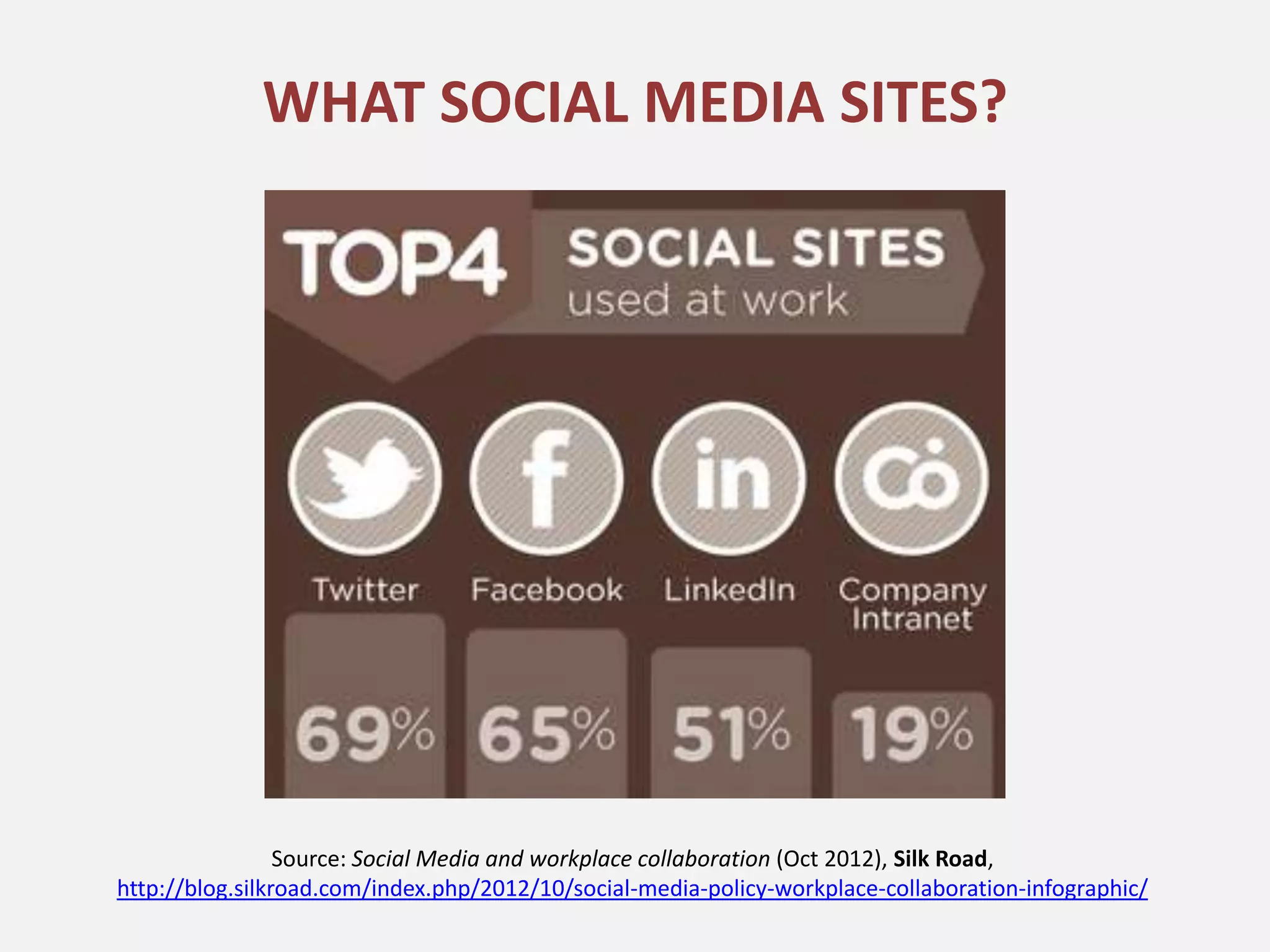
WHAT SOCIAL MEDIA SITES?


                 Source: Social Media and workplace collaboration (Oct 2012), Silk Road,
http://blog.silkroad.com/index.php/2012/10/social-media-policy-workplace-collaboration-infographic/
STAY UP TO DATE
Websites for professionals organizations, journals etc. usually
have a link to their social media profiles.


• Now you don’t need to regularly visit their website to stay up to date. They
  will share with you.
• View their recent posts first to decide whether they are worth following.
TWITTER
• Follow the Twitter accounts of people and organizations that
  fall in your areas of interest to discover content and stay up to
  date.
• Follow the conversation around an event, conference or
  workshop that you are attending or are interested in.
• Create lists on Twitter to organize profiles by areas of interest.
• Use third party tools like Hootsuite.com to organize tweets by
  who you are following, favourite searches, lists etc.
More info:
• How to use lists on Twitter: http://bit.ly/U5aRoZ
• Hootsuite: http://hootsuite.com/features/social-networks
• Following conference hashtags: http://bit.ly/TLwKeb
FACEBOOK
• Professionally useful for following Facebook pages that
  provide information related to your job or to professional
  development.
• Create lists to organize Pages around areas of interest.


 More info:
 • Guide to Facebook Lists: http://on.mash.to/TLxorX
LINKEDIN
• A social networking website for people in professional
  occupations
• Useful for:
   – Following areas of interest
   – Connecting with colleagues
   – Researching companies
   – Finding work
LINKEDIN GROUPS
• Groups associated with professional organization, industries,
  companies, causes etc. provide a source of information and
  networking for your field.
• Discover groups via other similar groups or by your network.
SOCIAL BOOKMARKING
Tools to help you easily save, organize and share information. Some examples
(All do similar thing but have different strengths):
     – Delicious: General bookmarking
     – Pocket: Articles I want to read later
     – Evernote: Mostly for research

All of these services provide:
• Plugins that you can use in your web browser to save the webpage
• Apps to view on your mobile device
• Tagging as a way to organize pages


 More info:
 • Social Bookmarking in Plain English: http://bit.ly/TLCDYG
DELICIOUS.COM
A social bookmarking tool that allows you to save pages and
organize them by tags. Access your bookmarks from anywhere.
1. Good article. I want to save for later.      2. Click on bookmarklet   4. Appears on your delicious account.


                                                 3. Add some tags


                                                                          Search bookmarks later, view them
More info:                                                                by tag(s) and see what others are
• Find bookmarklet for your browser:                                      posting using the same or similar
  https://delicious.com/tools                                             tags.
POCKET
A useful tool for saving articles that you want to read later when
you have a little more time. Easily syncs with your mobile device.
                                                                    3. Appears on your
 1. Good article. I want to save for later.
                                                                    Pocket profile on
                                                                    mobile or browser


                                               2. Click on plugin


More info:
• How to add things to Pocket: http://getpocket.com/add/
• Promo video for Pocket: http://vimeo.com/40168555
EVERNOTE
“Evernote is a suite of software and services designed for
notetaking and archiving.” – Wikipedia
Great for researching as you can organize everything for a
project using tags.


More info:
• Intro to Evernote: http://evernote.com/video/
RSS
• RSS = Really Simple Syndication or Rich Site Summary
• Look for       on blogs, news sites etc.
• Helps you receive information from many different sources
  without the need to remember and visit many different sites.
• Add to Outlook or other RSS reader (e.g., Google Reader,
  Netvibes)


 More info:
 • RSS in Plain English: http://www.commoncraft.com/video/rss
SO HOW IS IT USEFUL?
•   Finding, collecting, organizing, filtering info
•   Staying up to date
•   Staying connected w/ colleagues
•   Stay cool


Some interesting reports:
• Social Media Policy & Workplace Collaboration: http://bit.ly/TLBh03
• Social Media: A Guide for Researchers: http://bit.ly/TLDjNK

Social media at work

  • 1.
    SOCIAL MEDIA ONTHE JOB Tools and strategies to network, research or otherwise do your job or develop yourself as a professional Nigel Allan January 9, 2013
  • 2.
    WHY THIS TOPIC? Usingsocial media tools in a more focused way to: • Organize (filter and sort) information • Sharing and collaborating • Researching • Staying in touch with colleagues
  • 3.
    CAVEATS • This ishow I use these tools. You will likely use them differently. (Check out the How I Work series on LifeHacker.com) • Be aware of your workplace guidelines around social media and computer use.
  • 4.
    PERSONAL & PROFESSIONAL Forbetter or worse the distinction between the personal and professional is blurring. Source: Social Media and workplace collaboration (Oct 2012), Silk Road, http://blog.silkroad.com/index.php/2012/10/social-media-policy-workplace-collaboration-infographic/
  • 5.
    CHALLENGES AND OPPORTUNITIES Challenge Opportunity • Information overload • Networking • Work/life balance • Professional Identity • Privacy & Security • Learning • Growth of technology • Content discovery • Self discipline & • Research productivity • Connect w/ colleagues • Stay up to date
  • 6.
    Online Identity • Doyou have a professional profile online? Should you? • 37% of employers now check social media when hiring (65% of the respondents said they look to Facebook, 63% cited LinkedIn, while Twitter was on the radar of only 16% of hiring managers).* • Younger generation (“digital natives”) more active on social media. They share more and they may also be more likely to look to social media when they want to know about someone. *Source: Survey: 37% of your prospective employers are looking you up on Facebook CareerBuilder.com via The Next Web (April 2012), http://thenextweb.com/socialmedia/2012/04/18/survey-37-of-your-prospective-employers-are-looking-you-up-on- facebook/
  • 7.
    PERSONAL ORGANIZATION • Everyoneis dealing with information overload. • Does social media just add to this? • It can provide a filter if you use the tools. • Using systems such as tagging (e.g., Delicious.com) or creating lists (e.g., Facebook or Twitter) to create systems that you find useful.
  • 8.
    COMMUNITY & NETWORKING •Like any conversation, you get out of it what you put in. • Identify and communicate with others in your area(s) of interest. • Online community of practice, maybe outside of your workplace or your geographic area.
  • 9.
    WHAT SOCIAL MEDIASITES? Source: Social Media and workplace collaboration (Oct 2012), Silk Road, http://blog.silkroad.com/index.php/2012/10/social-media-policy-workplace-collaboration-infographic/
  • 10.
    STAY UP TODATE Websites for professionals organizations, journals etc. usually have a link to their social media profiles. • Now you don’t need to regularly visit their website to stay up to date. They will share with you. • View their recent posts first to decide whether they are worth following.
  • 11.
    TWITTER • Follow theTwitter accounts of people and organizations that fall in your areas of interest to discover content and stay up to date. • Follow the conversation around an event, conference or workshop that you are attending or are interested in. • Create lists on Twitter to organize profiles by areas of interest. • Use third party tools like Hootsuite.com to organize tweets by who you are following, favourite searches, lists etc. More info: • How to use lists on Twitter: http://bit.ly/U5aRoZ • Hootsuite: http://hootsuite.com/features/social-networks • Following conference hashtags: http://bit.ly/TLwKeb
  • 12.
    FACEBOOK • Professionally usefulfor following Facebook pages that provide information related to your job or to professional development. • Create lists to organize Pages around areas of interest. More info: • Guide to Facebook Lists: http://on.mash.to/TLxorX
  • 13.
    LINKEDIN • A socialnetworking website for people in professional occupations • Useful for: – Following areas of interest – Connecting with colleagues – Researching companies – Finding work
  • 14.
    LINKEDIN GROUPS • Groupsassociated with professional organization, industries, companies, causes etc. provide a source of information and networking for your field. • Discover groups via other similar groups or by your network.
  • 15.
    SOCIAL BOOKMARKING Tools tohelp you easily save, organize and share information. Some examples (All do similar thing but have different strengths): – Delicious: General bookmarking – Pocket: Articles I want to read later – Evernote: Mostly for research All of these services provide: • Plugins that you can use in your web browser to save the webpage • Apps to view on your mobile device • Tagging as a way to organize pages More info: • Social Bookmarking in Plain English: http://bit.ly/TLCDYG
  • 16.
    DELICIOUS.COM A social bookmarkingtool that allows you to save pages and organize them by tags. Access your bookmarks from anywhere. 1. Good article. I want to save for later. 2. Click on bookmarklet 4. Appears on your delicious account. 3. Add some tags Search bookmarks later, view them More info: by tag(s) and see what others are • Find bookmarklet for your browser: posting using the same or similar https://delicious.com/tools tags.
  • 17.
    POCKET A useful toolfor saving articles that you want to read later when you have a little more time. Easily syncs with your mobile device. 3. Appears on your 1. Good article. I want to save for later. Pocket profile on mobile or browser 2. Click on plugin More info: • How to add things to Pocket: http://getpocket.com/add/ • Promo video for Pocket: http://vimeo.com/40168555
  • 18.
    EVERNOTE “Evernote is asuite of software and services designed for notetaking and archiving.” – Wikipedia Great for researching as you can organize everything for a project using tags. More info: • Intro to Evernote: http://evernote.com/video/
  • 19.
    RSS • RSS =Really Simple Syndication or Rich Site Summary • Look for on blogs, news sites etc. • Helps you receive information from many different sources without the need to remember and visit many different sites. • Add to Outlook or other RSS reader (e.g., Google Reader, Netvibes) More info: • RSS in Plain English: http://www.commoncraft.com/video/rss
  • 20.
    SO HOW ISIT USEFUL? • Finding, collecting, organizing, filtering info • Staying up to date • Staying connected w/ colleagues • Stay cool Some interesting reports: • Social Media Policy & Workplace Collaboration: http://bit.ly/TLBh03 • Social Media: A Guide for Researchers: http://bit.ly/TLDjNK

Editor's Notes

  • #5 People will use SM regardless of workplace policies.Better to embrace and have some guidelines and encourage use.