Social
Media:
101
Learn the basics and get the tools you need
(Elementary and Middle Schools)
2BROWARD COUNTY PUBLIC SCHOOLS
Today’s presentation
1. What is social media?
2. The District’s channels.
3. Twitter basics.
4. Avoid pitfalls.
5. Tools you can use.
3BROWARD COUNTY PUBLIC SCHOOLS
What is social media?
4BROWARD COUNTY PUBLIC SCHOOLS
Social media
Facebook:
• Online social networking service
• Founded February 4, 20041
• More than a billion registered users2
Twitter:
• Platform for sending “tweets” – short forms of
communication no longer than 140 characters
• Founded March 21, 20063
• Almost 300 million active accounts2
Sources:
1 - https://en.wikipedia.org/wiki/Facebook
2 - http://www.statista.com/statistics/272014/global-
social-networks-ranked-by-number-of-users/
3 - https://en.wikipedia.org/wiki/Twitter
5BROWARD COUNTY PUBLIC SCHOOLS
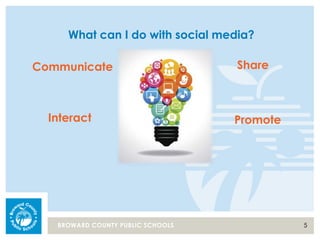
What can I do with social media?
Communicate
PromoteInteract
Share
6BROWARD COUNTY PUBLIC SCHOOLS
How can I use social media?
• Use as a communication tool
• Use to share information with organizations
such as your PTA
• Promote your school newsletter
• Showcase your events
• Recognize teachers and accomplishments
• Connect with other schools and see topics
that are trending
7BROWARD COUNTY PUBLIC SCHOOLS
The District’s channels.
8BROWARD COUNTY PUBLIC SCHOOLS
The District’s social media accounts:
twitter.com/browardschools
facebook.com/browardschools
Mobile App
9BROWARD COUNTY PUBLIC SCHOOLS
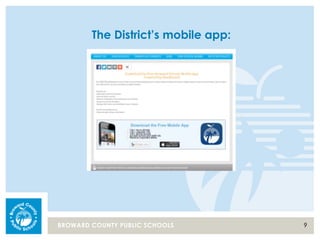
The District’s mobile app:
10BROWARD COUNTY PUBLIC SCHOOLS
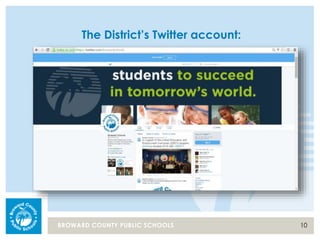
The District’s Twitter account:
11BROWARD COUNTY PUBLIC SCHOOLS
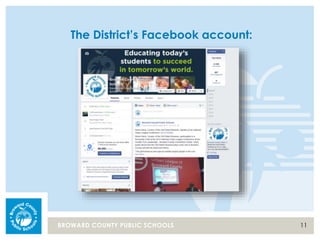
The District’s Facebook account:
12BROWARD COUNTY PUBLIC SCHOOLS
Twitter basics.
13BROWARD COUNTY PUBLIC SCHOOLS
Terminology
• Handle = @browardschools
• Above your handle – this describes your
Twitter feed, it will not direct people to your
account
• Hashtag = #
• Hashtag examples: #BCPSProud,
BCPSShines
14BROWARD COUNTY PUBLIC SCHOOLS
Terminology
• Followers = Twitter accounts that follow your
account
• Favorite/Favorited = People like this and link it to
their account page
• Following = The Twitter accounts that you follow
• Notifications = Updates
15BROWARD COUNTY PUBLIC SCHOOLS
Terminology
• Retweet = RT = You can send information from
another account to your followers
• Retweet with Quote = You can retweet a
message and add your own comment
• Direct Message = @browardschools
(you will see .@ in posts, this eliminates a direct msg)
16BROWARD COUNTY PUBLIC SCHOOLS
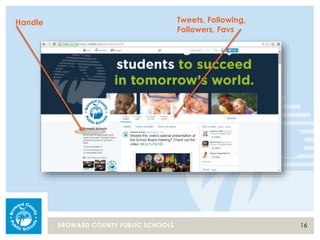
Handle Tweets, Following,
Followers, Favs
17BROWARD COUNTY PUBLIC SCHOOLS
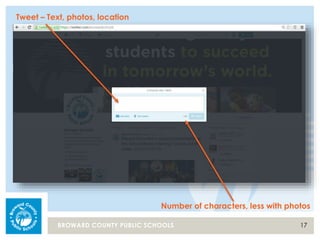
Tweet – Text, photos, location
Number of characters, less with photos
18BROWARD COUNTY PUBLIC SCHOOLS
What if parents don’t want to register for an
account?
• Parents do not have to have a Twitter account
to see the updates
• The information is available to anyone online
• View via a browser
• Interact through the Twitter app
• Twitter is embedded in the District’s mobile app
19BROWARD COUNTY PUBLIC SCHOOLS
How can I get the most out of my posts?
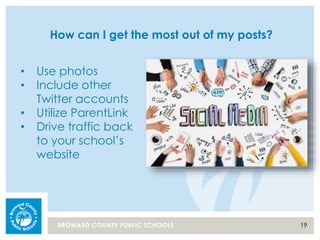
• Use photos
• Include other
Twitter accounts
• Utilize ParentLink
• Drive traffic back
to your school’s
website
20BROWARD COUNTY PUBLIC SCHOOLS
Avoid pitfalls.
21BROWARD COUNTY PUBLIC SCHOOLS
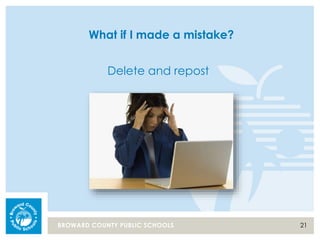
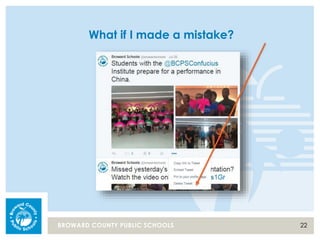
What if I made a mistake?
Delete and repost
22BROWARD COUNTY PUBLIC SCHOOLS
What if I made a mistake?
23BROWARD COUNTY PUBLIC SCHOOLS
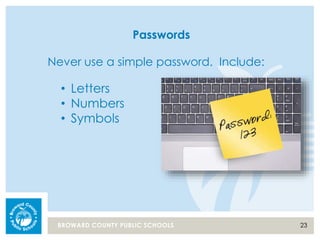
Passwords
Never use a simple password. Include:
• Letters
• Numbers
• Symbols
24BROWARD COUNTY PUBLIC SCHOOLS
Public Record
• Posts on social media are public record and follow
public record regulations.
• Public Records Guidebook:
http://browardschools.com/SiteMedia/Docs/web/PIO/PRR_Guidebook_draft13.pdf
• Public Records Brochure:
http://browardschools.com/SiteMedia/Docs/web/PIO/Public_Records_Brochure_v2.pdf
25BROWARD COUNTY PUBLIC SCHOOLS
Social Media Guidelines
• Social Media Guidelines:
http://www.browardprevention.org/wp-
content/uploads/2013/10/BCPS_SocialMediaUseGuidelines_Final.pdf
26BROWARD COUNTY PUBLIC SCHOOLS
Tools you can use.
27BROWARD COUNTY PUBLIC SCHOOLS
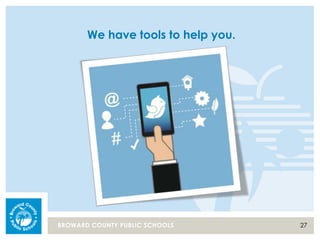
We have tools to help you.
28BROWARD COUNTY PUBLIC SCHOOLS
Social Media Toolkit
• Images
• Pre-sized
• Professional
• Seasonal
• Examples of tweets
• Examples of headers on Twitter
• List of elementary schools
• List of middle schools
29BROWARD COUNTY PUBLIC SCHOOLS
Getting started checklist
• Pre-determine possible handles
• Register an account
• Upload images
• Send your first tweet
• Follow @browardschools
• Follow list of elementary schools
and/or middle schools
• Incorporate tweets into your
work-week
• Use as a positive tool to promote
and communicate
BROWARD COUNTY PUBLIC SCHOOLS
Contact Information
Office
754-321-2305
KCW Internal
Ext. 2229
Mobile
954-706-4942
Email
maria.gebhardt@
browardschools.com

Social Media 101

  • 1.
    Social Media: 101 Learn the basicsand get the tools you need (Elementary and Middle Schools)
  • 2.
    2BROWARD COUNTY PUBLICSCHOOLS Today’s presentation 1. What is social media? 2. The District’s channels. 3. Twitter basics. 4. Avoid pitfalls. 5. Tools you can use.
  • 3.
    3BROWARD COUNTY PUBLICSCHOOLS What is social media?
  • 4.
    4BROWARD COUNTY PUBLICSCHOOLS Social media Facebook: • Online social networking service • Founded February 4, 20041 • More than a billion registered users2 Twitter: • Platform for sending “tweets” – short forms of communication no longer than 140 characters • Founded March 21, 20063 • Almost 300 million active accounts2 Sources: 1 - https://en.wikipedia.org/wiki/Facebook 2 - http://www.statista.com/statistics/272014/global- social-networks-ranked-by-number-of-users/ 3 - https://en.wikipedia.org/wiki/Twitter
  • 5.
    5BROWARD COUNTY PUBLICSCHOOLS What can I do with social media? Communicate PromoteInteract Share
  • 6.
    6BROWARD COUNTY PUBLICSCHOOLS How can I use social media? • Use as a communication tool • Use to share information with organizations such as your PTA • Promote your school newsletter • Showcase your events • Recognize teachers and accomplishments • Connect with other schools and see topics that are trending
  • 7.
    7BROWARD COUNTY PUBLICSCHOOLS The District’s channels.
  • 8.
    8BROWARD COUNTY PUBLICSCHOOLS The District’s social media accounts: twitter.com/browardschools facebook.com/browardschools Mobile App
  • 9.
    9BROWARD COUNTY PUBLICSCHOOLS The District’s mobile app:
  • 10.
    10BROWARD COUNTY PUBLICSCHOOLS The District’s Twitter account:
  • 11.
    11BROWARD COUNTY PUBLICSCHOOLS The District’s Facebook account:
  • 12.
    12BROWARD COUNTY PUBLICSCHOOLS Twitter basics.
  • 13.
    13BROWARD COUNTY PUBLICSCHOOLS Terminology • Handle = @browardschools • Above your handle – this describes your Twitter feed, it will not direct people to your account • Hashtag = # • Hashtag examples: #BCPSProud, BCPSShines
  • 14.
    14BROWARD COUNTY PUBLICSCHOOLS Terminology • Followers = Twitter accounts that follow your account • Favorite/Favorited = People like this and link it to their account page • Following = The Twitter accounts that you follow • Notifications = Updates
  • 15.
    15BROWARD COUNTY PUBLICSCHOOLS Terminology • Retweet = RT = You can send information from another account to your followers • Retweet with Quote = You can retweet a message and add your own comment • Direct Message = @browardschools (you will see .@ in posts, this eliminates a direct msg)
  • 16.
    16BROWARD COUNTY PUBLICSCHOOLS Handle Tweets, Following, Followers, Favs
  • 17.
    17BROWARD COUNTY PUBLICSCHOOLS Tweet – Text, photos, location Number of characters, less with photos
  • 18.
    18BROWARD COUNTY PUBLICSCHOOLS What if parents don’t want to register for an account? • Parents do not have to have a Twitter account to see the updates • The information is available to anyone online • View via a browser • Interact through the Twitter app • Twitter is embedded in the District’s mobile app
  • 19.
    19BROWARD COUNTY PUBLICSCHOOLS How can I get the most out of my posts? • Use photos • Include other Twitter accounts • Utilize ParentLink • Drive traffic back to your school’s website
  • 20.
    20BROWARD COUNTY PUBLICSCHOOLS Avoid pitfalls.
  • 21.
    21BROWARD COUNTY PUBLICSCHOOLS What if I made a mistake? Delete and repost
  • 22.
    22BROWARD COUNTY PUBLICSCHOOLS What if I made a mistake?
  • 23.
    23BROWARD COUNTY PUBLICSCHOOLS Passwords Never use a simple password. Include: • Letters • Numbers • Symbols
  • 24.
    24BROWARD COUNTY PUBLICSCHOOLS Public Record • Posts on social media are public record and follow public record regulations. • Public Records Guidebook: http://browardschools.com/SiteMedia/Docs/web/PIO/PRR_Guidebook_draft13.pdf • Public Records Brochure: http://browardschools.com/SiteMedia/Docs/web/PIO/Public_Records_Brochure_v2.pdf
  • 25.
    25BROWARD COUNTY PUBLICSCHOOLS Social Media Guidelines • Social Media Guidelines: http://www.browardprevention.org/wp- content/uploads/2013/10/BCPS_SocialMediaUseGuidelines_Final.pdf
  • 26.
    26BROWARD COUNTY PUBLICSCHOOLS Tools you can use.
  • 27.
    27BROWARD COUNTY PUBLICSCHOOLS We have tools to help you.
  • 28.
    28BROWARD COUNTY PUBLICSCHOOLS Social Media Toolkit • Images • Pre-sized • Professional • Seasonal • Examples of tweets • Examples of headers on Twitter • List of elementary schools • List of middle schools
  • 29.
    29BROWARD COUNTY PUBLICSCHOOLS Getting started checklist • Pre-determine possible handles • Register an account • Upload images • Send your first tweet • Follow @browardschools • Follow list of elementary schools and/or middle schools • Incorporate tweets into your work-week • Use as a positive tool to promote and communicate
  • 30.
    BROWARD COUNTY PUBLICSCHOOLS Contact Information Office 754-321-2305 KCW Internal Ext. 2229 Mobile 954-706-4942 Email maria.gebhardt@ browardschools.com

Editor's Notes

  • #2 WELCOME INTRODUCTIONS