INTERNET BASED SMART NOTICE
BOARD
By-
Rahul Shaw (8)
Rupam Laha (9)
 Why internet ?
• Access from anywhere.
 Why smart ?
• Fully Digital Board.
• Many Notices, ONE Board.
 Why have we chosen this project ?
• A Notice board is a surface intended to convey important
news, to advertise items needed or required to sell,
announce events, or provide information.
• Notice Board is primary thing in any institution or public
utility places like bus stations, railway stations.
• Nowadays Moving message displays are becoming a
global replacement.
• Reduces paper consumptions as well as saves trees.
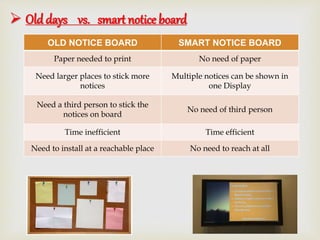
 Old days vs. smart notice board
OLD NOTICE BOARD SMART NOTICE BOARD
Paper needed to print No need of paper
Need larger places to stick more
notices
Multiple notices can be shown in
one Display
Need a third person to stick the
notices on board
No need of third person
Time inefficient Time efficient
Need to install at a reachable place No need to reach at all
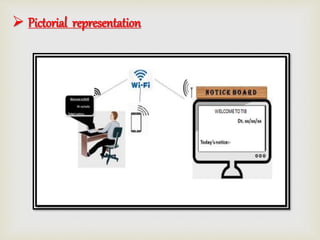
 Pictorial representation
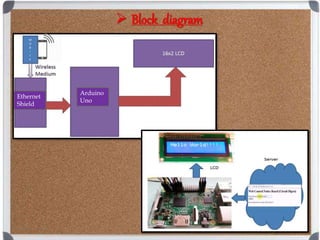
 Block diagram
Ethernet
Shield
Arduino
Uno
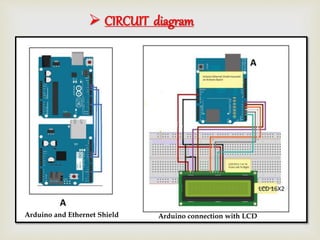
 CIRCUIT diagram
Arduino and Ethernet Shield Arduino connection with LCD
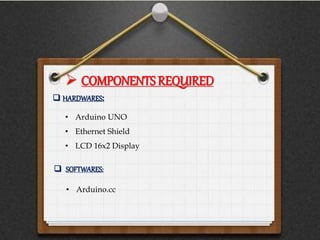
 COMPONENTS REQUIRED
• Arduino UNO
• Ethernet Shield
• LCD 16x2 Display
 HARDWARES:
 SOFTWARES:
• Arduino.cc
 Components description
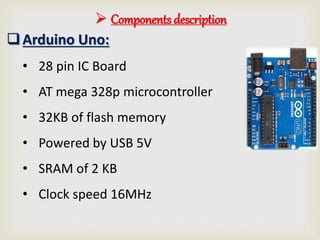
Arduino Uno:
• 28 pin IC Board
• AT mega 328p microcontroller
• 32KB of flash memory
• Powered by USB 5V
• SRAM of 2 KB
• Clock speed 16MHz
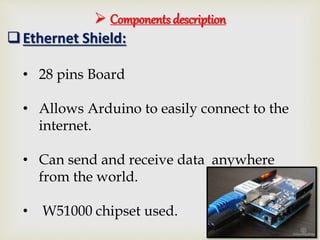
Ethernet Shield:
• 28 pins Board
• Allows Arduino to easily connect to the
internet.
• Can send and receive data anywhere
from the world.
• W51000 chipset used.
 Components description
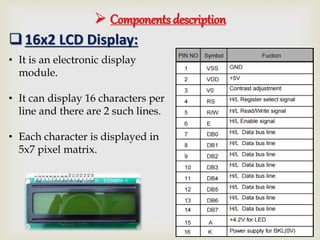
16x2 LCD Display:
• It is an electronic display
module.
• It can display 16 characters per
line and there are 2 such lines.
• Each character is displayed in
5x7 pixel matrix.
 software description
• Assembling the hardware :
 Lybrary functions:
Ethernet.h ---- Allows an Arduino board to connect to the internet
SPI.h ----Allows to communicate with SPI (Serial Peripheral Interface).
• Connecting LCD:
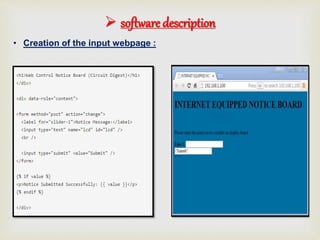
• Creation of the input webpage :
 software description
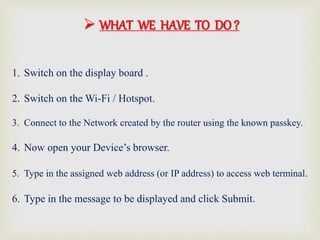
1. Switch on the display board .
2. Switch on the Wi-Fi / Hotspot.
3. Connect to the Network created by the router using the known passkey.
4. Now open your Device’s browser.
5. Type in the assigned web address (or IP address) to access web terminal.
6. Type in the message to be displayed and click Submit.
 WHAT WE HAVE TO DO ?
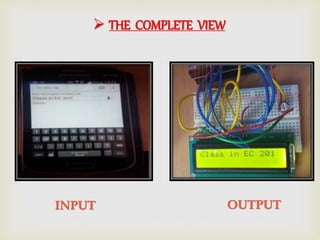
 THE COMPLETE VIEW
INPUT OUTPUT
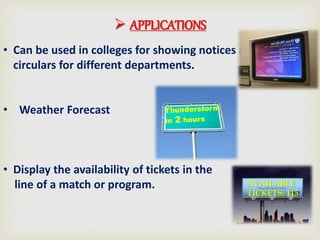
 APPLICATIONS
• Can be used in colleges for showing notices and
circulars for different departments.
• Weather Forecast
• Display the availability of tickets in the
line of a match or program. AVAILABLE
TICKETS: 115
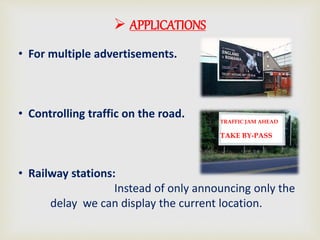
 APPLICATIONS
• For multiple advertisements.
• Controlling traffic on the road.
• Railway stations:
Instead of only announcing only the
delay we can display the current location.
TRAFFIC JAM AHEAD
TAKE BY-PASS
 FUTURE MODIFICATIONS
• USING NODE MCU (ESP8266)
• ADDITION OF A SPEAKER
• VOICE COMMAND MESSAGE TYPING
Project smart notice board ppt

Project smart notice board ppt

  • 2.
    INTERNET BASED SMARTNOTICE BOARD By- Rahul Shaw (8) Rupam Laha (9)
  • 3.
     Why internet? • Access from anywhere.  Why smart ? • Fully Digital Board. • Many Notices, ONE Board.
  • 4.
     Why havewe chosen this project ? • A Notice board is a surface intended to convey important news, to advertise items needed or required to sell, announce events, or provide information. • Notice Board is primary thing in any institution or public utility places like bus stations, railway stations. • Nowadays Moving message displays are becoming a global replacement. • Reduces paper consumptions as well as saves trees.
  • 5.
     Old daysvs. smart notice board OLD NOTICE BOARD SMART NOTICE BOARD Paper needed to print No need of paper Need larger places to stick more notices Multiple notices can be shown in one Display Need a third person to stick the notices on board No need of third person Time inefficient Time efficient Need to install at a reachable place No need to reach at all
  • 6.
  • 7.
  • 8.
     CIRCUIT diagram Arduinoand Ethernet Shield Arduino connection with LCD
  • 9.
     COMPONENTS REQUIRED •Arduino UNO • Ethernet Shield • LCD 16x2 Display  HARDWARES:  SOFTWARES: • Arduino.cc
  • 10.
     Components description ArduinoUno: • 28 pin IC Board • AT mega 328p microcontroller • 32KB of flash memory • Powered by USB 5V • SRAM of 2 KB • Clock speed 16MHz
  • 11.
    Ethernet Shield: • 28pins Board • Allows Arduino to easily connect to the internet. • Can send and receive data anywhere from the world. • W51000 chipset used.  Components description
  • 12.
     Components description 16x2LCD Display: • It is an electronic display module. • It can display 16 characters per line and there are 2 such lines. • Each character is displayed in 5x7 pixel matrix.
  • 13.
     software description •Assembling the hardware :  Lybrary functions: Ethernet.h ---- Allows an Arduino board to connect to the internet SPI.h ----Allows to communicate with SPI (Serial Peripheral Interface). • Connecting LCD:
  • 14.
    • Creation ofthe input webpage :  software description
  • 15.
    1. Switch onthe display board . 2. Switch on the Wi-Fi / Hotspot. 3. Connect to the Network created by the router using the known passkey. 4. Now open your Device’s browser. 5. Type in the assigned web address (or IP address) to access web terminal. 6. Type in the message to be displayed and click Submit.  WHAT WE HAVE TO DO ?
  • 16.
     THE COMPLETEVIEW INPUT OUTPUT
  • 17.
     APPLICATIONS • Canbe used in colleges for showing notices and circulars for different departments. • Weather Forecast • Display the availability of tickets in the line of a match or program. AVAILABLE TICKETS: 115
  • 18.
     APPLICATIONS • Formultiple advertisements. • Controlling traffic on the road. • Railway stations: Instead of only announcing only the delay we can display the current location. TRAFFIC JAM AHEAD TAKE BY-PASS
  • 19.
     FUTURE MODIFICATIONS •USING NODE MCU (ESP8266) • ADDITION OF A SPEAKER • VOICE COMMAND MESSAGE TYPING