Guided By –
Dr. BDK Patro
Smowser: A Voice Operated Web Browse
Presented By –
Arjit Dixit (308)
Neeraj Baghel (002)
CS 4th Year
Table of Contents
 Objective
 Introduction
 Literature Review
 Problem Definition
 Proposed Solution
 Data Flow Diagram (DFD)
 Flow Chart
 Commands accepted
 Working of Smowser
 Operations performed in speech recognition
 Conclusion
 References
Objective
 To develop a Web Browser which can be operated using
Voice Commands.
 Integrated functioning rather than plug-in dependency.
 Combined auditory and visual input.
 Offline feature independent of connection state.
Introduction
 Human-computer interaction is more advantageous than
conventional browsing.
 Control browser over distance, in the dark and while
hands are occupied.
 Useful to people with disabilities and vision problems.
Literature Review
 Voice Portal
 VoiceXML
 Third party plug-ins and add ons.
 Microsoft Speech Application Programming Interface
(SAPI)
Problem Definition
 Connectivity required by Microsoft Cortana.
 Google Chrome & Mozilla Firefox requires add ons.
 Voice Portals are limited to websites.
 CMU Sphinx supports only Linux.
Proposed Solution
 The Smowser will be using Microsoft Visual Studio for
developing the web browser using Dot NET framework with
C# programming language.
 It will be using Microsoft Speech SDK for voice control
integration.
 Voice commands are converted into text and then matched
with a set of pre-stored commands and execute them.
Data Flow Diagram (DFD)
Voice
Commands
Grammar
Command
Valid
Command
Invalid
User ResultSmowser
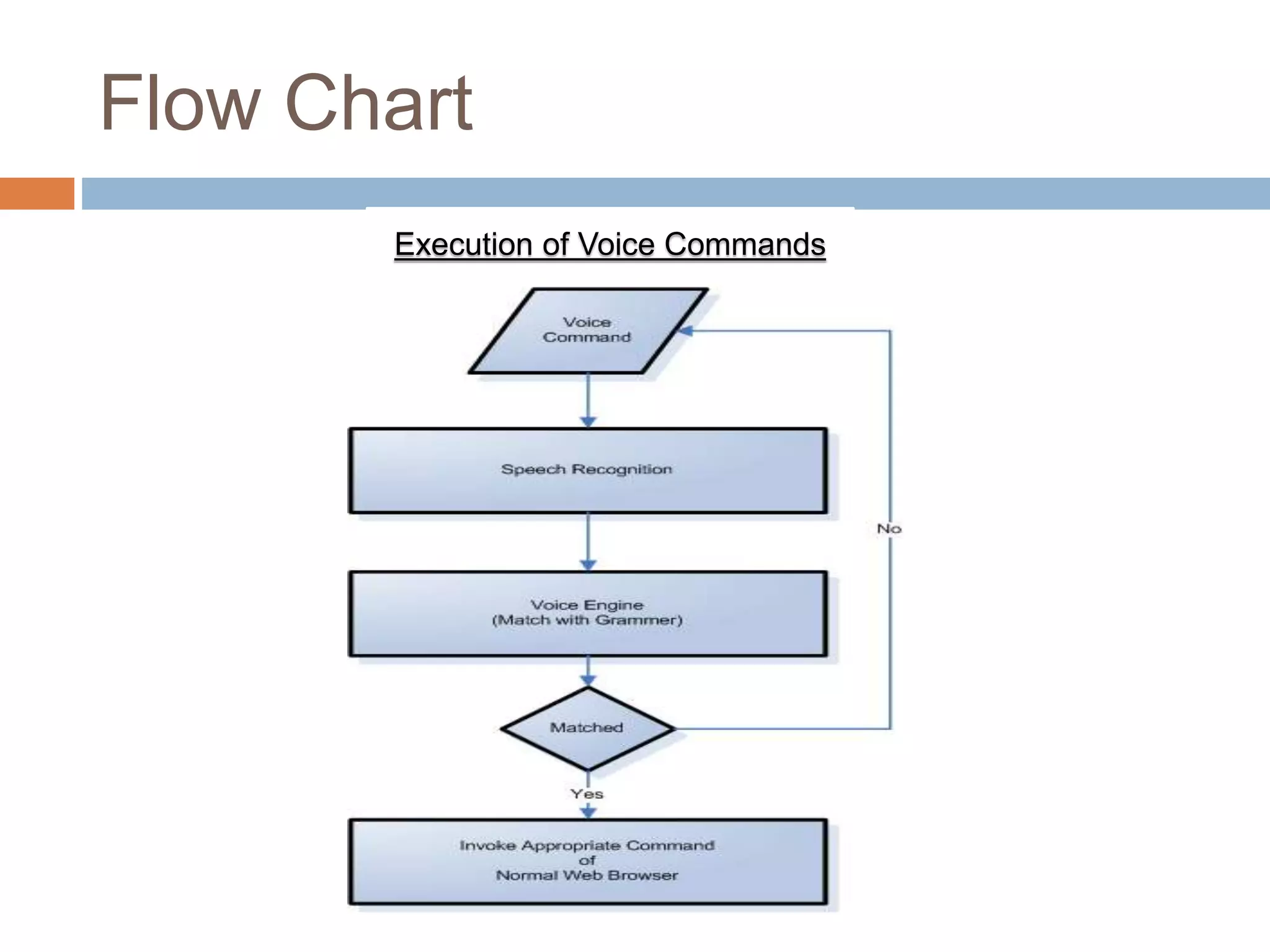
Flow Chart
Execution of Voice Commands
Commands accepted
 Open – Bookmarks, Downloads, History, Speed Dial,
Help
 Refresh and Stop – Refreshes and stops refreshing of
webpage.
 Speed Dial – Visit most frequent websites
 Next and Previous – Navigating Pages
 Up and Down – Scrolling through document
 Click – Visiting hyperlinks
 Settings – Configure Smowser
 New, Incognito, Switch and Close – Tab Operations
 Home - Opens home page
 Print – Prints a webpage
 Save – Saves webpage locally
 Exit and Restart – Quits and reopen smowser
Working of Smowser
 A welcome window will be displayed, which
will display the current user name.
Working of Smowser
(continued)
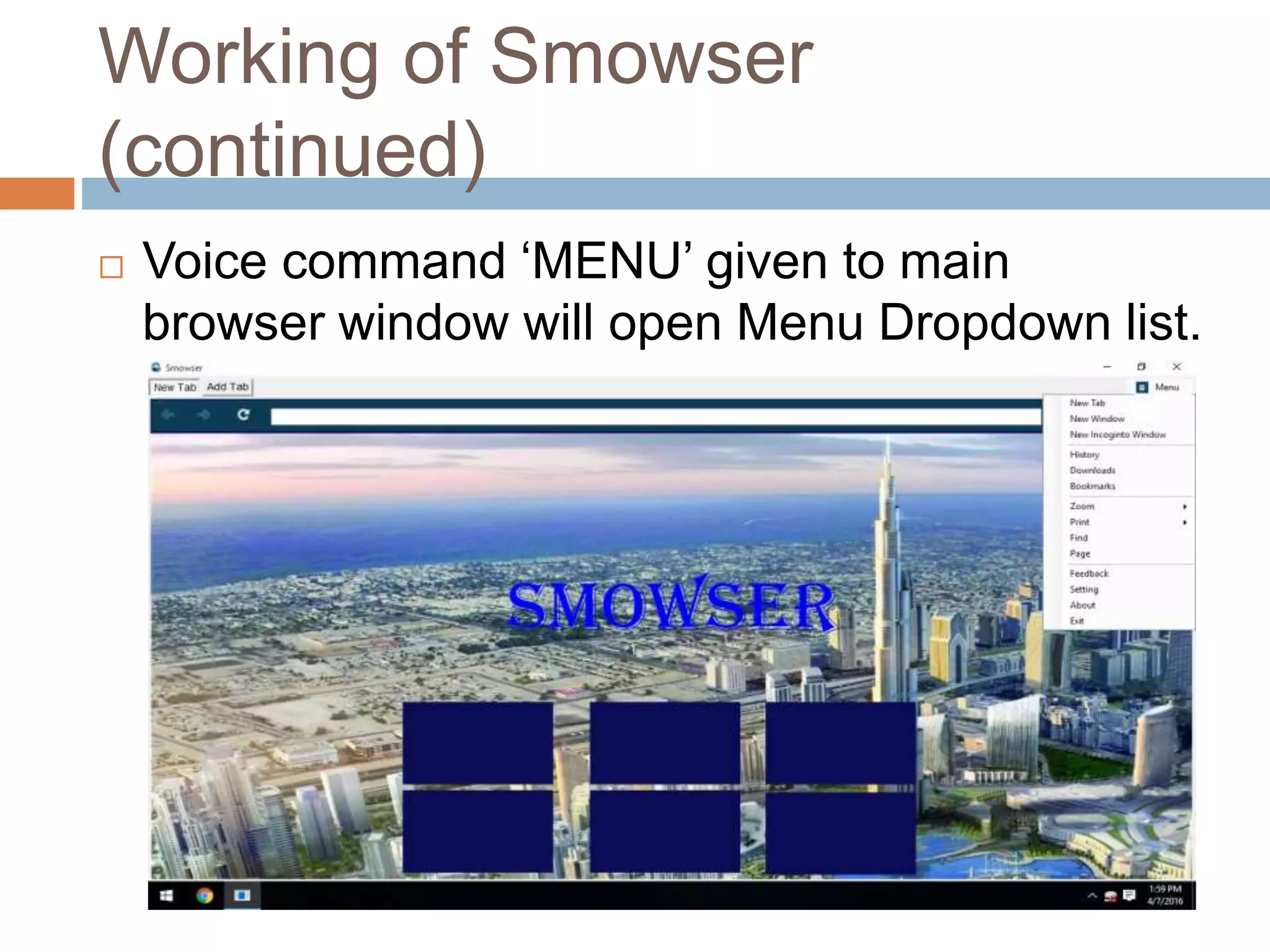
 Voice command ‘MENU’ given to main
browser window will open Menu Dropdown list.
Working of Smowser
(continued)
 Browser settings are displayed by giving voice
command ‘SETTINGS’
Operations performed in Speech Recogniti
 Initialize speech recognizer.
 Set input for speech recognizer.
 Create speech recognition grammar.
 Load grammar into speech recognizer.
 Register for its event notification.
 Create a handler for this event.
 Start Recognition.
Conclusion
The conclusion of this presentation is:-
 Voice based browsers are more interactive.
 Integrated Speech feature is more effective.
 Greater accuracy is needed in terms of accent
recognition.
References
 Akshay B. Bajpei, Moin S. Shaikh and Nikhil S. Ratate, “VOICE
OPERATED WEB BROWSER”, Proceedings of 21st IRF International
Conference, 8th March 2015, Pune, India.
 Priyanka N. Waghela, Ankita A. Shirsekar, Sandhyarani D. Narayankar
and Vijaya Pinjarkar, “SPEECH ENABLED BROWSER USING
MICROSOFT SPEECH API”, Proceedings of National Conference on
New Horizons in IT - NCNHIT 2013.
 Karunakar Batta and Vinay Krishna, “EFFICIENT VOICE
INTEGRATED BROWSER USING NAÏVE APPROACH”, Lecture Notes
on Information Theory Vol. 1, No. 3, September 2013.

SMOWSER (A VOICE BASED BROWSER)

  • 1.
    Guided By – Dr.BDK Patro Smowser: A Voice Operated Web Browse Presented By – Arjit Dixit (308) Neeraj Baghel (002) CS 4th Year
  • 2.
    Table of Contents Objective  Introduction  Literature Review  Problem Definition  Proposed Solution  Data Flow Diagram (DFD)  Flow Chart  Commands accepted  Working of Smowser  Operations performed in speech recognition  Conclusion  References
  • 3.
    Objective  To developa Web Browser which can be operated using Voice Commands.  Integrated functioning rather than plug-in dependency.  Combined auditory and visual input.  Offline feature independent of connection state.
  • 4.
    Introduction  Human-computer interactionis more advantageous than conventional browsing.  Control browser over distance, in the dark and while hands are occupied.  Useful to people with disabilities and vision problems.
  • 5.
    Literature Review  VoicePortal  VoiceXML  Third party plug-ins and add ons.  Microsoft Speech Application Programming Interface (SAPI)
  • 6.
    Problem Definition  Connectivityrequired by Microsoft Cortana.  Google Chrome & Mozilla Firefox requires add ons.  Voice Portals are limited to websites.  CMU Sphinx supports only Linux.
  • 7.
    Proposed Solution  TheSmowser will be using Microsoft Visual Studio for developing the web browser using Dot NET framework with C# programming language.  It will be using Microsoft Speech SDK for voice control integration.  Voice commands are converted into text and then matched with a set of pre-stored commands and execute them.
  • 8.
    Data Flow Diagram(DFD) Voice Commands Grammar Command Valid Command Invalid User ResultSmowser
  • 9.
  • 10.
    Commands accepted  Open– Bookmarks, Downloads, History, Speed Dial, Help  Refresh and Stop – Refreshes and stops refreshing of webpage.  Speed Dial – Visit most frequent websites  Next and Previous – Navigating Pages  Up and Down – Scrolling through document  Click – Visiting hyperlinks  Settings – Configure Smowser  New, Incognito, Switch and Close – Tab Operations  Home - Opens home page  Print – Prints a webpage  Save – Saves webpage locally  Exit and Restart – Quits and reopen smowser
  • 11.
    Working of Smowser A welcome window will be displayed, which will display the current user name.
  • 12.
    Working of Smowser (continued) Voice command ‘MENU’ given to main browser window will open Menu Dropdown list.
  • 13.
    Working of Smowser (continued) Browser settings are displayed by giving voice command ‘SETTINGS’
  • 14.
    Operations performed inSpeech Recogniti  Initialize speech recognizer.  Set input for speech recognizer.  Create speech recognition grammar.  Load grammar into speech recognizer.  Register for its event notification.  Create a handler for this event.  Start Recognition.
  • 15.
    Conclusion The conclusion ofthis presentation is:-  Voice based browsers are more interactive.  Integrated Speech feature is more effective.  Greater accuracy is needed in terms of accent recognition.
  • 16.
    References  Akshay B.Bajpei, Moin S. Shaikh and Nikhil S. Ratate, “VOICE OPERATED WEB BROWSER”, Proceedings of 21st IRF International Conference, 8th March 2015, Pune, India.  Priyanka N. Waghela, Ankita A. Shirsekar, Sandhyarani D. Narayankar and Vijaya Pinjarkar, “SPEECH ENABLED BROWSER USING MICROSOFT SPEECH API”, Proceedings of National Conference on New Horizons in IT - NCNHIT 2013.  Karunakar Batta and Vinay Krishna, “EFFICIENT VOICE INTEGRATED BROWSER USING NAÏVE APPROACH”, Lecture Notes on Information Theory Vol. 1, No. 3, September 2013.