Final report on Voice browser
Voice Based Web Browser
K.L.N College Of Engineering
Synopsis
Team Member Project In charge
P.Gowsalya Mr.Anandhamurugan
K.Uma (Assistant Professor)
(BE CSE 3rd
Year)
Page | 1 TEAM NAME:High voltage
Final report on Voice browser
• Table of Contents
Description Page No.
Introduction :
1.1. Purpose……………………………………………………………….3
1.2. Scope ……………………………………………………………….3
1.3. Definition, Acronyms and Abbreviation…………………………….3
1.4. Technologies to be used…………………………………………......4
1.5. Tools used……………………………………………………………5
1.6. References……………………………………………………….......5
1.7. Overview…………………………………………………………….5
2. Overall Description
2.1. Product Perspective……………………………………………….....6
2.2. Software Interface……………………………………………………6
2.3. Hardware Interface…………………………………………………..7
2.4. Communication Interface……………………………………….......7
2.5. Product Function………………………………………………….....7
2.6. Constraints……………………………………………………….......8
2.7. Use Case Model………………………………………………….......9
2.8. Class Diagram…………………………………………………….....10
2.9. Sequence Diagram…………………………………………………...11
2.10. Activity Diagram……………………………………………….........13
2.11. E-R Diagram………………………………………………………....16
2.12. Architecture Design……………………………………………….....17
2.13. Assumptions and Dependencies……………………………………..18
3. Specific Requirements
3.1.Supplementary Requirements……………………………………………18
1. Introduction
1.1 Purpose
Voice Based Web Browser. voice-based web to make information accessible to users
who may not be able to read or write, or who do not have access to the Internet. Users
can access the voice-based web using a toll-free number, through a variety of ways
Page | 2 TEAM NAME:High voltage
Final report on Voice browser
including a voice recognition system or a tone phone. Unlike a computer interface, a
voice interface needs no keyboard, no mouse, no screen, freeing users from these
barriers to access and action. It requires no training. It is accessible to anyone with a
telephone. Voice is mobile—information can be sent and retrieved from anywhere.
Since customers can have access at anytime from anywhere, voice makes it possible
to use time more effectively. Fast and efficient, voice frees users from not only the
desktop, but even the laptop.
1.2 Scope
 The user gives the request through the voice or text using phone ,personal
computer or Touch tone.
 The request goes to the voice browser.If the request is voice, speech
recognition converts voice into text.
 Checks the grammers and then using speech synthesis to convert text into pre-
recorded audio.
 The pre-recored audio should be store in the administrator.it should display to
the user.
1.3. Definitions, Acronyms and Abbreviations
• ADMIN-Administrator has the authority for convert the voice into
text,text into voice and then displaying to the user.
• ASR-Automatic Speech Recognition is to convert the speech into text.
• HTML – Hypertext Markup Language is to create static websites.
• J2EE – Java 2 Enterprise Edition is a programming platform and it is the part
of the java platform for developing and running distributed java applications.
• EJB – Enterprise java bean, it is architecture for the development and
deployment of transactional, distributed object applications-based, server-
side software componen
• RSA – Rational Software Architect is a designer toolkit which is designed
for develop more complex projects by providing fully dynamic web
service.
Page | 3 TEAM NAME:High voltage
Final report on Voice browser
• DB2 – Database 2 is the database management system that provides a
flexible and efficient database platform to erect strong on demand business
applications.
• UML- Unified Modeling Language is a standard language for writing
software blueprints. The UML may be used to visualize, specify, construct
and document
• XML - Extensive Markup Language used for data transfer and XML is
stored naturally in DB2
• HTTP – Hypertext transfer protocol is a transaction oriented client/server
protocol between web browser and a web server.
• HTTPS – Secure hypertext transfer protocol is a hypertext transfer
protocol over secure socket layer.
1.4 Technologies used:
 HTML – Hyper Text Markup Language
 Java Script – Script Language
 XML – Extensive Mark Up Language
 JAVA – Application architecture
 J2EE – Application architecture
 AJAX – Asynchronous Java script And XML
1.5. Tools used
• RSA – Rational Software Architect 7.0
Page | 4 TEAM NAME:High voltage
Final report on Voice browser
• DB2 9 – Database
• WAS – Websphere Application Server 6.0
• TSM – Tivoli Storage Manager
1.6 References
 IBM TGMC Sample Synopsis.
 IBM – www.ibm.in/developerworks.
 Wikipedia - www.wikipedia.com
 Database Management Systems - korth.
1.7 Overview
Existing System:
• Type the text search the content who may not be able to read or write
people does not access it.
Drawbacks:
WAP(Cellular phones, Palm Pilots)access to the web:
 Small screens: For web phones, there's an incredibly small viewing area;
palmtops are barely better.
 Speed of access: All devices have slow access.
 Limited or fragmented availability: Wireless web access is sporadic in many
areas and entirely unavailable in other areas.
 Awkward input: Palm's Graffiti, touchtone pads, or even tiny QWERTY
keyboards are awkward for any amount of writing, even a short email.
 Price: Many technology limitations are being addressed by higher-end devices
and services. But the entry price for a good wireless web palmtop with decent
display, keyboard, and speed is easily $700 to $900, not including monthly
access.
 Lack of user habit: It takes some patience and overcoming the learning curve
to get the hang of it -- connecting, putting in an address, typing. Users just
aren't used to the idea and protocol yet.
Page | 5 TEAM NAME:High voltage
Final report on Voice browser
Proposed System:
 Voice Browsers offer the promise of allowing everyone to access Web
based services from any phone, making it practical to access the Web
any time and anywhere, whether at home, on the move, or at work.
 Users will able to choose whether to respond by a key press or a
spoken command.
 Voice browsers allow people to access the Web using speech
synthesis, pre-recorded audio, and speech recognition.
Our plan:
 Accept the voice commands
 Output should be converted into speech
2.Overall Description
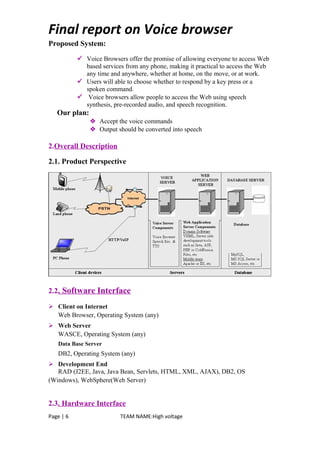
2.1. Product Perspective
2.2. Software Interface
 Client on Internet
Web Browser, Operating System (any)
 Web Server
WASCE, Operating System (any)
Data Base Server
DB2, Operating System (any)
 Development End
RAD (J2EE, Java, Java Bean, Servlets, HTML, XML, AJAX), DB2, OS
(Windows), WebSphere(Web Server)
2.3. Hardware Interface
Page | 6 TEAM NAME:High voltage
Final report on Voice browser
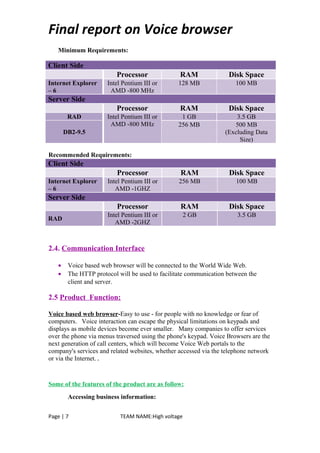
Minimum Requirements:
Client Side
Processor RAM Disk Space
Internet Explorer
– 6
Intel Pentium III or
AMD -800 MHz
128 MB 100 MB
Server Side
Processor RAM Disk Space
RAD Intel Pentium III or
AMD -800 MHz
1 GB 3.5 GB
DB2-9.5
256 MB 500 MB
(Excluding Data
Size)
Recommended Requirements:
Client Side
Processor RAM Disk Space
Internet Explorer
– 6
Intel Pentium III or
AMD -1GHZ
256 MB 100 MB
Server Side
Processor RAM Disk Space
RAD
Intel Pentium III or
AMD -2GHZ
2 GB 3.5 GB
2.4. Communication Interface
• Voice based web browser will be connected to the World Wide Web.
• The HTTP protocol will be used to facilitate communication between the
client and server.
2.5 Product Function:
Voice based web browser-Easy to use - for people with no knowledge or fear of
computers. Voice interaction can escape the physical limitations on keypads and
displays as mobile devices become ever smaller. Many companies to offer services
over the phone via menus traversed using the phone's keypad. Voice Browsers are the
next generation of call centers, which will become Voice Web portals to the
company's services and related websites, whether accessed via the telephone network
or via the Internet. .
Some of the features of the product are as follow:
Accessing business information:
Page | 7 TEAM NAME:High voltage
Final report on Voice browser
• The corporate "front desk" which asks callers who or what they want
• Automated telephone ordering services
• Support desks
• Order tracking
• Airline arrival and departure information
Accessing public information:
• Community information such as weather, traffic conditions, school
closures, directions and events
• Local, national and international news
• National and international stock market information
• Business and e-commerce transactions
Accessing personal information:
• Voice mail
• Calendars, address and telephone lists
• Personal horoscope
• Personal newsletter
• To-do lists, shopping lists, and calorie counters
2.6. Constraints
• The information of all the users must be stored in a database that is accessible
by the Administrator.
• Voice based web browser system is connected to the computer and is running
all 24 hours a day.
• The users can access Online Book Sales with mobile SMS System from any
computer that has Internet browsing capabilities and an Internet connection.
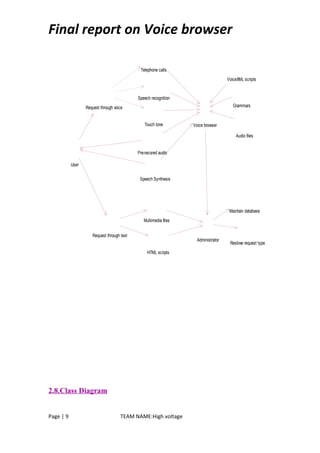
2.7. Use Case Model
Page | 8 TEAM NAME:High voltage
Final report on Voice browser
Touch tone
Speech recognition
Telephone calls
Request through voice
Pre-recored audio
Speech Synthesis
VoiceXML scripts
Grammars
Audio files
Voice browser
User
Request through text
HTML scripts
Multimedia files
Maintain database
Administrator
Reslove request type
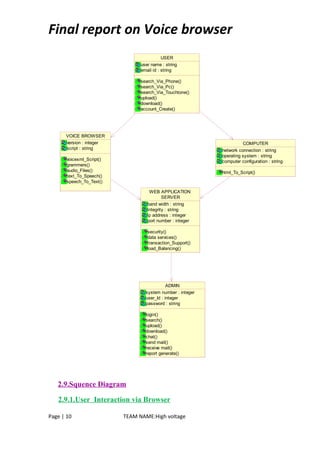
2.8.Class Diagram
Page | 9 TEAM NAME:High voltage
Final report on Voice browser
USER
user name : string
email id : string
search_Via_Phone()
search_Via_Pc()
search_Via_Touchtone()
upload()
download()
account_Create()
COMPUTER
network connection : string
operating system : string
computer configuration : string
html_To_Script()
VOICE BROWSER
version : integer
script : string
voicexml_Script()
grammers()
audio_Files()
text_To_Speech()
speech_To_Text()
ADMIN
system number : integer
user_Id : integer
password : string
login()
search()
upload()
download()
chat()
send mail()
receive mail()
report generate()
WEB APPLICATION
SERVER
band width : string
integrity : string
ip address : integer
port number : integer
security()
data services()
transaction_Support()
load_Balancing()
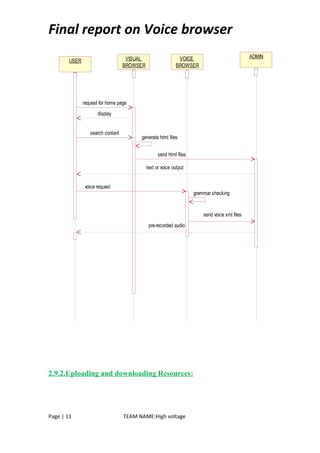
2.9.Squence Diagram
2.9.1.User Interaction via Browser
Page | 10 TEAM NAME:High voltage
Final report on Voice browser
USER VISUAL
BROWSER
VOICE
BROWSER
ADMIN
request for home page
search content
send html files
voice request
send voice xml files
display
text or voice output
generate html files
grammar checking
pre-recorded audio
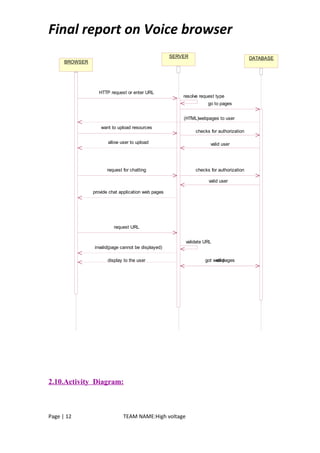
2.9.2.Uploading and downloading Resources:
Page | 11 TEAM NAME:High voltage
Final report on Voice browser
BROWSER
SERVER DATABASE
HTTP request or enter URL
resolve request type
go to pages
(HTML)webpages to user
want to upload resources
checks for authorization
valid user
request for chatting checks for authorization
allow user to upload
valid user
provide chat application web pages
request URL
validate URL
invalid(page cannot be displayed)
validgot web pagesdisplay to the user
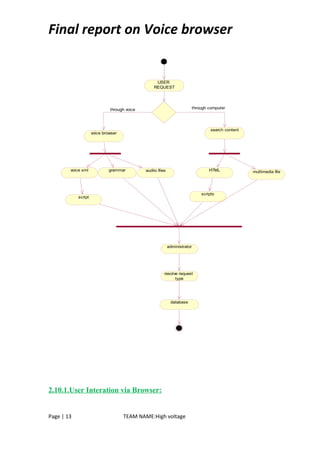
2.10.Activity Diagram:
Page | 12 TEAM NAME:High voltage
Final report on Voice browser
USER
REQUEST
voice browser
search content
voice xml grammar audiio files HTML multimedia file
scripts
script
administrator
resolve request
type
database
through voice through computer
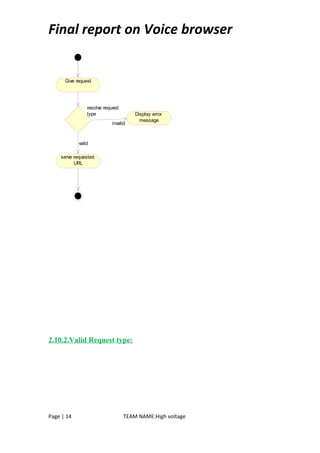
2.10.1.User Interation via Browser:
Page | 13 TEAM NAME:High voltage
Final report on Voice browser
Give request
resolve request
type Display error
message
serve requested
URL
invalid
valid
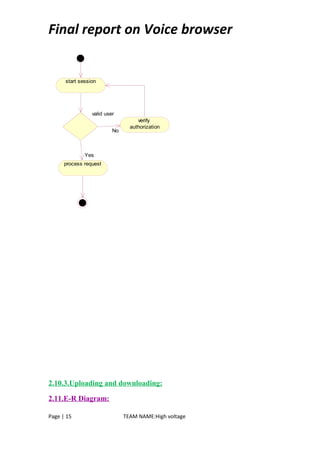
2.10.2.Valid Request type:
Page | 14 TEAM NAME:High voltage
Final report on Voice browser
start session
valid user
verify
authorization
process request
No
Yes
2.10.3.Uploading and downloading:
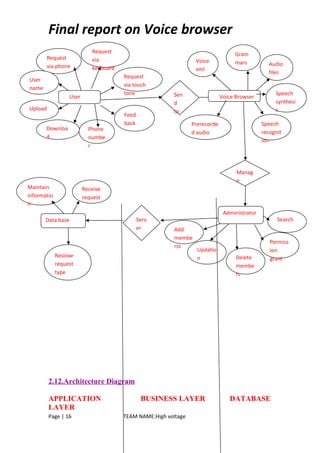
2.11.E-R Diagram:
Page | 15 TEAM NAME:High voltage
Final report on Voice browser
2.12.Architecture Diagram
APPLICATION BUSINESS LAYER DATABASE
LAYER
Page | 16 TEAM NAME:High voltage
User
Request
via
keyboard
Request
via phone
User
name
Upload
Downloa
d
Phone
numbe
r
Request
via touch
tone Sen
d
to
Feed
back
Voice Browser
Voice
xml
Gram
mars Audio
files
Speech
synthesi
s
Prerecorde
d audio
Speech
recognit
ion
Administrator
Search
Permiss
ion
grantDelete
membe
rs
Updatio
n
Add
membe
rss
Manag
e
Data base
Maintain
informatio
n
Reslove
request
type
Receive
request
Serv
er
Final report on Voice browser
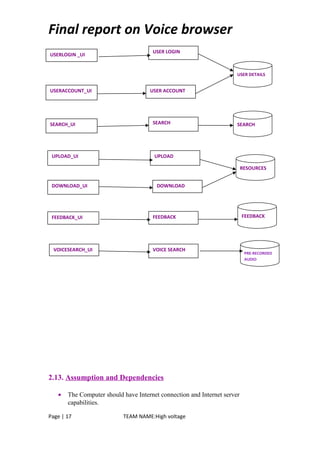
2.13. Assumption and Dependencies
• The Computer should have Internet connection and Internet server
capabilities.
Page | 17 TEAM NAME:High voltage
USER LOGIN
USERACCOUNT_UI USER ACCOUNT
USERLOGIN _UI
SEARCH_UI SEARCH
UPLOAD_UI UPLOAD
FEEDBACK_UI
DOWNLOADDOWNLOAD_UI
FEEDBACK
VOICESEARCH_UI VOICE SEARCH
USER DETAILS
SEARCH
FEEDBACK
RESOURCES
PRE-RECORDED
AUDIO
Final report on Voice browser
• The users know the English language, as the user interface will be provided in
English.
3.3Supplementary Requirement
Safety Requirements
Highly recommend Kaspersky 2010 internet security to been Installed
in users Pc to prevent the harm that may occurs by unwanted malicious
software’s, phishing URLs and all the types of virus attacks during
using this application..
Security Requirements
All users should be properly authenticated before allowed entry into
the system authentication will be based on an E-mail address, and a
password.
All activities on the system must be logged.
Non-Functional Requirements
• Secure access of confidential data (user’s details). SSL can be used.
• 24 X 7 availability.
• Better component design to get better performance at peak time.
• Flexible service based architecture will be highly desirable for future
extension.
Other Requirements
The user must be agreed with all the term and conditions that have
provided by the System Administrator, local authority and Should
Obey to the all International standards and Protocols.
Page | 18 TEAM NAME:High voltage

Voicebasedsrs 130319103050-phpapp02

  • 1.
    Final report onVoice browser Voice Based Web Browser K.L.N College Of Engineering Synopsis Team Member Project In charge P.Gowsalya Mr.Anandhamurugan K.Uma (Assistant Professor) (BE CSE 3rd Year) Page | 1 TEAM NAME:High voltage
  • 2.
    Final report onVoice browser • Table of Contents Description Page No. Introduction : 1.1. Purpose……………………………………………………………….3 1.2. Scope ……………………………………………………………….3 1.3. Definition, Acronyms and Abbreviation…………………………….3 1.4. Technologies to be used…………………………………………......4 1.5. Tools used……………………………………………………………5 1.6. References……………………………………………………….......5 1.7. Overview…………………………………………………………….5 2. Overall Description 2.1. Product Perspective……………………………………………….....6 2.2. Software Interface……………………………………………………6 2.3. Hardware Interface…………………………………………………..7 2.4. Communication Interface……………………………………….......7 2.5. Product Function………………………………………………….....7 2.6. Constraints……………………………………………………….......8 2.7. Use Case Model………………………………………………….......9 2.8. Class Diagram…………………………………………………….....10 2.9. Sequence Diagram…………………………………………………...11 2.10. Activity Diagram……………………………………………….........13 2.11. E-R Diagram………………………………………………………....16 2.12. Architecture Design……………………………………………….....17 2.13. Assumptions and Dependencies……………………………………..18 3. Specific Requirements 3.1.Supplementary Requirements……………………………………………18 1. Introduction 1.1 Purpose Voice Based Web Browser. voice-based web to make information accessible to users who may not be able to read or write, or who do not have access to the Internet. Users can access the voice-based web using a toll-free number, through a variety of ways Page | 2 TEAM NAME:High voltage
  • 3.
    Final report onVoice browser including a voice recognition system or a tone phone. Unlike a computer interface, a voice interface needs no keyboard, no mouse, no screen, freeing users from these barriers to access and action. It requires no training. It is accessible to anyone with a telephone. Voice is mobile—information can be sent and retrieved from anywhere. Since customers can have access at anytime from anywhere, voice makes it possible to use time more effectively. Fast and efficient, voice frees users from not only the desktop, but even the laptop. 1.2 Scope  The user gives the request through the voice or text using phone ,personal computer or Touch tone.  The request goes to the voice browser.If the request is voice, speech recognition converts voice into text.  Checks the grammers and then using speech synthesis to convert text into pre- recorded audio.  The pre-recored audio should be store in the administrator.it should display to the user. 1.3. Definitions, Acronyms and Abbreviations • ADMIN-Administrator has the authority for convert the voice into text,text into voice and then displaying to the user. • ASR-Automatic Speech Recognition is to convert the speech into text. • HTML – Hypertext Markup Language is to create static websites. • J2EE – Java 2 Enterprise Edition is a programming platform and it is the part of the java platform for developing and running distributed java applications. • EJB – Enterprise java bean, it is architecture for the development and deployment of transactional, distributed object applications-based, server- side software componen • RSA – Rational Software Architect is a designer toolkit which is designed for develop more complex projects by providing fully dynamic web service. Page | 3 TEAM NAME:High voltage
  • 4.
    Final report onVoice browser • DB2 – Database 2 is the database management system that provides a flexible and efficient database platform to erect strong on demand business applications. • UML- Unified Modeling Language is a standard language for writing software blueprints. The UML may be used to visualize, specify, construct and document • XML - Extensive Markup Language used for data transfer and XML is stored naturally in DB2 • HTTP – Hypertext transfer protocol is a transaction oriented client/server protocol between web browser and a web server. • HTTPS – Secure hypertext transfer protocol is a hypertext transfer protocol over secure socket layer. 1.4 Technologies used:  HTML – Hyper Text Markup Language  Java Script – Script Language  XML – Extensive Mark Up Language  JAVA – Application architecture  J2EE – Application architecture  AJAX – Asynchronous Java script And XML 1.5. Tools used • RSA – Rational Software Architect 7.0 Page | 4 TEAM NAME:High voltage
  • 5.
    Final report onVoice browser • DB2 9 – Database • WAS – Websphere Application Server 6.0 • TSM – Tivoli Storage Manager 1.6 References  IBM TGMC Sample Synopsis.  IBM – www.ibm.in/developerworks.  Wikipedia - www.wikipedia.com  Database Management Systems - korth. 1.7 Overview Existing System: • Type the text search the content who may not be able to read or write people does not access it. Drawbacks: WAP(Cellular phones, Palm Pilots)access to the web:  Small screens: For web phones, there's an incredibly small viewing area; palmtops are barely better.  Speed of access: All devices have slow access.  Limited or fragmented availability: Wireless web access is sporadic in many areas and entirely unavailable in other areas.  Awkward input: Palm's Graffiti, touchtone pads, or even tiny QWERTY keyboards are awkward for any amount of writing, even a short email.  Price: Many technology limitations are being addressed by higher-end devices and services. But the entry price for a good wireless web palmtop with decent display, keyboard, and speed is easily $700 to $900, not including monthly access.  Lack of user habit: It takes some patience and overcoming the learning curve to get the hang of it -- connecting, putting in an address, typing. Users just aren't used to the idea and protocol yet. Page | 5 TEAM NAME:High voltage
  • 6.
    Final report onVoice browser Proposed System:  Voice Browsers offer the promise of allowing everyone to access Web based services from any phone, making it practical to access the Web any time and anywhere, whether at home, on the move, or at work.  Users will able to choose whether to respond by a key press or a spoken command.  Voice browsers allow people to access the Web using speech synthesis, pre-recorded audio, and speech recognition. Our plan:  Accept the voice commands  Output should be converted into speech 2.Overall Description 2.1. Product Perspective 2.2. Software Interface  Client on Internet Web Browser, Operating System (any)  Web Server WASCE, Operating System (any) Data Base Server DB2, Operating System (any)  Development End RAD (J2EE, Java, Java Bean, Servlets, HTML, XML, AJAX), DB2, OS (Windows), WebSphere(Web Server) 2.3. Hardware Interface Page | 6 TEAM NAME:High voltage
  • 7.
    Final report onVoice browser Minimum Requirements: Client Side Processor RAM Disk Space Internet Explorer – 6 Intel Pentium III or AMD -800 MHz 128 MB 100 MB Server Side Processor RAM Disk Space RAD Intel Pentium III or AMD -800 MHz 1 GB 3.5 GB DB2-9.5 256 MB 500 MB (Excluding Data Size) Recommended Requirements: Client Side Processor RAM Disk Space Internet Explorer – 6 Intel Pentium III or AMD -1GHZ 256 MB 100 MB Server Side Processor RAM Disk Space RAD Intel Pentium III or AMD -2GHZ 2 GB 3.5 GB 2.4. Communication Interface • Voice based web browser will be connected to the World Wide Web. • The HTTP protocol will be used to facilitate communication between the client and server. 2.5 Product Function: Voice based web browser-Easy to use - for people with no knowledge or fear of computers. Voice interaction can escape the physical limitations on keypads and displays as mobile devices become ever smaller. Many companies to offer services over the phone via menus traversed using the phone's keypad. Voice Browsers are the next generation of call centers, which will become Voice Web portals to the company's services and related websites, whether accessed via the telephone network or via the Internet. . Some of the features of the product are as follow: Accessing business information: Page | 7 TEAM NAME:High voltage
  • 8.
    Final report onVoice browser • The corporate "front desk" which asks callers who or what they want • Automated telephone ordering services • Support desks • Order tracking • Airline arrival and departure information Accessing public information: • Community information such as weather, traffic conditions, school closures, directions and events • Local, national and international news • National and international stock market information • Business and e-commerce transactions Accessing personal information: • Voice mail • Calendars, address and telephone lists • Personal horoscope • Personal newsletter • To-do lists, shopping lists, and calorie counters 2.6. Constraints • The information of all the users must be stored in a database that is accessible by the Administrator. • Voice based web browser system is connected to the computer and is running all 24 hours a day. • The users can access Online Book Sales with mobile SMS System from any computer that has Internet browsing capabilities and an Internet connection. 2.7. Use Case Model Page | 8 TEAM NAME:High voltage
  • 9.
    Final report onVoice browser Touch tone Speech recognition Telephone calls Request through voice Pre-recored audio Speech Synthesis VoiceXML scripts Grammars Audio files Voice browser User Request through text HTML scripts Multimedia files Maintain database Administrator Reslove request type 2.8.Class Diagram Page | 9 TEAM NAME:High voltage
  • 10.
    Final report onVoice browser USER user name : string email id : string search_Via_Phone() search_Via_Pc() search_Via_Touchtone() upload() download() account_Create() COMPUTER network connection : string operating system : string computer configuration : string html_To_Script() VOICE BROWSER version : integer script : string voicexml_Script() grammers() audio_Files() text_To_Speech() speech_To_Text() ADMIN system number : integer user_Id : integer password : string login() search() upload() download() chat() send mail() receive mail() report generate() WEB APPLICATION SERVER band width : string integrity : string ip address : integer port number : integer security() data services() transaction_Support() load_Balancing() 2.9.Squence Diagram 2.9.1.User Interaction via Browser Page | 10 TEAM NAME:High voltage
  • 11.
    Final report onVoice browser USER VISUAL BROWSER VOICE BROWSER ADMIN request for home page search content send html files voice request send voice xml files display text or voice output generate html files grammar checking pre-recorded audio 2.9.2.Uploading and downloading Resources: Page | 11 TEAM NAME:High voltage
  • 12.
    Final report onVoice browser BROWSER SERVER DATABASE HTTP request or enter URL resolve request type go to pages (HTML)webpages to user want to upload resources checks for authorization valid user request for chatting checks for authorization allow user to upload valid user provide chat application web pages request URL validate URL invalid(page cannot be displayed) validgot web pagesdisplay to the user 2.10.Activity Diagram: Page | 12 TEAM NAME:High voltage
  • 13.
    Final report onVoice browser USER REQUEST voice browser search content voice xml grammar audiio files HTML multimedia file scripts script administrator resolve request type database through voice through computer 2.10.1.User Interation via Browser: Page | 13 TEAM NAME:High voltage
  • 14.
    Final report onVoice browser Give request resolve request type Display error message serve requested URL invalid valid 2.10.2.Valid Request type: Page | 14 TEAM NAME:High voltage
  • 15.
    Final report onVoice browser start session valid user verify authorization process request No Yes 2.10.3.Uploading and downloading: 2.11.E-R Diagram: Page | 15 TEAM NAME:High voltage
  • 16.
    Final report onVoice browser 2.12.Architecture Diagram APPLICATION BUSINESS LAYER DATABASE LAYER Page | 16 TEAM NAME:High voltage User Request via keyboard Request via phone User name Upload Downloa d Phone numbe r Request via touch tone Sen d to Feed back Voice Browser Voice xml Gram mars Audio files Speech synthesi s Prerecorde d audio Speech recognit ion Administrator Search Permiss ion grantDelete membe rs Updatio n Add membe rss Manag e Data base Maintain informatio n Reslove request type Receive request Serv er
  • 17.
    Final report onVoice browser 2.13. Assumption and Dependencies • The Computer should have Internet connection and Internet server capabilities. Page | 17 TEAM NAME:High voltage USER LOGIN USERACCOUNT_UI USER ACCOUNT USERLOGIN _UI SEARCH_UI SEARCH UPLOAD_UI UPLOAD FEEDBACK_UI DOWNLOADDOWNLOAD_UI FEEDBACK VOICESEARCH_UI VOICE SEARCH USER DETAILS SEARCH FEEDBACK RESOURCES PRE-RECORDED AUDIO
  • 18.
    Final report onVoice browser • The users know the English language, as the user interface will be provided in English. 3.3Supplementary Requirement Safety Requirements Highly recommend Kaspersky 2010 internet security to been Installed in users Pc to prevent the harm that may occurs by unwanted malicious software’s, phishing URLs and all the types of virus attacks during using this application.. Security Requirements All users should be properly authenticated before allowed entry into the system authentication will be based on an E-mail address, and a password. All activities on the system must be logged. Non-Functional Requirements • Secure access of confidential data (user’s details). SSL can be used. • 24 X 7 availability. • Better component design to get better performance at peak time. • Flexible service based architecture will be highly desirable for future extension. Other Requirements The user must be agreed with all the term and conditions that have provided by the System Administrator, local authority and Should Obey to the all International standards and Protocols. Page | 18 TEAM NAME:High voltage