SMART 360° EA Suite
Get a 360° view of your Enterprise Architecture
Gain control over your IT Landscape and help your business grow
Introduction
This document is an example showcase for a tool evaluation.
It contains screens from the open-source Enterprise Architecture
Management Suite called “iteraplan” from http://www.smart360biz.com.
The purpose of the slides is to get a feel for how the tool could be used
effectively in your organization.
It is based on a couple of common requirements in IT Management but
might need to be tailored for your specific situation. It can be part of
BusinessCase or Proposal..
The key requirements include an easy to use, cost effective tool that
captures data so that we could answer key application and technology
questions.
We will review those questions and how the app answers them via reports
and visualizations.

2
© SMART360° Co.
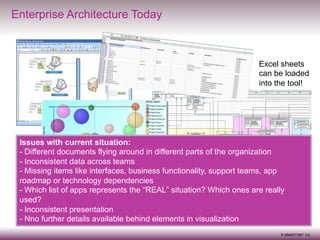
Enterprise Architecture Today

Excel sheets
can be loaded
into the tool!

Issues with current situation:
-  Different documents flying around in different parts of the organization
-  Inconsistent data across teams
-  Missing items like interfaces, business functionality, support teams, app
roadmap or technology dependencies
-  Which list of apps represents the “REAL” situation? Which ones are really
used?
-  Inconsistent presentation
-  Nno further details available behind elements in visualization

3

© SMART360° Co.
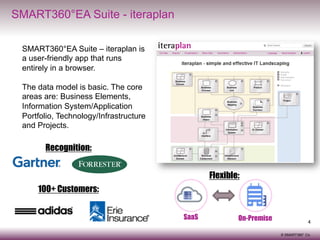
SMART360°EA Suite - iteraplan
SMART360°EA Suite – iteraplan is
a user-friendly app that runs
entirely in a browser.
The data model is basic. The core
areas are: Business Elements,
Information System/Application
Portfolio, Technology/Infrastructure
and Projects.

Recognition:
Flexible:
100+ Customers:
SaaS

On-Premise

4
© SMART360° Co.
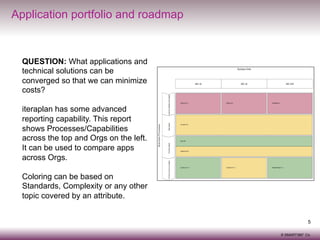
Application portfolio and roadmap

QUESTION: What applications and
technical solutions can be
converged so that we can minimize
costs?
iteraplan has some advanced
reporting capability. This report
shows Processes/Capabilities
across the top and Orgs on the left.
It can be used to compare apps
across Orgs.
Coloring can be based on
Standards, Complexity or any other
topic covered by an attribute.
5
© SMART360° Co.
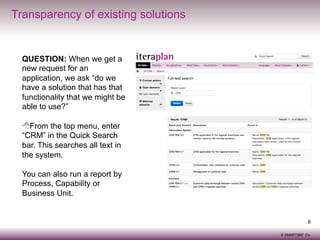
Transparency of existing solutions

QUESTION: When we get a
new request for an
application, we ask “do we
have a solution that has that
functionality that we might be
able to use?”
8 From the top menu, enter
“CRM” in the Quick Search
bar. This searches all text in
the system.
You can also run a report by
Process, Capability or
Business Unit.

6
© SMART360° Co.
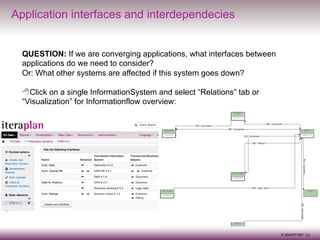
Application interfaces and interdependecies
QUESTION: If we are converging applications, what interfaces between
applications do we need to consider?
Or: What other systems are affected if this system goes down?
8 Click on a single InformationSystem and select “Relations” tab or
“Visualization” for Informationflow overview:

7
© SMART360° Co.
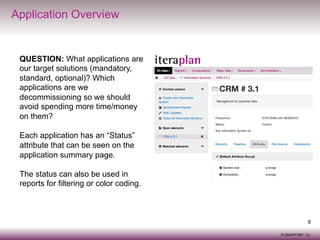
Application Overview

QUESTION: What applications are
our target solutions (mandatory,
standard, optional)? Which
applications are we
decommissioning so we should
avoid spending more time/money
on them?
Each application has an “Status”
attribute that can be seen on the
application summary page.
The status can also be used in
reports for filtering or color coding.

8
© SMART360° Co.
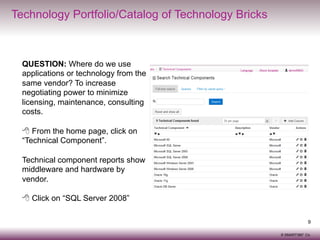
Technology Portfolio/Catalog of Technology Bricks

QUESTION: Where do we use
applications or technology from the
same vendor? To increase
negotiating power to minimize
licensing, maintenance, consulting
costs.
8  From the home page, click on
“Technical Component”.
Technical component reports show
middleware and hardware by
vendor.
8 Click on “SQL Server 2008”
9
© SMART360° Co.
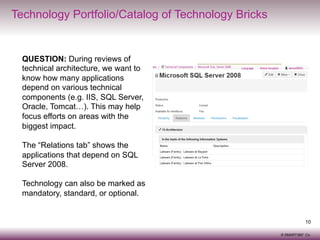
Technology Portfolio/Catalog of Technology Bricks

QUESTION: During reviews of
technical architecture, we want to
know how many applications
depend on various technical
components (e.g. IIS, SQL Server,
Oracle, Tomcat…). This may help
focus efforts on areas with the
biggest impact.

Relationship tab of
SQL Server 2008

The “Relations tab” shows the
applications that depend on SQL
Server 2008.
Technology can also be marked as
mandatory, standard, or optional.

10
© SMART360° Co.
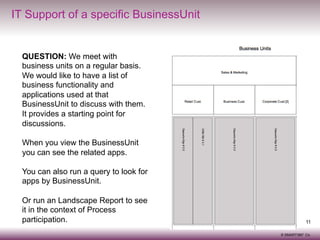
IT Support of a specific BusinessUnit

QUESTION: We meet with
business units on a regular basis.
We would like to have a list of
business functionality and
applications used at that
BusinessUnit to discuss with them.
It provides a starting point for
discussions.
When you view the BusinessUnit
you can see the related apps.
You can also run a query to look for
apps by BusinessUnit.
Or run an Landscape Report to see
it in the context of Process
participation.

11
© SMART360° Co.
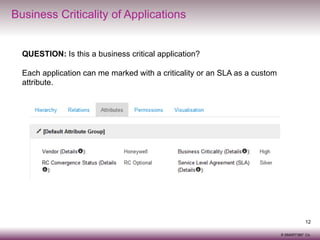
Business Criticality of Applications
QUESTION: Is this a business critical application?
Each application can me marked with a criticality or an SLA as a custom
attribute.

12
© SMART360° Co.
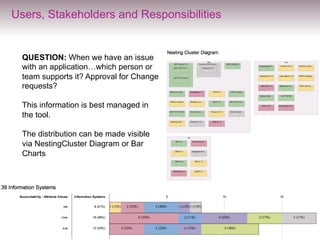
Users, Stakeholders and Responsibilities

QUESTION: When we have an issue
with an application…which person or
team supports it? Approval for Change
requests?
This information is best managed in
the tool.
The distribution can be made visible
via NestingCluster Diagram or Bar
Charts

13
© SMART360° Co.
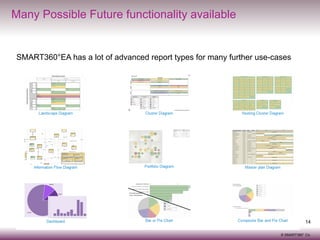
Many Possible Future functionality available

SMART360°EA has a lot of advanced report types for many further use-cases

14
© SMART360° Co.
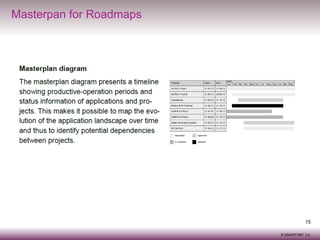
Masterpan for Roadmaps

15
© SMART360° Co.
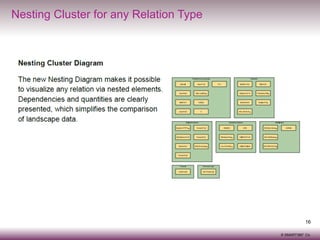
Nesting Cluster for any Relation Type

16
© SMART360° Co.
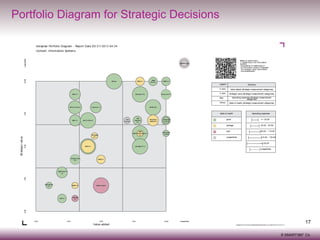
Portfolio Diagram for Strategic Decisions

17
© SMART360° Co.
Contact
Karsten Voges
kvoges@smart360.biz
SMART360°Biz
1 Broadway, 14th Floor
Cambridge, MA 02142, USA
Phone +1 (617) 800-6024
www.smart360biz.com
@smart360biz, +SMART360Biz
18
© SMART360° Co.

SMART360°EA questions & reports

  • 1.
    SMART 360° EASuite Get a 360° view of your Enterprise Architecture Gain control over your IT Landscape and help your business grow
  • 2.
    Introduction This document isan example showcase for a tool evaluation. It contains screens from the open-source Enterprise Architecture Management Suite called “iteraplan” from http://www.smart360biz.com. The purpose of the slides is to get a feel for how the tool could be used effectively in your organization. It is based on a couple of common requirements in IT Management but might need to be tailored for your specific situation. It can be part of BusinessCase or Proposal.. The key requirements include an easy to use, cost effective tool that captures data so that we could answer key application and technology questions. We will review those questions and how the app answers them via reports and visualizations. 2 © SMART360° Co.
  • 3.
    Enterprise Architecture Today Excelsheets can be loaded into the tool! Issues with current situation: -  Different documents flying around in different parts of the organization -  Inconsistent data across teams -  Missing items like interfaces, business functionality, support teams, app roadmap or technology dependencies -  Which list of apps represents the “REAL” situation? Which ones are really used? -  Inconsistent presentation -  Nno further details available behind elements in visualization 3 © SMART360° Co.
  • 4.
    SMART360°EA Suite -iteraplan SMART360°EA Suite – iteraplan is a user-friendly app that runs entirely in a browser. The data model is basic. The core areas are: Business Elements, Information System/Application Portfolio, Technology/Infrastructure and Projects. Recognition: Flexible: 100+ Customers: SaaS On-Premise 4 © SMART360° Co.
  • 5.
    Application portfolio androadmap QUESTION: What applications and technical solutions can be converged so that we can minimize costs? iteraplan has some advanced reporting capability. This report shows Processes/Capabilities across the top and Orgs on the left. It can be used to compare apps across Orgs. Coloring can be based on Standards, Complexity or any other topic covered by an attribute. 5 © SMART360° Co.
  • 6.
    Transparency of existingsolutions QUESTION: When we get a new request for an application, we ask “do we have a solution that has that functionality that we might be able to use?” 8 From the top menu, enter “CRM” in the Quick Search bar. This searches all text in the system. You can also run a report by Process, Capability or Business Unit. 6 © SMART360° Co.
  • 7.
    Application interfaces andinterdependecies QUESTION: If we are converging applications, what interfaces between applications do we need to consider? Or: What other systems are affected if this system goes down? 8 Click on a single InformationSystem and select “Relations” tab or “Visualization” for Informationflow overview: 7 © SMART360° Co.
  • 8.
    Application Overview QUESTION: Whatapplications are our target solutions (mandatory, standard, optional)? Which applications are we decommissioning so we should avoid spending more time/money on them? Each application has an “Status” attribute that can be seen on the application summary page. The status can also be used in reports for filtering or color coding. 8 © SMART360° Co.
  • 9.
    Technology Portfolio/Catalog ofTechnology Bricks QUESTION: Where do we use applications or technology from the same vendor? To increase negotiating power to minimize licensing, maintenance, consulting costs. 8  From the home page, click on “Technical Component”. Technical component reports show middleware and hardware by vendor. 8 Click on “SQL Server 2008” 9 © SMART360° Co.
  • 10.
    Technology Portfolio/Catalog ofTechnology Bricks QUESTION: During reviews of technical architecture, we want to know how many applications depend on various technical components (e.g. IIS, SQL Server, Oracle, Tomcat…). This may help focus efforts on areas with the biggest impact. Relationship tab of SQL Server 2008 The “Relations tab” shows the applications that depend on SQL Server 2008. Technology can also be marked as mandatory, standard, or optional. 10 © SMART360° Co.
  • 11.
    IT Support ofa specific BusinessUnit QUESTION: We meet with business units on a regular basis. We would like to have a list of business functionality and applications used at that BusinessUnit to discuss with them. It provides a starting point for discussions. When you view the BusinessUnit you can see the related apps. You can also run a query to look for apps by BusinessUnit. Or run an Landscape Report to see it in the context of Process participation. 11 © SMART360° Co.
  • 12.
    Business Criticality ofApplications QUESTION: Is this a business critical application? Each application can me marked with a criticality or an SLA as a custom attribute. 12 © SMART360° Co.
  • 13.
    Users, Stakeholders andResponsibilities QUESTION: When we have an issue with an application…which person or team supports it? Approval for Change requests? This information is best managed in the tool. The distribution can be made visible via NestingCluster Diagram or Bar Charts 13 © SMART360° Co.
  • 14.
    Many Possible Futurefunctionality available SMART360°EA has a lot of advanced report types for many further use-cases 14 © SMART360° Co.
  • 15.
  • 16.
    Nesting Cluster forany Relation Type 16 © SMART360° Co.
  • 17.
    Portfolio Diagram forStrategic Decisions 17 © SMART360° Co.
  • 18.
    Contact Karsten Voges kvoges@smart360.biz SMART360°Biz 1 Broadway,14th Floor Cambridge, MA 02142, USA Phone +1 (617) 800-6024 www.smart360biz.com @smart360biz, +SMART360Biz 18 © SMART360° Co.