Enterprise Integration
Solution patterns from the field
Safe Harbor
Safe harbor statement under the Private Securities Litigation Reform Act of 1995:
This presentation may contain forward-looking statements that involve risks, uncertainties, and assumptions. If any such uncertainties
materialize or if any of the assumptions proves incorrect, the results of salesforce.com, inc. could differ materially from the results
expressed or implied by the forward-looking statements we make. All statements other than statements of historical fact could be
deemed forward-looking, including any projections of product or service availability, subscriber growth, earnings, revenues, or other
financial items and any statements regarding strategies or plans of management for future operations, statements of belief, any
statements concerning new, planned, or upgraded services or technology developments and customer contracts or use of our services.
The risks and uncertainties referred to above include – but are not limited to – risks associated with developing and delivering new
functionality for our service, new products and services, our new business model, our past operating losses, possible fluctuations in our
operating results and rate of growth, interruptions or delays in our Web hosting, breach of our security measures, the outcome of any
litigation, risks associated with completed and any possible mergers and acquisitions, the immature market in which we operate, our
relatively limited operating history, our ability to expand, retain, and motivate our employees and manage our growth, new releases of our
service and successful customer deployment, our limited history reselling non-salesforce.com products, and utilization and selling to
larger enterprise customers. Further information on potential factors that could affect the financial results of salesforce.com, inc. is
included in our annual report on Form 10-K for the most recent fiscal year and in our quarterly report on Form 10-Q for the most recent
fiscal quarter. These documents and others containing important disclosures are available on the SEC Filings section of the Investor
Information section of our Web site.
Any unreleased services or features referenced in this or other presentations, press releases or public statements are not currently
available and may not be delivered on time or at all. Customers who purchase our services should make the purchase decisions
based upon features that are currently available. Salesforce.com, inc. assumes no obligation and does not intend to update these
forward-looking statements.
Ammar Alamar
Director – Salesforce Services, Australia
Troy Sellers
Platform Architect, APAC
Agenda
▪ Review integration patterns & Salesforce capabilities
▪ Use Case
▪ The notify with callback pattern
▪ Integration assessment criteria
▪ Alternatives
▪ Handling errors
▪ Q&A | References
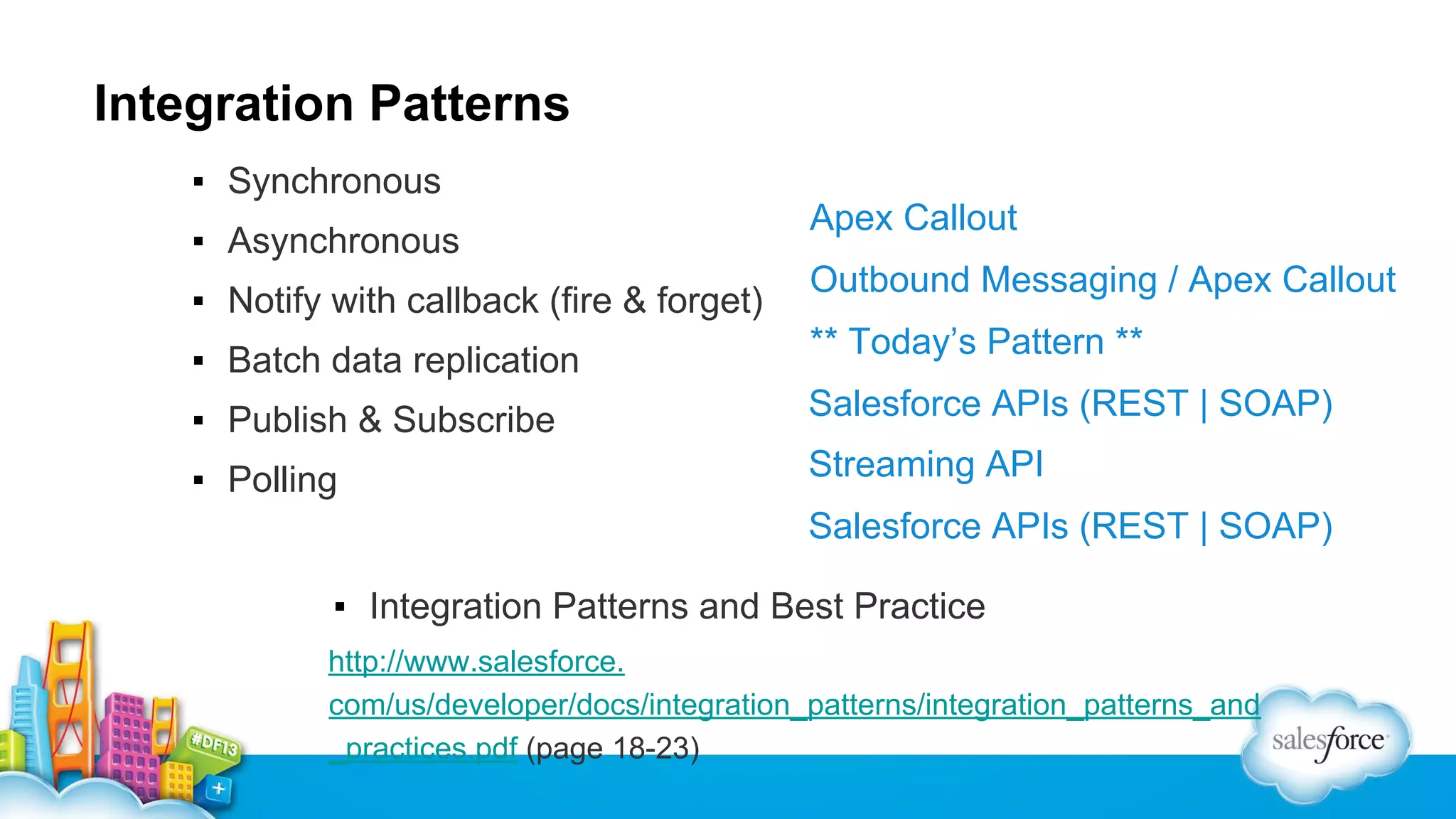
Integration Patterns
▪ Synchronous
▪ Asynchronous
▪ Notify with callback (fire & forget)
▪ Batch data replication

Apex Callout
Outbound Messaging / Apex Callout
** Today’s Pattern **

▪ Publish & Subscribe

Salesforce APIs (REST | SOAP)

▪ Polling

Streaming API
Salesforce APIs (REST | SOAP)

▪ Integration Patterns and Best Practice
http://www.salesforce.
com/us/developer/docs/integration_patterns/integration_patterns_and
_practices.pdf (page 18-23)
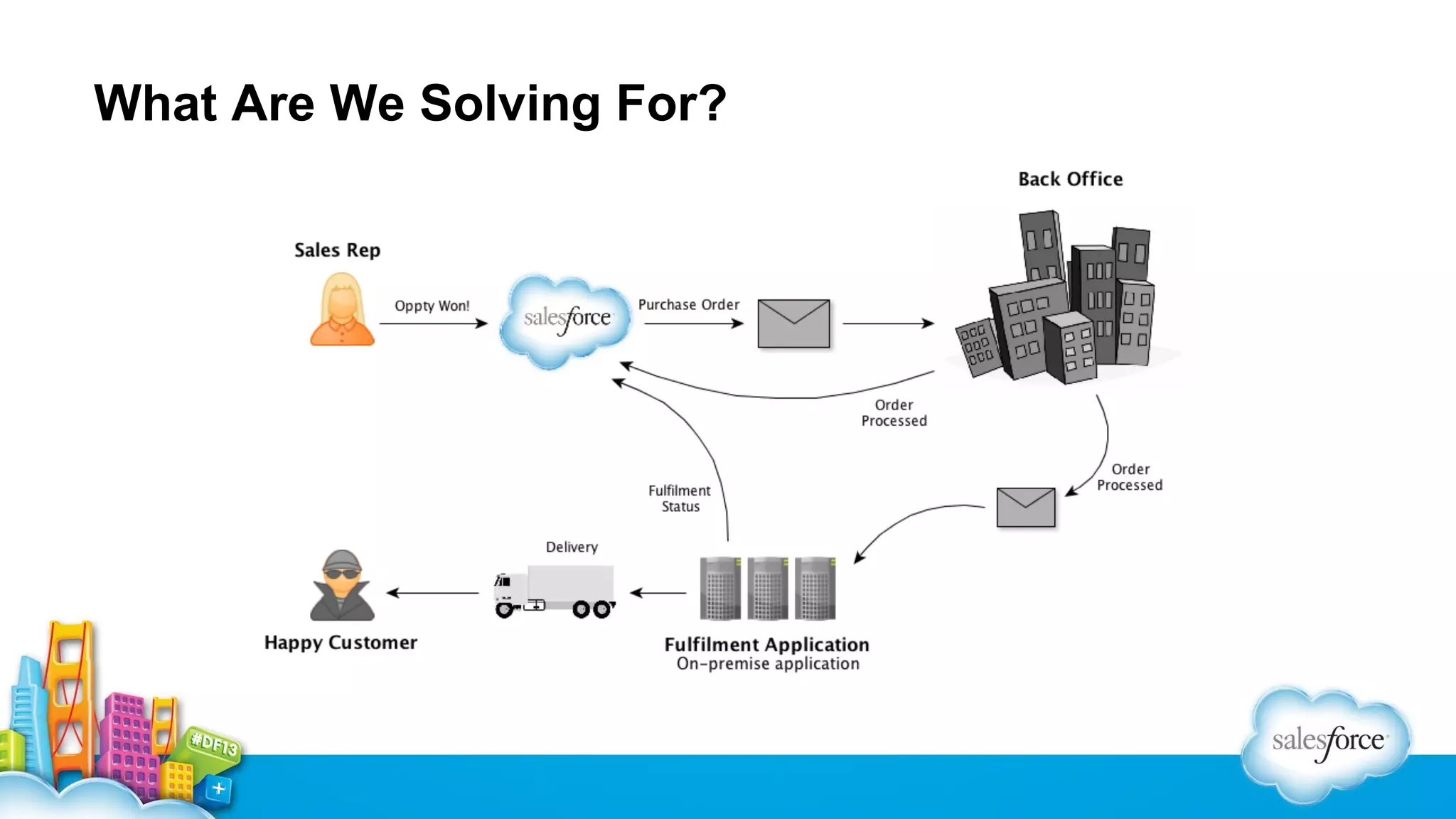
What Are We Solving For?
Integration Assessment Criteria
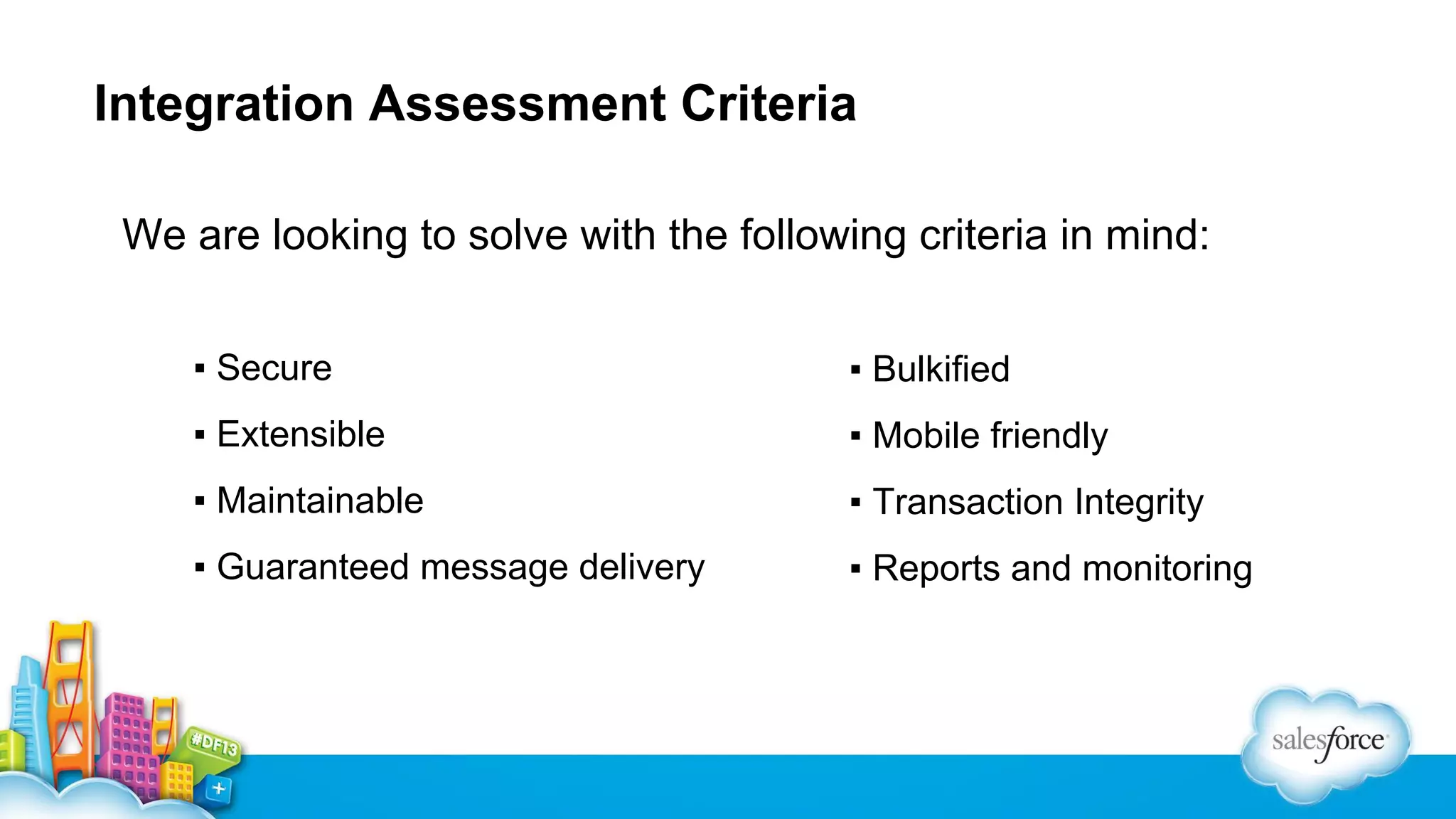
We are looking to solve with the following criteria in mind:
▪ Secure

▪ Bulkified

▪ Extensible

▪ Mobile friendly

▪ Maintainable

▪ Transaction Integrity

▪ Guaranteed message delivery

▪ Reports and monitoring
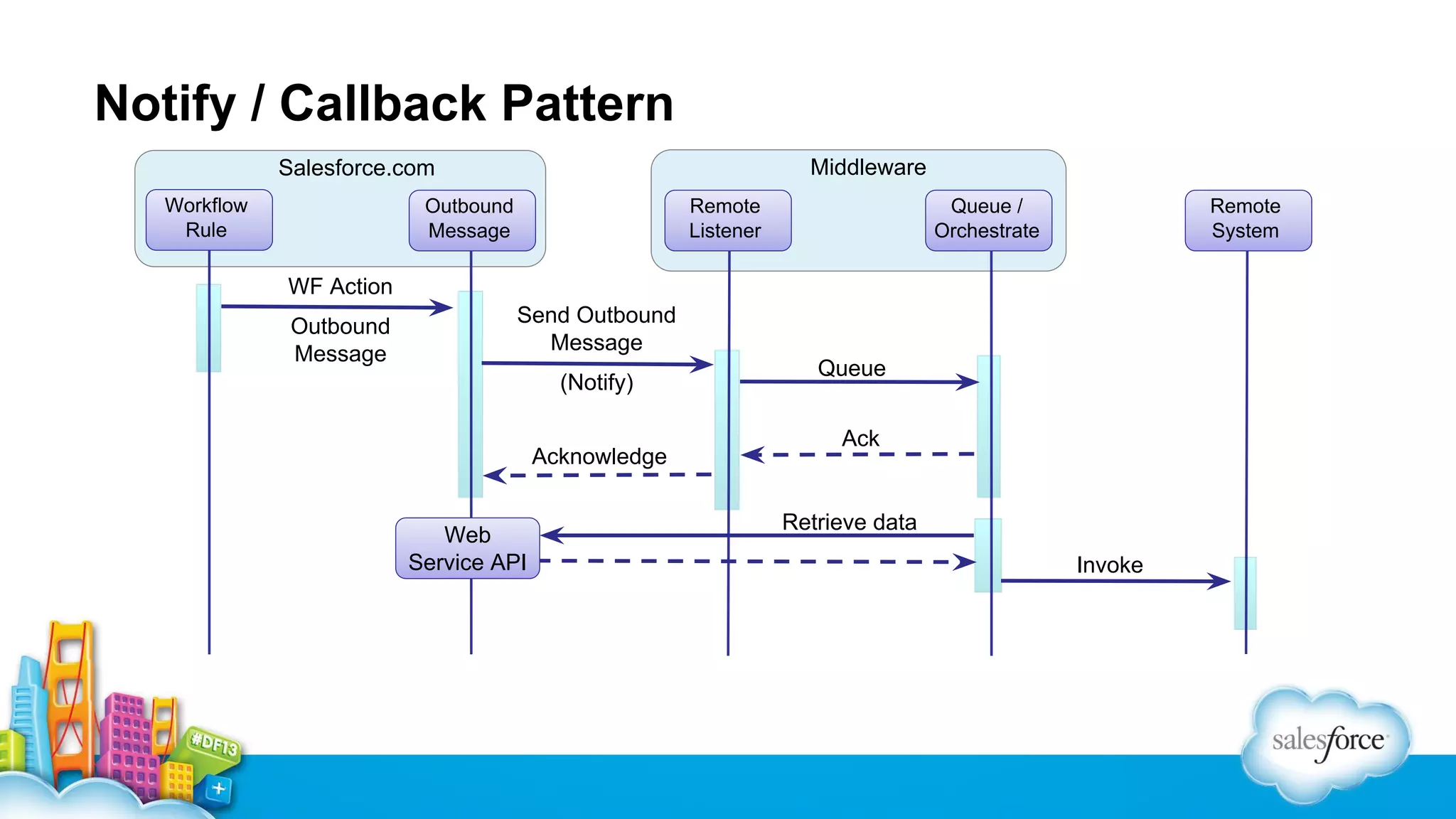
Notify / Callback Pattern
Middleware

Salesforce.com
Workflow
Rule

Outbound
Message

Remote
Listener

Queue /
Orchestrate

Remote
System

WF Action
Outbound
Message

Send Outbound
Message
(Notify)
Acknowledge

Web
Service API

Queue
Ack

Retrieve data
Invoke
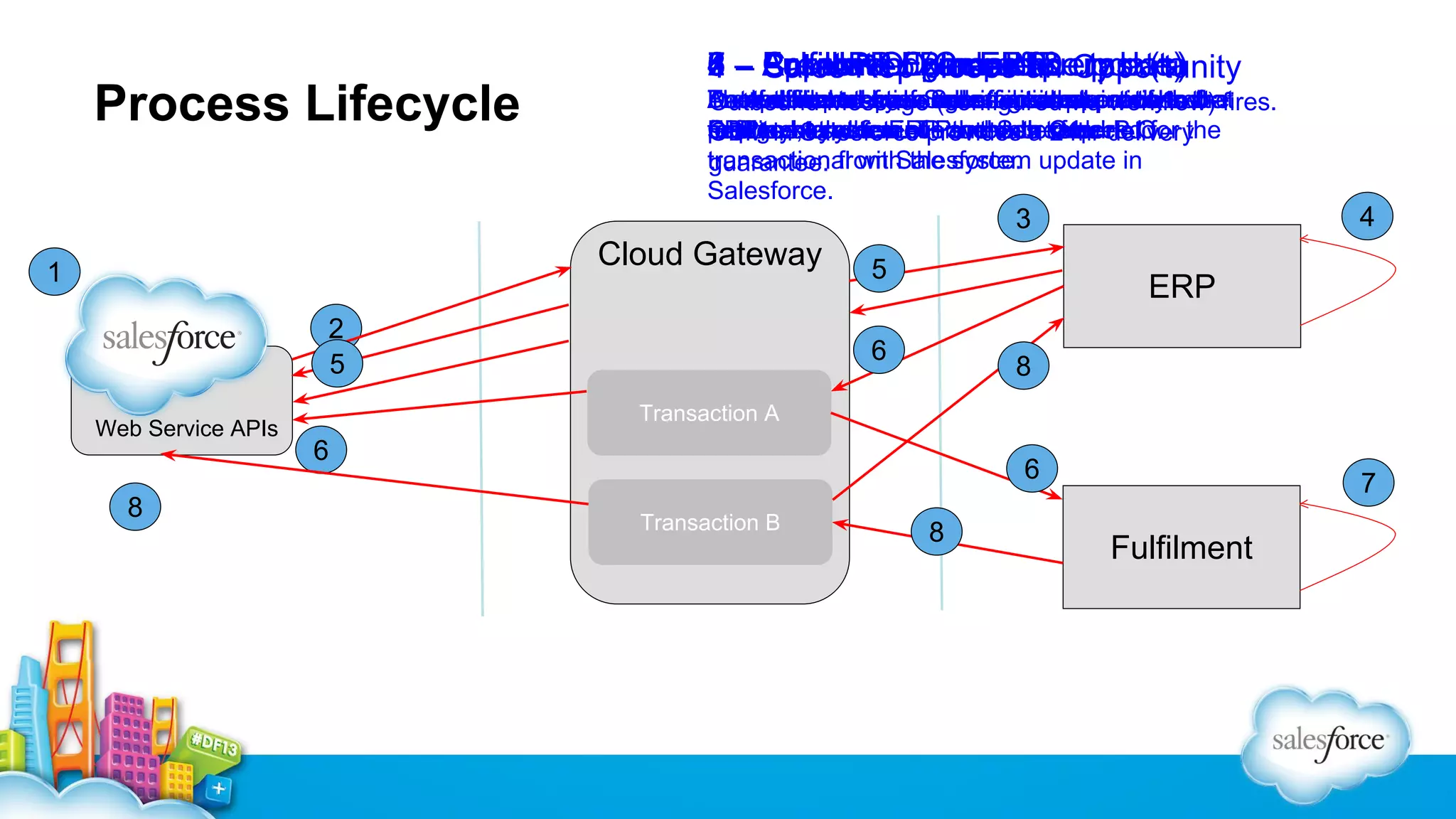
Process Lifecycle

8 Sales P.O. in ERP
7 Fulfillment (Create &
6 Fulfill P.O. complete.
5 Populate External query data
4 Approval / processID update)
3 CreateRep Back office task(s)
2 – Acknowledge and an Opportunity
1
closes
Another transaction order a
A created purchase messageasis needs
An optional tasks If Salesforcerequires a soft
Back retrieved fromSalesforcethat action to the
Datafulfillment system hasinitiatessent to thebefires.
The outbound messagesuchsimpleprocess that
office step. occur is internal notify.
Outbound Message (configured approval
via workflow)
sent system
requires and retrieve to the a required
fulfillmentcreation Purchase 24hr
foreign key the ofprovidescreated
process, to run. ERP the Salesforce etcfor
ERP to bothreference and data OrderP.O. the
CallbackSalesforceThis needs to be delivery
OBM in system.
transactional with the system
transaction from Salesforce. update in
guarantee.
Salesforce.

4

3

Cloud Gateway

1
2
5
Web Service APIs

8

5

ERP

6

8

Transaction A

6

6
Transaction B

8

7

Fulfilment
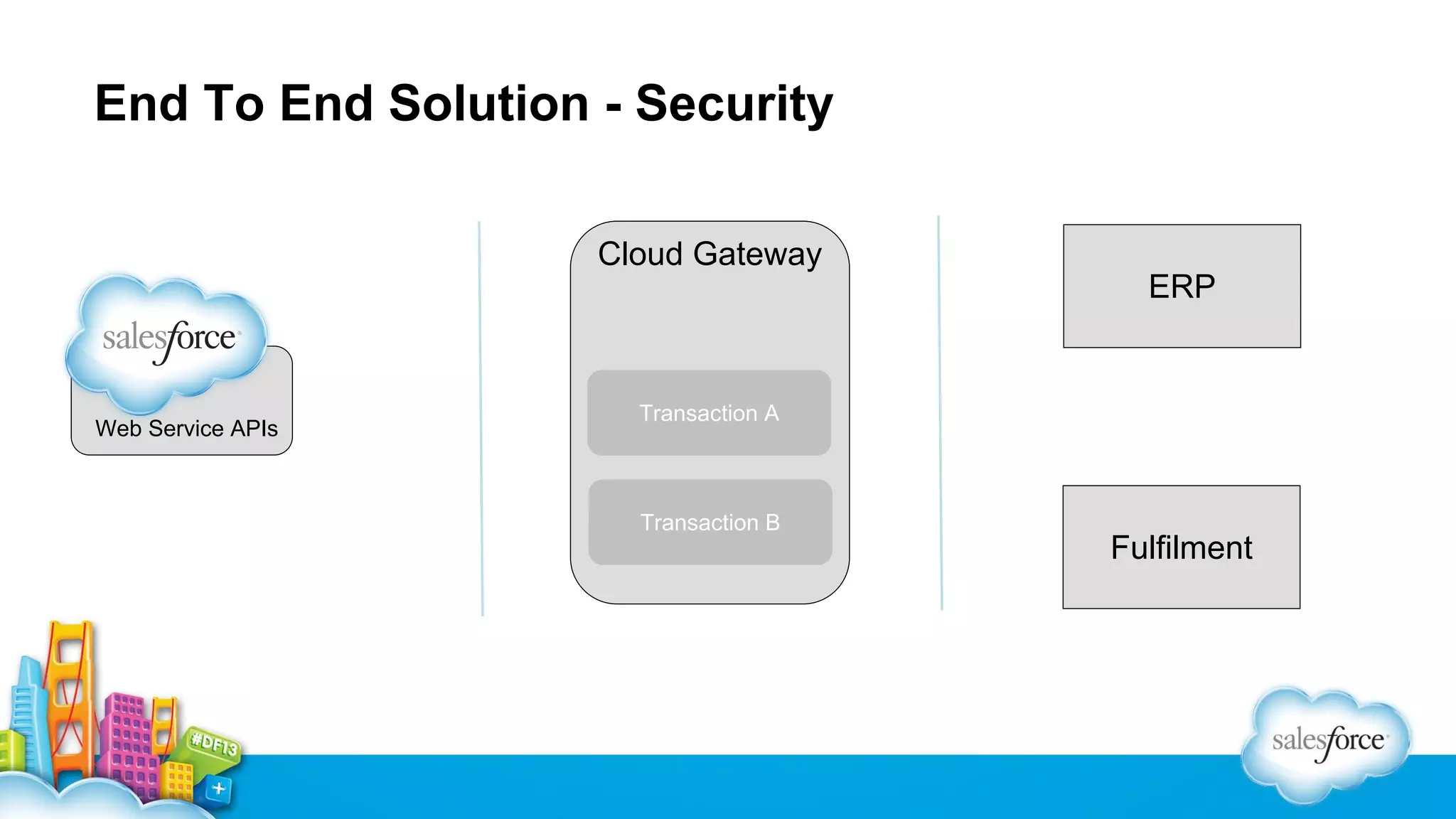
End To End Solution - Security
Cloud Gateway
ERP

Web Service APIs

Transaction A

Transaction B

Fulfilment
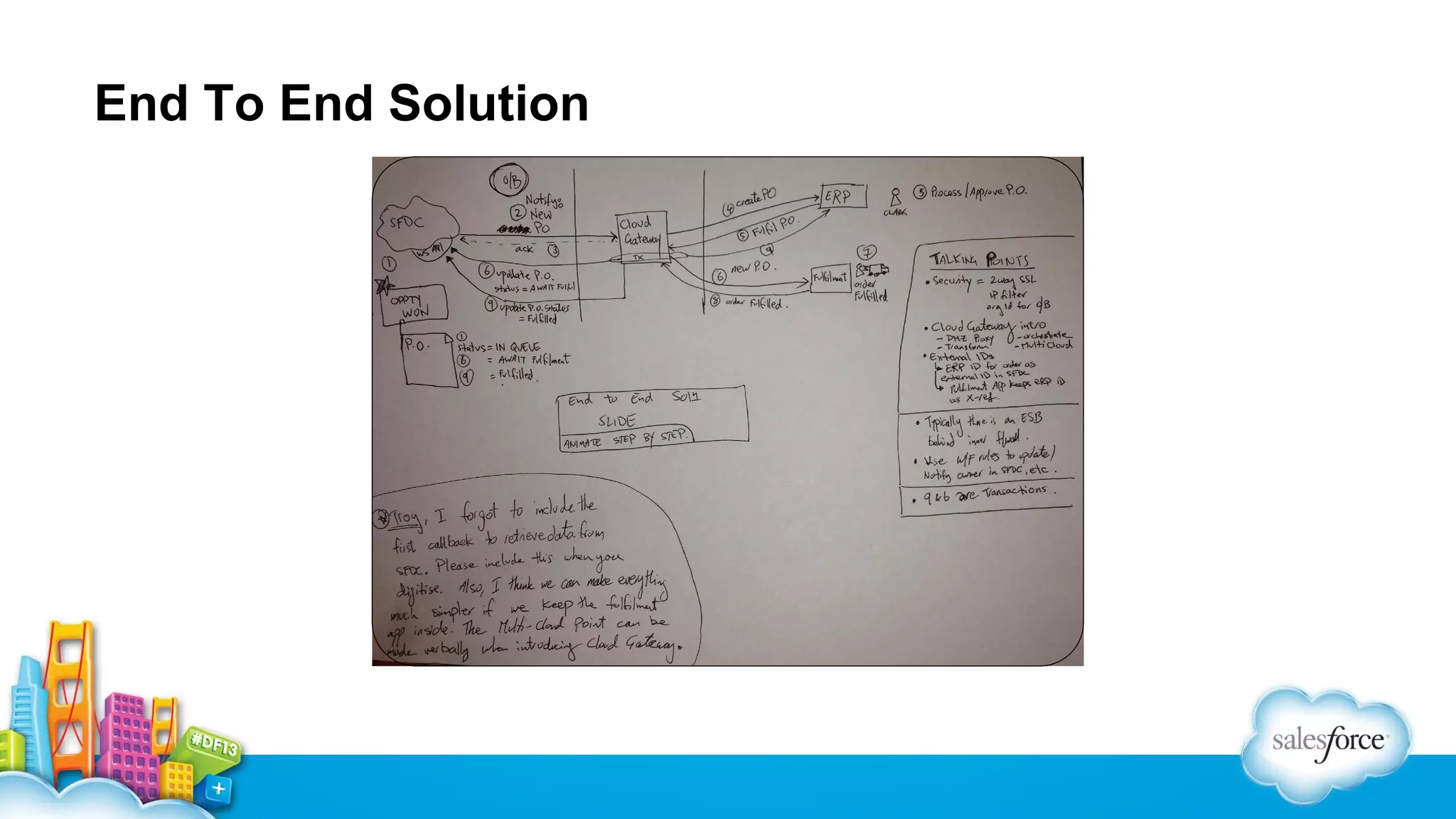
End To End Solution
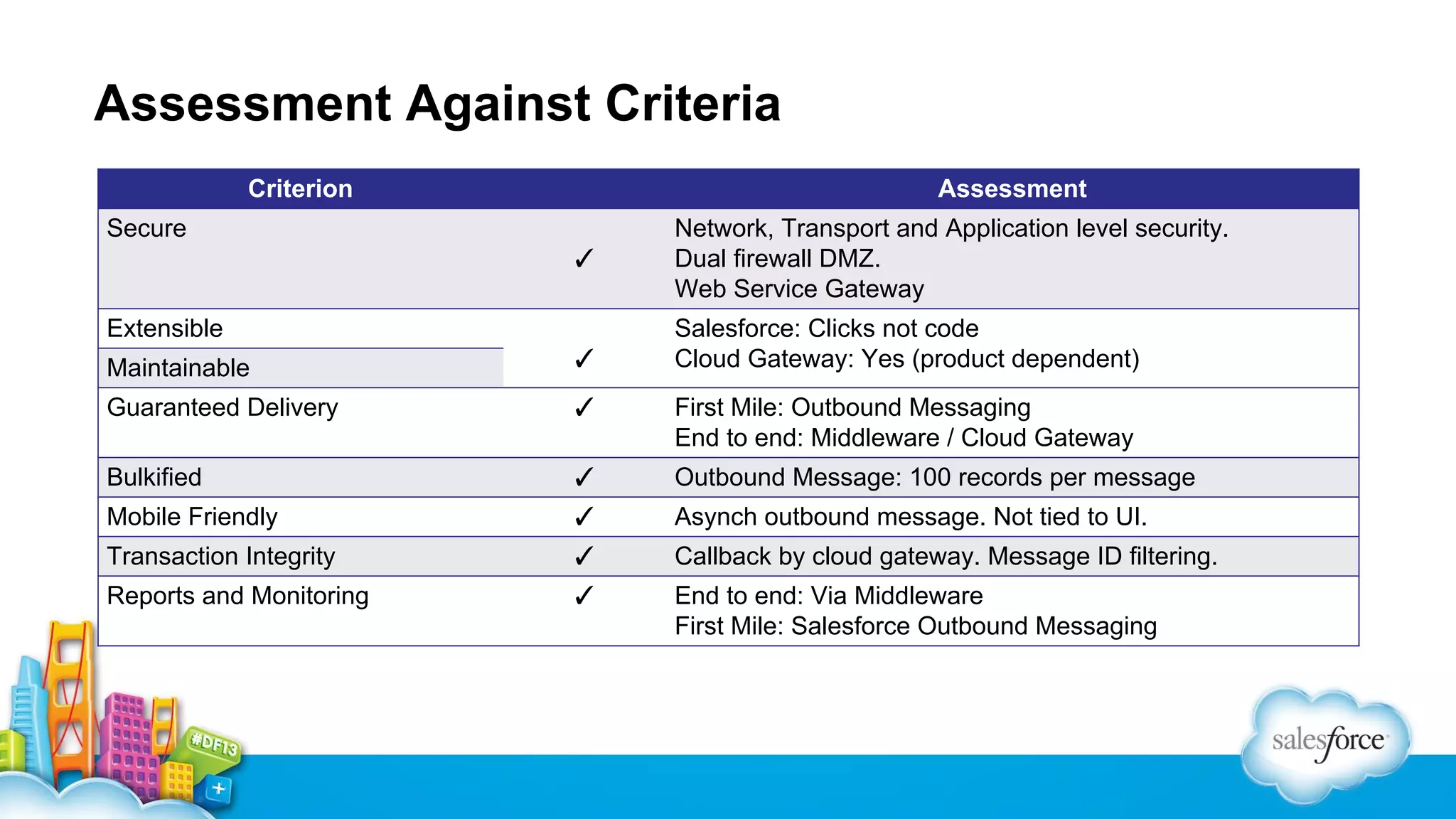
Assessment Against Criteria
Criterion

Assessment

Secure
✓

Network, Transport and Application level security.
Dual firewall DMZ.
Web Service Gateway

Maintainable

✓

Salesforce: Clicks not code
Cloud Gateway: Yes (product dependent)

Guaranteed Delivery

✓

First Mile: Outbound Messaging
End to end: Middleware / Cloud Gateway

Bulkified

✓

Outbound Message: 100 records per message

Mobile Friendly

✓

Asynch outbound message. Not tied to UI.

Transaction Integrity

✓

Callback by cloud gateway. Message ID filtering.

Reports and Monitoring

✓

End to end: Via Middleware
First Mile: Salesforce Outbound Messaging

Extensible
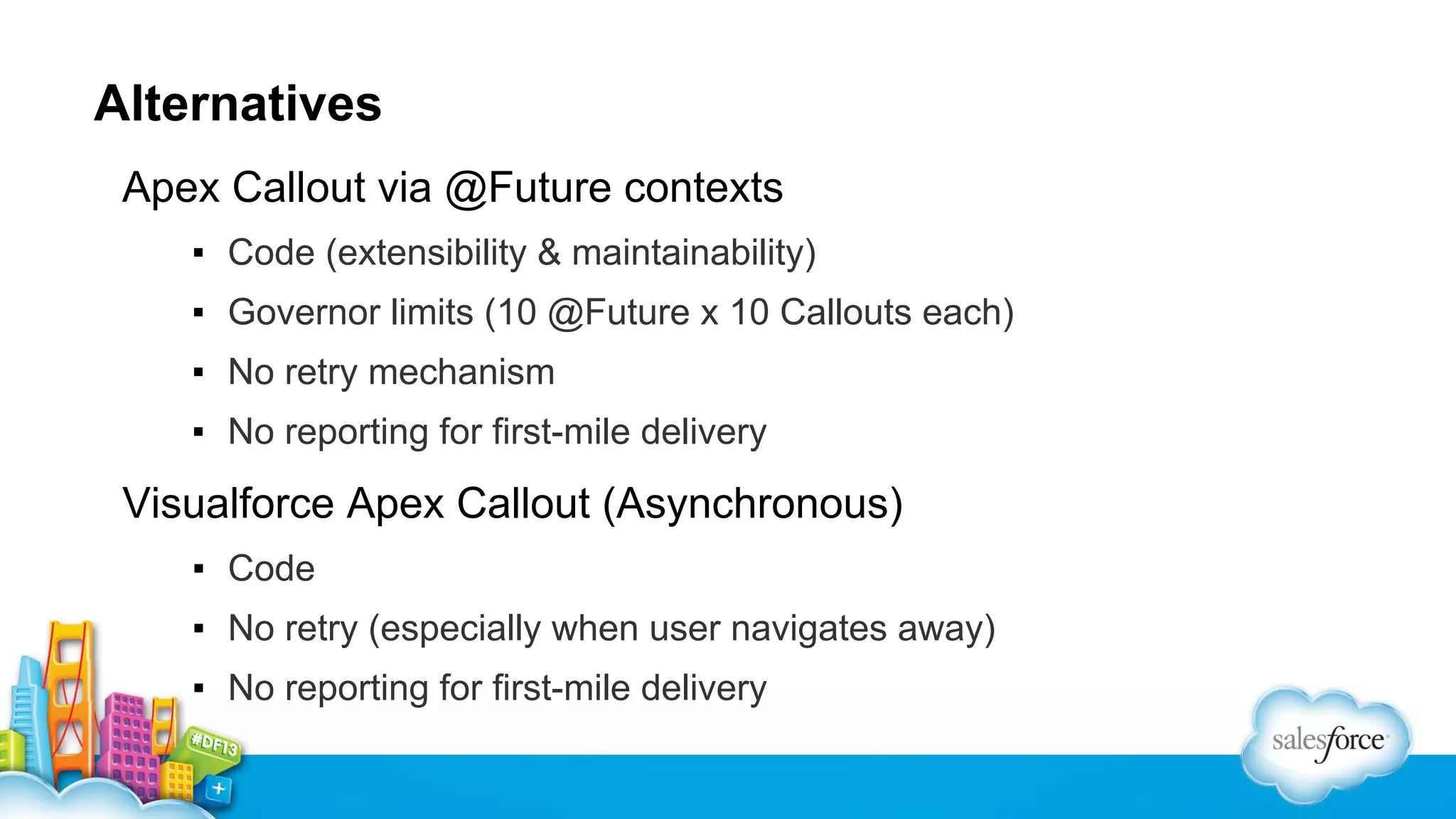
Alternatives
Apex Callout via @Future contexts
▪ Code (extensibility & maintainability)
▪ Governor limits (10 @Future x 10 Callouts each)
▪ No retry mechanism
▪ No reporting for first-mile delivery

Visualforce Apex Callout (Asynchronous)
▪ Code
▪ No retry (especially when user navigates away)
▪ No reporting for first-mile delivery
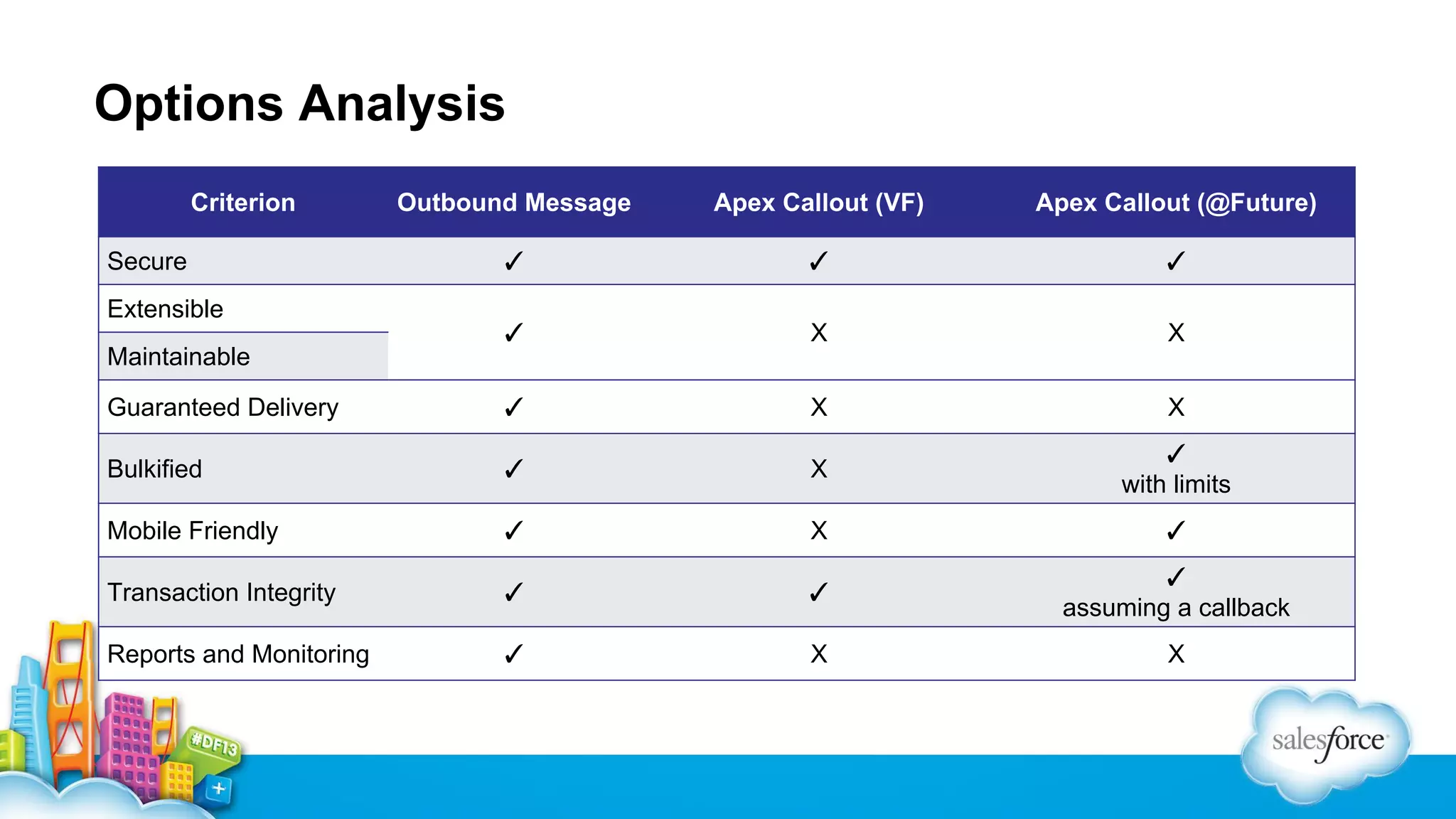
Options Analysis
Criterion

Outbound Message

Apex Callout (VF)

Apex Callout (@Future)

✓

✓

✓

✓

X

X

Guaranteed Delivery

✓

X

X

Bulkified

✓

X

✓
with limits

Mobile Friendly

✓

X

✓

Transaction Integrity

✓

✓

✓
assuming a callback

Reports and Monitoring

✓

X

X

Secure
Extensible
Maintainable
When good things go bad…
What happens when there are functional / validation errors
▪ Asynchronous messages do not give users feedback
▪ Users will need feedback as to the current status
• E.g In Queue, Sent, In Error etc

▪ Operations / Support team needs access to proactively investigate
and quantify errors.
Integration Control Fields
▪ Each object / record sent to the master system has 3 fields
▪ Integration Action (Add, Modify, Delete)
▪ Integration Status (Sent, Complete, Error)
▪ Integration Error Code

▪ A workflow rule fires and sends an outbound message when
the integration action is set to ‘Sent’
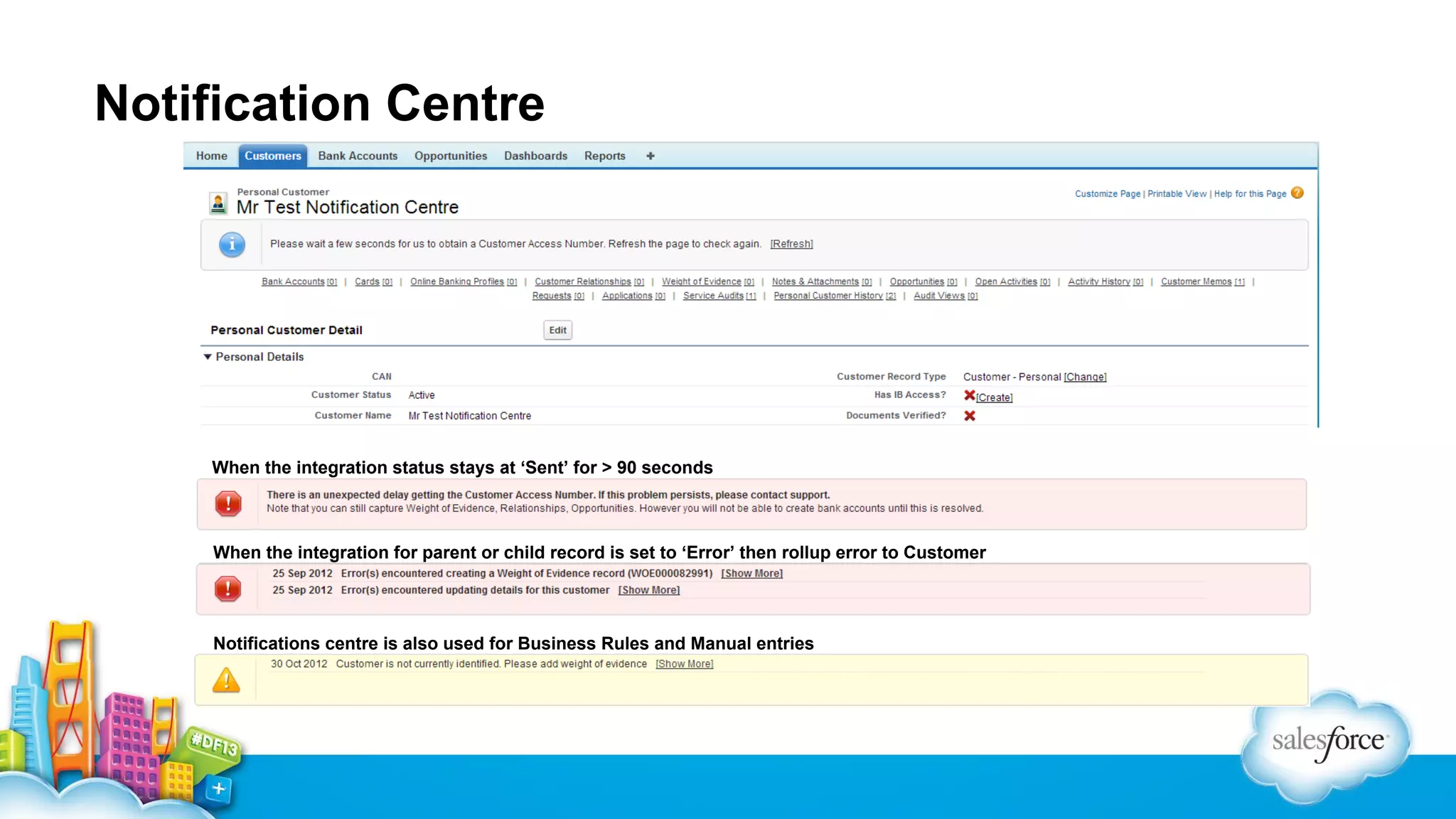
Notification Centre

When the integration status stays at ‘Sent’ for > 90 seconds

When the integration for parent or child record is set to ‘Error’ then rollup error to Customer

Notifications centre is also used for Business Rules and Manual entries
Where To Get More
• Download and review the Salesforce.com Integration
Patterns and Best Practice paper
http://bit.ly/1aMHrVC

Visit the integration page on wiki.developerforce.com
http://wiki.developerforce.com/page/Integration

• Create a developer account
https://events.developerforce.com/signup

• Use the Integration CookBook
http://developer.force.com/cookbook/category/integration/
Ammar Alamar

Troy Sellers

Director – Salesforce Services, Australia

Platform Architect – APAC
@ibigfoot7
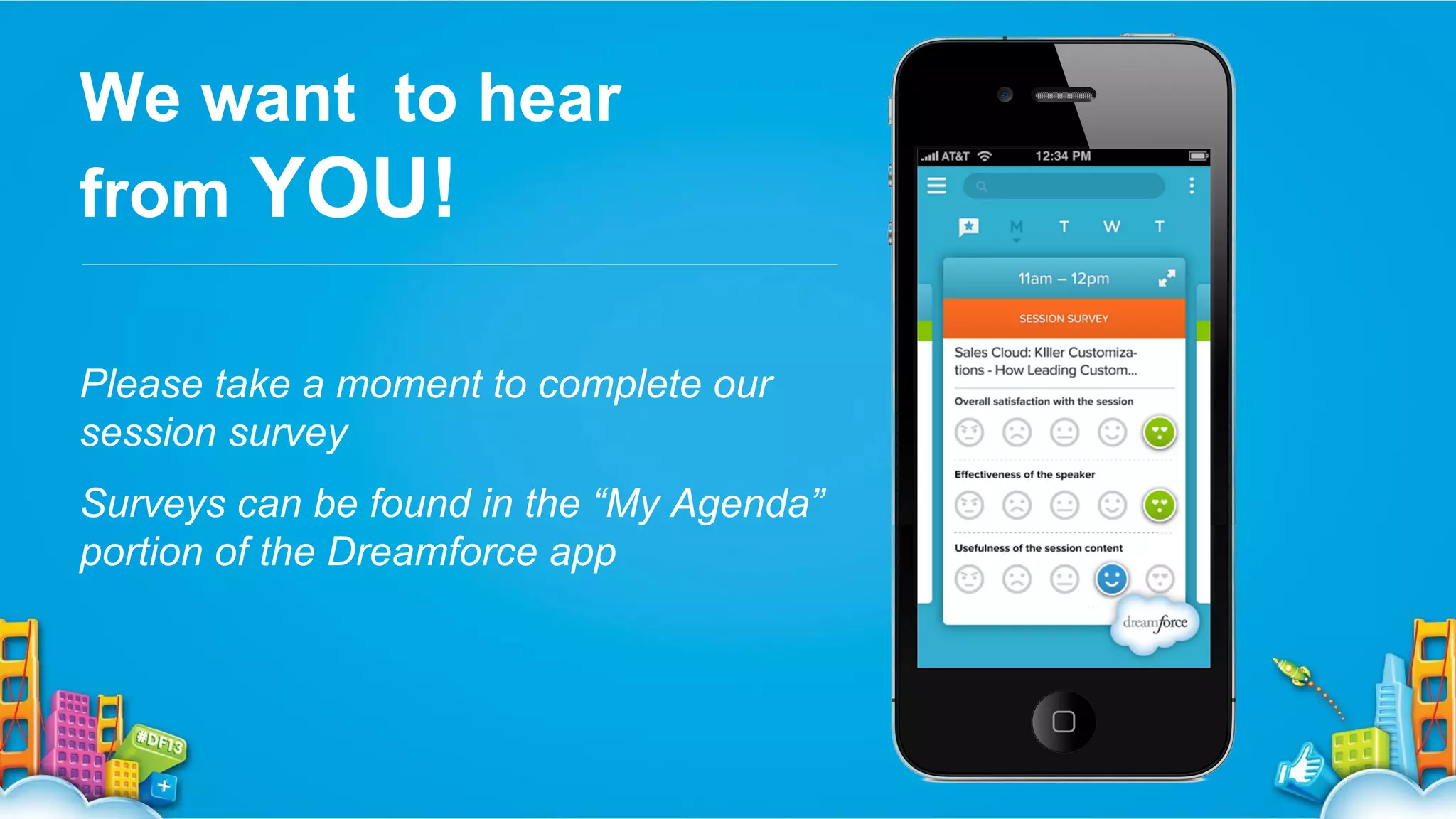
We want to hear
from YOU!
Please take a moment to complete our
session survey
Surveys can be found in the “My Agenda”
portion of the Dreamforce app
Enterprise Integration - Solution Patterns From the Field

Enterprise Integration - Solution Patterns From the Field

  • 1.
  • 2.
    Safe Harbor Safe harborstatement under the Private Securities Litigation Reform Act of 1995: This presentation may contain forward-looking statements that involve risks, uncertainties, and assumptions. If any such uncertainties materialize or if any of the assumptions proves incorrect, the results of salesforce.com, inc. could differ materially from the results expressed or implied by the forward-looking statements we make. All statements other than statements of historical fact could be deemed forward-looking, including any projections of product or service availability, subscriber growth, earnings, revenues, or other financial items and any statements regarding strategies or plans of management for future operations, statements of belief, any statements concerning new, planned, or upgraded services or technology developments and customer contracts or use of our services. The risks and uncertainties referred to above include – but are not limited to – risks associated with developing and delivering new functionality for our service, new products and services, our new business model, our past operating losses, possible fluctuations in our operating results and rate of growth, interruptions or delays in our Web hosting, breach of our security measures, the outcome of any litigation, risks associated with completed and any possible mergers and acquisitions, the immature market in which we operate, our relatively limited operating history, our ability to expand, retain, and motivate our employees and manage our growth, new releases of our service and successful customer deployment, our limited history reselling non-salesforce.com products, and utilization and selling to larger enterprise customers. Further information on potential factors that could affect the financial results of salesforce.com, inc. is included in our annual report on Form 10-K for the most recent fiscal year and in our quarterly report on Form 10-Q for the most recent fiscal quarter. These documents and others containing important disclosures are available on the SEC Filings section of the Investor Information section of our Web site. Any unreleased services or features referenced in this or other presentations, press releases or public statements are not currently available and may not be delivered on time or at all. Customers who purchase our services should make the purchase decisions based upon features that are currently available. Salesforce.com, inc. assumes no obligation and does not intend to update these forward-looking statements.
  • 3.
    Ammar Alamar Director –Salesforce Services, Australia
  • 4.
  • 5.
    Agenda ▪ Review integrationpatterns & Salesforce capabilities ▪ Use Case ▪ The notify with callback pattern ▪ Integration assessment criteria ▪ Alternatives ▪ Handling errors ▪ Q&A | References
  • 7.
    Integration Patterns ▪ Synchronous ▪Asynchronous ▪ Notify with callback (fire & forget) ▪ Batch data replication Apex Callout Outbound Messaging / Apex Callout ** Today’s Pattern ** ▪ Publish & Subscribe Salesforce APIs (REST | SOAP) ▪ Polling Streaming API Salesforce APIs (REST | SOAP) ▪ Integration Patterns and Best Practice http://www.salesforce. com/us/developer/docs/integration_patterns/integration_patterns_and _practices.pdf (page 18-23)
  • 8.
    What Are WeSolving For?
  • 9.
    Integration Assessment Criteria Weare looking to solve with the following criteria in mind: ▪ Secure ▪ Bulkified ▪ Extensible ▪ Mobile friendly ▪ Maintainable ▪ Transaction Integrity ▪ Guaranteed message delivery ▪ Reports and monitoring
  • 10.
    Notify / CallbackPattern Middleware Salesforce.com Workflow Rule Outbound Message Remote Listener Queue / Orchestrate Remote System WF Action Outbound Message Send Outbound Message (Notify) Acknowledge Web Service API Queue Ack Retrieve data Invoke
  • 11.
    Process Lifecycle 8 SalesP.O. in ERP 7 Fulfillment (Create & 6 Fulfill P.O. complete. 5 Populate External query data 4 Approval / processID update) 3 CreateRep Back office task(s) 2 – Acknowledge and an Opportunity 1 closes Another transaction order a A created purchase messageasis needs An optional tasks If Salesforcerequires a soft Back retrieved fromSalesforcethat action to the Datafulfillment system hasinitiatessent to thebefires. The outbound messagesuchsimpleprocess that office step. occur is internal notify. Outbound Message (configured approval via workflow) sent system requires and retrieve to the a required fulfillmentcreation Purchase 24hr foreign key the ofprovidescreated process, to run. ERP the Salesforce etcfor ERP to bothreference and data OrderP.O. the CallbackSalesforceThis needs to be delivery OBM in system. transactional with the system transaction from Salesforce. update in guarantee. Salesforce. 4 3 Cloud Gateway 1 2 5 Web Service APIs 8 5 ERP 6 8 Transaction A 6 6 Transaction B 8 7 Fulfilment
  • 12.
    End To EndSolution - Security Cloud Gateway ERP Web Service APIs Transaction A Transaction B Fulfilment
  • 13.
    End To EndSolution
  • 14.
    Assessment Against Criteria Criterion Assessment Secure ✓ Network,Transport and Application level security. Dual firewall DMZ. Web Service Gateway Maintainable ✓ Salesforce: Clicks not code Cloud Gateway: Yes (product dependent) Guaranteed Delivery ✓ First Mile: Outbound Messaging End to end: Middleware / Cloud Gateway Bulkified ✓ Outbound Message: 100 records per message Mobile Friendly ✓ Asynch outbound message. Not tied to UI. Transaction Integrity ✓ Callback by cloud gateway. Message ID filtering. Reports and Monitoring ✓ End to end: Via Middleware First Mile: Salesforce Outbound Messaging Extensible
  • 15.
    Alternatives Apex Callout via@Future contexts ▪ Code (extensibility & maintainability) ▪ Governor limits (10 @Future x 10 Callouts each) ▪ No retry mechanism ▪ No reporting for first-mile delivery Visualforce Apex Callout (Asynchronous) ▪ Code ▪ No retry (especially when user navigates away) ▪ No reporting for first-mile delivery
  • 16.
    Options Analysis Criterion Outbound Message ApexCallout (VF) Apex Callout (@Future) ✓ ✓ ✓ ✓ X X Guaranteed Delivery ✓ X X Bulkified ✓ X ✓ with limits Mobile Friendly ✓ X ✓ Transaction Integrity ✓ ✓ ✓ assuming a callback Reports and Monitoring ✓ X X Secure Extensible Maintainable
  • 17.
    When good thingsgo bad… What happens when there are functional / validation errors ▪ Asynchronous messages do not give users feedback ▪ Users will need feedback as to the current status • E.g In Queue, Sent, In Error etc ▪ Operations / Support team needs access to proactively investigate and quantify errors.
  • 18.
    Integration Control Fields ▪Each object / record sent to the master system has 3 fields ▪ Integration Action (Add, Modify, Delete) ▪ Integration Status (Sent, Complete, Error) ▪ Integration Error Code ▪ A workflow rule fires and sends an outbound message when the integration action is set to ‘Sent’
  • 19.
    Notification Centre When theintegration status stays at ‘Sent’ for > 90 seconds When the integration for parent or child record is set to ‘Error’ then rollup error to Customer Notifications centre is also used for Business Rules and Manual entries
  • 20.
    Where To GetMore • Download and review the Salesforce.com Integration Patterns and Best Practice paper http://bit.ly/1aMHrVC Visit the integration page on wiki.developerforce.com http://wiki.developerforce.com/page/Integration • Create a developer account https://events.developerforce.com/signup • Use the Integration CookBook http://developer.force.com/cookbook/category/integration/
  • 21.
    Ammar Alamar Troy Sellers Director– Salesforce Services, Australia Platform Architect – APAC @ibigfoot7
  • 22.
    We want tohear from YOU! Please take a moment to complete our session survey Surveys can be found in the “My Agenda” portion of the Dreamforce app