5/8/12   © EXP 2012   1
Barb Cagley
                     Graphic Design Degree

                 1987 | Worked for CompuServe

                1996 | Started a Web Design Firm

                 2010 | Launched First Mobile App

         2011 | New Mobile Firm | EXP |experienceapp.com

            Launched 8 Apps |iOS| Android | Blackberry


5/8/12                       © EXP 2012                    2
Facts and Figures
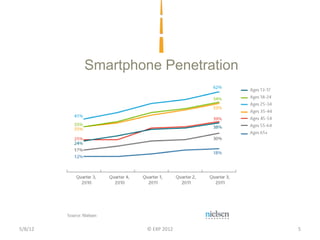
   By 2015, 81% of U.S. cell users will have smartphones (Source: Goldman Sachs, 2011)

   Mobile is predicted to be bigger than internet in 5 years (Source: Morgan Stanley, 2010)

              50.4% of US cellphones are smartphones(Source: Nielsen, 2012)

    Nearly 116 million Americans will use a smartphone at least monthly by
       the end of this year, up from 93.1 million in 2011. By 2013, they will
    represent over half of all mobile phone users, and by 2016, nearly three in
              five consumers will have a smartphone (Source: eMarketer, 2012)

     55% of consumers express an interest in mobile coupons but only 10%
       have actually received one from a merchant (Source: Mercator Advisory Group, 2012

5/8/12                                    © EXP 2012                                          3
Facts and Figures
           65% of mobile users use their device to find a business to make an
                            in-store purchase (Source: Google, 2011)
     82% consumers see themselves making a mobile payment within 2012
                                   (Source: Mobio Identity Systems Inc. Report, 2011)


         73% of companies are planning an investment in mobile in 2011, half
         planning to move into mobile commerce (Source: Econsultancy’s Customer Engagement Report)

   Approximately a third of consumers prefer an app to the mobile browser
     for their mobile retail experience. (Adobe Systems Survey conducted by Keynote Systems, 2010)


5/8/12                                               © EXP 2012                                      4
Smartphone Penetration


5/8/12           © EXP 2012       5
What are Mobile Options
                    Web App vs Native Apps vs Social Apps

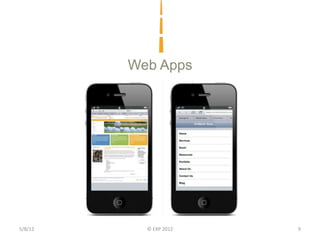
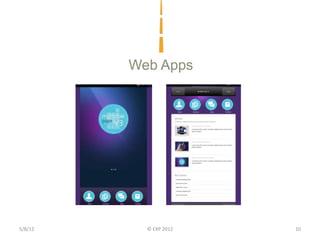
         Web App or Mobile Website
         • Built specifically to work and read easily on a smartphone
         • It is viewed using a browser and needs internet to view
         • Can be a segment of the full version of your website and auto
           displays when detecting a mobile device
         • Displays on all devices
         • Easy updates, less costly, cannot use all the devices functions


5/8/12                                © EXP 2012                             6
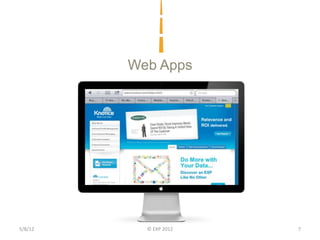
Web Apps


5/8/12     © EXP 2012   7
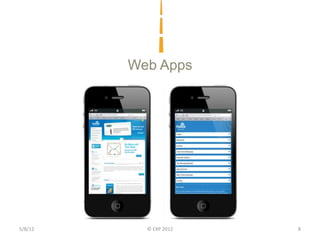
Web Apps


5/8/12     © EXP 2012   8
Web Apps


5/8/12     © EXP 2012   9
Web Apps


5/8/12     © EXP 2012   10
What are Mobile Options
                    Web App vs Native Apps vs Social Apps

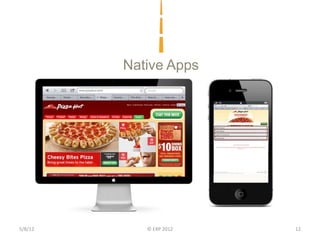
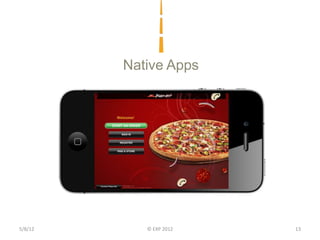
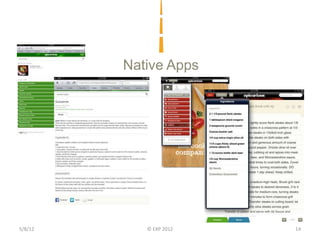
         Native App or Smartphone Apps
         • Built specifically for device type; iPhone, Droid, Blackberry…
         • Richer experience using the device functions
         • May work without internet connection
         • Ubiquitous, direct connection to customer
         • Can be expensive


5/8/12                                © EXP 2012                            11
Native Apps


5/8/12      © EXP 2012   12
Native Apps


5/8/12      © EXP 2012   13
Native Apps


5/8/12      © EXP 2012   14
What are Mobile Options
                   Web App vs Native Apps vs Social Apps

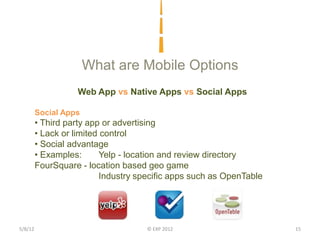
         Social Apps
         • Third party app or advertising
         • Lack or limited control
         • Social advantage
         • Examples:       Yelp - location and review directory
         FourSquare - location based geo game
                           Industry specific apps such as OpenTable


5/8/12                               © EXP 2012                       15
Who is Your Audience
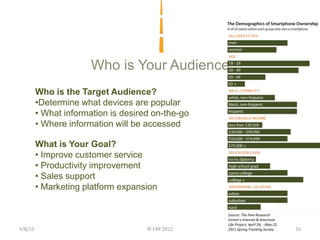
         Who is the Target Audience?
         •Determine what devices are popular
         • What information is desired on-the-go
         • Where information will be accessed

         What is Your Goal?
         • Improve customer service
         • Productivity improvement
         • Sales support
         • Marketing platform expansion

                                                   Source: The Pew Research
                                                   Center’s Internet & American
                                                   Life Project, April 26, - May 22,
5/8/12                               © EXP 2012    2011 Spring Tracking Survey         16
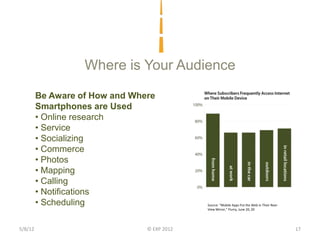
Where is Your Audience

         Be Aware of How and Where
         Smartphones are Used
         • Online research
         • Service
         • Socializing
         • Commerce
         • Photos
         • Mapping
         • Calling
         • Notifications
         • Scheduling                        Source: “Mobile Apps Put the Web in Their Rear-
                                             View Mirror,” Flurry, June 20, 20


5/8/12                          © EXP 2012                                                     17
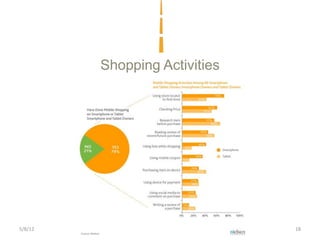
Shopping Activities


5/8/12          © EXP 2012     18
Types of Apps
         ADDED VALUE
         Auto Insurance – Smartphone Accident Report App
         • Geo locator to map location
         • Photo to record incident
         • Phone directory to call police
         • Form to enter information about the other vehicle
         • A record of the insurance agent’s name, phone, policy number…

         PRODUCTIVITY
         Home Inspector – Smartphone Inspection Reports App
         • Phone to record with text descriptions, pull down selection for
           rankings…
         • Connect to database to upload and manage billing and business side

5/8/12                                 © EXP 2012                               19
Examples
         TOOL
         Consultant – Smartphone Tracking App
         • Reminder for assigned tasks with push notification
         • Contact information
         • Custom tools based on the industry

         PRODUCT
         Security Company – Smartphone Password Recorder App
         • Login for security
         • Ability to search for keywords
         • Enter new passwords
         • Link to appropriate websites


5/8/12                                      © EXP 2012          20
Making the Mobile App Decision

         Consumers Demand Added Value or Fix a Problem
         1. Determine what your customer wants – they are in control
         2. What location will the customer will be interacting
         3. What is the best format Web or Native app
             1. Budget
             2. Functions
             3. Revenue generating


5/8/12                                 © EXP 2012                      21
Making the Mobile Campaign Decision

         Engage Proactively with Customers Through Mobile
         1. Offer value (coupon) to build a relevant SMS contact list
         2. Participate with existing industry or social apps
         3. Combine on-line and off-line marketing activities
             1. QR Codes
             2. Email Campaigns
             3. Landing Pages
             4. Print Ads
             5. Cable Television advertising
             6. Facebook Advertising
             7. Google Adwords


5/8/12                                   © EXP 2012                     22
Barb Cagley
                   EXP
         bcagley@experienceapp.com

          www.experienceapp.com

         facebook.com/experienceapp

                @barbcagley

           Linkedin.com/barbcagley

         Mobile App Roadmap Report
         www.mobileapproadmap.com

5/8/12            © EXP 2012          23

Small Business Mobile Marketing

  • 1.
    5/8/12 © EXP 2012 1
  • 2.
    Barb Cagley Graphic Design Degree 1987 | Worked for CompuServe 1996 | Started a Web Design Firm 2010 | Launched First Mobile App 2011 | New Mobile Firm | EXP |experienceapp.com Launched 8 Apps |iOS| Android | Blackberry 5/8/12 © EXP 2012 2
  • 3.
    Facts and Figures By 2015, 81% of U.S. cell users will have smartphones (Source: Goldman Sachs, 2011) Mobile is predicted to be bigger than internet in 5 years (Source: Morgan Stanley, 2010) 50.4% of US cellphones are smartphones(Source: Nielsen, 2012) Nearly 116 million Americans will use a smartphone at least monthly by the end of this year, up from 93.1 million in 2011. By 2013, they will represent over half of all mobile phone users, and by 2016, nearly three in five consumers will have a smartphone (Source: eMarketer, 2012) 55% of consumers express an interest in mobile coupons but only 10% have actually received one from a merchant (Source: Mercator Advisory Group, 2012 5/8/12 © EXP 2012 3
  • 4.
    Facts and Figures 65% of mobile users use their device to find a business to make an in-store purchase (Source: Google, 2011) 82% consumers see themselves making a mobile payment within 2012 (Source: Mobio Identity Systems Inc. Report, 2011) 73% of companies are planning an investment in mobile in 2011, half planning to move into mobile commerce (Source: Econsultancy’s Customer Engagement Report) Approximately a third of consumers prefer an app to the mobile browser for their mobile retail experience. (Adobe Systems Survey conducted by Keynote Systems, 2010) 5/8/12 © EXP 2012 4
  • 5.
  • 6.
    What are MobileOptions Web App vs Native Apps vs Social Apps Web App or Mobile Website • Built specifically to work and read easily on a smartphone • It is viewed using a browser and needs internet to view • Can be a segment of the full version of your website and auto displays when detecting a mobile device • Displays on all devices • Easy updates, less costly, cannot use all the devices functions 5/8/12 © EXP 2012 6
  • 7.
    Web Apps 5/8/12 © EXP 2012 7
  • 8.
    Web Apps 5/8/12 © EXP 2012 8
  • 9.
    Web Apps 5/8/12 © EXP 2012 9
  • 10.
    Web Apps 5/8/12 © EXP 2012 10
  • 11.
    What are MobileOptions Web App vs Native Apps vs Social Apps Native App or Smartphone Apps • Built specifically for device type; iPhone, Droid, Blackberry… • Richer experience using the device functions • May work without internet connection • Ubiquitous, direct connection to customer • Can be expensive 5/8/12 © EXP 2012 11
  • 12.
    Native Apps 5/8/12 © EXP 2012 12
  • 13.
    Native Apps 5/8/12 © EXP 2012 13
  • 14.
    Native Apps 5/8/12 © EXP 2012 14
  • 15.
    What are MobileOptions Web App vs Native Apps vs Social Apps Social Apps • Third party app or advertising • Lack or limited control • Social advantage • Examples: Yelp - location and review directory FourSquare - location based geo game Industry specific apps such as OpenTable 5/8/12 © EXP 2012 15
  • 16.
    Who is YourAudience Who is the Target Audience? •Determine what devices are popular • What information is desired on-the-go • Where information will be accessed What is Your Goal? • Improve customer service • Productivity improvement • Sales support • Marketing platform expansion Source: The Pew Research Center’s Internet & American Life Project, April 26, - May 22, 5/8/12 © EXP 2012 2011 Spring Tracking Survey 16
  • 17.
    Where is YourAudience Be Aware of How and Where Smartphones are Used • Online research • Service • Socializing • Commerce • Photos • Mapping • Calling • Notifications • Scheduling Source: “Mobile Apps Put the Web in Their Rear- View Mirror,” Flurry, June 20, 20 5/8/12 © EXP 2012 17
  • 18.
  • 19.
    Types of Apps ADDED VALUE Auto Insurance – Smartphone Accident Report App • Geo locator to map location • Photo to record incident • Phone directory to call police • Form to enter information about the other vehicle • A record of the insurance agent’s name, phone, policy number… PRODUCTIVITY Home Inspector – Smartphone Inspection Reports App • Phone to record with text descriptions, pull down selection for rankings… • Connect to database to upload and manage billing and business side 5/8/12 © EXP 2012 19
  • 20.
    Examples TOOL Consultant – Smartphone Tracking App • Reminder for assigned tasks with push notification • Contact information • Custom tools based on the industry PRODUCT Security Company – Smartphone Password Recorder App • Login for security • Ability to search for keywords • Enter new passwords • Link to appropriate websites 5/8/12 © EXP 2012 20
  • 21.
    Making the MobileApp Decision Consumers Demand Added Value or Fix a Problem 1. Determine what your customer wants – they are in control 2. What location will the customer will be interacting 3. What is the best format Web or Native app 1. Budget 2. Functions 3. Revenue generating 5/8/12 © EXP 2012 21
  • 22.
    Making the MobileCampaign Decision Engage Proactively with Customers Through Mobile 1. Offer value (coupon) to build a relevant SMS contact list 2. Participate with existing industry or social apps 3. Combine on-line and off-line marketing activities 1. QR Codes 2. Email Campaigns 3. Landing Pages 4. Print Ads 5. Cable Television advertising 6. Facebook Advertising 7. Google Adwords 5/8/12 © EXP 2012 22
  • 23.
    Barb Cagley EXP bcagley@experienceapp.com www.experienceapp.com facebook.com/experienceapp @barbcagley Linkedin.com/barbcagley Mobile App Roadmap Report www.mobileapproadmap.com 5/8/12 © EXP 2012 23