ICE Conference Feb 27, 2009 Terence Sullivan    Technology Director   Shiloh CUSD#1
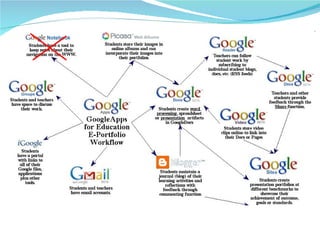
Google Apps Messaging   Gmail and Google Calendar  keep employees connected and save your company time and money  Collaboration   Google Docs, Google Video and Google Sites  complement traditional office software to make teamwork easier. Companies or departments can use these apps on their own to be more productive
Google Tools for Schools Standard single user google/gmail accounts Google Team Edition Overview page Can be setup and managed by a teacher or group of students Google Apps Complete School Solution Overview page Requires IT management support and involvement
 
Education Edition FAQ  “click here for live  faq ” 1) What is Google Apps Education Edition?   2) Why Google Apps?   3) What other schools are using Google Apps for Education?   4) How much is Google Apps for Education?   5) Will there be advertisements with Google Apps?   6) How much storage do users get with Google Apps Education Edition?   7) What is the uptime for the Google Apps email?   8) What's the difference between Education Edition and Premier Edition?   9) How secure is Google Apps?
Google Apps for Education Local management of an institution domain http://school.org     school registered and owned domain Basic messaging and collaboration services Google tools all registered under the school owned domain School staff has complete management rights Account creation and management Which services are active Access to take control of any account Tools to integrate with existing services Tools to migrate user accounts to Google Apps domain
Intro Classroom Activities http://www.google.com/educators/activities.html
Reference  Other Google Apps video http://www.youtube.com/user/GoogleApps Admin Control Panel video http:// www.youtube.com/view_play_list?p =445899A1305C271C
Options Single user account Faculty, teachers, and students: get started now with Google Apps Team Edition Team Edition Video IT decision-makers:  learn more about Google Apps Education Edition
What is it? Option to Mix and Match Gmail Google Talk Google Calendar Google Docs Document, Spreadsheet, Presentation Document Storage, upload, export, publish Google Sites (website)
Who  North Western University Notre Dame Univ Southern California  (USC) Arizona State University Colorado State St Louis University Clemson University Univ of TX – San Antonio
K-12 Shiloh CUSD#1 – for staff as a pilot Roxana District Niles Township High School – District 219 – for Students http:// www.youtube.com/watch?v =4qJI3d0Tbc0 http://www.nths219.org/   http://register.niles-hs.k12.il.us/googleapps/faq.html http://www.niles-hs.k12.il.us/
Others – coming maybe G-drive Blogger Already can access and use any tool from the Google Labs from the Google Apps for Education Account
Cost FREE will remain free as long as the product’s around.    promise from Google
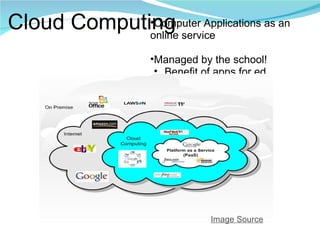
Cloud Computing Computer Applications as an online service Managed by the school! Benefit of apps for ed Image Source
Cloud Computing Cloud Computing -  YouTube.com    Google Apps    this session Zoho http://zoho.com/index.html   http://iceconference.wiki.zoho.com/   Windows Live http://home.live.com/ Windows Live at EDU http://get.liveatedu.com/ Live Campus http:// livecampus.net /
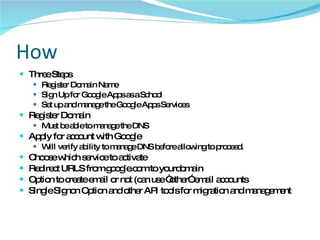
How Three Steps Register Domain Name Sign Up for Google Apps as a School Set up and manage the Google Apps Services Register Domain Must be able to manage the DNS Apply for account with Google Will verify ability to manage DNS before allowing to proceed. Choose which service to activate Redirect URLS from google.com to yourdomain Option to create email or not (can use “other” email accounts Single Signon Option and other API tools for migration and management
How to sign up Google Apps personal or business http://google.com/a Schools, Colleges, Unversities http:// google.com/a/edu Help education- [email_address] .
Reference Education Agreement: http://www.google.com/a/help/intl/en/admins/education_terms.html Admin Help http:// www.google.com /support/a/?hl=en
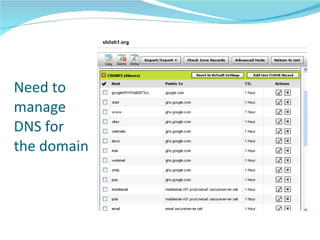
Need to manage DNS for the domain
Management Focused around collaboration “ Cloud Computing” 24/7 uptime and backup managed by google Free tech support – provide a phone number Privacy Will not delete data Option to cancel and remove all data if desired No advertising Addon services – 66% discount for education
OPPS - Feb 24, Gmail crash SEVERAL million people around the world were left without access to email for more than two hours on Tuesday after Gmail, Google's web-based email service, crashed.  More than 100 million people are estimated to use Gmail every month, and the widespread outage is known to have affected users across the globe  STILL far better than typical school network system
Education Features All basic services Unlimited number users 7 Gig quota per account Option to turn off Advertising Basic spam/virus filtering (option for Postini filtering service) Priority Support Option
Premium and Education Services The free (Standard) version of Google Apps is nice by itself, but for $50 per user, per year, you can upgrade to the Premier Edition. The Premier Edition of Google Apps offers the same services as the Standard Edition with the addition of:  Up to 25 gigs of Gmail storage space per account  99.9% guarantee of email uptime  Ability to turn off  AdSense  ads in Gmail  Conference room and resource scheduling  APIs that can be integrated with your existing infrastructure  Email migration tools  Phone support  Third party applications and services  Postini mail management and recovery  Education institutions can use the premium features for free through  Google Apps for Education . Many users would be more than fine with the free version.
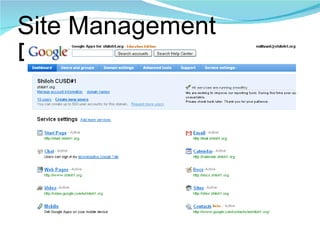
Site Management Dashboard
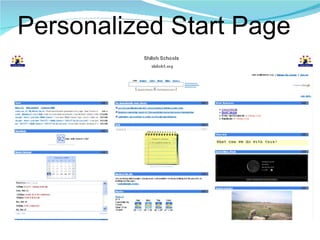
Personalized Start Page
Contacts Personal Contact Lists Contact Lists for domain (school) to share
Advanced Features Bulk upload/update users Advanced authentication options Single Sign On  Password strength customization oAuthentication option E-mail quotas E-mail migration APIs for managing and synchronizing user accounts with legacy account systems
Working with Google Apps Using the tools in a school
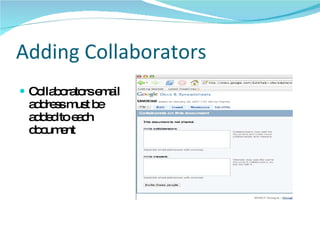
Adding Collaborators Collaborators email address must be added to each document
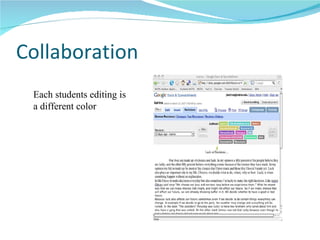
Collaboration  Each students editing is a different color
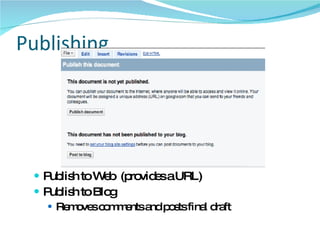
Publishing Publish to Web  (provides a URL) Publish to Blog Removes comments and posts final draft
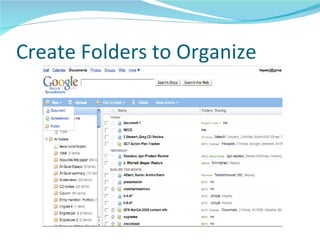
Create Folders to Organize
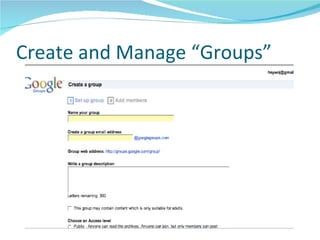
Create and Manage “Groups”
Collaboration Allow all in same domain to have reading privileges, or editing/collaborating privileges Allow “everyone” in public Internet to view Allow selected individuals within same domain, OR anywhere on Internet to have specific privileges with selection set by e-mail address and invitation
Docs - History
Blog Connection Publish from Google Docs directly to personal blog on Blogger
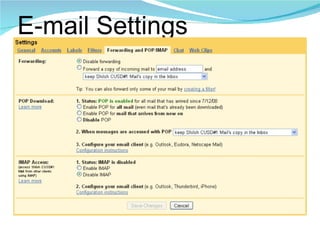
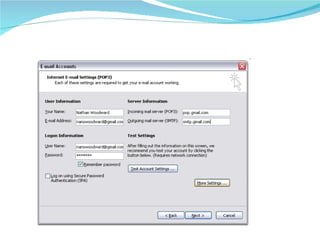
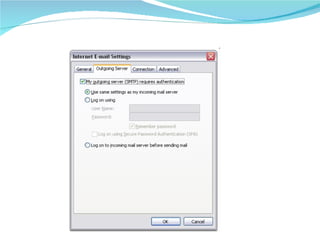
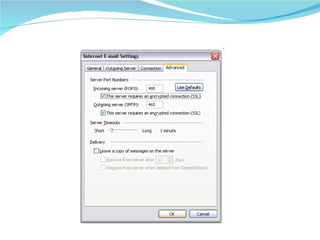
E-mail Basic Features Use to Receive or Send e-mail from other accounts POP3/IMAP Tools to access from inside Outlook, Thunderbird, etc.
E-mail Settings


Calendar Personal Calendar Tools to Sync with desktop calendar or mobile device Options for Private Viewing by invitation (including collaboration) Open viewing by all Embedding in other websites online
Google Sites Personal Website or Group Website Options for Private Viewing by invitation (including collaboration) Open viewing by all Embedding video, calendars, or any other Google app inside website Classsroom Example http://sites.google.com/a/googleclassrooms.org/mrs-richau/Home
Sample Google Sites Google Demo Classroom Site       http://sites.google.com/a/googleclassrooms.org/mrs-richau/Home   Amber Grenda - Shiloh Guidance       http://sites.shiloh1.org/grendaa/scholarships   Amy McClain - Shiloh Language Arts     http://sites.shiloh1.org/7th-grade-literature/     Jessie Durdel - Arcola Schools       http://sites.google.com/a/arcolaschools.com/chemistry/Home
Google Docs Document Presentation Spreadsheet Form Folders to Organize Import/Export options Publish Options Share for Collaboration
Chat
Video
Resources Google for Educators resources       http://www.google.com/educators/p_docs.html   Google Apps in the Classroom      http://sites.google.com/site/sdusdgoo/Home   Cloud Computing - slideshare by Jim Puglia      http://www.slideshare.net/jpuglia/techspo-google-docs-and-sites-presentation
CIPA & COPA - oh my 13 yr old limitations for online services? Childrens Online Privacy Protection Act of 1998 -  COPPA Can use any hotmail, yahoomail account to access google apps Prefer Gaggle type student specific service Can use school hosted service Did you know ??  About  Google "plus" Addressing           http://www.extremetech.com/article2/0,1697,1865178,00.asp
Q & A Presentation slides: http://www.shiloh1.us/presentations/ICE2009   Terence Sullivan (  [email_address]  ) Technology Director Shiloh CUSD#1

Google Apps Ed3

  • 1.
    ICE Conference Feb27, 2009 Terence Sullivan Technology Director Shiloh CUSD#1
  • 2.
    Google Apps Messaging Gmail and Google Calendar keep employees connected and save your company time and money Collaboration Google Docs, Google Video and Google Sites complement traditional office software to make teamwork easier. Companies or departments can use these apps on their own to be more productive
  • 3.
    Google Tools forSchools Standard single user google/gmail accounts Google Team Edition Overview page Can be setup and managed by a teacher or group of students Google Apps Complete School Solution Overview page Requires IT management support and involvement
  • 4.
  • 5.
    Education Edition FAQ “click here for live faq ” 1) What is Google Apps Education Edition? 2) Why Google Apps? 3) What other schools are using Google Apps for Education? 4) How much is Google Apps for Education? 5) Will there be advertisements with Google Apps? 6) How much storage do users get with Google Apps Education Edition? 7) What is the uptime for the Google Apps email? 8) What's the difference between Education Edition and Premier Edition? 9) How secure is Google Apps?
  • 6.
    Google Apps forEducation Local management of an institution domain http://school.org  school registered and owned domain Basic messaging and collaboration services Google tools all registered under the school owned domain School staff has complete management rights Account creation and management Which services are active Access to take control of any account Tools to integrate with existing services Tools to migrate user accounts to Google Apps domain
  • 7.
    Intro Classroom Activitieshttp://www.google.com/educators/activities.html
  • 8.
    Reference OtherGoogle Apps video http://www.youtube.com/user/GoogleApps Admin Control Panel video http:// www.youtube.com/view_play_list?p =445899A1305C271C
  • 9.
    Options Single useraccount Faculty, teachers, and students: get started now with Google Apps Team Edition Team Edition Video IT decision-makers: learn more about Google Apps Education Edition
  • 10.
    What is it?Option to Mix and Match Gmail Google Talk Google Calendar Google Docs Document, Spreadsheet, Presentation Document Storage, upload, export, publish Google Sites (website)
  • 11.
    Who NorthWestern University Notre Dame Univ Southern California (USC) Arizona State University Colorado State St Louis University Clemson University Univ of TX – San Antonio
  • 12.
    K-12 Shiloh CUSD#1– for staff as a pilot Roxana District Niles Township High School – District 219 – for Students http:// www.youtube.com/watch?v =4qJI3d0Tbc0 http://www.nths219.org/ http://register.niles-hs.k12.il.us/googleapps/faq.html http://www.niles-hs.k12.il.us/
  • 13.
    Others – comingmaybe G-drive Blogger Already can access and use any tool from the Google Labs from the Google Apps for Education Account
  • 14.
    Cost FREE willremain free as long as the product’s around.  promise from Google
  • 15.
    Cloud Computing ComputerApplications as an online service Managed by the school! Benefit of apps for ed Image Source
  • 16.
    Cloud Computing CloudComputing - YouTube.com   Google Apps  this session Zoho http://zoho.com/index.html http://iceconference.wiki.zoho.com/ Windows Live http://home.live.com/ Windows Live at EDU http://get.liveatedu.com/ Live Campus http:// livecampus.net /
  • 17.
    How Three StepsRegister Domain Name Sign Up for Google Apps as a School Set up and manage the Google Apps Services Register Domain Must be able to manage the DNS Apply for account with Google Will verify ability to manage DNS before allowing to proceed. Choose which service to activate Redirect URLS from google.com to yourdomain Option to create email or not (can use “other” email accounts Single Signon Option and other API tools for migration and management
  • 18.
    How to signup Google Apps personal or business http://google.com/a Schools, Colleges, Unversities http:// google.com/a/edu Help education- [email_address] .
  • 19.
    Reference Education Agreement:http://www.google.com/a/help/intl/en/admins/education_terms.html Admin Help http:// www.google.com /support/a/?hl=en
  • 20.
    Need to manageDNS for the domain
  • 21.
    Management Focused aroundcollaboration “ Cloud Computing” 24/7 uptime and backup managed by google Free tech support – provide a phone number Privacy Will not delete data Option to cancel and remove all data if desired No advertising Addon services – 66% discount for education
  • 22.
    OPPS - Feb24, Gmail crash SEVERAL million people around the world were left without access to email for more than two hours on Tuesday after Gmail, Google's web-based email service, crashed. More than 100 million people are estimated to use Gmail every month, and the widespread outage is known to have affected users across the globe STILL far better than typical school network system
  • 23.
    Education Features Allbasic services Unlimited number users 7 Gig quota per account Option to turn off Advertising Basic spam/virus filtering (option for Postini filtering service) Priority Support Option
  • 24.
    Premium and EducationServices The free (Standard) version of Google Apps is nice by itself, but for $50 per user, per year, you can upgrade to the Premier Edition. The Premier Edition of Google Apps offers the same services as the Standard Edition with the addition of: Up to 25 gigs of Gmail storage space per account 99.9% guarantee of email uptime Ability to turn off AdSense ads in Gmail Conference room and resource scheduling APIs that can be integrated with your existing infrastructure Email migration tools Phone support Third party applications and services Postini mail management and recovery Education institutions can use the premium features for free through Google Apps for Education . Many users would be more than fine with the free version.
  • 25.
  • 26.
  • 27.
    Contacts Personal ContactLists Contact Lists for domain (school) to share
  • 28.
    Advanced Features Bulkupload/update users Advanced authentication options Single Sign On Password strength customization oAuthentication option E-mail quotas E-mail migration APIs for managing and synchronizing user accounts with legacy account systems
  • 29.
    Working with GoogleApps Using the tools in a school
  • 30.
    Adding Collaborators Collaboratorsemail address must be added to each document
  • 31.
    Collaboration Eachstudents editing is a different color
  • 32.
    Publishing Publish toWeb (provides a URL) Publish to Blog Removes comments and posts final draft
  • 33.
  • 34.
    Create and Manage“Groups”
  • 35.
    Collaboration Allow allin same domain to have reading privileges, or editing/collaborating privileges Allow “everyone” in public Internet to view Allow selected individuals within same domain, OR anywhere on Internet to have specific privileges with selection set by e-mail address and invitation
  • 36.
  • 37.
    Blog Connection Publishfrom Google Docs directly to personal blog on Blogger
  • 38.
    E-mail Basic FeaturesUse to Receive or Send e-mail from other accounts POP3/IMAP Tools to access from inside Outlook, Thunderbird, etc.
  • 39.
  • 40.
  • 41.
  • 42.
  • 43.
    Calendar Personal CalendarTools to Sync with desktop calendar or mobile device Options for Private Viewing by invitation (including collaboration) Open viewing by all Embedding in other websites online
  • 44.
    Google Sites PersonalWebsite or Group Website Options for Private Viewing by invitation (including collaboration) Open viewing by all Embedding video, calendars, or any other Google app inside website Classsroom Example http://sites.google.com/a/googleclassrooms.org/mrs-richau/Home
  • 45.
    Sample Google SitesGoogle Demo Classroom Site     http://sites.google.com/a/googleclassrooms.org/mrs-richau/Home   Amber Grenda - Shiloh Guidance      http://sites.shiloh1.org/grendaa/scholarships   Amy McClain - Shiloh Language Arts     http://sites.shiloh1.org/7th-grade-literature/   Jessie Durdel - Arcola Schools      http://sites.google.com/a/arcolaschools.com/chemistry/Home
  • 46.
    Google Docs DocumentPresentation Spreadsheet Form Folders to Organize Import/Export options Publish Options Share for Collaboration
  • 47.
  • 48.
  • 49.
    Resources Google forEducators resources      http://www.google.com/educators/p_docs.html   Google Apps in the Classroom     http://sites.google.com/site/sdusdgoo/Home Cloud Computing - slideshare by Jim Puglia     http://www.slideshare.net/jpuglia/techspo-google-docs-and-sites-presentation
  • 50.
    CIPA & COPA- oh my 13 yr old limitations for online services? Childrens Online Privacy Protection Act of 1998 - COPPA Can use any hotmail, yahoomail account to access google apps Prefer Gaggle type student specific service Can use school hosted service Did you know ?? About  Google "plus" Addressing          http://www.extremetech.com/article2/0,1697,1865178,00.asp
  • 51.
    Q & APresentation slides: http://www.shiloh1.us/presentations/ICE2009 Terence Sullivan ( [email_address] ) Technology Director Shiloh CUSD#1