Introduction to:
Internet and the World Wide Web
         Fundamental Concepts and Technologies
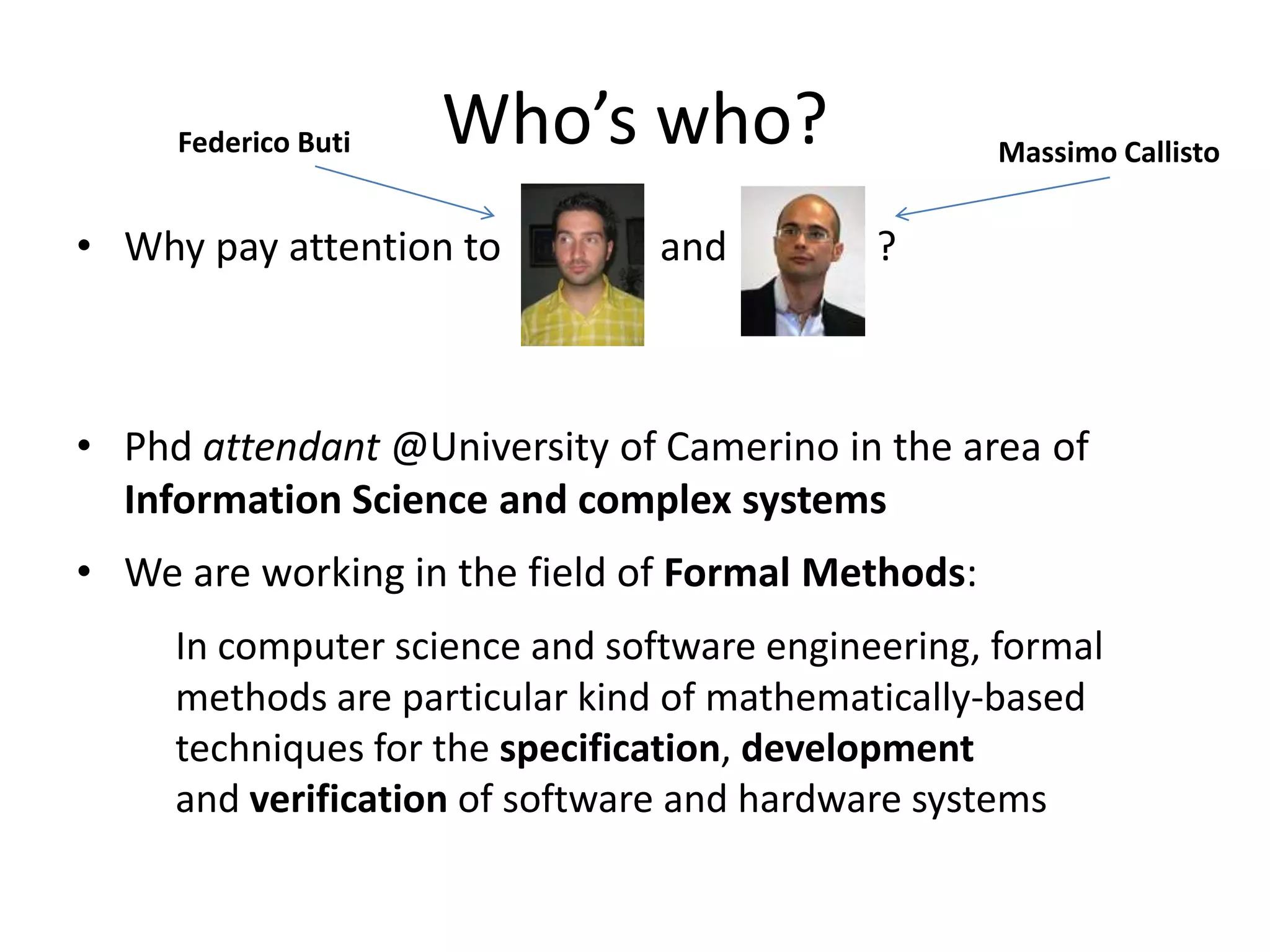
Federico Buti   Who’s who?                    Massimo Callisto


• Why pay attention to          and         ?


• Phd attendant @University of Camerino in the area of
  Information Science and complex systems
• We are working in the field of Formal Methods:
     In computer science and software engineering, formal
     methods are particular kind of mathematically-based
     techniques for the specification, development
     and verification of software and hardware systems
Web Internet
• The terms Internet and World Wide Web are often used in everyday
  speech without much distinction.

• The Internet (network of networks, the Net) is a global system of
  interconnected computer networks:
      Uses the standard Internet protocol (TCP/IP) to serve billions of users
      worldwide.

• Web is one of the services communicated via the Internet:
      World Wide Web: a collection of interlinked multimedia documents that are
      stored on the Internet and accessed using a common protocol (HTTP)

• Other services that you normally use (almost):
    – Email, FTP, telnet, SSH…
Internet… A bit of story
• Internet was born in the 60s as a military project of the ARPA (Advanced
  Research Projects Agency) group.
    – The initial aim was to create a decentralized network which could be highly
      robust and survivable.

    – (1969) Connection between University of California at Los Angeles, Stanford, University
      of California at Santa Barbara, and University of Utah.
    – (1971) Arpanet connects 15 sites including universities and research organizations...
      Birth of TELNET and FTP.. First email program (1972)
    – (1974) Specification of Internet Transmission Control Protocol (TCP)… (1978) TCP split to
      TCP/IP… 62+ sites
    – (1983/84) ARPANET uses TCP/IP, UNIX BSD 4.3 built around TCP/IP, Invention of the
      Domain Name System (DNS)
    – (1986) The United States' National Science Foundation (NSF) commissioned the
      construction of the NSFNET, a university 56 kilobit/second network backbone using
      computers called "fuzzballs“… Dramatic growth of hosts: February-> 2000, November ->
      5000
Internet… A bit of story (2)
 How many computer are on the Internet?
 http://www.internetworldstats.com/stats.htm "!
  – (1989/90) Number of hosts exceeded 100,000! Arpanet becomes "Internet
   – (1991) CERN publicized the World Wide Web project by Tim Berners-Lee. Term "Surfing
     the Internet" coined by Jean Armour Polly (1992)
   – (1993) First web browser WorldWideWeb than called Nexus

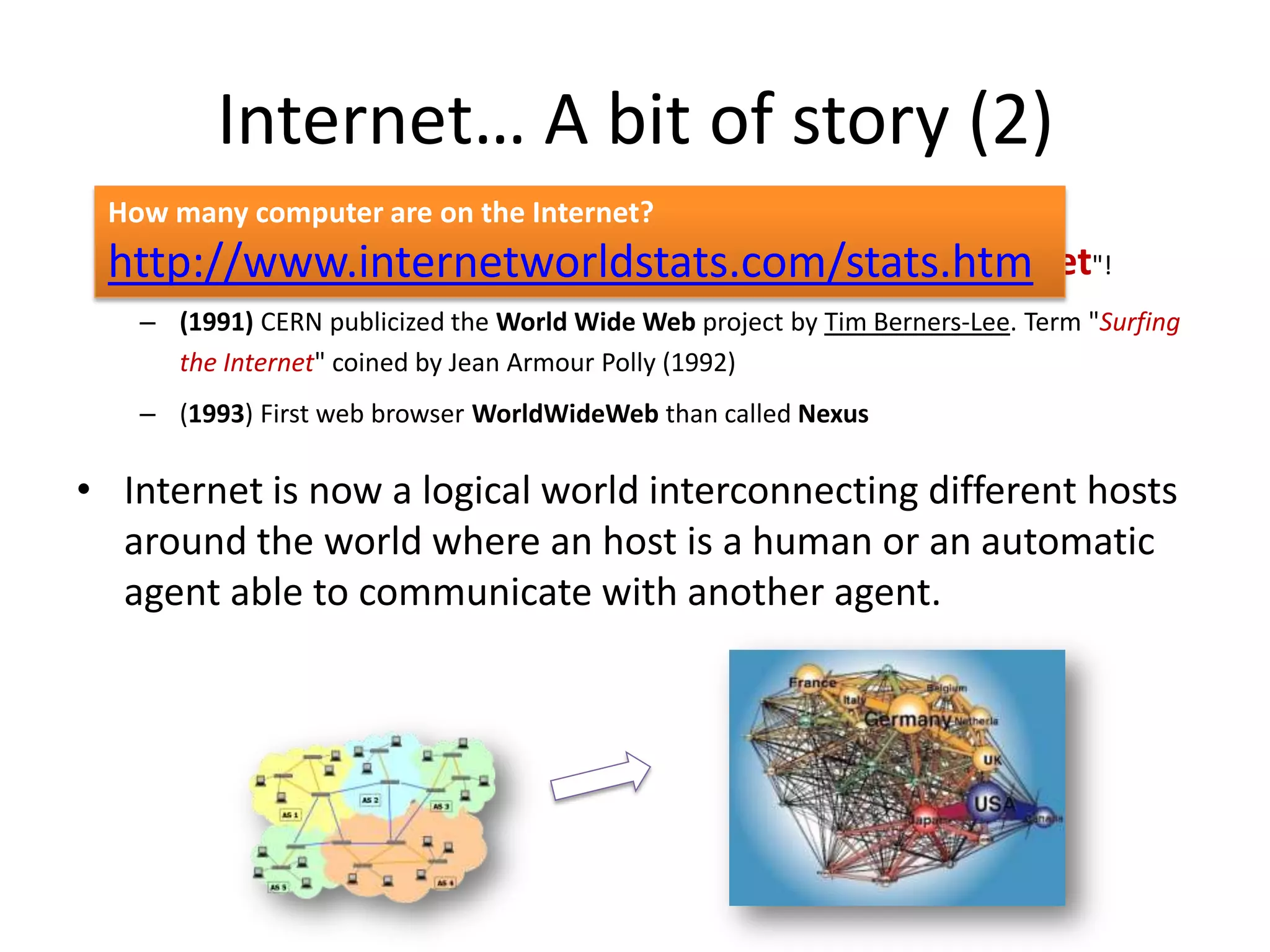
• Internet is now a logical world interconnecting different hosts
  around the world where an host is a human or an automatic
  agent able to communicate with another agent.
Communication rules
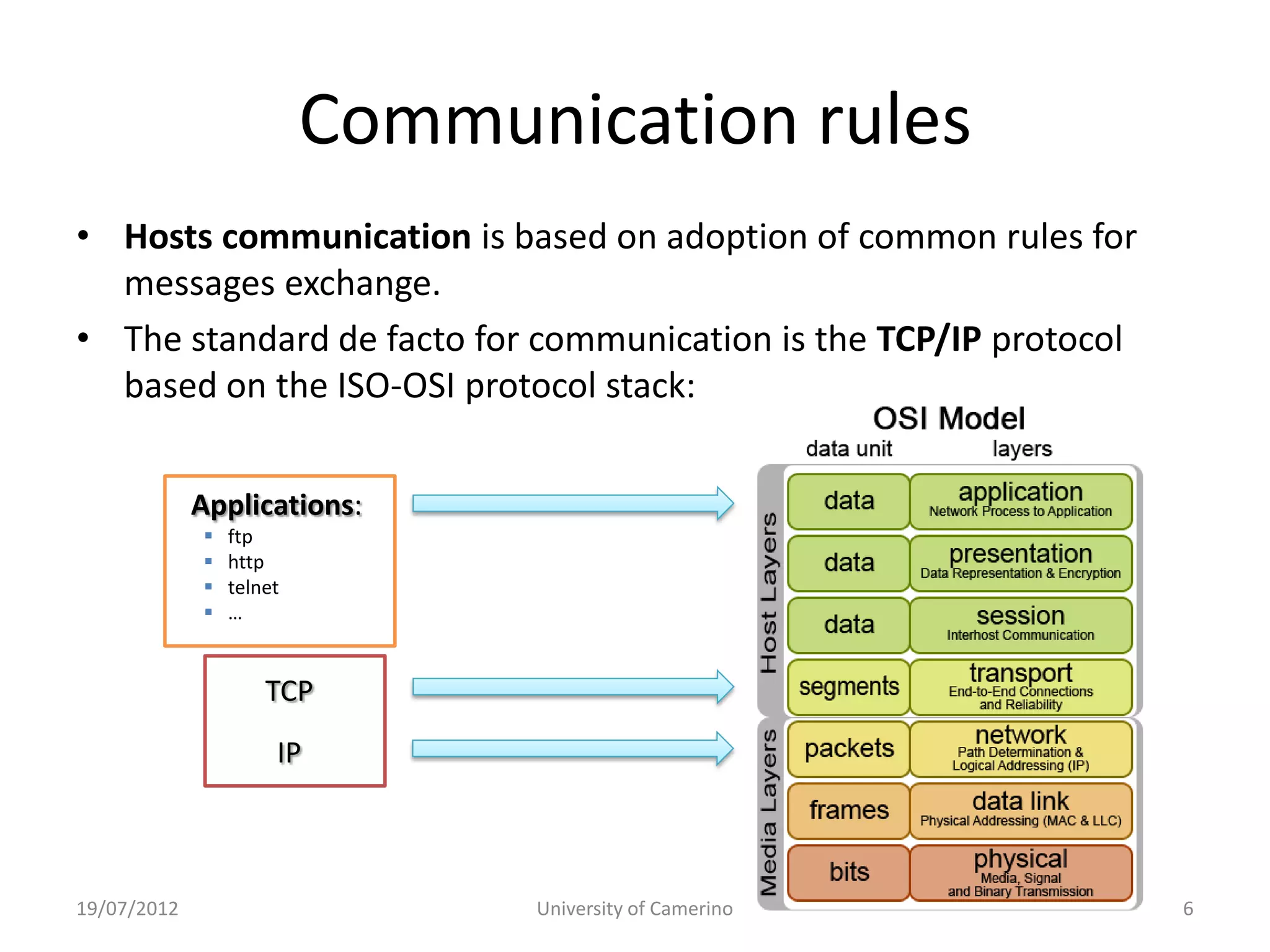
• Hosts communication is based on adoption of common rules for
  messages exchange.
• The standard de facto for communication is the TCP/IP protocol
  based on the ISO-OSI protocol stack:


             Applications:
                ftp
                http
                telnet
                …


                     TCP
                      IP


19/07/2012                      University of Camerino             6
World Wide Web (aka Web)
• The Web is a system of interlinked hypertext documents
  accessed via the Internet.
      – The Web is at OSI “application” level that contains the HTTP
        service (Hyper Text Transfer Protocol)
      – HTTP is the main protocol for information exchange on the web.


• The Web (for humans)
      – Consist of a web browser…
      – One can view web pages that may contain text, images, videos…
      – One navigates (surf) between the web pages via hyperlinks.


19/07/2012                    University of Camerino                 7
HTTP & Web
• The Web was invented by English scientist Tim Berners-
  Lee (1989) and is based on three mechanisms :
      – A naming scheme for locating resources -- like addresses -- (e.g.
        URLs such as http://www.google.it);
      – Communication rules (e.g. protocol HTTP);
      – Hypertext language for easy navigation (e.g. HTML).


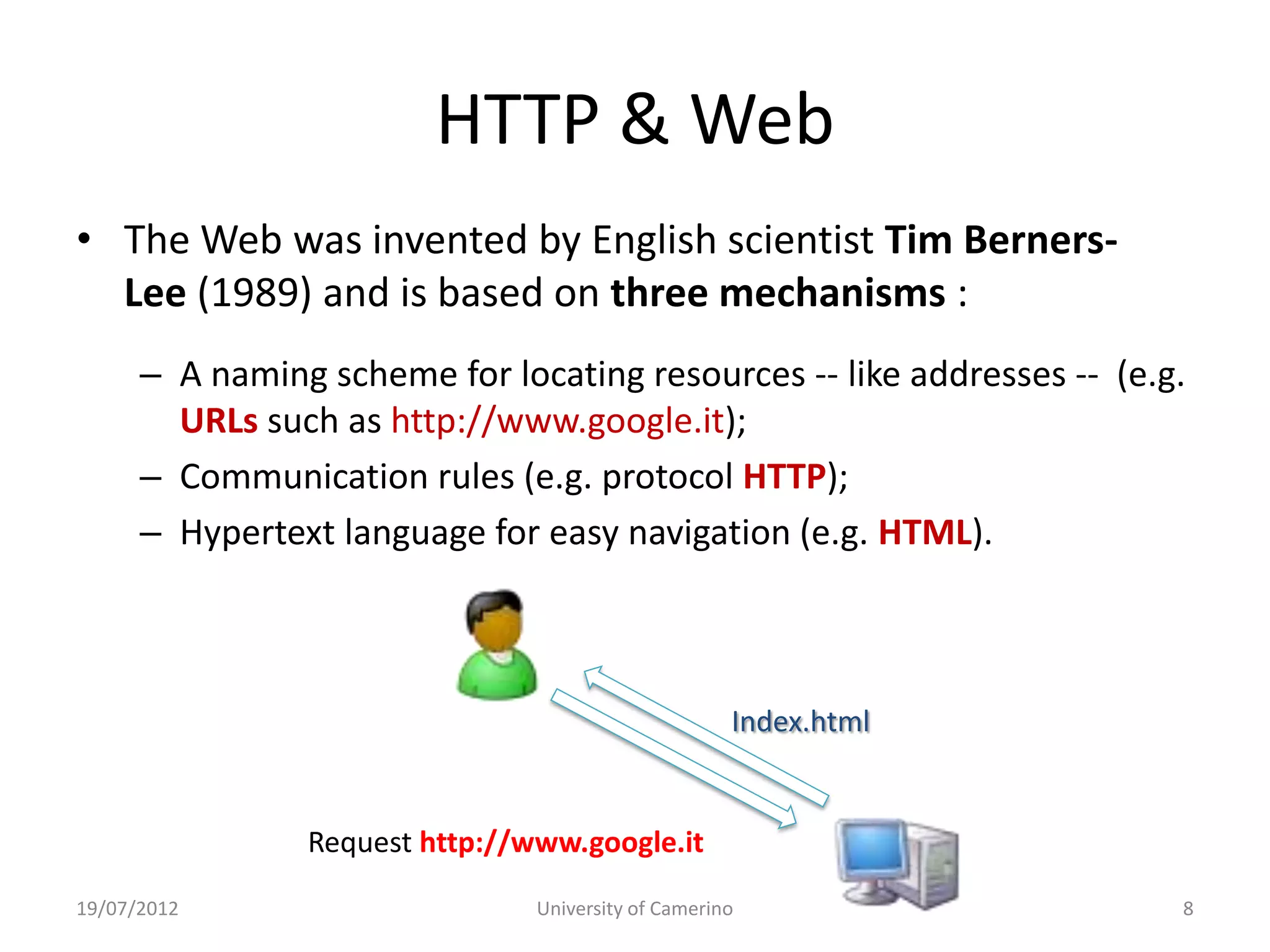
                                                     Index.html


                Request http://www.google.it
19/07/2012                      University of Camerino                  8
Web: fundamentals technologies
• Internet  vehicle of data.
• Web  is an application over Internet to present
  information.
• What are the technologies which implements the Web?

• Three major elements to present a web page:

      – HTML         (describes the contents)
      – CSS          (describes how the elements appear)
      – JavaScript   (enrich ability of the client)


19/07/2012               University of Camerino            10
What is HTML?
• HTML (HyperText Markup Language) is a language
  that describes web pages.
• Is not a programming language, but it is a markup
  language
      – A markup language is a set of markup tags
      – markup tags describe how text, images has to be
        rendered by the browser


19/07/2012                 University of Camerino         11
What is HTML?
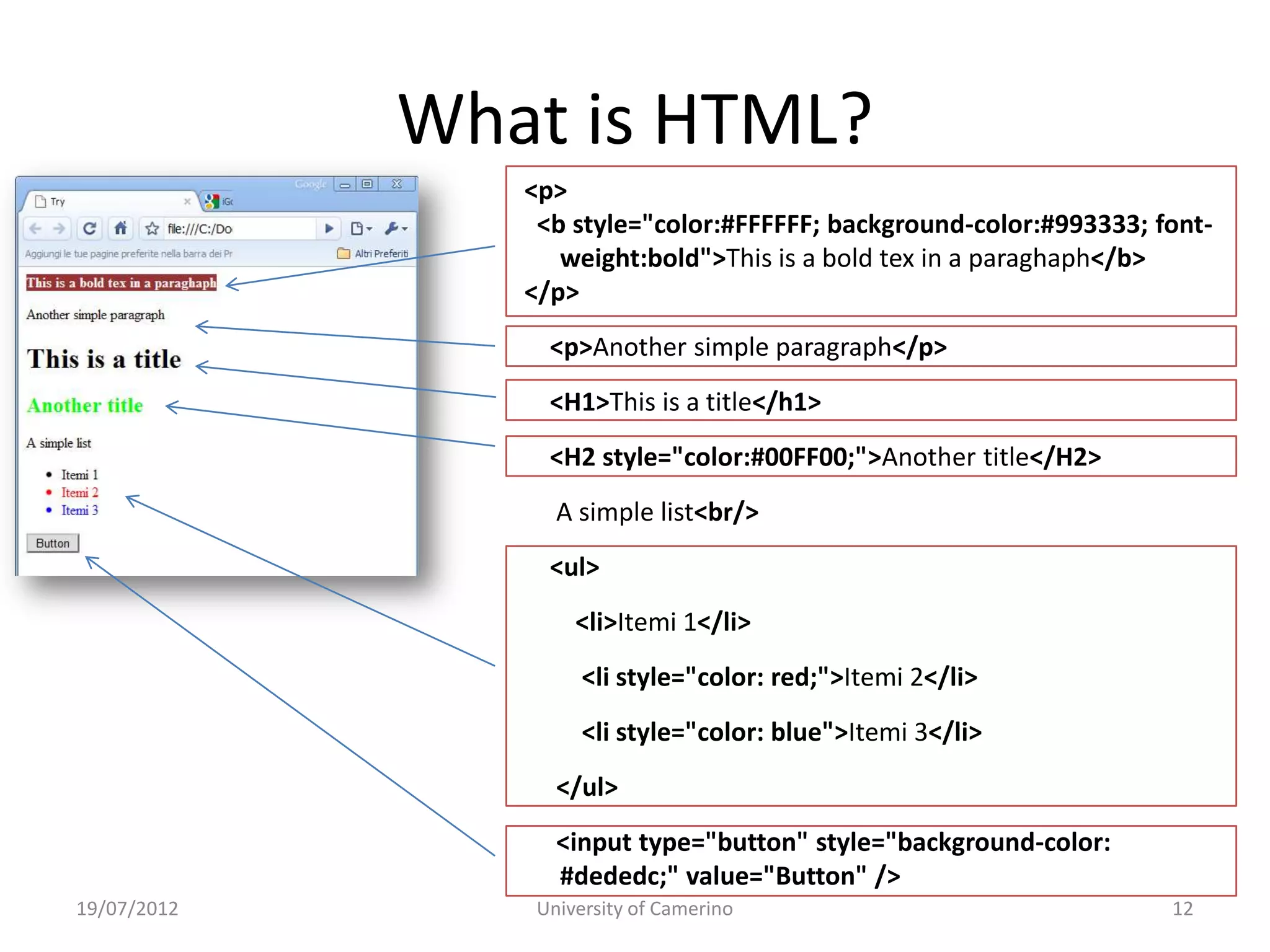
                <p>
                 <b style="color:#FFFFFF; background-color:#993333; font-
                   weight:bold">This is a bold tex in a paraghaph</b>
                </p>
                  <p>Another simple paragraph</p>
                  <H1>This is a title</h1>
                  <H2 style="color:#00FF00;">Another title</H2>
                   A simple list<br/>
                  <ul>
                     <li>Itemi 1</li>
                      <li style="color: red;">Itemi 2</li>
                      <li style="color: blue">Itemi 3</li>
                   </ul>
                   <input type="button" style="background-color:
                   #dededc;" value="Button" />
19/07/2012       University of Camerino                              12
HTML: evolution
•   (1989) HTML 1.0 was first introduced by Tim Berners-Lee.
•   (1995) In November the first draft of HTML 2.0 was published
•   (1997) January, HTML 3.2 was published by W3C (World Wide Web Consortium).
•   (1997/98) HTML 4.0 was published as a W3C Recommendation. Three "flavors":
     – Strict: deprecated elements are forbidden,
     – Transitional: deprecated elements are allowed,
     – Frameset: frame (different web pages in a single one) are allowed
•   (2000) XHTML 1.0 is a separate language that began as a reformulation of HTML
    4.01 using XML 1.0…
      –      XHTML 2.0 published as a draft but deprecated (2009) in favor of…


• January 2008: HTML 5.0 is published as a Working Draft by W3C.

                                      Anyway HTML is not capable to     improve the looks of the information.
                                                                                     It is needed something else.
19/07/2012                                     University of Camerino                                      13
Cascading Style Sheets (CSS 1, 2, 3)
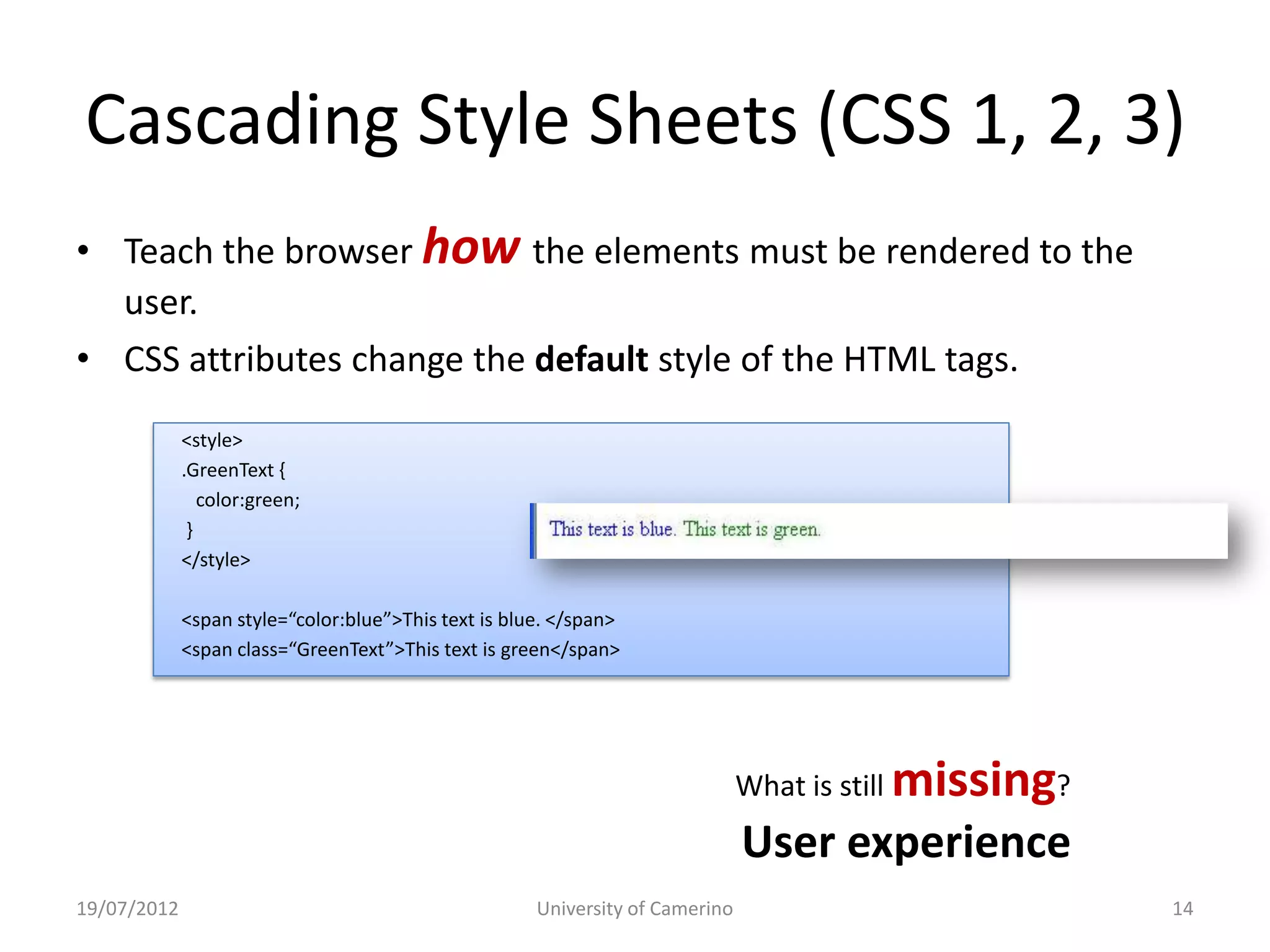
• Teach the browser how the elements must be rendered to the
  user.
• CSS attributes change the default style of the HTML tags.
             <style>
             .GreenText {
                color:green;
              }
             </style>

             <span style=“color:blue”>This text is blue. </span>
             <span class=“GreenText”>This text is green</span>


                                                                               What is still   missing?
                                                                               User experience
19/07/2012                                            University of Camerino                              14
JavaScript
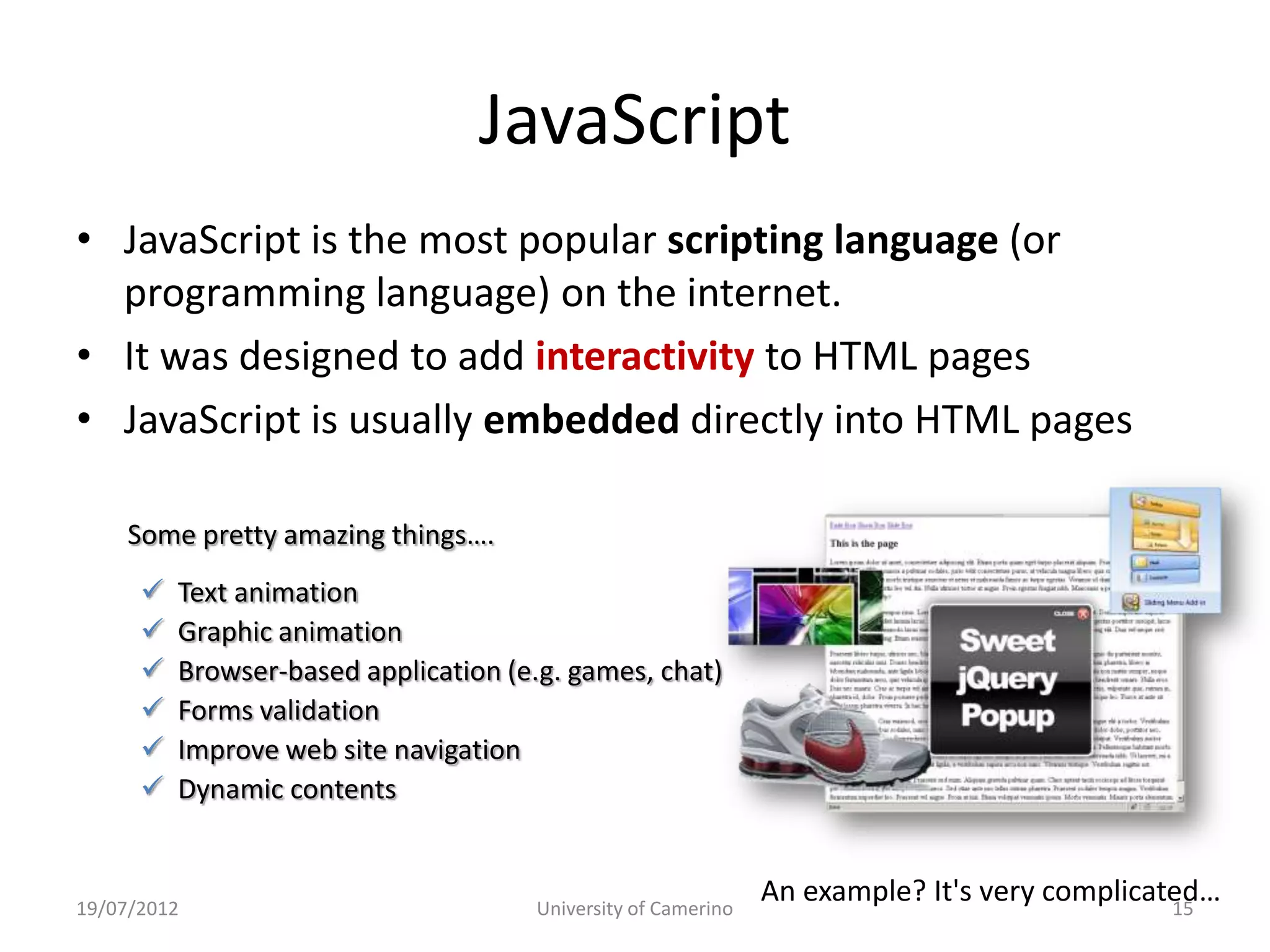
• JavaScript is the most popular scripting language (or
  programming language) on the internet.
• It was designed to add interactivity to HTML pages
• JavaScript is usually embedded directly into HTML pages

     Some pretty amazing things….
         Text animation
         Graphic animation
         Browser-based application (e.g. games, chat)
         Forms validation
         Improve web site navigation
         Dynamic contents


19/07/2012                            University of Camerino
                                                               An example? It's very complicated…
                                                                                              15
Static Web (vs Dynamic Web)
• The first web pages were created with a static content:
         Web pages that always present the same information
         to all download users.

• HTML files are “read” from the web browser to render the
  information to the user with a given layout (tuned by CSS).

• So, in the “static” web nothing is done on the page content;
  therefore information does not change since its creation.


19/07/2012                    University of Camerino            16
Static Web (vs Dynamic Web)


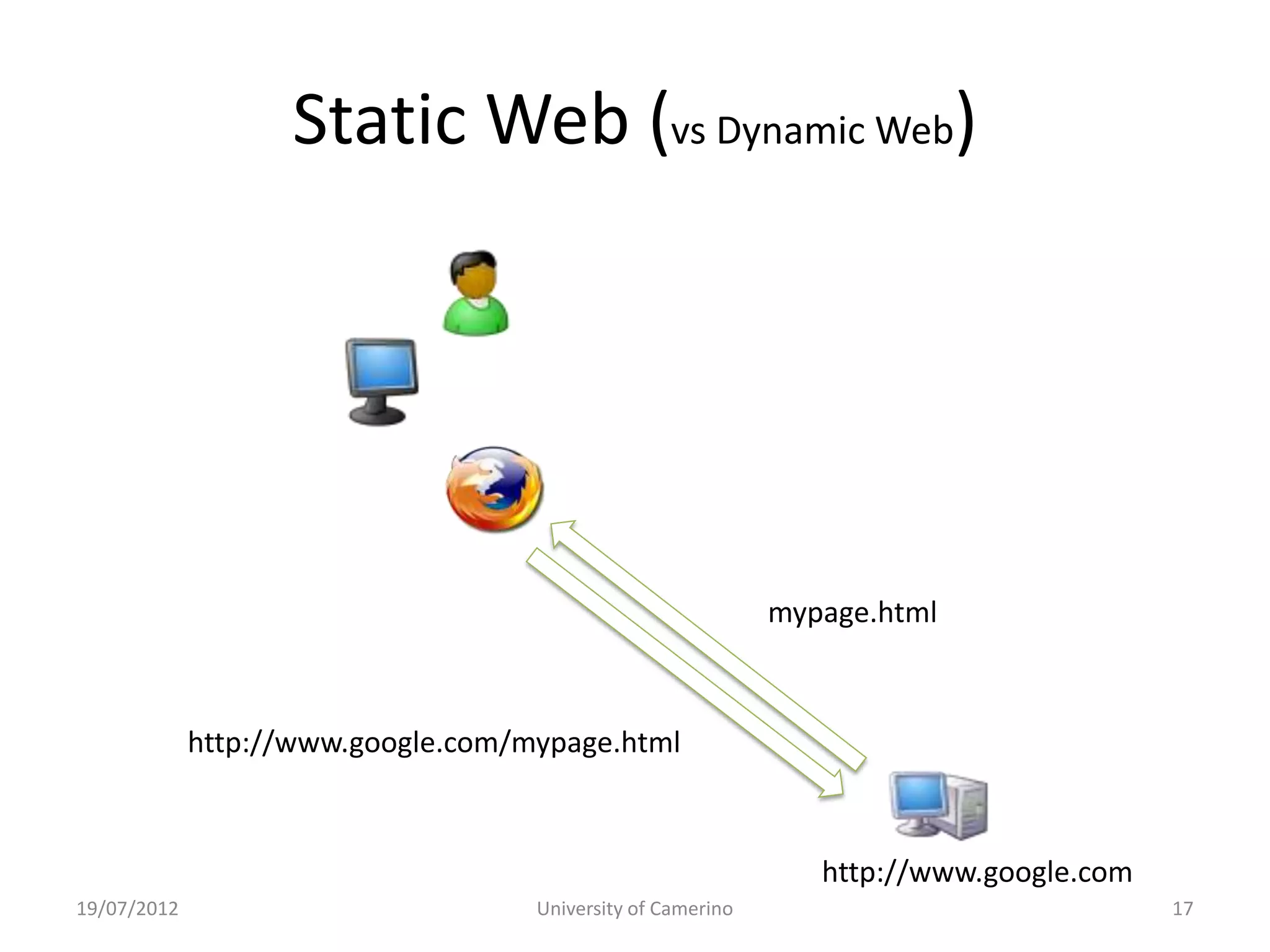
                                                             mypage.html


             http://www.google.com/mypage.html


                                                                http://www.google.com
19/07/2012                          University of Camerino                              17
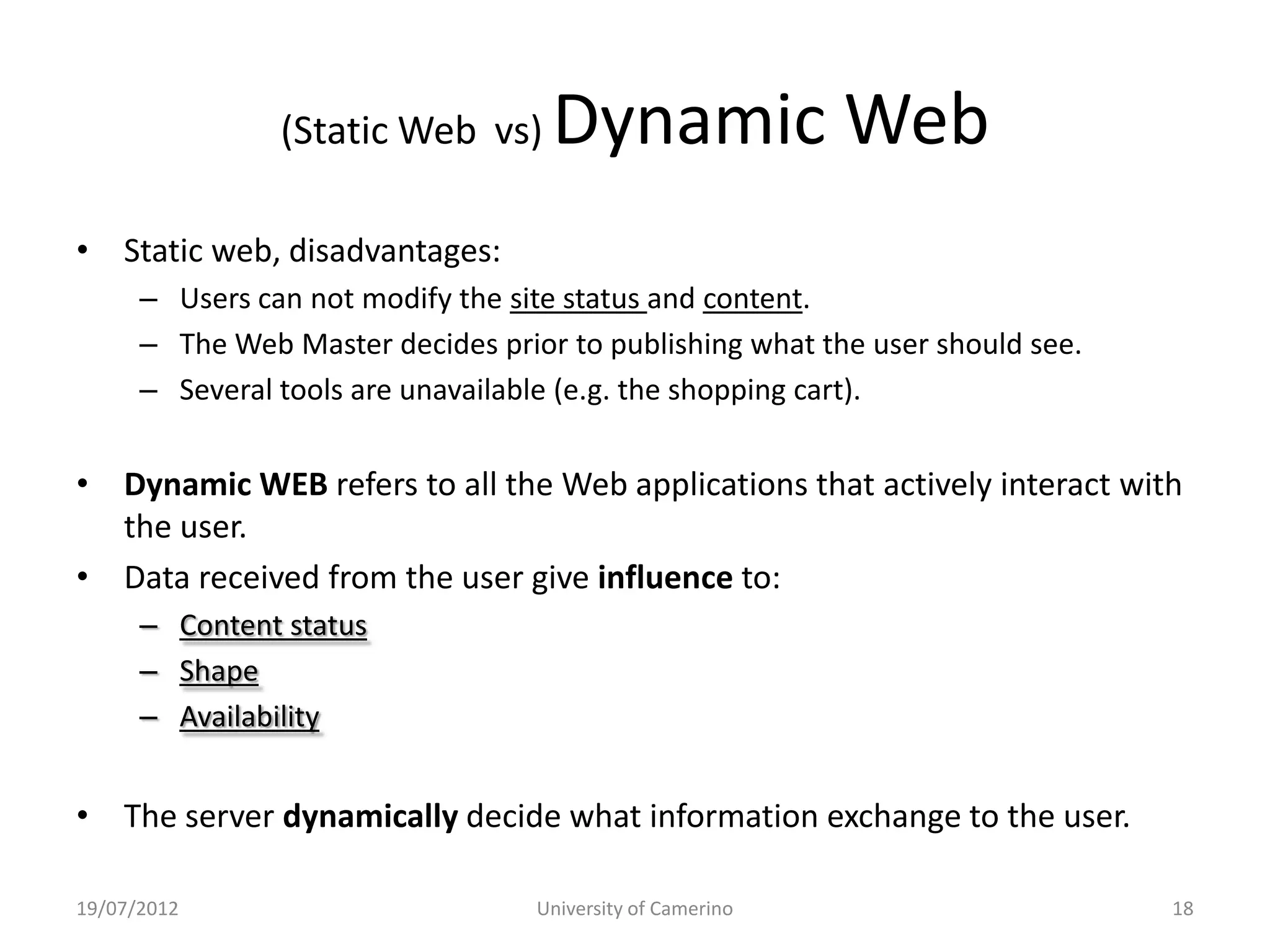
(Static Web vs)     Dynamic Web
• Static web, disadvantages:
      – Users can not modify the site status and content.
      – The Web Master decides prior to publishing what the user should see.
      – Several tools are unavailable (e.g. the shopping cart).


• Dynamic WEB refers to all the Web applications that actively interact with
  the user.
• Data received from the user give influence to:
      – Content status
      – Shape
      – Availability


• The server dynamically decide what information exchange to the user.

19/07/2012                         University of Camerino                      18
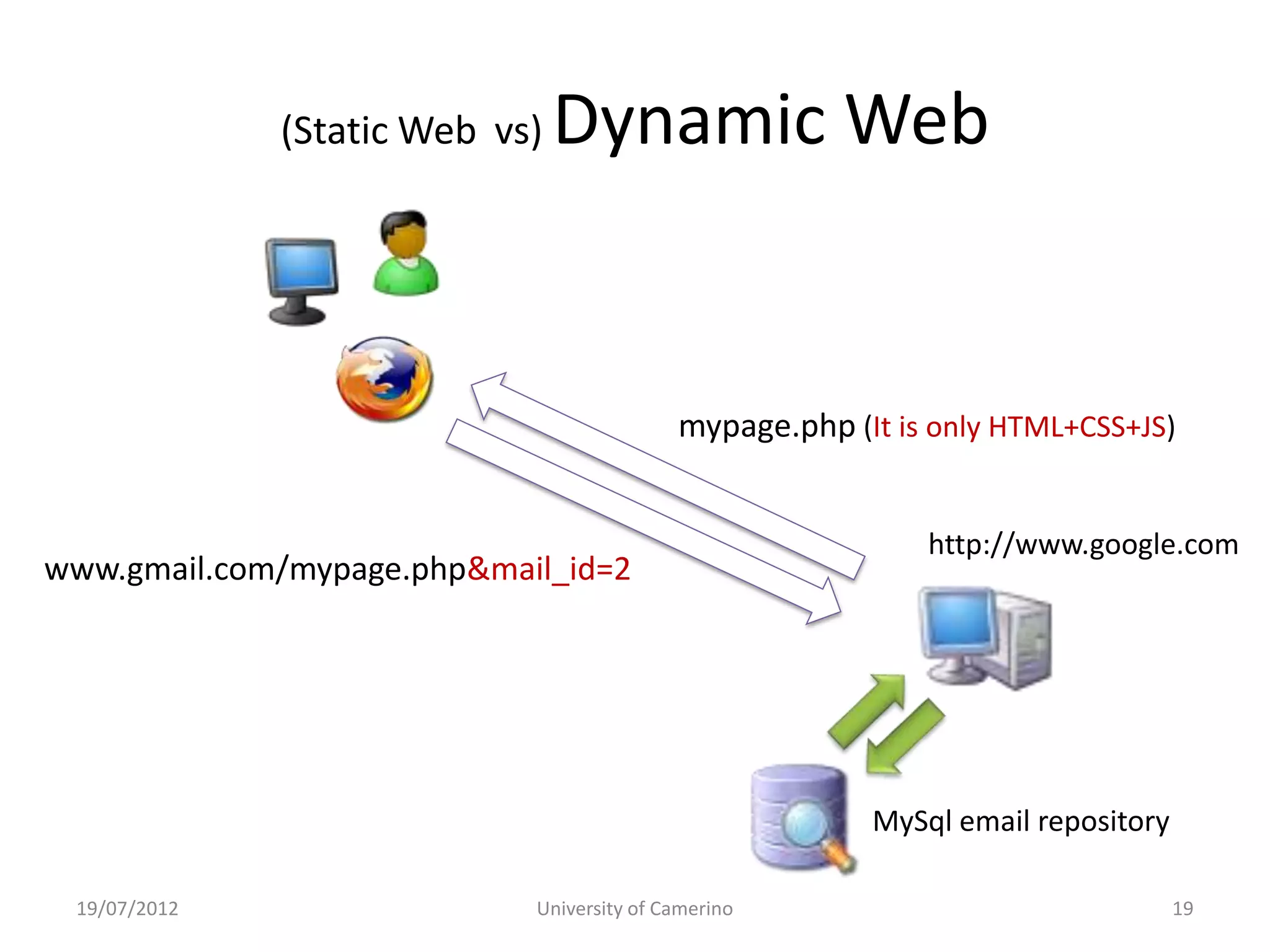
(Static Web vs)   Dynamic Web


                                           mypage.php (It is only HTML+CSS+JS)


                                                            http://www.google.com
www.gmail.com/mypage.php&mail_id=2


                                                        MySql email repository

 19/07/2012                 University of Camerino                               19
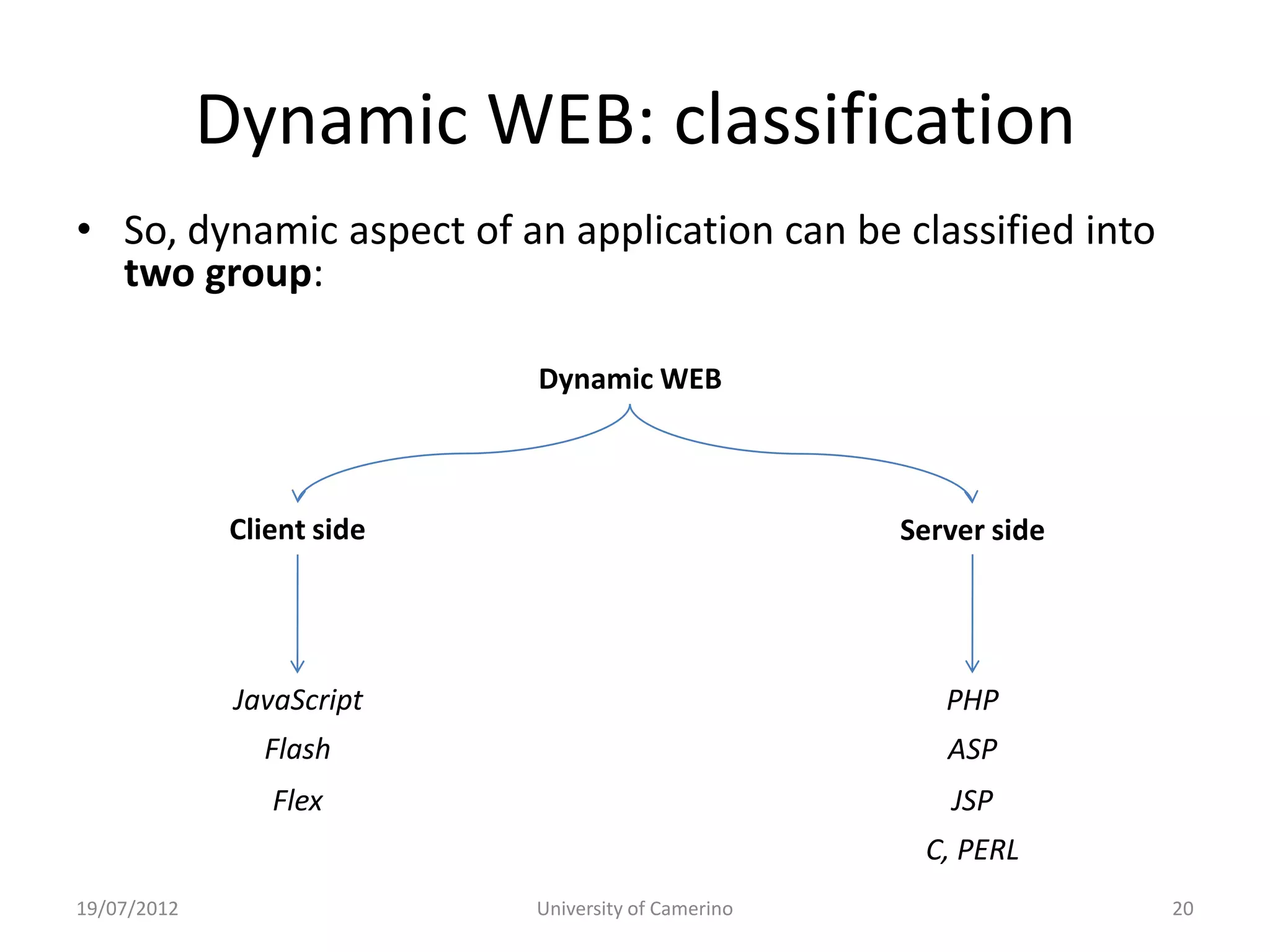
Dynamic WEB: classification
• So, dynamic aspect of an application can be classified into
  two group:

                            Dynamic WEB


              Client side                            Server side


              JavaScript                                PHP
                Flash                                   ASP
                 Flex                                   JSP
                                                      C, PERL
19/07/2012                  University of Camerino                 20
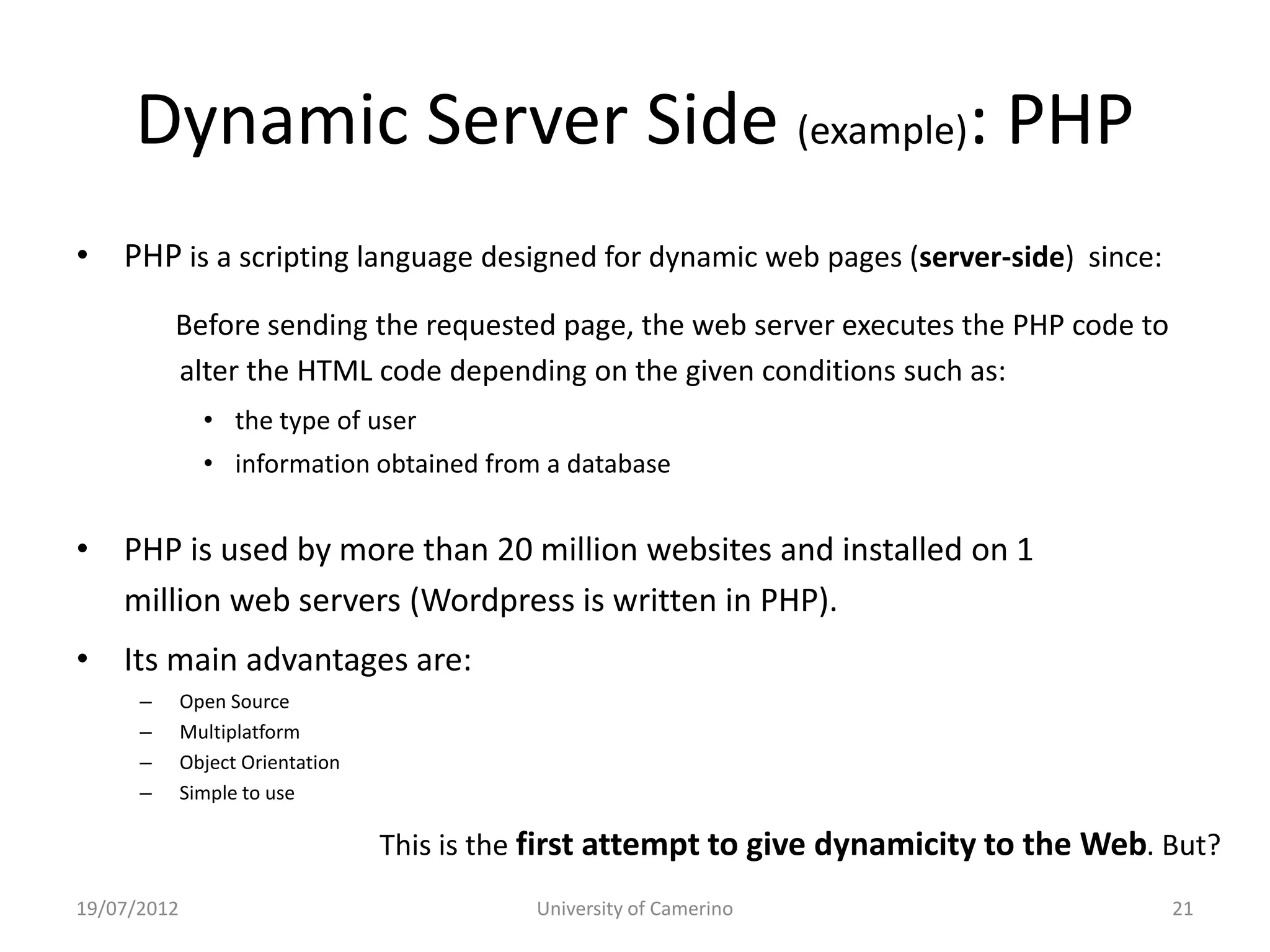
Dynamic Server Side (example): PHP
• PHP is a scripting language designed for dynamic web pages (server-side) since:
          Before sending the requested page, the web server executes the PHP code to
          alter the HTML code depending on the given conditions such as:
               • the type of user
               • information obtained from a database


• PHP is used by more than 20 million websites and installed on 1
  million web servers (Wordpress is written in PHP).
• Its main advantages are:
      –      Open Source
      –      Multiplatform
      –      Object Orientation
      –      Simple to use

                                  This is the first attempt to give dynamicity to the Web. But?
19/07/2012                                   University of Camerino                        21
True dynamicity: Interaction and Social Network
• PHP and others give dynamicity about the information
  presented to the user.

• However the communication is still connection-less:
      – After a request, the connection dropped between client
        and server.
             The server forgets the client

      – The experience is a single interaction information related
        to the single requested page.
             It is not possible to have global information

                                                              Web 2.0 grows up!
19/07/2012                           University of Camerino                 22
True dynamicity: Interaction and Social Network
• New feelings: people want true dynamism!

      – Approach to the information in real time and
        everywhere when it is needed (Interaction).

      – Share the information anytime with others (Social
        Network).


                                                  Web 2.0 grows up!
19/07/2012               University of Camerino                 23
Technologies for dynamicity
• Evolution of dynamic client-side technologies has led the Web 2.0.

• WEB 2.0 also means tendencies to create a new user experience
  such as Interaction, Collaboration, Blogging ...

• Base technologies are always the same (URL, HTTP, HTML).

• However web pages incorporate new solutions such as:
      – AJAX (Asynchronous JavaScript and XML);
      – Adobe Flash
      – ActiveX, Applet


19/07/2012                     University of Camerino                  24
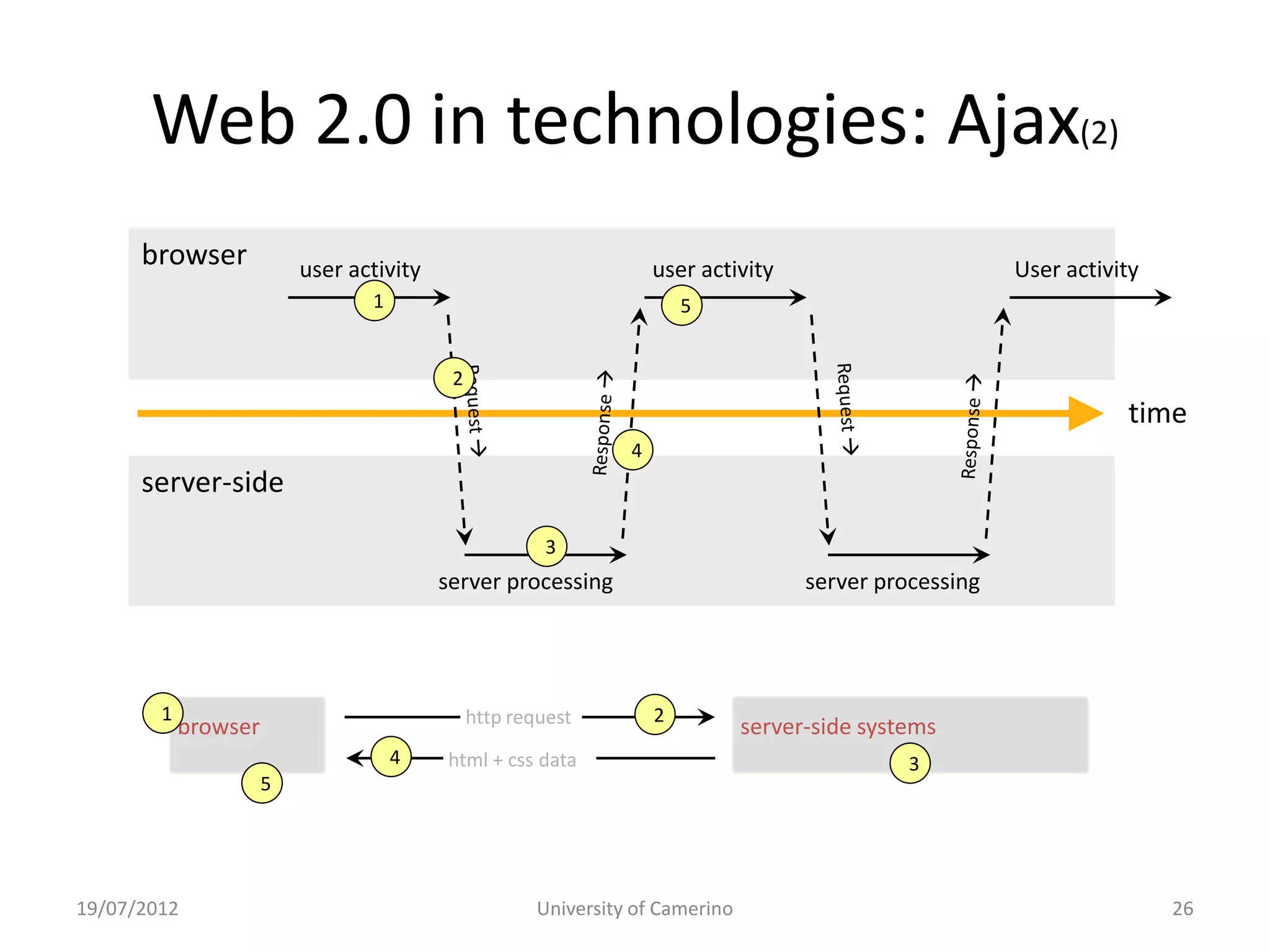
Web 2.0 in technologies: Ajax
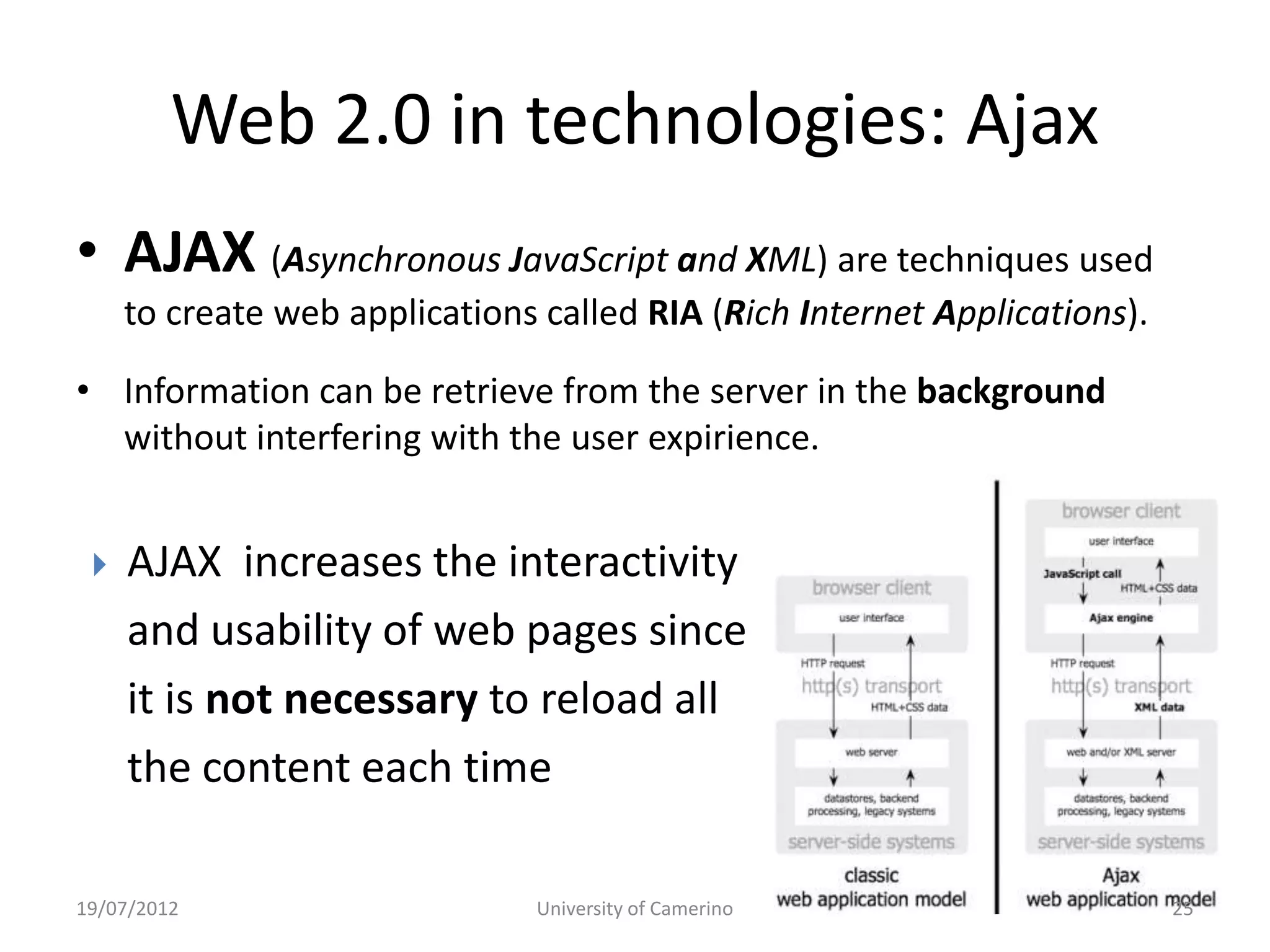
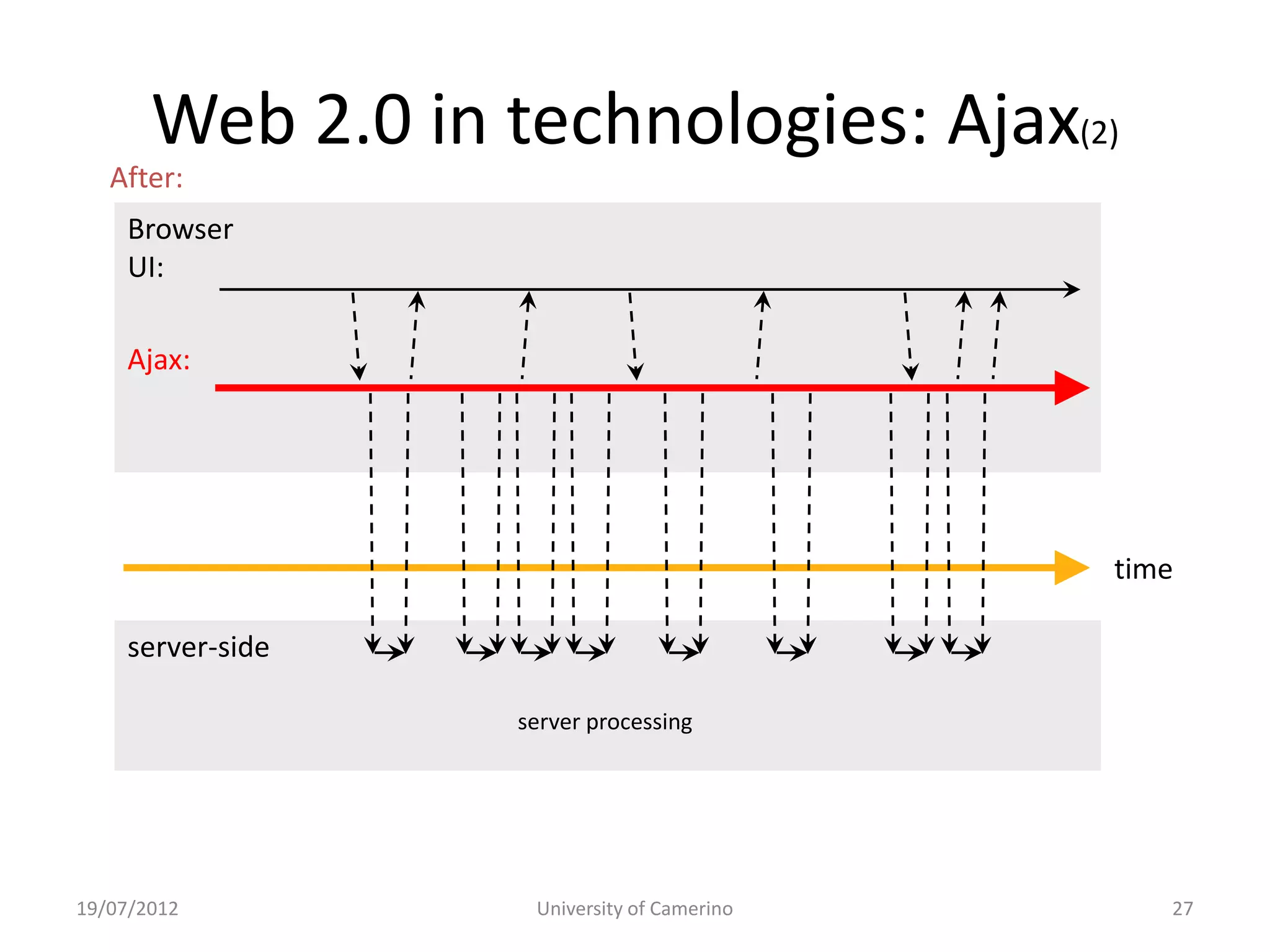
• AJAX (Asynchronous JavaScript and XML) are techniques used
     to create web applications called RIA (Rich Internet Applications).

• Information can be retrieve from the server in the background
  without interfering with the user expirience.


    AJAX increases the interactivity
     and usability of web pages since
     it is not necessary to reload all
     the content each time

19/07/2012                     University of Camerino                      25
Web 2.0 in technologies: Ajax(2)
      browser             user activity                              user activity                        User activity
                                 1                                       5


                                           2
                                                                                                                     time
                                                                 4
      server-side
                                                        3
                                          server processing                           server processing


        1                                      http request          2
            browser                                                             server-side systems
                                     4    html + css data                                       3
                      5


19/07/2012                                             University of Camerino                                             26
Web 2.0 in technologies: Ajax(2)
   After:
    Browser
     browser
    UI:                   user activity                             user activity                        User activity
                                 1                                     5

    Ajax:                                  2
                                                                                                                    time
                                                                4
      server-side
                                                       3
                                          server processing                          server processing             time

    server-side

        1                                                         2
                                               http request processing
                                                     server
            browser                                                            server-side systems
                                     4    html + css data                                      3
                      5


19/07/2012                                            University of Camerino                                             27
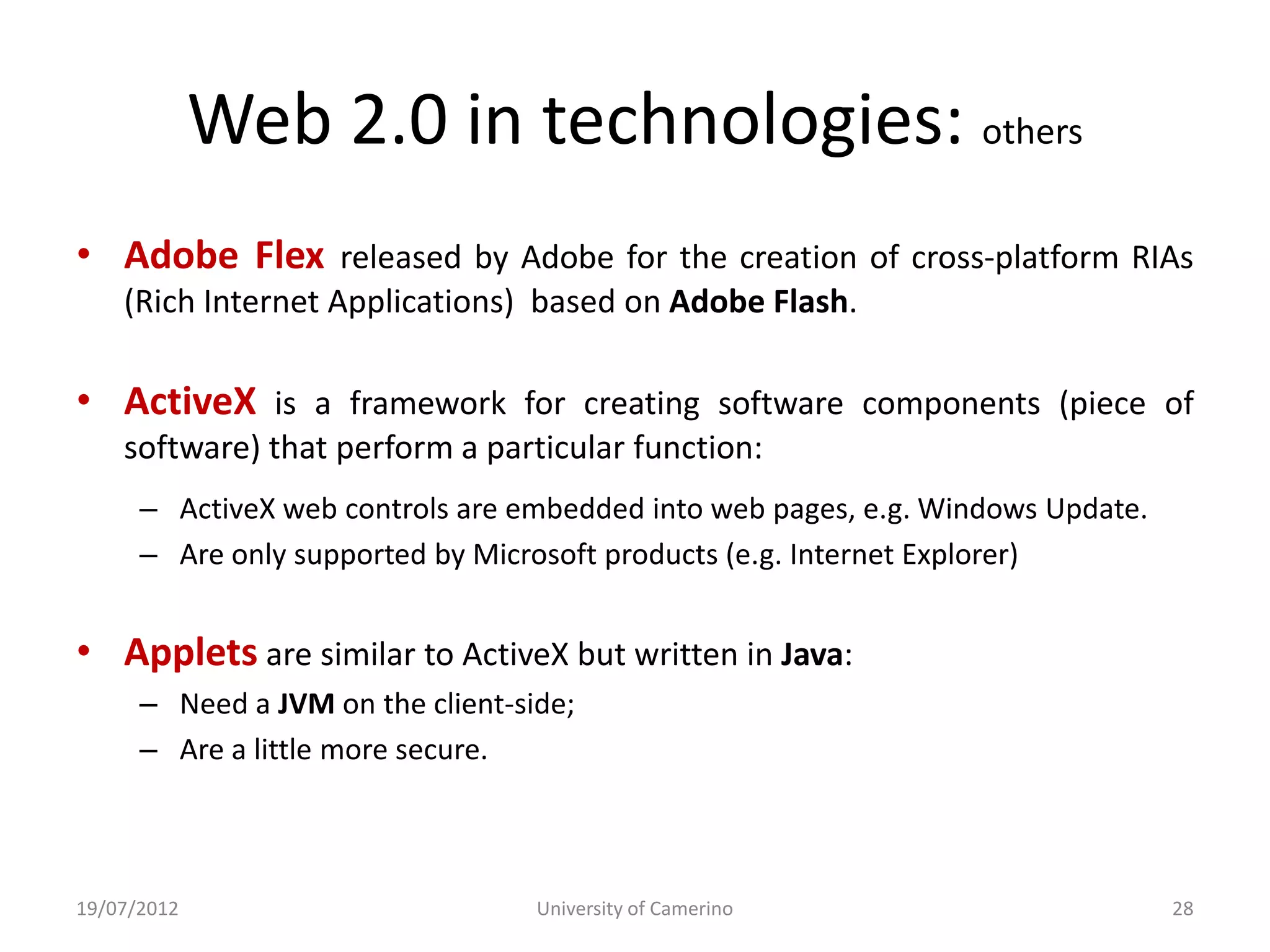
Web 2.0 in technologies: others
• Adobe Flex released by Adobe for the creation of cross-platform RIAs
    (Rich Internet Applications) based on Adobe Flash.

• ActiveX is a framework for creating software components (piece of
    software) that perform a particular function:
      – ActiveX web controls are embedded into web pages, e.g. Windows Update.
      – Are only supported by Microsoft products (e.g. Internet Explorer)


• Applets are similar to ActiveX but written in Java:
      – Need a JVM on the client-side;
      – Are a little more secure.


19/07/2012                         University of Camerino                        28
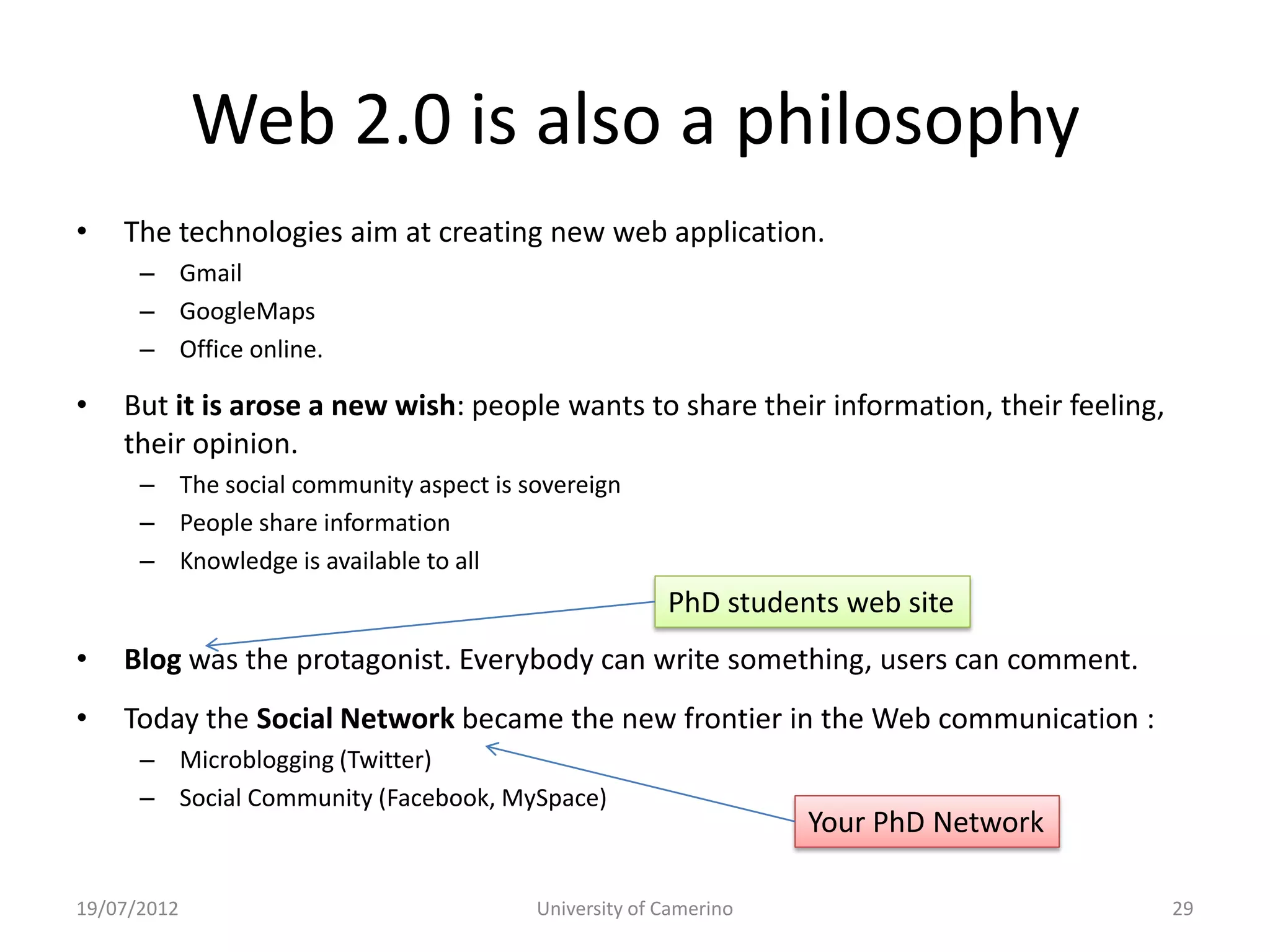
Web 2.0 is also a philosophy
•   The technologies aim at creating new web application.
      – Gmail
      – GoogleMaps
      – Office online.

•   But it is arose a new wish: people wants to share their information, their feeling,
    their opinion.
      – The social community aspect is sovereign
      – People share information
      – Knowledge is available to all
                                                      PhD students web site
•   Blog was the protagonist. Everybody can write something, users can comment.
•   Today the Social Network became the new frontier in the Web communication :
      – Microblogging (Twitter)
      – Social Community (Facebook, MySpace)
                                                                 Your PhD Network

19/07/2012                              University of Camerino                            29
Web 2.0 is for all?
• There are many technologies for creating web
  application… but each of you must become a
  Web Developer!(?)

• Many software tools help to hide technical
  details and each one can create his application
  easily.
• Example: Web Content Management Systems

19/07/2012          University of Camerino      30
Web CMS
• Web CMS are designed to simplify the publication of
  contents and creation of web pages.

• Web CMS allow to submit content without requiring
  technical knowledge (such as HTML, PHP, javascript).

• There are a platora of Web CMS, each one developed
  for a specific context (eCommerce, Blogging, Forums)


19/07/2012             University of Camerino            33
Why we use
•   Open source
•   Long-life support
•   Extremely easy to use
•   Allows to implement both web sites and network

• Makes easier the administration’s stuffs:
  – Installation, updates
  – PhD’s list management
  – Web sites management
Why you should learn technical stuff
• Software tools (like Web CMS) are imperfect and sometime
  tuning is required.

• To obtain a web page that look as you want, you must
  write some piece of code (HTML, CSS or JavaScript) by hand.

• If you know the basis, you are not restricted to Worpress
  and other CMS can be used.


                                                   So, let’s begin!
19/07/2012                University of Camerino                      36

Slides 1 - Internet and Web

  • 1.
    Introduction to: Internet andthe World Wide Web Fundamental Concepts and Technologies
  • 2.
    Federico Buti Who’s who? Massimo Callisto • Why pay attention to and ? • Phd attendant @University of Camerino in the area of Information Science and complex systems • We are working in the field of Formal Methods: In computer science and software engineering, formal methods are particular kind of mathematically-based techniques for the specification, development and verification of software and hardware systems
  • 3.
    Web Internet • Theterms Internet and World Wide Web are often used in everyday speech without much distinction. • The Internet (network of networks, the Net) is a global system of interconnected computer networks: Uses the standard Internet protocol (TCP/IP) to serve billions of users worldwide. • Web is one of the services communicated via the Internet: World Wide Web: a collection of interlinked multimedia documents that are stored on the Internet and accessed using a common protocol (HTTP) • Other services that you normally use (almost): – Email, FTP, telnet, SSH…
  • 4.
    Internet… A bitof story • Internet was born in the 60s as a military project of the ARPA (Advanced Research Projects Agency) group. – The initial aim was to create a decentralized network which could be highly robust and survivable. – (1969) Connection between University of California at Los Angeles, Stanford, University of California at Santa Barbara, and University of Utah. – (1971) Arpanet connects 15 sites including universities and research organizations... Birth of TELNET and FTP.. First email program (1972) – (1974) Specification of Internet Transmission Control Protocol (TCP)… (1978) TCP split to TCP/IP… 62+ sites – (1983/84) ARPANET uses TCP/IP, UNIX BSD 4.3 built around TCP/IP, Invention of the Domain Name System (DNS) – (1986) The United States' National Science Foundation (NSF) commissioned the construction of the NSFNET, a university 56 kilobit/second network backbone using computers called "fuzzballs“… Dramatic growth of hosts: February-> 2000, November -> 5000
  • 5.
    Internet… A bitof story (2) How many computer are on the Internet? http://www.internetworldstats.com/stats.htm "! – (1989/90) Number of hosts exceeded 100,000! Arpanet becomes "Internet – (1991) CERN publicized the World Wide Web project by Tim Berners-Lee. Term "Surfing the Internet" coined by Jean Armour Polly (1992) – (1993) First web browser WorldWideWeb than called Nexus • Internet is now a logical world interconnecting different hosts around the world where an host is a human or an automatic agent able to communicate with another agent.
  • 6.
    Communication rules • Hostscommunication is based on adoption of common rules for messages exchange. • The standard de facto for communication is the TCP/IP protocol based on the ISO-OSI protocol stack: Applications:  ftp  http  telnet  … TCP IP 19/07/2012 University of Camerino 6
  • 7.
    World Wide Web(aka Web) • The Web is a system of interlinked hypertext documents accessed via the Internet. – The Web is at OSI “application” level that contains the HTTP service (Hyper Text Transfer Protocol) – HTTP is the main protocol for information exchange on the web. • The Web (for humans) – Consist of a web browser… – One can view web pages that may contain text, images, videos… – One navigates (surf) between the web pages via hyperlinks. 19/07/2012 University of Camerino 7
  • 8.
    HTTP & Web •The Web was invented by English scientist Tim Berners- Lee (1989) and is based on three mechanisms : – A naming scheme for locating resources -- like addresses -- (e.g. URLs such as http://www.google.it); – Communication rules (e.g. protocol HTTP); – Hypertext language for easy navigation (e.g. HTML). Index.html Request http://www.google.it 19/07/2012 University of Camerino 8
  • 9.
    Web: fundamentals technologies •Internet  vehicle of data. • Web  is an application over Internet to present information. • What are the technologies which implements the Web? • Three major elements to present a web page: – HTML (describes the contents) – CSS (describes how the elements appear) – JavaScript (enrich ability of the client) 19/07/2012 University of Camerino 10
  • 10.
    What is HTML? •HTML (HyperText Markup Language) is a language that describes web pages. • Is not a programming language, but it is a markup language – A markup language is a set of markup tags – markup tags describe how text, images has to be rendered by the browser 19/07/2012 University of Camerino 11
  • 11.
    What is HTML? <p> <b style="color:#FFFFFF; background-color:#993333; font- weight:bold">This is a bold tex in a paraghaph</b> </p> <p>Another simple paragraph</p> <H1>This is a title</h1> <H2 style="color:#00FF00;">Another title</H2> A simple list<br/> <ul> <li>Itemi 1</li> <li style="color: red;">Itemi 2</li> <li style="color: blue">Itemi 3</li> </ul> <input type="button" style="background-color: #dededc;" value="Button" /> 19/07/2012 University of Camerino 12
  • 12.
    HTML: evolution • (1989) HTML 1.0 was first introduced by Tim Berners-Lee. • (1995) In November the first draft of HTML 2.0 was published • (1997) January, HTML 3.2 was published by W3C (World Wide Web Consortium). • (1997/98) HTML 4.0 was published as a W3C Recommendation. Three "flavors": – Strict: deprecated elements are forbidden, – Transitional: deprecated elements are allowed, – Frameset: frame (different web pages in a single one) are allowed • (2000) XHTML 1.0 is a separate language that began as a reformulation of HTML 4.01 using XML 1.0… – XHTML 2.0 published as a draft but deprecated (2009) in favor of… • January 2008: HTML 5.0 is published as a Working Draft by W3C. Anyway HTML is not capable to improve the looks of the information. It is needed something else. 19/07/2012 University of Camerino 13
  • 13.
    Cascading Style Sheets(CSS 1, 2, 3) • Teach the browser how the elements must be rendered to the user. • CSS attributes change the default style of the HTML tags. <style> .GreenText { color:green; } </style> <span style=“color:blue”>This text is blue. </span> <span class=“GreenText”>This text is green</span> What is still missing? User experience 19/07/2012 University of Camerino 14
  • 14.
    JavaScript • JavaScript isthe most popular scripting language (or programming language) on the internet. • It was designed to add interactivity to HTML pages • JavaScript is usually embedded directly into HTML pages Some pretty amazing things….  Text animation  Graphic animation  Browser-based application (e.g. games, chat)  Forms validation  Improve web site navigation  Dynamic contents 19/07/2012 University of Camerino An example? It's very complicated… 15
  • 15.
    Static Web (vsDynamic Web) • The first web pages were created with a static content: Web pages that always present the same information to all download users. • HTML files are “read” from the web browser to render the information to the user with a given layout (tuned by CSS). • So, in the “static” web nothing is done on the page content; therefore information does not change since its creation. 19/07/2012 University of Camerino 16
  • 16.
    Static Web (vsDynamic Web) mypage.html http://www.google.com/mypage.html http://www.google.com 19/07/2012 University of Camerino 17
  • 17.
    (Static Web vs) Dynamic Web • Static web, disadvantages: – Users can not modify the site status and content. – The Web Master decides prior to publishing what the user should see. – Several tools are unavailable (e.g. the shopping cart). • Dynamic WEB refers to all the Web applications that actively interact with the user. • Data received from the user give influence to: – Content status – Shape – Availability • The server dynamically decide what information exchange to the user. 19/07/2012 University of Camerino 18
  • 18.
    (Static Web vs) Dynamic Web mypage.php (It is only HTML+CSS+JS) http://www.google.com www.gmail.com/mypage.php&mail_id=2 MySql email repository 19/07/2012 University of Camerino 19
  • 19.
    Dynamic WEB: classification •So, dynamic aspect of an application can be classified into two group: Dynamic WEB Client side Server side JavaScript PHP Flash ASP Flex JSP C, PERL 19/07/2012 University of Camerino 20
  • 20.
    Dynamic Server Side(example): PHP • PHP is a scripting language designed for dynamic web pages (server-side) since: Before sending the requested page, the web server executes the PHP code to alter the HTML code depending on the given conditions such as: • the type of user • information obtained from a database • PHP is used by more than 20 million websites and installed on 1 million web servers (Wordpress is written in PHP). • Its main advantages are: – Open Source – Multiplatform – Object Orientation – Simple to use This is the first attempt to give dynamicity to the Web. But? 19/07/2012 University of Camerino 21
  • 21.
    True dynamicity: Interactionand Social Network • PHP and others give dynamicity about the information presented to the user. • However the communication is still connection-less: – After a request, the connection dropped between client and server. The server forgets the client – The experience is a single interaction information related to the single requested page. It is not possible to have global information Web 2.0 grows up! 19/07/2012 University of Camerino 22
  • 22.
    True dynamicity: Interactionand Social Network • New feelings: people want true dynamism! – Approach to the information in real time and everywhere when it is needed (Interaction). – Share the information anytime with others (Social Network). Web 2.0 grows up! 19/07/2012 University of Camerino 23
  • 23.
    Technologies for dynamicity •Evolution of dynamic client-side technologies has led the Web 2.0. • WEB 2.0 also means tendencies to create a new user experience such as Interaction, Collaboration, Blogging ... • Base technologies are always the same (URL, HTTP, HTML). • However web pages incorporate new solutions such as: – AJAX (Asynchronous JavaScript and XML); – Adobe Flash – ActiveX, Applet 19/07/2012 University of Camerino 24
  • 24.
    Web 2.0 intechnologies: Ajax • AJAX (Asynchronous JavaScript and XML) are techniques used to create web applications called RIA (Rich Internet Applications). • Information can be retrieve from the server in the background without interfering with the user expirience.  AJAX increases the interactivity and usability of web pages since it is not necessary to reload all the content each time 19/07/2012 University of Camerino 25
  • 25.
    Web 2.0 intechnologies: Ajax(2) browser user activity user activity User activity 1 5 2 time 4 server-side 3 server processing server processing 1 http request 2 browser server-side systems 4 html + css data 3 5 19/07/2012 University of Camerino 26
  • 26.
    Web 2.0 intechnologies: Ajax(2) After: Browser browser UI: user activity user activity User activity 1 5 Ajax: 2 time 4 server-side 3 server processing server processing time server-side 1 2 http request processing server browser server-side systems 4 html + css data 3 5 19/07/2012 University of Camerino 27
  • 27.
    Web 2.0 intechnologies: others • Adobe Flex released by Adobe for the creation of cross-platform RIAs (Rich Internet Applications) based on Adobe Flash. • ActiveX is a framework for creating software components (piece of software) that perform a particular function: – ActiveX web controls are embedded into web pages, e.g. Windows Update. – Are only supported by Microsoft products (e.g. Internet Explorer) • Applets are similar to ActiveX but written in Java: – Need a JVM on the client-side; – Are a little more secure. 19/07/2012 University of Camerino 28
  • 28.
    Web 2.0 isalso a philosophy • The technologies aim at creating new web application. – Gmail – GoogleMaps – Office online. • But it is arose a new wish: people wants to share their information, their feeling, their opinion. – The social community aspect is sovereign – People share information – Knowledge is available to all PhD students web site • Blog was the protagonist. Everybody can write something, users can comment. • Today the Social Network became the new frontier in the Web communication : – Microblogging (Twitter) – Social Community (Facebook, MySpace) Your PhD Network 19/07/2012 University of Camerino 29
  • 29.
    Web 2.0 isfor all? • There are many technologies for creating web application… but each of you must become a Web Developer!(?) • Many software tools help to hide technical details and each one can create his application easily. • Example: Web Content Management Systems 19/07/2012 University of Camerino 30
  • 30.
    Web CMS • WebCMS are designed to simplify the publication of contents and creation of web pages. • Web CMS allow to submit content without requiring technical knowledge (such as HTML, PHP, javascript). • There are a platora of Web CMS, each one developed for a specific context (eCommerce, Blogging, Forums) 19/07/2012 University of Camerino 33
  • 31.
    Why we use • Open source • Long-life support • Extremely easy to use • Allows to implement both web sites and network • Makes easier the administration’s stuffs: – Installation, updates – PhD’s list management – Web sites management
  • 32.
    Why you shouldlearn technical stuff • Software tools (like Web CMS) are imperfect and sometime tuning is required. • To obtain a web page that look as you want, you must write some piece of code (HTML, CSS or JavaScript) by hand. • If you know the basis, you are not restricted to Worpress and other CMS can be used. So, let’s begin! 19/07/2012 University of Camerino 36