Igor Bossenko
23.05.2014
SPA & REST security
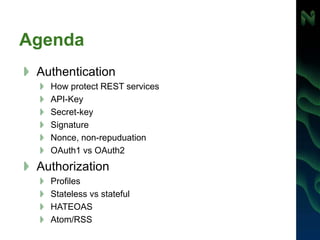
Agenda
Authentication
How protect REST services
API-Key
Secret-key
Signature
Nonce, non-repuduation
OAuth1 vs OAuth2
Authorization
Profiles
Stateless vs stateful
HATEOAS
Atom/RSS
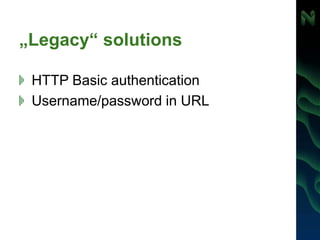
„Legacy“ solutions
HTTP Basic authentication
Username/password in URL
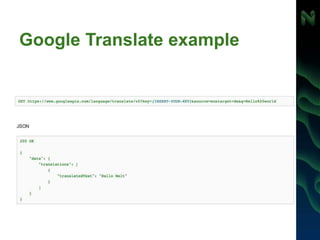
Google Translate example
Authentication with API Key
Simplest way for REST authentication
Used for public or open APIs
Twitter, Google Maps, New York Times, …
API key usually used for
Identify the caller
Check IP addresses of caller
To limit the number of requests
Authentication with API Key only is
unsecure
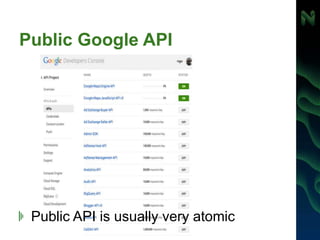
Public Google API
Public API is usually very atomic
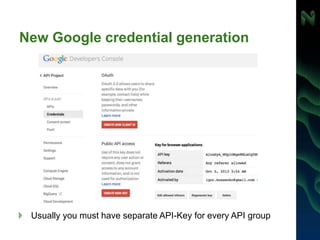
New Google credential generation
Usually you must have separate API-Key for every API group
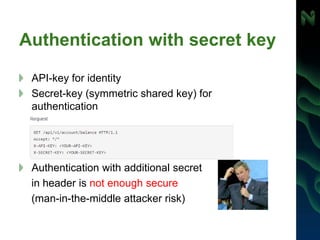
Authentication with secret key
API-key for identity
Secret-key (symmetric shared key) for
authentication
Authentication with additional secret
in header is not enough secure
(man-in-the-middle attacker risk)
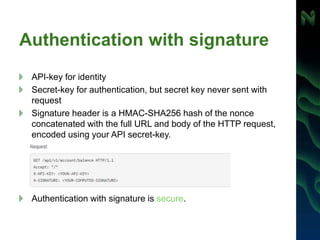
Authentication with signature
API-key for identity
Secret-key for authentication, but secret key never sent with
request
Signature header is a HMAC-SHA256 hash of the nonce
concatenated with the full URL and body of the HTTP request,
encoded using your API secret-key.
Authentication with signature is secure.
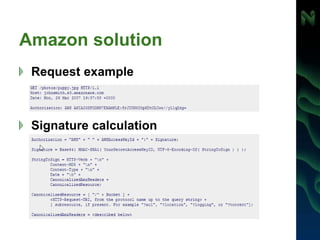
Amazon solution
Request example
Signature calculation
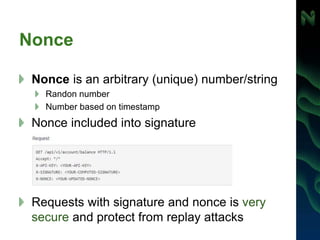
Nonce
Nonce is an arbitrary (unique) number/string
Randon number
Number based on timestamp
Nonce included into signature
Requests with signature and nonce is very
secure and protect from replay attacks
Oauth (1.0)
In 2006 were no open standards for
API access delegation.
OAuth was designed to solve the
application-to-application security
problem.
OAuth Core 1.0 was released in 2007.
OAuth 1.0 concept
Terms
User, Consumer, Service Provider, Protected Resource, Provider
API
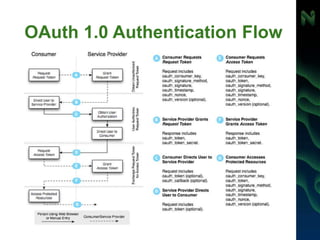
5 parameters to work with OAuth 1.0
Consumer key & Consumer secret
Request token URL
Authorize URL
Access token URL
OAuth 1.0 components
Token = Key + Secret
Message = Document + Digital Signature
Application = Consumer + Access to API
OAuth 1.0 Authentication Flow
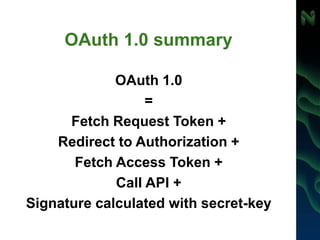
OAuth 1.0 summary
OAuth 1.0
=
Fetch Request Token +
Redirect to Authorization +
Fetch Access Token +
Call API +
Signature calculated with secret-key
vs
OpenID - protocol for fast user
registration on the current website
(“protocol for users”)
OAuth - protocol for authorized access
to the third-party vendor API („protocol
for robots“ ).
Non-repudiation
Non-repuduation - method to ensure that a
transferred message has been sent and
received by the parties claiming to have sent
and received the message
Nonrepudiation can be obtained through the
use of:
Digital signatures
Confirmation services
Timestamp
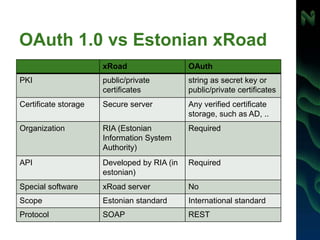
OAuth 1.0 vs Estonian xRoad
xRoad OAuth
PKI public/private
certificates
string as secret key or
public/private certificates
Certificate storage Secure server Any verified certificate
storage, such as AD, ..
Organization RIA (Estonian
Information System
Authority)
Required
API Developed by RIA (in
estonian)
Required
Special software xRoad server No
Scope Estonian standard International standard
Protocol SOAP REST
OAuth 2.0
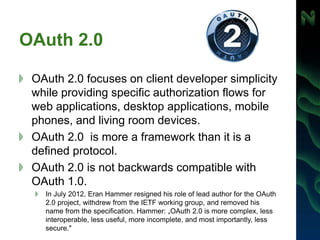
OAuth 2.0 focuses on client developer simplicity
while providing specific authorization flows for
web applications, desktop applications, mobile
phones, and living room devices.
OAuth 2.0 is more a framework than it is a
defined protocol.
OAuth 2.0 is not backwards compatible with
OAuth 1.0.
In July 2012, Eran Hammer resigned his role of lead author for the OAuth
2.0 project, withdrew from the IETF working group, and removed his
name from the specification. Hammer: „OAuth 2.0 is more complex, less
interoperable, less useful, more incomplete, and most importantly, less
secure."
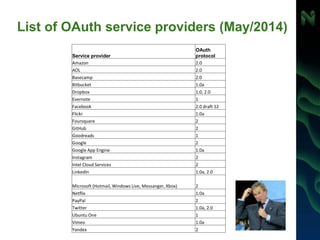
List of OAuth service providers (May/2014)
Service provider
OAuth
protocol
Amazon 2.0
AOL 2.0
Basecamp 2.0
Bitbucket 1.0a
Dropbox 1.0, 2.0
Evernote 1
Facebook 2.0 draft 12
Flickr 1.0a
Foursquare 2
GitHub 2
Goodreads 1
Google 2
Google App Engine 1.0a
Instagram 2
Intel Cloud Services 2
LinkedIn 1.0a, 2.0
Microsoft (Hotmail, Windows Live, Messanger, Xbox) 2
Netflix 1.0a
PayPal 2
Twitter 1.0a, 2.0
Ubuntu One 1
Vimeo 1.0a
Yandex 2
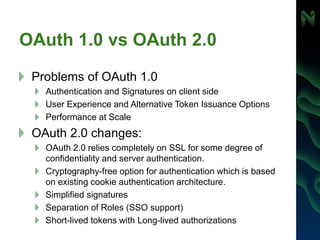
OAuth 1.0 vs OAuth 2.0
Problems of OAuth 1.0
Authentication and Signatures on client side
User Experience and Alternative Token Issuance Options
Performance at Scale
OAuth 2.0 changes:
OAuth 2.0 relies completely on SSL for some degree of
confidentiality and server authentication.
Cryptography-free option for authentication which is based
on existing cookie authentication architecture.
Simplified signatures
Separation of Roles (SSO support)
Short-lived tokens with Long-lived authorizations
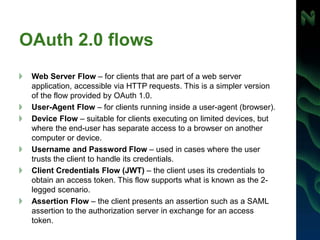
OAuth 2.0 flows
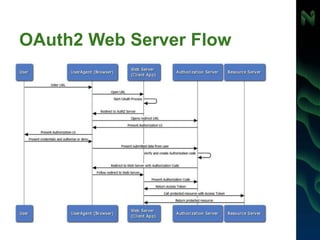
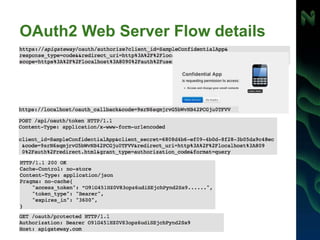
Web Server Flow – for clients that are part of a web server
application, accessible via HTTP requests. This is a simpler version
of the flow provided by OAuth 1.0.
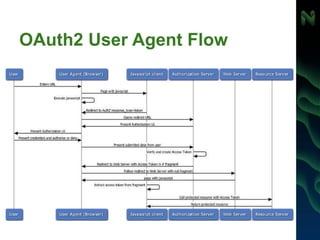
User-Agent Flow – for clients running inside a user-agent (browser).
Device Flow – suitable for clients executing on limited devices, but
where the end-user has separate access to a browser on another
computer or device.
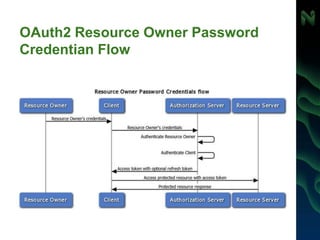
Username and Password Flow – used in cases where the user
trusts the client to handle its credentials.
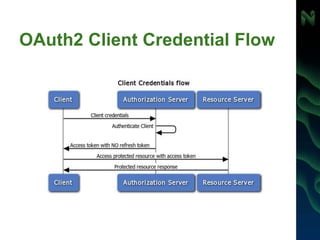
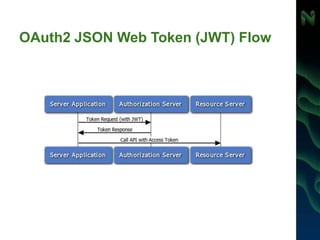
Client Credentials Flow (JWT) – the client uses its credentials to
obtain an access token. This flow supports what is known as the 2-
legged scenario.
Assertion Flow – the client presents an assertion such as a SAML
assertion to the authorization server in exchange for an access
token.
OAuth2 Web Server Flow
OAuth2 Web Server Flow details
SSO
Particular case of Web Server Flow
when Client App and Resource Server
use the same Authorization Server
OAuth2 User Agent Flow
OAuth2 Resource Owner Password
Credentian Flow
OAuth2 Client Credential Flow
OAuth2 JSON Web Token (JWT) Flow
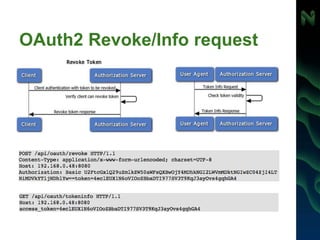
OAuth2 Revoke/Info request
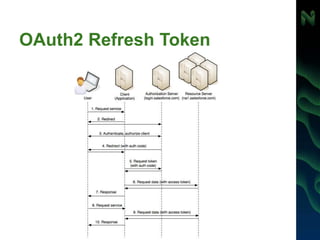
OAuth2 Refresh Token
Does OAuth1 better than OAuth2?
No, they have different purpose: OAuth1 for
server to server communication and OAuth2 for
user/device to server
Does OAuth1 more secure than
OAuth2?
Yes and No
OAuth 1.0 may be used without HTTPS
But, OAuth2 same secure as SSL
When to use OAuth1 & OAuth2?
OAuth 1.0 – server-to-server
OAuth 2.0 – browser/device/client-to-
server
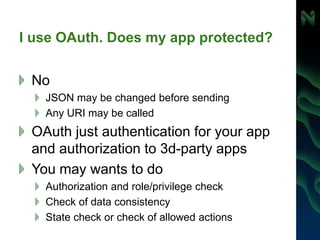
I use OAuth. Does my app protected?
No
JSON may be changed before sending
Any URI may be called
OAuth just authentication for your app
and authorization to 3d-party apps
You may wants to do
Authorization and role/privilege check
Check of data consistency
State check or check of allowed actions
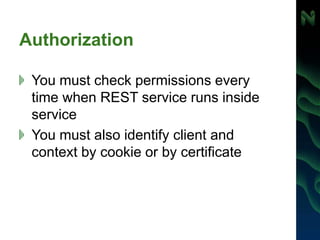
Authorization
You must check permissions every
time when REST service runs inside
service
You must also identify client and
context by cookie or by certificate
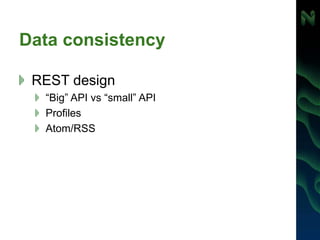
Data consistency
REST design
“Big” API vs “small” API
Profiles
Atom/RSS
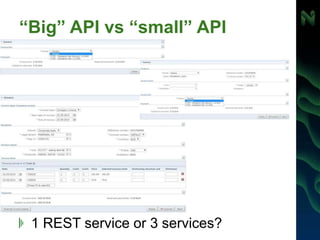
“Big” API vs “small” API
1 REST service or 3 services?
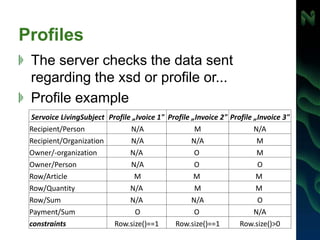
Profiles
Тhe server checks the data sent
regarding the xsd or profile or...
Profile example
Servoice LivingSubject Profile „Ivoice 1" Profile „Invoice 2" Profile „Invoice 3"
Recipient/Person N/A M N/A
Recipient/Organization N/A N/A M
Owner/-organization N/A O M
Owner/Person N/A O O
Row/Article M M M
Row/Quantity N/A M M
Row/Sum N/A N/A O
Payment/Sum O O N/A
constraints Row.size()==1 Row.size()==1 Row.size()>0
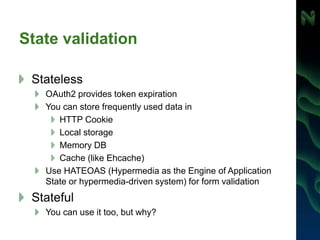
State validation
Stateless
OAuth2 provides token expiration
You can store frequently used data in
HTTP Cookie
Local storage
Memory DB
Cache (like Ehcache)
Use HATEOAS (Hypermedia as the Engine of Application
State or hypermedia-driven system) for form validation
Stateful
You can use it too, but why?
HATEOAS
Data and links content separated one from another
Server may store allowed links and refuse all other
REST queries
A simple JSON presentation is traditionally rendered as:
{
"name" : "Alice"
}
A HATEOAS-based response would provide relevant links like this:
{
"name": "Alice",
"links": [ {
"rel": "self",
"href": "http://localhost:8080/customer/1"
} ]
}
HATEOAS and the PayPal REST Payment API
[
{
"href": "https://api.sandbox.paypal.com/v1/payments/payment/PAY-6RV70583SB702805EKEYSZ6Y",
"rel": "self",
"method": "GET"
},
{
"href": "https://www.sandbox.paypal.com/webscr?cmd=_express-checkout&token=EC-60U79048BN7719609",
"rel": "approval_url",
"method": "REDIRECT"
},
{
"href": "https://api.sandbox.paypal.com/v1/payments/payment/PAY-6RV70583SB702805EKEYSZ6Y/execute",
"rel": "execute",
"method": "POST"
}
]
https://developer.paypal.com/docs/integration/direct/paypal-
rest-payment-hateoas-links/
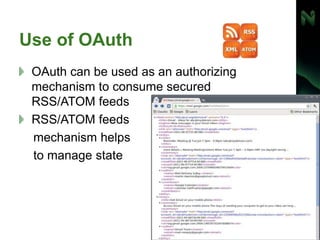
Use of OАuth
OAuth can be used as an authorizing
mechanism to consume secured
RSS/ATOM feeds
RSS/ATOM feeds
mechanism helps
to manage state
Thank you! Questions?

Single-Page-Application & REST security

  • 1.
  • 2.
    Agenda Authentication How protect RESTservices API-Key Secret-key Signature Nonce, non-repuduation OAuth1 vs OAuth2 Authorization Profiles Stateless vs stateful HATEOAS Atom/RSS
  • 3.
    „Legacy“ solutions HTTP Basicauthentication Username/password in URL
  • 4.
  • 5.
    Authentication with APIKey Simplest way for REST authentication Used for public or open APIs Twitter, Google Maps, New York Times, … API key usually used for Identify the caller Check IP addresses of caller To limit the number of requests Authentication with API Key only is unsecure
  • 6.
    Public Google API PublicAPI is usually very atomic
  • 7.
    New Google credentialgeneration Usually you must have separate API-Key for every API group
  • 8.
    Authentication with secretkey API-key for identity Secret-key (symmetric shared key) for authentication Authentication with additional secret in header is not enough secure (man-in-the-middle attacker risk)
  • 9.
    Authentication with signature API-keyfor identity Secret-key for authentication, but secret key never sent with request Signature header is a HMAC-SHA256 hash of the nonce concatenated with the full URL and body of the HTTP request, encoded using your API secret-key. Authentication with signature is secure.
  • 10.
  • 11.
    Nonce Nonce is anarbitrary (unique) number/string Randon number Number based on timestamp Nonce included into signature Requests with signature and nonce is very secure and protect from replay attacks
  • 12.
    Oauth (1.0) In 2006were no open standards for API access delegation. OAuth was designed to solve the application-to-application security problem. OAuth Core 1.0 was released in 2007.
  • 13.
    OAuth 1.0 concept Terms User,Consumer, Service Provider, Protected Resource, Provider API 5 parameters to work with OAuth 1.0 Consumer key & Consumer secret Request token URL Authorize URL Access token URL OAuth 1.0 components Token = Key + Secret Message = Document + Digital Signature Application = Consumer + Access to API
  • 14.
  • 15.
    OAuth 1.0 summary OAuth1.0 = Fetch Request Token + Redirect to Authorization + Fetch Access Token + Call API + Signature calculated with secret-key
  • 16.
    vs OpenID - protocolfor fast user registration on the current website (“protocol for users”) OAuth - protocol for authorized access to the third-party vendor API („protocol for robots“ ).
  • 17.
    Non-repudiation Non-repuduation - methodto ensure that a transferred message has been sent and received by the parties claiming to have sent and received the message Nonrepudiation can be obtained through the use of: Digital signatures Confirmation services Timestamp
  • 18.
    OAuth 1.0 vsEstonian xRoad xRoad OAuth PKI public/private certificates string as secret key or public/private certificates Certificate storage Secure server Any verified certificate storage, such as AD, .. Organization RIA (Estonian Information System Authority) Required API Developed by RIA (in estonian) Required Special software xRoad server No Scope Estonian standard International standard Protocol SOAP REST
  • 19.
    OAuth 2.0 OAuth 2.0focuses on client developer simplicity while providing specific authorization flows for web applications, desktop applications, mobile phones, and living room devices. OAuth 2.0 is more a framework than it is a defined protocol. OAuth 2.0 is not backwards compatible with OAuth 1.0. In July 2012, Eran Hammer resigned his role of lead author for the OAuth 2.0 project, withdrew from the IETF working group, and removed his name from the specification. Hammer: „OAuth 2.0 is more complex, less interoperable, less useful, more incomplete, and most importantly, less secure."
  • 20.
    List of OAuthservice providers (May/2014) Service provider OAuth protocol Amazon 2.0 AOL 2.0 Basecamp 2.0 Bitbucket 1.0a Dropbox 1.0, 2.0 Evernote 1 Facebook 2.0 draft 12 Flickr 1.0a Foursquare 2 GitHub 2 Goodreads 1 Google 2 Google App Engine 1.0a Instagram 2 Intel Cloud Services 2 LinkedIn 1.0a, 2.0 Microsoft (Hotmail, Windows Live, Messanger, Xbox) 2 Netflix 1.0a PayPal 2 Twitter 1.0a, 2.0 Ubuntu One 1 Vimeo 1.0a Yandex 2
  • 21.
    OAuth 1.0 vsOAuth 2.0 Problems of OAuth 1.0 Authentication and Signatures on client side User Experience and Alternative Token Issuance Options Performance at Scale OAuth 2.0 changes: OAuth 2.0 relies completely on SSL for some degree of confidentiality and server authentication. Cryptography-free option for authentication which is based on existing cookie authentication architecture. Simplified signatures Separation of Roles (SSO support) Short-lived tokens with Long-lived authorizations
  • 22.
    OAuth 2.0 flows WebServer Flow – for clients that are part of a web server application, accessible via HTTP requests. This is a simpler version of the flow provided by OAuth 1.0. User-Agent Flow – for clients running inside a user-agent (browser). Device Flow – suitable for clients executing on limited devices, but where the end-user has separate access to a browser on another computer or device. Username and Password Flow – used in cases where the user trusts the client to handle its credentials. Client Credentials Flow (JWT) – the client uses its credentials to obtain an access token. This flow supports what is known as the 2- legged scenario. Assertion Flow – the client presents an assertion such as a SAML assertion to the authorization server in exchange for an access token.
  • 23.
  • 24.
    OAuth2 Web ServerFlow details
  • 25.
    SSO Particular case ofWeb Server Flow when Client App and Resource Server use the same Authorization Server
  • 26.
  • 27.
    OAuth2 Resource OwnerPassword Credentian Flow
  • 28.
  • 29.
    OAuth2 JSON WebToken (JWT) Flow
  • 30.
  • 31.
  • 32.
    Does OAuth1 betterthan OAuth2? Does OAuth1 better than OAuth2? No, they have different purpose: OAuth1 for server to server communication and OAuth2 for user/device to server Does OAuth1 more secure than OAuth2? Yes and No OAuth 1.0 may be used without HTTPS But, OAuth2 same secure as SSL
  • 33.
    When to useOAuth1 & OAuth2? OAuth 1.0 – server-to-server OAuth 2.0 – browser/device/client-to- server
  • 34.
    I use OAuth.Does my app protected? No JSON may be changed before sending Any URI may be called OAuth just authentication for your app and authorization to 3d-party apps You may wants to do Authorization and role/privilege check Check of data consistency State check or check of allowed actions
  • 35.
    Authorization You must checkpermissions every time when REST service runs inside service You must also identify client and context by cookie or by certificate
  • 36.
    Data consistency REST design “Big”API vs “small” API Profiles Atom/RSS
  • 37.
    “Big” API vs“small” API 1 REST service or 3 services?
  • 38.
    Profiles Тhe server checksthe data sent regarding the xsd or profile or... Profile example Servoice LivingSubject Profile „Ivoice 1" Profile „Invoice 2" Profile „Invoice 3" Recipient/Person N/A M N/A Recipient/Organization N/A N/A M Owner/-organization N/A O M Owner/Person N/A O O Row/Article M M M Row/Quantity N/A M M Row/Sum N/A N/A O Payment/Sum O O N/A constraints Row.size()==1 Row.size()==1 Row.size()>0
  • 39.
    State validation Stateless OAuth2 providestoken expiration You can store frequently used data in HTTP Cookie Local storage Memory DB Cache (like Ehcache) Use HATEOAS (Hypermedia as the Engine of Application State or hypermedia-driven system) for form validation Stateful You can use it too, but why?
  • 40.
    HATEOAS Data and linkscontent separated one from another Server may store allowed links and refuse all other REST queries A simple JSON presentation is traditionally rendered as: { "name" : "Alice" } A HATEOAS-based response would provide relevant links like this: { "name": "Alice", "links": [ { "rel": "self", "href": "http://localhost:8080/customer/1" } ] }
  • 41.
    HATEOAS and thePayPal REST Payment API [ { "href": "https://api.sandbox.paypal.com/v1/payments/payment/PAY-6RV70583SB702805EKEYSZ6Y", "rel": "self", "method": "GET" }, { "href": "https://www.sandbox.paypal.com/webscr?cmd=_express-checkout&token=EC-60U79048BN7719609", "rel": "approval_url", "method": "REDIRECT" }, { "href": "https://api.sandbox.paypal.com/v1/payments/payment/PAY-6RV70583SB702805EKEYSZ6Y/execute", "rel": "execute", "method": "POST" } ] https://developer.paypal.com/docs/integration/direct/paypal- rest-payment-hateoas-links/
  • 42.
    Use of OАuth OAuthcan be used as an authorizing mechanism to consume secured RSS/ATOM feeds RSS/ATOM feeds mechanism helps to manage state
  • 43.

Editor's Notes

  • #29 The client credentials grant type must only be used by confidential clients. The client can request an access token using only its client credentials (or other supported means of authentication) when the client is requesting access to the protected resources under its control. The client can also request access to those of another Resource Owner that has been previously arranged with the Authorization Server (the method of which is beyond the scope of the specification).
  • #30 A JSON Web Token (JWT) is a JSON-based security token encoding that enables identity and security information to be shared across security domains. In the OAuth 2.0 JWT flow, the client application is assumed to be a confidential client that can store the client application’s private key. The X.509 certificate that matches the client’s private key must be registered in the API Manager. The API Gateway uses this certificate to verify the signature of the JWT claim. POST /api/oauth/token HTTP/1.1 Content-Length: 424 Content-Type: application/x-www-form-urlencoded; charset=UTF-8 Host: 192.168.0.48:8080 grant_type=urn%3Aietf%3Aparams%3Aoauth%3Agrant-type%3Ajwt-bearer&assertion=eyJhbGciOiJS UzI1NiJ9.eyJpc3MiOiAiU2FtcGxlQ29uZmlkZW50aWFsQXBwIiwgImF1ZCI6ICJodHRwOi8vYXBpc2Vy dmVyL2FwaS9vYXV0aC90b2tlbiIsICJleHAiOiAiMTM0MTM1NDYwNSIsICJpYXQiOiAiMTM0MTM1NDMwN SJ9.ilWR8O8OlbQtT5zBaGIQjveOZFIWGTkdVC6LofJ8dN0akvvD0m7IvUZtPp4dx3KdEDj4YcsyCEAPh fopUlZO3LE-iNPlbxB5dsmizbFIc2oGZr7Zo4IlDf92OJHq9DGqwQosJ-s9GcIRQk-IUPF4lVy1Q7PidP WKR9ohm3c2gt8