Simplify your Jenkins Projects with
Docker Multi-Stage Builds
Eric Smalling - Solution Architect, Docker Inc.
Simplify your Jenkins Projects
with Docker Multi-Stage Builds
Eric Smalling
Solution Architect
Docker Inc.
Agenda
• Docker images 101
•Building images via Jenkins
• Image size challenges
• Old way: Using Docker image builder pattern
• New way: Docker multi-stage builds
• Demos
• Resources for more info
Introduction
• Eric Smalling
–Solution Architect
Docker Customer Success Team
• ~25 years in software development, architecture,
version control admin, etc…
–Java / J2EE, C, Python, etc
–Puppet, Ansible
–Git, SVN, CVS, ClearCase, VSS, PVCS
• ~10 years in build & test automation
–Primarily Jenkins for CI, including some very large scale
implementations
–Testing with Selenium, Fitnesse, RESTAssured, SOAPUI,
Puppet-RSpec, etc
–Docker user since pre-1.0 days
•Dallas/Fort Worth Jenkins Area Meetup (JAM)
coordinator.
Docker images 101
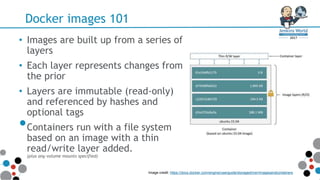
• Images are built up from a series of
layers
• Each layer represents changes from
the prior
• Layers are immutable (read-only)
and referenced by hashes and
optional tags
•Containers run with a file system
based on an image with a thin
read/write layer added.
(plus any volume mounts specified)
Image credit: https://docs.docker.com/engine/userguide/storagedriver/imagesandcontainers
Docker images 101
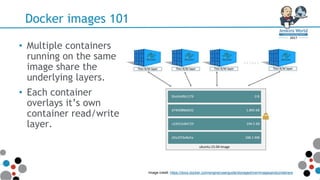
• Multiple containers
running on the same
image share the
underlying layers.
• Each container
overlays it’s own
container read/write
layer.
Image credit: https://docs.docker.com/engine/userguide/storagedriver/imagesandcontainers
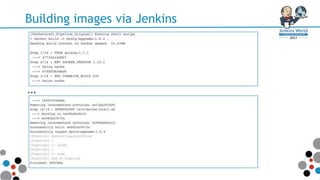
Building images via Jenkins
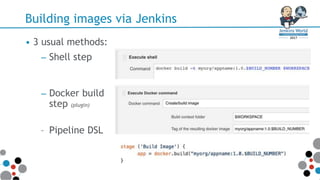
• 3 usual methods:
– Shell step
– Docker build
step (plugin)
– Pipeline DSL
Building images via Jenkins
...
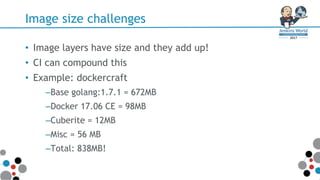
Image size challenges
• Image layers have size and they add up!
• CI can compound this
• Example: dockercraft
–Base golang:1.7.1 = 672MB
–Docker 17.06 CE = 98MB
–Cuberite = 12MB
–Misc = 56 MB
–Total: 838MB!
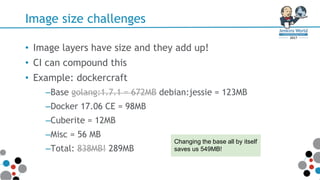
Image size challenges
• Image layers have size and they add up!
• CI can compound this
• Example: dockercraft
–Base golang:1.7.1 = 672MB debian:jessie = 123MB
–Docker 17.06 CE = 98MB
–Cuberite = 12MB
–Misc = 56 MB
–Total: 838MB! 289MB
Changing the base all by itself
saves us 549MB!
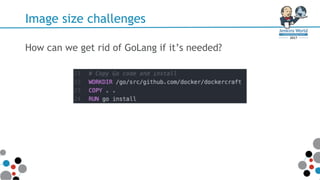
Image size challenges
How can we get rid of GoLang if it’s needed?
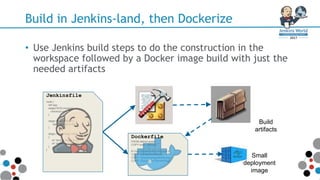
Build in Jenkins-land, then Dockerize
• Use Jenkins build steps to do the construction in the
workspace followed by a Docker image build with just the
needed artifacts
node {
def app
stage('SCM clone') {
checkout scm
}
stage ('Build Image') {
app = docker.build("m
}
stage ('Print image info')
{
sh 'docker image ls my
sh 'docker image histo
}
}
Jenkinsfile
FROM debian:jessie
COPY build_artifacts /
# Copy Dockercraft config and p
COPY ./config /srv/Server
COPY ./docs/img/logo64x64.png /
COPY ./Docker /srv/Server/Plugi
Dockerfile
Build
artifacts
Small
deployment
image
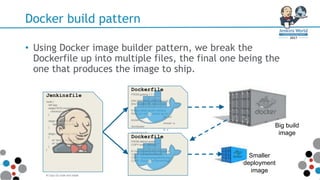
Docker build pattern
• Using Docker image builder pattern, we break the
Dockerfile up into multiple files, the final one being the
one that produces the image to ship.
FROM golang:1.7.1
ENV DOCKER_VERSION 1.12.1
ENV CUBERITE_BUILD 630
# Copy latest docker client(s)
RUN curl -sSL -o docker.tgz ht
tar -xvf
docker.tgz
chmod +x
/bin/docker
ln -s
/bin/docker /b
# Download Cuberite server (Mi
WORKDIR /srv
RUN curl "https://builds.cuber
# Copy Dockercraft config and
COPY ./config /srv/Server
COPY ./docs/img/logo64x64.png
COPY ./Docker /srv/Server/Plug
# Copy Go code and install
Dockerfile FROM golang:1.7.1
ENV DOCKER_VERSION 1.12.1
ENV CUBERITE_BUILD 630
# Copy latest docker client(s)
RUN curl -sSL -o docker.tgz ht
tar -xvf
docker.tgz
chmod +x
/bin/docker
ln -s
/bin/docker /b
Dockerfile
FROM debian:jessie
COPY build_artifacts /
# Copy Dockercraft config and p
COPY ./config /srv/Server
COPY ./docs/img/logo64x64.png /
COPY ./Docker /srv/Server/Plugi
Dockerfile
Big build
image
Smaller
deployment
image
node {
def app
stage('SCM clone') {
checkout scm
}
stage ('Build Image') {
app = docker.build("m
}
stage ('Print image info')
{
sh 'docker image ls my
sh 'docker image histo
}
}
Jenkinsfile
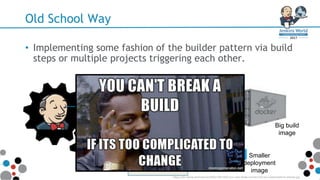
Old School Way
• Implementing some fashion of the builder pattern via build
steps or multiple projects triggering each other.
FROM golang:1.7.1
ENV DOCKER_VERSION 1.12.1
ENV CUBERITE_BUILD 630
# Copy latest docker client(s)
RUN curl -sSL -o docker.tgz ht
tar -xvf
docker.tgz
chmod +x
/bin/docker
ln -s
/bin/docker /b
Dockerfile
FROM debian:jessie
COPY build_artifacts /
# Copy Dockercraft config and p
COPY ./config /srv/Server
COPY ./docs/img/logo64x64.png /
COPY ./Docker /srv/Server/Plugi
Dockerfile
Big build
image
Smaller
deployment
image
https://cdn.meme.am/instances/500x/76014521/you-cant-break-a-build-if-its-too-complicated-to-change.jpg
Docker image builds demo (old way)
Demo time!
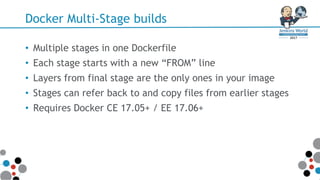
Docker Multi-Stage builds
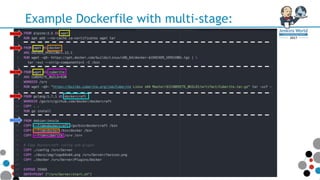
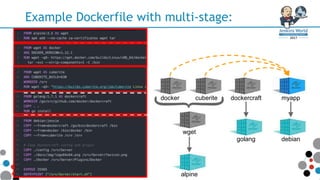
• Multiple stages in one Dockerfile
• Each stage starts with a new “FROM” line
• Layers from final stage are the only ones in your image
• Stages can refer back to and copy files from earlier stages
• Requires Docker CE 17.05+ / EE 17.06+
Example Dockerfile with multi-stage:
wget
docker cuberite
}alpine
golang debian
myappdockercraft
Minecraft, really?
Not everyone works at Unicorn shops that code in GoLang all
day and visualize their Docker containers in Minecraft
http://gph.is/1UK1ZFa
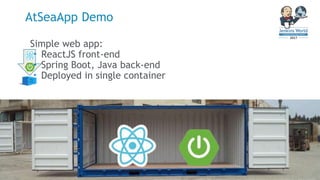
Simple web app:
• ReactJS front-end
• Spring Boot, Java back-end
• Deployed in single container
AtSeaApp Demo
AtSeaApp Demo
Demo time!
Resources
• Dockercon 2017 keynote introducing Multi-Stage Builds:
https://youtu.be/hwkqju_BXEo?t=24m26s
• Abby Fuller, Creating Effective Images:
https://youtu.be/pPsREQbf3PA
•Nicolas Frankel, A Dockerfile for Maven-Based GitHub
Projects: https://goo.gl/hWv3NM
Resources
COPENHAGEN, DENMARK
Q & A
Contact me
Eric Smalling
Solution Architect at Docker
eric.smalling@docker.com
ericsmalling
}
COPENHAGEN, DENMARK
Simply your Jenkins Projects with Docker Multi-Stage Builds

Simply your Jenkins Projects with Docker Multi-Stage Builds

  • 1.
    Simplify your JenkinsProjects with Docker Multi-Stage Builds Eric Smalling - Solution Architect, Docker Inc.
  • 2.
    Simplify your JenkinsProjects with Docker Multi-Stage Builds Eric Smalling Solution Architect Docker Inc.
  • 3.
    Agenda • Docker images101 •Building images via Jenkins • Image size challenges • Old way: Using Docker image builder pattern • New way: Docker multi-stage builds • Demos • Resources for more info
  • 4.
    Introduction • Eric Smalling –SolutionArchitect Docker Customer Success Team • ~25 years in software development, architecture, version control admin, etc… –Java / J2EE, C, Python, etc –Puppet, Ansible –Git, SVN, CVS, ClearCase, VSS, PVCS • ~10 years in build & test automation –Primarily Jenkins for CI, including some very large scale implementations –Testing with Selenium, Fitnesse, RESTAssured, SOAPUI, Puppet-RSpec, etc –Docker user since pre-1.0 days •Dallas/Fort Worth Jenkins Area Meetup (JAM) coordinator.
  • 5.
    Docker images 101 •Images are built up from a series of layers • Each layer represents changes from the prior • Layers are immutable (read-only) and referenced by hashes and optional tags •Containers run with a file system based on an image with a thin read/write layer added. (plus any volume mounts specified) Image credit: https://docs.docker.com/engine/userguide/storagedriver/imagesandcontainers
  • 6.
    Docker images 101 •Multiple containers running on the same image share the underlying layers. • Each container overlays it’s own container read/write layer. Image credit: https://docs.docker.com/engine/userguide/storagedriver/imagesandcontainers
  • 7.
    Building images viaJenkins • 3 usual methods: – Shell step – Docker build step (plugin) – Pipeline DSL
  • 8.
  • 9.
    Image size challenges •Image layers have size and they add up! • CI can compound this • Example: dockercraft –Base golang:1.7.1 = 672MB –Docker 17.06 CE = 98MB –Cuberite = 12MB –Misc = 56 MB –Total: 838MB!
  • 10.
    Image size challenges •Image layers have size and they add up! • CI can compound this • Example: dockercraft –Base golang:1.7.1 = 672MB debian:jessie = 123MB –Docker 17.06 CE = 98MB –Cuberite = 12MB –Misc = 56 MB –Total: 838MB! 289MB Changing the base all by itself saves us 549MB!
  • 11.
    Image size challenges Howcan we get rid of GoLang if it’s needed?
  • 12.
    Build in Jenkins-land,then Dockerize • Use Jenkins build steps to do the construction in the workspace followed by a Docker image build with just the needed artifacts node { def app stage('SCM clone') { checkout scm } stage ('Build Image') { app = docker.build("m } stage ('Print image info') { sh 'docker image ls my sh 'docker image histo } } Jenkinsfile FROM debian:jessie COPY build_artifacts / # Copy Dockercraft config and p COPY ./config /srv/Server COPY ./docs/img/logo64x64.png / COPY ./Docker /srv/Server/Plugi Dockerfile Build artifacts Small deployment image
  • 13.
    Docker build pattern •Using Docker image builder pattern, we break the Dockerfile up into multiple files, the final one being the one that produces the image to ship. FROM golang:1.7.1 ENV DOCKER_VERSION 1.12.1 ENV CUBERITE_BUILD 630 # Copy latest docker client(s) RUN curl -sSL -o docker.tgz ht tar -xvf docker.tgz chmod +x /bin/docker ln -s /bin/docker /b # Download Cuberite server (Mi WORKDIR /srv RUN curl "https://builds.cuber # Copy Dockercraft config and COPY ./config /srv/Server COPY ./docs/img/logo64x64.png COPY ./Docker /srv/Server/Plug # Copy Go code and install Dockerfile FROM golang:1.7.1 ENV DOCKER_VERSION 1.12.1 ENV CUBERITE_BUILD 630 # Copy latest docker client(s) RUN curl -sSL -o docker.tgz ht tar -xvf docker.tgz chmod +x /bin/docker ln -s /bin/docker /b Dockerfile FROM debian:jessie COPY build_artifacts / # Copy Dockercraft config and p COPY ./config /srv/Server COPY ./docs/img/logo64x64.png / COPY ./Docker /srv/Server/Plugi Dockerfile Big build image Smaller deployment image node { def app stage('SCM clone') { checkout scm } stage ('Build Image') { app = docker.build("m } stage ('Print image info') { sh 'docker image ls my sh 'docker image histo } } Jenkinsfile
  • 14.
    Old School Way •Implementing some fashion of the builder pattern via build steps or multiple projects triggering each other. FROM golang:1.7.1 ENV DOCKER_VERSION 1.12.1 ENV CUBERITE_BUILD 630 # Copy latest docker client(s) RUN curl -sSL -o docker.tgz ht tar -xvf docker.tgz chmod +x /bin/docker ln -s /bin/docker /b Dockerfile FROM debian:jessie COPY build_artifacts / # Copy Dockercraft config and p COPY ./config /srv/Server COPY ./docs/img/logo64x64.png / COPY ./Docker /srv/Server/Plugi Dockerfile Big build image Smaller deployment image https://cdn.meme.am/instances/500x/76014521/you-cant-break-a-build-if-its-too-complicated-to-change.jpg
  • 15.
    Docker image buildsdemo (old way) Demo time!
  • 16.
    Docker Multi-Stage builds •Multiple stages in one Dockerfile • Each stage starts with a new “FROM” line • Layers from final stage are the only ones in your image • Stages can refer back to and copy files from earlier stages • Requires Docker CE 17.05+ / EE 17.06+
  • 17.
  • 18.
    Example Dockerfile withmulti-stage: wget docker cuberite }alpine golang debian myappdockercraft
  • 19.
    Minecraft, really? Not everyoneworks at Unicorn shops that code in GoLang all day and visualize their Docker containers in Minecraft http://gph.is/1UK1ZFa
  • 20.
    Simple web app: •ReactJS front-end • Spring Boot, Java back-end • Deployed in single container AtSeaApp Demo
  • 21.
  • 22.
    Resources • Dockercon 2017keynote introducing Multi-Stage Builds: https://youtu.be/hwkqju_BXEo?t=24m26s • Abby Fuller, Creating Effective Images: https://youtu.be/pPsREQbf3PA •Nicolas Frankel, A Dockerfile for Maven-Based GitHub Projects: https://goo.gl/hWv3NM
  • 23.
  • 24.
  • 25.
    Contact me Eric Smalling SolutionArchitect at Docker eric.smalling@docker.com ericsmalling } COPENHAGEN, DENMARK