SIMPLIFIED C++
40 PROGRAMS
NOEL MOSES MWADENDE
PAGE 1
ABOUT THE AUTHOR.
Noel Moses Mwadende is the passionate book and article
writer based of different books and articles concern
computer science in general, especially in cybersecurity and
machine learning, currently Noel is employed as youtuber
and book author at MoTech which is mini firm dealing with
provision of information technology services.
@2019.
PAGE 2
INTRODUCTION.
For the first time I faced C++ to be honest it was one of
the difficult programming language as I was newer to the
programming language, I stayed sleepless the whole night
thinking on how I can make it easy for me, I found one of my
exercise where I wrote most frequently and important
examples in each topic, studying those examples for about
two weeks then everything was simple, I know still there
might people face difficulties in learning C++, do not worry let
us learn by examples today, the same methodology I used to
master C++ in simplified way and it worked fine for me, now
it is time for me to introduce this simplified way to master
C++.
This book contains four chapter, in which there are 10
examples in each chapter which sum up to 40 C++programs
in simplified way.
PAGE 3
ACKNOWELDGEMENT.
Thanks to Prof Leonard James Mselle the author of
“C++ programming in RAM diagrams under MTL-1” your
efforts in teaching us C++ today seems to bear fruits as am
able to teach others as you used to teach me.
Thanks to my former head of department Doctor
Masoud Masoud, currently lecture at DIT, everyone knows
your teaching style to be honest most of C++ programs
were weak before you, I enjoyed your class sessions.
Thanks to my instructor Miss Martha Shaka, your
efforts in tutorial session made easy way for me to capture
different concepts of C++, most of time you tried to teach
us in simple ways.
PAGE 4
HOW TO READ THIS BOOK.
Methodology used for teaching in this book is example
based teaching methodology, so it is better to follow the
same way in learning as I used in teaching, for better
understanding you should take one example or one
program after another, trying to write each and every
program yourself, this will help you in understanding,
reading by looking pictures in figure may lead you to fall
in a sleep, programming language is about practice, so
after reading one program write it either in Dev
C++,Borland or elsewhere.
PAGE 5
WHY YOU SHOULD READ THIS BOOK.
What makes students understand a subject by either
more examples provided by instructor or by more practice
for the side of student, in my book I have provided more
examples if you will take them seriously and do more
practice, for sure you will understand.
All programs have two parts, part is program and
second part is the output of the program, making errors in
program will lead to errors in the output, here it comes the
matter of why you should read this book, every program in
my book is provided with two important parts of program,
that is piece of code and output of code, studying these two
parts of program will makes you understand more.
PAGE 6
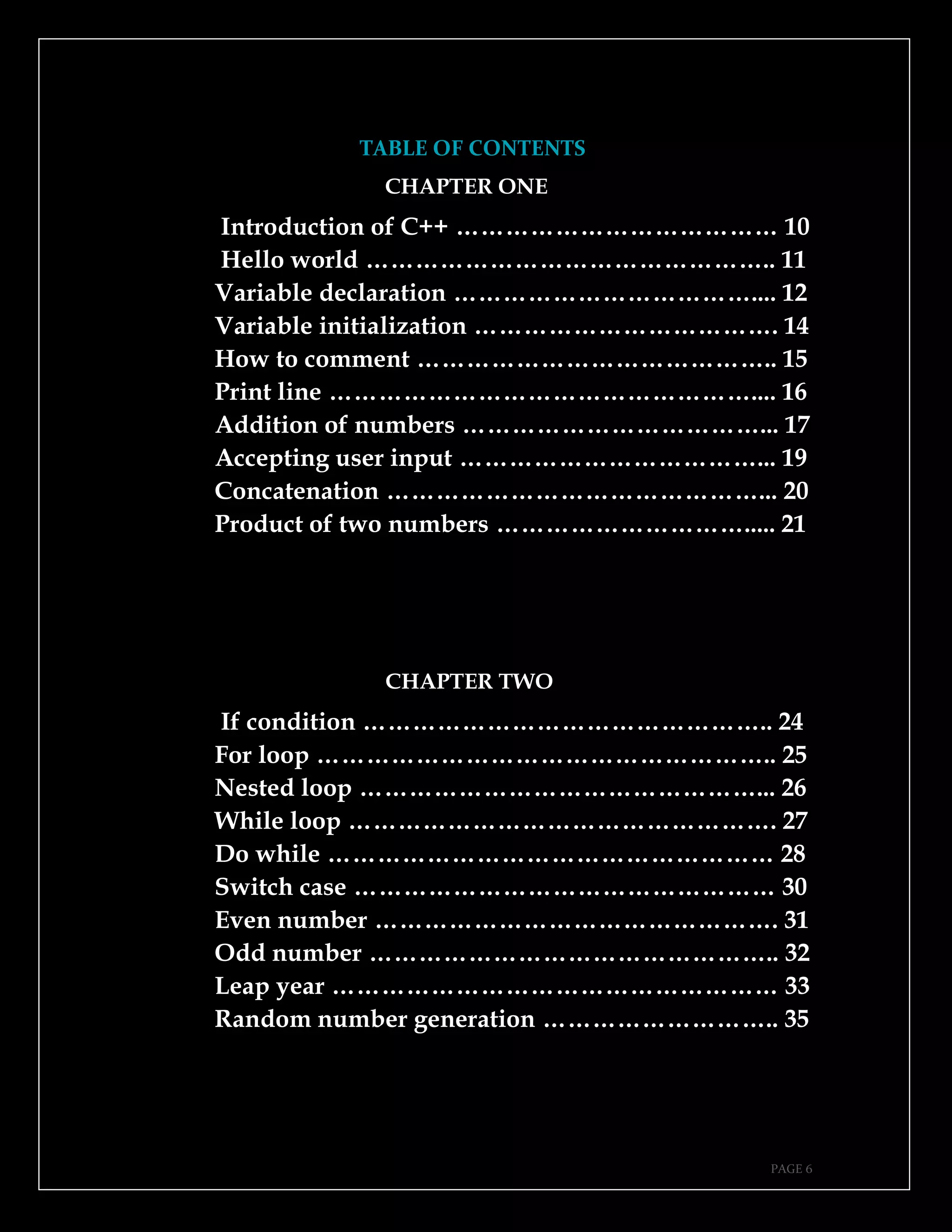
TABLE OF CONTENTS
CHAPTER ONE
Introduction of C++ ………………………………… 10
Hello world ………………………………………….. 11
Variable declaration ……………………………….... 12
Variable initialization ………………………………. 14
How to comment …………………………………….. 15
Print line …………………………………………….... 16
Addition of numbers ………………………………... 17
Accepting user input ………………………………... 19
Concatenation ………………………………………... 20
Product of two numbers …………………………..... 21
CHAPTER TWO
If condition ………………………………………….. 24
For loop ……………………………………………….. 25
Nested loop …………………………………………... 26
While loop ……………………………………………. 27
Do while ……………………………………………… 28
Switch case …………………………………………… 30
Even number …………………………………………. 31
Odd number ………………………………………….. 32
Leap year ……………………………………………… 33
Random number generation ……………………….. 35
PAGE 7
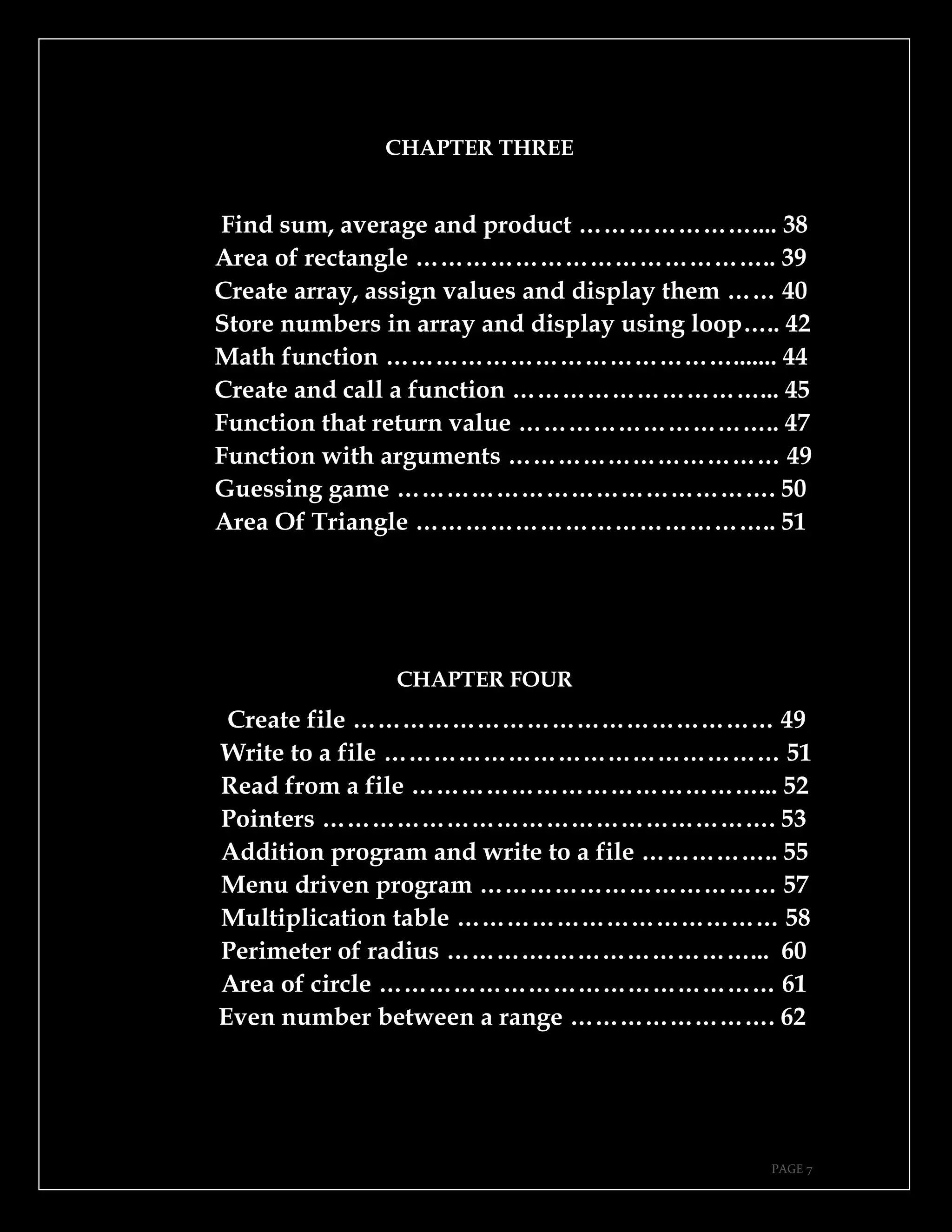
CHAPTER THREE
Find sum, average and product ………………….... 38
Area of rectangle …………………………………….. 39
Create array, assign values and display them …… 40
Store numbers in array and display using loop….. 42
Math function ……………………………………....... 44
Create and call a function …………………………... 45
Function that return value ………………………….. 47
Function with arguments …………………………… 49
Guessing game ………………………………………. 50
Area Of Triangle …………………………………….. 51
CHAPTER FOUR
Create file …………………………………………… 49
Write to a file ………………………………………… 51
Read from a file ……………………………………... 52
Pointers ………………………………………………. 53
Addition program and write to a file …………….. 55
Menu driven program ……………………………… 57
Multiplication table ………………………………… 58
Perimeter of radius ………….……………………... 60
Area of circle ………………………………………… 61
Even number between a range ……………………. 62
PAGE 8
This page is intentionally left blank.
PAGE 9
CHAPTER ONE.
➔Introduction of C++.
➔Hello world.
➔Variable declaration.
➔Variable initialization.
➔How to comment.
➔Print line.
➔Addition of numbers.
➔Accepting user input.
➔ Concatenation.
➔Product of two numbers.
PAGE 10
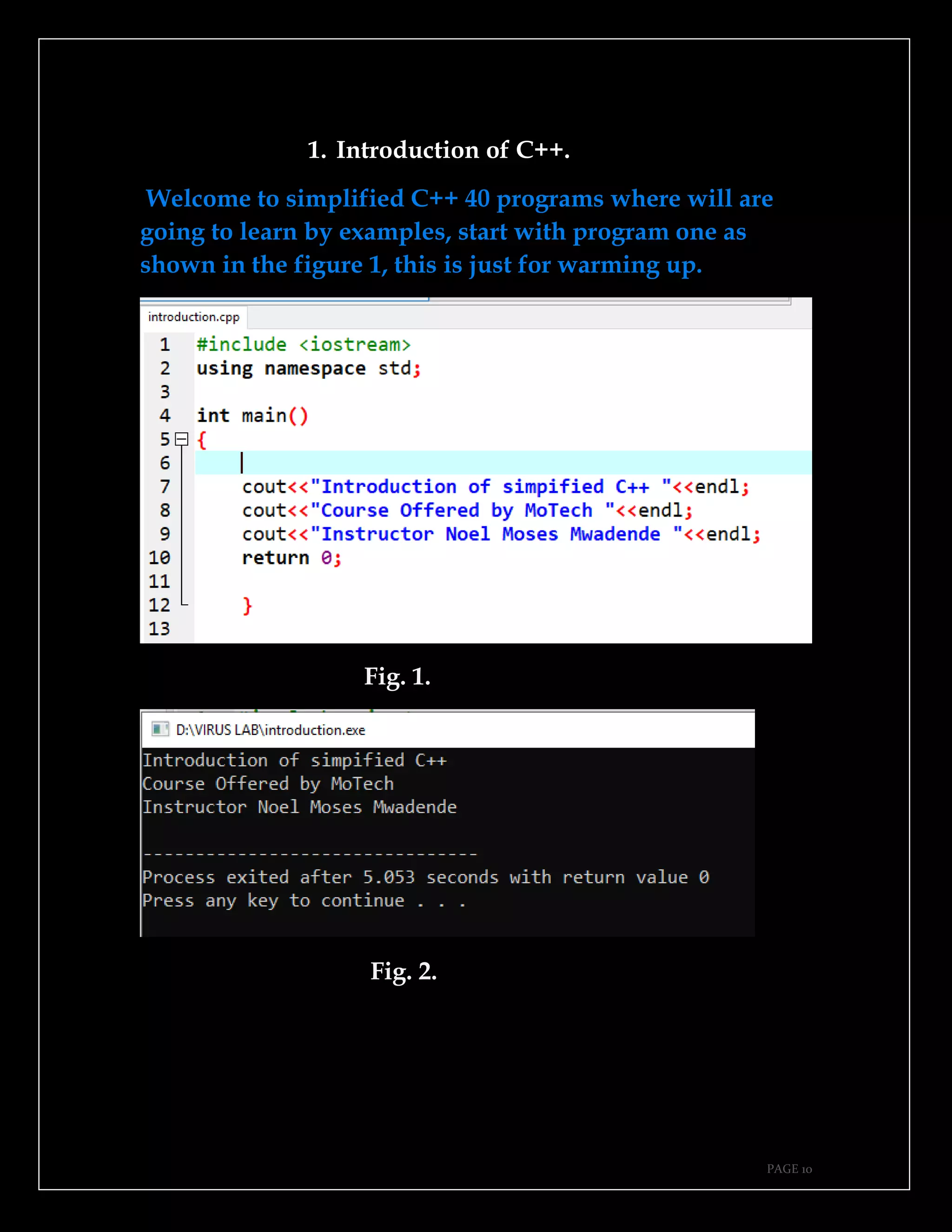
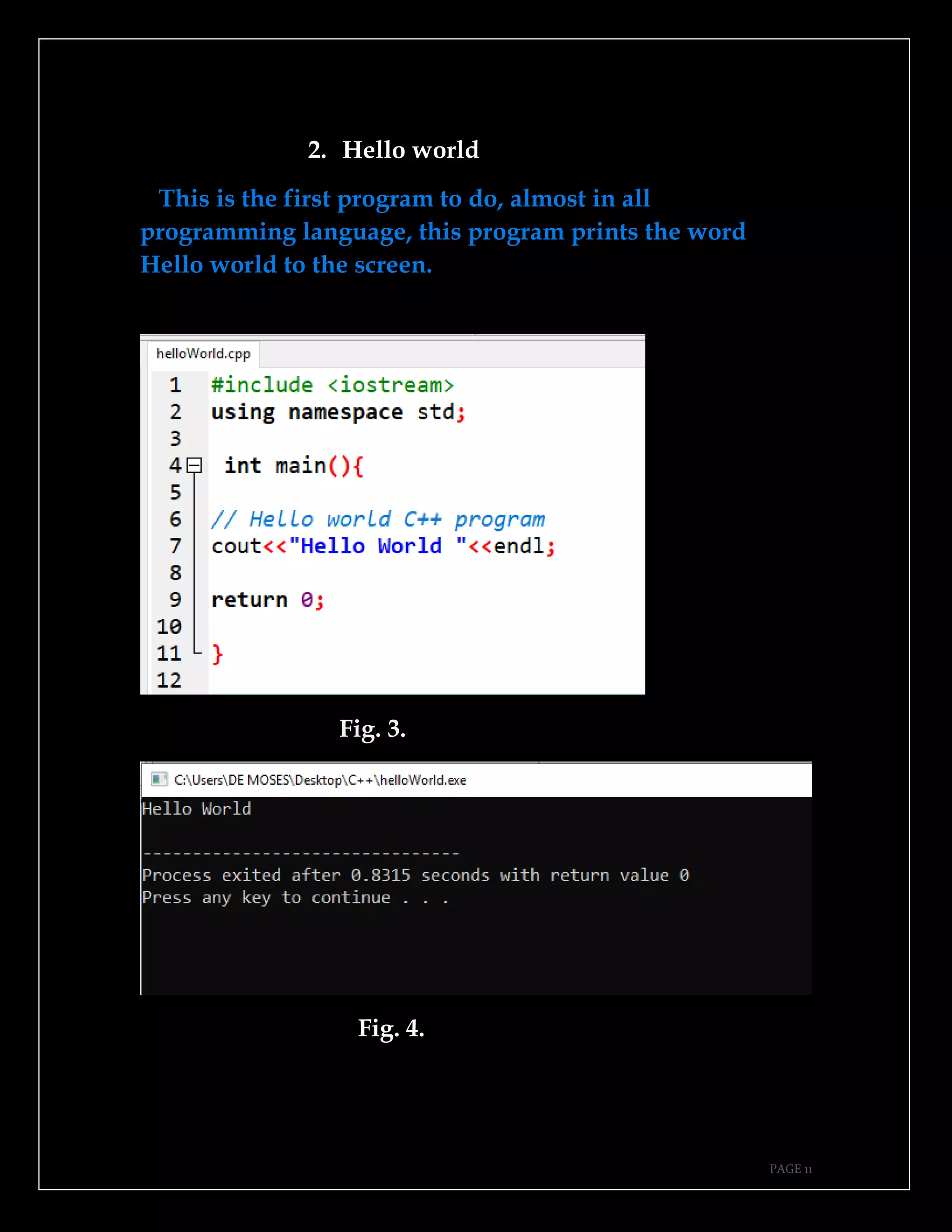
1. Introduction of C++.
Welcome to simplified C++ 40 programs where will are
going to learn by examples, start with program one as
shown in the figure 1, this is just for warming up.
Fig. 1.
Fig. 2.
PAGE 11
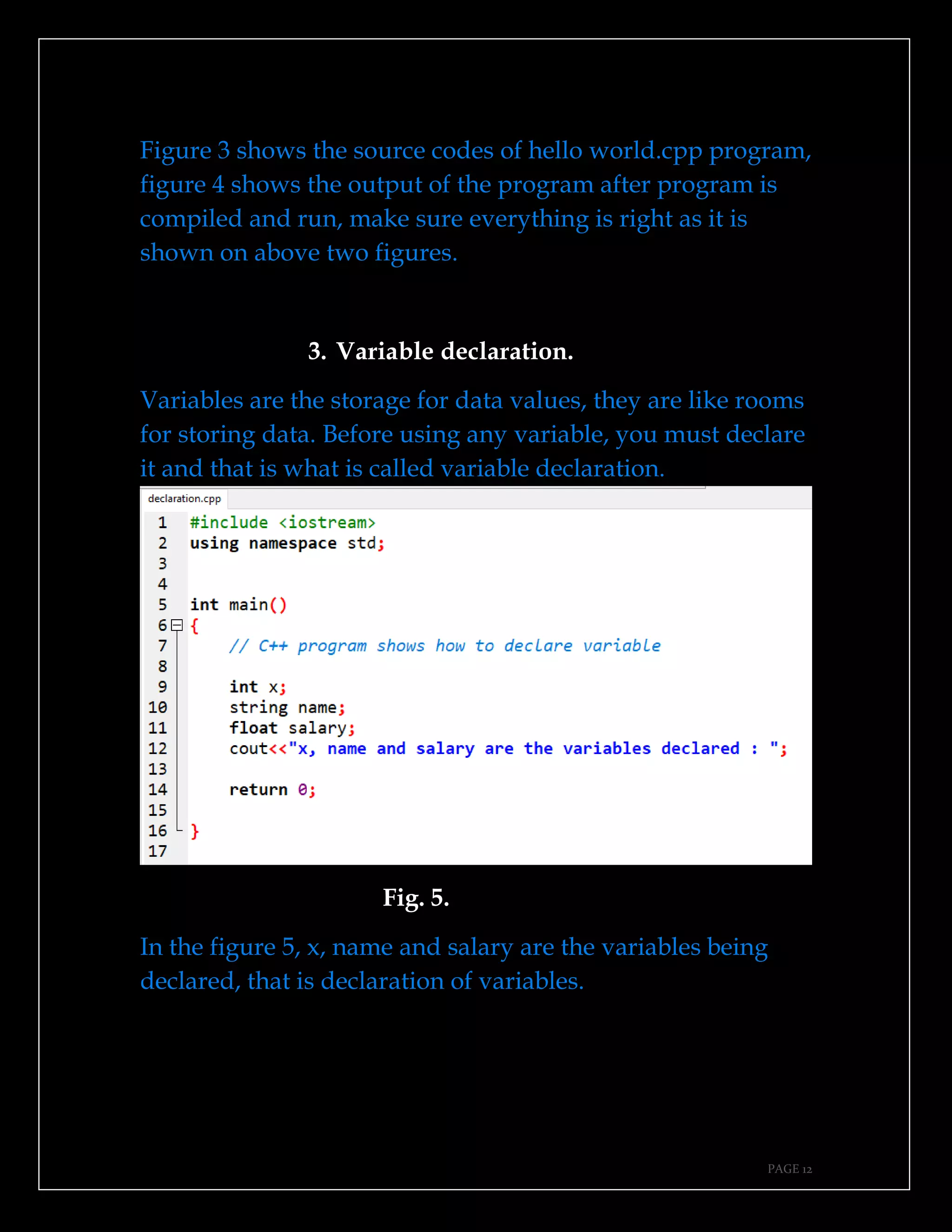
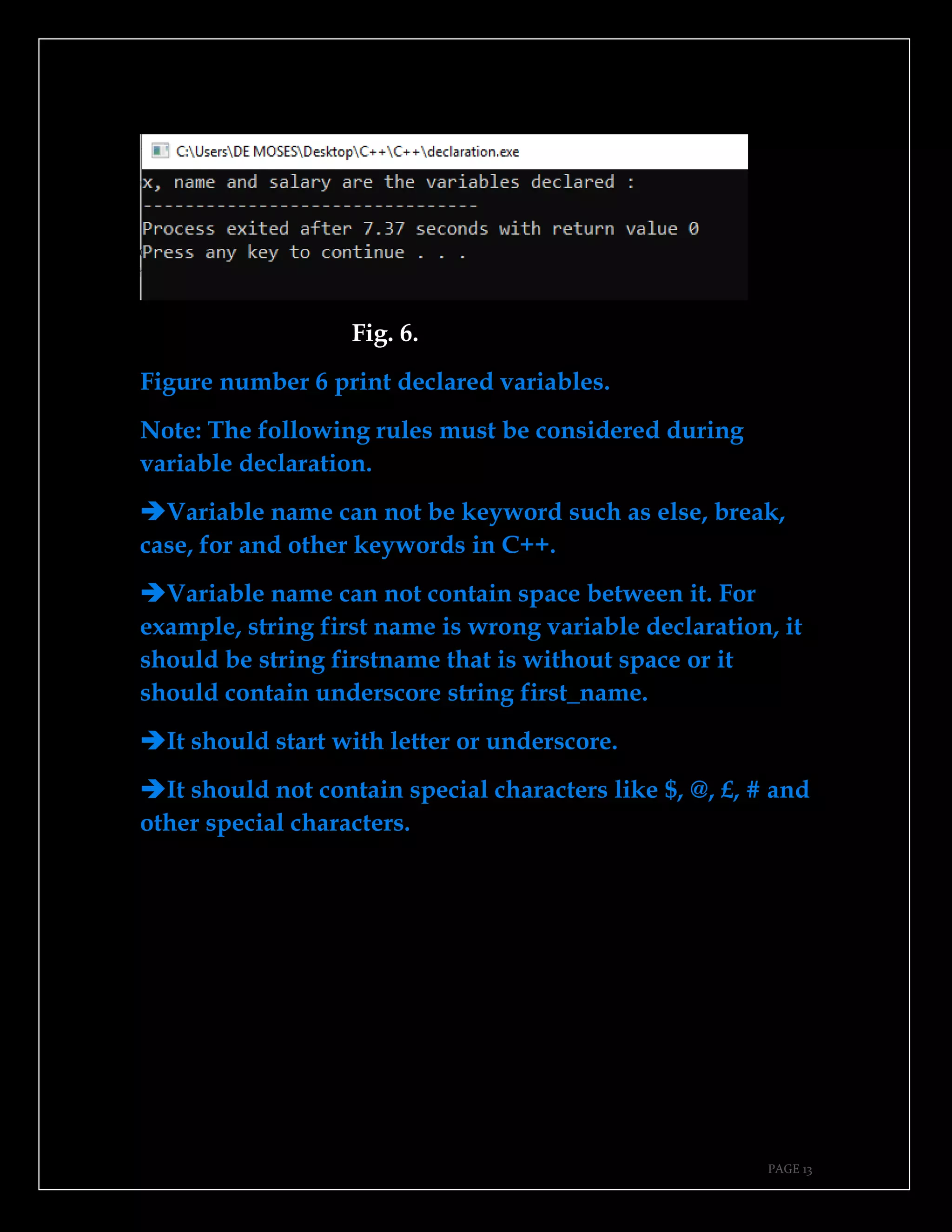
2. Hello world
This is the first program to do, almost in all
programming language, this program prints the word
Hello world to the screen.
Fig. 3.
Fig. 4.
PAGE 12
Figure 3 shows the source codes of hello world.cpp program,
figure 4 shows the output of the program after program is
compiled and run, make sure everything is right as it is
shown on above two figures.
3. Variable declaration.
Variables are the storage for data values, they are like rooms
for storing data. Before using any variable, you must declare
it and that is what is called variable declaration.
Fig. 5.
In the figure 5, x, name and salary are the variables being
declared, that is declaration of variables.
PAGE 13
Fig. 6.
Figure number 6 print declared variables.
Note: The following rules must be considered during
variable declaration.
➔Variable name can not be keyword such as else, break,
case, for and other keywords in C++.
➔Variable name can not contain space between it. For
example, string first name is wrong variable declaration, it
should be string firstname that is without space or it
should contain underscore string first_name.
➔It should start with letter or underscore.
➔It should not contain special characters like $, @, £, # and
other special characters.
PAGE 14
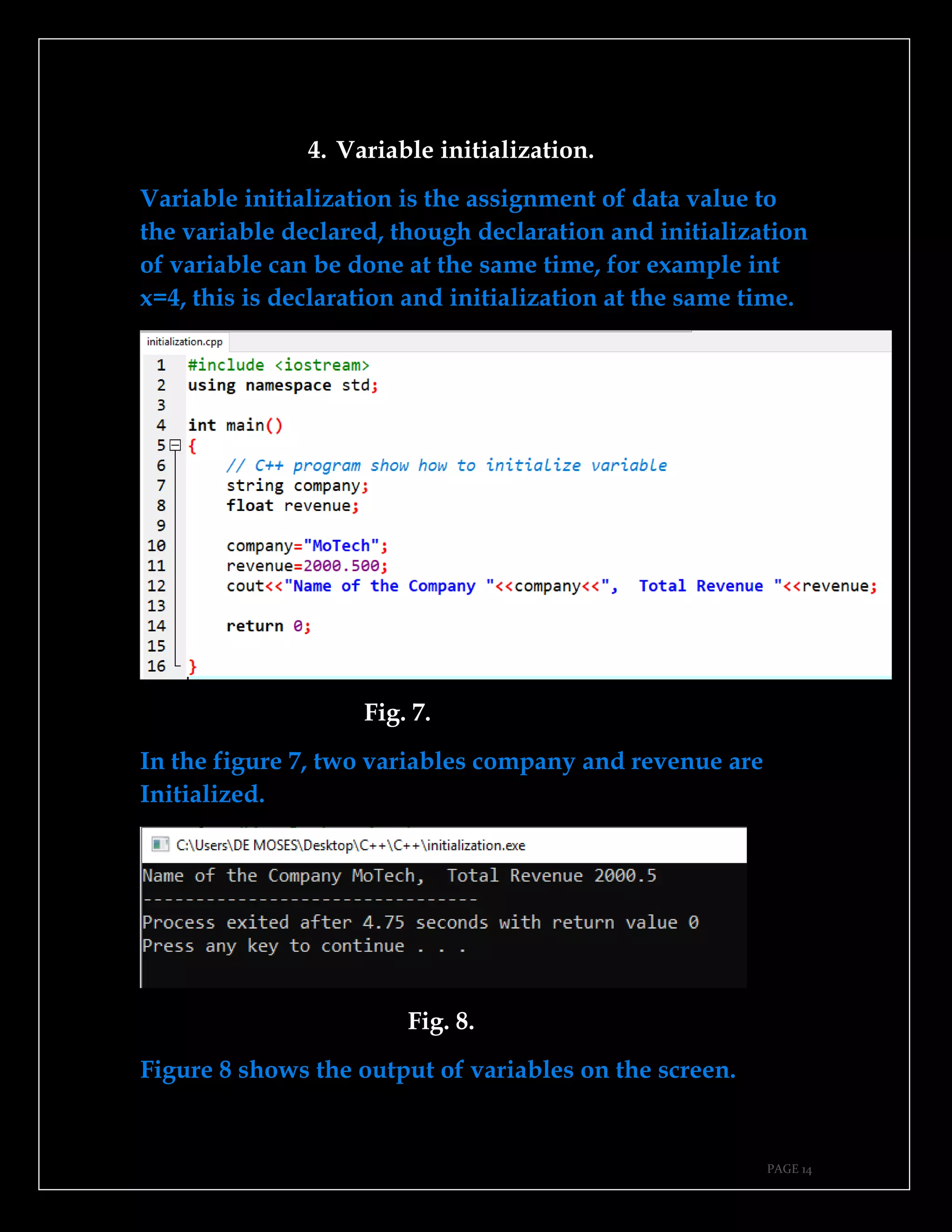
4. Variable initialization.
Variable initialization is the assignment of data value to
the variable declared, though declaration and initialization
of variable can be done at the same time, for example int
x=4, this is declaration and initialization at the same time.
Fig. 7.
In the figure 7, two variables company and revenue are
Initialized.
Fig. 8.
Figure 8 shows the output of variables on the screen.
PAGE 15
5. How to comment.
Comments are the lines which are not visible to the compiler
during compilation time and running time of a program, mostly
they are used to provide more explanation about a certain line of

code so as to provide more understanding.
Types of comments.
➔Single line comment.
➔Multiple line comment.
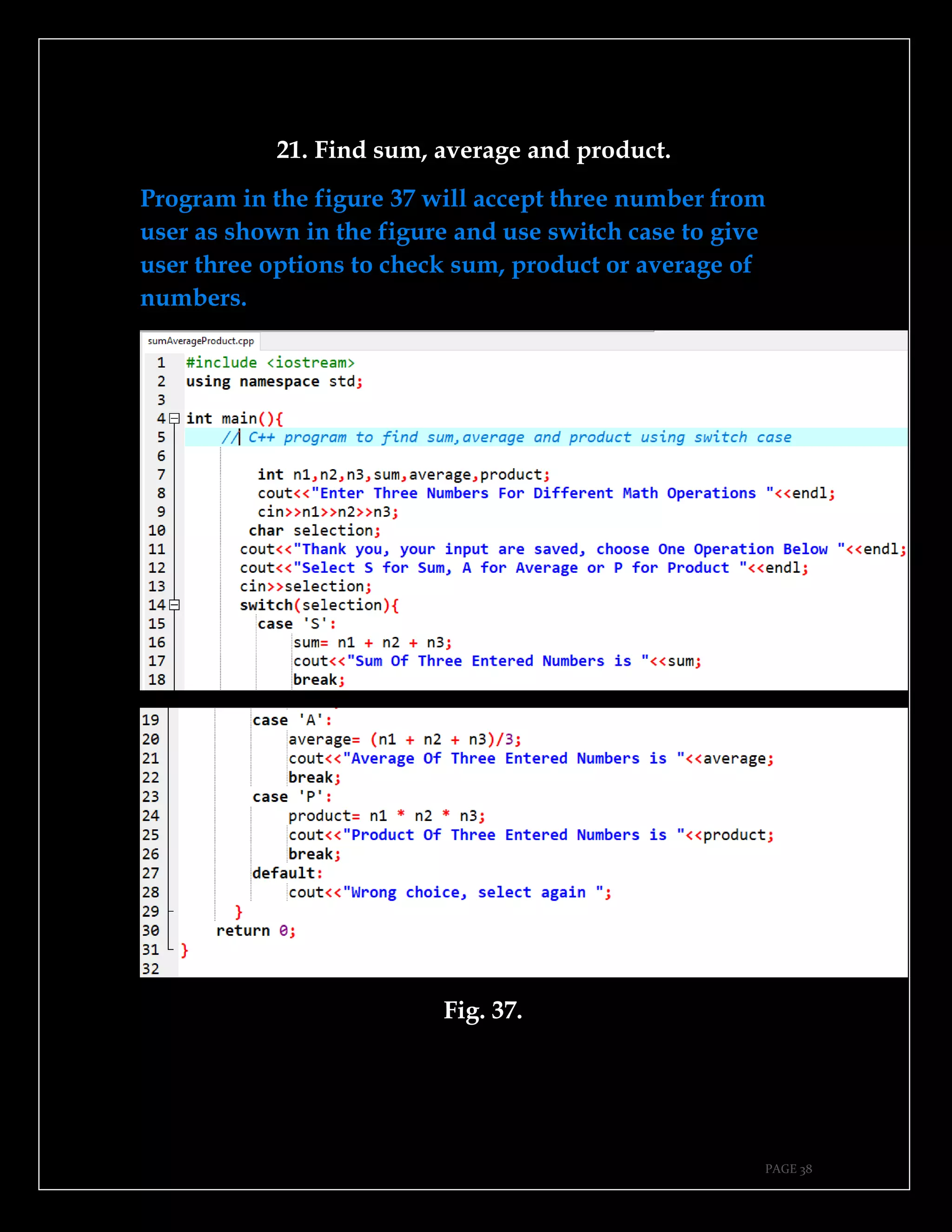
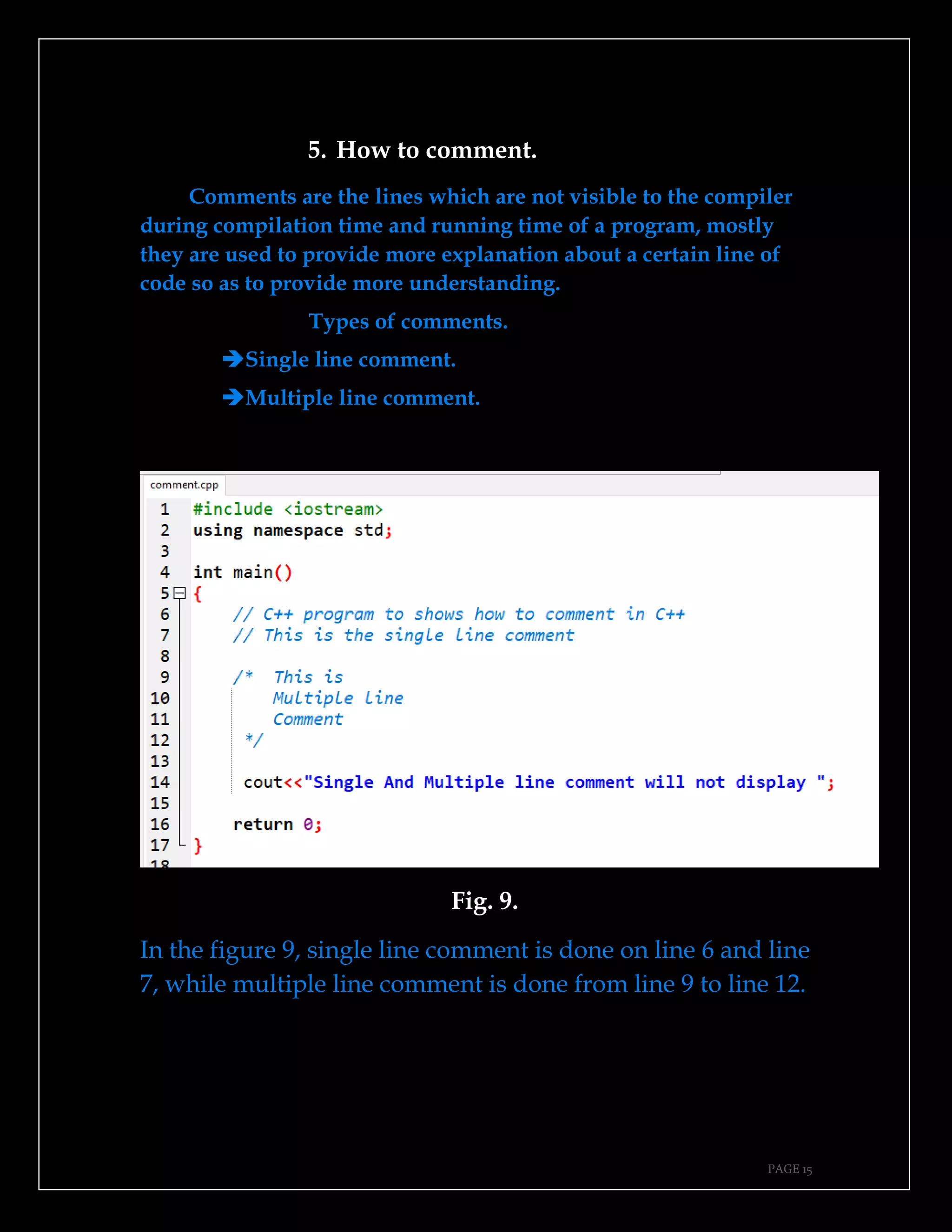
Fig. 9.
In the figure 9, single line comment is done on line 6 and line
7, while multiple line comment is done from line 9 to line 12.
PAGE 16
Fig. 10.
Single line and multiple line comment will not display if
program is compiled and run as shown in the figure 10.
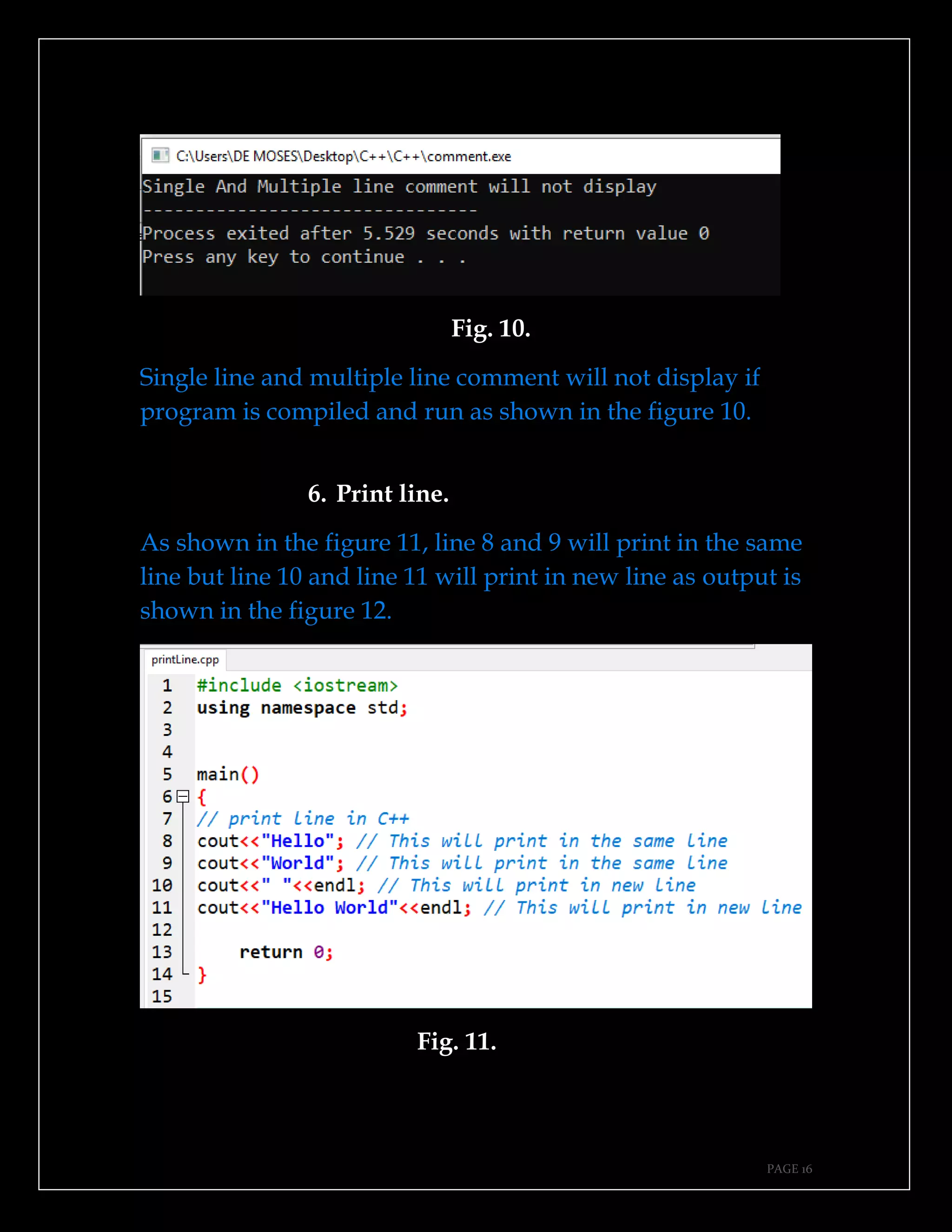
6. Print line.
As shown in the figure 11, line 8 and 9 will print in the same
line but line 10 and line 11 will print in new line as output is
shown in the figure 12.
Fig. 11.
PAGE 17
Fig. 12.
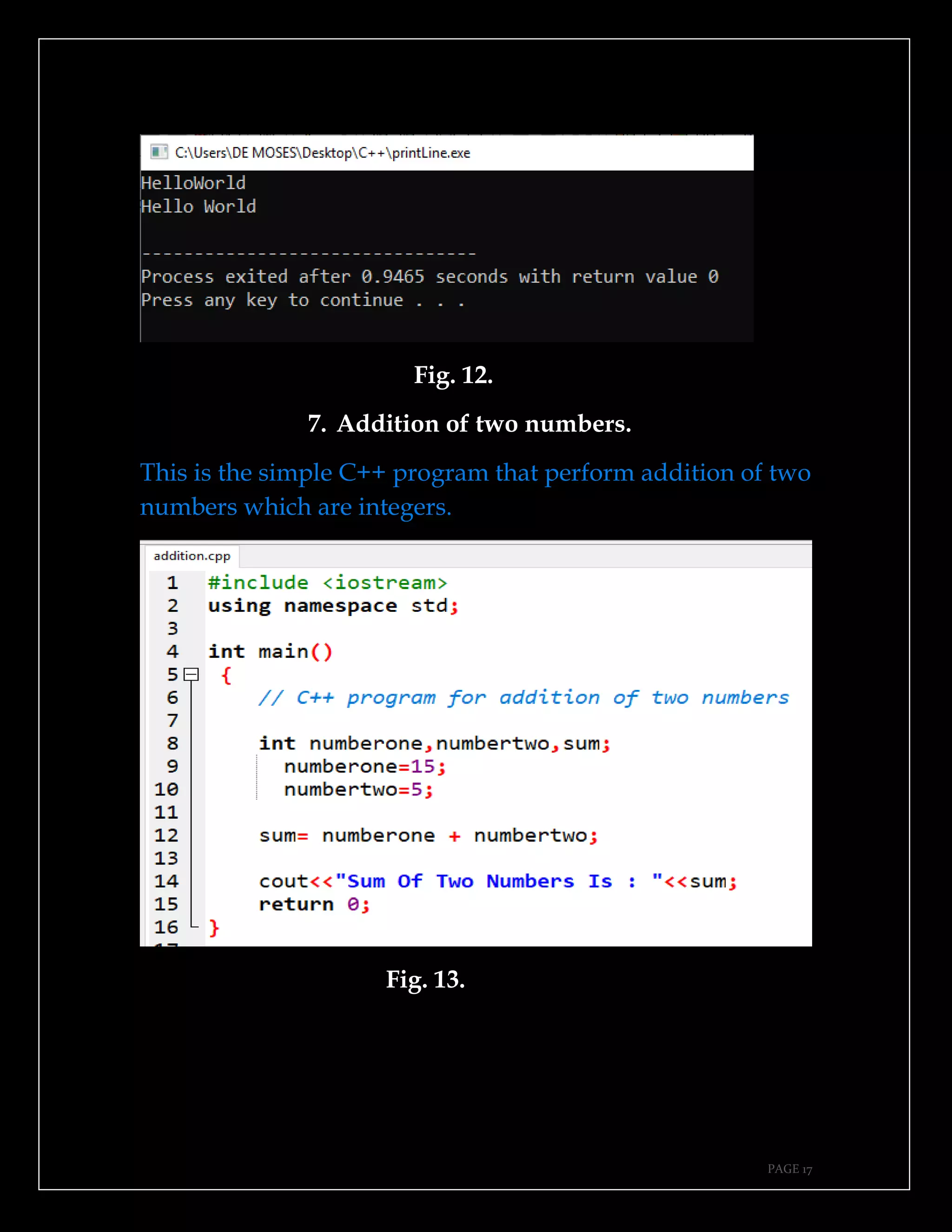
7. Addition of two numbers.
This is the simple C++ program that perform addition of two
numbers which are integers.
Fig. 13.
PAGE 18
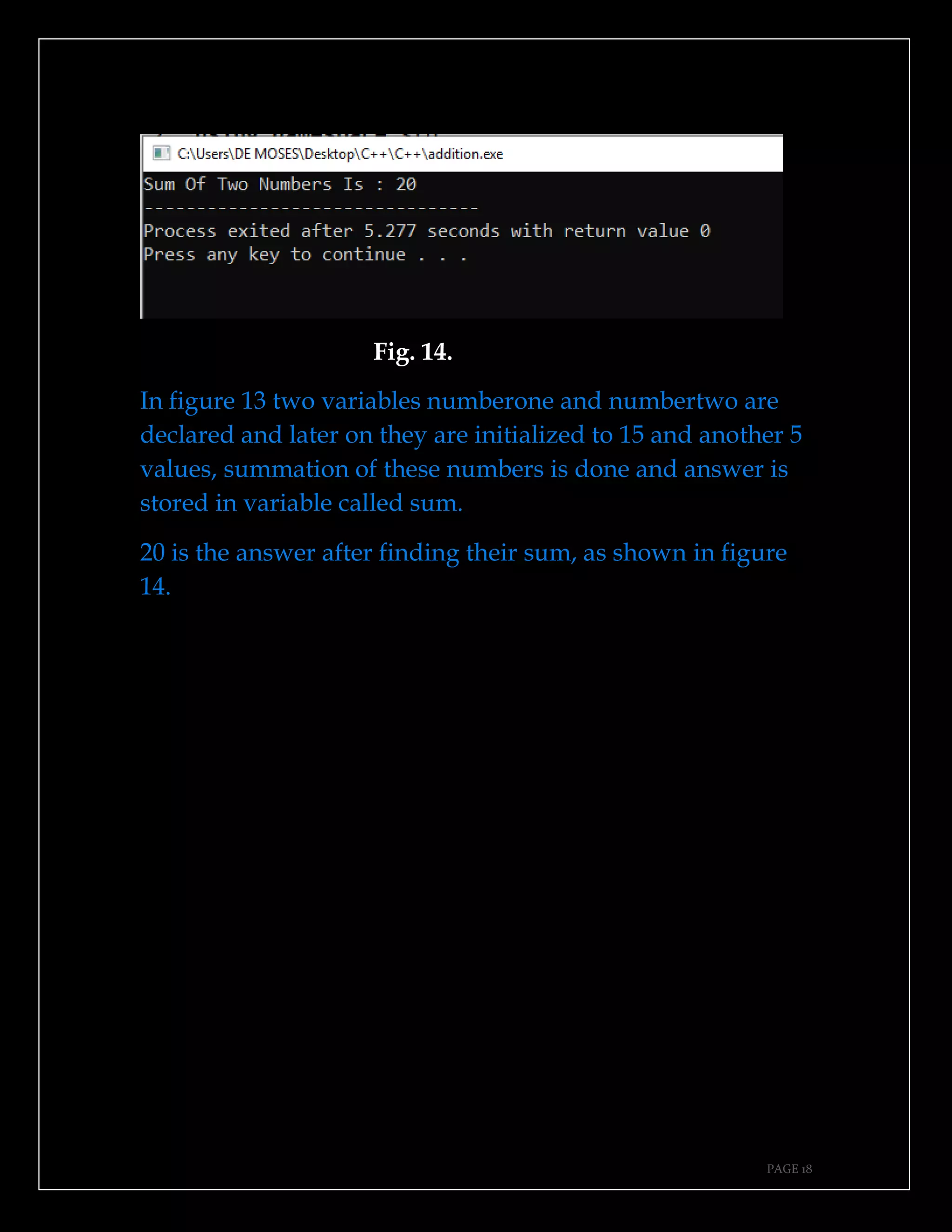
Fig. 14.
In figure 13 two variables numberone and numbertwo are
declared and later on they are initialized to 15 and another 5
values, summation of these numbers is done and answer is
stored in variable called sum.
20 is the answer after finding their sum, as shown in figure
14.
PAGE 19
8. Accepting user input.
This program accepts and read user input entered by
standard input device like keyboard.
Fig. 15.
Fig. 16.
PAGE 20
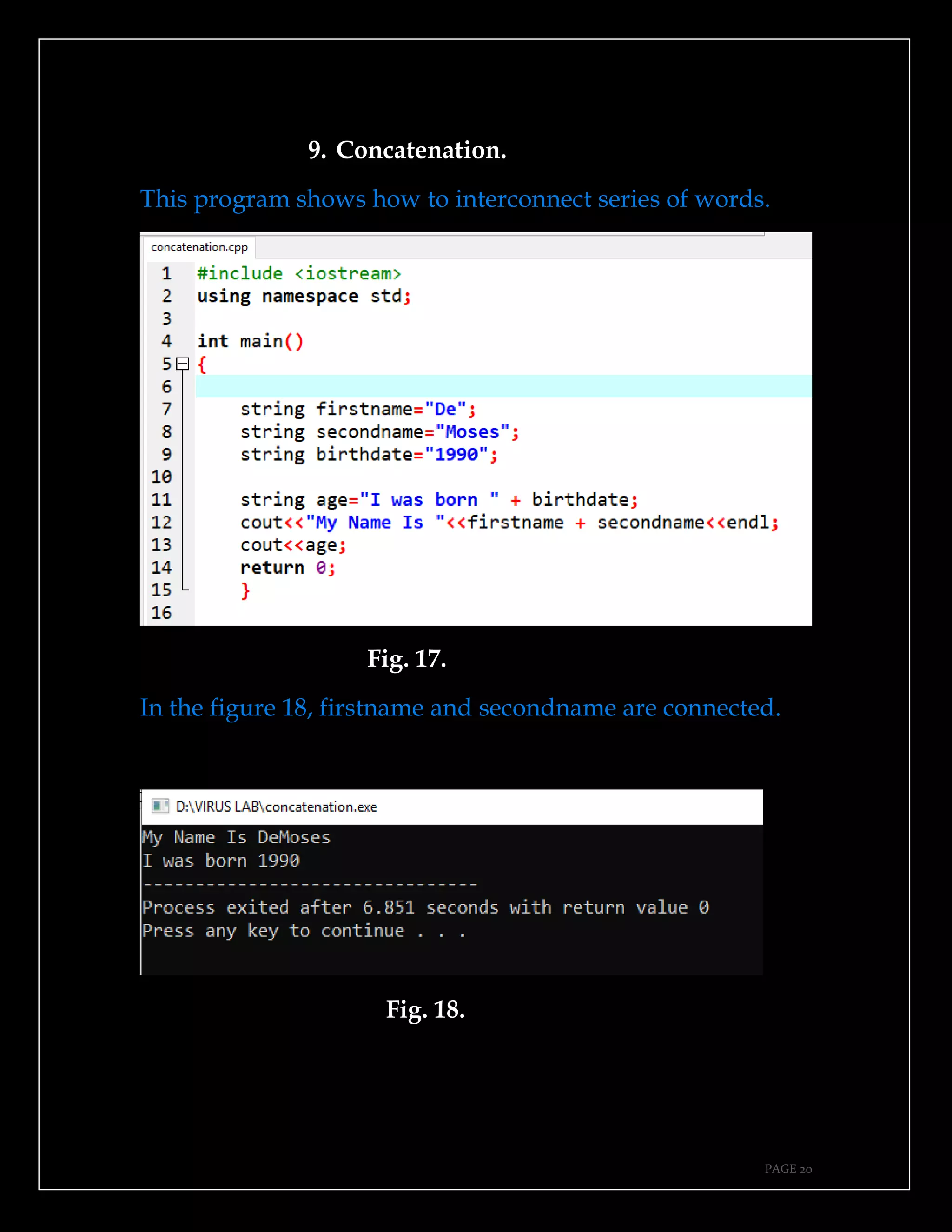
9. Concatenation.
This program shows how to interconnect series of words.
Fig. 17.
In the figure 18, firstname and secondname are connected.
Fig. 18.
PAGE 21
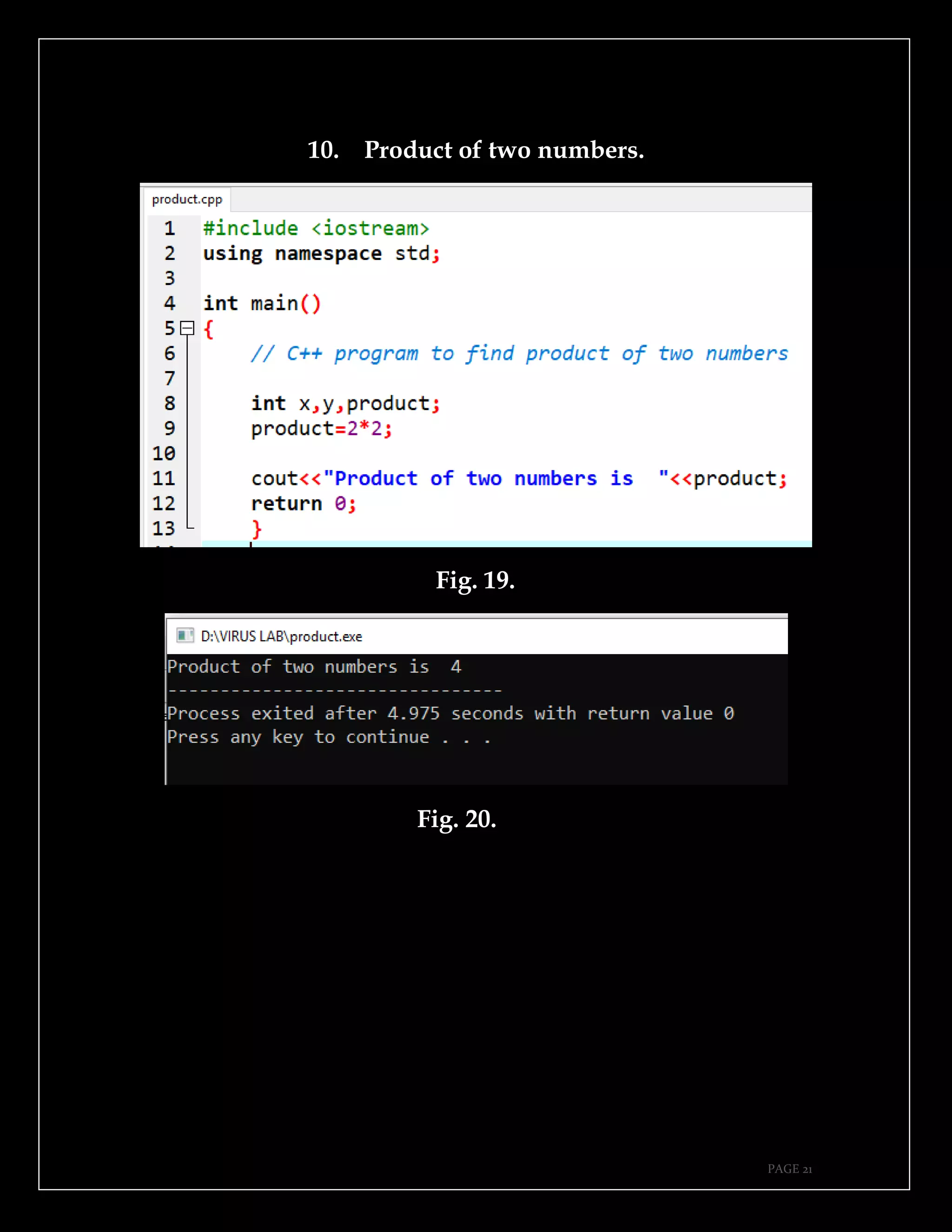
10. Product of two numbers.
Fig. 19.
Fig. 20.
PAGE 22
This page is intentionally left blank.
PAGE 23
CHAPTER TWO.
➔If condition.
➔For loop.
➔Nested loop.
➔While loop.
➔Do while.
➔Switch case.
➔Even number.
➔Odd number.
➔Leap year.
➔Random number generation.
PAGE 24
11. If condition.
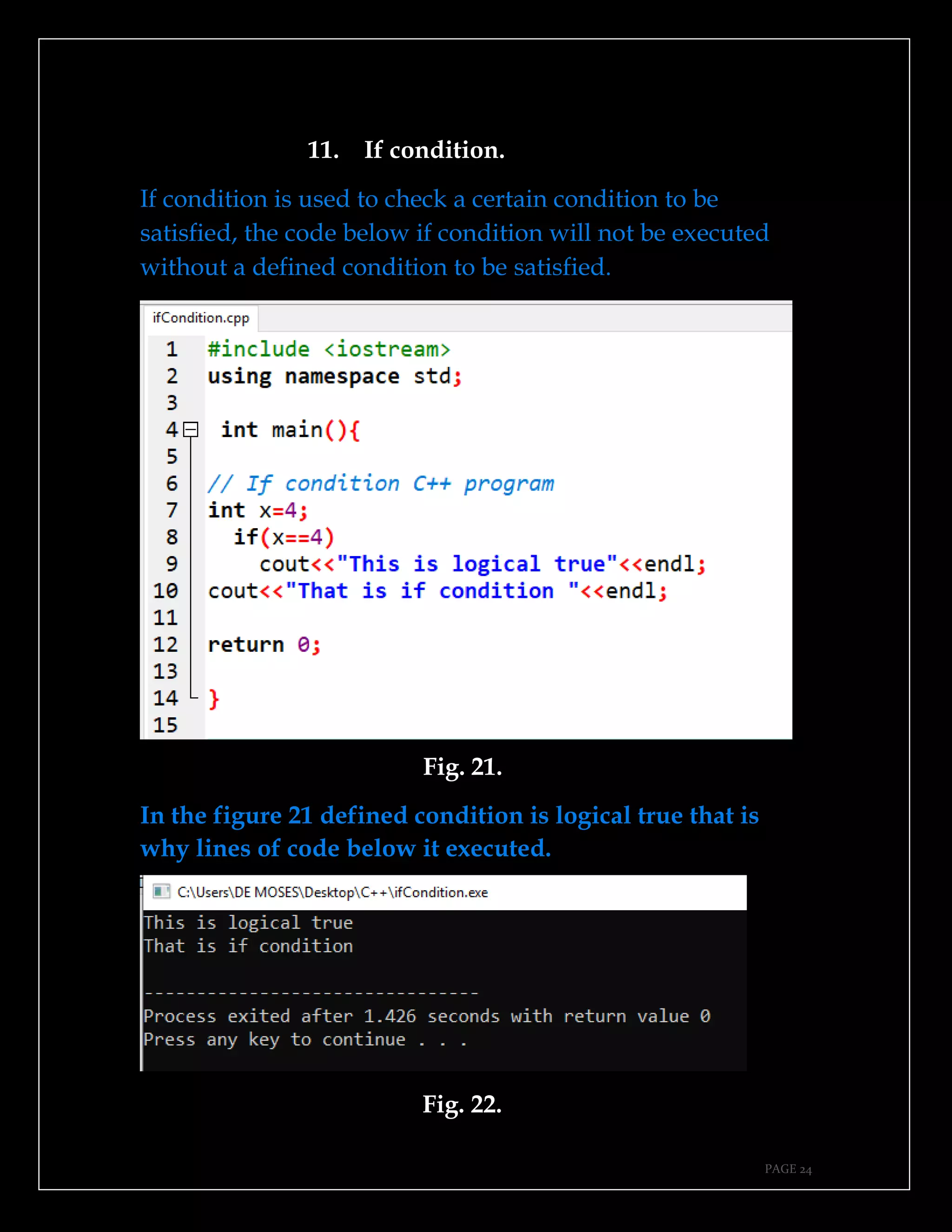
If condition is used to check a certain condition to be
satisfied, the code below if condition will not be executed
without a defined condition to be satisfied.
Fig. 21.
In the figure 21 defined condition is logical true that is
why lines of code below it executed.
Fig. 22.
PAGE 25
12. For loop.
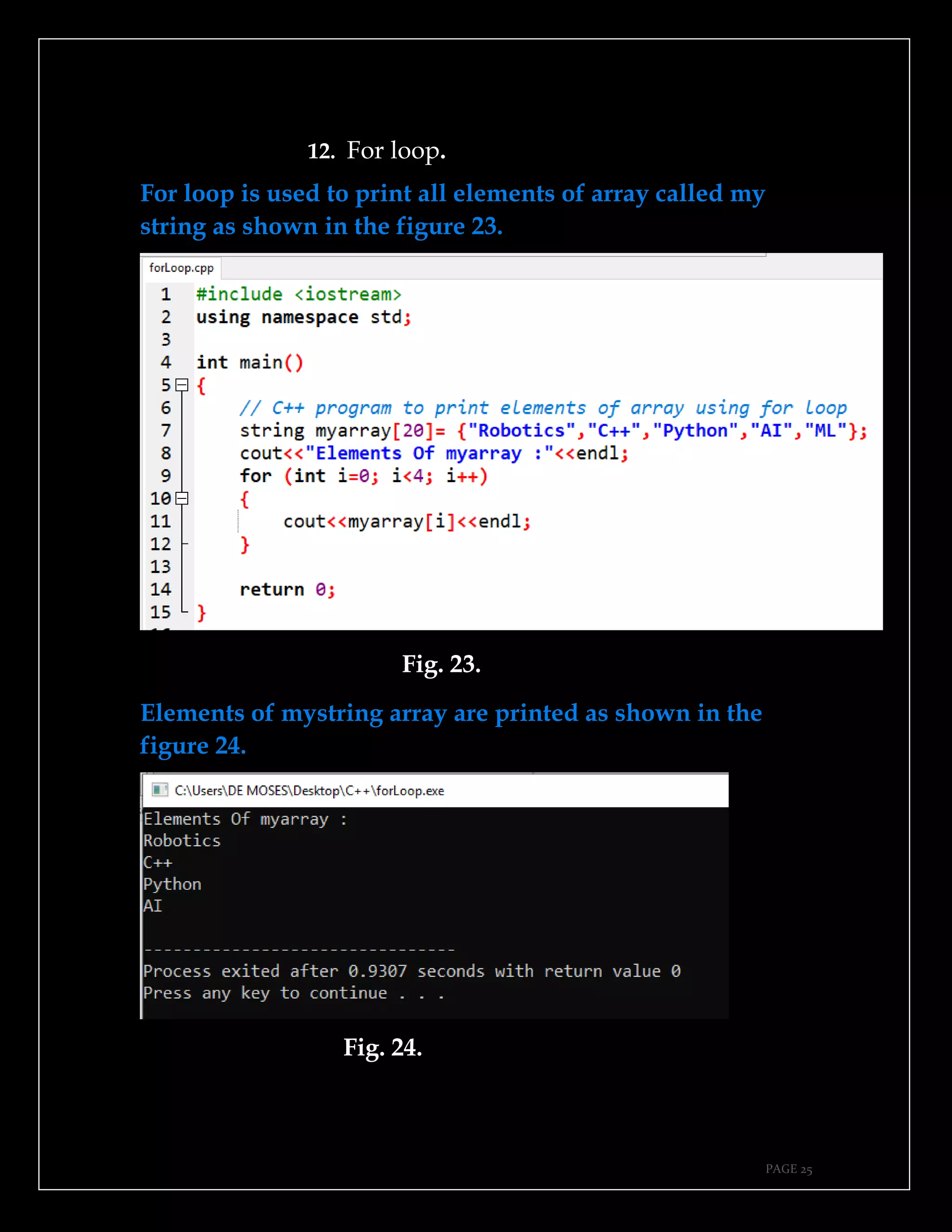
For loop is used to print all elements of array called my
string as shown in the figure 23.
Fig. 23.
Elements of mystring array are printed as shown in the
figure 24.
Fig. 24.
PAGE 26
13. Nested loop.
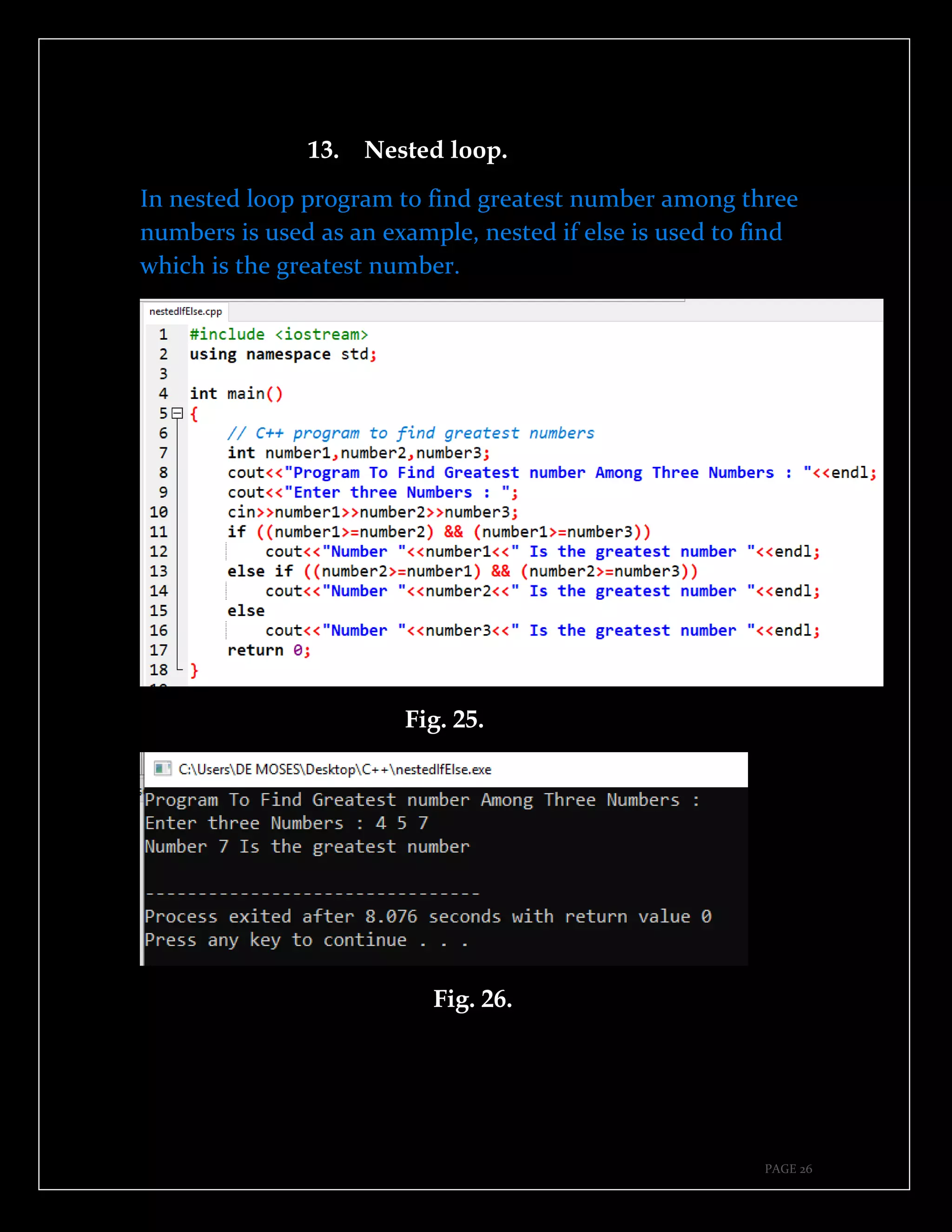
In nested loop program to find greatest number among three
numbers is used as an example, nested if else is used to find
which is the greatest number.
Fig. 25.
Fig. 26.
PAGE 27
In the figure 26 it is true that number 7 is the greatest number
among 4 and 5, code of lines in the figure 25 were able to find
greatest number.
14. While loop.
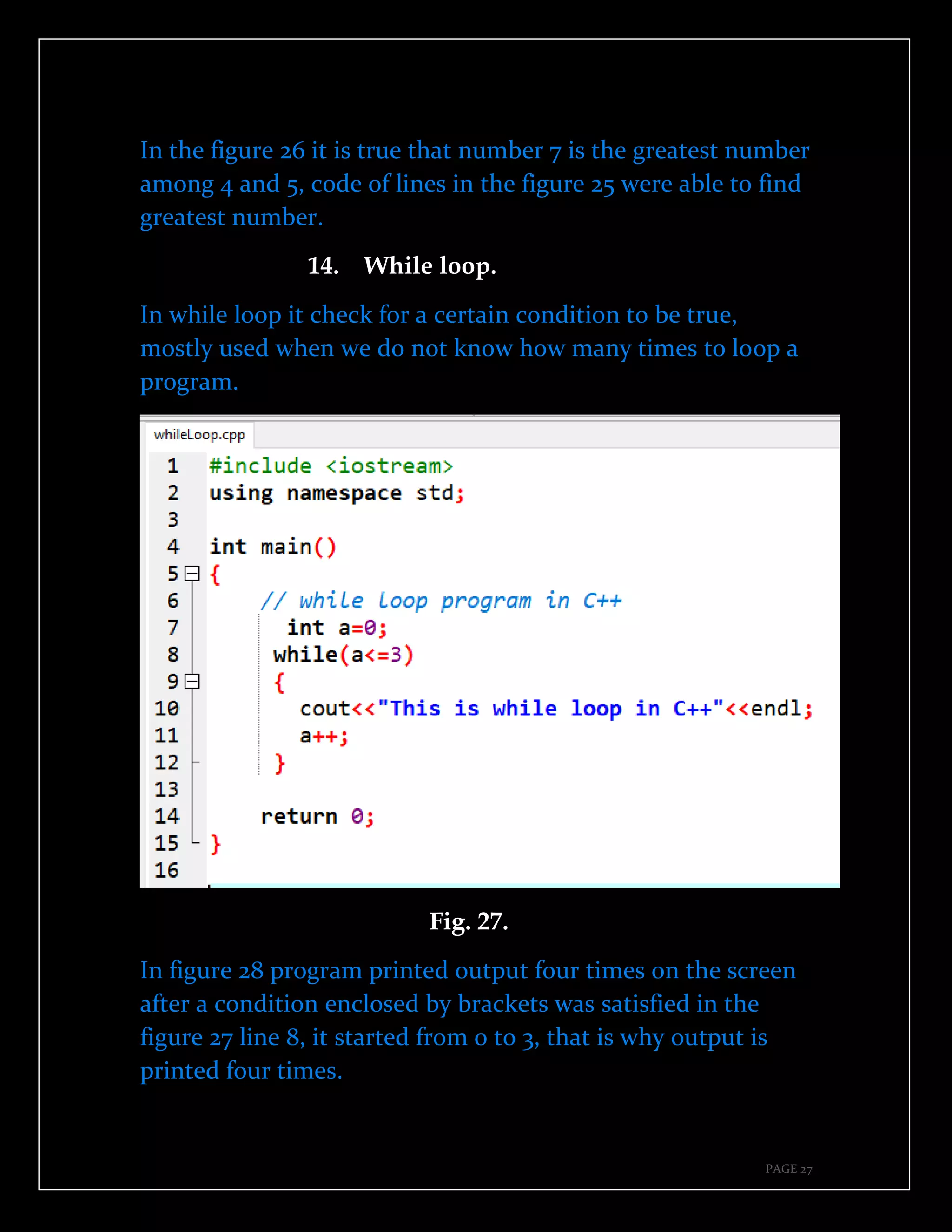
In while loop it check for a certain condition to be true,
mostly used when we do not know how many times to loop a
program.
Fig. 27.
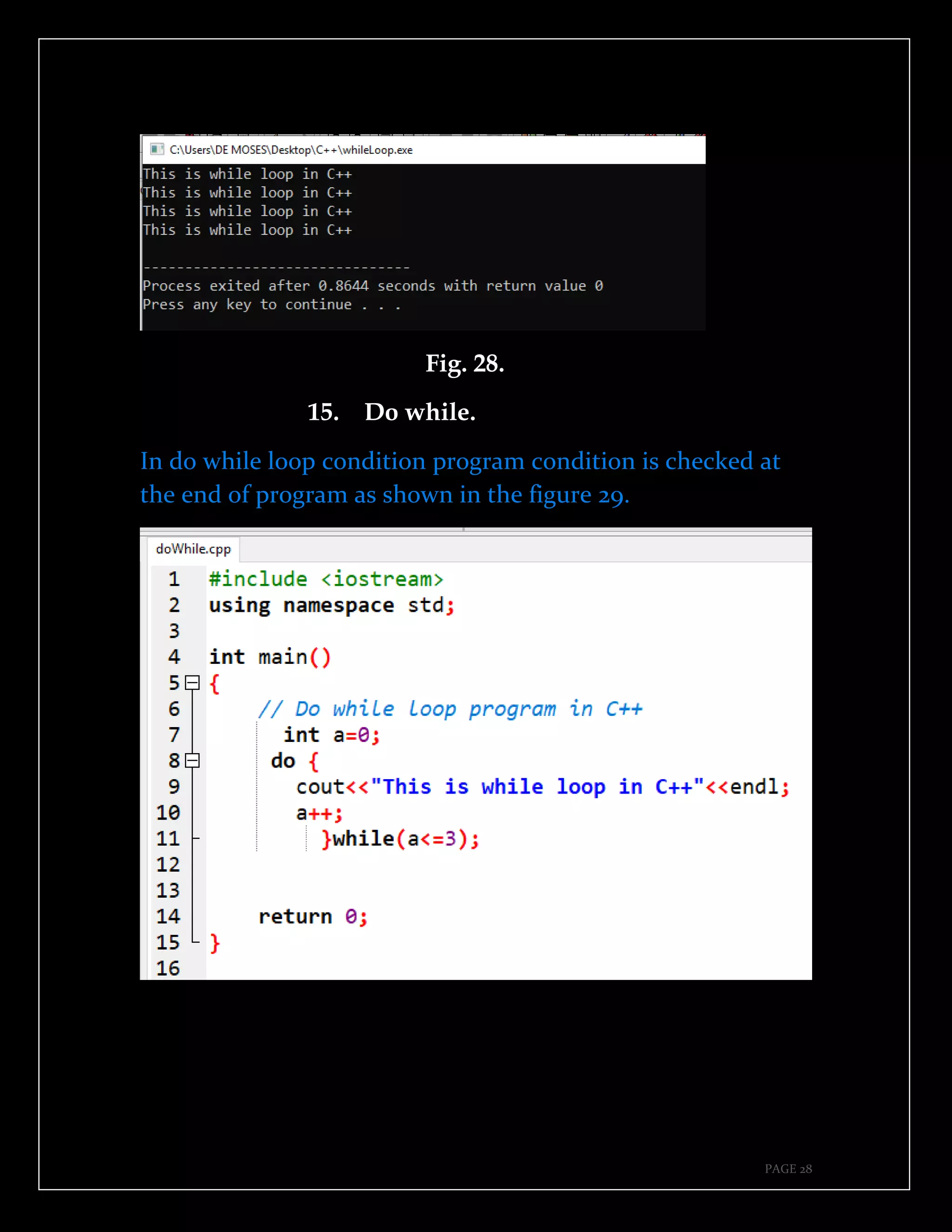
In figure 28 program printed output four times on the screen
after a condition enclosed by brackets was satisfied in the
figure 27 line 8, it started from 0 to 3, that is why output is
printed four times.
PAGE 28
Fig. 28.
15. Do while.
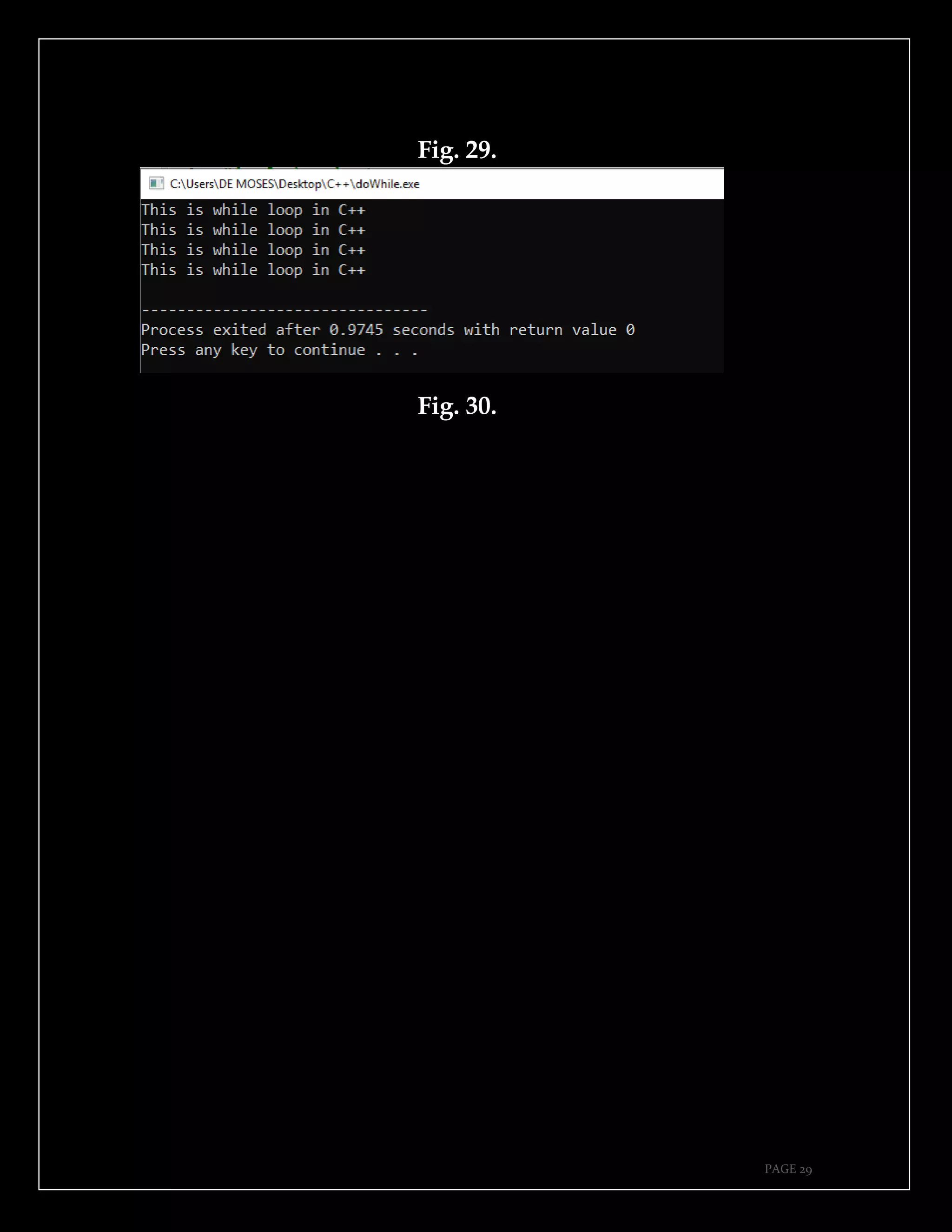
In do while loop condition program condition is checked at
the end of program as shown in the figure 29.
PAGE 29
Fig. 29.
Fig. 30.
PAGE 30
16. Switch case.
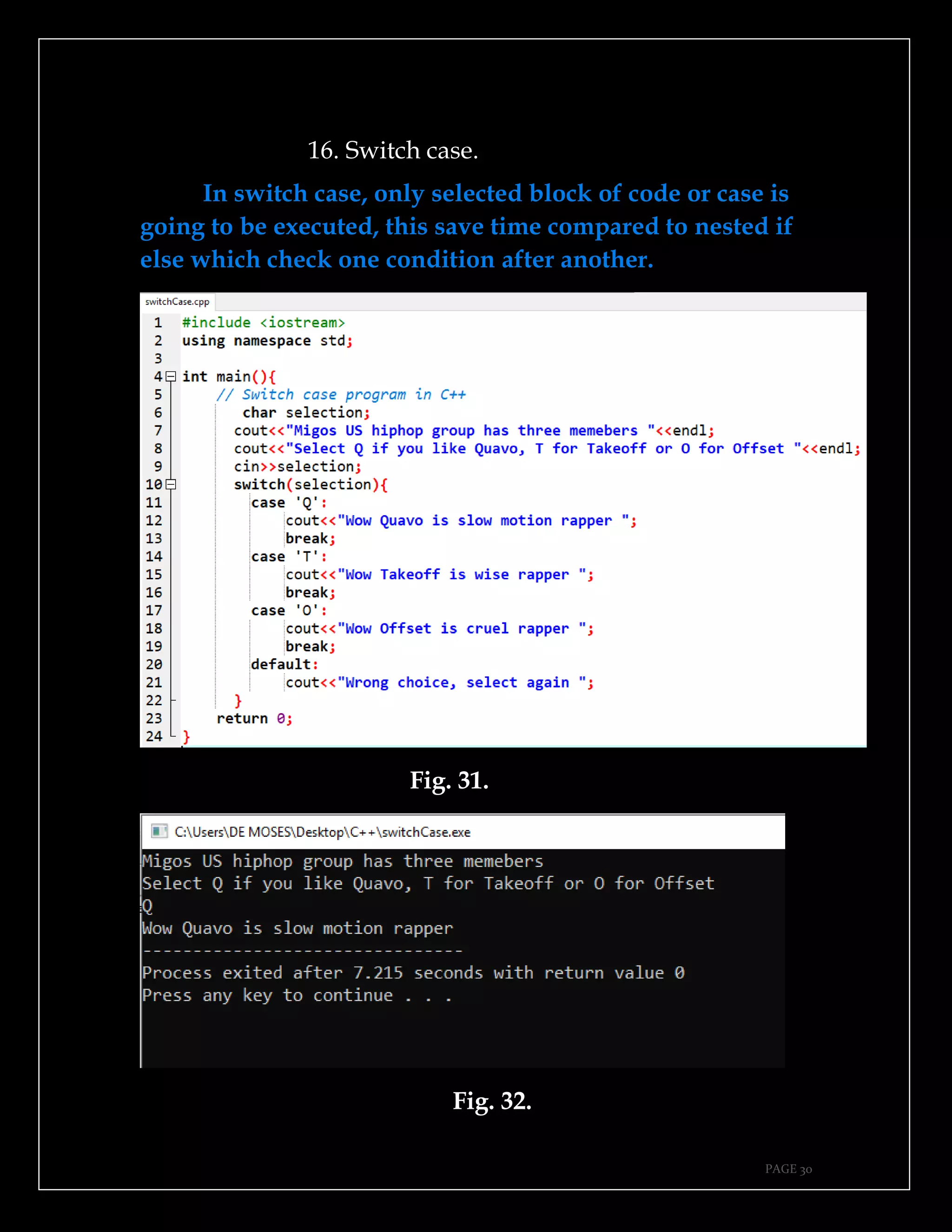
In switch case, only selected block of code or case is
going to be executed, this save time compared to nested if
else which check one condition after another.
Fig. 31.
Fig. 32.
PAGE 31
17. Even number.
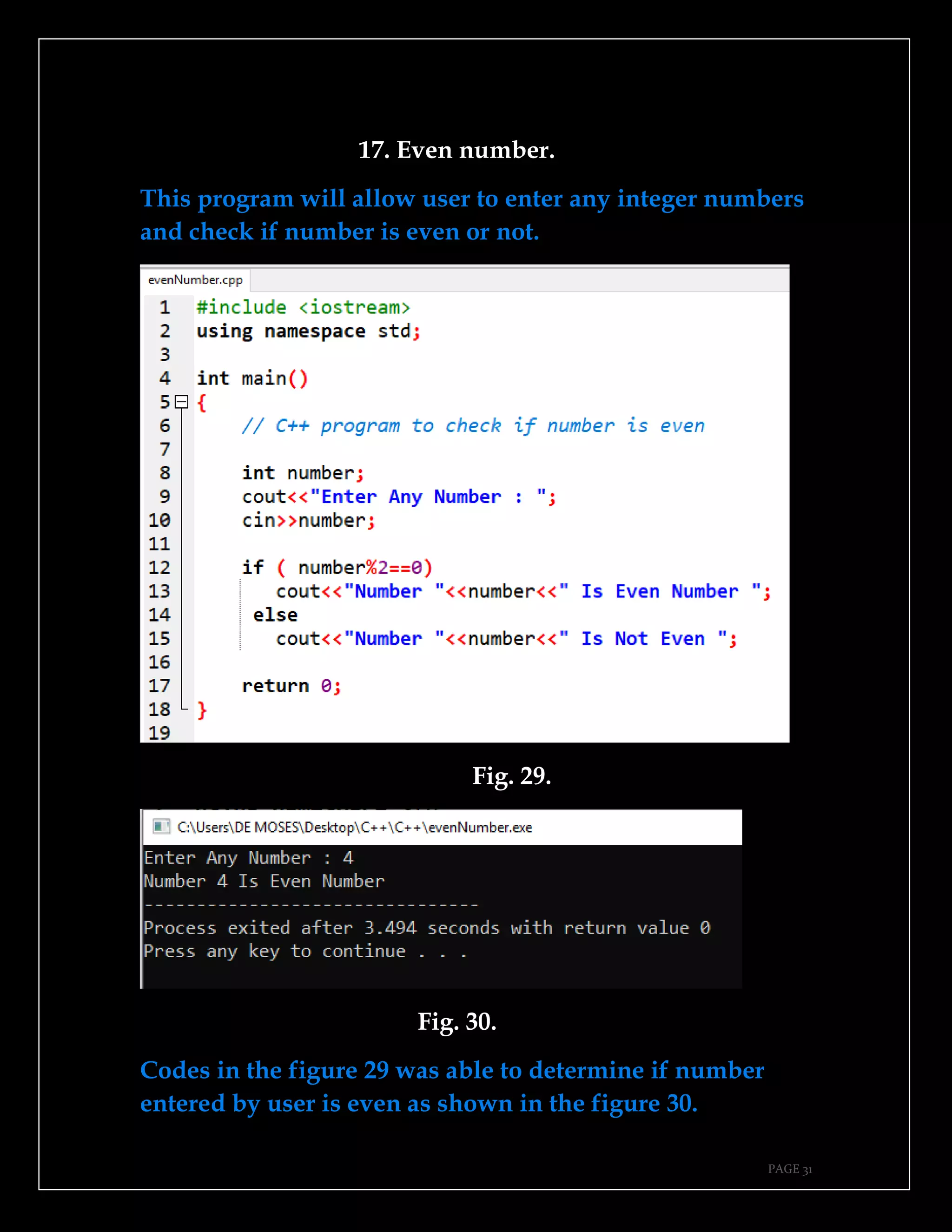
This program will allow user to enter any integer numbers
and check if number is even or not.
Fig. 29.
Fig. 30.
Codes in the figure 29 was able to determine if number
entered by user is even as shown in the figure 30.
PAGE 32
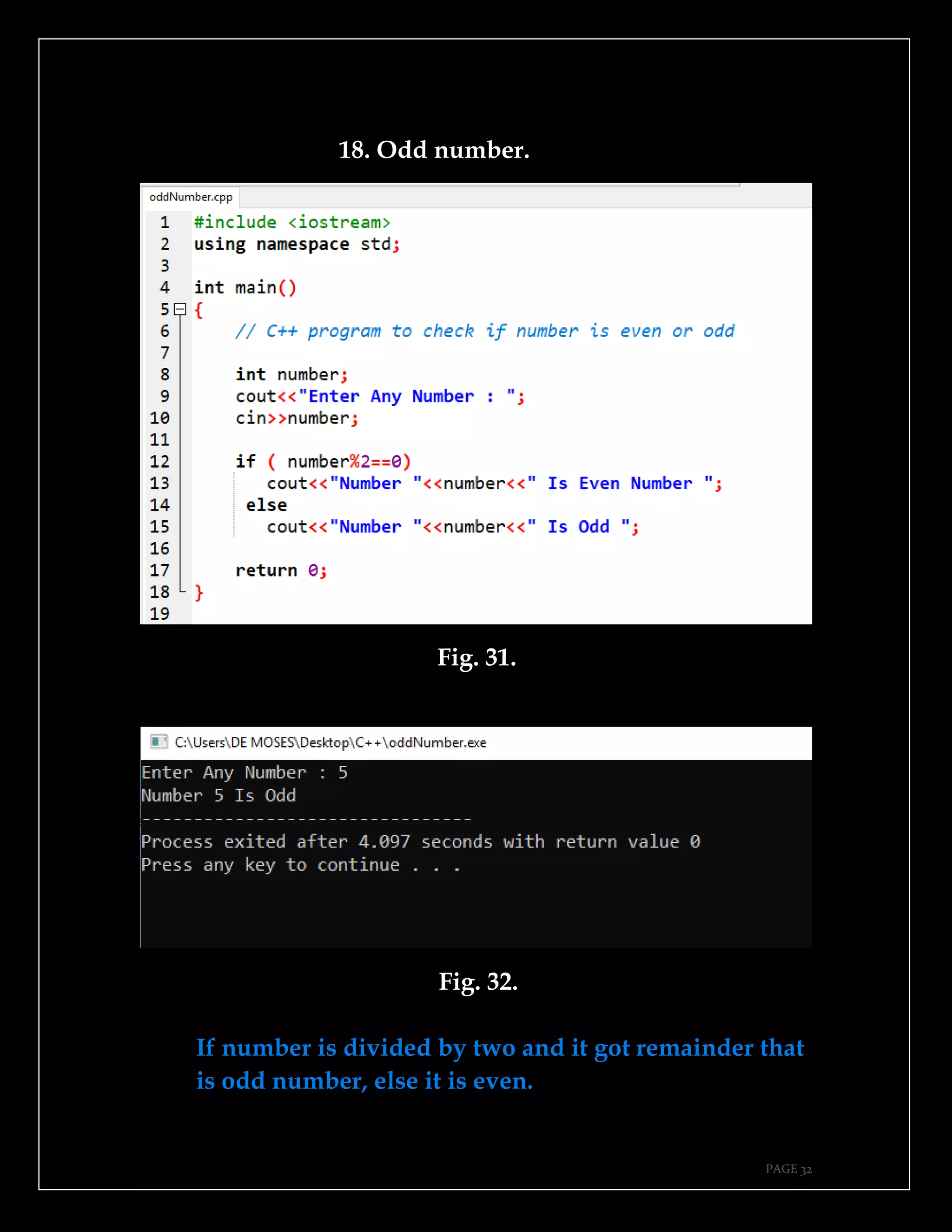
18. Odd number.
Fig. 31.
Fig. 32.
If number is divided by two and it got remainder that
is odd number, else it is even.
PAGE 33
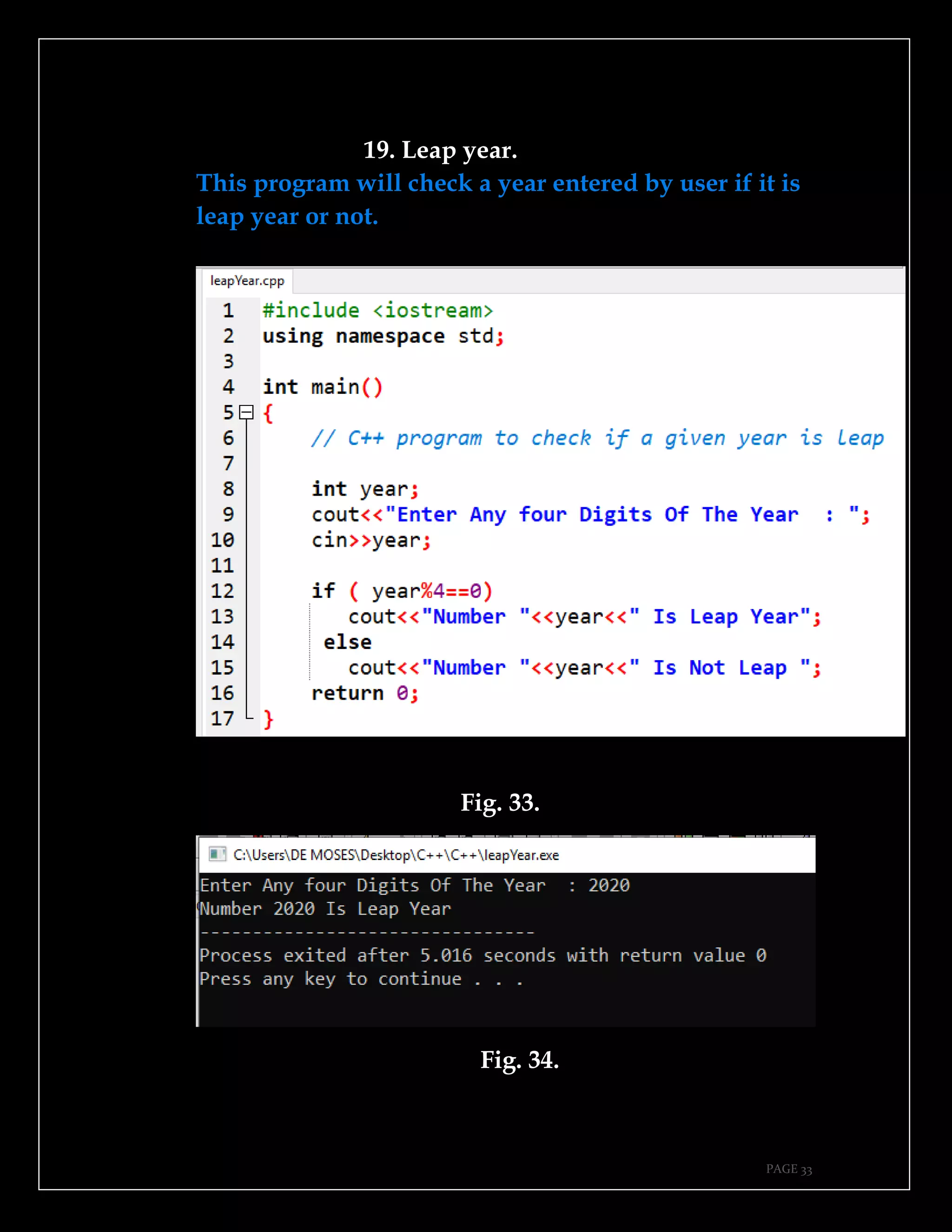
19. Leap year.
This program will check a year entered by user if it is
leap year or not.
Fig. 33.
Fig. 34.
PAGE 34
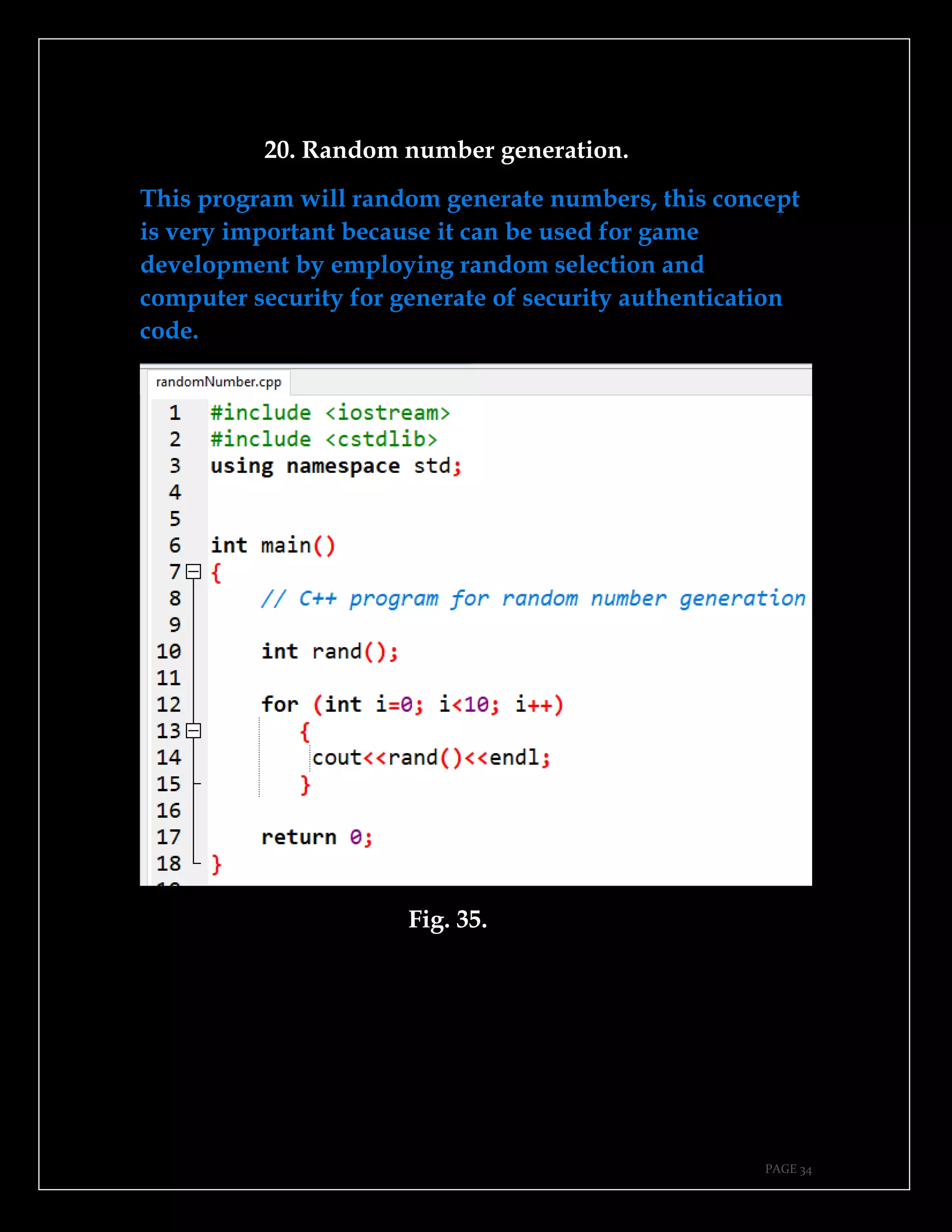
20. Random number generation.
This program will random generate numbers, this concept
is very important because it can be used for game
development by employing random selection and
computer security for generate of security authentication
code.
Fig. 35.
PAGE 35
Fig. 36.
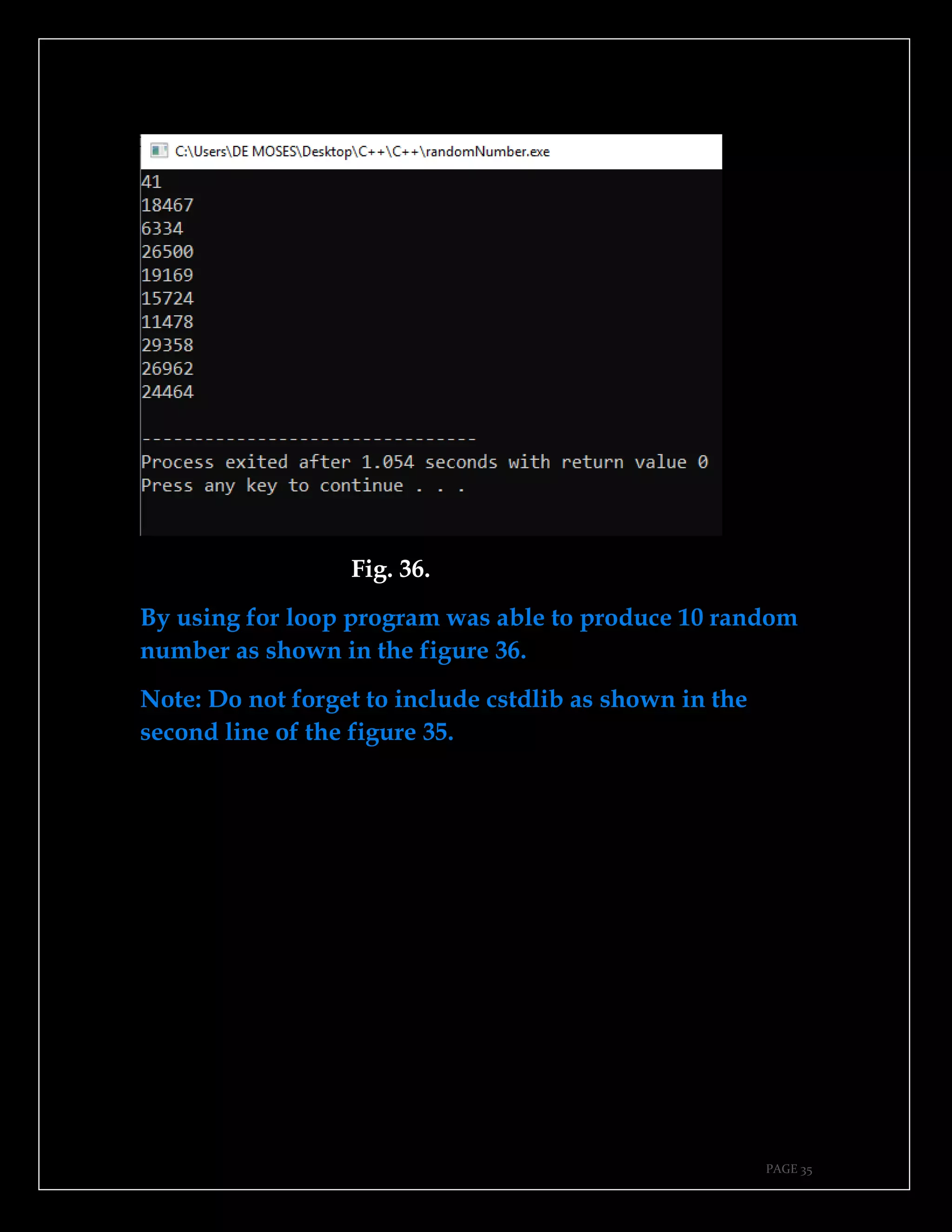
By using for loop program was able to produce 10 random
number as shown in the figure 36.
Note: Do not forget to include cstdlib as shown in the
second line of the figure 35.
PAGE 36
This page is intentionally left blank.
PAGE 37
CHAPTER THREE.
➔Find sum, average and product.
➔Area of rectangle.
➔Create array, assign values and display them.
➔Store numbers in array and display using loop.
➔Math function.
➔Create and call a function.
➔Function that return value.
➔Function with arguments.
➔Guessing game.
➔Area of triangle.
PAGE 38
21. Find sum, average and product.
Program in the figure 37 will accept three number from
user as shown in the figure and use switch case to give
user three options to check sum, product or average of
numbers.
Fig. 37.
PAGE 39
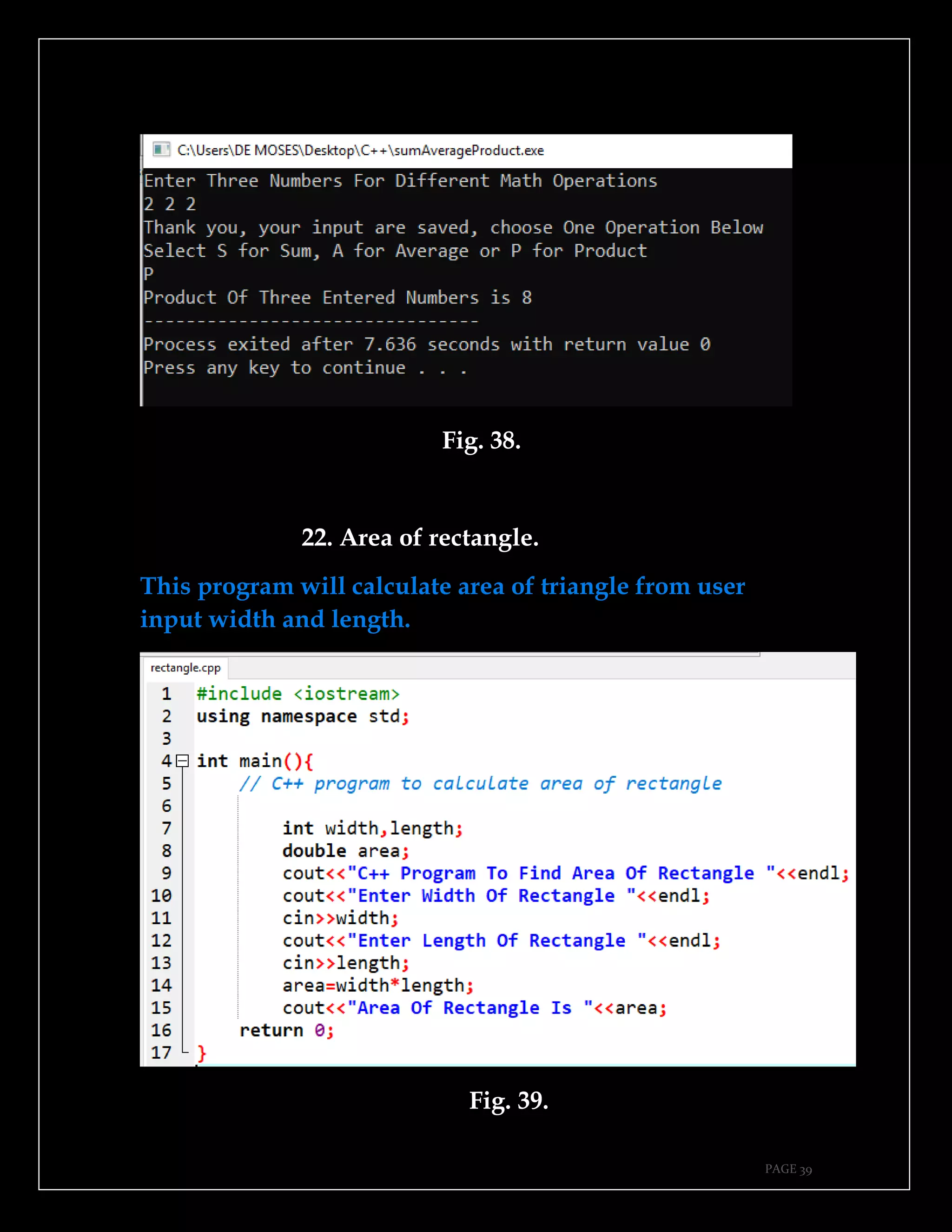
Fig. 38.
22. Area of rectangle.
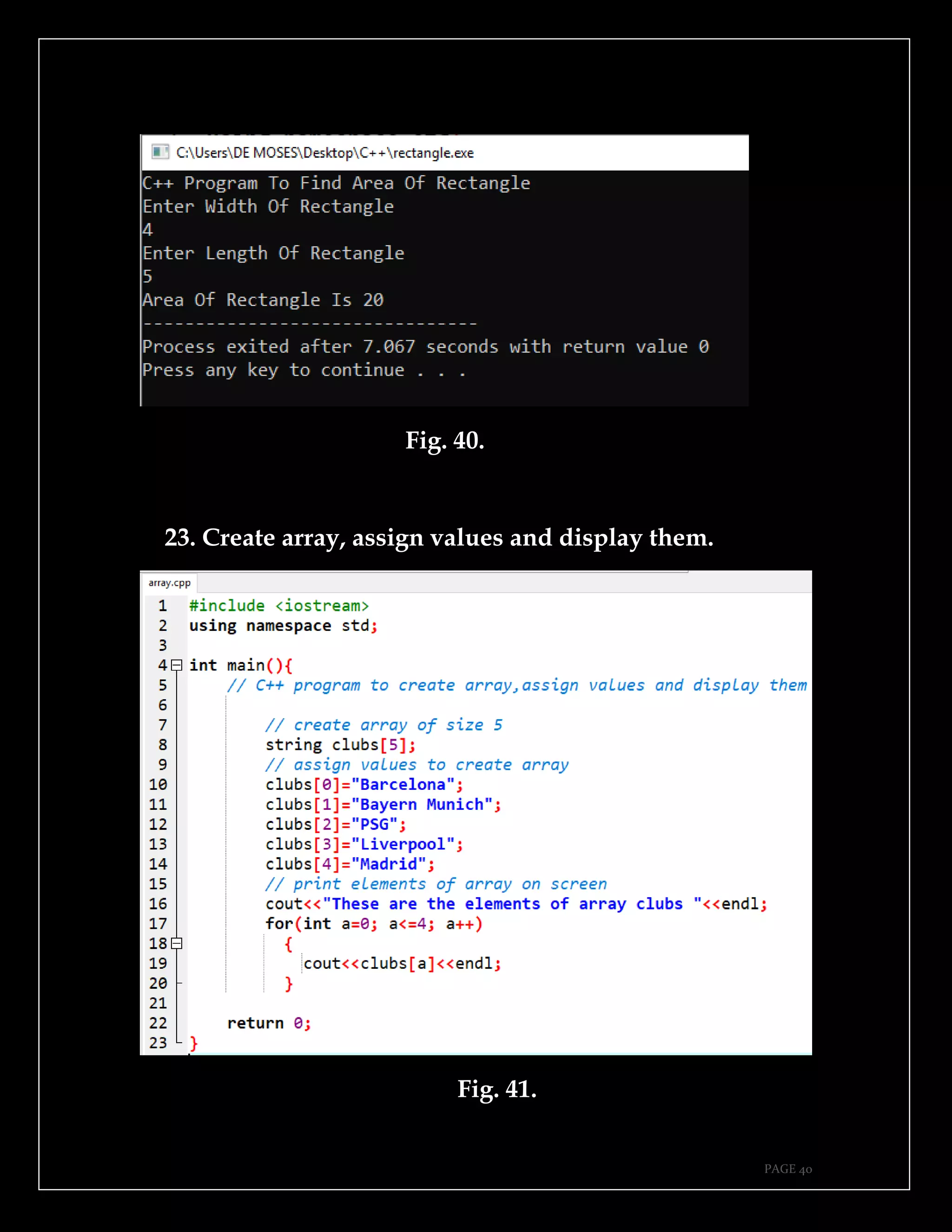
This program will calculate area of triangle from user
input width and length.
Fig. 39.
PAGE 40
Fig. 40.
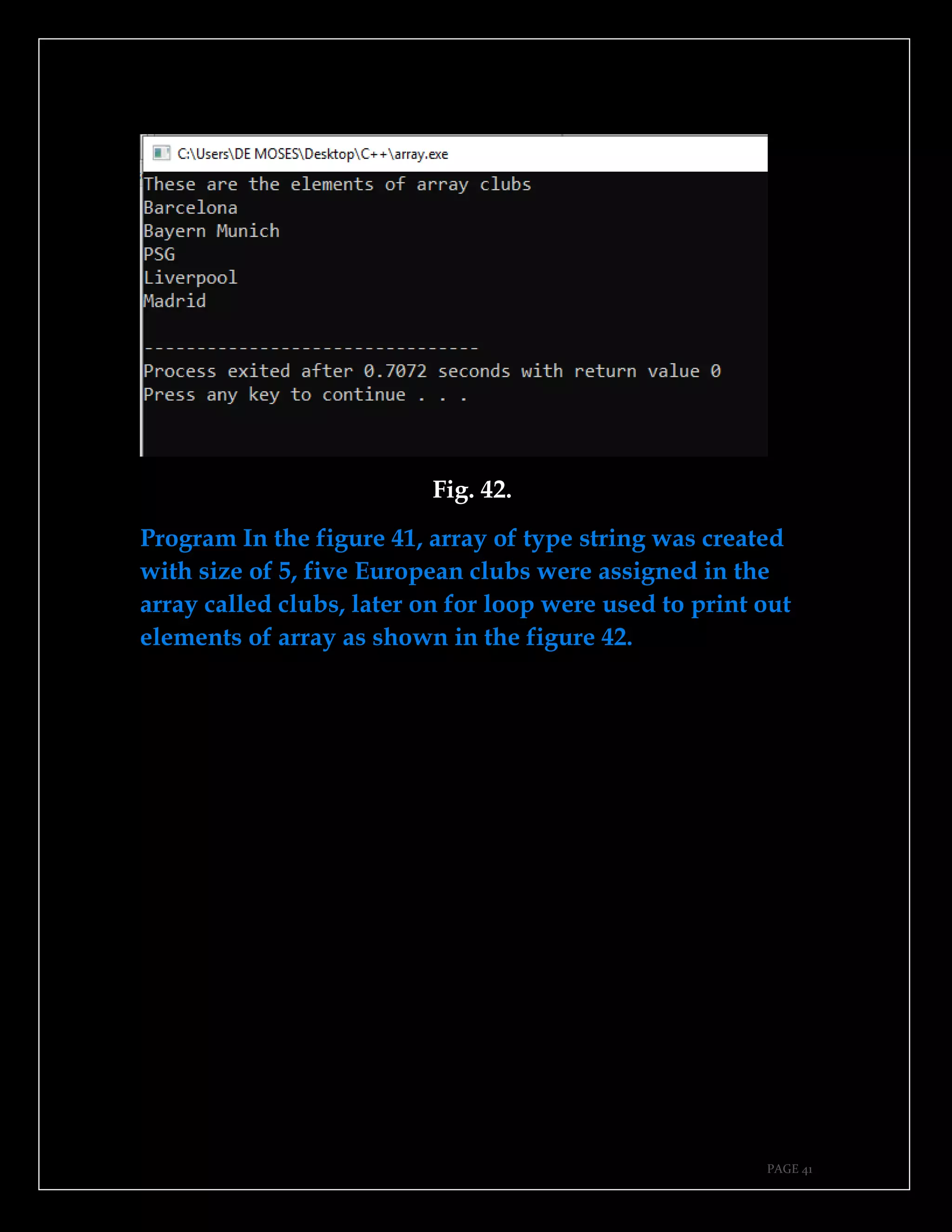
23. Create array, assign values and display them.
Fig. 41.
PAGE 41
Fig. 42.
Program In the figure 41, array of type string was created
with size of 5, five European clubs were assigned in the
array called clubs, later on for loop were used to print out
elements of array as shown in the figure 42.
PAGE 42
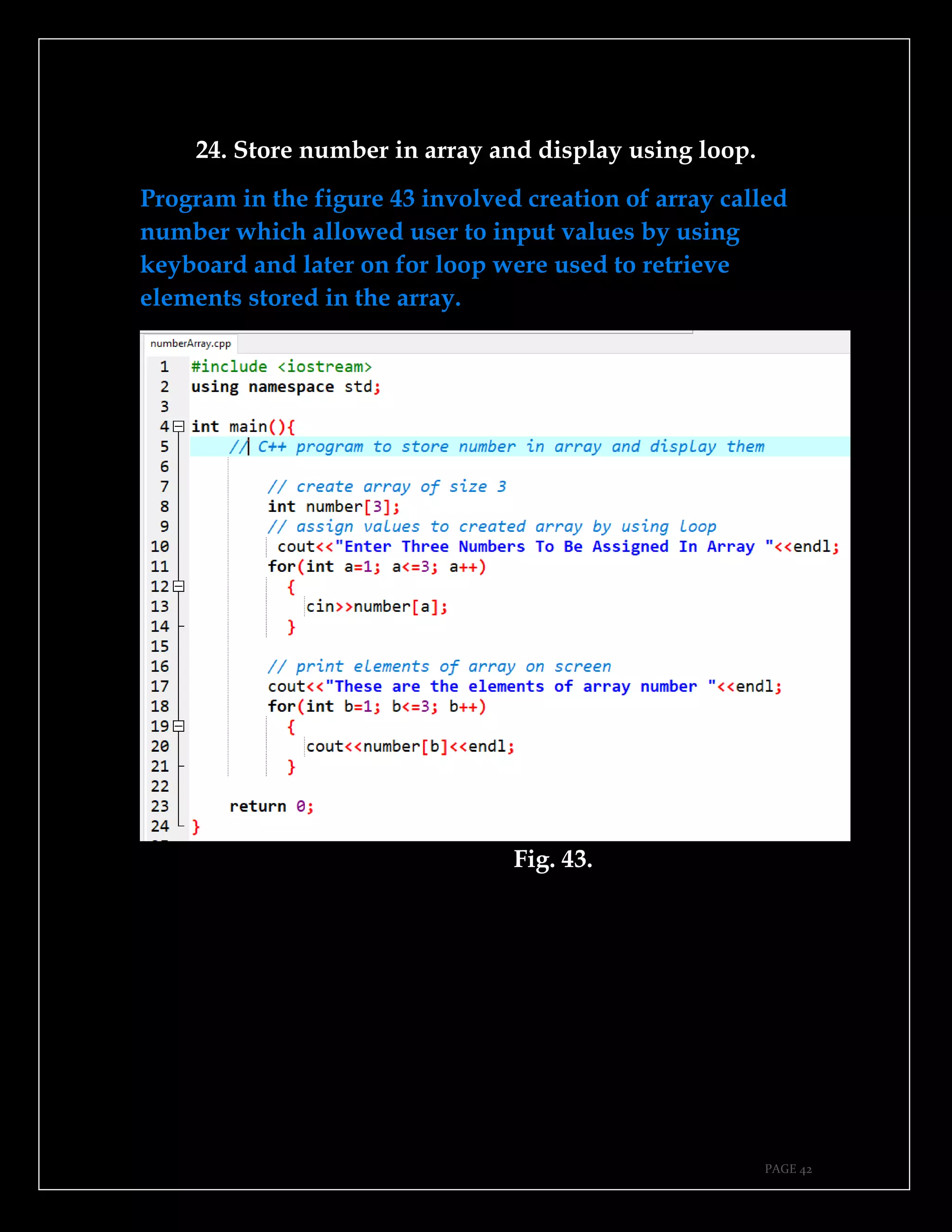
24. Store number in array and display using loop.
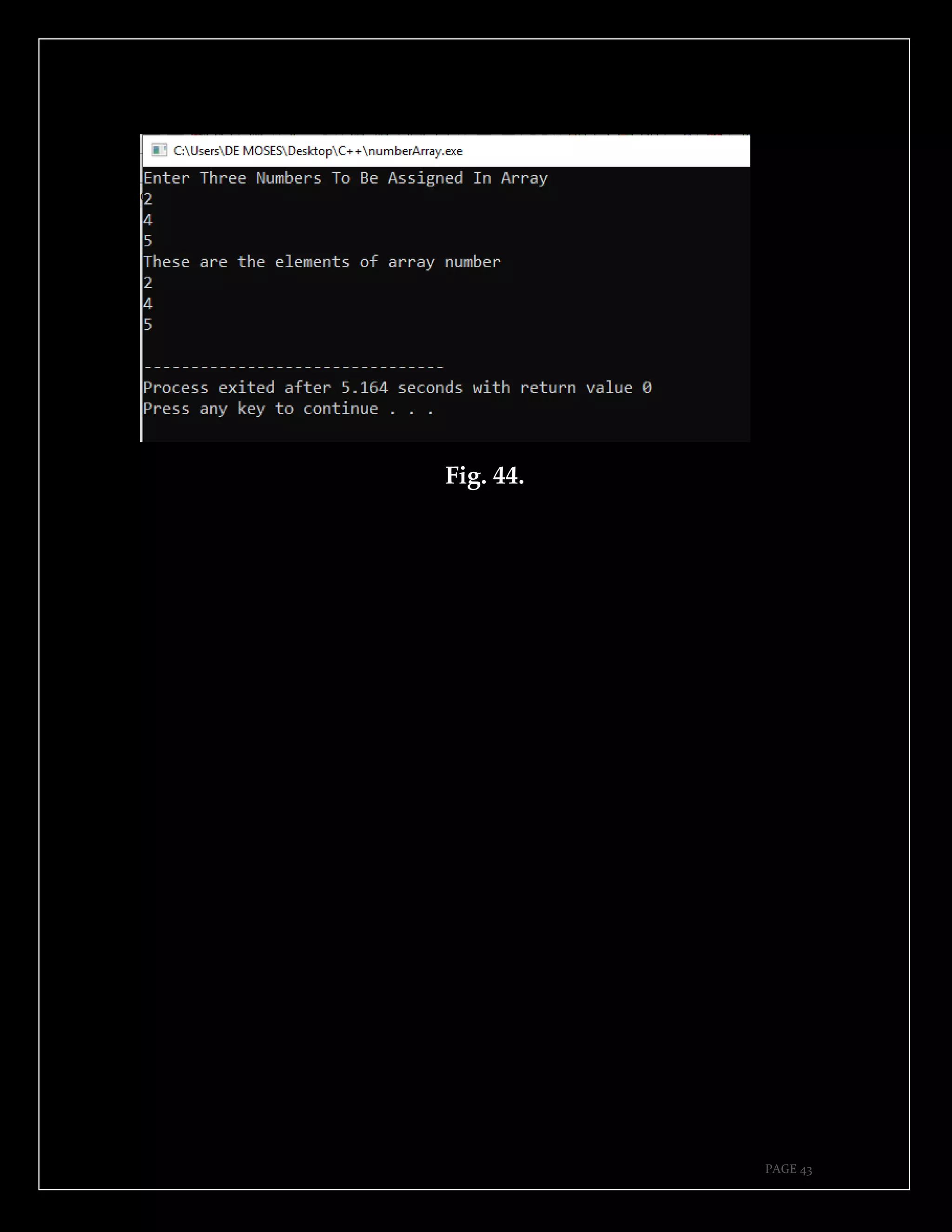
Program in the figure 43 involved creation of array called
number which allowed user to input values by using
keyboard and later on for loop were used to retrieve
elements stored in the array.
Fig. 43.
PAGE 43
Fig. 44.
PAGE 44
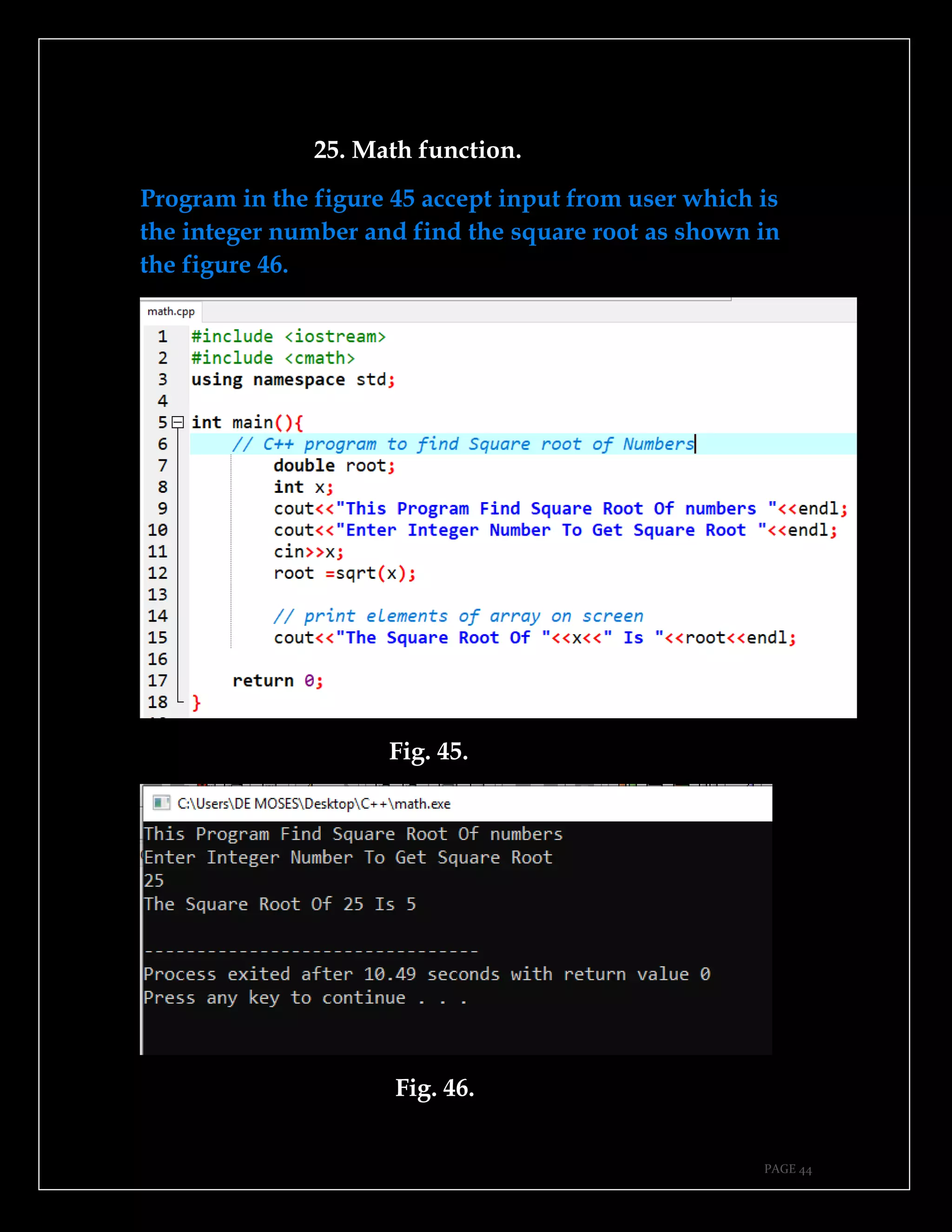
25. Math function.
Program in the figure 45 accept input from user which is
the integer number and find the square root as shown in
the figure 46.
Fig. 45.
Fig. 46.
PAGE 45
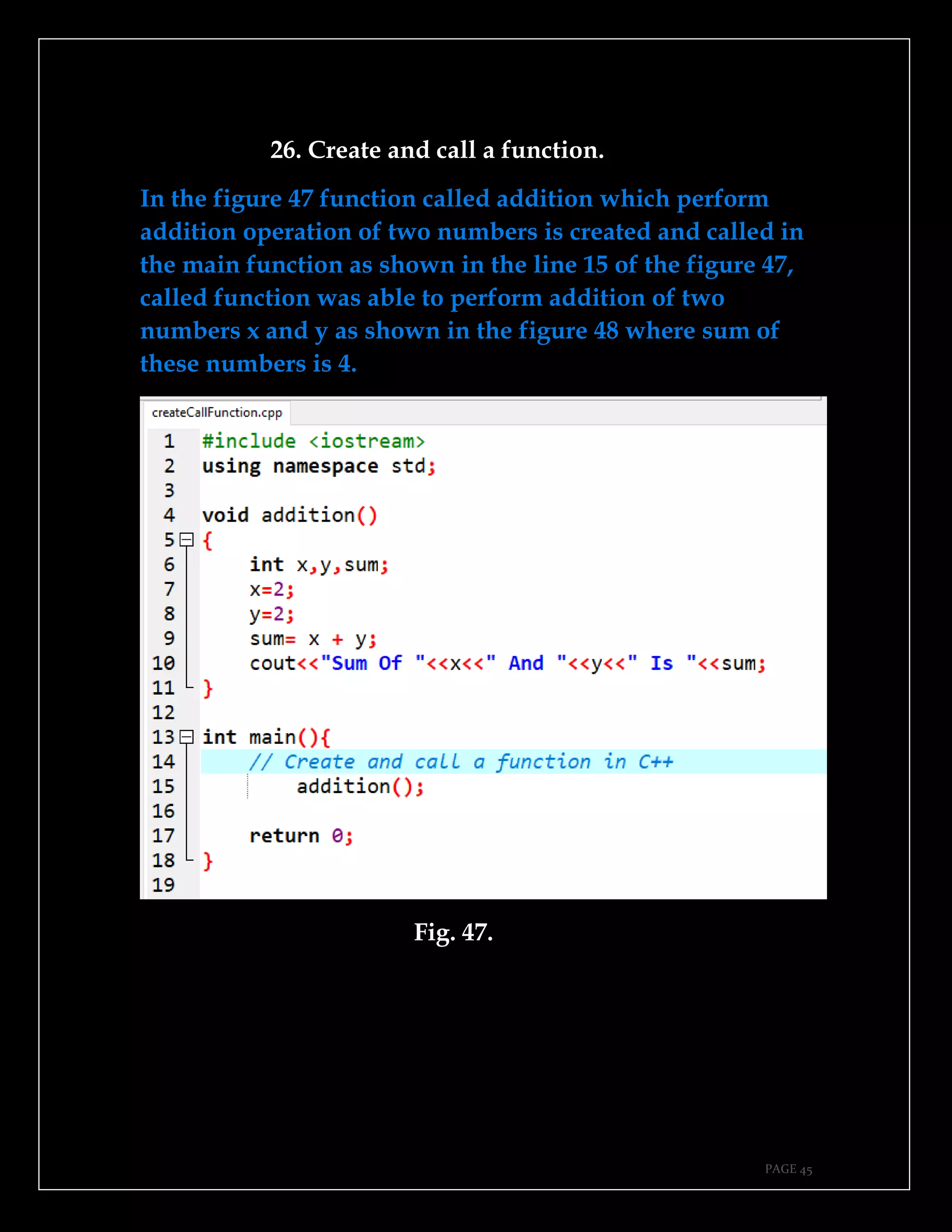
26. Create and call a function.
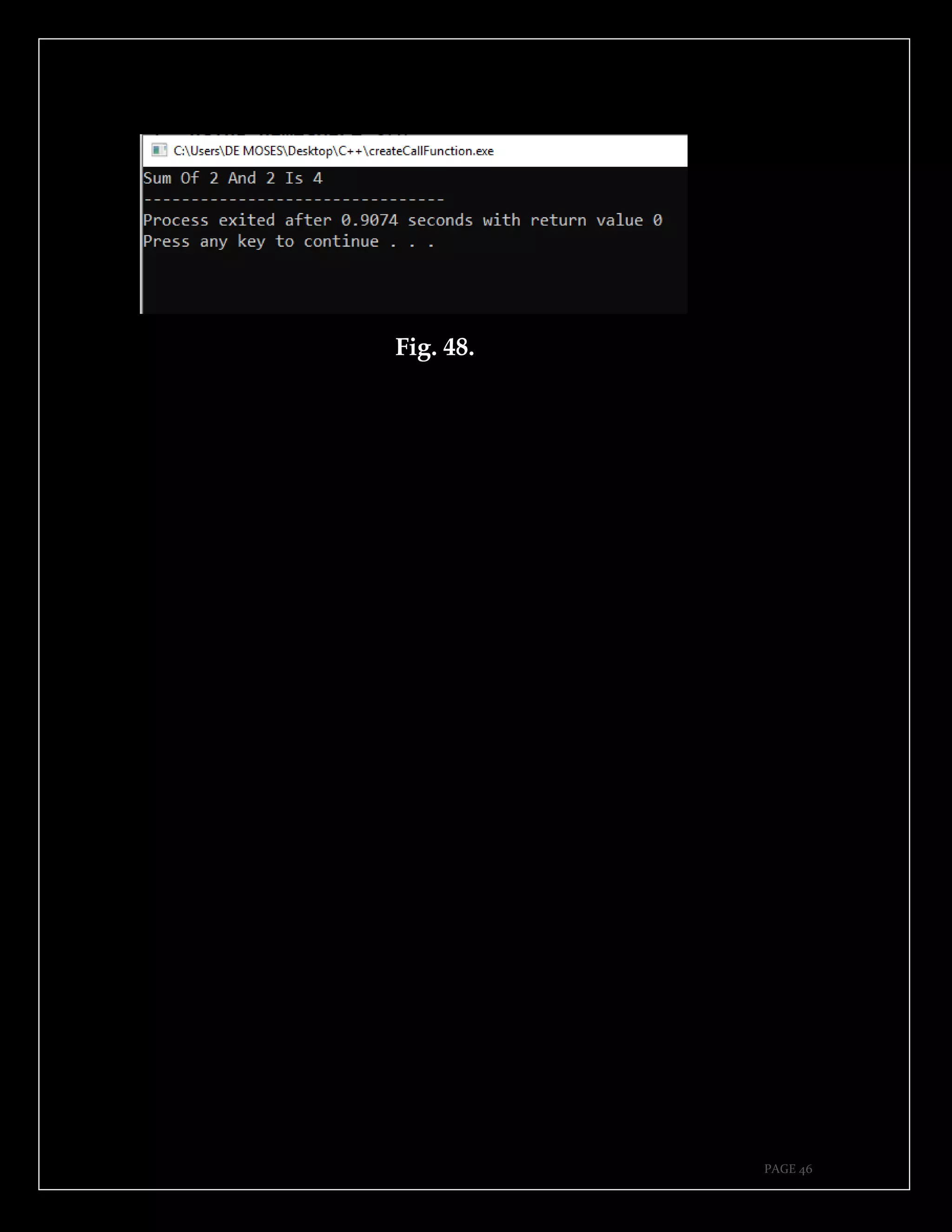
In the figure 47 function called addition which perform
addition operation of two numbers is created and called in
the main function as shown in the line 15 of the figure 47,
called function was able to perform addition of two
numbers x and y as shown in the figure 48 where sum of
these numbers is 4.
Fig. 47.
PAGE 46
Fig. 48.
PAGE 47
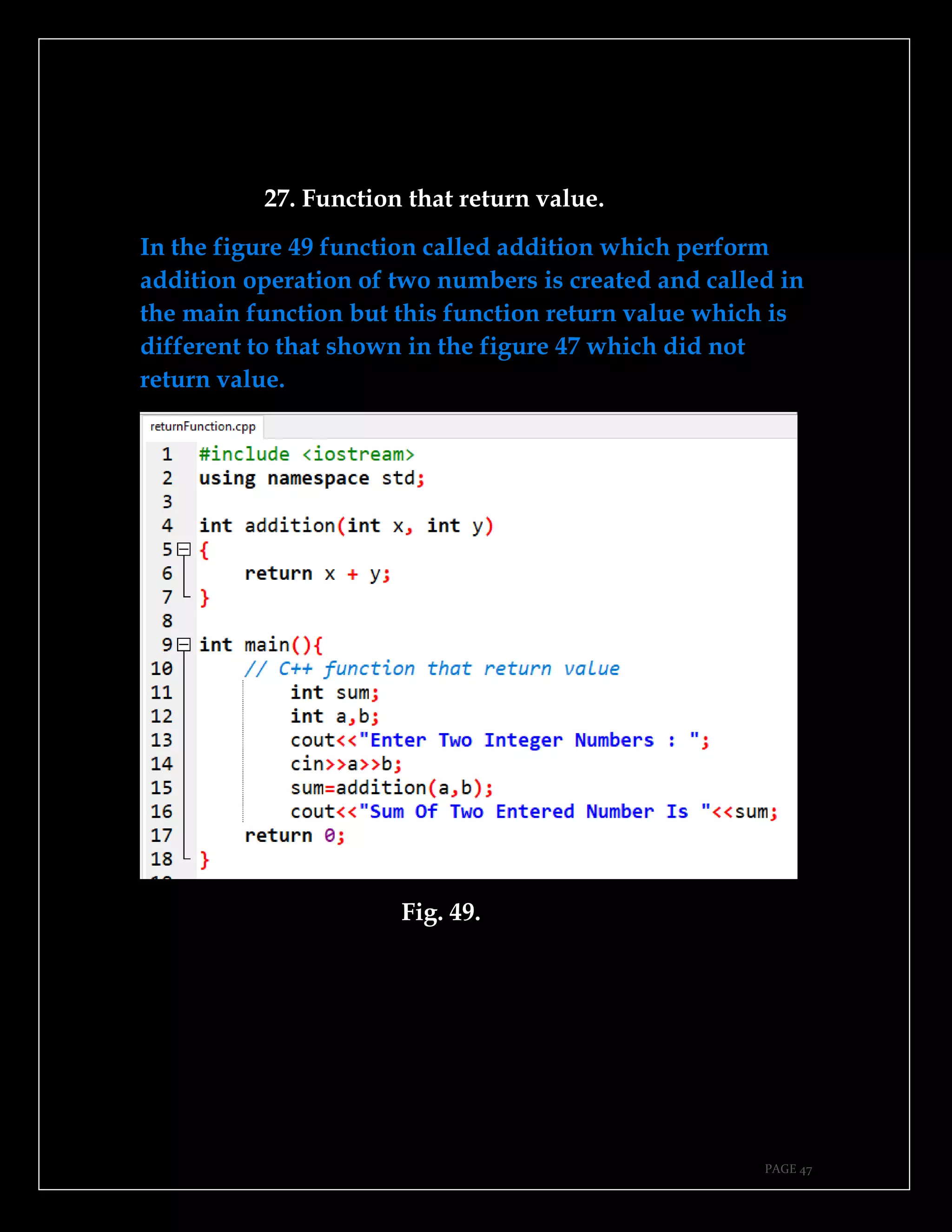
27. Function that return value.
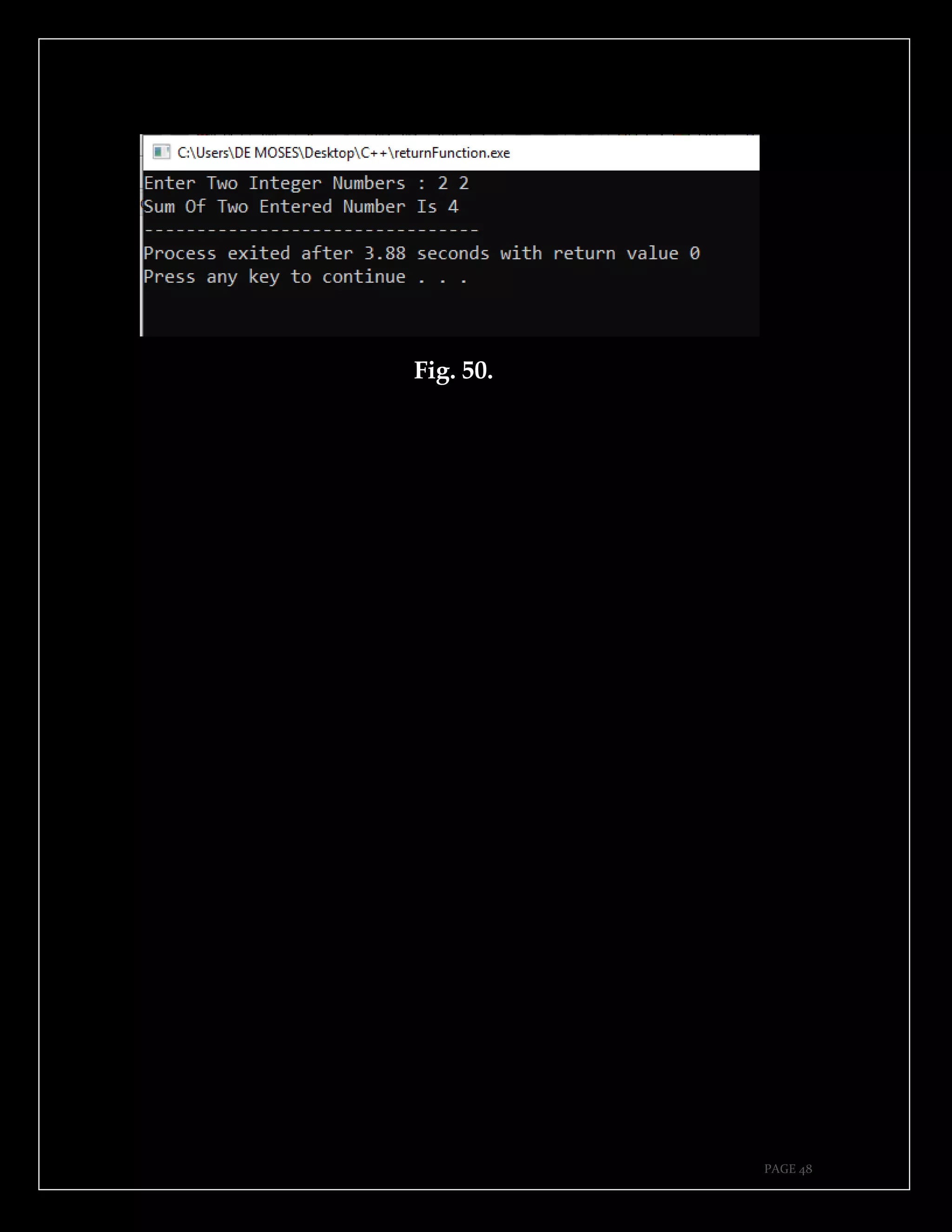
In the figure 49 function called addition which perform
addition operation of two numbers is created and called in
the main function but this function return value which is
different to that shown in the figure 47 which did not
return value.
Fig. 49.
PAGE 48
Fig. 50.
PAGE 49
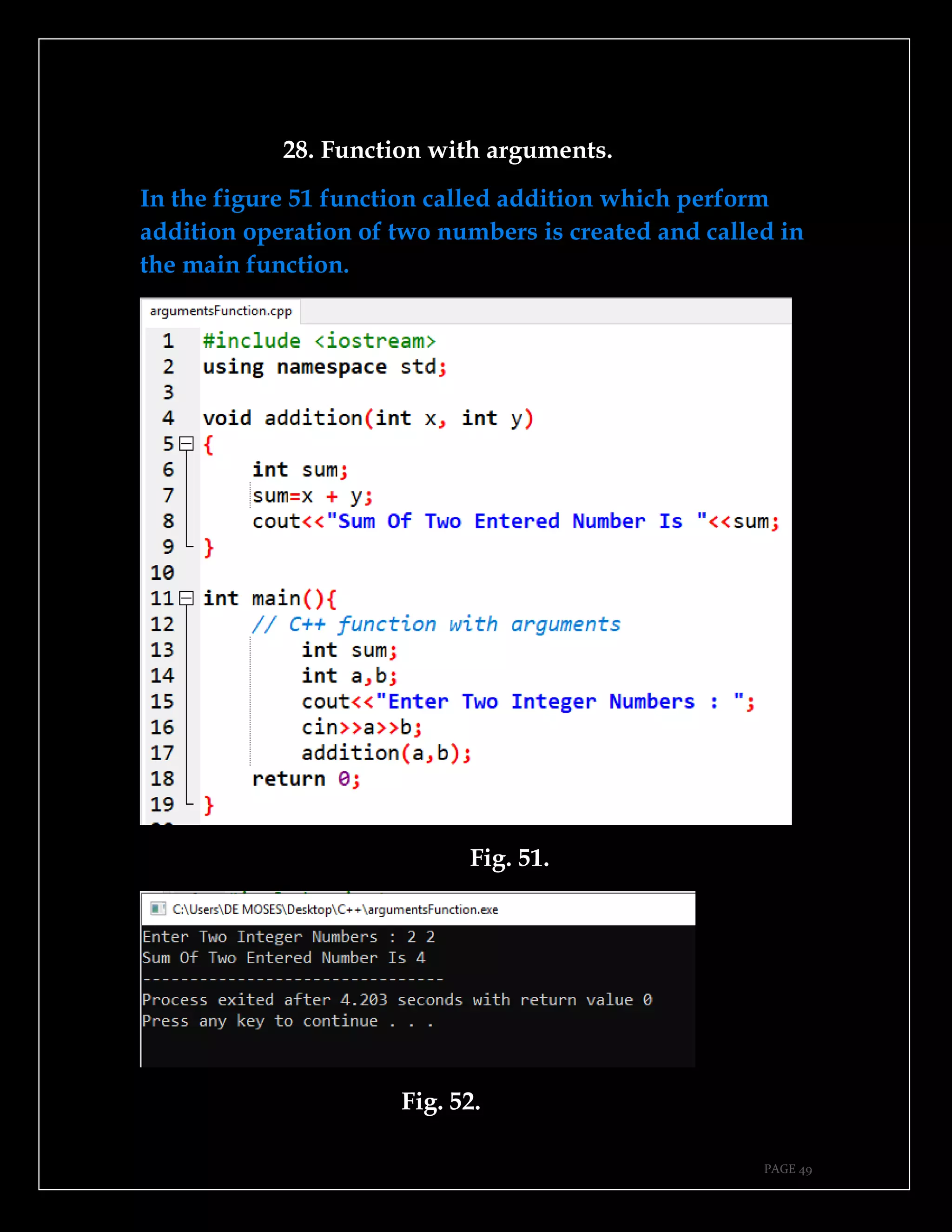
28. Function with arguments.
In the figure 51 function called addition which perform
addition operation of two numbers is created and called in
the main function.
Fig. 51.
Fig. 52.
PAGE 50
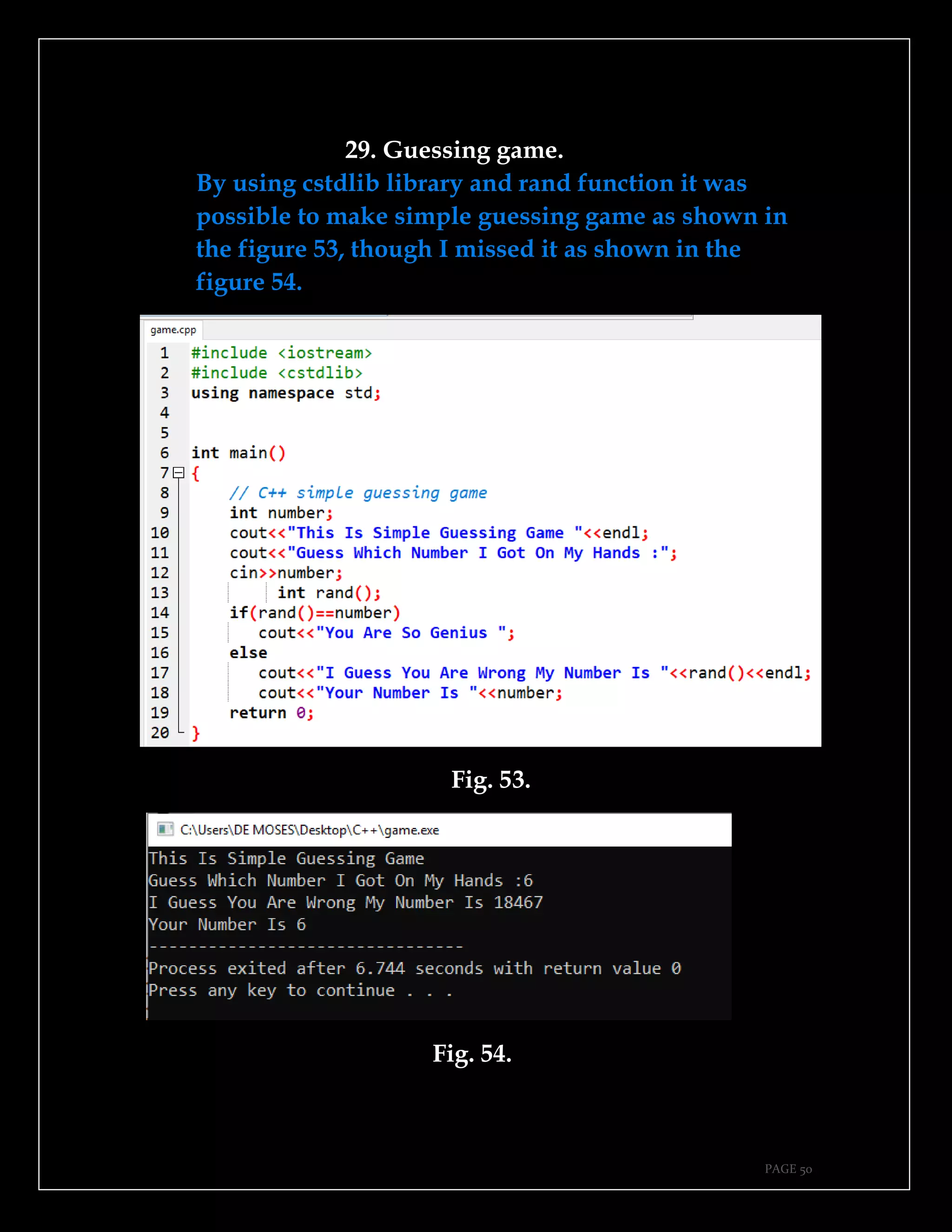
29. Guessing game.
By using cstdlib library and rand function it was
possible to make simple guessing game as shown in
the figure 53, though I missed it as shown in the
figure 54.
Fig. 53.
Fig. 54.
PAGE 51
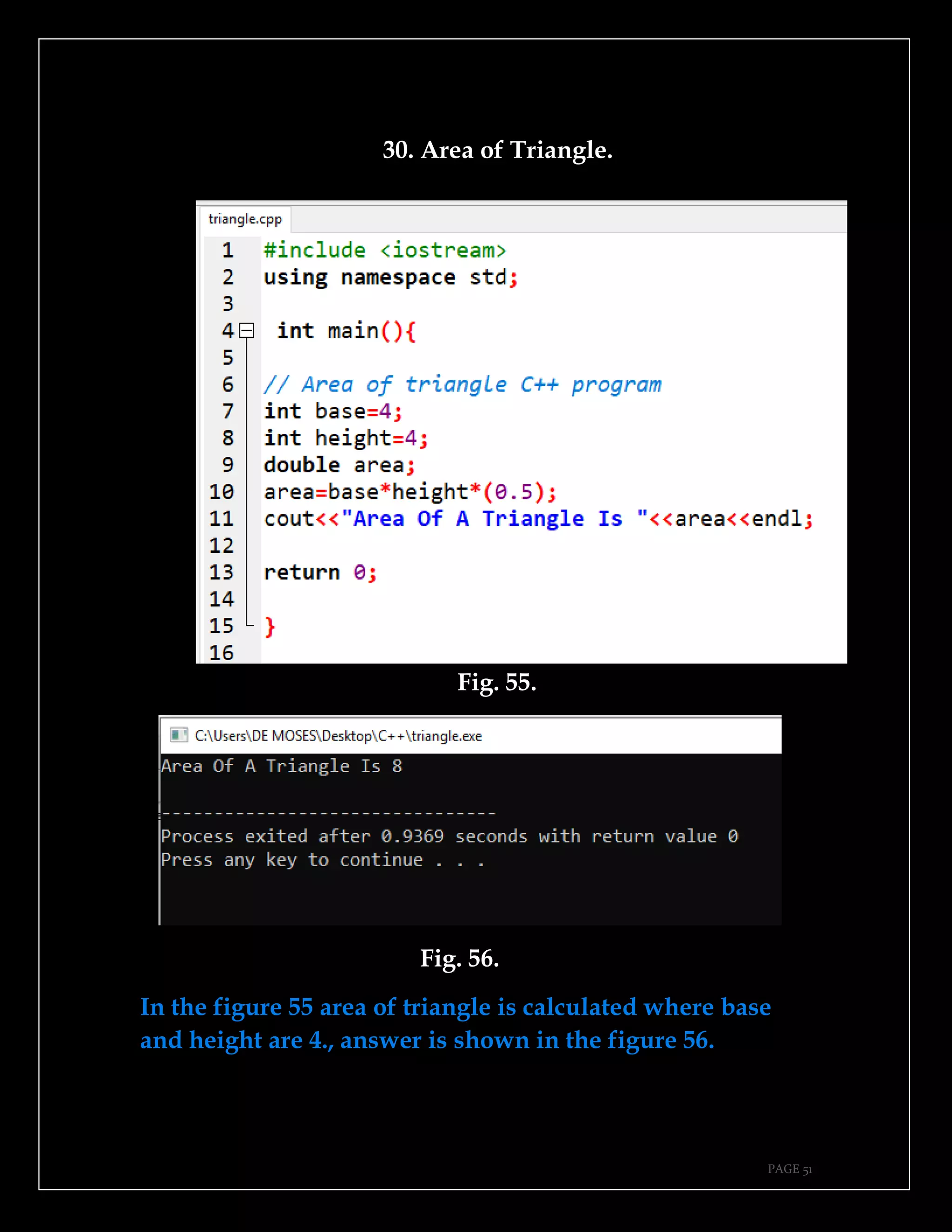
30. Area of Triangle.
Fig. 55.
Fig. 56.
In the figure 55 area of triangle is calculated where base
and height are 4., answer is shown in the figure 56.
PAGE 52
This page is intentionally left blank.
PAGE 53
CHAPTER FOUR.
➔Create file.
➔Write to a file.
➔Read from a file.
➔Pointers.
➔Addition program and write to a file.
➔Menu driven program.
➔Multiplication table.
➔Area of circle.
➔Perimeter of radius.
➔Even number between a range.
PAGE 54
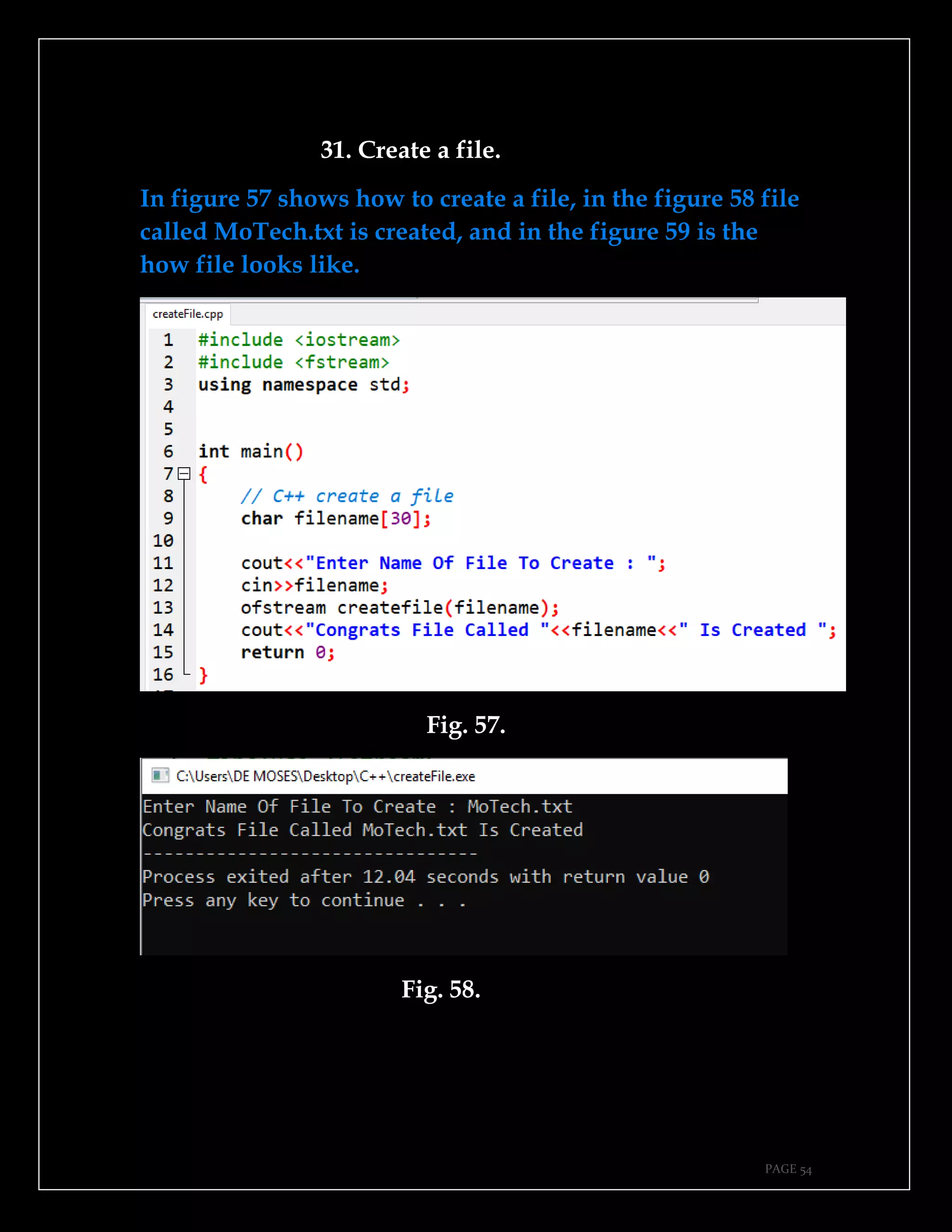
31. Create a file.
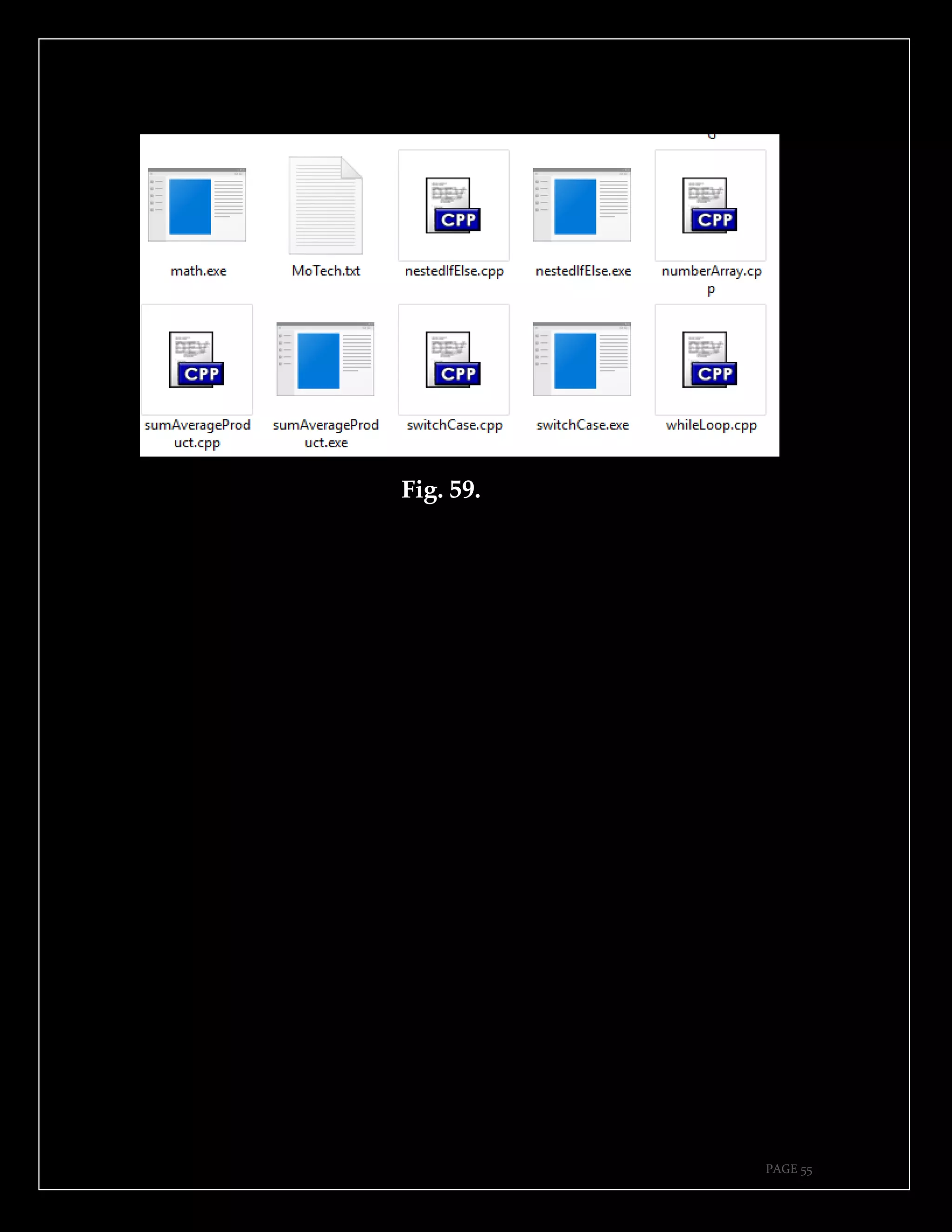
In figure 57 shows how to create a file, in the figure 58 file
called MoTech.txt is created, and in the figure 59 is the
how file looks like.
Fig. 57.
Fig. 58.
PAGE 55
Fig. 59.
PAGE 56
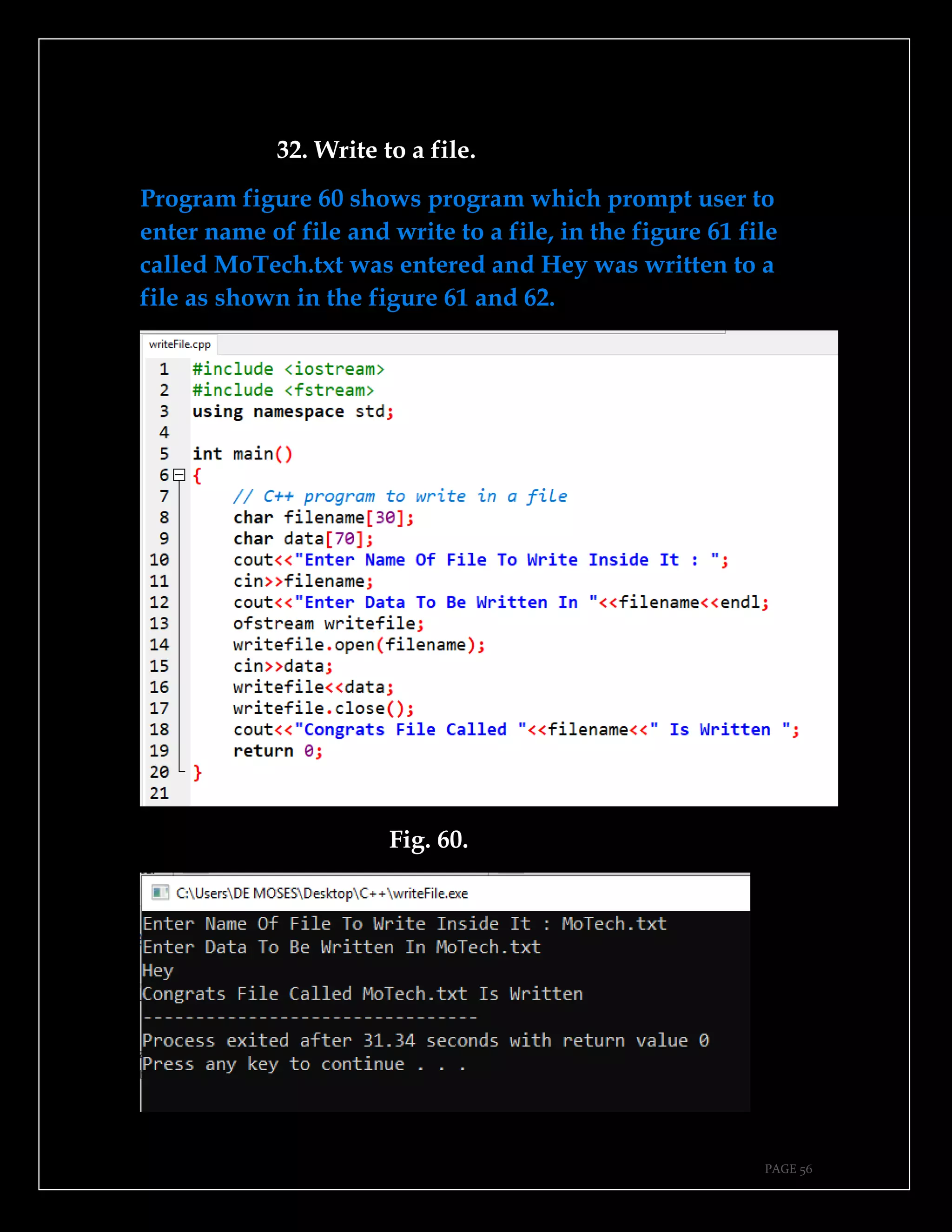
32. Write to a file.
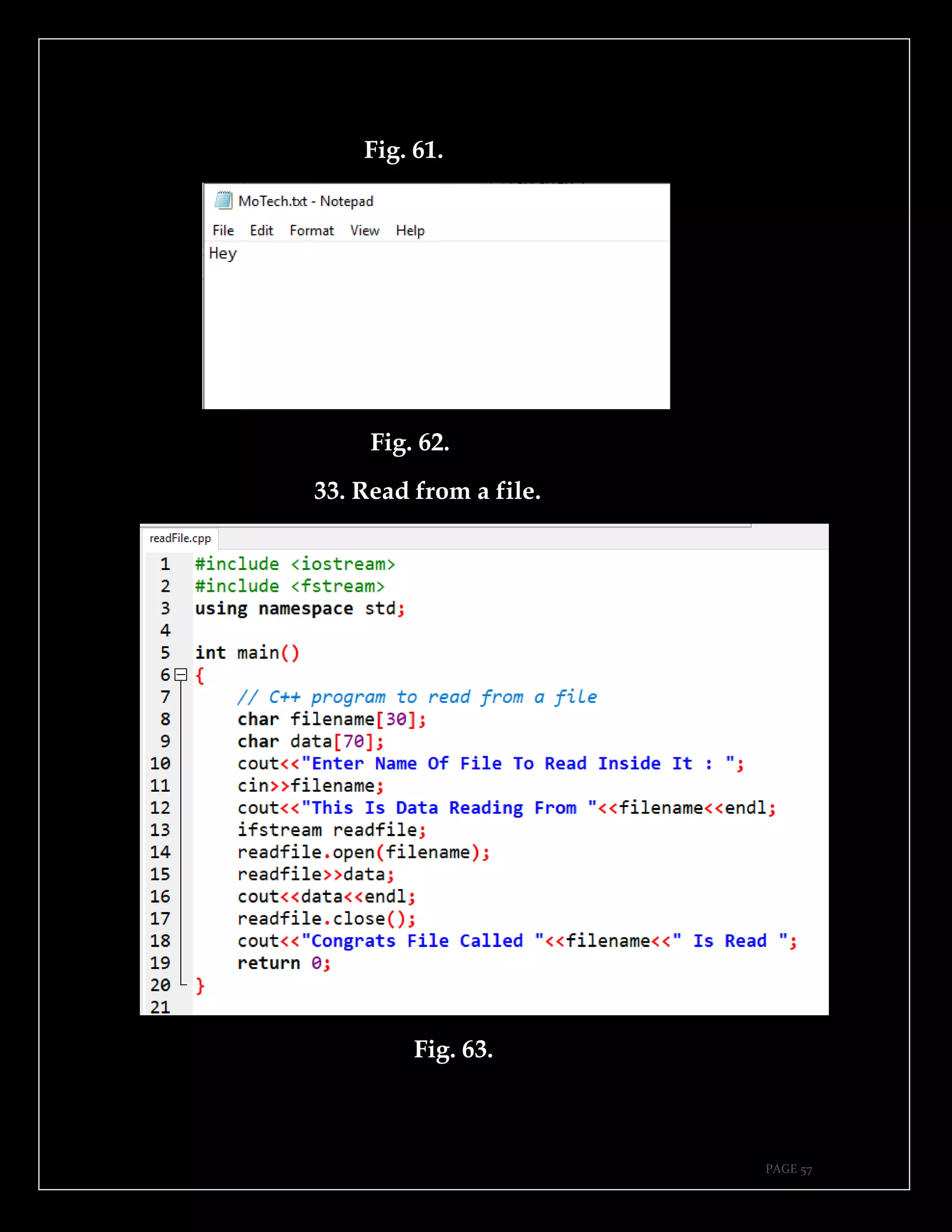
Program figure 60 shows program which prompt user to
enter name of file and write to a file, in the figure 61 file
called MoTech.txt was entered and Hey was written to a
file as shown in the figure 61 and 62.
Fig. 60.
PAGE 57
Fig. 61.
Fig. 62.
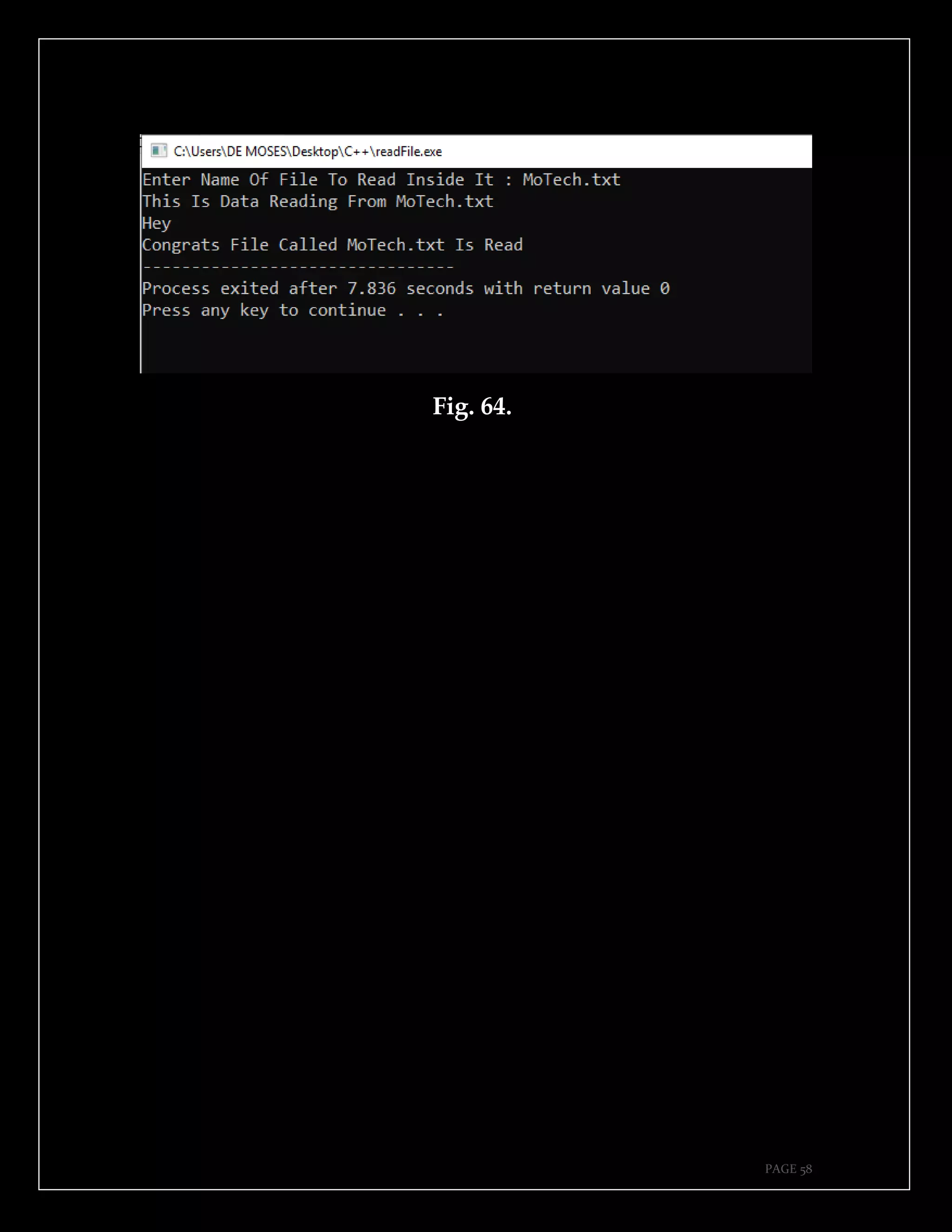
33. Read from a file.
Fig. 63.
PAGE 58
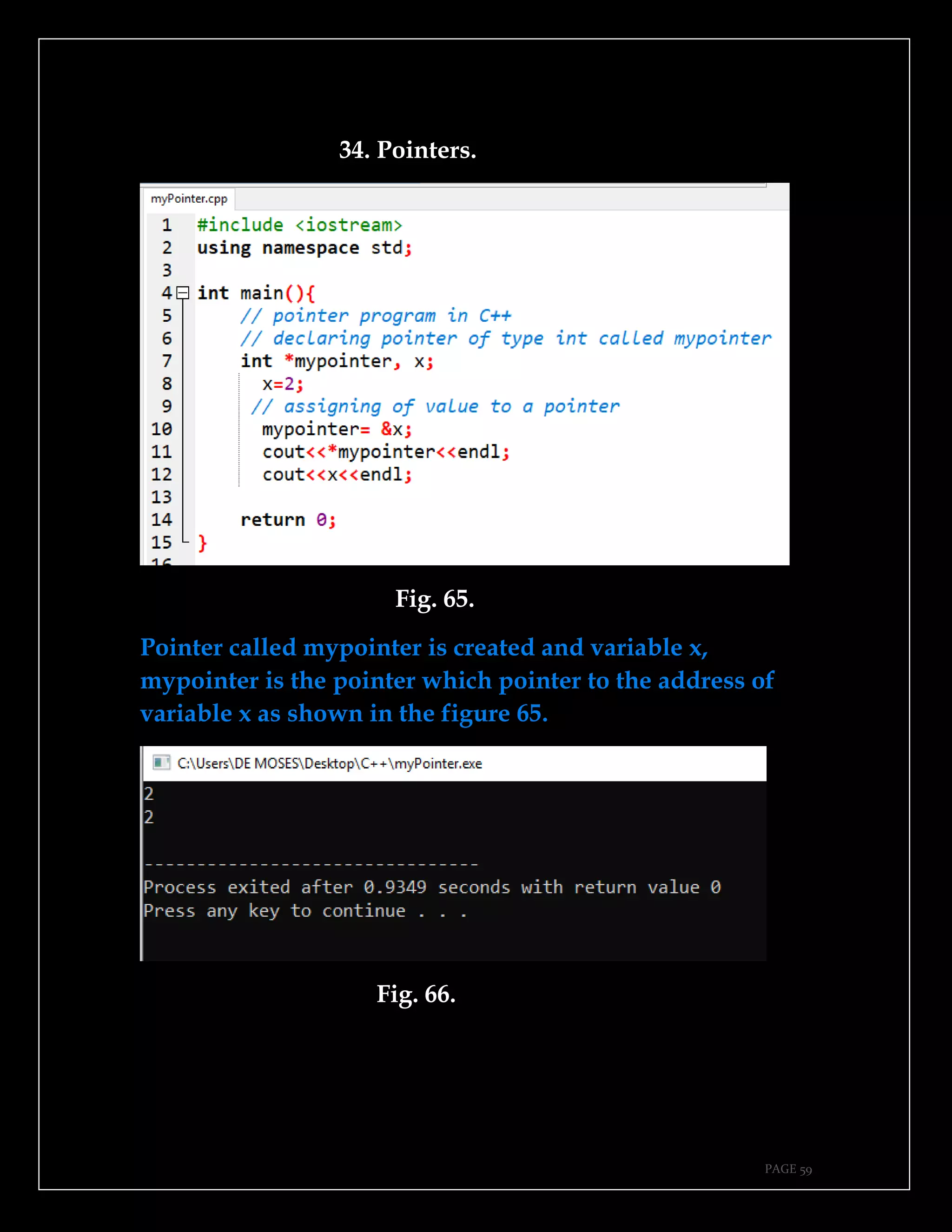
Fig. 64.
PAGE 59
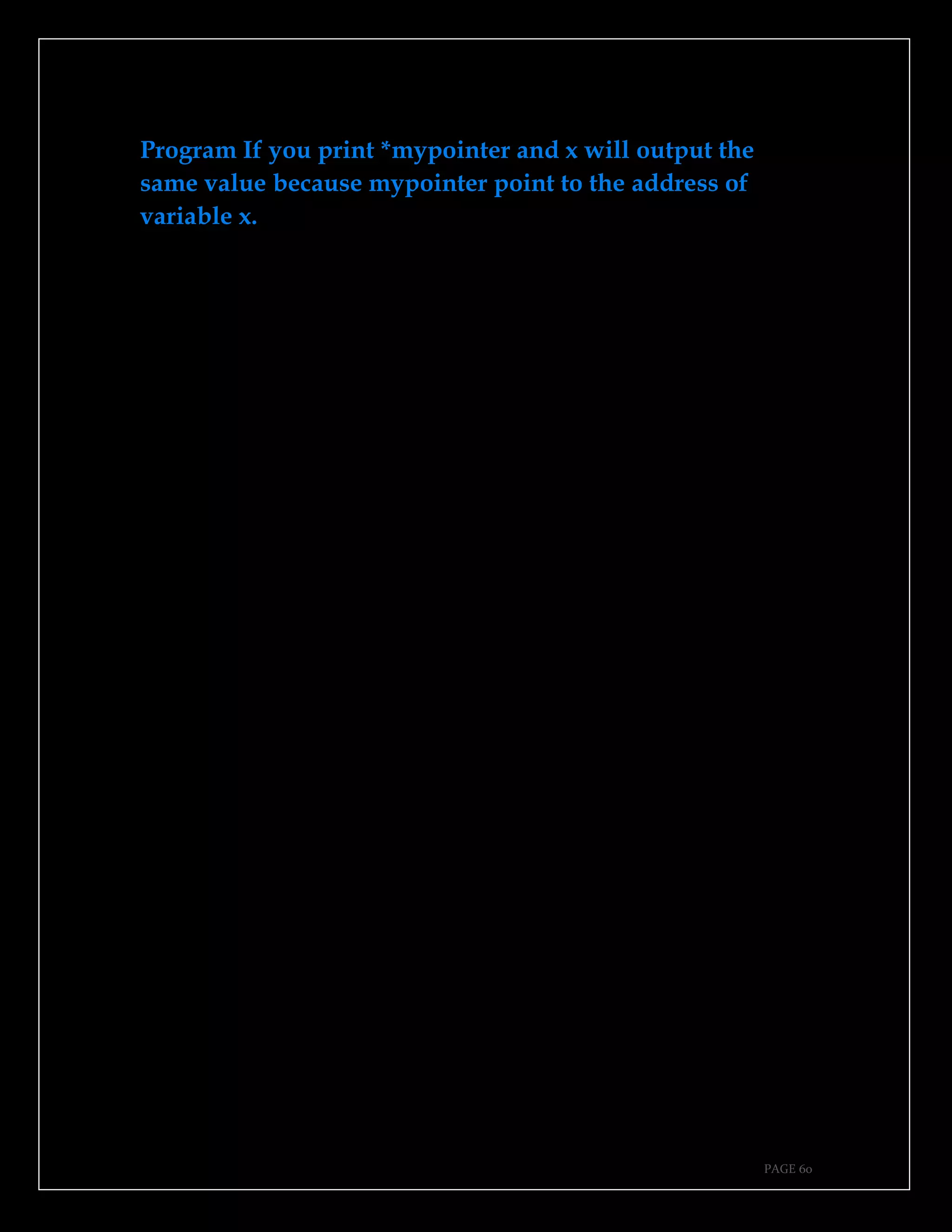
34. Pointers.
Fig. 65.
Pointer called mypointer is created and variable x,
mypointer is the pointer which pointer to the address of
variable x as shown in the figure 65.
Fig. 66.
PAGE 60
Program If you print *mypointer and x will output the
same value because mypointer point to the address of
variable x.
PAGE 61
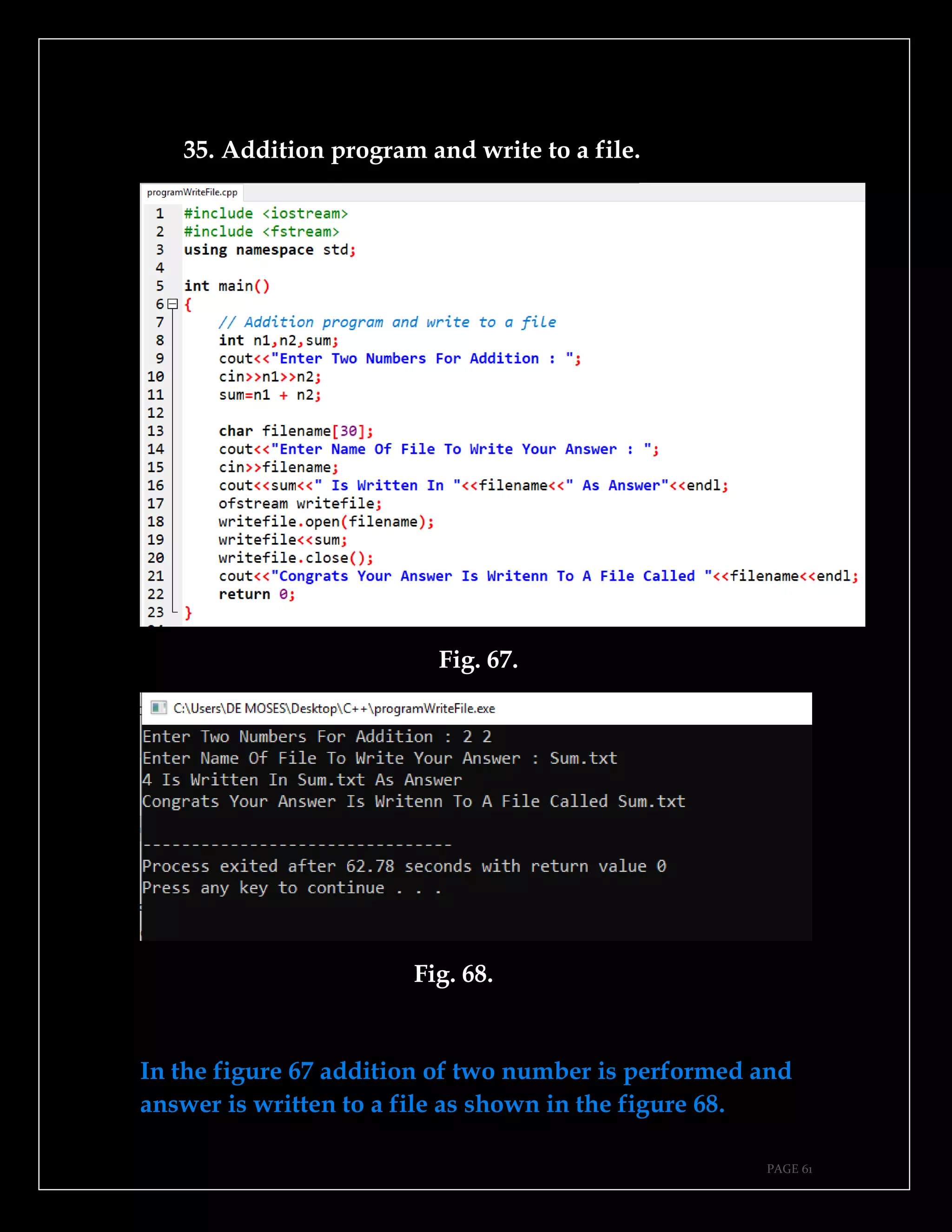
35. Addition program and write to a file.
Fig. 67.
Fig. 68.
In the figure 67 addition of two number is performed and
answer is written to a file as shown in the figure 68.
PAGE 62
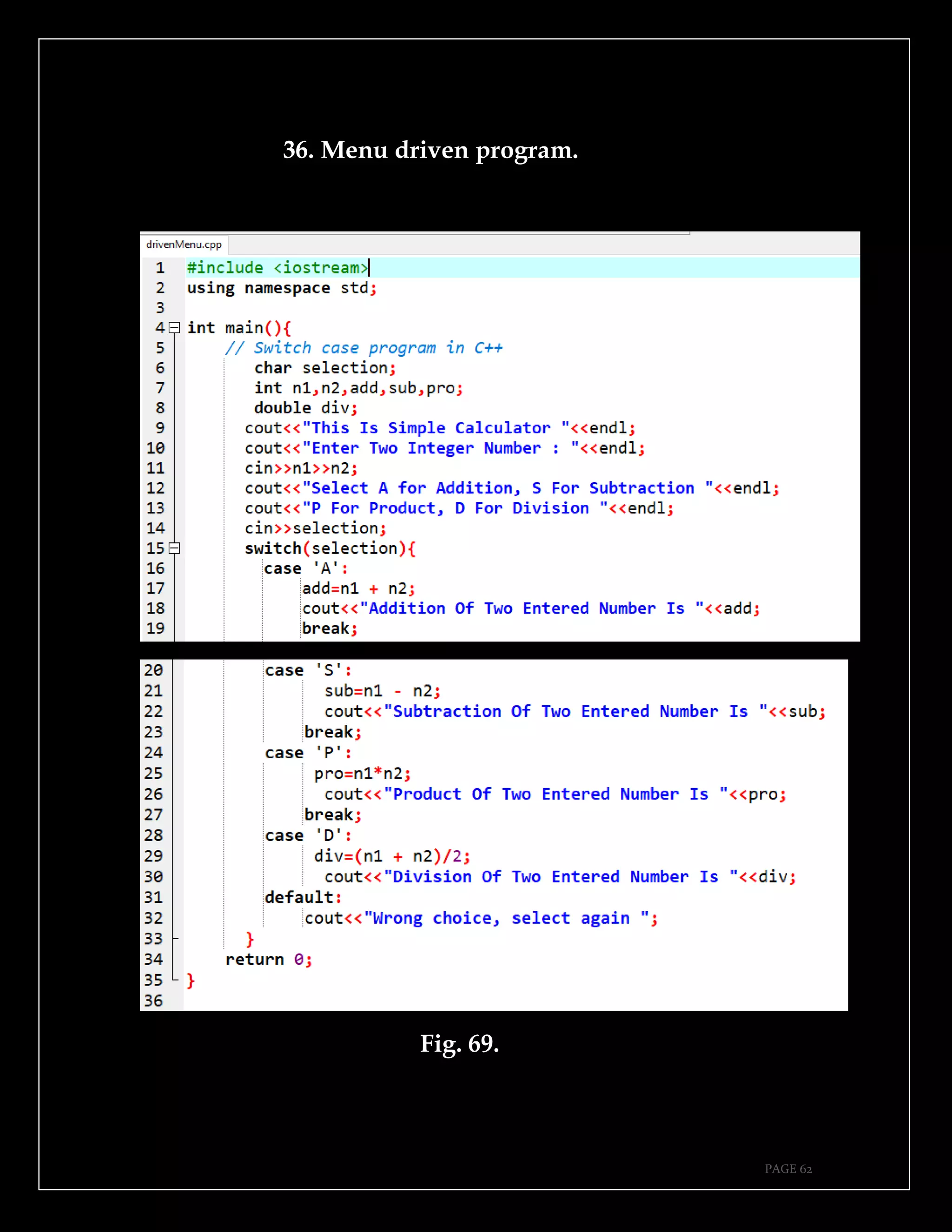
36. Menu driven program.
Fig. 69.
PAGE 63
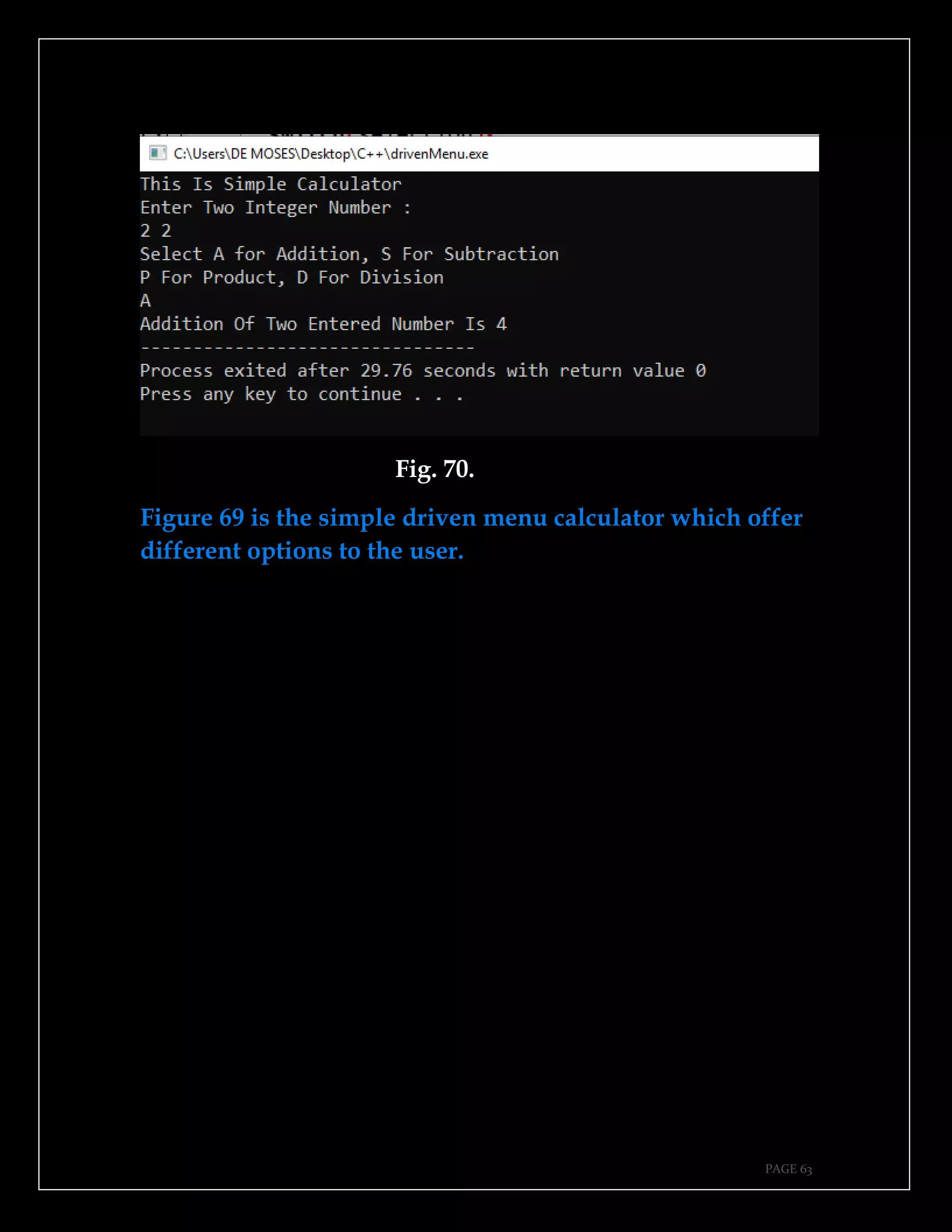
Fig. 70.
Figure 69 is the simple driven menu calculator which offer
different options to the user.
PAGE 64
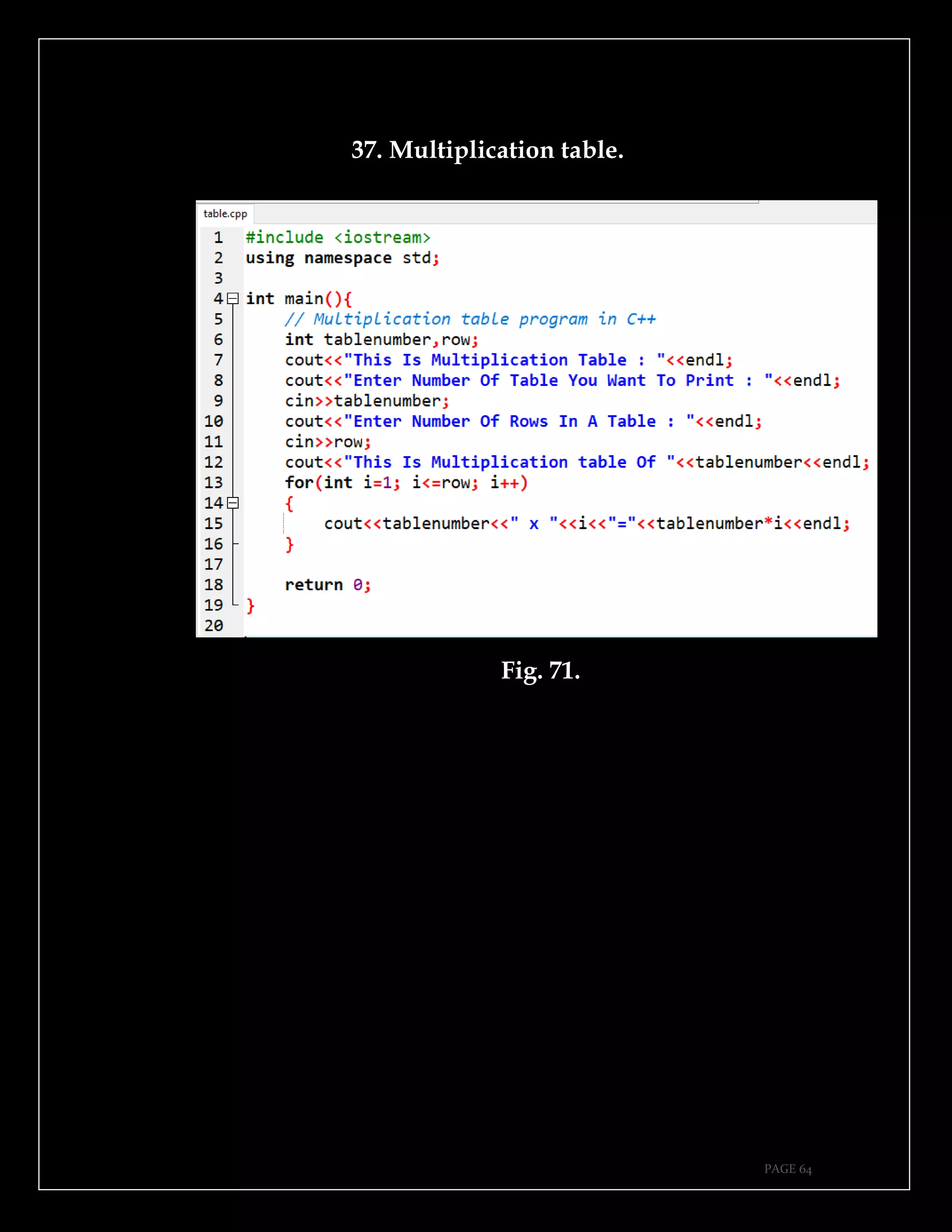
37. Multiplication table.
Fig. 71.
PAGE 65
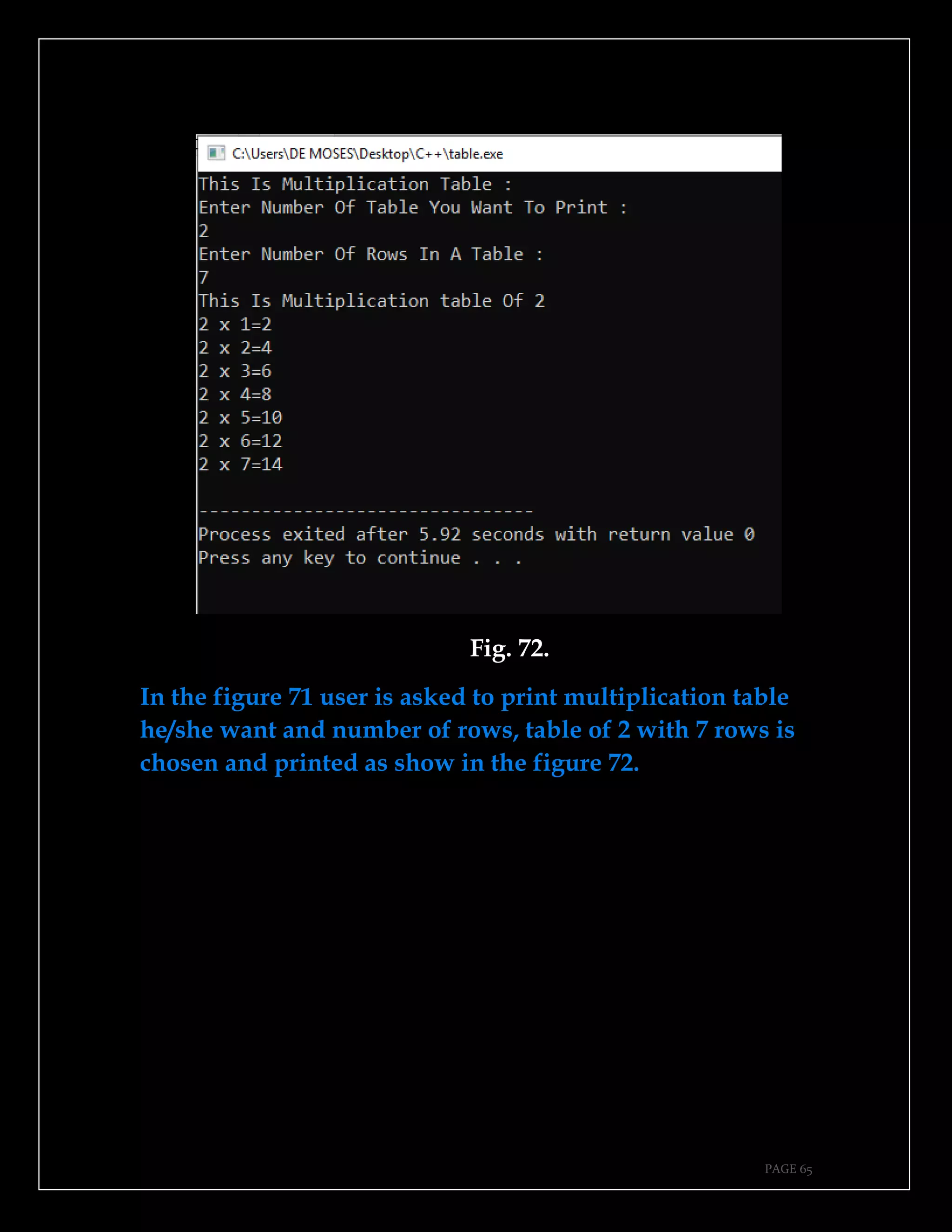
Fig. 72.
In the figure 71 user is asked to print multiplication table
he/she want and number of rows, table of 2 with 7 rows is
chosen and printed as show in the figure 72.
PAGE 66
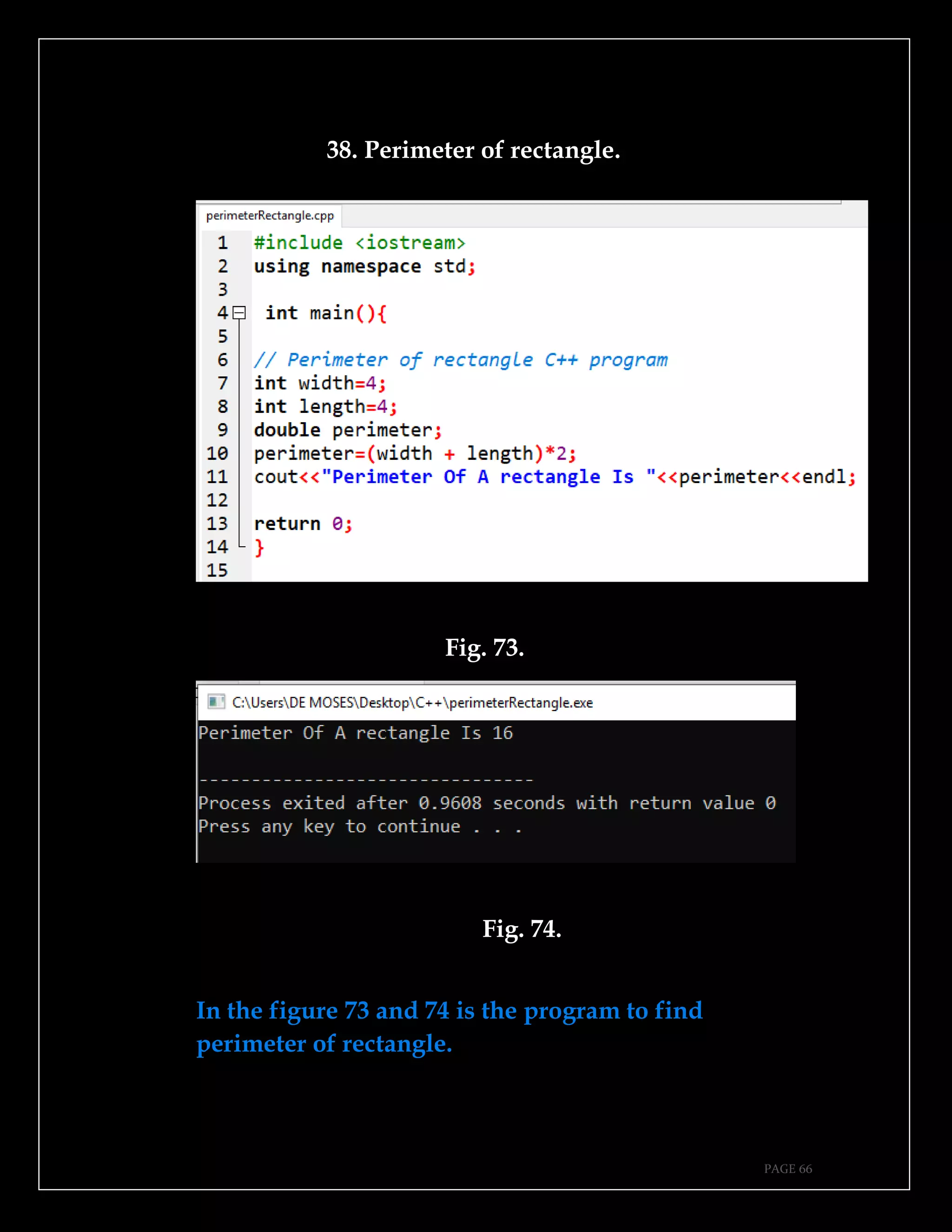
38. Perimeter of rectangle.
Fig. 73.
Fig. 74.
In the figure 73 and 74 is the program to find
perimeter of rectangle.
PAGE 67
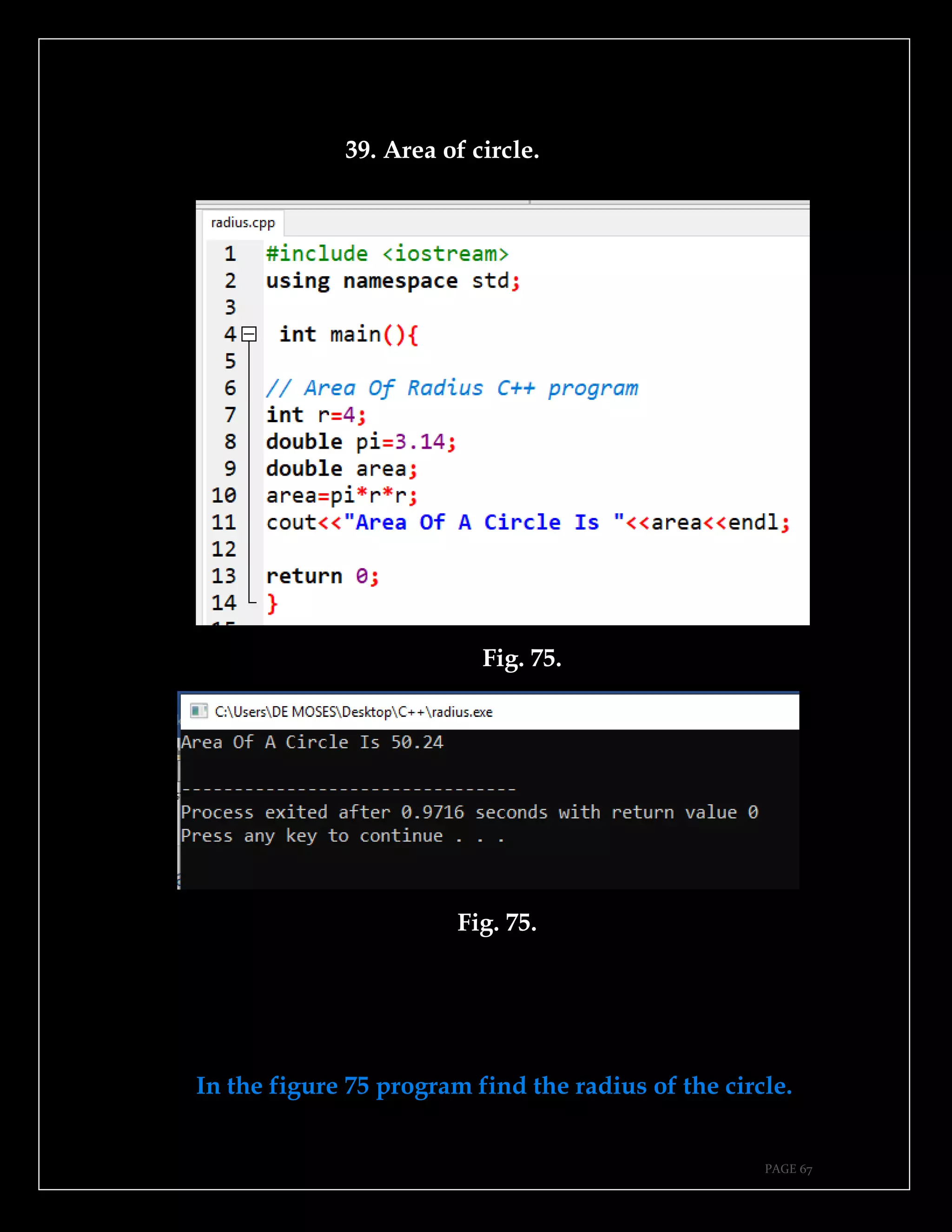
39. Area of circle.
Fig. 75.
Fig. 75.
In the figure 75 program find the radius of the circle.
PAGE 68
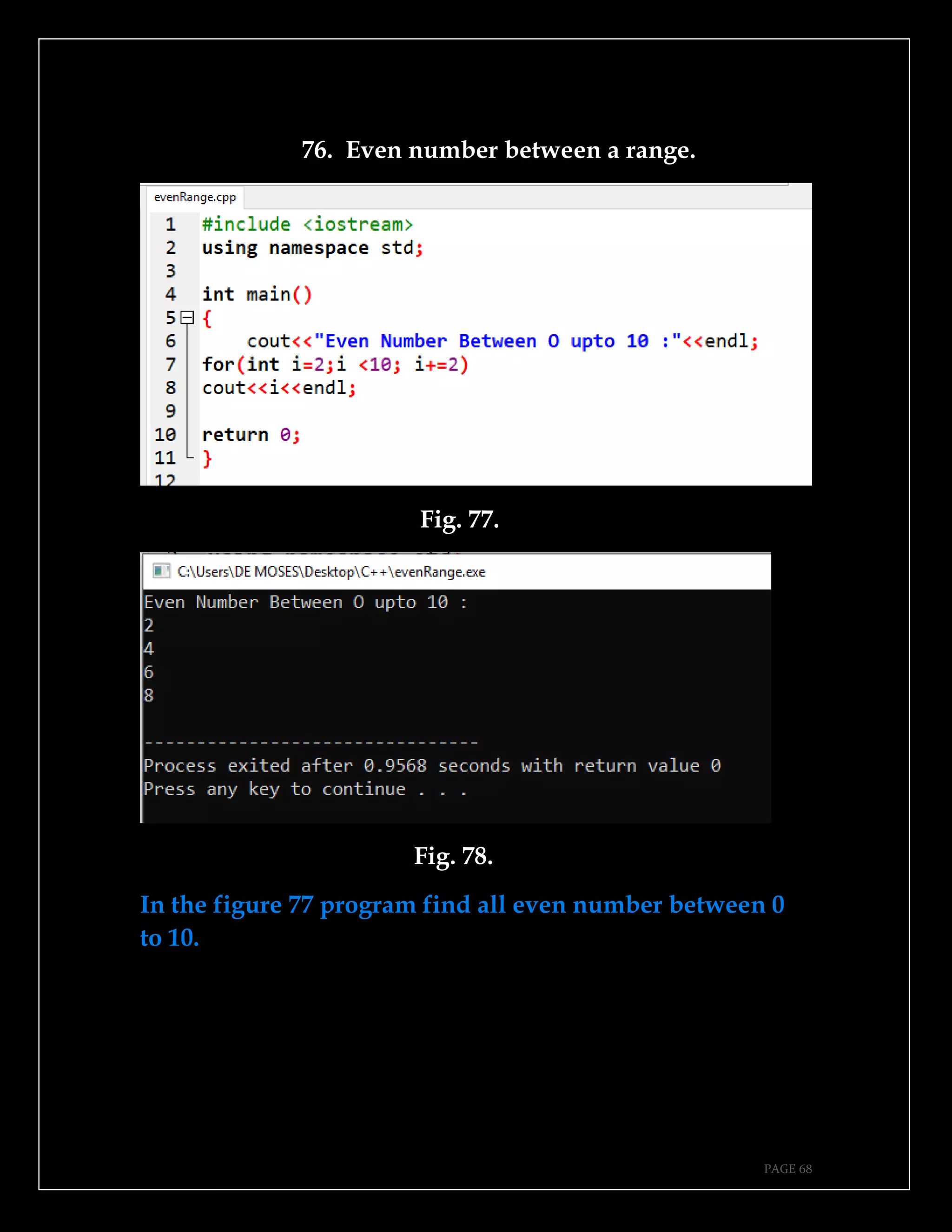
76. Even number between a range.
Fig. 77.
Fig. 78.
In the figure 77 program find all even number between 0
to 10.
PAGE 69
CONCLUSION.
Thank you for following this session until the end, this
book will have video tutorials uploaded at MoTech
YouTube channel soon so it is better if you subscribe at
MoTech YouTube channel so that if videos will be
uploaded you get a notification.
Source codes of all programs in this book will be
uploaded at MoTechStore which is github account owned
by MoTech, it will be better if you follow MoTech GitHub
account so that when 40 files containing programs in this
book get uploaded at github it become easy for you to
know and get them.
If you get any trouble contact us, but also if you have
any issue let us know it, MoTech says you are warm
welcome for our services.
PAGE 70
WAYS TO GET IN TOUCH WITH MoTech.
Linkedin.com
https://www.linkedin.com/in/motech-inc-720261191/
YouTube.com
https://www.youtube.com/channel/UCtuaigKZF3okQnKON5RM1qQ
Amazon.com
https://www.amazon.com/s?k=noel+moses+mwadende&ref=nb_sb_n oss
Github.com
https://github.com/MoTechStore/
Scribd.com
https://www.scribd.com/user/470459684/MoTech
SlideShare.com
https://www.slideshare.net/MoTechInc?utm_campaign=profiletracking&utm_
medium=sssite&utm_source=ssslideview
PAGE 71
REFERENCES.
1. Mselle, J.L. (2017). C++ programming in RAM diagrams underMTL-
1.Dar es Salam, Tanzania:E&D Vision Publishing.
2. Sharif, W. (2015). Learning C++ by creating games with UE4.
Birmingham, Mumbai: PACKT.
3. https://beginnerbook.com/
4. https://hackr.io/tutorials/learn-c-plus-plus
5. https://www.nanapro.org/

Simplified c++ 40 programs

  • 1.
  • 2.
    PAGE 1 ABOUT THEAUTHOR. Noel Moses Mwadende is the passionate book and article writer based of different books and articles concern computer science in general, especially in cybersecurity and machine learning, currently Noel is employed as youtuber and book author at MoTech which is mini firm dealing with provision of information technology services. @2019.
  • 3.
    PAGE 2 INTRODUCTION. For thefirst time I faced C++ to be honest it was one of the difficult programming language as I was newer to the programming language, I stayed sleepless the whole night thinking on how I can make it easy for me, I found one of my exercise where I wrote most frequently and important examples in each topic, studying those examples for about two weeks then everything was simple, I know still there might people face difficulties in learning C++, do not worry let us learn by examples today, the same methodology I used to master C++ in simplified way and it worked fine for me, now it is time for me to introduce this simplified way to master C++. This book contains four chapter, in which there are 10 examples in each chapter which sum up to 40 C++programs in simplified way.
  • 4.
    PAGE 3 ACKNOWELDGEMENT. Thanks toProf Leonard James Mselle the author of “C++ programming in RAM diagrams under MTL-1” your efforts in teaching us C++ today seems to bear fruits as am able to teach others as you used to teach me. Thanks to my former head of department Doctor Masoud Masoud, currently lecture at DIT, everyone knows your teaching style to be honest most of C++ programs were weak before you, I enjoyed your class sessions. Thanks to my instructor Miss Martha Shaka, your efforts in tutorial session made easy way for me to capture different concepts of C++, most of time you tried to teach us in simple ways.
  • 5.
    PAGE 4 HOW TOREAD THIS BOOK. Methodology used for teaching in this book is example based teaching methodology, so it is better to follow the same way in learning as I used in teaching, for better understanding you should take one example or one program after another, trying to write each and every program yourself, this will help you in understanding, reading by looking pictures in figure may lead you to fall in a sleep, programming language is about practice, so after reading one program write it either in Dev C++,Borland or elsewhere.
  • 6.
    PAGE 5 WHY YOUSHOULD READ THIS BOOK. What makes students understand a subject by either more examples provided by instructor or by more practice for the side of student, in my book I have provided more examples if you will take them seriously and do more practice, for sure you will understand. All programs have two parts, part is program and second part is the output of the program, making errors in program will lead to errors in the output, here it comes the matter of why you should read this book, every program in my book is provided with two important parts of program, that is piece of code and output of code, studying these two parts of program will makes you understand more.
  • 7.
    PAGE 6 TABLE OFCONTENTS CHAPTER ONE Introduction of C++ ………………………………… 10 Hello world ………………………………………….. 11 Variable declaration ……………………………….... 12 Variable initialization ………………………………. 14 How to comment …………………………………….. 15 Print line …………………………………………….... 16 Addition of numbers ………………………………... 17 Accepting user input ………………………………... 19 Concatenation ………………………………………... 20 Product of two numbers …………………………..... 21 CHAPTER TWO If condition ………………………………………….. 24 For loop ……………………………………………….. 25 Nested loop …………………………………………... 26 While loop ……………………………………………. 27 Do while ……………………………………………… 28 Switch case …………………………………………… 30 Even number …………………………………………. 31 Odd number ………………………………………….. 32 Leap year ……………………………………………… 33 Random number generation ……………………….. 35
  • 8.
    PAGE 7 CHAPTER THREE Findsum, average and product ………………….... 38 Area of rectangle …………………………………….. 39 Create array, assign values and display them …… 40 Store numbers in array and display using loop….. 42 Math function ……………………………………....... 44 Create and call a function …………………………... 45 Function that return value ………………………….. 47 Function with arguments …………………………… 49 Guessing game ………………………………………. 50 Area Of Triangle …………………………………….. 51 CHAPTER FOUR Create file …………………………………………… 49 Write to a file ………………………………………… 51 Read from a file ……………………………………... 52 Pointers ………………………………………………. 53 Addition program and write to a file …………….. 55 Menu driven program ……………………………… 57 Multiplication table ………………………………… 58 Perimeter of radius ………….……………………... 60 Area of circle ………………………………………… 61 Even number between a range ……………………. 62
  • 9.
    PAGE 8 This pageis intentionally left blank.
  • 10.
    PAGE 9 CHAPTER ONE. ➔Introductionof C++. ➔Hello world. ➔Variable declaration. ➔Variable initialization. ➔How to comment. ➔Print line. ➔Addition of numbers. ➔Accepting user input. ➔ Concatenation. ➔Product of two numbers.
  • 11.
    PAGE 10 1. Introductionof C++. Welcome to simplified C++ 40 programs where will are going to learn by examples, start with program one as shown in the figure 1, this is just for warming up. Fig. 1. Fig. 2.
  • 12.
    PAGE 11 2. Helloworld This is the first program to do, almost in all programming language, this program prints the word Hello world to the screen. Fig. 3. Fig. 4.
  • 13.
    PAGE 12 Figure 3shows the source codes of hello world.cpp program, figure 4 shows the output of the program after program is compiled and run, make sure everything is right as it is shown on above two figures. 3. Variable declaration. Variables are the storage for data values, they are like rooms for storing data. Before using any variable, you must declare it and that is what is called variable declaration. Fig. 5. In the figure 5, x, name and salary are the variables being declared, that is declaration of variables.
  • 14.
    PAGE 13 Fig. 6. Figurenumber 6 print declared variables. Note: The following rules must be considered during variable declaration. ➔Variable name can not be keyword such as else, break, case, for and other keywords in C++. ➔Variable name can not contain space between it. For example, string first name is wrong variable declaration, it should be string firstname that is without space or it should contain underscore string first_name. ➔It should start with letter or underscore. ➔It should not contain special characters like $, @, £, # and other special characters.
  • 15.
    PAGE 14 4. Variableinitialization. Variable initialization is the assignment of data value to the variable declared, though declaration and initialization of variable can be done at the same time, for example int x=4, this is declaration and initialization at the same time. Fig. 7. In the figure 7, two variables company and revenue are Initialized. Fig. 8. Figure 8 shows the output of variables on the screen.
  • 16.
    PAGE 15 5. Howto comment. Comments are the lines which are not visible to the compiler during compilation time and running time of a program, mostly they are used to provide more explanation about a certain line of code so as to provide more understanding. Types of comments. ➔Single line comment. ➔Multiple line comment. Fig. 9. In the figure 9, single line comment is done on line 6 and line 7, while multiple line comment is done from line 9 to line 12.
  • 17.
    PAGE 16 Fig. 10. Singleline and multiple line comment will not display if program is compiled and run as shown in the figure 10. 6. Print line. As shown in the figure 11, line 8 and 9 will print in the same line but line 10 and line 11 will print in new line as output is shown in the figure 12. Fig. 11.
  • 18.
    PAGE 17 Fig. 12. 7.Addition of two numbers. This is the simple C++ program that perform addition of two numbers which are integers. Fig. 13.
  • 19.
    PAGE 18 Fig. 14. Infigure 13 two variables numberone and numbertwo are declared and later on they are initialized to 15 and another 5 values, summation of these numbers is done and answer is stored in variable called sum. 20 is the answer after finding their sum, as shown in figure 14.
  • 20.
    PAGE 19 8. Acceptinguser input. This program accepts and read user input entered by standard input device like keyboard. Fig. 15. Fig. 16.
  • 21.
    PAGE 20 9. Concatenation. Thisprogram shows how to interconnect series of words. Fig. 17. In the figure 18, firstname and secondname are connected. Fig. 18.
  • 22.
    PAGE 21 10. Productof two numbers. Fig. 19. Fig. 20.
  • 23.
    PAGE 22 This pageis intentionally left blank.
  • 24.
    PAGE 23 CHAPTER TWO. ➔Ifcondition. ➔For loop. ➔Nested loop. ➔While loop. ➔Do while. ➔Switch case. ➔Even number. ➔Odd number. ➔Leap year. ➔Random number generation.
  • 25.
    PAGE 24 11. Ifcondition. If condition is used to check a certain condition to be satisfied, the code below if condition will not be executed without a defined condition to be satisfied. Fig. 21. In the figure 21 defined condition is logical true that is why lines of code below it executed. Fig. 22.
  • 26.
    PAGE 25 12. Forloop. For loop is used to print all elements of array called my string as shown in the figure 23. Fig. 23. Elements of mystring array are printed as shown in the figure 24. Fig. 24.
  • 27.
    PAGE 26 13. Nestedloop. In nested loop program to find greatest number among three numbers is used as an example, nested if else is used to find which is the greatest number. Fig. 25. Fig. 26.
  • 28.
    PAGE 27 In thefigure 26 it is true that number 7 is the greatest number among 4 and 5, code of lines in the figure 25 were able to find greatest number. 14. While loop. In while loop it check for a certain condition to be true, mostly used when we do not know how many times to loop a program. Fig. 27. In figure 28 program printed output four times on the screen after a condition enclosed by brackets was satisfied in the figure 27 line 8, it started from 0 to 3, that is why output is printed four times.
  • 29.
    PAGE 28 Fig. 28. 15.Do while. In do while loop condition program condition is checked at the end of program as shown in the figure 29.
  • 30.
  • 31.
    PAGE 30 16. Switchcase. In switch case, only selected block of code or case is going to be executed, this save time compared to nested if else which check one condition after another. Fig. 31. Fig. 32.
  • 32.
    PAGE 31 17. Evennumber. This program will allow user to enter any integer numbers and check if number is even or not. Fig. 29. Fig. 30. Codes in the figure 29 was able to determine if number entered by user is even as shown in the figure 30.
  • 33.
    PAGE 32 18. Oddnumber. Fig. 31. Fig. 32. If number is divided by two and it got remainder that is odd number, else it is even.
  • 34.
    PAGE 33 19. Leapyear. This program will check a year entered by user if it is leap year or not. Fig. 33. Fig. 34.
  • 35.
    PAGE 34 20. Randomnumber generation. This program will random generate numbers, this concept is very important because it can be used for game development by employing random selection and computer security for generate of security authentication code. Fig. 35.
  • 36.
    PAGE 35 Fig. 36. Byusing for loop program was able to produce 10 random number as shown in the figure 36. Note: Do not forget to include cstdlib as shown in the second line of the figure 35.
  • 37.
    PAGE 36 This pageis intentionally left blank.
  • 38.
    PAGE 37 CHAPTER THREE. ➔Findsum, average and product. ➔Area of rectangle. ➔Create array, assign values and display them. ➔Store numbers in array and display using loop. ➔Math function. ➔Create and call a function. ➔Function that return value. ➔Function with arguments. ➔Guessing game. ➔Area of triangle.
  • 39.
    PAGE 38 21. Findsum, average and product. Program in the figure 37 will accept three number from user as shown in the figure and use switch case to give user three options to check sum, product or average of numbers. Fig. 37.
  • 40.
    PAGE 39 Fig. 38. 22.Area of rectangle. This program will calculate area of triangle from user input width and length. Fig. 39.
  • 41.
    PAGE 40 Fig. 40. 23.Create array, assign values and display them. Fig. 41.
  • 42.
    PAGE 41 Fig. 42. ProgramIn the figure 41, array of type string was created with size of 5, five European clubs were assigned in the array called clubs, later on for loop were used to print out elements of array as shown in the figure 42.
  • 43.
    PAGE 42 24. Storenumber in array and display using loop. Program in the figure 43 involved creation of array called number which allowed user to input values by using keyboard and later on for loop were used to retrieve elements stored in the array. Fig. 43.
  • 44.
  • 45.
    PAGE 44 25. Mathfunction. Program in the figure 45 accept input from user which is the integer number and find the square root as shown in the figure 46. Fig. 45. Fig. 46.
  • 46.
    PAGE 45 26. Createand call a function. In the figure 47 function called addition which perform addition operation of two numbers is created and called in the main function as shown in the line 15 of the figure 47, called function was able to perform addition of two numbers x and y as shown in the figure 48 where sum of these numbers is 4. Fig. 47.
  • 47.
  • 48.
    PAGE 47 27. Functionthat return value. In the figure 49 function called addition which perform addition operation of two numbers is created and called in the main function but this function return value which is different to that shown in the figure 47 which did not return value. Fig. 49.
  • 49.
  • 50.
    PAGE 49 28. Functionwith arguments. In the figure 51 function called addition which perform addition operation of two numbers is created and called in the main function. Fig. 51. Fig. 52.
  • 51.
    PAGE 50 29. Guessinggame. By using cstdlib library and rand function it was possible to make simple guessing game as shown in the figure 53, though I missed it as shown in the figure 54. Fig. 53. Fig. 54.
  • 52.
    PAGE 51 30. Areaof Triangle. Fig. 55. Fig. 56. In the figure 55 area of triangle is calculated where base and height are 4., answer is shown in the figure 56.
  • 53.
    PAGE 52 This pageis intentionally left blank.
  • 54.
    PAGE 53 CHAPTER FOUR. ➔Createfile. ➔Write to a file. ➔Read from a file. ➔Pointers. ➔Addition program and write to a file. ➔Menu driven program. ➔Multiplication table. ➔Area of circle. ➔Perimeter of radius. ➔Even number between a range.
  • 55.
    PAGE 54 31. Createa file. In figure 57 shows how to create a file, in the figure 58 file called MoTech.txt is created, and in the figure 59 is the how file looks like. Fig. 57. Fig. 58.
  • 56.
  • 57.
    PAGE 56 32. Writeto a file. Program figure 60 shows program which prompt user to enter name of file and write to a file, in the figure 61 file called MoTech.txt was entered and Hey was written to a file as shown in the figure 61 and 62. Fig. 60.
  • 58.
    PAGE 57 Fig. 61. Fig.62. 33. Read from a file. Fig. 63.
  • 59.
  • 60.
    PAGE 59 34. Pointers. Fig.65. Pointer called mypointer is created and variable x, mypointer is the pointer which pointer to the address of variable x as shown in the figure 65. Fig. 66.
  • 61.
    PAGE 60 Program Ifyou print *mypointer and x will output the same value because mypointer point to the address of variable x.
  • 62.
    PAGE 61 35. Additionprogram and write to a file. Fig. 67. Fig. 68. In the figure 67 addition of two number is performed and answer is written to a file as shown in the figure 68.
  • 63.
    PAGE 62 36. Menudriven program. Fig. 69.
  • 64.
    PAGE 63 Fig. 70. Figure69 is the simple driven menu calculator which offer different options to the user.
  • 65.
  • 66.
    PAGE 65 Fig. 72. Inthe figure 71 user is asked to print multiplication table he/she want and number of rows, table of 2 with 7 rows is chosen and printed as show in the figure 72.
  • 67.
    PAGE 66 38. Perimeterof rectangle. Fig. 73. Fig. 74. In the figure 73 and 74 is the program to find perimeter of rectangle.
  • 68.
    PAGE 67 39. Areaof circle. Fig. 75. Fig. 75. In the figure 75 program find the radius of the circle.
  • 69.
    PAGE 68 76. Evennumber between a range. Fig. 77. Fig. 78. In the figure 77 program find all even number between 0 to 10.
  • 70.
    PAGE 69 CONCLUSION. Thank youfor following this session until the end, this book will have video tutorials uploaded at MoTech YouTube channel soon so it is better if you subscribe at MoTech YouTube channel so that if videos will be uploaded you get a notification. Source codes of all programs in this book will be uploaded at MoTechStore which is github account owned by MoTech, it will be better if you follow MoTech GitHub account so that when 40 files containing programs in this book get uploaded at github it become easy for you to know and get them. If you get any trouble contact us, but also if you have any issue let us know it, MoTech says you are warm welcome for our services.
  • 71.
    PAGE 70 WAYS TOGET IN TOUCH WITH MoTech. Linkedin.com https://www.linkedin.com/in/motech-inc-720261191/ YouTube.com https://www.youtube.com/channel/UCtuaigKZF3okQnKON5RM1qQ Amazon.com https://www.amazon.com/s?k=noel+moses+mwadende&ref=nb_sb_n oss Github.com https://github.com/MoTechStore/ Scribd.com https://www.scribd.com/user/470459684/MoTech SlideShare.com https://www.slideshare.net/MoTechInc?utm_campaign=profiletracking&utm_ medium=sssite&utm_source=ssslideview
  • 72.
    PAGE 71 REFERENCES. 1. Mselle,J.L. (2017). C++ programming in RAM diagrams underMTL- 1.Dar es Salam, Tanzania:E&D Vision Publishing. 2. Sharif, W. (2015). Learning C++ by creating games with UE4. Birmingham, Mumbai: PACKT. 3. https://beginnerbook.com/ 4. https://hackr.io/tutorials/learn-c-plus-plus 5. https://www.nanapro.org/