NOEL MOSES MWADENDE
INTRODUCTION
It took me be about 5 minutes to install nltk, and start by first natural
language processing project for sure I couldn’t believe how simple it was. You
have knowledge about python, and machine learning why can’t you install nltk
and start your Natural Language Processing project.
Today I will teach you on how to install nltk and it will take you very few
minutes.
SPECIAL THANKS
First of all, I would like to thank all online tv which shared our
YouTube videos, much thanks you salda.ws because they shared all
videos of our YouTube channel, videos are currently numbered to 74,
but for their support it was easy to share all videos.
Thanks for funny-video-online.com for sharing some of videos from
MoTech YouTube channel.
Thanks to codingcentral.info for sharing some of MoTech YouTube
Videos.
Thanks to 9tube.tv for sharing videos, and all other sites and TV shared
our videos from MoTech.
I would like to thanks my friends JohnBosco Francis, and Baraka
Joseph Mbugwa famed by name bourgeoisie for their support to be
honest they are much more important.
Lastly, I would like to thanks you all and you’re welcome for our
different services at MoTech.
NATURAL LANGUAGE PROCESSING
GET STARTED
Get ready about environment setup for starting NLP projects, first
you should have anaconda installed in your machine, as nltk is
already inside anaconda, we just need to install it’s packages and this
is what is taught in this section.
MEANING OF NLP
According to Wikipedia, Natural Language Processing (NLP) “is a
subfield of computer science, information engineering, and artificial
intelligence concerned with interactions between computers and human
(natural) languages, in particular how to program computers to process
and analyse large amount of data”
According to techtarget.com NLP “is the ability of computer
program to understand human language as it is spoken. NLP is the
component of artificial intelligence (AI). Three common tools used for
NLP include NLTK, Gensim, and Intel NLP Architect. NTLK, Natural
Language Toolkit, it is an open source python module with data sets
and tutorials. NLP can be used to interpret text and make analyse”
NLP can read, hear, make analysis word and bring output as feedback.
MEANING OF NLTK
According to nltk.org, Natural Language Toolkit (NLTK) “ is the
leading python for building Python programs to work with human
language data. It provides easy-to-use interfaces to over 50 corpora and
lexical resources such as WordNet, along with suite of text processing
libraries for classification, tokenization, stemming, tagging, parsing and
sementic reasoning, wrapper for industrial-strength NLP libraries, and
an active discussion forum”
START NLTK INSTALLATION
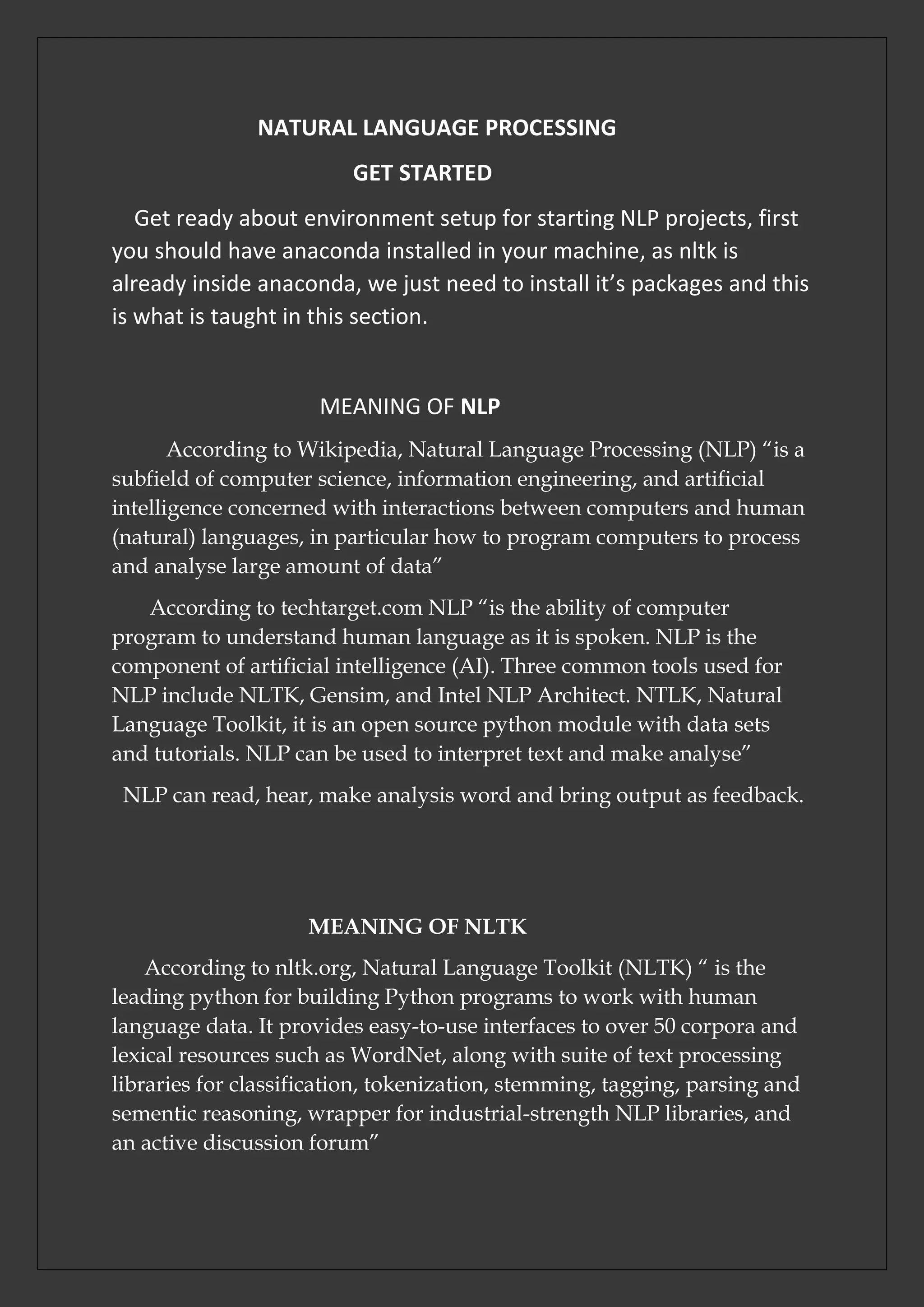
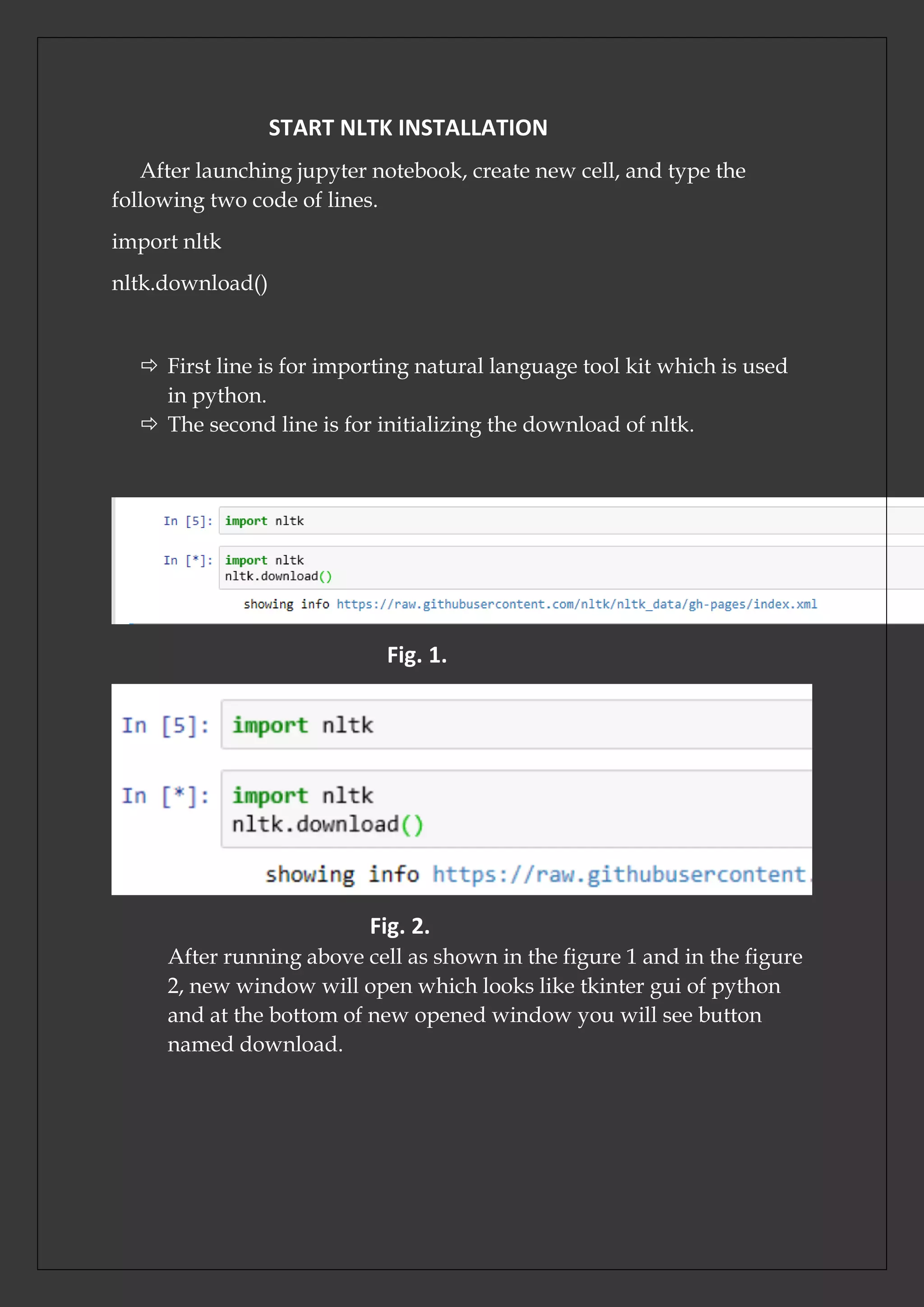
After launching jupyter notebook, create new cell, and type the
following two code of lines.
import nltk
nltk.download()
 First line is for importing natural language tool kit which is used
in python.
 The second line is for initializing the download of nltk.
Fig. 1.
Fig. 2.
After running above cell as shown in the figure 1 and in the figure
2, new window will open which looks like tkinter gui of python
and at the bottom of new opened window you will see button
named download.
Fig. 3.
Fig. 4.
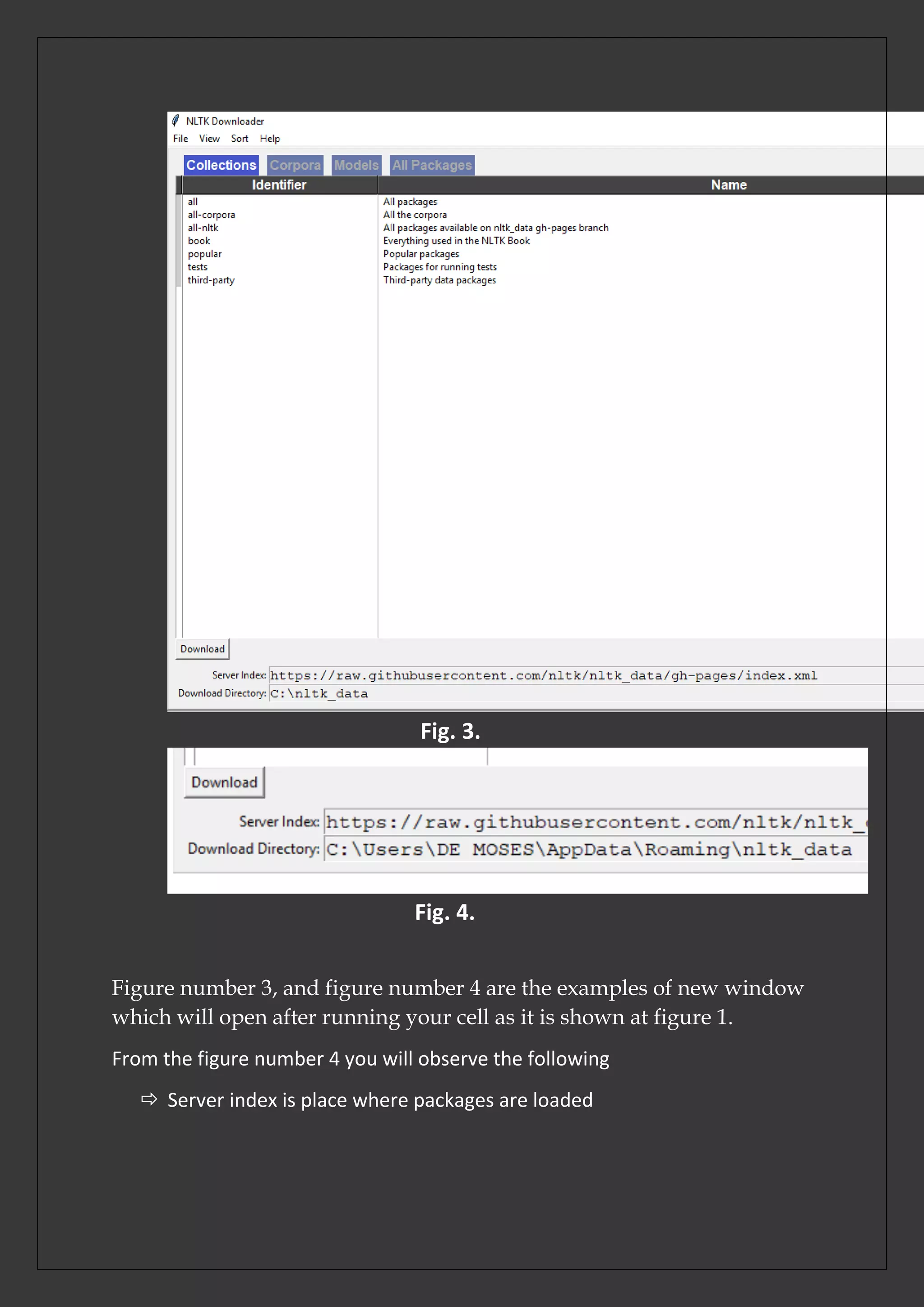
Figure number 3, and figure number 4 are the examples of new window
which will open after running your cell as it is shown at figure 1.
From the figure number 4 you will observe the following
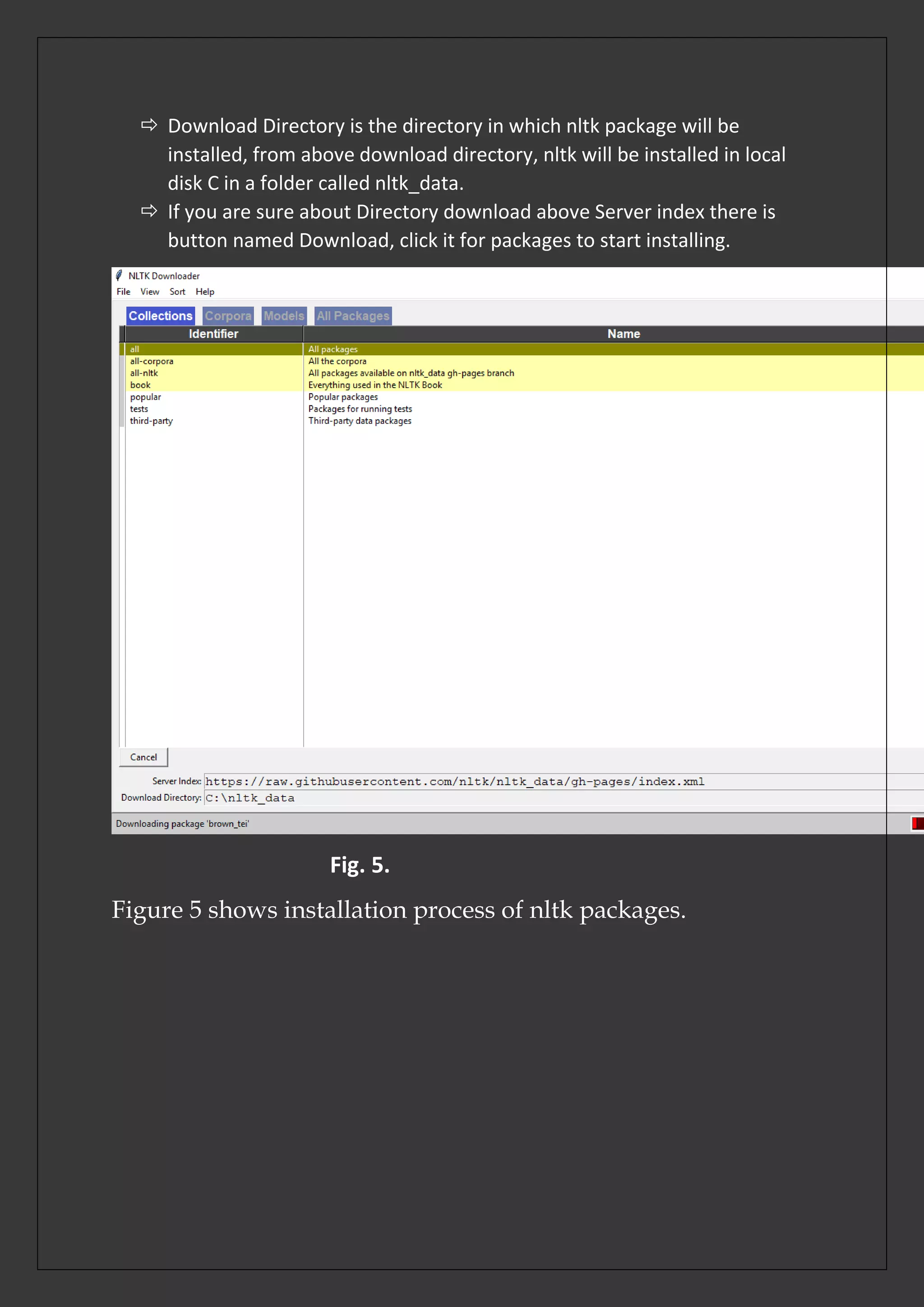
 Server index is place where packages are loaded
 Download Directory is the directory in which nltk package will be
installed, from above download directory, nltk will be installed in local
disk C in a folder called nltk_data.
 If you are sure about Directory download above Server index there is
button named Download, click it for packages to start installing.
Fig. 5.
Figure 5 shows installation process of nltk packages.
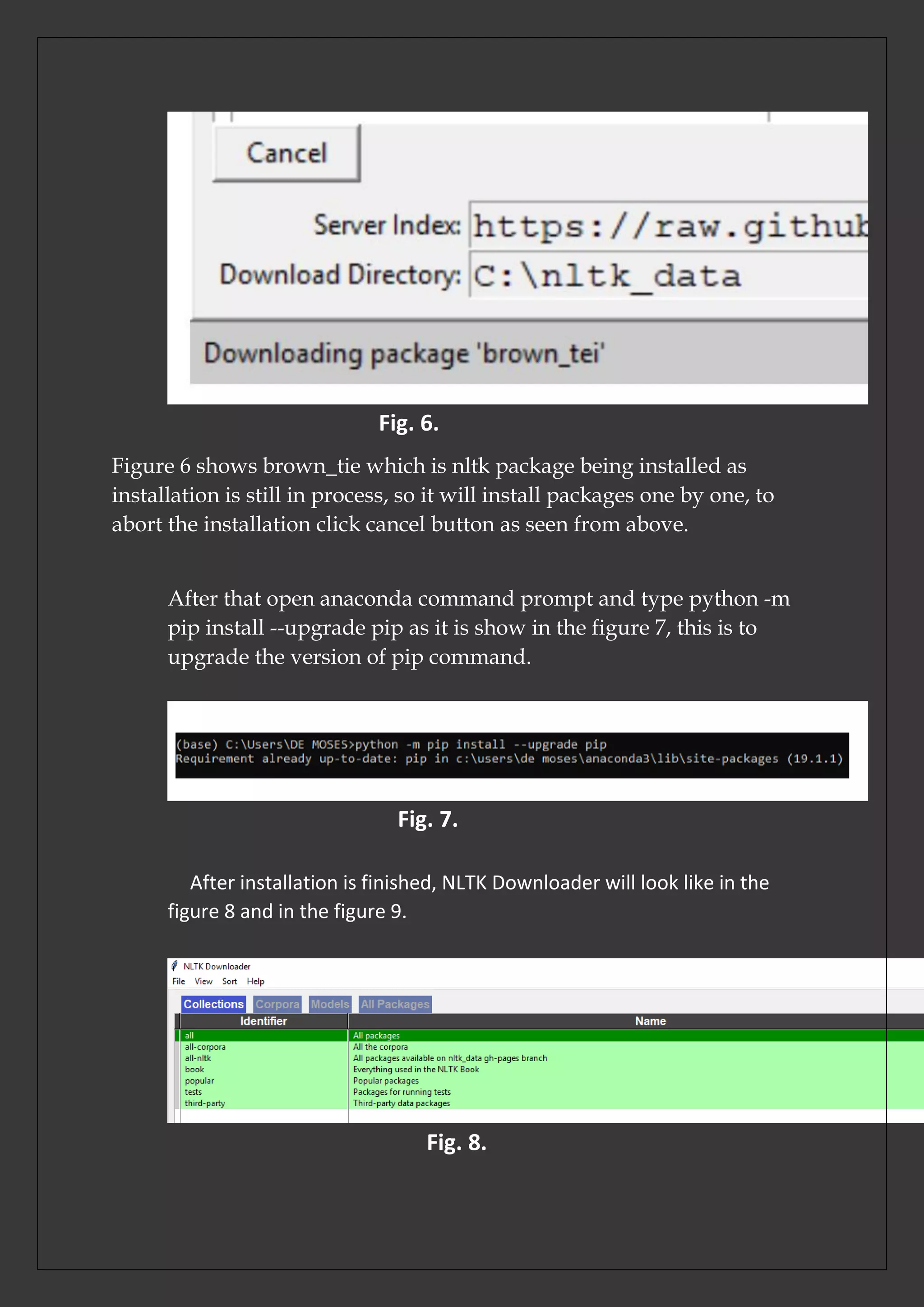
Fig. 6.
Figure 6 shows brown_tie which is nltk package being installed as
installation is still in process, so it will install packages one by one, to
abort the installation click cancel button as seen from above.
After that open anaconda command prompt and type python -m
pip install --upgrade pip as it is show in the figure 7, this is to
upgrade the version of pip command.
Fig. 7.
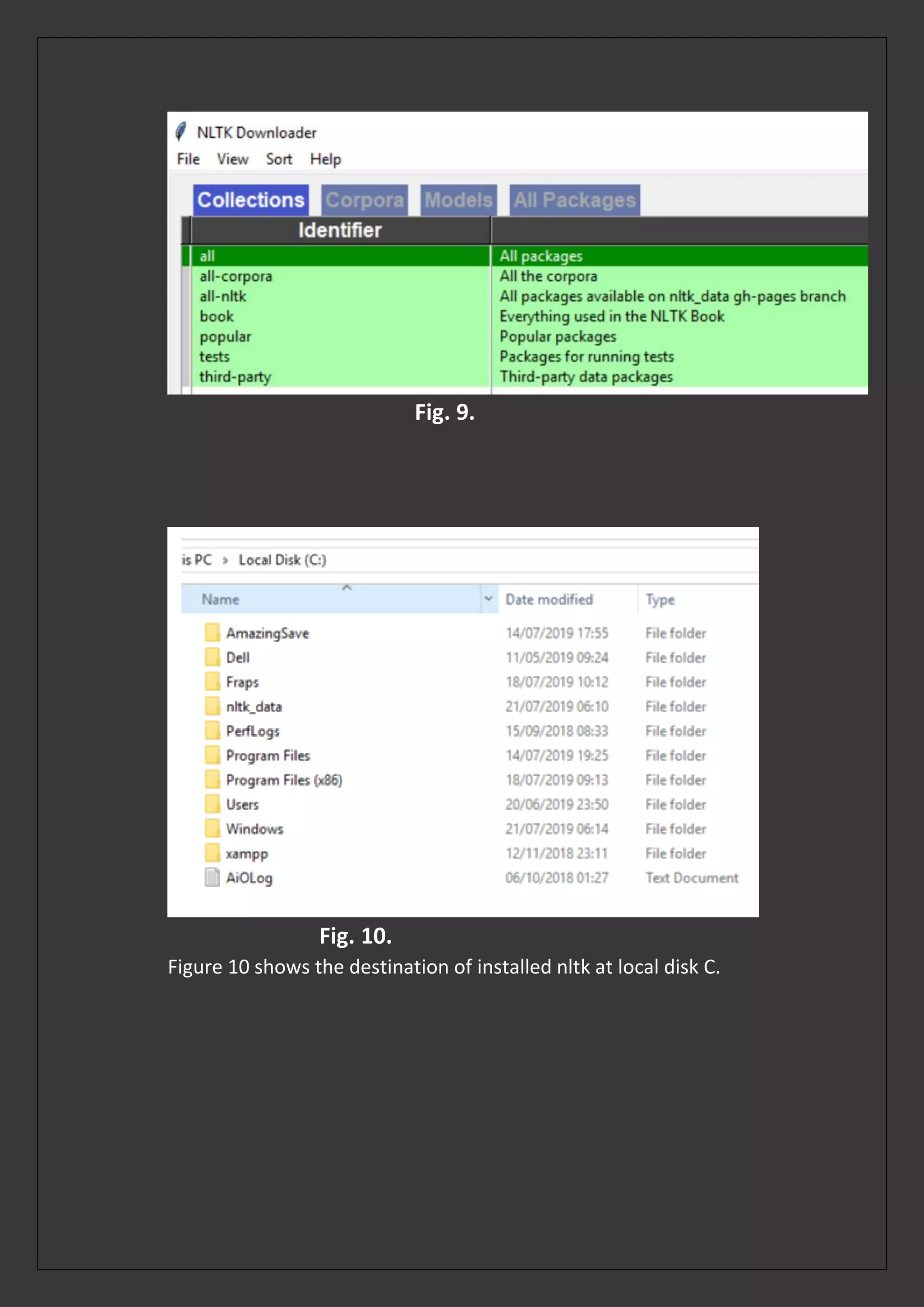
After installation is finished, NLTK Downloader will look like in the
figure 8 and in the figure 9.
Fig. 8.
Fig. 9.
Fig. 10.
Figure 10 shows the destination of installed nltk at local disk C.
After that open anaconda prompt, and write python -m pip install
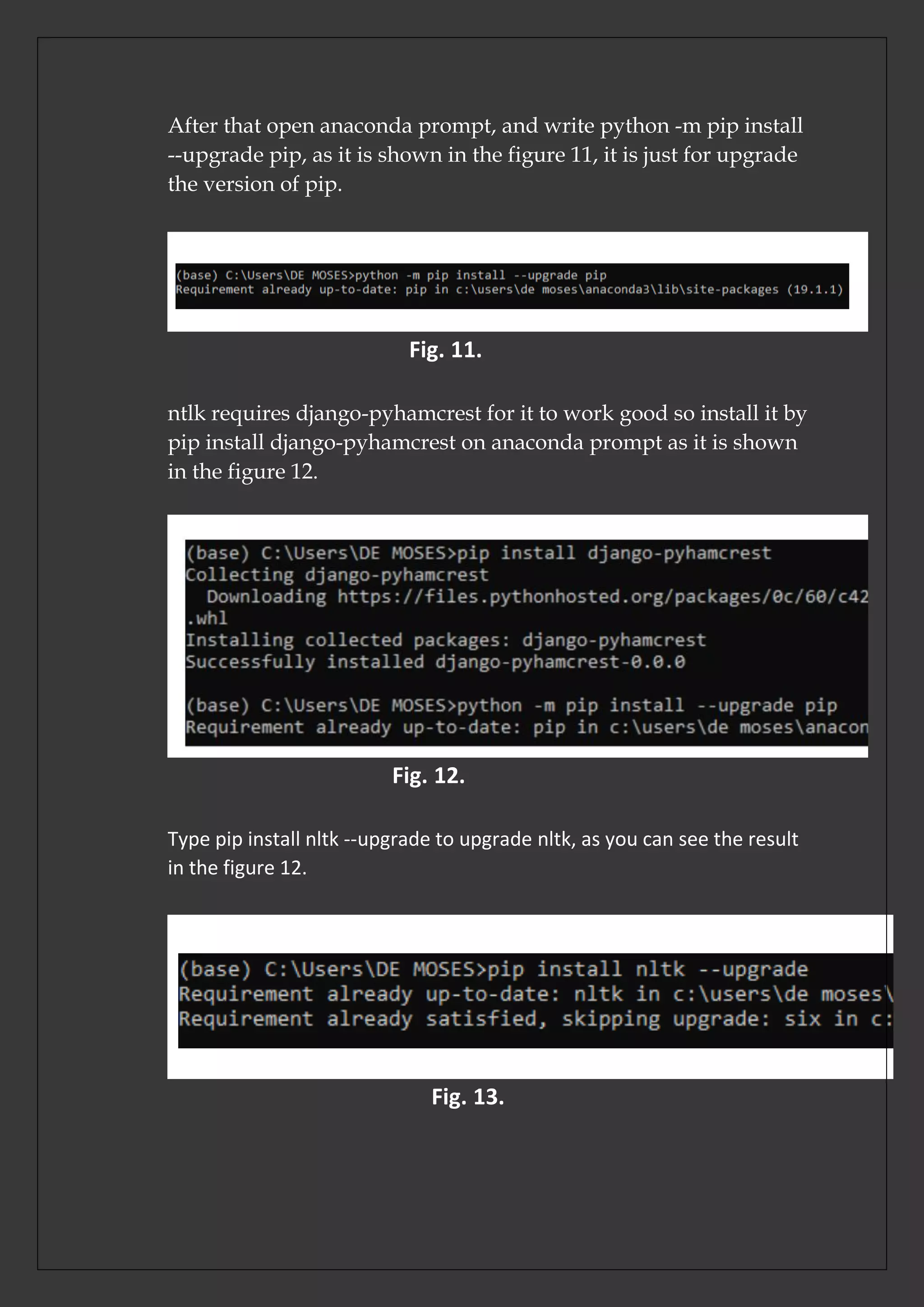
--upgrade pip, as it is shown in the figure 11, it is just for upgrade
the version of pip.
Fig. 11.
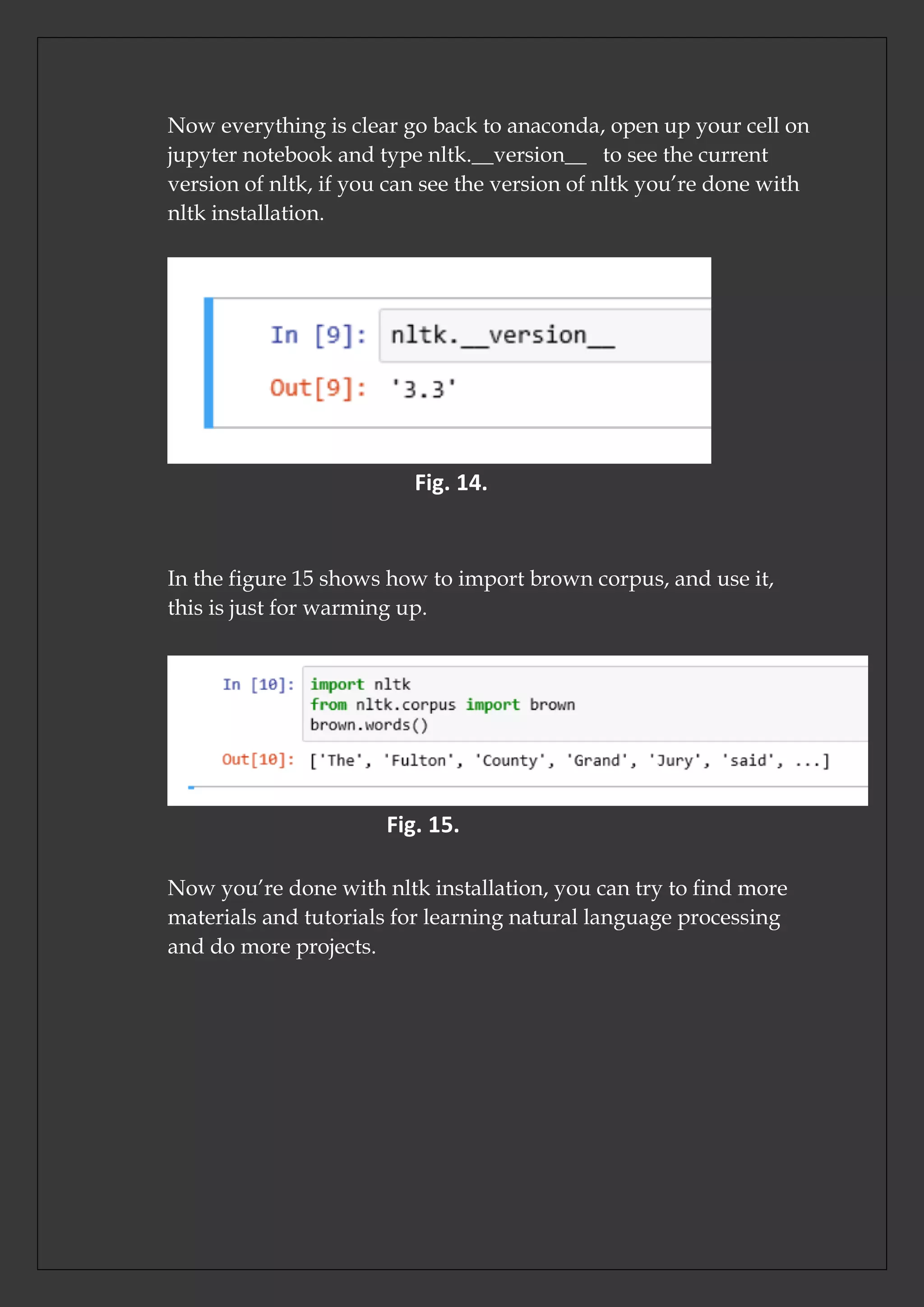
ntlk requires django-pyhamcrest for it to work good so install it by
pip install django-pyhamcrest on anaconda prompt as it is shown
in the figure 12.
Fig. 12.
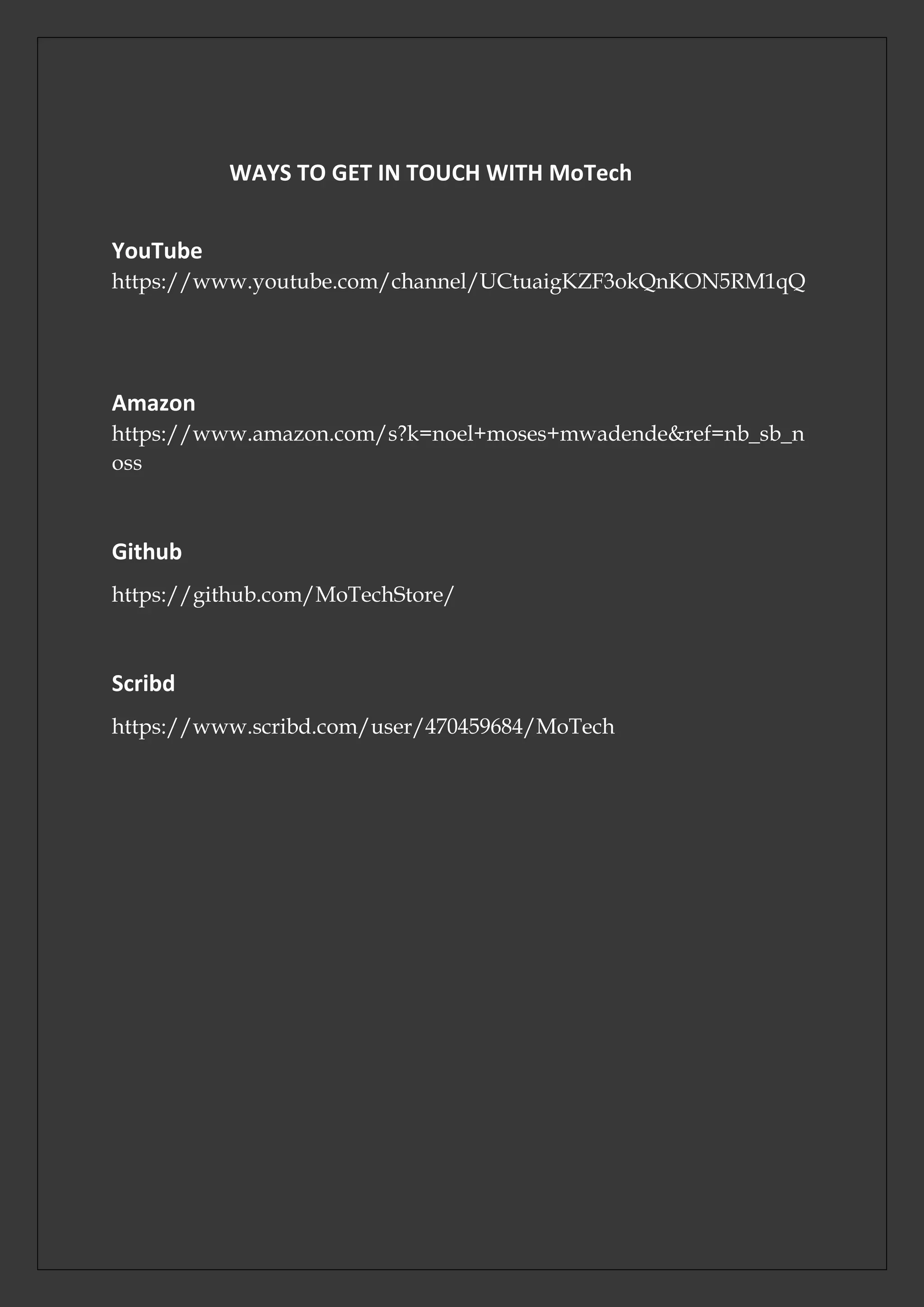
Type pip install nltk --upgrade to upgrade nltk, as you can see the result
in the figure 12.
Fig. 13.
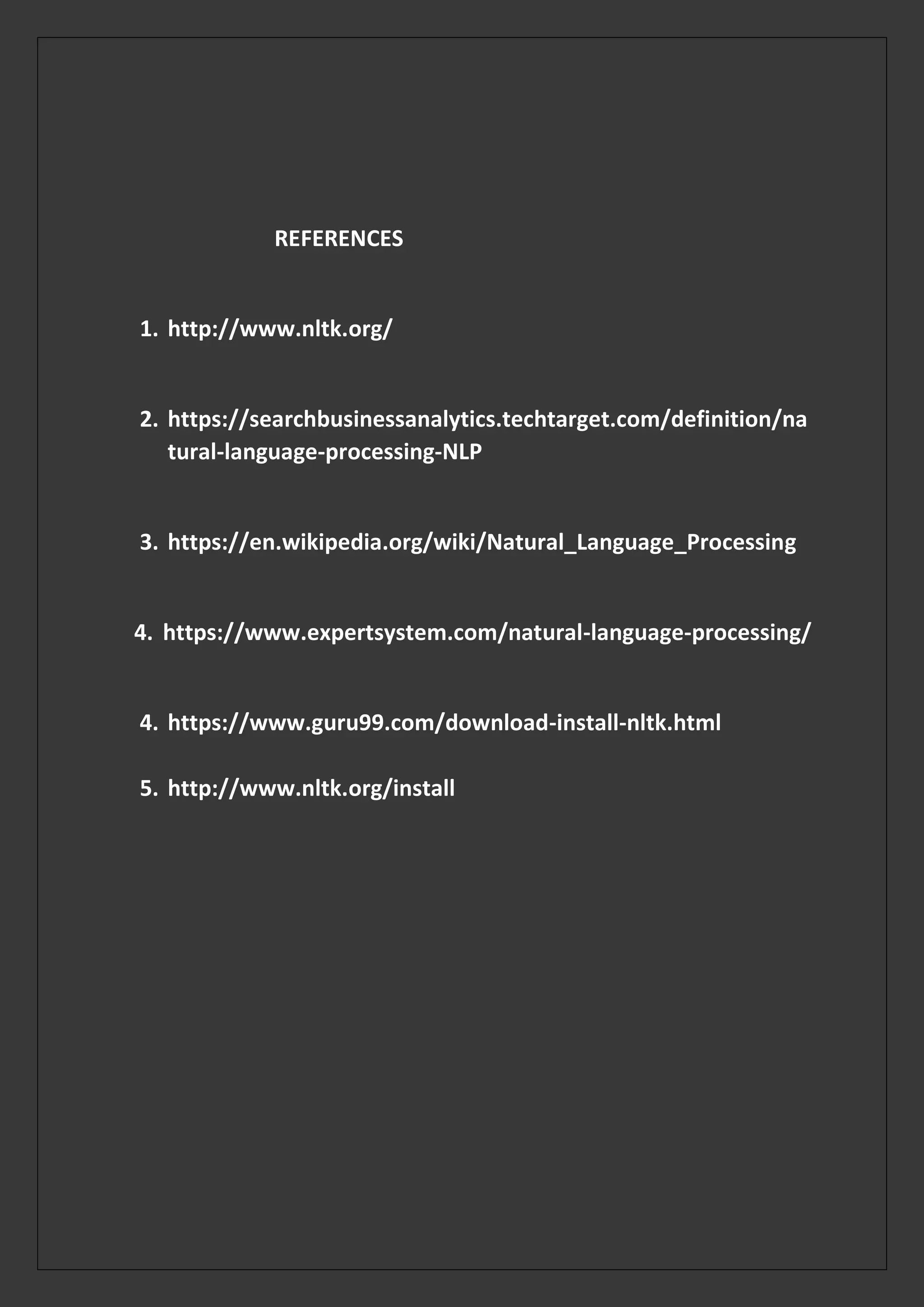
Now everything is clear go back to anaconda, open up your cell on
jupyter notebook and type nltk.__version__ to see the current
version of nltk, if you can see the version of nltk you’re done with
nltk installation.
Fig. 14.
In the figure 15 shows how to import brown corpus, and use it,
this is just for warming up.
Fig. 15.
Now you’re done with nltk installation, you can try to find more
materials and tutorials for learning natural language processing
and do more projects.
CONCLUSION
That is the end of nltk installation guide, thank you all for
following this session untill the end, if you get any trouble contact
us, but also if you have any issue let us know it, I hope MoTech
will open an issue in MoTechStore account for connecting
different readers of this article so as we can share our ideas
through discussion, author of MoTech Mr Noel Moses Mwadende
who prepared this article will be active for sharing ideas with you
who will be providing your questions, answers and comments, so
get in touch with MoTechStore our GitHub account, you’re warm
welcome you can follow us, thank you all.
WAYS TO GET IN TOUCH WITH MoTech
YouTube
https://www.youtube.com/channel/UCtuaigKZF3okQnKON5RM1qQ
Amazon
https://www.amazon.com/s?k=noel+moses+mwadende&ref=nb_sb_n
oss
Github
https://github.com/MoTechStore/
Scribd
https://www.scribd.com/user/470459684/MoTech
REFERENCES
1. http://www.nltk.org/
2. https://searchbusinessanalytics.techtarget.com/definition/na
tural-language-processing-NLP
3. https://en.wikipedia.org/wiki/Natural_Language_Processing
4. https://www.expertsystem.com/natural-language-processing/
4. https://www.guru99.com/download-install-nltk.html
5. http://www.nltk.org/install

Nltk installation guide

  • 1.
  • 2.
    INTRODUCTION It took mebe about 5 minutes to install nltk, and start by first natural language processing project for sure I couldn’t believe how simple it was. You have knowledge about python, and machine learning why can’t you install nltk and start your Natural Language Processing project. Today I will teach you on how to install nltk and it will take you very few minutes. SPECIAL THANKS First of all, I would like to thank all online tv which shared our YouTube videos, much thanks you salda.ws because they shared all videos of our YouTube channel, videos are currently numbered to 74, but for their support it was easy to share all videos. Thanks for funny-video-online.com for sharing some of videos from MoTech YouTube channel. Thanks to codingcentral.info for sharing some of MoTech YouTube Videos. Thanks to 9tube.tv for sharing videos, and all other sites and TV shared our videos from MoTech. I would like to thanks my friends JohnBosco Francis, and Baraka Joseph Mbugwa famed by name bourgeoisie for their support to be honest they are much more important. Lastly, I would like to thanks you all and you’re welcome for our different services at MoTech.
  • 3.
    NATURAL LANGUAGE PROCESSING GETSTARTED Get ready about environment setup for starting NLP projects, first you should have anaconda installed in your machine, as nltk is already inside anaconda, we just need to install it’s packages and this is what is taught in this section. MEANING OF NLP According to Wikipedia, Natural Language Processing (NLP) “is a subfield of computer science, information engineering, and artificial intelligence concerned with interactions between computers and human (natural) languages, in particular how to program computers to process and analyse large amount of data” According to techtarget.com NLP “is the ability of computer program to understand human language as it is spoken. NLP is the component of artificial intelligence (AI). Three common tools used for NLP include NLTK, Gensim, and Intel NLP Architect. NTLK, Natural Language Toolkit, it is an open source python module with data sets and tutorials. NLP can be used to interpret text and make analyse” NLP can read, hear, make analysis word and bring output as feedback. MEANING OF NLTK According to nltk.org, Natural Language Toolkit (NLTK) “ is the leading python for building Python programs to work with human language data. It provides easy-to-use interfaces to over 50 corpora and lexical resources such as WordNet, along with suite of text processing libraries for classification, tokenization, stemming, tagging, parsing and sementic reasoning, wrapper for industrial-strength NLP libraries, and an active discussion forum”
  • 4.
    START NLTK INSTALLATION Afterlaunching jupyter notebook, create new cell, and type the following two code of lines. import nltk nltk.download()  First line is for importing natural language tool kit which is used in python.  The second line is for initializing the download of nltk. Fig. 1. Fig. 2. After running above cell as shown in the figure 1 and in the figure 2, new window will open which looks like tkinter gui of python and at the bottom of new opened window you will see button named download.
  • 5.
    Fig. 3. Fig. 4. Figurenumber 3, and figure number 4 are the examples of new window which will open after running your cell as it is shown at figure 1. From the figure number 4 you will observe the following  Server index is place where packages are loaded
  • 6.
     Download Directoryis the directory in which nltk package will be installed, from above download directory, nltk will be installed in local disk C in a folder called nltk_data.  If you are sure about Directory download above Server index there is button named Download, click it for packages to start installing. Fig. 5. Figure 5 shows installation process of nltk packages.
  • 7.
    Fig. 6. Figure 6shows brown_tie which is nltk package being installed as installation is still in process, so it will install packages one by one, to abort the installation click cancel button as seen from above. After that open anaconda command prompt and type python -m pip install --upgrade pip as it is show in the figure 7, this is to upgrade the version of pip command. Fig. 7. After installation is finished, NLTK Downloader will look like in the figure 8 and in the figure 9. Fig. 8.
  • 8.
    Fig. 9. Fig. 10. Figure10 shows the destination of installed nltk at local disk C.
  • 9.
    After that openanaconda prompt, and write python -m pip install --upgrade pip, as it is shown in the figure 11, it is just for upgrade the version of pip. Fig. 11. ntlk requires django-pyhamcrest for it to work good so install it by pip install django-pyhamcrest on anaconda prompt as it is shown in the figure 12. Fig. 12. Type pip install nltk --upgrade to upgrade nltk, as you can see the result in the figure 12. Fig. 13.
  • 10.
    Now everything isclear go back to anaconda, open up your cell on jupyter notebook and type nltk.__version__ to see the current version of nltk, if you can see the version of nltk you’re done with nltk installation. Fig. 14. In the figure 15 shows how to import brown corpus, and use it, this is just for warming up. Fig. 15. Now you’re done with nltk installation, you can try to find more materials and tutorials for learning natural language processing and do more projects.
  • 11.
    CONCLUSION That is theend of nltk installation guide, thank you all for following this session untill the end, if you get any trouble contact us, but also if you have any issue let us know it, I hope MoTech will open an issue in MoTechStore account for connecting different readers of this article so as we can share our ideas through discussion, author of MoTech Mr Noel Moses Mwadende who prepared this article will be active for sharing ideas with you who will be providing your questions, answers and comments, so get in touch with MoTechStore our GitHub account, you’re warm welcome you can follow us, thank you all.
  • 12.
    WAYS TO GETIN TOUCH WITH MoTech YouTube https://www.youtube.com/channel/UCtuaigKZF3okQnKON5RM1qQ Amazon https://www.amazon.com/s?k=noel+moses+mwadende&ref=nb_sb_n oss Github https://github.com/MoTechStore/ Scribd https://www.scribd.com/user/470459684/MoTech
  • 13.
    REFERENCES 1. http://www.nltk.org/ 2. https://searchbusinessanalytics.techtarget.com/definition/na tural-language-processing-NLP 3.https://en.wikipedia.org/wiki/Natural_Language_Processing 4. https://www.expertsystem.com/natural-language-processing/ 4. https://www.guru99.com/download-install-nltk.html 5. http://www.nltk.org/install