STEPS IN A SIMPLE WEBSITE
DESIGN PROCESS
Website Design Case Study
Hemingways Expeditions
THIS 6-PART CASE STUDY COVERS:
  #1 Intro and Meet the Client
  #2 Wireframes
  #3 The Design Document
  #4 The Moodboard
  #5 Completing the Design
  #6 Wrapping it All Up
#1 INTRO AND MEET THE CLIENT

MEET THE CLIENT: Hemingways Expeditions
                     For decades, Hemingways Expeditions has
                     been one of East Africa's premier safari
                     and tour operators. They specialize in
                     crafting custom itineraries for adventures
                     seekers from around the the globe who are
                     looking to experience the wonders of
                     Tanzania, Kenya, Rwanda, or Uganda.


                     View the live Hemingways site here:
                     www.hemingways-expeditions.com
#1 INTRO AND MEET THE CLIENT

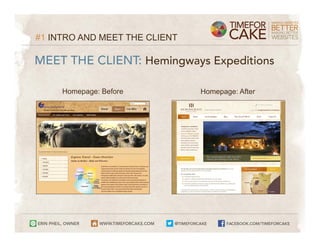
MEET THE CLIENT: Hemingways Expeditions

     Homepage: Before          Homepage: After
#1 INTRO AND MEET THE CLIENT

PRE-DESIGN STAGE: The essential first step

Pre-design work sets the stage for effective websites. During our pre-
design stage with Hemingways, we:


    ➤   gained a deep understanding of their company’s services, values,
        target customers, and vision
    ➤   conducted a thorough review of their available assets (literature,
        photography, promotional materials, etc.)
    ➤   began to consider the new site’s architecture/structure
#1 INTRO AND MEET THE CLIENT

PRE-DESIGN STAGE: The essential first step
The information we collected in the pre-design stage helped us make
objective, smart decisions and plan:


    ➤   the website's primary goals
    ➤   what story we wanted the site to tell
    ➤   how the site would be organized
    ➤   what type of information visitors would be most interested in
    ➤   what we wanted to encourage website visitors to do upon arriving
        at the new website
#2 WIREFRAMES

WIREFRAMES: Skeleton page layouts
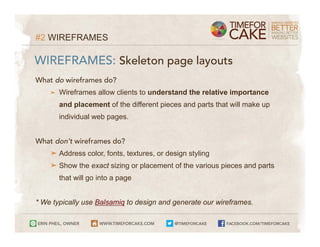
What do wireframes do?
    ➤   Wireframes allow clients to understand the relative importance
        and placement of the different pieces and parts that will make up
        individual web pages.


What don’t wireframes do?
    ➤ Address color, fonts, textures, or design styling
    ➤ Show the exact sizing or placement of the various pieces and parts
        that will go into a page


* We typically use Balsamiq to design and generate our wireframes.
#2 WIREFRAMES

WIREFRAMES: Skeleton page layouts
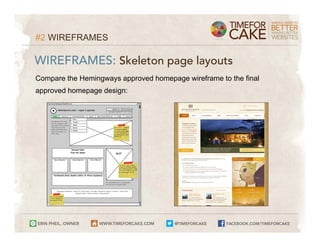
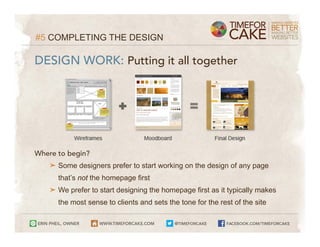
Compare the Hemingways approved homepage wireframe to the final
approved homepage design:
#2 WIREFRAMES

WIREFRAMES: Skeleton page layouts
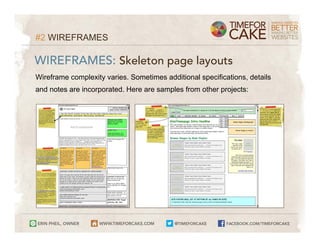
Wireframe complexity varies. Sometimes additional specifications, details
and notes are incorporated. Here are samples from other projects:
#3 THE DESIGN DOCUMENT

DESIGN DOCUMENT: Clear site guidelines
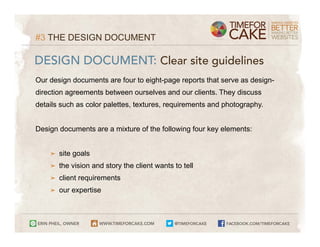
Our design documents are four to eight-page reports that serve as design-
direction agreements between ourselves and our clients. They discuss
details such as color palettes, textures, requirements and photography.


Design documents are a mixture of the following four key elements:


    ➤   site goals
    ➤   the vision and story the client wants to tell
    ➤   client requirements
    ➤   our expertise
#3 THE DESIGN DOCUMENT

DESIGN DOCUMENT: Clear site guidelines
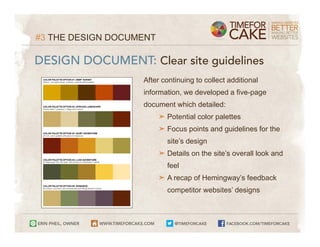
                   After continuing to collect additional
                   information, we developed a five-page
                   document which detailed:
                         ➤ Potential color palettes
                         ➤ Focus points and guidelines for the
                           site’s design
                         ➤ Details on the site’s overall look and
                           feel
                         ➤ A recap of Hemingway’s feedback
                           competitor websites’ designs
#4 THE MOODBOARD

MOODBOARDS: Translate the design document
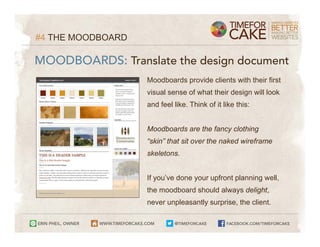
                   Moodboards provide clients with their first
                   visual sense of what their design will look
                   and feel like. Think of it like this:


                   Moodboards are the fancy clothing
                   “skin” that sit over the naked wireframe
                   skeletons.


                   If you’ve done your upfront planning well,
                   the moodboard should always delight,
                   never unpleasantly surprise, the client.
#5 COMPLETING THE DESIGN

DESIGN WORK: Putting it all together


Where to begin?
   ➤ Some designers prefer to start working on the design of any page
      that’s not the homepage first
   ➤ We prefer to start designing the homepage first as it typically makes
      the most sense to clients and sets the tone for the rest of the site
#5 COMPLETING THE DESIGN

DESIGN WORK: Putting it all together
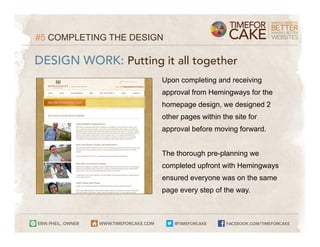
                       Upon completing and receiving
                       approval from Hemingways for the
                       homepage design, we designed 2
                       other pages within the site for
                       approval before moving forward.


                       The thorough pre-planning we
                       completed upfront with Hemingways
                       ensured everyone was on the same
                       page every step of the way.
#5 COMPLETING THE DESIGN

DESIGN WORK: Putting it all together
To recap, this simple website design process case study moved through
these steps:

    #1 Intro and Meet the Client
    #2 Wireframes
    #3 The Design Document
    #4 The Moodboard
    #5 Completing the Design
#6 WRAPPING IT ALL UP

FINAL STEPS: Moving forward after design
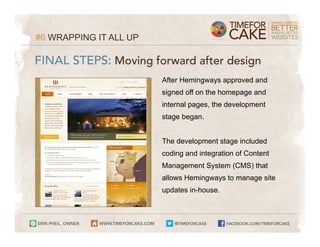
                        After Hemingways approved and
                        signed off on the homepage and
                        internal pages, the development
                        stage began.


                        The development stage included
                        coding and integration of Content
                        Management System (CMS) that
                        allows Hemingways to manage site
                        updates in-house.
#6 WRAPPING IT ALL UP

FINAL STEPS: Moving forward after design
Remember:
Effective, goal-oriented design takes planning, teamwork, extensive
communications, and a clear process.
GET THE FULL STORY:
Read the full Hemingways Expeditions case study:
www.timeforcake.com/blog/post/website-design-case-study-part-1-of-6/


Learn more about timeforcake:
www.timeforcake.com

Simple Web Design Case Study (Website Design Process Walkthrough)

  • 1.
    STEPS IN ASIMPLE WEBSITE DESIGN PROCESS Website Design Case Study Hemingways Expeditions
  • 2.
    THIS 6-PART CASESTUDY COVERS: #1 Intro and Meet the Client #2 Wireframes #3 The Design Document #4 The Moodboard #5 Completing the Design #6 Wrapping it All Up
  • 3.
    #1 INTRO ANDMEET THE CLIENT MEET THE CLIENT: Hemingways Expeditions For decades, Hemingways Expeditions has been one of East Africa's premier safari and tour operators. They specialize in crafting custom itineraries for adventures seekers from around the the globe who are looking to experience the wonders of Tanzania, Kenya, Rwanda, or Uganda. View the live Hemingways site here: www.hemingways-expeditions.com
  • 4.
    #1 INTRO ANDMEET THE CLIENT MEET THE CLIENT: Hemingways Expeditions Homepage: Before Homepage: After
  • 5.
    #1 INTRO ANDMEET THE CLIENT PRE-DESIGN STAGE: The essential first step Pre-design work sets the stage for effective websites. During our pre- design stage with Hemingways, we: ➤ gained a deep understanding of their company’s services, values, target customers, and vision ➤ conducted a thorough review of their available assets (literature, photography, promotional materials, etc.) ➤ began to consider the new site’s architecture/structure
  • 6.
    #1 INTRO ANDMEET THE CLIENT PRE-DESIGN STAGE: The essential first step The information we collected in the pre-design stage helped us make objective, smart decisions and plan: ➤ the website's primary goals ➤ what story we wanted the site to tell ➤ how the site would be organized ➤ what type of information visitors would be most interested in ➤ what we wanted to encourage website visitors to do upon arriving at the new website
  • 7.
    #2 WIREFRAMES WIREFRAMES: Skeletonpage layouts What do wireframes do? ➤ Wireframes allow clients to understand the relative importance and placement of the different pieces and parts that will make up individual web pages. What don’t wireframes do? ➤ Address color, fonts, textures, or design styling ➤ Show the exact sizing or placement of the various pieces and parts that will go into a page * We typically use Balsamiq to design and generate our wireframes.
  • 8.
    #2 WIREFRAMES WIREFRAMES: Skeletonpage layouts Compare the Hemingways approved homepage wireframe to the final approved homepage design:
  • 9.
    #2 WIREFRAMES WIREFRAMES: Skeletonpage layouts Wireframe complexity varies. Sometimes additional specifications, details and notes are incorporated. Here are samples from other projects:
  • 10.
    #3 THE DESIGNDOCUMENT DESIGN DOCUMENT: Clear site guidelines Our design documents are four to eight-page reports that serve as design- direction agreements between ourselves and our clients. They discuss details such as color palettes, textures, requirements and photography. Design documents are a mixture of the following four key elements: ➤ site goals ➤ the vision and story the client wants to tell ➤ client requirements ➤ our expertise
  • 11.
    #3 THE DESIGNDOCUMENT DESIGN DOCUMENT: Clear site guidelines After continuing to collect additional information, we developed a five-page document which detailed: ➤ Potential color palettes ➤ Focus points and guidelines for the site’s design ➤ Details on the site’s overall look and feel ➤ A recap of Hemingway’s feedback competitor websites’ designs
  • 12.
    #4 THE MOODBOARD MOODBOARDS:Translate the design document Moodboards provide clients with their first visual sense of what their design will look and feel like. Think of it like this: Moodboards are the fancy clothing “skin” that sit over the naked wireframe skeletons. If you’ve done your upfront planning well, the moodboard should always delight, never unpleasantly surprise, the client.
  • 13.
    #5 COMPLETING THEDESIGN DESIGN WORK: Putting it all together Where to begin? ➤ Some designers prefer to start working on the design of any page that’s not the homepage first ➤ We prefer to start designing the homepage first as it typically makes the most sense to clients and sets the tone for the rest of the site
  • 14.
    #5 COMPLETING THEDESIGN DESIGN WORK: Putting it all together Upon completing and receiving approval from Hemingways for the homepage design, we designed 2 other pages within the site for approval before moving forward. The thorough pre-planning we completed upfront with Hemingways ensured everyone was on the same page every step of the way.
  • 15.
    #5 COMPLETING THEDESIGN DESIGN WORK: Putting it all together To recap, this simple website design process case study moved through these steps: #1 Intro and Meet the Client #2 Wireframes #3 The Design Document #4 The Moodboard #5 Completing the Design
  • 16.
    #6 WRAPPING ITALL UP FINAL STEPS: Moving forward after design After Hemingways approved and signed off on the homepage and internal pages, the development stage began. The development stage included coding and integration of Content Management System (CMS) that allows Hemingways to manage site updates in-house.
  • 17.
    #6 WRAPPING ITALL UP FINAL STEPS: Moving forward after design Remember: Effective, goal-oriented design takes planning, teamwork, extensive communications, and a clear process.
  • 18.
    GET THE FULLSTORY: Read the full Hemingways Expeditions case study: www.timeforcake.com/blog/post/website-design-case-study-part-1-of-6/ Learn more about timeforcake: www.timeforcake.com