ITC Infotech’s Cloud Connector
For
Eloqua And Siebel Integration (EASI)
 2013 ITC Infotech
2
Siebel – Eloqua Integration : Business Need
EASI– Eloqua and Siebel Integration allows you to simplify your Enterprise Marketing
automation needs.
Do you want to unlock the potential of your customer data warehouse?
Do you want a digital marketing solution for you Siebel contacts and Siebel loyalty members?
Do you want quick campaign launch and response and leverage your segmentation tool ?
Leverage your datawarehouse with OBIEE Segmentation Manager to create complex segments and use the
interface between OBIEE and Eloqua, to easily execute campaigns in Eloqua
For B2B customers having Siebel modules other than Siebel Marketing; with EASI and Eloqua integration, can
conduct campaigns in Eloqua , with contacts synchronization and get back the responses in Siebel CRM as part of
the customer master record
For customers having Siebel Marketing and wanting to leverage results of their complex and conditioned
segmentation with a digital marketing tool, EASI along with Eloqua can provide a seamless solution to send
Siebel Marketing segments to launch campaign in Eloqua
 2013 ITC Infotech
3
Eloqua
When Customer has Siebel Marketing
For customers having Siebel Marketing and wanting to leverage results of their complex and conditioned
segmentation with a digital marketing tool, EASI along with Eloqua can provide a seamless solution to send
Siebel Marketing segments to launch campaign in Eloqua.
Siebel Marketing
Segmentation
Using OBIEE
Contact load
EASI
Insert/update
contact
Launch campaign
 2013 ITC Infotech
4
Eloqua
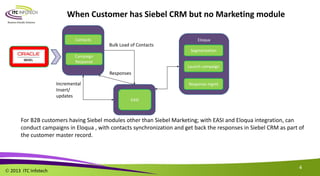
When Customer has Siebel CRM but no Marketing module
For B2B customers having Siebel modules other than Siebel Marketing; with EASI and Eloqua integration, can
conduct campaigns in Eloqua , with contacts synchronization and get back the responses in Siebel CRM as part of
the customer master record.
Contacts
EASI
Segmentation
Launch campaign
Incremental
Insert/
updates
Response mgmt
Bulk Load of Contacts
Campaign
Response
Responses
 2013 ITC Infotech
5
When the customer has a DWH and needs OBIEE enabled Marketing capability
Eloqua
EASI
Campaign Design
Launch campaign
Response mgmt
Leverage your datawarehouse with OBIEE Segmentation Manager to create complex segments and use the
interface between OBIEE and Eloqua, to easily execute campaigns in Eloqua
It is expected that the DWH will be in customer DMZ
Customer
DWH
Stand alone
Segmentation
engine
OBIEE
Bulk Load of
Contacts
Campaign Responses
 2013 ITC Infotech
6
Siebel - Eloqua Integration – High-level integrated flows
1) Segmentation in Siebel – Imported in Eloqua
Campaign contacts segmented in Siebel Marketing are loaded into Eloqua automatically during “Load Campaign” in Siebel. The contacts are
created in Eloqua with ability to add along with the contact attributes, additional information like for example loyalty attributes (balance point).
2) Creation of Eloqua Shared List
Automatic creation of Eloqua shared list for creating a quick segment. This is an integration of a Siebel Marketing segment to automatically load
this segment as a shared list in Eloqua.
3) Individual Contact Update
Contact attributes updates in Siebel will be updated in Eloqua in real time. For example, a change to loyalty points balance for the contact in
Siebel will be reflected back in Eloqua.
4) Eloqua Response view in Siebel
Eloqua Campaign Responses for a contact can be viewed in Siebel by the call center agents for any clarifications related to any campaigns.
The data is not stored in Siebel but pulled from Eloqua to be displayed in Siebel.
5) Eloqua-Siebel Activity Creation
Based on the response for a campaign contact attribute will be updated in Siebel or a New activity will be created.
Example: If the contact unsubscribe for email, the Eloqua campaign response will update “Do not Email” attribute against that contact record in
Siebel. If there is any bounce back for any email a new activity will be created in Siebel for the call center agents to call the customer to inform
the same.
 2013 ITC Infotech
7
Siebel - Eloqua Integration – High-level process flow
Application
Events
Custom Web
Services using
C# (.net)
Eloqua API
(REST/BULK)
Scheduled Jobs
Custom
Workflows
Scheduled Jobs
Export Data
Export Data File
Application
Events
Custom Siebel
Business
Process
Eloqua API
(SOAP)
Request
Response
Individual Contact Update & Bulk Load
Activity View VBC in Siebel
Eloqua to Siebel Data Load
ITC Infotech Cloud Connector
 2013 ITC Infotech
8
1: Individual Contact Update
Asynchronous Request
Siebel Events
Contact Save
Loyalty Member
Save
Get
Siebel-Eloqua
Mappings
Build Input
Arguments
Custom Web
Service
Eloqua
Insert/Update
Contact
1. Add remove field mappings between Eloqua & Siebel.
2. Key Loyalty attributes exposed on Contact Business Component (Rolled up).
3. Loyalty attributes in Eloqua remain in sync with Siebel Loyalty.
4. Create Eloqua segment using customer loyalty attributes which is always in sync with Siebel Loyalty
Stored in
Siebel LOV
Cloud Server
 2013 ITC Infotech
9
Create CSV Load from CSV
Siebel Process Custom WebService REST API Call
Create Shared List
Customized
Business
Process
1. Revised Siebel Marketing OOTB workflows
Import Marketing Contact
Marketing Campaign Load
2. Automatic creation of Contact Shared List in Eloqua for campaign
contacts loaded from Siebel
3. Customization works in sync with automatic split of campaign contact
load for every 1000 record batch size.
2: Bulk Contact Load & Shared List
Siebel Campaign
Create &
Associate
Segment
Load Campaign
 2013 ITC Infotech
10
Scheduled
Workflow
Scheduled
Activity Export
Eloqua Activity
Data File
Read Activity
Data File
Load Eloqua
Activity
Marked for
Follow-up
in LOV?
Create Siebel
Activity
Siebel RCR
Job
Recurring
Export Job
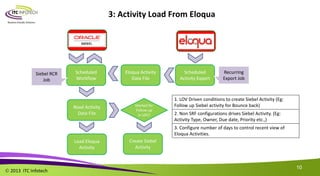
1. LOV Driven conditions to create Siebel Activity (Eg:
Follow up Siebel activity for Bounce back)
2. Non SRF configurations drives Siebel Activity. (Eg:
Activity Type, Owner, Due date, Priority etc.,)
3. Configure number of days to control recent view of
Eloqua Activities.
3: Activity Load From Eloqua
Siebel Eloqua
 2013 ITC Infotech
11
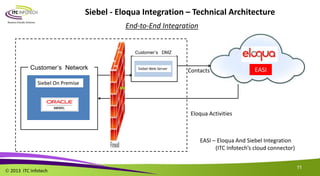
Siebel - Eloqua Integration – Technical Architecture
Customer’s Network
Customer’s DMZ
EASI
Siebel On Premise
Siebel Web Server
Contacts
Eloqua Activities
End-to-End Integration
EASI – Eloqua And Siebel Integration
(ITC Infotech’s cloud connector)
 2013 ITC Infotech
12
Q & A
 2013 ITC Infotech
Thank you

Siebel eloqua itc - cloud connector

  • 1.
    ITC Infotech’s CloudConnector For Eloqua And Siebel Integration (EASI)
  • 2.
     2013 ITCInfotech 2 Siebel – Eloqua Integration : Business Need EASI– Eloqua and Siebel Integration allows you to simplify your Enterprise Marketing automation needs. Do you want to unlock the potential of your customer data warehouse? Do you want a digital marketing solution for you Siebel contacts and Siebel loyalty members? Do you want quick campaign launch and response and leverage your segmentation tool ? Leverage your datawarehouse with OBIEE Segmentation Manager to create complex segments and use the interface between OBIEE and Eloqua, to easily execute campaigns in Eloqua For B2B customers having Siebel modules other than Siebel Marketing; with EASI and Eloqua integration, can conduct campaigns in Eloqua , with contacts synchronization and get back the responses in Siebel CRM as part of the customer master record For customers having Siebel Marketing and wanting to leverage results of their complex and conditioned segmentation with a digital marketing tool, EASI along with Eloqua can provide a seamless solution to send Siebel Marketing segments to launch campaign in Eloqua
  • 3.
     2013 ITCInfotech 3 Eloqua When Customer has Siebel Marketing For customers having Siebel Marketing and wanting to leverage results of their complex and conditioned segmentation with a digital marketing tool, EASI along with Eloqua can provide a seamless solution to send Siebel Marketing segments to launch campaign in Eloqua. Siebel Marketing Segmentation Using OBIEE Contact load EASI Insert/update contact Launch campaign
  • 4.
     2013 ITCInfotech 4 Eloqua When Customer has Siebel CRM but no Marketing module For B2B customers having Siebel modules other than Siebel Marketing; with EASI and Eloqua integration, can conduct campaigns in Eloqua , with contacts synchronization and get back the responses in Siebel CRM as part of the customer master record. Contacts EASI Segmentation Launch campaign Incremental Insert/ updates Response mgmt Bulk Load of Contacts Campaign Response Responses
  • 5.
     2013 ITCInfotech 5 When the customer has a DWH and needs OBIEE enabled Marketing capability Eloqua EASI Campaign Design Launch campaign Response mgmt Leverage your datawarehouse with OBIEE Segmentation Manager to create complex segments and use the interface between OBIEE and Eloqua, to easily execute campaigns in Eloqua It is expected that the DWH will be in customer DMZ Customer DWH Stand alone Segmentation engine OBIEE Bulk Load of Contacts Campaign Responses
  • 6.
     2013 ITCInfotech 6 Siebel - Eloqua Integration – High-level integrated flows 1) Segmentation in Siebel – Imported in Eloqua Campaign contacts segmented in Siebel Marketing are loaded into Eloqua automatically during “Load Campaign” in Siebel. The contacts are created in Eloqua with ability to add along with the contact attributes, additional information like for example loyalty attributes (balance point). 2) Creation of Eloqua Shared List Automatic creation of Eloqua shared list for creating a quick segment. This is an integration of a Siebel Marketing segment to automatically load this segment as a shared list in Eloqua. 3) Individual Contact Update Contact attributes updates in Siebel will be updated in Eloqua in real time. For example, a change to loyalty points balance for the contact in Siebel will be reflected back in Eloqua. 4) Eloqua Response view in Siebel Eloqua Campaign Responses for a contact can be viewed in Siebel by the call center agents for any clarifications related to any campaigns. The data is not stored in Siebel but pulled from Eloqua to be displayed in Siebel. 5) Eloqua-Siebel Activity Creation Based on the response for a campaign contact attribute will be updated in Siebel or a New activity will be created. Example: If the contact unsubscribe for email, the Eloqua campaign response will update “Do not Email” attribute against that contact record in Siebel. If there is any bounce back for any email a new activity will be created in Siebel for the call center agents to call the customer to inform the same.
  • 7.
     2013 ITCInfotech 7 Siebel - Eloqua Integration – High-level process flow Application Events Custom Web Services using C# (.net) Eloqua API (REST/BULK) Scheduled Jobs Custom Workflows Scheduled Jobs Export Data Export Data File Application Events Custom Siebel Business Process Eloqua API (SOAP) Request Response Individual Contact Update & Bulk Load Activity View VBC in Siebel Eloqua to Siebel Data Load ITC Infotech Cloud Connector
  • 8.
     2013 ITCInfotech 8 1: Individual Contact Update Asynchronous Request Siebel Events Contact Save Loyalty Member Save Get Siebel-Eloqua Mappings Build Input Arguments Custom Web Service Eloqua Insert/Update Contact 1. Add remove field mappings between Eloqua & Siebel. 2. Key Loyalty attributes exposed on Contact Business Component (Rolled up). 3. Loyalty attributes in Eloqua remain in sync with Siebel Loyalty. 4. Create Eloqua segment using customer loyalty attributes which is always in sync with Siebel Loyalty Stored in Siebel LOV Cloud Server
  • 9.
     2013 ITCInfotech 9 Create CSV Load from CSV Siebel Process Custom WebService REST API Call Create Shared List Customized Business Process 1. Revised Siebel Marketing OOTB workflows Import Marketing Contact Marketing Campaign Load 2. Automatic creation of Contact Shared List in Eloqua for campaign contacts loaded from Siebel 3. Customization works in sync with automatic split of campaign contact load for every 1000 record batch size. 2: Bulk Contact Load & Shared List Siebel Campaign Create & Associate Segment Load Campaign
  • 10.
     2013 ITCInfotech 10 Scheduled Workflow Scheduled Activity Export Eloqua Activity Data File Read Activity Data File Load Eloqua Activity Marked for Follow-up in LOV? Create Siebel Activity Siebel RCR Job Recurring Export Job 1. LOV Driven conditions to create Siebel Activity (Eg: Follow up Siebel activity for Bounce back) 2. Non SRF configurations drives Siebel Activity. (Eg: Activity Type, Owner, Due date, Priority etc.,) 3. Configure number of days to control recent view of Eloqua Activities. 3: Activity Load From Eloqua Siebel Eloqua
  • 11.
     2013 ITCInfotech 11 Siebel - Eloqua Integration – Technical Architecture Customer’s Network Customer’s DMZ EASI Siebel On Premise Siebel Web Server Contacts Eloqua Activities End-to-End Integration EASI – Eloqua And Siebel Integration (ITC Infotech’s cloud connector)
  • 12.
     2013 ITCInfotech 12 Q & A
  • 13.
     2013 ITCInfotech Thank you