Eloqua Integration with CRM &
Oracle Sales Cloud
Bhaskara Reddy Sannapureddy, Senior Project Manager @Infosys, +91-7702577769
Overview
 A way to transform Sales and Marketing with Eloqua provides
an efficient and leading marketing automation and revenue
performance solution.
 The CRM Integration is a great feature of two-way
synchronization, which is a bi-synchronous relationship
between the CRM system and Eloqua databases for the data
captured through uploads and forms also in terms of activities
like email opens, click-through, form submissions, and website
visits.
 With this integration, we can build and manage the Eloqua
database effectively by using marketing scores and can route
the leads to Sales agents. Additionally, it measures marketing’s
impact on business
Methods of Syncing Data Between
Eloqua and CRM
 There are two ways to sync data in Eloqua:
 Inbound data
 Outbound data
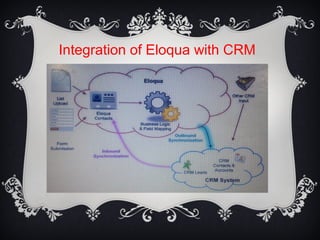
Eloqua will capture all new and modified records in your
CRM system through an Inbound data flow process.
Additionally, any new or updated records in Eloqua like
form submissions or list uploads will get synchronized
with your CRM system by an Outbound data flow
process.
Synchronization Processes
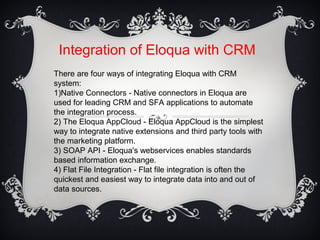
 Inbound Synchronization: Inbound synchronization refers
to the newly created Lead, Contact, Account records or
modified records from the CRM system written to the
Eloqua Database. It is a scheduled action to be
configured and data is pulled into Eloqua.
 Outbound Synchronization: Outbound synchronization
refers to the newly created or modified records from
Eloqua database to the CRM system. This process is
achieved by Program builder module with the logic and
timing.
Integration of Eloqua with CRM
There are four ways of integrating Eloqua with CRM
system:
1)Native Connectors - Native connectors in Eloqua are
used for leading CRM and SFA applications to automate
the integration process.
2) The Eloqua AppCloud - Eloqua AppCloud is the simplest
way to integrate native extensions and third party tools with
the marketing platform.
3) SOAP API - Eloqua's webservices enables standards
based information exchange.
4) Flat File Integration - Flat file integration is often the
quickest and easiest way to integrate data into and out of
data sources.
Integration of Eloqua with CRM
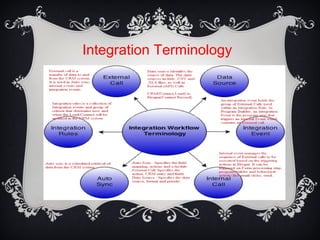
Integration Terminology
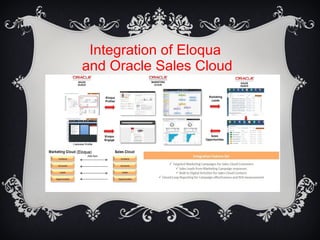
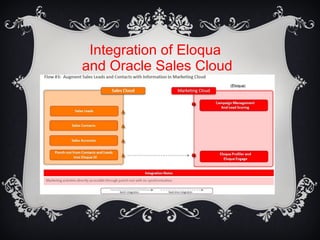
Integration of Eloqua
and Oracle Sales Cloud
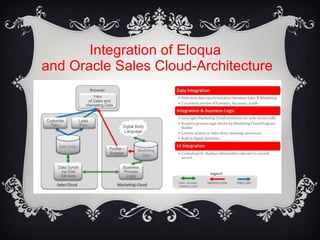
Integration of Eloqua
and Oracle Sales Cloud-Architecture
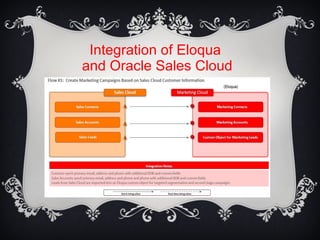
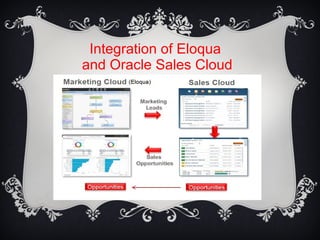
Integration of Eloqua
and Oracle Sales Cloud
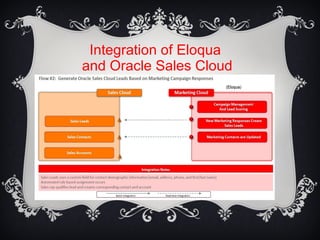
Integration of Eloqua
and Oracle Sales Cloud
Integration of Eloqua
and Oracle Sales Cloud
Integration of Eloqua
and Oracle Sales Cloud
THANK YOU

Eloqua Integration with CRM and Oracle Sales Cloud

  • 1.
    Eloqua Integration withCRM & Oracle Sales Cloud Bhaskara Reddy Sannapureddy, Senior Project Manager @Infosys, +91-7702577769
  • 2.
    Overview  A wayto transform Sales and Marketing with Eloqua provides an efficient and leading marketing automation and revenue performance solution.  The CRM Integration is a great feature of two-way synchronization, which is a bi-synchronous relationship between the CRM system and Eloqua databases for the data captured through uploads and forms also in terms of activities like email opens, click-through, form submissions, and website visits.  With this integration, we can build and manage the Eloqua database effectively by using marketing scores and can route the leads to Sales agents. Additionally, it measures marketing’s impact on business
  • 3.
    Methods of SyncingData Between Eloqua and CRM  There are two ways to sync data in Eloqua:  Inbound data  Outbound data Eloqua will capture all new and modified records in your CRM system through an Inbound data flow process. Additionally, any new or updated records in Eloqua like form submissions or list uploads will get synchronized with your CRM system by an Outbound data flow process.
  • 4.
    Synchronization Processes  InboundSynchronization: Inbound synchronization refers to the newly created Lead, Contact, Account records or modified records from the CRM system written to the Eloqua Database. It is a scheduled action to be configured and data is pulled into Eloqua.  Outbound Synchronization: Outbound synchronization refers to the newly created or modified records from Eloqua database to the CRM system. This process is achieved by Program builder module with the logic and timing.
  • 5.
    Integration of Eloquawith CRM There are four ways of integrating Eloqua with CRM system: 1)Native Connectors - Native connectors in Eloqua are used for leading CRM and SFA applications to automate the integration process. 2) The Eloqua AppCloud - Eloqua AppCloud is the simplest way to integrate native extensions and third party tools with the marketing platform. 3) SOAP API - Eloqua's webservices enables standards based information exchange. 4) Flat File Integration - Flat file integration is often the quickest and easiest way to integrate data into and out of data sources.
  • 6.
  • 7.
  • 8.
    Integration of Eloqua andOracle Sales Cloud
  • 9.
    Integration of Eloqua andOracle Sales Cloud-Architecture
  • 10.
    Integration of Eloqua andOracle Sales Cloud
  • 11.
    Integration of Eloqua andOracle Sales Cloud
  • 12.
    Integration of Eloqua andOracle Sales Cloud
  • 13.
    Integration of Eloqua andOracle Sales Cloud
  • 14.