SharePoint Saturday Bogotá
Sábado , Mayo 24,2014
Live Online
#SPSaturdayCol
Our Sponsors:
Haaron Gonzalez
• Consultant
• Lead Solution Architect at Hershey
Technologies
• Independent Consultant & Trainer in
Mexico
• Microsoft MVP
• ASP/ASP.NET (2004 – 2008)
• SharePoint Server (2009 until now)
• Speaker/Community
• Mexico SharePoint User Group
• San Diego SharePoint User Group
• Staff at Microsoft TechEd
• Blogger since 2005
haarongonzalez@mvps.org
youtube.com/haarongonzalez
twitter.com/haarongonzalez
facebook.com/haarongonzalez
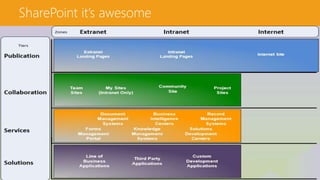
SharePoint it’s awesome
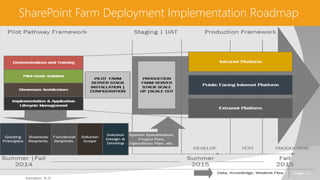
SharePoint Farm Deployment Implementation Roadmap
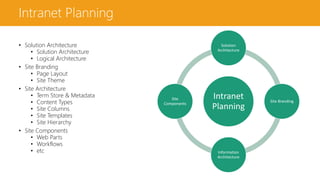
Intranet Planning
• Solution Architecture
• Logical Architecture
• Site Branding
• Page Layout
• Site Theme
• Site Architecture
• Term Store & Metadata
• Content Types
• Site Columns
• Site Templates
• Site Hierarchy
• Site Components
• Web Parts
• Workflows
• etc
Intranet
Planning
Solution
Architecture
Site Branding
Information
Architecture
Site
Components
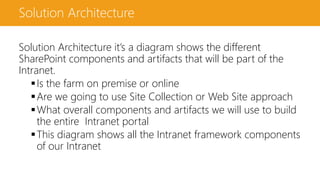
Solution Architecture
Solution Architecture it’s a diagram shows the different
SharePoint components and artifacts that will be part of the
Intranet.
Is the farm on premise or online
Are we going to use Site Collection or Web Site approach
What overall components and artifacts we will use to build
the entire Intranet portal
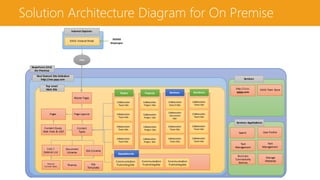
This diagram shows all the Intranet framework components
of our Intranet
Solution Architecture Diagram for On Premise
Internet Explorer
XXXX Intranet Portal
Host Named Site Collection
http://xxx.yyyy.com
View
XXXXX
Employee
SharePoint 2013
On Premise
Top Level
Web Site
Content
Types
Site Columns
Lists /
External List
Document
Libraries
Page LayoutsPages
Content Query
Web Parts & XSLT Search User Profile
Task
Management
Task
Management
Business
Connectivity
Services
Collaboration
Team Site
Teams
Manage
Metadata
Projects Services
Themes
Master Pages
Site
Templates
Services
http://zzzz.
yyyyy.comSolutions
XXXX Term Store
Services Applications
Communication
PublishingSite
Departments
Collaboration
Team Site
Collaboration
Team Site
Collaboration
Team Site
Collaboration
Project Site
Collaboration
Project Site
Collaboration
Project Site
Collaboration
Project Site
Communication
PublishingSite
Communication
PublishingSite
Collaboration
SearchSite
Collaboration
Document
Site
Collaboration
Team Site
Collaboration
Team Site
Collaboration
Team Site
Collaboration
Team Site
Collaboration
Team Site
Collaboration
Team Site
External
Content Types
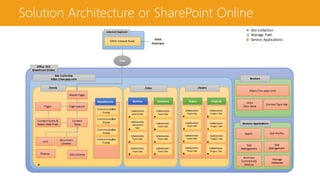
Solution Architecture or SharePoint Online
Internet Explorer
XXXX Intranet Portal
Site Collection
https://xxx.yyyy.com
View
XXXX
Employee
Office 365
SharePoint Online
Services
https://zzz.yyyy.com/
XXXX
Term Store
Search User Profile
Task
Management
Task
Management
Business
Connectivity
Services
Manage
Metadata
Services Applications
/teams
Collaboration
Team Site
Teams
Collaboration
Team Site
Collaboration
Team Site
Collaboration
Team Site
Projects
Collaboration
Project Site
Collaboration
Project Site
Collaboration
Project Site
Collaboration
Project Site
/sites
Services
Collaboration
SearchSite
Collaboration
Document
Site
Collaboration
Team Site
Collaboration
Team Site
Solutions
Collaboration
Team Site
Collaboration
Team Site
Collaboration
Team Site
Collaboration
Team Site
/(root)
Content
Types
Site Columns
Lists Document
Libraries
Page LayoutsPages
Content Query &
Search Web Parts
Themes
Master Pages
Communication
Portal
Departments
Communication
Portal
Communication
Portal
Communication
Portal
Content Type Hub
Site Collection
Manage Path
Service Applications
Departments
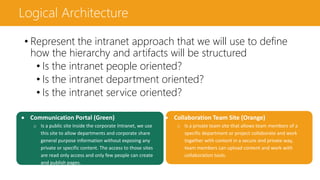
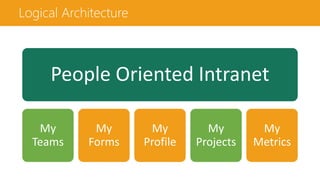
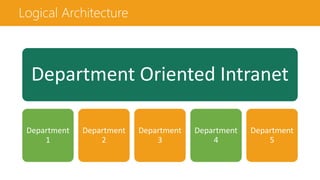
Logical Architecture
• Represent the intranet approach that we will use to define
how the hierarchy and artifacts will be structured
• Is the intranet people oriented?
• Is the intranet department oriented?
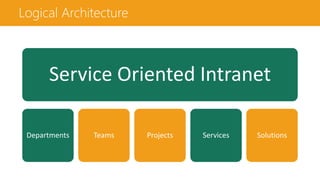
• Is the intranet service oriented?
 Communication Portal (Green)
o Is a public site inside the corporate Intranet, we use
this site to allow departments and corporate share
general purpose information without exposing any
private or specific content. The access to those sites
are read only access and only few people can create
and publish pages.
 Collaboration Team Site (Orange)
o Is a private team site that allows team members of a
specific department or project collaborate and work
together with content in a secure and private way,
team members can upload content and work with
collaboration tools.
Logical Architecture
People Oriented Intranet
My
Teams
My
Forms
My
Profile
My
Projects
My
Metrics
Logical Architecture
Department Oriented Intranet
Department
1
Department
2
Department
3
Department
4
Department
5
Logical Architecture
Service Oriented Intranet
Departments Teams Projects Services Solutions
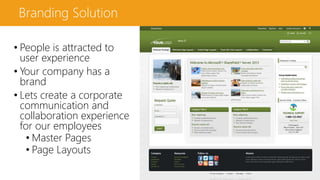
Branding Solution
• People is attracted to
user experience
• Your company has a
brand
• Lets create a corporate
communication and
collaboration experience
for our employees
• Master Pages
• Page Layouts
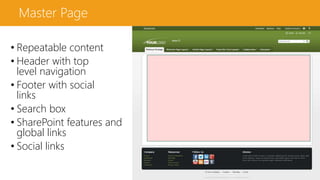
Master Page
• Repeatable content
• Header with top
level navigation
• Footer with social
links
• Search box
• SharePoint features and
global links
• Social links
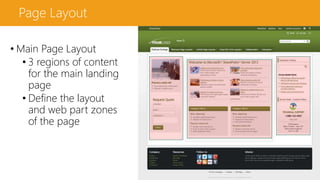
Page Layout
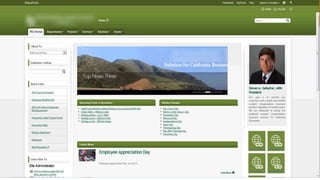
• Main Page Layout
• 3 regions of content
for the main landing
page
• Define the layout
and web part zones
of the page
Page Layout
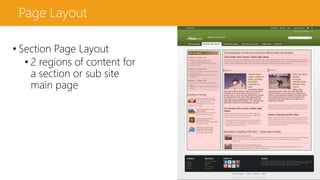
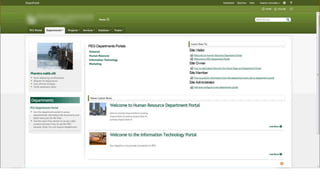
• Section Page Layout
• 2 regions of content for
a section or sub site
main page
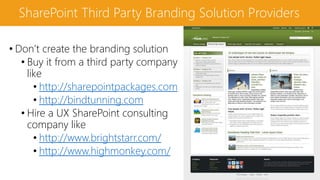
SharePoint Third Party Branding Solution Providers
• Don’t create the branding solution
• Buy it from a third party company
like
• http://sharepointpackages.com
• http://bindtunning.com
• Hire a UX SharePoint consulting
company like
• http://www.brightstarr.com/
• http://www.highmonkey.com/
Information Architecture
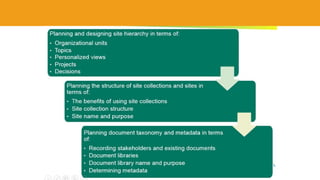
• An effective IA entails the
deliberate organization of
information in an enterprise to
maximize the information’s
usability and manageability.
• Provide people with the right
information in a simple manner
• Define clear an intuitive structure
• Provide consistency
The components of Site IA are:
Site Metadata
Site Columns
Site Content Types
Site Templates
Site Structure
Site Metadata
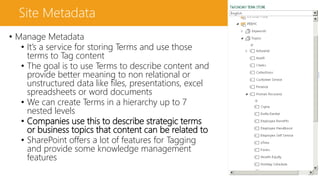
• Manage Metadata
• It’s a service for storing Terms and use those
terms to Tag content
• The goal is to use Terms to describe content and
provide better meaning to non relational or
unstructured data like files, presentations, excel
spreadsheets or word documents
• We can create Terms in a hierarchy up to 7
nested levels
• Companies use this to describe strategic terms
or business topics that content can be related to
• SharePoint offers a lot of features for Tagging
and provide some knowledge management
features
Site Metadata
• Manage Metadata features
• Tag button
• Tag Profile Page
• Tag Search Refiners
• Manage Metadata Navigation
and Filtering
• Content Query Web Part
Manage Metadata Filtering
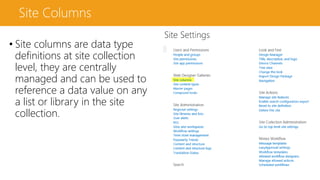
Site Columns
• Site columns are data type
definitions at site collection
level, they are centrally
managed and can be used to
reference a data value on any
a list or library in the site
collection.
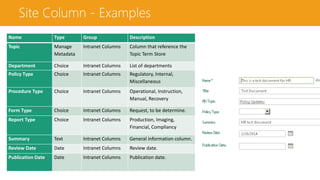
Site Column - Examples
Name Type Group Description
Topic Manage
Metadata
Intranet Columns Column that reference the
Topic Term Store
Department Choice Intranet Columns List of departments
Policy Type Choice Intranet Columns Regulatory, Internal,
Miscellaneous
Procedure Type Choice Intranet Columns Operational, Instruction,
Manual, Recovery
Form Type Choice Intranet Columns Request, to be determine.
Report Type Choice Intranet Columns Production, Imaging,
Financial, Compliancy
Summary Text Intranet Columns General information column.
Review Date Date Intranet Columns Review date.
Publication Date Date Intranet Columns Publication date.
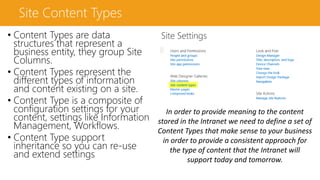
Site Content Types
• Content Types are data
structures that represent a
business entity, they group Site
Columns.
• Content Types represent the
different types of information
and content existing on a site.
• Content Type is a composite of
configuration settings for your
content, settings like Information
Management, Workflows.
• Content Type support
inheritance so you can re-use
and extend settings
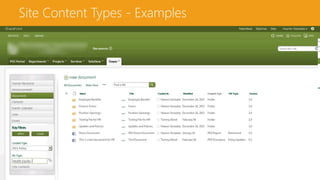
In order to provide meaning to the content
stored in the Intranet we need to define a set of
Content Types that make sense to your business
in order to provide a consistent approach for
the type of content that the Intranet will
support today and tomorrow.
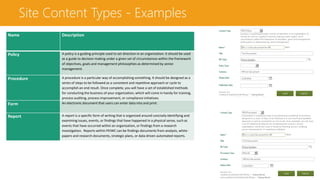
Site Content Types - Examples
Name Description
Policy A policy is a guiding principle used to set direction in an organization. It should be used
as a guide to decision making under a given set of circumstances within the framework
of objectives, goals and management philosophies as determined by senior
management.
Procedure A procedure is a particular way of accomplishing something. It should be designed as a
series of steps to be followed as a consistent and repetitive approach or cycle to
accomplish an end result. Once complete, you will have a set of established methods
for conducting the business of your organization, which will come in handy for training,
process auditing, process improvement, or compliance initiatives.
Form An electronic document that users can enter data into and print.
Report A report is a specific form of writing that is organized around concisely identifying and
examining issues, events, or findings that have happened in a physical sense, such as
events that have occurred within an organization, or findings from a research
investigation. Reports within PEIWC can be findings documents from analysis, white-
papers and research documents, strategic plans, or data driven automated reports.
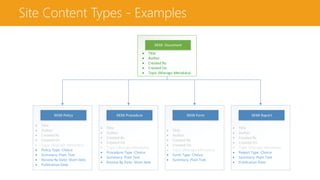
XXXX Document
 Title
 Author
 Created By
 Created On
 Topic (Manage Metadata)
XXXX Policy
 Title
 Author
 Created By
 Created On
 Topic (Manage Metadata)
 Policy Type: Choice
 Summary: Plain Text
 Review By Date: Short date
 Publication Date
XXXX Procedure
 Title
 Author
 Created By
 Created On
 Topic (Manage Metadata)
 Procedure Type: Choice
 Summary: Plain Text
 Review By Date: Short date
XXXX Form
 Title
 Author
 Created By
 Created On
 Topic (Manage Metadata)
 Form Type: Choice
 Summary: Plain Text
XXXX Report
 Title
 Author
 Created By
 Created On
 Topic (Manage Metadata)
 Report Type: Choice
 Summary: Plain Text
 Publication Date
Site Content Types - Examples
Site Templates
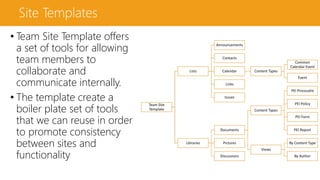
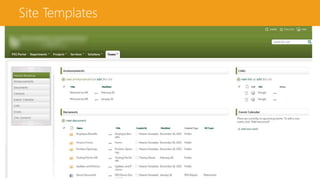
• Team Site Template offers
a set of tools for allowing
team members to
collaborate and
communicate internally.
• The template create a
boiler plate set of tools
that we can reuse in order
to promote consistency
between sites and
functionality
Team Site
Template
Lists
Announcements
Contacts
Calendar Content Types
Common
Calendar Event
Event
Links
Issues
Libraries
Documents
Content Types
PEI Proceudre
PEI Policy
PEI Form
PEI Report
Views
By Content Type
By Author
Pictures
Discussions
Site Templates
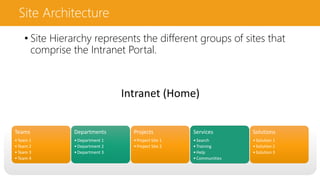
Intranet (Home)
Teams
•Team 1
•Team 2
•Team 3
•Team 4
Departments
•Department 1
•Department 2
•Department 3
Projects
•Project Site 1
•Project Site 2
Services
•Search
•Training
•Help
•Communities
Solutions
•Solution 1
•Solution 2
•Solution 3
Site Architecture
• Site Hierarchy represents the different groups of sites that
comprise the Intranet Portal.
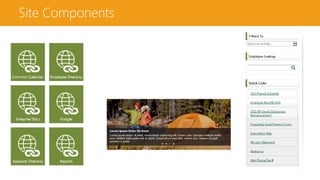
Site Components
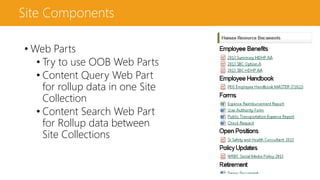
Site Components
• Web Parts
• Try to use OOB Web Parts
• Content Query Web Part
for rollup data in one Site
Collection
• Content Search Web Part
for Rollup data between
Site Collections
Site Components
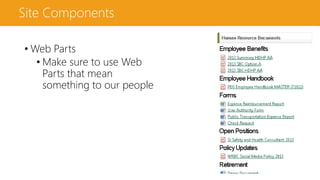
• Web Parts
• Make sure to use Web
Parts that mean
something to our people
Haaron Gonzalez
• Questions!
haarongonzalez@mvps.org
youtube.com/haarongonzalez
twitter.com/haarongonzalez
facebook.com/haarongonzalez
SharePoint Saturday Bogotá
Sábado , Mayo 24,2014
Live Online
#SPSaturdayCol
Our Sponsors:

Planeación de Intranet con SharePoint

  • 1.
    SharePoint Saturday Bogotá Sábado, Mayo 24,2014 Live Online #SPSaturdayCol Our Sponsors:
  • 2.
    Haaron Gonzalez • Consultant •Lead Solution Architect at Hershey Technologies • Independent Consultant & Trainer in Mexico • Microsoft MVP • ASP/ASP.NET (2004 – 2008) • SharePoint Server (2009 until now) • Speaker/Community • Mexico SharePoint User Group • San Diego SharePoint User Group • Staff at Microsoft TechEd • Blogger since 2005 haarongonzalez@mvps.org youtube.com/haarongonzalez twitter.com/haarongonzalez facebook.com/haarongonzalez
  • 3.
  • 4.
    SharePoint Farm DeploymentImplementation Roadmap
  • 5.
    Intranet Planning • SolutionArchitecture • Solution Architecture • Logical Architecture • Site Branding • Page Layout • Site Theme • Site Architecture • Term Store & Metadata • Content Types • Site Columns • Site Templates • Site Hierarchy • Site Components • Web Parts • Workflows • etc Intranet Planning Solution Architecture Site Branding Information Architecture Site Components
  • 6.
    Solution Architecture Solution Architectureit’s a diagram shows the different SharePoint components and artifacts that will be part of the Intranet. Is the farm on premise or online Are we going to use Site Collection or Web Site approach What overall components and artifacts we will use to build the entire Intranet portal This diagram shows all the Intranet framework components of our Intranet
  • 7.
    Solution Architecture Diagramfor On Premise Internet Explorer XXXX Intranet Portal Host Named Site Collection http://xxx.yyyy.com View XXXXX Employee SharePoint 2013 On Premise Top Level Web Site Content Types Site Columns Lists / External List Document Libraries Page LayoutsPages Content Query Web Parts & XSLT Search User Profile Task Management Task Management Business Connectivity Services Collaboration Team Site Teams Manage Metadata Projects Services Themes Master Pages Site Templates Services http://zzzz. yyyyy.comSolutions XXXX Term Store Services Applications Communication PublishingSite Departments Collaboration Team Site Collaboration Team Site Collaboration Team Site Collaboration Project Site Collaboration Project Site Collaboration Project Site Collaboration Project Site Communication PublishingSite Communication PublishingSite Collaboration SearchSite Collaboration Document Site Collaboration Team Site Collaboration Team Site Collaboration Team Site Collaboration Team Site Collaboration Team Site Collaboration Team Site External Content Types
  • 8.
    Solution Architecture orSharePoint Online Internet Explorer XXXX Intranet Portal Site Collection https://xxx.yyyy.com View XXXX Employee Office 365 SharePoint Online Services https://zzz.yyyy.com/ XXXX Term Store Search User Profile Task Management Task Management Business Connectivity Services Manage Metadata Services Applications /teams Collaboration Team Site Teams Collaboration Team Site Collaboration Team Site Collaboration Team Site Projects Collaboration Project Site Collaboration Project Site Collaboration Project Site Collaboration Project Site /sites Services Collaboration SearchSite Collaboration Document Site Collaboration Team Site Collaboration Team Site Solutions Collaboration Team Site Collaboration Team Site Collaboration Team Site Collaboration Team Site /(root) Content Types Site Columns Lists Document Libraries Page LayoutsPages Content Query & Search Web Parts Themes Master Pages Communication Portal Departments Communication Portal Communication Portal Communication Portal Content Type Hub Site Collection Manage Path Service Applications
  • 9.
    Departments Logical Architecture • Representthe intranet approach that we will use to define how the hierarchy and artifacts will be structured • Is the intranet people oriented? • Is the intranet department oriented? • Is the intranet service oriented?  Communication Portal (Green) o Is a public site inside the corporate Intranet, we use this site to allow departments and corporate share general purpose information without exposing any private or specific content. The access to those sites are read only access and only few people can create and publish pages.  Collaboration Team Site (Orange) o Is a private team site that allows team members of a specific department or project collaborate and work together with content in a secure and private way, team members can upload content and work with collaboration tools.
  • 10.
    Logical Architecture People OrientedIntranet My Teams My Forms My Profile My Projects My Metrics
  • 11.
    Logical Architecture Department OrientedIntranet Department 1 Department 2 Department 3 Department 4 Department 5
  • 12.
    Logical Architecture Service OrientedIntranet Departments Teams Projects Services Solutions
  • 13.
    Branding Solution • Peopleis attracted to user experience • Your company has a brand • Lets create a corporate communication and collaboration experience for our employees • Master Pages • Page Layouts
  • 14.
    Master Page • Repeatablecontent • Header with top level navigation • Footer with social links • Search box • SharePoint features and global links • Social links
  • 15.
    Page Layout • MainPage Layout • 3 regions of content for the main landing page • Define the layout and web part zones of the page
  • 16.
    Page Layout • SectionPage Layout • 2 regions of content for a section or sub site main page
  • 17.
    SharePoint Third PartyBranding Solution Providers • Don’t create the branding solution • Buy it from a third party company like • http://sharepointpackages.com • http://bindtunning.com • Hire a UX SharePoint consulting company like • http://www.brightstarr.com/ • http://www.highmonkey.com/
  • 21.
    Information Architecture • Aneffective IA entails the deliberate organization of information in an enterprise to maximize the information’s usability and manageability. • Provide people with the right information in a simple manner • Define clear an intuitive structure • Provide consistency The components of Site IA are: Site Metadata Site Columns Site Content Types Site Templates Site Structure
  • 22.
    Site Metadata • ManageMetadata • It’s a service for storing Terms and use those terms to Tag content • The goal is to use Terms to describe content and provide better meaning to non relational or unstructured data like files, presentations, excel spreadsheets or word documents • We can create Terms in a hierarchy up to 7 nested levels • Companies use this to describe strategic terms or business topics that content can be related to • SharePoint offers a lot of features for Tagging and provide some knowledge management features
  • 23.
    Site Metadata • ManageMetadata features • Tag button • Tag Profile Page • Tag Search Refiners • Manage Metadata Navigation and Filtering • Content Query Web Part Manage Metadata Filtering
  • 24.
    Site Columns • Sitecolumns are data type definitions at site collection level, they are centrally managed and can be used to reference a data value on any a list or library in the site collection.
  • 25.
    Site Column -Examples Name Type Group Description Topic Manage Metadata Intranet Columns Column that reference the Topic Term Store Department Choice Intranet Columns List of departments Policy Type Choice Intranet Columns Regulatory, Internal, Miscellaneous Procedure Type Choice Intranet Columns Operational, Instruction, Manual, Recovery Form Type Choice Intranet Columns Request, to be determine. Report Type Choice Intranet Columns Production, Imaging, Financial, Compliancy Summary Text Intranet Columns General information column. Review Date Date Intranet Columns Review date. Publication Date Date Intranet Columns Publication date.
  • 26.
    Site Content Types •Content Types are data structures that represent a business entity, they group Site Columns. • Content Types represent the different types of information and content existing on a site. • Content Type is a composite of configuration settings for your content, settings like Information Management, Workflows. • Content Type support inheritance so you can re-use and extend settings In order to provide meaning to the content stored in the Intranet we need to define a set of Content Types that make sense to your business in order to provide a consistent approach for the type of content that the Intranet will support today and tomorrow.
  • 27.
    Site Content Types- Examples Name Description Policy A policy is a guiding principle used to set direction in an organization. It should be used as a guide to decision making under a given set of circumstances within the framework of objectives, goals and management philosophies as determined by senior management. Procedure A procedure is a particular way of accomplishing something. It should be designed as a series of steps to be followed as a consistent and repetitive approach or cycle to accomplish an end result. Once complete, you will have a set of established methods for conducting the business of your organization, which will come in handy for training, process auditing, process improvement, or compliance initiatives. Form An electronic document that users can enter data into and print. Report A report is a specific form of writing that is organized around concisely identifying and examining issues, events, or findings that have happened in a physical sense, such as events that have occurred within an organization, or findings from a research investigation. Reports within PEIWC can be findings documents from analysis, white- papers and research documents, strategic plans, or data driven automated reports.
  • 28.
    XXXX Document  Title Author  Created By  Created On  Topic (Manage Metadata) XXXX Policy  Title  Author  Created By  Created On  Topic (Manage Metadata)  Policy Type: Choice  Summary: Plain Text  Review By Date: Short date  Publication Date XXXX Procedure  Title  Author  Created By  Created On  Topic (Manage Metadata)  Procedure Type: Choice  Summary: Plain Text  Review By Date: Short date XXXX Form  Title  Author  Created By  Created On  Topic (Manage Metadata)  Form Type: Choice  Summary: Plain Text XXXX Report  Title  Author  Created By  Created On  Topic (Manage Metadata)  Report Type: Choice  Summary: Plain Text  Publication Date Site Content Types - Examples
  • 29.
  • 30.
    Site Templates • TeamSite Template offers a set of tools for allowing team members to collaborate and communicate internally. • The template create a boiler plate set of tools that we can reuse in order to promote consistency between sites and functionality Team Site Template Lists Announcements Contacts Calendar Content Types Common Calendar Event Event Links Issues Libraries Documents Content Types PEI Proceudre PEI Policy PEI Form PEI Report Views By Content Type By Author Pictures Discussions
  • 31.
  • 32.
    Intranet (Home) Teams •Team 1 •Team2 •Team 3 •Team 4 Departments •Department 1 •Department 2 •Department 3 Projects •Project Site 1 •Project Site 2 Services •Search •Training •Help •Communities Solutions •Solution 1 •Solution 2 •Solution 3 Site Architecture • Site Hierarchy represents the different groups of sites that comprise the Intranet Portal.
  • 34.
  • 35.
    Site Components • WebParts • Try to use OOB Web Parts • Content Query Web Part for rollup data in one Site Collection • Content Search Web Part for Rollup data between Site Collections
  • 36.
    Site Components • WebParts • Make sure to use Web Parts that mean something to our people
  • 37.
  • 38.
    SharePoint Saturday Bogotá Sábado, Mayo 24,2014 Live Online #SPSaturdayCol Our Sponsors: