SharePoint 2013
New UI &
Branding Features
Tom M. Daly
May 16, 2013
© Atidan, LLC 2013 Confidential
 Thomas M Daly
 SharePoint Consultant
• Developer
• Branding
 Focused on the UI side of things
 Community Involvement
• Speaker
• NJ SP Princeton User Group
• SharePoint Saturday NYC organizer
• SharePoint Saturday NJ organizer
• My SharePoint Blog
• MSDN forums contributor
© Atidan, LLC 2013 Confidential
 User Interface Enhancements
 Site & Page Enhancements
 Design Manager
 Snippet Gallery
 Composed Looks
 Managed Meta Data Navigation
 Image Renditions
 Mobile Enhancements
© Atidan, LLC 2013 Confidential
 Browser Support
• IE 8, 9, 10, Chrome, FireFox, Safari
 Enhanced Mobile Support
 Increased Standards Compliance
• Better XHTML Compliance
• HTML5 Compatible
 Increased use of Ajax
• Partial Page Loads
 Better user experience
 Minimal full page refreshes
 Perceived faster load times
• Minimal Download Strategy (MDS)
 Not on publishing or sandbox
© Atidan, LLC 2013 Confidential
 Community Site Template
 Search Based Web Parts
 Page Enhancements
• Flash / HTML5 Video Player
• Embed Code Snippets
• Share / Follow Documents, People, Sites
• Drag & Drop file into Document Libraries
© Atidan, LLC 2013 Confidential
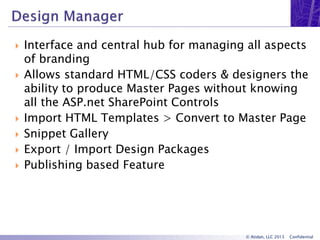
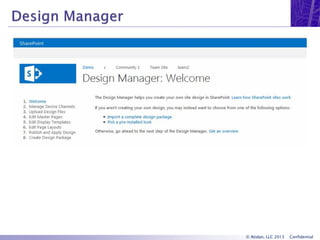
 Interface and central hub for managing all aspects
of branding
 Allows standard HTML/CSS coders & designers the
ability to produce Master Pages without knowing
all the ASP.net SharePoint Controls
 Import HTML Templates > Convert to Master Page
 Snippet Gallery
 Export / Import Design Packages
 Publishing based Feature
© Atidan, LLC 2013 Confidential
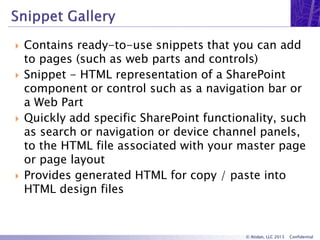
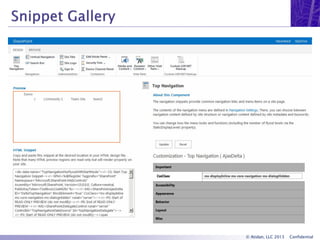
 Contains ready-to-use snippets that you can add
to pages (such as web parts and controls)
 Snippet - HTML representation of a SharePoint
component or control such as a navigation bar or
a Web Part
 Quickly add specific SharePoint functionality, such
as search or navigation or device channel panels,
to the HTML file associated with your master page
or page layout
 Provides generated HTML for copy / paste into
HTML design files
© Atidan, LLC 2013 Confidential
 Templates used in Web Parts that use search
technology
 Display templates control which managed
properties are shown in the search results, and
how they appear in the Web Part
 Each display template is made of two files:
• a HTML version of the display template that you can
edit in your HTML editor
• a JS file that SharePoint uses.
© Atidan, LLC 2013 Confidential
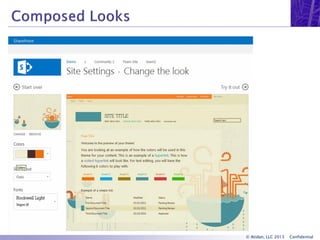
 Theming provides a quick and easy way to apply
lightweight branding to a SharePoint 2013 site
 A composed look, or design, is the color palette,
font scheme, background image, and master page
that determine the look and feel of a site.
 Theming experience components
• Color palette
• Font scheme
• Background Image
• Master Page
• Master Page Preview
© Atidan, LLC 2013 Confidential
 Enables you to design site navigation that is
driven by managed metadata & create SEO-
friendly URLs that are derived from the managed
navigation structure
 Manage Terms for the site collection in site
settings, NOT Central Admin
 Friendly URLs
• web address that is easy to read and includes words
that describe the content of the web page
© Atidan, LLC 2013 Confidential
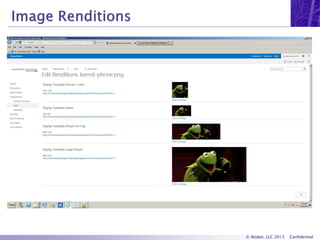
 Enables you to display differently sized versions
of an image on different pages in a publishing
site, based on the same source image.
 Prerequisites
• Publishing Site
• BLOB cache
 Designers can define an image rendition to
display an image as a thumbnail image and
another image rendition as a display banner
© Atidan, LLC 2013 Confidential
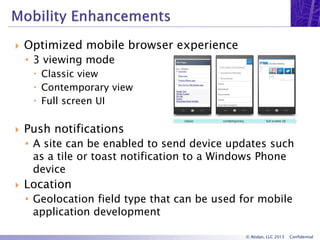
 Optimized mobile browser experience
• 3 viewing mode
 Classic view
 Contemporary view
 Full screen UI
 Push notifications
• A site can be enabled to send device updates such
as a tile or toast notification to a Windows Phone
device
 Location
• Geolocation field type that can be used for mobile
application development
© Atidan, LLC 2013 Confidential
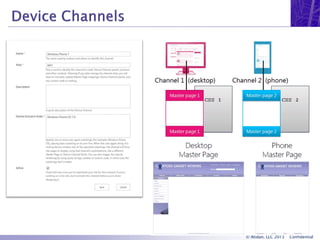
 Renders a single publishing site in multiple ways
by delivering different master pages to target
devices.
 Uses the device’s user agent string to determine
the channel to serve
 Optional can use cookie based
 Max 10 on-premise, 2 SP Online
 Device Panels
• target specific devices on page layouts
© Atidan, LLC 2013 Confidential
 Making Web Pages XHTML Compliant
 SharePoint 2013 – Introduction to the Minimal
Download Strategy (MDS)
 SharePoint 2013 Design Manager device channels
 SharePoint 2013 Design Manager display
templates
 SharePoint 2013 Design Manager image
renditions
 How to: Create a master page preview file in
SharePoint 2013
 Themes overview for SharePoint 2013
 What's new for mobile devices in SharePoint 2013
 Enhanced Video Experience in SharePoint 2013
© Atidan, LLC 2013 Confidential
 Thank You!
 Additional questions: tom.daly@Atidan.com
 SharePoint@Atidan.com
 1-215-825-5045

SharePoint 2013 User Interface and Design Improvements - Webinar from Atidan

  • 1.
    SharePoint 2013 New UI& Branding Features Tom M. Daly May 16, 2013
  • 2.
    © Atidan, LLC2013 Confidential  Thomas M Daly  SharePoint Consultant • Developer • Branding  Focused on the UI side of things  Community Involvement • Speaker • NJ SP Princeton User Group • SharePoint Saturday NYC organizer • SharePoint Saturday NJ organizer • My SharePoint Blog • MSDN forums contributor
  • 3.
    © Atidan, LLC2013 Confidential  User Interface Enhancements  Site & Page Enhancements  Design Manager  Snippet Gallery  Composed Looks  Managed Meta Data Navigation  Image Renditions  Mobile Enhancements
  • 4.
    © Atidan, LLC2013 Confidential  Browser Support • IE 8, 9, 10, Chrome, FireFox, Safari  Enhanced Mobile Support  Increased Standards Compliance • Better XHTML Compliance • HTML5 Compatible  Increased use of Ajax • Partial Page Loads  Better user experience  Minimal full page refreshes  Perceived faster load times • Minimal Download Strategy (MDS)  Not on publishing or sandbox
  • 5.
    © Atidan, LLC2013 Confidential  Community Site Template  Search Based Web Parts  Page Enhancements • Flash / HTML5 Video Player • Embed Code Snippets • Share / Follow Documents, People, Sites • Drag & Drop file into Document Libraries
  • 6.
    © Atidan, LLC2013 Confidential  Interface and central hub for managing all aspects of branding  Allows standard HTML/CSS coders & designers the ability to produce Master Pages without knowing all the ASP.net SharePoint Controls  Import HTML Templates > Convert to Master Page  Snippet Gallery  Export / Import Design Packages  Publishing based Feature
  • 7.
    © Atidan, LLC2013 Confidential
  • 8.
    © Atidan, LLC2013 Confidential  Contains ready-to-use snippets that you can add to pages (such as web parts and controls)  Snippet - HTML representation of a SharePoint component or control such as a navigation bar or a Web Part  Quickly add specific SharePoint functionality, such as search or navigation or device channel panels, to the HTML file associated with your master page or page layout  Provides generated HTML for copy / paste into HTML design files
  • 9.
    © Atidan, LLC2013 Confidential
  • 10.
    © Atidan, LLC2013 Confidential  Templates used in Web Parts that use search technology  Display templates control which managed properties are shown in the search results, and how they appear in the Web Part  Each display template is made of two files: • a HTML version of the display template that you can edit in your HTML editor • a JS file that SharePoint uses.
  • 11.
    © Atidan, LLC2013 Confidential  Theming provides a quick and easy way to apply lightweight branding to a SharePoint 2013 site  A composed look, or design, is the color palette, font scheme, background image, and master page that determine the look and feel of a site.  Theming experience components • Color palette • Font scheme • Background Image • Master Page • Master Page Preview
  • 12.
    © Atidan, LLC2013 Confidential
  • 13.
    © Atidan, LLC2013 Confidential  Enables you to design site navigation that is driven by managed metadata & create SEO- friendly URLs that are derived from the managed navigation structure  Manage Terms for the site collection in site settings, NOT Central Admin  Friendly URLs • web address that is easy to read and includes words that describe the content of the web page
  • 14.
    © Atidan, LLC2013 Confidential  Enables you to display differently sized versions of an image on different pages in a publishing site, based on the same source image.  Prerequisites • Publishing Site • BLOB cache  Designers can define an image rendition to display an image as a thumbnail image and another image rendition as a display banner
  • 15.
    © Atidan, LLC2013 Confidential
  • 16.
    © Atidan, LLC2013 Confidential  Optimized mobile browser experience • 3 viewing mode  Classic view  Contemporary view  Full screen UI  Push notifications • A site can be enabled to send device updates such as a tile or toast notification to a Windows Phone device  Location • Geolocation field type that can be used for mobile application development
  • 17.
    © Atidan, LLC2013 Confidential  Renders a single publishing site in multiple ways by delivering different master pages to target devices.  Uses the device’s user agent string to determine the channel to serve  Optional can use cookie based  Max 10 on-premise, 2 SP Online  Device Panels • target specific devices on page layouts
  • 18.
    © Atidan, LLC2013 Confidential
  • 19.
    © Atidan, LLC2013 Confidential  Making Web Pages XHTML Compliant  SharePoint 2013 – Introduction to the Minimal Download Strategy (MDS)  SharePoint 2013 Design Manager device channels  SharePoint 2013 Design Manager display templates  SharePoint 2013 Design Manager image renditions  How to: Create a master page preview file in SharePoint 2013  Themes overview for SharePoint 2013  What's new for mobile devices in SharePoint 2013  Enhanced Video Experience in SharePoint 2013
  • 20.
    © Atidan, LLC2013 Confidential  Thank You!  Additional questions: tom.daly@Atidan.com  SharePoint@Atidan.com  1-215-825-5045