











#MongoDB 
Sharding Methods For 
MongoDB 
Jay Runkel 
jay.runkel@mongodb.com 
@jayrunkel
Agenda 
• Customer Stories 
• Sharding for Performance/Scale 
2 
– When to shard? 
– How many shards do I need? 
• Types of Sharding 
• How to Pick a Shard Key 
• Sharding for Other Reasons
Customer Stories
4
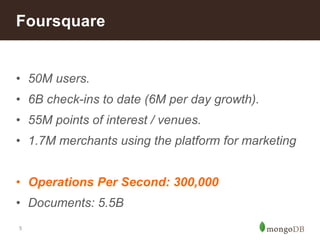
Foursquare 
• 50M users. 
• 6B check-ins to date (6M per day growth). 
• 55M points of interest / venues. 
• 1.7M merchants using the platform for marketing 
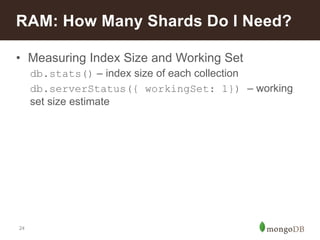
• Operations Per Second: 300,000 
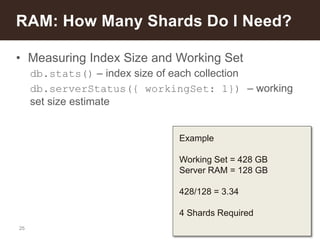
• Documents: 5.5B 
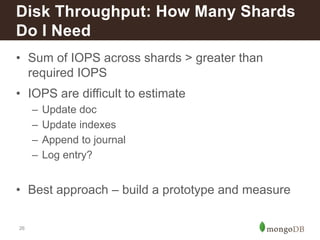
5
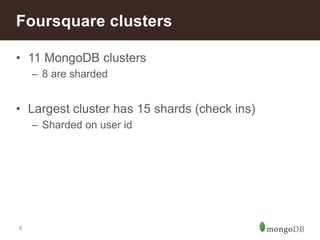
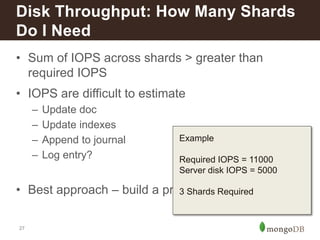
Foursquare clusters 
• 11 MongoDB clusters 
6 
– 8 are sharded 
• Largest cluster has 15 shards (check ins) 
– Sharded on user id
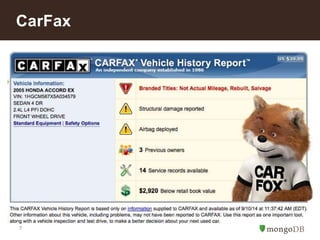
CarFax 
• Large data set 
7
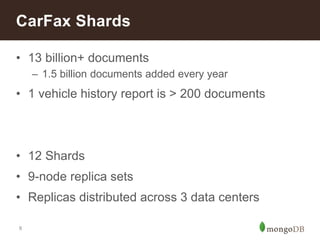
CarFax Shards 
• 13 billion+ documents 
8 
– 1.5 billion documents added every year 
• 1 vehicle history report is > 200 documents 
• 12 Shards 
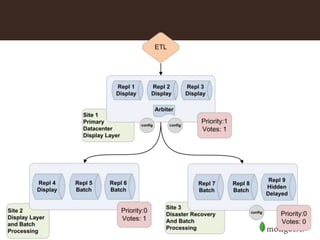
• 9-node replica sets 
• Replicas distributed across 3 data centers
9
What is Sharding?
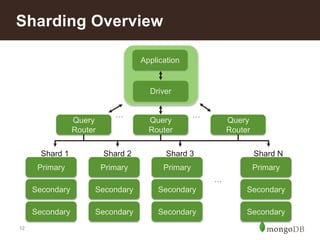
Sharding Overview 
12 
Shard 1 
Primary 
Secondary 
Secondary 
Shard 2 
Primary 
Secondary 
Secondary 
Application 
Driver 
Shard 3 
Primary 
Secondary 
Secondary 
Shard N 
Primary 
Secondary 
Secondary 
… 
Query 
Router 
Query 
Router 
Query 
Router 
… …
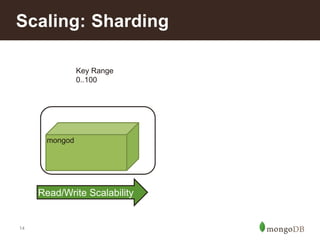
Scaling: Sharding 
14 
mongod 
Key Range 
0..100 
Read/Write Scalability
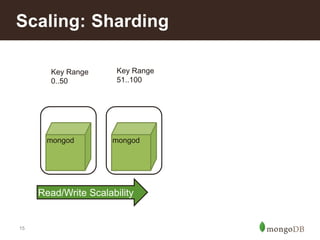
Scaling: Sharding 
15 
Key Range 
0..50 
Key Range 
51..100 
mongod mongod 
Read/Write Scalability
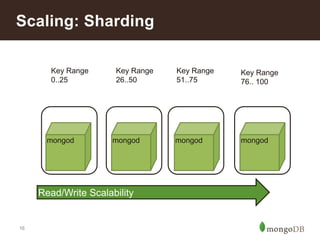
Scaling: Sharding 
16 
Key Range 
0..25 
Key Range 
26..50 
Key Range 
51..75 
Key Range 
76.. 100 
mongod mongod mongod mongod 
Read/Write Scalability
How do I know I need to shard?
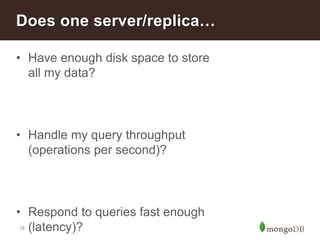
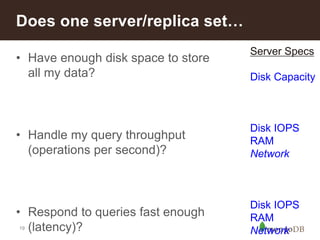
Does one server/replica… 
• Have enough disk space to store 
18 
all my data? 
• Handle my query throughput 
(operations per second)? 
• Respond to queries fast enough 
(latency)?
Does one server/replica set… 
• Have enough disk space to store 
19 
all my data? 
• Handle my query throughput 
(operations per second)? 
• Respond to queries fast enough 
(latency)? 
Server Specs 
Disk Capacity 
Disk IOPS 
RAM 
Network 
Disk IOPS 
RAM 
Network
How many shards do I need?
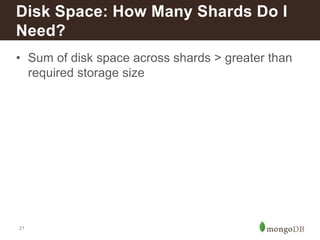
Disk Space: How Many Shards Do I 
Need? 
• Sum of disk space across shards > greater than 
21 
required storage size
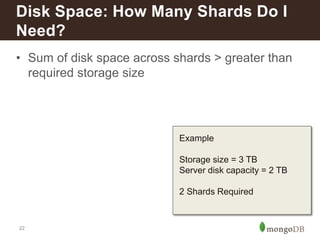
Disk Space: How Many Shards Do I 
Need? 
• Sum of disk space across shards > greater than 
22 
required storage size 
Example 
Storage size = 3 TB 
Server disk capacity = 2 TB 
2 Shards Required
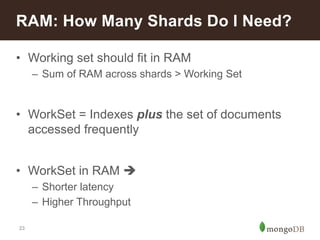
RAM: How Many Shards Do I Need? 
• Working set should fit in RAM 
23 
– Sum of RAM across shards > Working Set 
• WorkSet = Indexes plus the set of documents 
accessed frequently 
• WorkSet in RAM  
– Shorter latency 
– Higher Throughput
RAM: How Many Shards Do I Need? 
• Measuring Index Size and Working Set 
24 
db.stats() – index size of each collection 
db.serverStatus({ workingSet: 1}) – working 
set size estimate
RAM: How Many Shards Do I Need? 
• Measuring Index Size and Working Set 
25 
db.stats() – index size of each collection 
db.serverStatus({ workingSet: 1}) – working 
set size estimate 
Example 
Working Set = 428 GB 
Server RAM = 128 GB 
428/128 = 3.34 
4 Shards Required
Disk Throughput: How Many Shards 
Do I Need 
• Sum of IOPS across shards > greater than 
26 
required IOPS 
• IOPS are difficult to estimate 
– Update doc 
– Update indexes 
– Append to journal 
– Log entry? 
• Best approach – build a prototype and measure
Disk Throughput: How Many Shards 
Do I Need 
• Sum of IOPS across shards > greater than 
27 
required IOPS 
• IOPS are difficult to estimate 
– Update doc 
– Update indexes 
– Append to journal 
– Log entry? 
Example 
Required IOPS = 11000 
Server disk IOPS = 5000 
• Best approach – build a prototype 3 Shards Required 
and measure
Types of Sharding
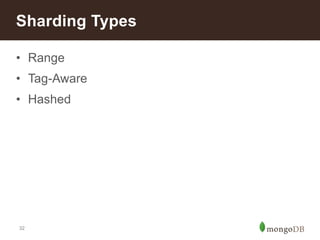
Sharding Types 
• Range 
• Tag-Aware 
• Hashed 
32
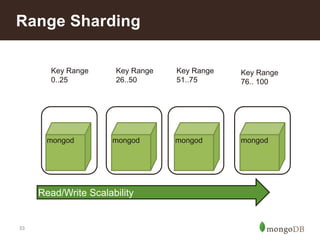
Range Sharding 
33 
Key Range 
0..25 
Key Range 
26..50 
Key Range 
51..75 
Key Range 
76.. 100 
mongod mongod mongod mongod 
Read/Write Scalability
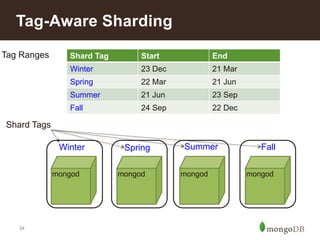
Tag-Aware Sharding 
34 
mongod mongod mongod mongod 
Shard Tags 
Shard Tag Start End 
Winter 23 Dec 21 Mar 
Spring 22 Mar 21 Jun 
Summer 21 Jun 23 Sep 
Fall 24 Sep 22 Dec 
Tag Ranges 
Winter Spring Summer Fall
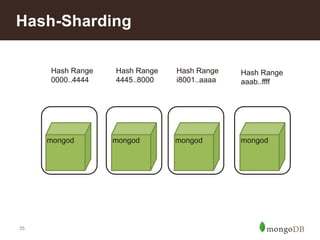
Hash-Sharding 
35 
Hash Range 
0000..4444 
Hash Range 
4445..8000 
Hash Range 
i8001..aaaa 
Hash Range 
aaab..ffff 
mongod mongod mongod mongod
Hashed shard key 
36 
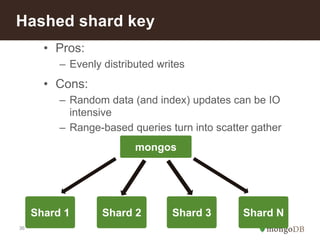
• Pros: 
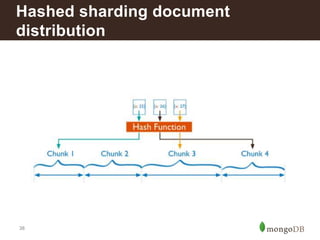
– Evenly distributed writes 
• Cons: 
– Random data (and index) updates can be IO 
intensive 
– Range-based queries turn into scatter gather 
Shard 1 
mongos 
Shard 2 Shard 3 Shard N
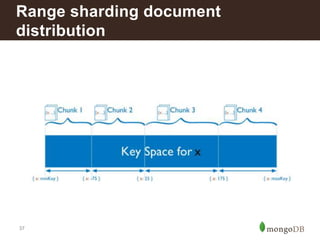
Range sharding document 
distribution 
37
Hashed sharding document 
distribution 
38
How do I Pick A Shard Key
Shard Key characteristics 
40 
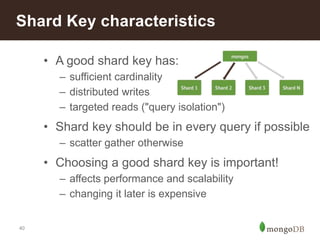
• A good shard key has: 
– sufficient cardinality 
– distributed writes 
– targeted reads ("query isolation") 
• Shard key should be in every query if possible 
– scatter gather otherwise 
• Choosing a good shard key is important! 
– affects performance and scalability 
– changing it later is expensive
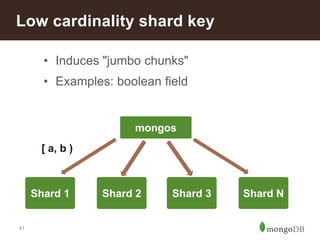
Low cardinality shard key 
41 
• Induces "jumbo chunks" 
• Examples: boolean field 
Shard 1 
mongos 
Shard 2 Shard 3 Shard N 
[ a, b )
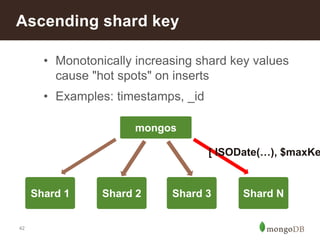
Ascending shard key 
42 
• Monotonically increasing shard key values 
cause "hot spots" on inserts 
• Examples: timestamps, _id 
Shard 1 
mongos 
[ ISODate(…), $maxKey 
Shard 2 Shard 3 Shard N
Reasons to Shard
Reasons to shard 
• Scale 
44 
– Data volume 
– Query volume 
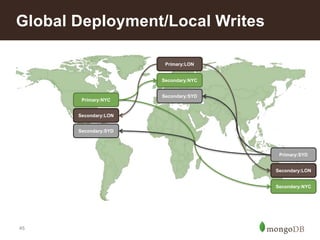
• Global deployment with local writes 
– Geography aware sharding 
• Tiered Storage 
• Fast backup restore
Global Deployment/Local Writes 
45 
Primary:NYC 
Primary:LON 
Secondary:NYC 
Primary:SYD 
Secondary:LON 
Secondary:NYC 
Secondary:SYD 
Secondary:LON 
Secondary:SYD
Tiered Storage 
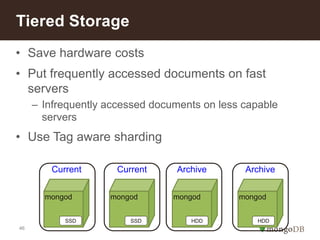
• Save hardware costs 
• Put frequently accessed documents on fast 
46 
servers 
– Infrequently accessed documents on less capable 
servers 
• Use Tag aware sharding 
Current Current Archive Archive 
mongod mongod mongod mongod 
SSD SSD HDD HDD
Fast Restore 
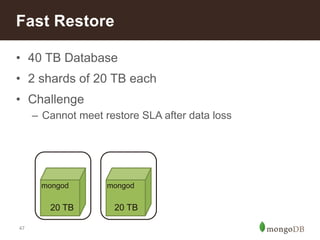
• 40 TB Database 
• 2 shards of 20 TB each 
• Challenge 
47 
– Cannot meet restore SLA after data loss 
mongod mongod 
20 TB 20 TB
Fast Restore 
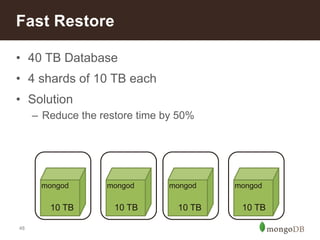
• 40 TB Database 
• 4 shards of 10 TB each 
• Solution 
48 
– Reduce the restore time by 50% 
mongod mongod 
10 TB 10 TB 
mongod mongod 
10 TB 10 TB
Summary
Determining the # of shards 
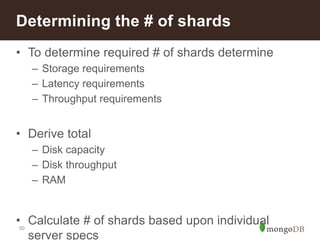
• To determine required # of shards determine 
50 
– Storage requirements 
– Latency requirements 
– Throughput requirements 
• Derive total 
– Disk capacity 
– Disk throughput 
– RAM 
• Calculate # of shards based upon individual 
server specs
Leverage Sharding For 
• Scalability 
• Geo-aware clusters 
• Tiered Storage 
• Reduce backup restore times 
51
Sharding: Where to go from here… 
• MongoDB Manual: 
52 
http://docs.mongodb.org/manual/sharding/ 
• Other Webinars: 
– How to Achieve Scale With MongoDB 
• White Papers 
– MongoDB Performance Best Practices 
– MongoDB Architecture Guide
Thank You

Sharding Methods for MongoDB

  • 1.
    #MongoDB Sharding MethodsFor MongoDB Jay Runkel jay.runkel@mongodb.com @jayrunkel
  • 2.
    Agenda • CustomerStories • Sharding for Performance/Scale 2 – When to shard? – How many shards do I need? • Types of Sharding • How to Pick a Shard Key • Sharding for Other Reasons
  • 3.
  • 4.
  • 5.
    Foursquare • 50Musers. • 6B check-ins to date (6M per day growth). • 55M points of interest / venues. • 1.7M merchants using the platform for marketing • Operations Per Second: 300,000 • Documents: 5.5B 5
  • 6.
    Foursquare clusters •11 MongoDB clusters 6 – 8 are sharded • Largest cluster has 15 shards (check ins) – Sharded on user id
  • 7.
    CarFax • Largedata set 7
  • 8.
    CarFax Shards •13 billion+ documents 8 – 1.5 billion documents added every year • 1 vehicle history report is > 200 documents • 12 Shards • 9-node replica sets • Replicas distributed across 3 data centers
  • 9.
  • 10.
  • 11.
    Sharding Overview 12 Shard 1 Primary Secondary Secondary Shard 2 Primary Secondary Secondary Application Driver Shard 3 Primary Secondary Secondary Shard N Primary Secondary Secondary … Query Router Query Router Query Router … …
  • 12.
    Scaling: Sharding 14 mongod Key Range 0..100 Read/Write Scalability
  • 13.
    Scaling: Sharding 15 Key Range 0..50 Key Range 51..100 mongod mongod Read/Write Scalability
  • 14.
    Scaling: Sharding 16 Key Range 0..25 Key Range 26..50 Key Range 51..75 Key Range 76.. 100 mongod mongod mongod mongod Read/Write Scalability
  • 15.
    How do Iknow I need to shard?
  • 16.
    Does one server/replica… • Have enough disk space to store 18 all my data? • Handle my query throughput (operations per second)? • Respond to queries fast enough (latency)?
  • 17.
    Does one server/replicaset… • Have enough disk space to store 19 all my data? • Handle my query throughput (operations per second)? • Respond to queries fast enough (latency)? Server Specs Disk Capacity Disk IOPS RAM Network Disk IOPS RAM Network
  • 18.
    How many shardsdo I need?
  • 19.
    Disk Space: HowMany Shards Do I Need? • Sum of disk space across shards > greater than 21 required storage size
  • 20.
    Disk Space: HowMany Shards Do I Need? • Sum of disk space across shards > greater than 22 required storage size Example Storage size = 3 TB Server disk capacity = 2 TB 2 Shards Required
  • 21.
    RAM: How ManyShards Do I Need? • Working set should fit in RAM 23 – Sum of RAM across shards > Working Set • WorkSet = Indexes plus the set of documents accessed frequently • WorkSet in RAM  – Shorter latency – Higher Throughput
  • 22.
    RAM: How ManyShards Do I Need? • Measuring Index Size and Working Set 24 db.stats() – index size of each collection db.serverStatus({ workingSet: 1}) – working set size estimate
  • 23.
    RAM: How ManyShards Do I Need? • Measuring Index Size and Working Set 25 db.stats() – index size of each collection db.serverStatus({ workingSet: 1}) – working set size estimate Example Working Set = 428 GB Server RAM = 128 GB 428/128 = 3.34 4 Shards Required
  • 24.
    Disk Throughput: HowMany Shards Do I Need • Sum of IOPS across shards > greater than 26 required IOPS • IOPS are difficult to estimate – Update doc – Update indexes – Append to journal – Log entry? • Best approach – build a prototype and measure
  • 25.
    Disk Throughput: HowMany Shards Do I Need • Sum of IOPS across shards > greater than 27 required IOPS • IOPS are difficult to estimate – Update doc – Update indexes – Append to journal – Log entry? Example Required IOPS = 11000 Server disk IOPS = 5000 • Best approach – build a prototype 3 Shards Required and measure
  • 26.
  • 27.
    Sharding Types •Range • Tag-Aware • Hashed 32
  • 28.
    Range Sharding 33 Key Range 0..25 Key Range 26..50 Key Range 51..75 Key Range 76.. 100 mongod mongod mongod mongod Read/Write Scalability
  • 29.
    Tag-Aware Sharding 34 mongod mongod mongod mongod Shard Tags Shard Tag Start End Winter 23 Dec 21 Mar Spring 22 Mar 21 Jun Summer 21 Jun 23 Sep Fall 24 Sep 22 Dec Tag Ranges Winter Spring Summer Fall
  • 30.
    Hash-Sharding 35 HashRange 0000..4444 Hash Range 4445..8000 Hash Range i8001..aaaa Hash Range aaab..ffff mongod mongod mongod mongod
  • 31.
    Hashed shard key 36 • Pros: – Evenly distributed writes • Cons: – Random data (and index) updates can be IO intensive – Range-based queries turn into scatter gather Shard 1 mongos Shard 2 Shard 3 Shard N
  • 32.
    Range sharding document distribution 37
  • 33.
    Hashed sharding document distribution 38
  • 34.
    How do IPick A Shard Key
  • 35.
    Shard Key characteristics 40 • A good shard key has: – sufficient cardinality – distributed writes – targeted reads ("query isolation") • Shard key should be in every query if possible – scatter gather otherwise • Choosing a good shard key is important! – affects performance and scalability – changing it later is expensive
  • 36.
    Low cardinality shardkey 41 • Induces "jumbo chunks" • Examples: boolean field Shard 1 mongos Shard 2 Shard 3 Shard N [ a, b )
  • 37.
    Ascending shard key 42 • Monotonically increasing shard key values cause "hot spots" on inserts • Examples: timestamps, _id Shard 1 mongos [ ISODate(…), $maxKey Shard 2 Shard 3 Shard N
  • 38.
  • 39.
    Reasons to shard • Scale 44 – Data volume – Query volume • Global deployment with local writes – Geography aware sharding • Tiered Storage • Fast backup restore
  • 40.
    Global Deployment/Local Writes 45 Primary:NYC Primary:LON Secondary:NYC Primary:SYD Secondary:LON Secondary:NYC Secondary:SYD Secondary:LON Secondary:SYD
  • 41.
    Tiered Storage •Save hardware costs • Put frequently accessed documents on fast 46 servers – Infrequently accessed documents on less capable servers • Use Tag aware sharding Current Current Archive Archive mongod mongod mongod mongod SSD SSD HDD HDD
  • 42.
    Fast Restore •40 TB Database • 2 shards of 20 TB each • Challenge 47 – Cannot meet restore SLA after data loss mongod mongod 20 TB 20 TB
  • 43.
    Fast Restore •40 TB Database • 4 shards of 10 TB each • Solution 48 – Reduce the restore time by 50% mongod mongod 10 TB 10 TB mongod mongod 10 TB 10 TB
  • 44.
  • 45.
    Determining the #of shards • To determine required # of shards determine 50 – Storage requirements – Latency requirements – Throughput requirements • Derive total – Disk capacity – Disk throughput – RAM • Calculate # of shards based upon individual server specs
  • 46.
    Leverage Sharding For • Scalability • Geo-aware clusters • Tiered Storage • Reduce backup restore times 51
  • 47.
    Sharding: Where togo from here… • MongoDB Manual: 52 http://docs.mongodb.org/manual/sharding/ • Other Webinars: – How to Achieve Scale With MongoDB • White Papers – MongoDB Performance Best Practices – MongoDB Architecture Guide
  • 48.

Editor's Notes

  • #14 MongoDB provides horizontal scale-out for databases using a technique called sharding, which is trans- parent to applications. Sharding distributes data across multiple physical partitions called shards. Sharding allows MongoDB deployments to address the hardware limitations of a single server, such as bottlenecks in RAM or disk I/O, without adding complexity to the application. MongoDB supports three types of sharding: • Range-based Sharding. Documents are partitioned across shards according to the shard key value. Documents with shard key values “close” to one another are likely to be co-located on the same shard. This approach is well suited for applications that need to optimize range- based queries. • Hash-based Sharding. Documents are uniformly distributed according to an MD5 hash of the shard key value. Documents with shard key values “close” to one another are unlikely to be co-located on the same shard. This approach guarantees a uniform distribution of writes across shards, but is less optimal for range-based queries. • Tag-aware Sharding. Documents are partitioned according to a user-specified configuration that associates shard key ranges with shards. Users can optimize the physical location of documents for application requirements such as locating data in specific data centers. MongoDB automatically balances the data in the cluster as the data grows or the size of the cluster increases or decreases.
  • #42 may consider hashing _id instead
  • #43 may consider hashing _id instead
  • #54 www.mongodb.com/lp/contact/scaling-101 http://www.mongodb.com/lp/contact/planning-for-scale