Performance Tuning and
Optimization
Jake Angerman
Sr. Solutions Architect, MongoDB
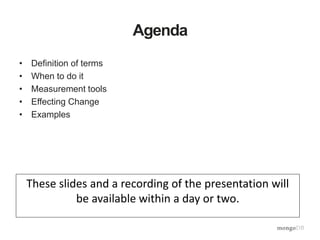
Agenda
• Definition of terms
• When to do it
• Measurement tools
• Effecting Change
• Examples
These slides and a recording of the presentation will
be available within a day or two.
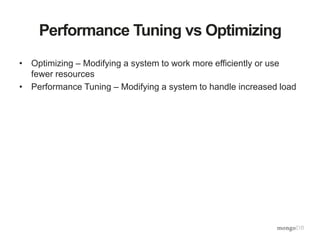
Performance Tuning vs Optimizing
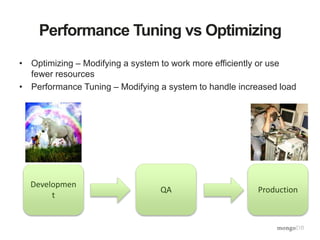
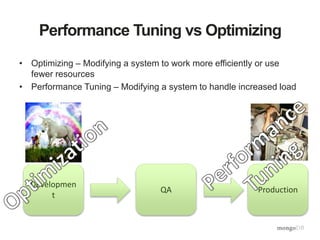
• Optimizing – Modifying a system to work more efficiently or use
fewer resources
• Performance Tuning – Modifying a system to handle increased load
Performance Tuning vs Optimizing
• Optimizing – Modifying a system to work more efficiently or use
fewer resources
• Performance Tuning – Modifying a system to handle increased load
Developmen
t
QA Production
Performance Tuning vs Optimizing
• Optimizing – Modifying a system to work more efficiently or use
fewer resources
• Performance Tuning – Modifying a system to handle increased load
Developmen
t
QA Production
Performance Tuning vs Optimizing
• Optimizing – Modifying a system to work more efficiently or use
fewer resources
• Performance Tuning – Modifying a system to handle increased load
Developmen
t
QA Production
Premature Optimization
• "There is no doubt that the grail of efficiency leads to
abuse. Programmers waste enormous amounts of time
thinking about, or worrying about, the speed of
noncritical parts of their programs, and these attempts at
efficiency actually have a strong negative impact when
debugging and maintenance are considered. We should
forget about small efficiencies, say about 97% of the
time: premature optimization is the root of all evil.
Yet we should not pass up our opportunities in that
critical 3%."
- Donald Knuth, 1974
Premature Optimization
• "There is no doubt that the grail of efficiency leads to
abuse. Programmers waste enormous amounts of time
thinking about, or worrying about, the speed of
noncritical parts of their programs, and these attempts at
efficiency actually have a strong negative impact when
debugging and maintenance are considered. We should
forget about small efficiencies, say about 97% of the
time: premature optimization is the root of all evil.
Yet we should not pass up our opportunities in that
critical 3%."
- Donald Knuth, 1974
Premature Optimization
• "There is no doubt that the grail of efficiency leads to
abuse. Programmers waste enormous amounts of time
thinking about, or worrying about, the speed of
noncritical parts of their programs, and these attempts at
efficiency actually have a strong negative impact when
debugging and maintenance are considered. We should
forget about small efficiencies, say about 97% of the
time: premature optimization is the root of all evil.
Yet we should not pass up our opportunities in that
critical 3%."
- Donald Knuth, 1974
Measurement Tools
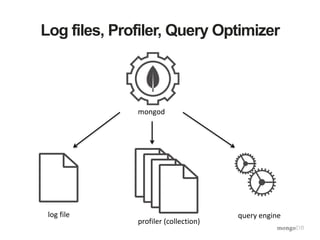
Log files, Profiler, Query Optimizer
mongod
log file
profiler (collection)
query engine
Explain plan – Query Planner
Jakes-MacBook-Pro(mongod-3.0.1)[PRIMARY] test> db.example.find({a:1}).explain() // using the old <3.0 syntax
{
"ok": 1,
"queryPlanner": {
"indexFilterSet": false,
"namespace": "test.example",
"parsedQuery": {
"a": {
"$eq": 1
}
},
"plannerVersion": 1,
"rejectedPlans": [ ],
"winningPlan": {
"direction": "forward",
"filter": {
"a": {
"$eq": 1
}
},
"stage": "COLLSCAN"
}
},
"serverInfo": {
"gitVersion": "534b5a3f9d10f00cd27737fbcd951032248b5952",
"host": "Jakes-MacBook-Pro.local",
"port": 27017,
"version": "3.0.1"
}
}
Explain plan – Adding an Index
Jakes-MacBook-Pro(mongod-3.0.1)[PRIMARY] test> db.example.ensureIndex({a:1})
Jakes-MacBook-Pro(mongod-3.0.1)[PRIMARY] test> db.example.find({a:1}).explain() // using the old <3.0 syntax
{
"ok": 1,
"queryPlanner": {
"indexFilterSet": false,
"namespace": "test.example",
"parsedQuery": {
"a": {
"$eq": 1
}
},
"plannerVersion": 1,
"rejectedPlans": [ ],
"winningPlan": {
"inputStage": {
"direction": "forward",
"indexBounds": {
"a": [
"[1.0, 1.0]"
]
},
"indexName": "a_1",
"isMultiKey": false,
"keyPattern": {
"a": 1
},
"stage": "IXSCAN"
},
"stage": "FETCH"
}
}
[…]
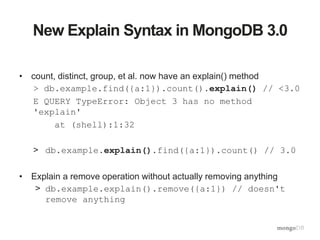
New Explain Syntax in MongoDB 3.0
• count, distinct, group, et al. now have an explain() method
> db.example.find({a:1}).count().explain() // <3.0
E QUERY TypeError: Object 3 has no method
'explain'
at (shell):1:32
> db.example.explain().find({a:1}).count() // 3.0
• Explain a remove operation without actually removing anything
> db.example.explain().remove({a:1}) // doesn't
remove anything
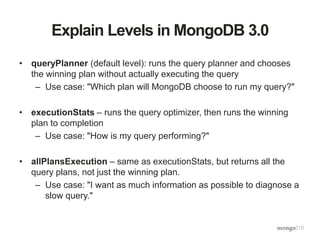
Explain Levels in MongoDB 3.0
• queryPlanner (default level): runs the query planner and chooses
the winning plan without actually executing the query
– Use case: "Which plan will MongoDB choose to run my query?"
• executionStats – runs the query optimizer, then runs the winning
plan to completion
– Use case: "How is my query performing?"
• allPlansExecution – same as executionStats, but returns all the
query plans, not just the winning plan.
– Use case: "I want as much information as possible to diagnose a
slow query."
Explain plan – Query Planner
Jakes-MacBook-Pro(mongod-3.0.1)[PRIMARY] test> db.example.explain().find({a:1}) // new 3.0 syntax, default level
{
"ok": 1,
"queryPlanner": {
"indexFilterSet": false,
"namespace": "test.example",
"parsedQuery": {
"a": {
"$eq": 1
}
},
"plannerVersion": 1,
"rejectedPlans": [ ],
"winningPlan": {
"inputStage": {
"direction": "forward",
"indexBounds": {
"a": [
"[1.0, 1.0]"
]
},
"indexName": "a_1",
"isMultiKey": false,
"keyPattern": {
"a": 1
},
"stage": "IXSCAN"
},
"stage": "FETCH"
}
}
[…]
queryPlanner (default level): runs
the query planner and chooses the
winning plan without actually
executing the query
Explain plan – Query Optimizer
> db.example.explain("executionStats").find({a:1}) // new 3.0 syntax
{
"executionStats": {
"executionStages": {
"advanced": 3,
"alreadyHasObj": 0,
"docsExamined": 3,
"executionTimeMillisEstimate": 0,
"inputStage": {
"advanced": 3,
"direction": "forward",
"dupsDropped": 0,
"dupsTested": 0,
"executionTimeMillisEstimate": 0,
"indexBounds": {
"a": [
"[1.0, 1.0]"
]
},
"indexName": "a_1",
"invalidates": 0,
"isEOF": 1,
"isMultiKey": false,
"keyPattern": {
"a": 1
},
"keysExamined": 3,
"matchTested": 0,
"nReturned": 3,
"needFetch": 0,
"needTime": 0,
"restoreState": 0,
"saveState": 0,
"seenInvalidated": 0,
"stage": "IXSCAN",
"works": 3
},
"invalidates": 0,
"isEOF": 1,
"nReturned": 3,
"needFetch": 0,
"needTime": 0,
"restoreState": 0,
"saveState": 0,
"stage": "FETCH",
"works": 4
},
"executionSuccess": true,
"executionTimeMillis": 0,
"nReturned": 3,
"totalDocsExamined": 3,
"totalKeysExamined": 3
},
"ok": 1,
"queryPlanner": {
[…]
}
}
executionStats – runs the query optimizer,
then runs the winning plan to completion
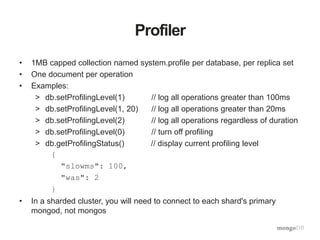
Profiler
• 1MB capped collection named system.profile per database, per replica set
• One document per operation
• Examples:
> db.setProfilingLevel(1) // log all operations greater than 100ms
> db.setProfilingLevel(1, 20) // log all operations greater than 20ms
> db.setProfilingLevel(2) // log all operations regardless of duration
> db.setProfilingLevel(0) // turn off profiling
> db.getProfilingStatus() // display current profiling level
{
"slowms": 100,
"was": 2
}
• In a sharded cluster, you will need to connect to each shard's primary
mongod, not mongos
mongod Log Files
Sun Jun 29 06:35:37.646 [conn2]
query test.docs query: {
parent.company: "22794",
parent.employeeId: "83881" }
ntoreturn:1 ntoskip:0
nscanned:806381 keyUpdates:0
numYields: 5 locks(micros)
r:2145254 nreturned:0 reslen:20
1156ms
date and time thread
operation
namespace
n…
counters
lock
times
duration
number
of yields
Parsing Log Files
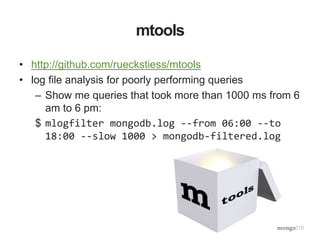
mtools
• http://github.com/rueckstiess/mtools
• log file analysis for poorly performing queries
– Show me queries that took more than 1000 ms from 6
am to 6 pm:
$ mlogfilter mongodb.log --from 06:00 --to
18:00 --slow 1000 > mongodb-filtered.log
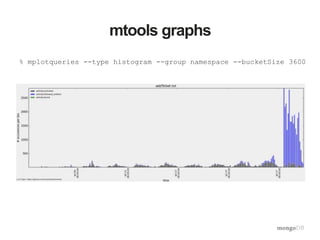
mtools graphs
% mplotqueries --type histogram --group namespace --bucketSize 3600
Command Line tools
• iostat
• dstat
• mongostat
• mongotop
• mongoperf
MMS
• Memory usage
• Opcounters
• Lock percentage
• Queues
• Background flush average
• Replication oplog window and lag
Effecting Change
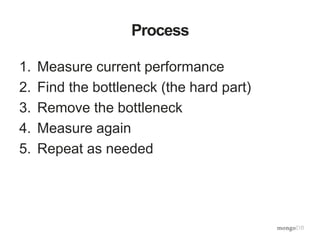
Process
1. Measure current performance
2. Find the bottleneck (the hard part)
3. Remove the bottleneck
4. Measure again
5. Repeat as needed
What can you change?
• Schema design
• Access patterns
• Indexes
• Instance
• Hardware
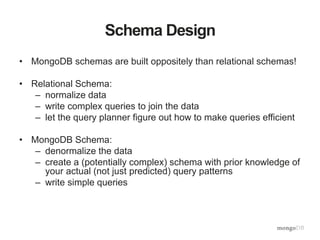
Schema Design
• MongoDB schemas are built oppositely than relational schemas!
• Relational Schema:
– normalize data
– write complex queries to join the data
– let the query planner figure out how to make queries efficient
• MongoDB Schema:
– denormalize the data
– create a (potentially complex) schema with prior knowledge of
your actual (not just predicted) query patterns
– write simple queries
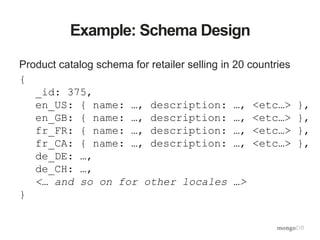
Example: Schema Design
Product catalog schema for retailer selling in 20 countries
{
_id: 375,
en_US: { name: …, description: …, <etc…> },
en_GB: { name: …, description: …, <etc…> },
fr_FR: { name: …, description: …, <etc…> },
fr_CA: { name: …, description: …, <etc…> },
de_DE: …,
de_CH: …,
<… and so on for other locales …>
}
Example: Schema Design
• What's good about this schema?
–Each document contains all the data
about the product across all possible
locales.
–It is the most efficient way to retrieve all
translations of a product in a single
query (English, French, German, etc).
Example: Schema Design
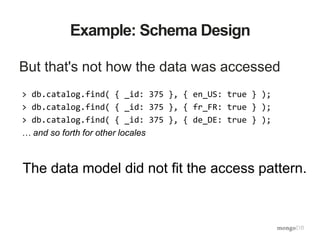
But that's not how the data was accessed
> db.catalog.find( { _id: 375 }, { en_US: true } );
> db.catalog.find( { _id: 375 }, { fr_FR: true } );
> db.catalog.find( { _id: 375 }, { de_DE: true } );
… and so forth for other locales
The data model did not fit the access pattern.
Example: Schema Design
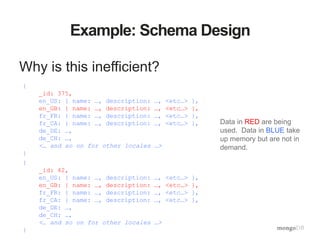
Why is this inefficient?
Data in RED are being
used. Data in BLUE take
up memory but are not in
demand.
{
_id: 375,
en_US: { name: …, description: …, <etc…> },
en_GB: { name: …, description: …, <etc…> },
fr_FR: { name: …, description: …, <etc…> },
fr_CA: { name: …, description: …, <etc…> },
de_DE: …,
de_CH: …,
<… and so on for other locales …>
}
{
_id: 42,
en_US: { name: …, description: …, <etc…> },
en_GB: { name: …, description: …, <etc…> },
fr_FR: { name: …, description: …, <etc…> },
fr_CA: { name: …, description: …, <etc…> },
de_DE: …,
de_CH: …,
<… and so on for other locales …>
}
Example: Schema Design
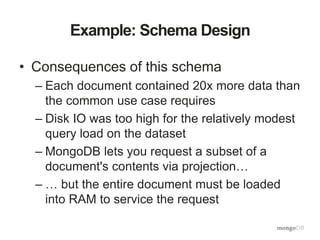
• Consequences of this schema
– Each document contained 20x more data than
the common use case requires
– Disk IO was too high for the relatively modest
query load on the dataset
– MongoDB lets you request a subset of a
document's contents via projection…
– … but the entire document must be loaded
into RAM to service the request
Example: Schema Design
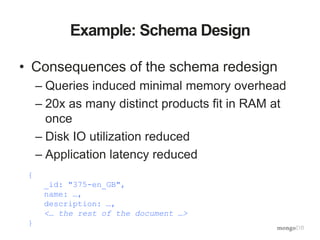
• Consequences of the schema redesign
– Queries induced minimal memory overhead
– 20x as many distinct products fit in RAM at
once
– Disk IO utilization reduced
– Application latency reduced
{
_id: "375-en_GB",
name: …,
description: …,
<… the rest of the document …>
}
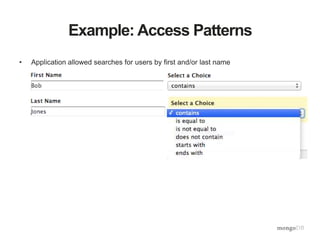
Example: Access Patterns
• Application allowed searches for users by first and/or last name
Example: Access Patterns
• Application allowed searches for users by first and/or last name
Tue Jul 1 13:08:29.858 [conn581923] query db.users query: {
$query: {$and: [ { $and: [ { firstName: /((?i)QbobE)/ }, {
lastName: /((?i)QjonesE)/ } ] } ] }, $orderby: { lastName:
1 } } ntoreturn:25 ntoskip:0 nscanned:2626282 scanAndOrder:1
keyUpdates:0 numYields: 299 locks(micros) r:30536738
nreturned:14 reslen:8646 15504ms
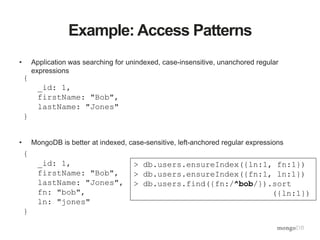
Example: Access Patterns
• Application was searching for unindexed, case-insensitive, unanchored regular
expressions
• MongoDB is better at indexed, case-sensitive, left-anchored regular expressions
{
_id: 1,
firstName: "Bob",
lastName: "Jones"
}
{
_id: 1,
firstName: "Bob",
lastName: "Jones",
fn: "bob",
ln: "jones"
}
> db.users.ensureIndex({ln:1, fn:1})
> db.users.ensureIndex({fn:1, ln:1})
> db.users.find({fn:/^bob/}).sort
({ln:1})
Example: Indexing
• Slow Queries in the logs:
Sun Jun 29 06:35:37.646 [conn2] query test.docs query: {
parent.company: "22794", parent.employeeId: "83881" } ntoreturn:1
ntoskip:0 nscanned:806381 keyUpdates:0 numYields: 5 locks(micros)
r:2145254 nreturned:0 reslen:20 1156ms
• But there's an index???!!!!
db.system.indexes.find().toArray()
[{
"v" : 1,
"key" : {
"company" : 1,
"employeeId" : 1
},
"ns" : "test.docs",
"name" : "company_1_employeeId_1"
}]
Example: Indexing
• Answer: there needs to be an index on the subdocument's fields
Sun Jun 29 06:35:37.646 [conn2] query test.docs query: {
parent.company: "22794", parent.employeeId: "83881" } ntoreturn:1
ntoskip:0 nscanned:806381 keyUpdates:0 numYields: 5 locks(micros)
r:2145254 nreturned:0 reslen:20 1156ms
db.system.indexes.find().toArray()
[{
"v" : 1,
"key" : {
"parent.company" : 1,
"parent.employeeId" : 1
},
"ns" : "test.docs",
"name" :"parent.company_1_parent.employeeId_1"
}]
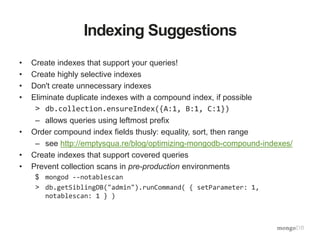
Indexing Suggestions
• Create indexes that support your queries!
• Create highly selective indexes
• Don't create unnecessary indexes
• Eliminate duplicate indexes with a compound index, if possible
> db.collection.ensureIndex({A:1, B:1, C:1})
– allows queries using leftmost prefix
• Order compound index fields thusly: equality, sort, then range
– see http://emptysqua.re/blog/optimizing-mongodb-compound-indexes/
• Create indexes that support covered queries
• Prevent collection scans in pre-production environments
$ mongod --notablescan
> db.getSiblingDB("admin").runCommand( { setParameter: 1,
notablescan: 1 } )
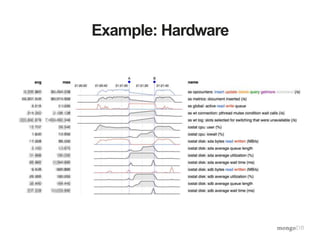
Example: Hardware
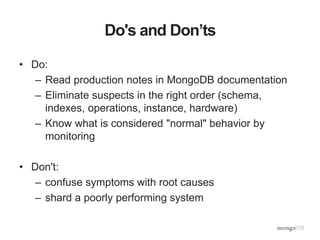
Do's and Don’ts
• Do:
– Read production notes in MongoDB documentation
– Eliminate suspects in the right order (schema,
indexes, operations, instance, hardware)
– Know what is considered "normal" behavior by
monitoring
• Don't:
– confuse symptoms with root causes
– shard a poorly performing system
25% off discount code: JakeAngerman
Webinar: Performance Tuning + Optimization

Webinar: Performance Tuning + Optimization

  • 1.
    Performance Tuning and Optimization JakeAngerman Sr. Solutions Architect, MongoDB
  • 2.
    Agenda • Definition ofterms • When to do it • Measurement tools • Effecting Change • Examples These slides and a recording of the presentation will be available within a day or two.
  • 3.
    Performance Tuning vsOptimizing • Optimizing – Modifying a system to work more efficiently or use fewer resources • Performance Tuning – Modifying a system to handle increased load
  • 4.
    Performance Tuning vsOptimizing • Optimizing – Modifying a system to work more efficiently or use fewer resources • Performance Tuning – Modifying a system to handle increased load Developmen t QA Production
  • 5.
    Performance Tuning vsOptimizing • Optimizing – Modifying a system to work more efficiently or use fewer resources • Performance Tuning – Modifying a system to handle increased load Developmen t QA Production
  • 6.
    Performance Tuning vsOptimizing • Optimizing – Modifying a system to work more efficiently or use fewer resources • Performance Tuning – Modifying a system to handle increased load Developmen t QA Production
  • 7.
    Premature Optimization • "Thereis no doubt that the grail of efficiency leads to abuse. Programmers waste enormous amounts of time thinking about, or worrying about, the speed of noncritical parts of their programs, and these attempts at efficiency actually have a strong negative impact when debugging and maintenance are considered. We should forget about small efficiencies, say about 97% of the time: premature optimization is the root of all evil. Yet we should not pass up our opportunities in that critical 3%." - Donald Knuth, 1974
  • 8.
    Premature Optimization • "Thereis no doubt that the grail of efficiency leads to abuse. Programmers waste enormous amounts of time thinking about, or worrying about, the speed of noncritical parts of their programs, and these attempts at efficiency actually have a strong negative impact when debugging and maintenance are considered. We should forget about small efficiencies, say about 97% of the time: premature optimization is the root of all evil. Yet we should not pass up our opportunities in that critical 3%." - Donald Knuth, 1974
  • 9.
    Premature Optimization • "Thereis no doubt that the grail of efficiency leads to abuse. Programmers waste enormous amounts of time thinking about, or worrying about, the speed of noncritical parts of their programs, and these attempts at efficiency actually have a strong negative impact when debugging and maintenance are considered. We should forget about small efficiencies, say about 97% of the time: premature optimization is the root of all evil. Yet we should not pass up our opportunities in that critical 3%." - Donald Knuth, 1974
  • 10.
  • 11.
    Log files, Profiler,Query Optimizer mongod log file profiler (collection) query engine
  • 12.
    Explain plan –Query Planner Jakes-MacBook-Pro(mongod-3.0.1)[PRIMARY] test> db.example.find({a:1}).explain() // using the old <3.0 syntax { "ok": 1, "queryPlanner": { "indexFilterSet": false, "namespace": "test.example", "parsedQuery": { "a": { "$eq": 1 } }, "plannerVersion": 1, "rejectedPlans": [ ], "winningPlan": { "direction": "forward", "filter": { "a": { "$eq": 1 } }, "stage": "COLLSCAN" } }, "serverInfo": { "gitVersion": "534b5a3f9d10f00cd27737fbcd951032248b5952", "host": "Jakes-MacBook-Pro.local", "port": 27017, "version": "3.0.1" } }
  • 13.
    Explain plan –Adding an Index Jakes-MacBook-Pro(mongod-3.0.1)[PRIMARY] test> db.example.ensureIndex({a:1}) Jakes-MacBook-Pro(mongod-3.0.1)[PRIMARY] test> db.example.find({a:1}).explain() // using the old <3.0 syntax { "ok": 1, "queryPlanner": { "indexFilterSet": false, "namespace": "test.example", "parsedQuery": { "a": { "$eq": 1 } }, "plannerVersion": 1, "rejectedPlans": [ ], "winningPlan": { "inputStage": { "direction": "forward", "indexBounds": { "a": [ "[1.0, 1.0]" ] }, "indexName": "a_1", "isMultiKey": false, "keyPattern": { "a": 1 }, "stage": "IXSCAN" }, "stage": "FETCH" } } […]
  • 14.
    New Explain Syntaxin MongoDB 3.0 • count, distinct, group, et al. now have an explain() method > db.example.find({a:1}).count().explain() // <3.0 E QUERY TypeError: Object 3 has no method 'explain' at (shell):1:32 > db.example.explain().find({a:1}).count() // 3.0 • Explain a remove operation without actually removing anything > db.example.explain().remove({a:1}) // doesn't remove anything
  • 15.
    Explain Levels inMongoDB 3.0 • queryPlanner (default level): runs the query planner and chooses the winning plan without actually executing the query – Use case: "Which plan will MongoDB choose to run my query?" • executionStats – runs the query optimizer, then runs the winning plan to completion – Use case: "How is my query performing?" • allPlansExecution – same as executionStats, but returns all the query plans, not just the winning plan. – Use case: "I want as much information as possible to diagnose a slow query."
  • 16.
    Explain plan –Query Planner Jakes-MacBook-Pro(mongod-3.0.1)[PRIMARY] test> db.example.explain().find({a:1}) // new 3.0 syntax, default level { "ok": 1, "queryPlanner": { "indexFilterSet": false, "namespace": "test.example", "parsedQuery": { "a": { "$eq": 1 } }, "plannerVersion": 1, "rejectedPlans": [ ], "winningPlan": { "inputStage": { "direction": "forward", "indexBounds": { "a": [ "[1.0, 1.0]" ] }, "indexName": "a_1", "isMultiKey": false, "keyPattern": { "a": 1 }, "stage": "IXSCAN" }, "stage": "FETCH" } } […] queryPlanner (default level): runs the query planner and chooses the winning plan without actually executing the query
  • 17.
    Explain plan –Query Optimizer > db.example.explain("executionStats").find({a:1}) // new 3.0 syntax { "executionStats": { "executionStages": { "advanced": 3, "alreadyHasObj": 0, "docsExamined": 3, "executionTimeMillisEstimate": 0, "inputStage": { "advanced": 3, "direction": "forward", "dupsDropped": 0, "dupsTested": 0, "executionTimeMillisEstimate": 0, "indexBounds": { "a": [ "[1.0, 1.0]" ] }, "indexName": "a_1", "invalidates": 0, "isEOF": 1, "isMultiKey": false, "keyPattern": { "a": 1 }, "keysExamined": 3, "matchTested": 0, "nReturned": 3, "needFetch": 0, "needTime": 0, "restoreState": 0, "saveState": 0, "seenInvalidated": 0, "stage": "IXSCAN", "works": 3 }, "invalidates": 0, "isEOF": 1, "nReturned": 3, "needFetch": 0, "needTime": 0, "restoreState": 0, "saveState": 0, "stage": "FETCH", "works": 4 }, "executionSuccess": true, "executionTimeMillis": 0, "nReturned": 3, "totalDocsExamined": 3, "totalKeysExamined": 3 }, "ok": 1, "queryPlanner": { […] } } executionStats – runs the query optimizer, then runs the winning plan to completion
  • 18.
    Profiler • 1MB cappedcollection named system.profile per database, per replica set • One document per operation • Examples: > db.setProfilingLevel(1) // log all operations greater than 100ms > db.setProfilingLevel(1, 20) // log all operations greater than 20ms > db.setProfilingLevel(2) // log all operations regardless of duration > db.setProfilingLevel(0) // turn off profiling > db.getProfilingStatus() // display current profiling level { "slowms": 100, "was": 2 } • In a sharded cluster, you will need to connect to each shard's primary mongod, not mongos
  • 19.
    mongod Log Files SunJun 29 06:35:37.646 [conn2] query test.docs query: { parent.company: "22794", parent.employeeId: "83881" } ntoreturn:1 ntoskip:0 nscanned:806381 keyUpdates:0 numYields: 5 locks(micros) r:2145254 nreturned:0 reslen:20 1156ms date and time thread operation namespace n… counters lock times duration number of yields
  • 20.
  • 21.
    mtools • http://github.com/rueckstiess/mtools • logfile analysis for poorly performing queries – Show me queries that took more than 1000 ms from 6 am to 6 pm: $ mlogfilter mongodb.log --from 06:00 --to 18:00 --slow 1000 > mongodb-filtered.log
  • 22.
    mtools graphs % mplotqueries--type histogram --group namespace --bucketSize 3600
  • 23.
    Command Line tools •iostat • dstat • mongostat • mongotop • mongoperf
  • 24.
    MMS • Memory usage •Opcounters • Lock percentage • Queues • Background flush average • Replication oplog window and lag
  • 25.
  • 26.
    Process 1. Measure currentperformance 2. Find the bottleneck (the hard part) 3. Remove the bottleneck 4. Measure again 5. Repeat as needed
  • 27.
    What can youchange? • Schema design • Access patterns • Indexes • Instance • Hardware
  • 28.
    Schema Design • MongoDBschemas are built oppositely than relational schemas! • Relational Schema: – normalize data – write complex queries to join the data – let the query planner figure out how to make queries efficient • MongoDB Schema: – denormalize the data – create a (potentially complex) schema with prior knowledge of your actual (not just predicted) query patterns – write simple queries
  • 29.
    Example: Schema Design Productcatalog schema for retailer selling in 20 countries { _id: 375, en_US: { name: …, description: …, <etc…> }, en_GB: { name: …, description: …, <etc…> }, fr_FR: { name: …, description: …, <etc…> }, fr_CA: { name: …, description: …, <etc…> }, de_DE: …, de_CH: …, <… and so on for other locales …> }
  • 30.
    Example: Schema Design •What's good about this schema? –Each document contains all the data about the product across all possible locales. –It is the most efficient way to retrieve all translations of a product in a single query (English, French, German, etc).
  • 31.
    Example: Schema Design Butthat's not how the data was accessed > db.catalog.find( { _id: 375 }, { en_US: true } ); > db.catalog.find( { _id: 375 }, { fr_FR: true } ); > db.catalog.find( { _id: 375 }, { de_DE: true } ); … and so forth for other locales The data model did not fit the access pattern.
  • 32.
    Example: Schema Design Whyis this inefficient? Data in RED are being used. Data in BLUE take up memory but are not in demand. { _id: 375, en_US: { name: …, description: …, <etc…> }, en_GB: { name: …, description: …, <etc…> }, fr_FR: { name: …, description: …, <etc…> }, fr_CA: { name: …, description: …, <etc…> }, de_DE: …, de_CH: …, <… and so on for other locales …> } { _id: 42, en_US: { name: …, description: …, <etc…> }, en_GB: { name: …, description: …, <etc…> }, fr_FR: { name: …, description: …, <etc…> }, fr_CA: { name: …, description: …, <etc…> }, de_DE: …, de_CH: …, <… and so on for other locales …> }
  • 33.
    Example: Schema Design •Consequences of this schema – Each document contained 20x more data than the common use case requires – Disk IO was too high for the relatively modest query load on the dataset – MongoDB lets you request a subset of a document's contents via projection… – … but the entire document must be loaded into RAM to service the request
  • 34.
    Example: Schema Design •Consequences of the schema redesign – Queries induced minimal memory overhead – 20x as many distinct products fit in RAM at once – Disk IO utilization reduced – Application latency reduced { _id: "375-en_GB", name: …, description: …, <… the rest of the document …> }
  • 35.
    Example: Access Patterns •Application allowed searches for users by first and/or last name
  • 36.
    Example: Access Patterns •Application allowed searches for users by first and/or last name Tue Jul 1 13:08:29.858 [conn581923] query db.users query: { $query: {$and: [ { $and: [ { firstName: /((?i)QbobE)/ }, { lastName: /((?i)QjonesE)/ } ] } ] }, $orderby: { lastName: 1 } } ntoreturn:25 ntoskip:0 nscanned:2626282 scanAndOrder:1 keyUpdates:0 numYields: 299 locks(micros) r:30536738 nreturned:14 reslen:8646 15504ms
  • 37.
    Example: Access Patterns •Application was searching for unindexed, case-insensitive, unanchored regular expressions • MongoDB is better at indexed, case-sensitive, left-anchored regular expressions { _id: 1, firstName: "Bob", lastName: "Jones" } { _id: 1, firstName: "Bob", lastName: "Jones", fn: "bob", ln: "jones" } > db.users.ensureIndex({ln:1, fn:1}) > db.users.ensureIndex({fn:1, ln:1}) > db.users.find({fn:/^bob/}).sort ({ln:1})
  • 38.
    Example: Indexing • SlowQueries in the logs: Sun Jun 29 06:35:37.646 [conn2] query test.docs query: { parent.company: "22794", parent.employeeId: "83881" } ntoreturn:1 ntoskip:0 nscanned:806381 keyUpdates:0 numYields: 5 locks(micros) r:2145254 nreturned:0 reslen:20 1156ms • But there's an index???!!!! db.system.indexes.find().toArray() [{ "v" : 1, "key" : { "company" : 1, "employeeId" : 1 }, "ns" : "test.docs", "name" : "company_1_employeeId_1" }]
  • 39.
    Example: Indexing • Answer:there needs to be an index on the subdocument's fields Sun Jun 29 06:35:37.646 [conn2] query test.docs query: { parent.company: "22794", parent.employeeId: "83881" } ntoreturn:1 ntoskip:0 nscanned:806381 keyUpdates:0 numYields: 5 locks(micros) r:2145254 nreturned:0 reslen:20 1156ms db.system.indexes.find().toArray() [{ "v" : 1, "key" : { "parent.company" : 1, "parent.employeeId" : 1 }, "ns" : "test.docs", "name" :"parent.company_1_parent.employeeId_1" }]
  • 40.
    Indexing Suggestions • Createindexes that support your queries! • Create highly selective indexes • Don't create unnecessary indexes • Eliminate duplicate indexes with a compound index, if possible > db.collection.ensureIndex({A:1, B:1, C:1}) – allows queries using leftmost prefix • Order compound index fields thusly: equality, sort, then range – see http://emptysqua.re/blog/optimizing-mongodb-compound-indexes/ • Create indexes that support covered queries • Prevent collection scans in pre-production environments $ mongod --notablescan > db.getSiblingDB("admin").runCommand( { setParameter: 1, notablescan: 1 } )
  • 41.
  • 42.
    Do's and Don’ts •Do: – Read production notes in MongoDB documentation – Eliminate suspects in the right order (schema, indexes, operations, instance, hardware) – Know what is considered "normal" behavior by monitoring • Don't: – confuse symptoms with root causes – shard a poorly performing system
  • 43.
    25% off discountcode: JakeAngerman