SEO with WordPress Learn how to use the power of Wordpress SEO  correctly   Lou Anne McKeefery  http://Be-Found.net  June 2011
We Will Cover Retrofitting an Existing Site Building a New Site Measure Results The Risks of DIY
But First... What is SEO? The process of improving the visibility of a website or a web page in search engines via the "natural" or un-paid ("organic" or "algorithmic") search results.  SEO may target different kinds of search, including image search, local search, video search, academic search, news search and industry-specific vertical search engines.
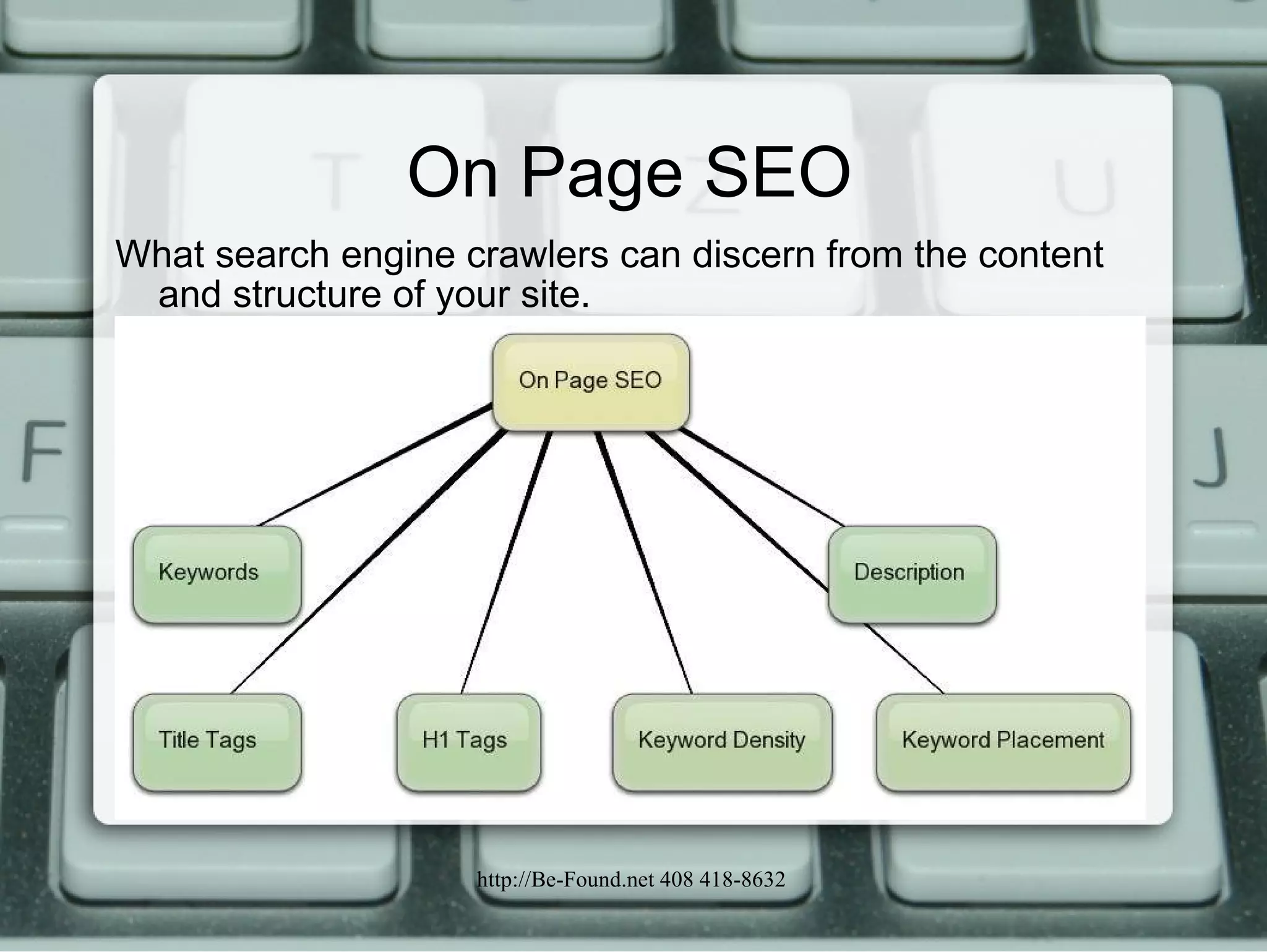
On Page SEO What search engine crawlers can discern from the content and structure of your site.
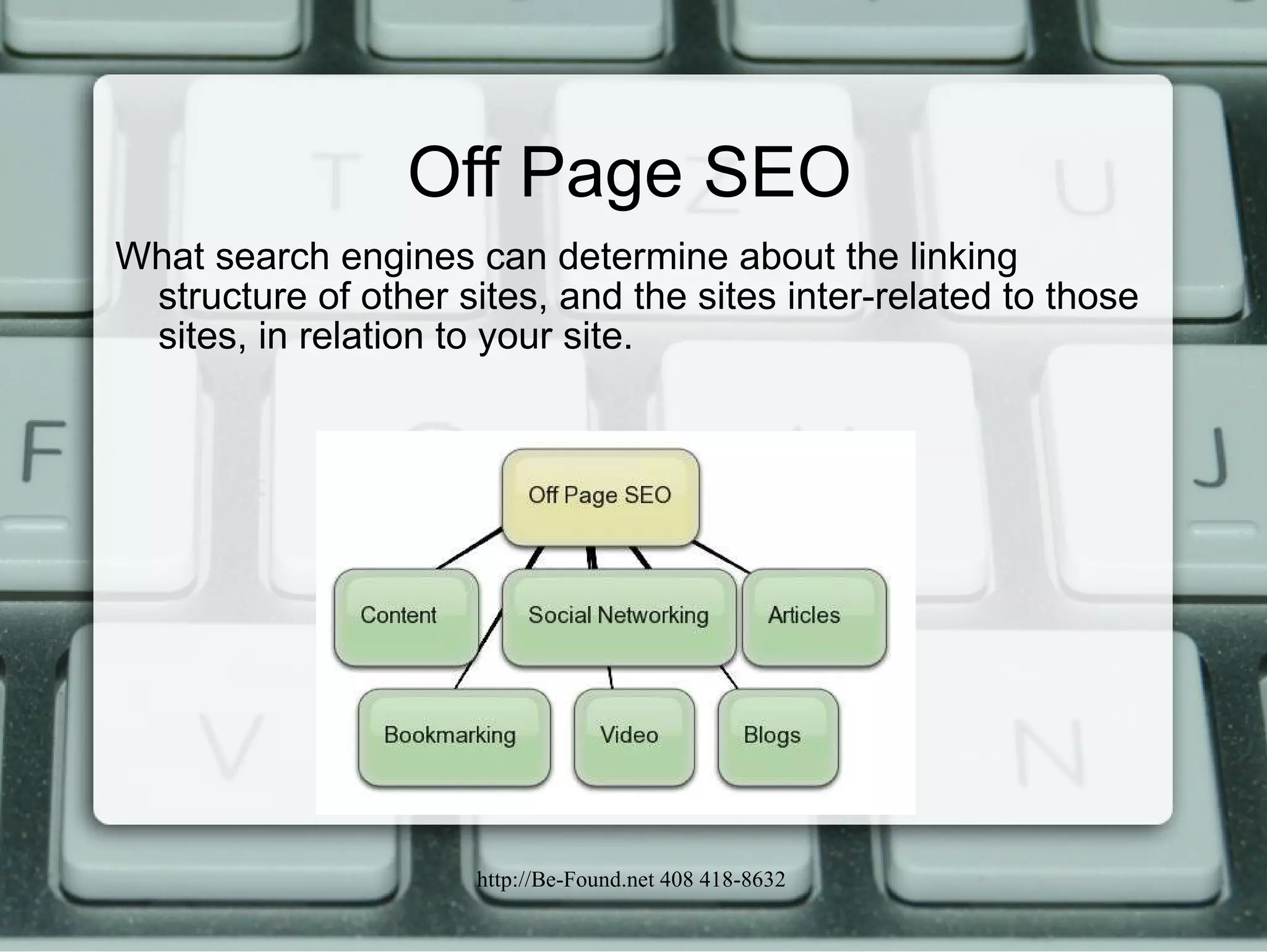
Off Page SEO What search engines can determine about the linking structure of other sites, and the sites inter-related to those sites, in relation to your site.
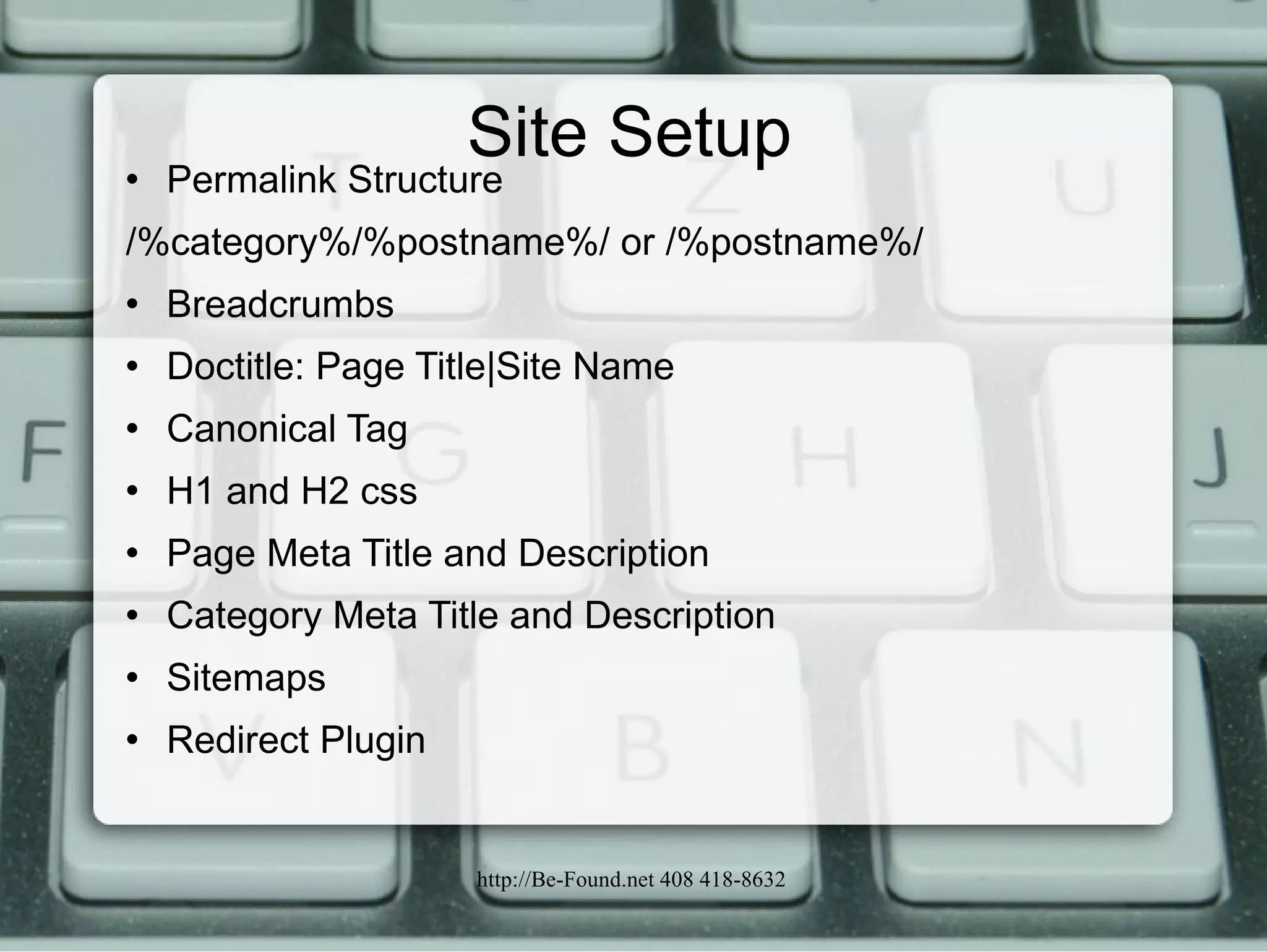
Site Setup Permalink Structure /%category%/%postname%/ or /%postname%/ Breadcrumbs Doctitle: Page Title|Site Name Canonical Tag H1 and H2 css Page Meta Title and Description Category Meta Title and Description Sitemaps Redirect Plugin
Site Setup  continued Broken Link Checker noindex/nofollow Option on Pages/Posts Ensuring that a Site's Contents Are Fully Crawlable Validation Code for Webmaster Tools in Google and Bing Google Analytics Track Keywords Entered into Your Search Box Site Speed W3 Total Cache with CDN, CSS Optimization, Good Server. Sitelinks Google Voice and Call Back Button
Site Setup to Avoid Javascript Is Not Read by the Search Bots- if you need the content read; otherwise Javascript can hide unrelated content Text in Images Is Not Read Urls with 2+ Dynamic Parameters; url.com/page.php?id=4&ck=34rr&user=%tom%  Url with More than 3 Keywords; Http://www.url.com/category/keyword1-.Keyword2-keyword3-keyword4/
Site Setup to Avoid  continued Orphaned Pages and Posts Pages Requiring a "Session Id" or Cookie to Enable Navigation Pages Requiring a Login if you Need the Content read by bots Pages That Re-direct Before Showing Content Cloaking- One Result to the Visitor a Different Result to the Bots Same color background as fonts
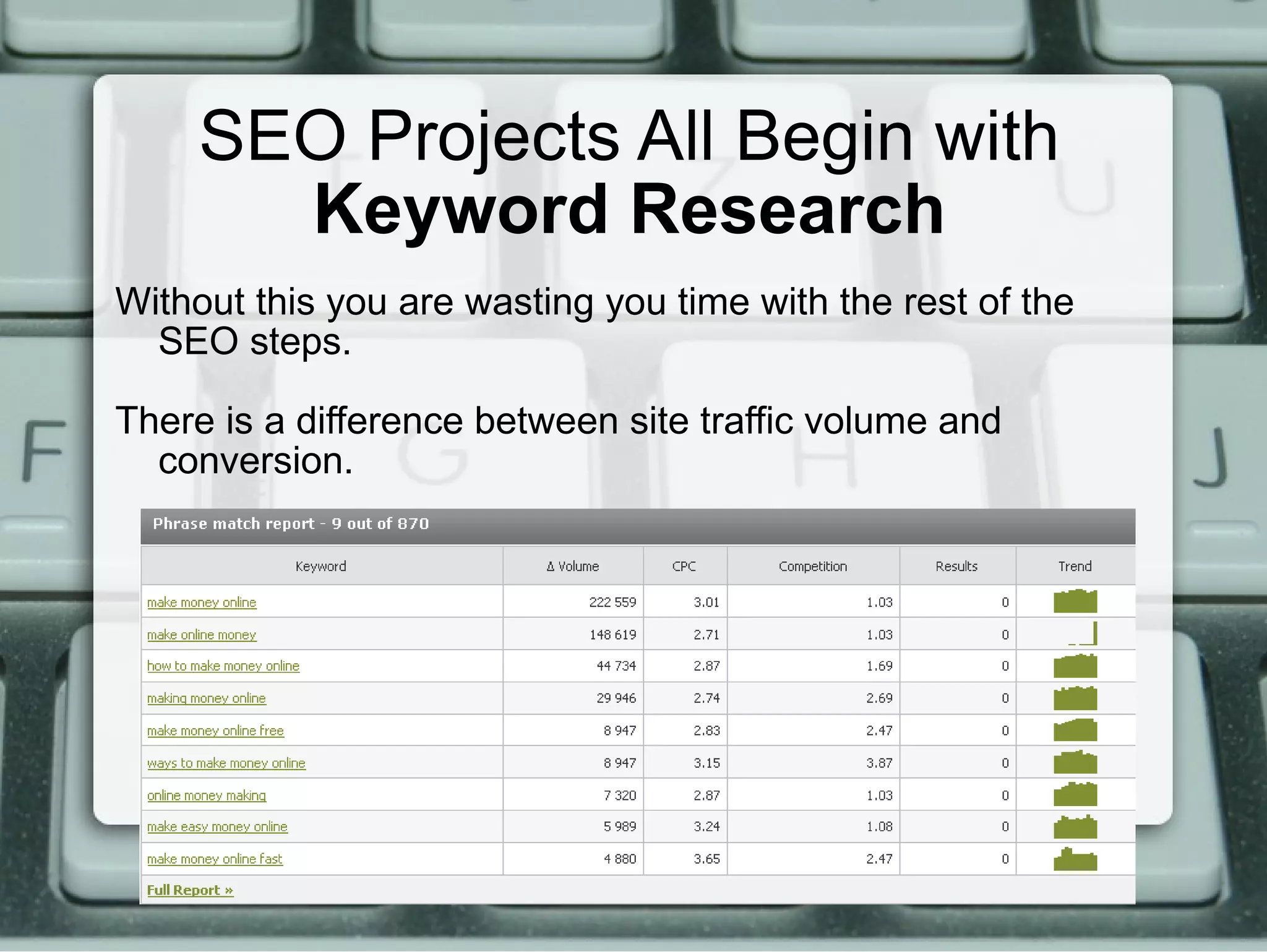
SEO Projects All Begin with  Keyword Research Without this you are wasting you time with the rest of the SEO steps. There is a difference between site traffic volume and conversion.
Implement the SEO Always Refer to you Keyword Research List Use Keywords in the Permalink Author Keyword Rich Meta Title for Pages, Posts and Categories Author a Page/Post/Category Description Which Will Encourage Clicks Name Image Files to Match the Keywords Use related keyphrases in the content Use Alt and Title Tags for the Images Sitelinks- Keyword in Anchor Text and Text Directly Before and after the Link -  No Click Here
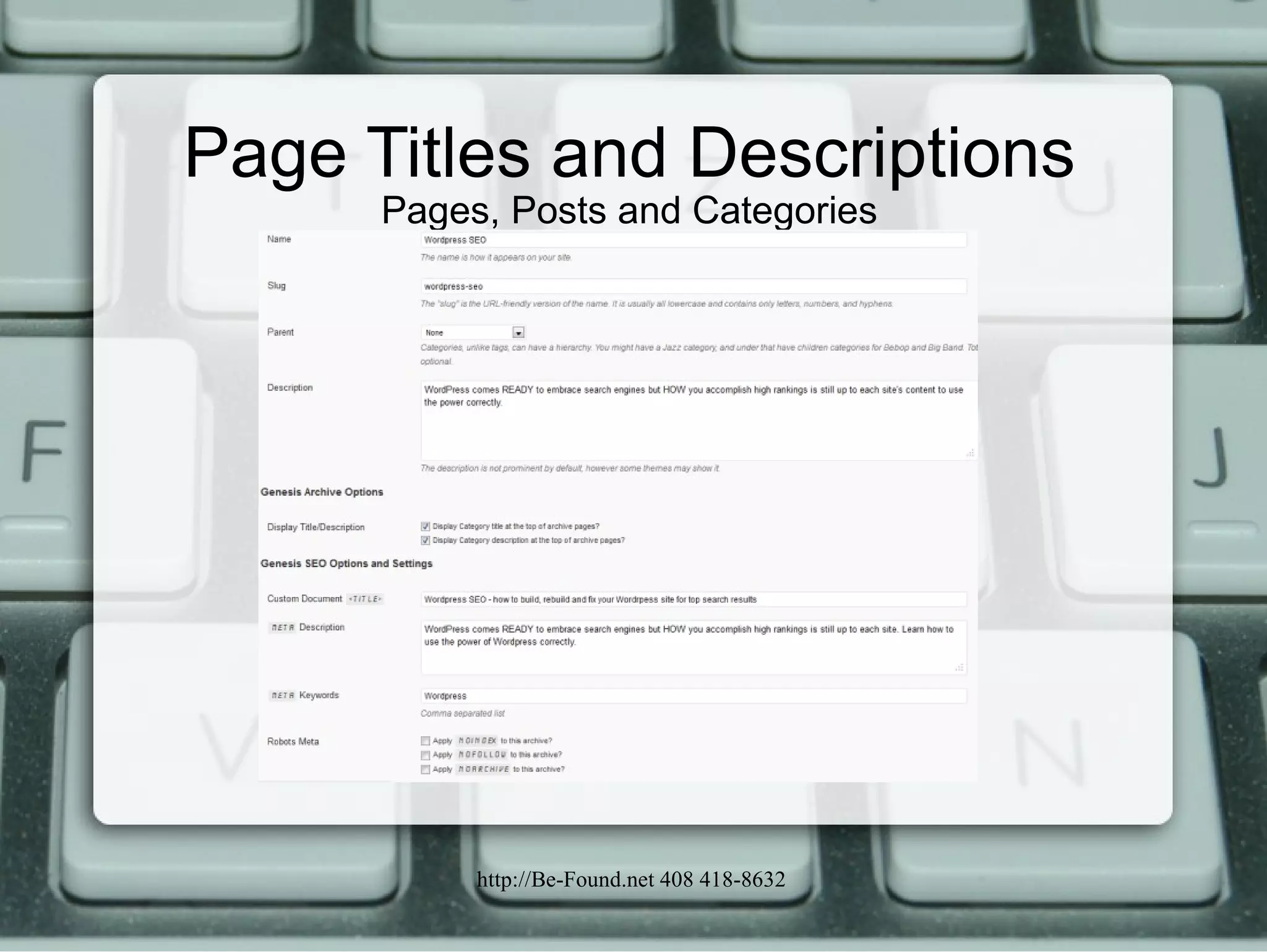
Page Titles and Descriptions Pages, Posts and Categories
New Site Design Process In Addition to the Techniques Listed Earlier Keyword Research, What Categories Could the Site Include Competitive Analysis - How Well SEO’d Are the Competitor’s Sites, How Much Are They Paying for PPC and How Many Other Sites Compete for the Same Keyword Space. Compare the Two and Determine What Your Site must Include and What it Should Focus On Silo the Site Content Using the Categories and Determine Related Pages and Catagorize the Navigation.  Some Navigation May Only Be in the Sidebar and Not the Top Navigation.
New Site Design Process In Addition to the Techniques Listed Earlier Know Where Your Content and Navigation Will Show in the Source Code.  Bots Start at the Top Assuming the Most Important Information Is at the Top.  Include Your Social Properties- Get Facebook, Linkedin, Twitter and Youtube Pages Use Video and Audio as Well as Content. Focus 2 Keyword Phrases per Post Use Redirect Plugin to Move SEO Juice from Old to New Pages
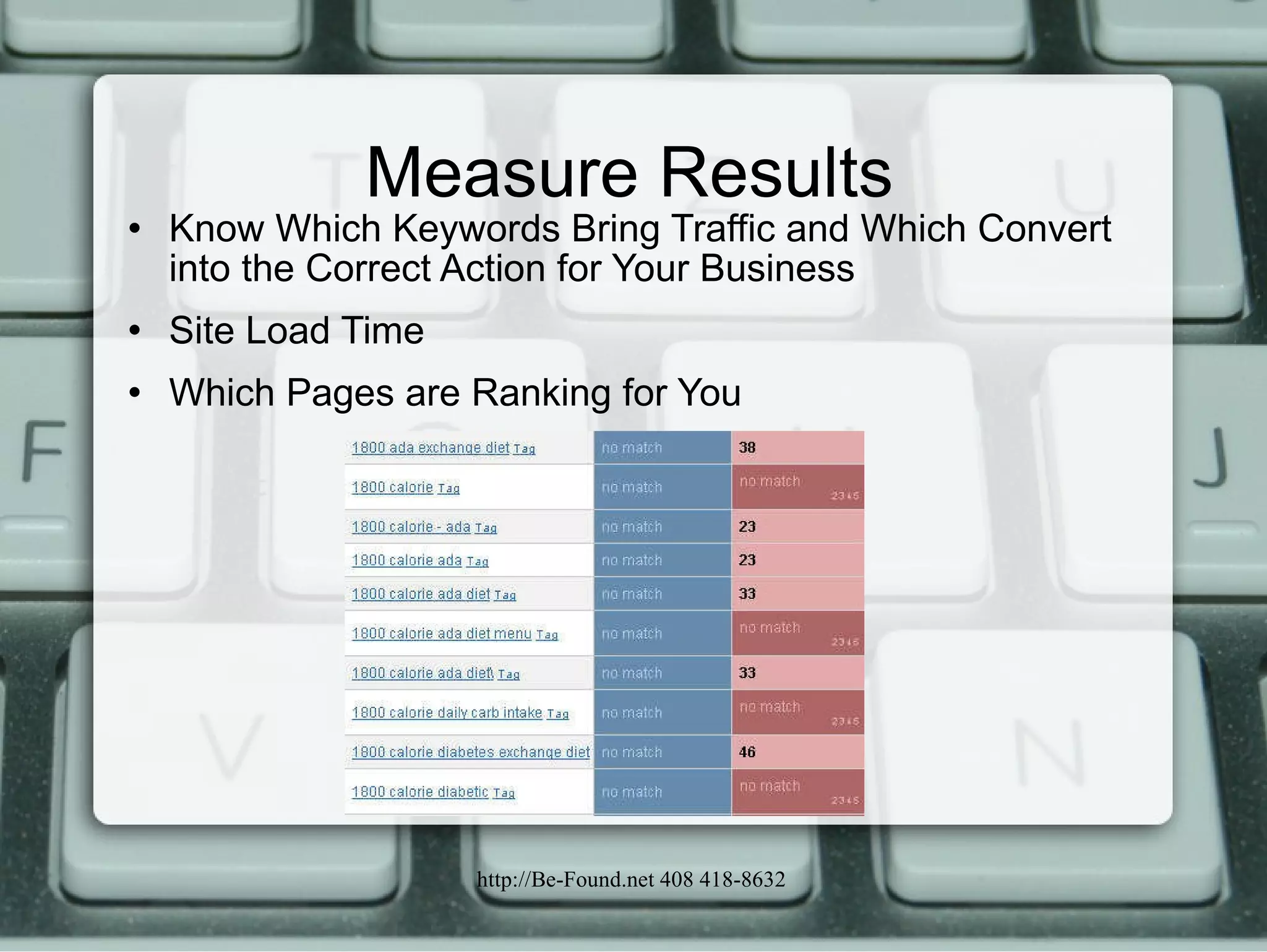
Measure Results Know Which Keywords Bring Traffic and Which Convert into the Correct Action for Your Business Site Load Time Which Pages are Ranking for You
The Risks to DIY Plugin Incorrect Check Boxes Set – Ex. Noindex Home Page Adding Plugins That Trump Your Theme Settings and the Fields Are Blank Learning Curve – stick to the knitting
SEO Plugins yoast.com/wordpress/seo/ wordpress.org/extend/plugins/seo-ultimate Scribe - Premium Plugin  scribeseo.com/ wordpress.org/extend/plugins/seo-data-transporter/
Sitelinks Plugins Seo Auto Links & Related Post  When the Meta Keywords are Found in a Page/Post, it Will Automatically Converte into Internal Links  wordpress.org/extend/plugins/seo-alrp/ OR Related Posts - Yet Another Related Posts Plugin  wordpress.org/extend/plugins/yet-another-related-posts-plugin/ Efficient Related Posts  wordpress.org/extend/plugins/efficient-related-posts/
Track Search Box Plugins Know the Keywords Entered at your Site If you have a Search box on your blog, Search Meter automatically records what people are searching for = New Keyword  wordpress.org/extend/plugins/search-meter/ Add Custom Google Search  – Purchase from Google, Implement in the Theme ($100 year free with Ads)
Analytics Plugins Google Analytics  wordpress.org/extend/plugins/google-analytics-for-wordpress/ Google Analytics Dashboard  wordpress.org/extend/plugins/google-analytics-dashboard/ Woopra real-time Web tracking and analysis application  wordpress.org/extend/plugins/woopra/
Sitemap Plugins XML Sitemap & Google News Sitemap Feeds Google XML Sitemaps Google XML Sitemap for Videos Google XML Sitemaps for Multisite
Additional Plugins Redirection  wordpress.org/extend/plugins/redirection/ Broken Links Checker Breadcrumbs – May Be in Your Theme Canonical Tag  – May Be in Your Theme
SEO with Wordpress

Wordpress SEO

  • 1.
    SEO with WordPressLearn how to use the power of Wordpress SEO correctly Lou Anne McKeefery http://Be-Found.net June 2011
  • 2.
    We Will CoverRetrofitting an Existing Site Building a New Site Measure Results The Risks of DIY
  • 3.
    But First... Whatis SEO? The process of improving the visibility of a website or a web page in search engines via the "natural" or un-paid ("organic" or "algorithmic") search results. SEO may target different kinds of search, including image search, local search, video search, academic search, news search and industry-specific vertical search engines.
  • 4.
    On Page SEOWhat search engine crawlers can discern from the content and structure of your site.
  • 5.
    Off Page SEOWhat search engines can determine about the linking structure of other sites, and the sites inter-related to those sites, in relation to your site.
  • 6.
    Site Setup PermalinkStructure /%category%/%postname%/ or /%postname%/ Breadcrumbs Doctitle: Page Title|Site Name Canonical Tag H1 and H2 css Page Meta Title and Description Category Meta Title and Description Sitemaps Redirect Plugin
  • 7.
    Site Setup continued Broken Link Checker noindex/nofollow Option on Pages/Posts Ensuring that a Site's Contents Are Fully Crawlable Validation Code for Webmaster Tools in Google and Bing Google Analytics Track Keywords Entered into Your Search Box Site Speed W3 Total Cache with CDN, CSS Optimization, Good Server. Sitelinks Google Voice and Call Back Button
  • 8.
    Site Setup toAvoid Javascript Is Not Read by the Search Bots- if you need the content read; otherwise Javascript can hide unrelated content Text in Images Is Not Read Urls with 2+ Dynamic Parameters; url.com/page.php?id=4&ck=34rr&user=%tom% Url with More than 3 Keywords; Http://www.url.com/category/keyword1-.Keyword2-keyword3-keyword4/
  • 9.
    Site Setup toAvoid continued Orphaned Pages and Posts Pages Requiring a "Session Id" or Cookie to Enable Navigation Pages Requiring a Login if you Need the Content read by bots Pages That Re-direct Before Showing Content Cloaking- One Result to the Visitor a Different Result to the Bots Same color background as fonts
  • 10.
    SEO Projects AllBegin with Keyword Research Without this you are wasting you time with the rest of the SEO steps. There is a difference between site traffic volume and conversion.
  • 11.
    Implement the SEOAlways Refer to you Keyword Research List Use Keywords in the Permalink Author Keyword Rich Meta Title for Pages, Posts and Categories Author a Page/Post/Category Description Which Will Encourage Clicks Name Image Files to Match the Keywords Use related keyphrases in the content Use Alt and Title Tags for the Images Sitelinks- Keyword in Anchor Text and Text Directly Before and after the Link - No Click Here
  • 12.
    Page Titles andDescriptions Pages, Posts and Categories
  • 13.
    New Site DesignProcess In Addition to the Techniques Listed Earlier Keyword Research, What Categories Could the Site Include Competitive Analysis - How Well SEO’d Are the Competitor’s Sites, How Much Are They Paying for PPC and How Many Other Sites Compete for the Same Keyword Space. Compare the Two and Determine What Your Site must Include and What it Should Focus On Silo the Site Content Using the Categories and Determine Related Pages and Catagorize the Navigation. Some Navigation May Only Be in the Sidebar and Not the Top Navigation.
  • 14.
    New Site DesignProcess In Addition to the Techniques Listed Earlier Know Where Your Content and Navigation Will Show in the Source Code. Bots Start at the Top Assuming the Most Important Information Is at the Top. Include Your Social Properties- Get Facebook, Linkedin, Twitter and Youtube Pages Use Video and Audio as Well as Content. Focus 2 Keyword Phrases per Post Use Redirect Plugin to Move SEO Juice from Old to New Pages
  • 15.
    Measure Results KnowWhich Keywords Bring Traffic and Which Convert into the Correct Action for Your Business Site Load Time Which Pages are Ranking for You
  • 16.
    The Risks toDIY Plugin Incorrect Check Boxes Set – Ex. Noindex Home Page Adding Plugins That Trump Your Theme Settings and the Fields Are Blank Learning Curve – stick to the knitting
  • 17.
    SEO Plugins yoast.com/wordpress/seo/wordpress.org/extend/plugins/seo-ultimate Scribe - Premium Plugin scribeseo.com/ wordpress.org/extend/plugins/seo-data-transporter/
  • 18.
    Sitelinks Plugins SeoAuto Links & Related Post When the Meta Keywords are Found in a Page/Post, it Will Automatically Converte into Internal Links wordpress.org/extend/plugins/seo-alrp/ OR Related Posts - Yet Another Related Posts Plugin wordpress.org/extend/plugins/yet-another-related-posts-plugin/ Efficient Related Posts wordpress.org/extend/plugins/efficient-related-posts/
  • 19.
    Track Search BoxPlugins Know the Keywords Entered at your Site If you have a Search box on your blog, Search Meter automatically records what people are searching for = New Keyword wordpress.org/extend/plugins/search-meter/ Add Custom Google Search – Purchase from Google, Implement in the Theme ($100 year free with Ads)
  • 20.
    Analytics Plugins GoogleAnalytics wordpress.org/extend/plugins/google-analytics-for-wordpress/ Google Analytics Dashboard wordpress.org/extend/plugins/google-analytics-dashboard/ Woopra real-time Web tracking and analysis application wordpress.org/extend/plugins/woopra/
  • 21.
    Sitemap Plugins XMLSitemap & Google News Sitemap Feeds Google XML Sitemaps Google XML Sitemap for Videos Google XML Sitemaps for Multisite
  • 22.
    Additional Plugins Redirection wordpress.org/extend/plugins/redirection/ Broken Links Checker Breadcrumbs – May Be in Your Theme Canonical Tag – May Be in Your Theme
  • 23.