1
‫ر‬َ‫ـد‬ْ‫ق‬‫ِـ‬‫ن‬،،،‫لما‬‫اننا‬ ‫نصدق‬ْْ‫ق‬ِ‫ن‬‫ر‬َ‫د‬
2
 Introduction
 Cloud Computing Definition
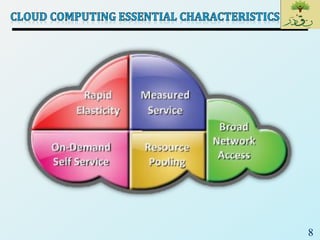
 Cloud Computing Essential Characteristics
 Cloud Computing Benefits
 Cloud Service Models
 Cloud Deployment Models
 Economics of Cloud
 Cloud Challenges – Consumer’s Perspective
 Cloud Challenges – Provider’s Perspective
 Cloud Computing: Technological Foundations
3
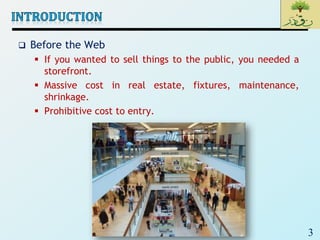
 Before the Web
 If you wanted to sell things to the public, you needed a
storefront.
 Massive cost in real estate, fixtures, maintenance,
shrinkage.
 Prohibitive cost to entry.
4
 What if …
 You could have hundreds of millions of storefronts
worldwide?
• Without real estate
• Without fixtures
• Without maintenance
• Without shrinkage
• With [relatively] zero cost to entry
 The Web changed everything
5
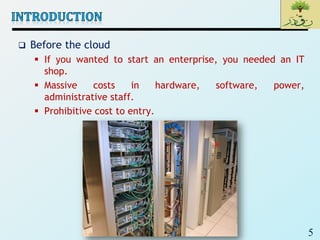
 Before the cloud
 If you wanted to start an enterprise, you needed an IT
shop.
 Massive costs in hardware, software, power,
administrative staff.
 Prohibitive cost to entry.
6
 What if …
 You could have unlimited computing resources?
• All the processing power you want
• All the data storage you want
• Data mining whenever you want
 Cloud computing will be the biggest change to our industry
since the rise of the Internet
7
 Cloud computing is the delivery of computing as a service
rather than a product, whereby shared resources, software,
and information are provided to computers and other devices
as a metered service over a network
 Cloud computing provides computation, software, data
access, and storage resources without requiring cloud users to
know the location and other details of the computing
infrastructure.
 End users access cloud based applications through a web
browser or a light weight desktop or mobile app while the
business software and data are stored on servers at a remote
location.
 Cloud application providers strive to give the same or better
service and performance as if the software programs were
installed locally on end-user computers.
8
9
 Enables consumers to get computing
resources as and when required,
without any human intervention
 Facilitates consumer to leverage
“ready to use” services or, enables to
choose required services from the
service catalog
 Allows provisioning of resources using
self-service interface
 Self-service interface should be user-
friendly
10
 Cloud services are accessed via the
network, usually the internet, from a
broad range of client platforms such
as:
 Desktop computer
 Laptop
 Mobile phone
 Thin Client
 Eliminates the need for accessing a
particular client platform to access
the services
 Enables accessing the services from
anywhere across the globe
11
 IT resources (compute, storage,
network) are pooled to serve multiple
consumers
 Based on multi-tenant model
 Consumer has no knowledge about
the exact location of the resources
provided
 Resources are dynamically assigned
and reassigned based on the
consumer demand
12
 Ability to scale IT resources rapidly,
as required, to fulfill the changing
needs without interruption of service
 Resources can be both scaled up and
scaled down dynamically
 To the consumer, the Cloud appears
to be infinite
 Consumers can start with minimal
computing power and can expand
their environment to any size
 Consumer can go from 5 servers to 50
or from 50 servers to 5
13
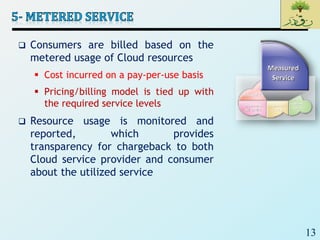
 Consumers are billed based on the
metered usage of Cloud resources
 Cost incurred on a pay-per-use basis
 Pricing/billing model is tied up with
the required service levels
 Resource usage is monitored and
reported, which provides
transparency for chargeback to both
Cloud service provider and consumer
about the utilized service
14
 If you use Flickr or Facebook or LinkedIn or Twitter or
Backpack or [insert hundreds of other sites here], you’re
using the cloud
 Cloud is a metaphor for the internet
15
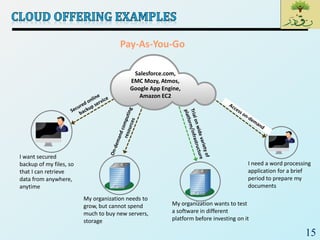
Pay-As-You-Go
I want secured
backup of my files, so
that I can retrieve
data from anywhere,
anytime
My organization needs to
grow, but cannot spend
much to buy new servers,
storage
My organization wants to test
a software in different
platform before investing on it
I need a word processing
application for a brief
period to prepare my
documents
Salesforce.com,
EMC Mozy, Atmos,
Google App Engine,
Amazon EC2
16
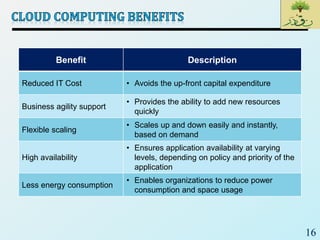
Benefit Description
Reduced IT Cost • Avoids the up-front capital expenditure
Business agility support
• Provides the ability to add new resources
quickly
Flexible scaling
• Scales up and down easily and instantly,
based on demand
High availability
• Ensures application availability at varying
levels, depending on policy and priority of the
application
Less energy consumption
• Enables organizations to reduce power
consumption and space usage
17
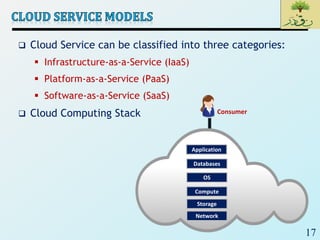
 Cloud Service can be classified into three categories:
 Infrastructure-as-a-Service (IaaS)
 Platform-as-a-Service (PaaS)
 Software-as-a-Service (SaaS)
 Cloud Computing Stack Consumer
Application
Databases
OS
Compute
Storage
Network
18
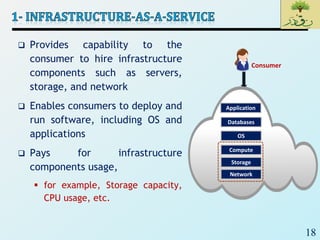
 Provides capability to the
consumer to hire infrastructure
components such as servers,
storage, and network
 Enables consumers to deploy and
run software, including OS and
applications
 Pays for infrastructure
components usage,
 for example, Storage capacity,
CPU usage, etc.
Consumer
Application
Databases
OS
Compute
Storage
Network
19
 Amazon Elastic Compute Cloud (EC2) is an IaaS model
that provides resizable compute capacity on a pay-per-
use basis
 Allows consumers to hire virtual compute on which they
run their own applications
 EMC Atmos Online provides Storage as a service
 Internet accessible, on demand storage
20
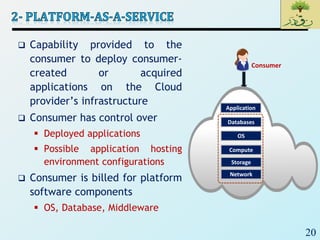
 Capability provided to the
consumer to deploy consumer-
created or acquired
applications on the Cloud
provider’s infrastructure
 Consumer has control over
 Deployed applications
 Possible application hosting
environment configurations
 Consumer is billed for platform
software components
 OS, Database, Middleware
Consumer
Application
Databases
OS
Compute
Storage
Network
21
 Google App Engine provides platform for consumers to
deploy or create their own applications
 Allows dynamic allocation of system resources for an
application based on the actual demand
 Provides Java and Python environment to create and
deploy application
 Microsoft Azure Platform provides diverse functionalities
to build applications
 Uses existing skills with Visual Studio and .Net to build
applications
 Builds applications also in Java and PHP using Eclipse and
other tools
22
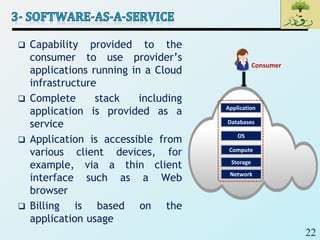
 Capability provided to the
consumer to use provider’s
applications running in a Cloud
infrastructure
 Complete stack including
application is provided as a
service
 Application is accessible from
various client devices, for
example, via a thin client
interface such as a Web
browser
 Billing is based on the
application usage
Consumer
Application
Databases
OS
Compute
Storage
Network
23
 EMC Mozy is a Software-as-a-Service solution for on-line
backup
 Consumers can leverage the Mozy console to perform
automatic, secured, online backup and recovery of their
data with ease
 Salesforce.com is a Software-as-a-Service solution for
CRM (customer relationship management) application
 Consumers can access CRM applications from anywhere,
any time
24
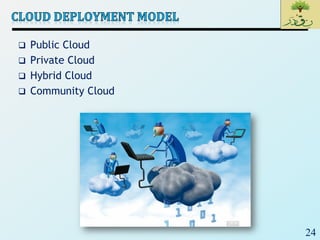
 Public Cloud
 Private Cloud
 Hybrid Cloud
 Community Cloud
25
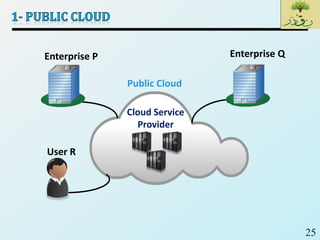
Enterprise P
User R
Cloud Service
Provider
Public Cloud
Enterprise Q
26
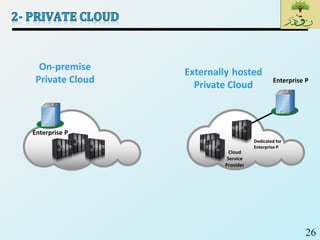
Enterprise P
On-premise
Private Cloud
Cloud
Service
Provider
Enterprise P
Externally hosted
Private Cloud
Dedicated for
Enterprise P
27
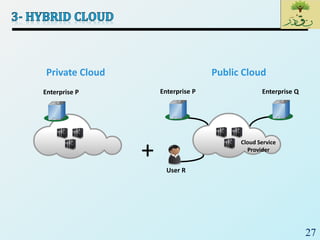
Private Cloud
+
Enterprise P
User R
Cloud Service
Provider
Public Cloud
Enterprise QEnterprise P
28
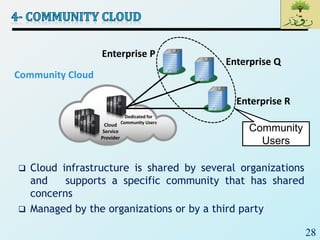
 Cloud infrastructure is shared by several organizations
and supports a specific community that has shared
concerns
 Managed by the organizations or by a third party
Cloud
Service
Provider
Dedicated for
Community Users
Enterprise P
Enterprise Q
Enterprise R
Community
Users
Community Cloud
29
 Cloud has changed the economics of IT
 Cloud enables to move from a CAPEX to an OPEX model
 Cloud provides the following key cost savings
 Infrastructure cost
 Management cost
 Power and energy cost
30
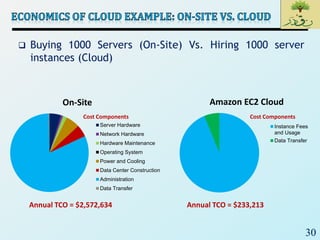
 Buying 1000 Servers (On-Site) Vs. Hiring 1000 server
instances (Cloud)
Annual TCO = $233,213
Cost Components
On-Site
Server Hardware
Network Hardware
Hardware Maintenance
Operating System
Power and Cooling
Data Center Construction
Administration
Data Transfer
Amazon EC2 Cloud
Instance Fees
and Usage
Data Transfer
Cost Components
Annual TCO = $2,572,634
31
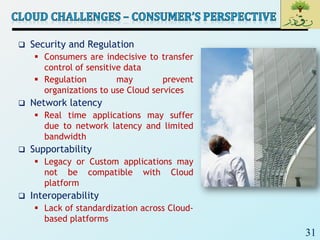
 Security and Regulation
 Consumers are indecisive to transfer
control of sensitive data
 Regulation may prevent
organizations to use Cloud services
 Network latency
 Real time applications may suffer
due to network latency and limited
bandwidth
 Supportability
 Legacy or Custom applications may
not be compatible with Cloud
platform
 Interoperability
 Lack of standardization across Cloud-
based platforms
32
 Service warranty and service cost
 Resources must be kept ready to meet unpredictable
demand
 Hefty penalty, if SLAs are not fulfilled
 Huge numbers of software to manage
 Huge number of applications and platform software to
purchase
 ROI (Return-on-Investment) is unpredictable
 No standard Cloud access interface
 Cloud customers want open APIs
 Need agreement among Cloud providers for
standardization
33
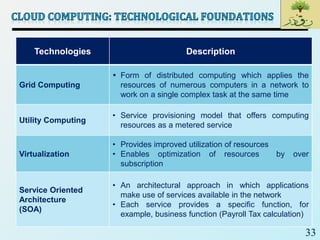
Technologies Description
Grid Computing
 Form of distributed computing which applies the
resources of numerous computers in a network to
work on a single complex task at the same time
Utility Computing
• Service provisioning model that offers computing
resources as a metered service
Virtualization
• Provides improved utilization of resources
• Enables optimization of resources by over
subscription
Service Oriented
Architecture
(SOA)
• An architectural approach in which applications
make use of services available in the network
• Each service provides a specific function, for
example, business function (Payroll Tax calculation)
34
35
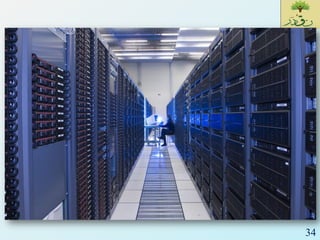
 Data Centers are specialized environments that safeguard
your company's most valuable equipment and intellectual
property.
 Data Centers house the devices that do the following:
 Process your business transactions
 Host your website
 Process and store your intellectual property
 Maintain your financial records
 Route your e-mails
 Important Issues:
 Redundancy
 Efficiency
 Utilization
 Management
35
36
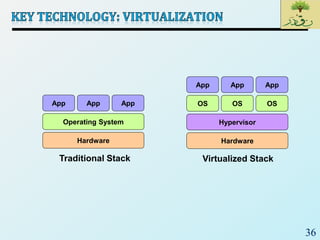
Hardware
Operating System
App App App
Traditional Stack
Hardware
OS
App App App
Hypervisor
OS OS
Virtualized Stack
37
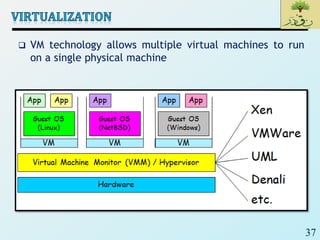
 VM technology allows multiple virtual machines to run
on a single physical machine
38
 Advantages of virtual machines:
 Run operating systems where the physical hardware is
unavailable;
 Easier to create new machines, backup machines, etc.;
 Software testing using “clean” installs of operating
systems and software;
 Emulate more machines than are physically available;
 Timeshare lightly loaded systems on one host,
 Debug problems (suspend and resume the problem
machine);
 Easy migration of virtual machines (shutdown needed or
not);
 Run legacy systems!
38
39
 “Introduction to cloud computing”,
ibm.com/developerworks/
 “Cloud Infrastructure and services”, EMC2
40

SE2_Lec 23_Introduction to Cloud Computing

  • 1.
  • 2.
    2  Introduction  CloudComputing Definition  Cloud Computing Essential Characteristics  Cloud Computing Benefits  Cloud Service Models  Cloud Deployment Models  Economics of Cloud  Cloud Challenges – Consumer’s Perspective  Cloud Challenges – Provider’s Perspective  Cloud Computing: Technological Foundations
  • 3.
    3  Before theWeb  If you wanted to sell things to the public, you needed a storefront.  Massive cost in real estate, fixtures, maintenance, shrinkage.  Prohibitive cost to entry.
  • 4.
    4  What if…  You could have hundreds of millions of storefronts worldwide? • Without real estate • Without fixtures • Without maintenance • Without shrinkage • With [relatively] zero cost to entry  The Web changed everything
  • 5.
    5  Before thecloud  If you wanted to start an enterprise, you needed an IT shop.  Massive costs in hardware, software, power, administrative staff.  Prohibitive cost to entry.
  • 6.
    6  What if…  You could have unlimited computing resources? • All the processing power you want • All the data storage you want • Data mining whenever you want  Cloud computing will be the biggest change to our industry since the rise of the Internet
  • 7.
    7  Cloud computingis the delivery of computing as a service rather than a product, whereby shared resources, software, and information are provided to computers and other devices as a metered service over a network  Cloud computing provides computation, software, data access, and storage resources without requiring cloud users to know the location and other details of the computing infrastructure.  End users access cloud based applications through a web browser or a light weight desktop or mobile app while the business software and data are stored on servers at a remote location.  Cloud application providers strive to give the same or better service and performance as if the software programs were installed locally on end-user computers.
  • 8.
  • 9.
    9  Enables consumersto get computing resources as and when required, without any human intervention  Facilitates consumer to leverage “ready to use” services or, enables to choose required services from the service catalog  Allows provisioning of resources using self-service interface  Self-service interface should be user- friendly
  • 10.
    10  Cloud servicesare accessed via the network, usually the internet, from a broad range of client platforms such as:  Desktop computer  Laptop  Mobile phone  Thin Client  Eliminates the need for accessing a particular client platform to access the services  Enables accessing the services from anywhere across the globe
  • 11.
    11  IT resources(compute, storage, network) are pooled to serve multiple consumers  Based on multi-tenant model  Consumer has no knowledge about the exact location of the resources provided  Resources are dynamically assigned and reassigned based on the consumer demand
  • 12.
    12  Ability toscale IT resources rapidly, as required, to fulfill the changing needs without interruption of service  Resources can be both scaled up and scaled down dynamically  To the consumer, the Cloud appears to be infinite  Consumers can start with minimal computing power and can expand their environment to any size  Consumer can go from 5 servers to 50 or from 50 servers to 5
  • 13.
    13  Consumers arebilled based on the metered usage of Cloud resources  Cost incurred on a pay-per-use basis  Pricing/billing model is tied up with the required service levels  Resource usage is monitored and reported, which provides transparency for chargeback to both Cloud service provider and consumer about the utilized service
  • 14.
    14  If youuse Flickr or Facebook or LinkedIn or Twitter or Backpack or [insert hundreds of other sites here], you’re using the cloud  Cloud is a metaphor for the internet
  • 15.
    15 Pay-As-You-Go I want secured backupof my files, so that I can retrieve data from anywhere, anytime My organization needs to grow, but cannot spend much to buy new servers, storage My organization wants to test a software in different platform before investing on it I need a word processing application for a brief period to prepare my documents Salesforce.com, EMC Mozy, Atmos, Google App Engine, Amazon EC2
  • 16.
    16 Benefit Description Reduced ITCost • Avoids the up-front capital expenditure Business agility support • Provides the ability to add new resources quickly Flexible scaling • Scales up and down easily and instantly, based on demand High availability • Ensures application availability at varying levels, depending on policy and priority of the application Less energy consumption • Enables organizations to reduce power consumption and space usage
  • 17.
    17  Cloud Servicecan be classified into three categories:  Infrastructure-as-a-Service (IaaS)  Platform-as-a-Service (PaaS)  Software-as-a-Service (SaaS)  Cloud Computing Stack Consumer Application Databases OS Compute Storage Network
  • 18.
    18  Provides capabilityto the consumer to hire infrastructure components such as servers, storage, and network  Enables consumers to deploy and run software, including OS and applications  Pays for infrastructure components usage,  for example, Storage capacity, CPU usage, etc. Consumer Application Databases OS Compute Storage Network
  • 19.
    19  Amazon ElasticCompute Cloud (EC2) is an IaaS model that provides resizable compute capacity on a pay-per- use basis  Allows consumers to hire virtual compute on which they run their own applications  EMC Atmos Online provides Storage as a service  Internet accessible, on demand storage
  • 20.
    20  Capability providedto the consumer to deploy consumer- created or acquired applications on the Cloud provider’s infrastructure  Consumer has control over  Deployed applications  Possible application hosting environment configurations  Consumer is billed for platform software components  OS, Database, Middleware Consumer Application Databases OS Compute Storage Network
  • 21.
    21  Google AppEngine provides platform for consumers to deploy or create their own applications  Allows dynamic allocation of system resources for an application based on the actual demand  Provides Java and Python environment to create and deploy application  Microsoft Azure Platform provides diverse functionalities to build applications  Uses existing skills with Visual Studio and .Net to build applications  Builds applications also in Java and PHP using Eclipse and other tools
  • 22.
    22  Capability providedto the consumer to use provider’s applications running in a Cloud infrastructure  Complete stack including application is provided as a service  Application is accessible from various client devices, for example, via a thin client interface such as a Web browser  Billing is based on the application usage Consumer Application Databases OS Compute Storage Network
  • 23.
    23  EMC Mozyis a Software-as-a-Service solution for on-line backup  Consumers can leverage the Mozy console to perform automatic, secured, online backup and recovery of their data with ease  Salesforce.com is a Software-as-a-Service solution for CRM (customer relationship management) application  Consumers can access CRM applications from anywhere, any time
  • 24.
    24  Public Cloud Private Cloud  Hybrid Cloud  Community Cloud
  • 25.
    25 Enterprise P User R CloudService Provider Public Cloud Enterprise Q
  • 26.
    26 Enterprise P On-premise Private Cloud Cloud Service Provider EnterpriseP Externally hosted Private Cloud Dedicated for Enterprise P
  • 27.
    27 Private Cloud + Enterprise P UserR Cloud Service Provider Public Cloud Enterprise QEnterprise P
  • 28.
    28  Cloud infrastructureis shared by several organizations and supports a specific community that has shared concerns  Managed by the organizations or by a third party Cloud Service Provider Dedicated for Community Users Enterprise P Enterprise Q Enterprise R Community Users Community Cloud
  • 29.
    29  Cloud haschanged the economics of IT  Cloud enables to move from a CAPEX to an OPEX model  Cloud provides the following key cost savings  Infrastructure cost  Management cost  Power and energy cost
  • 30.
    30  Buying 1000Servers (On-Site) Vs. Hiring 1000 server instances (Cloud) Annual TCO = $233,213 Cost Components On-Site Server Hardware Network Hardware Hardware Maintenance Operating System Power and Cooling Data Center Construction Administration Data Transfer Amazon EC2 Cloud Instance Fees and Usage Data Transfer Cost Components Annual TCO = $2,572,634
  • 31.
    31  Security andRegulation  Consumers are indecisive to transfer control of sensitive data  Regulation may prevent organizations to use Cloud services  Network latency  Real time applications may suffer due to network latency and limited bandwidth  Supportability  Legacy or Custom applications may not be compatible with Cloud platform  Interoperability  Lack of standardization across Cloud- based platforms
  • 32.
    32  Service warrantyand service cost  Resources must be kept ready to meet unpredictable demand  Hefty penalty, if SLAs are not fulfilled  Huge numbers of software to manage  Huge number of applications and platform software to purchase  ROI (Return-on-Investment) is unpredictable  No standard Cloud access interface  Cloud customers want open APIs  Need agreement among Cloud providers for standardization
  • 33.
    33 Technologies Description Grid Computing Form of distributed computing which applies the resources of numerous computers in a network to work on a single complex task at the same time Utility Computing • Service provisioning model that offers computing resources as a metered service Virtualization • Provides improved utilization of resources • Enables optimization of resources by over subscription Service Oriented Architecture (SOA) • An architectural approach in which applications make use of services available in the network • Each service provides a specific function, for example, business function (Payroll Tax calculation)
  • 34.
  • 35.
    35  Data Centersare specialized environments that safeguard your company's most valuable equipment and intellectual property.  Data Centers house the devices that do the following:  Process your business transactions  Host your website  Process and store your intellectual property  Maintain your financial records  Route your e-mails  Important Issues:  Redundancy  Efficiency  Utilization  Management 35
  • 36.
    36 Hardware Operating System App AppApp Traditional Stack Hardware OS App App App Hypervisor OS OS Virtualized Stack
  • 37.
    37  VM technologyallows multiple virtual machines to run on a single physical machine
  • 38.
    38  Advantages ofvirtual machines:  Run operating systems where the physical hardware is unavailable;  Easier to create new machines, backup machines, etc.;  Software testing using “clean” installs of operating systems and software;  Emulate more machines than are physically available;  Timeshare lightly loaded systems on one host,  Debug problems (suspend and resume the problem machine);  Easy migration of virtual machines (shutdown needed or not);  Run legacy systems! 38
  • 39.
    39  “Introduction tocloud computing”, ibm.com/developerworks/  “Cloud Infrastructure and services”, EMC2
  • 40.