What is Cloud Computing
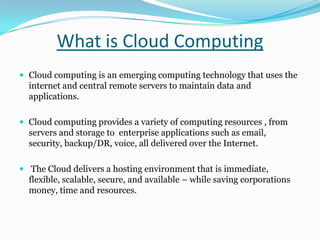
 Cloud computing is an emerging computing technology that uses the
internet and central remote servers to maintain data and
applications.
 Cloud computing provides a variety of computing resources , from
servers and storage to enterprise applications such as email,
security, backup/DR, voice, all delivered over the Internet.
 The Cloud delivers a hosting environment that is immediate,
flexible, scalable, secure, and available – while saving corporations
money, time and resources.
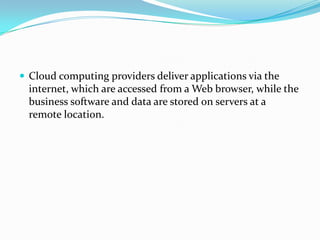
 Cloud computing providers deliver applications via the
internet, which are accessed from a Web browser, while the
business software and data are stored on servers at a
remote location.
Why Cloud- As basic Business Scenarios
 Fast Application Deployment
 Hassle Free Maintenance
 Better Resources Utilization
 Platform Independent
 Security
 Scalability
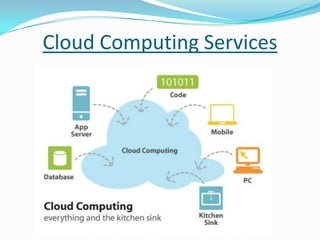
Cloud Computing Services
Google Apps: provides the service of business applications such as Gmail,
Google Talk, Google Calendar and Google Docs, etc.
 Amazon Web Services: The services offered are the Amazon EC2 ,
Amazon S3, Simple DB , Amazon SQS .
 Azure: Microsoft provides operating system services, hosting, systems
development.
 Rack space, a popular hosting company, Mosso is behind a company which
offers a basic hosting package and from this scaled as needed (and not migrate
servers). Rack space recently acquired Jungle Disk, a popular client for
Amazon S3 and that future will be integrated with Cloud Files another Mosso
service.
Example of Cloud Computing
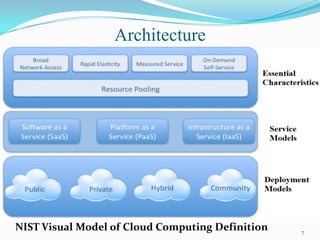
NIST Visual Model of Cloud Computing Definition 7
Architecture
1) Essential Characteristics
 On-demand self-service.
 A consumer can unilaterally provision computing capabilities
such as server time and network storage as needed
automatically, without requiring human interaction with a
service provider.
 Broad network access.
 Capabilities are available over the network and accessed
through standard mechanisms that promote use by
heterogeneous thin or thick client platforms (e.g., mobile
phones, laptops, and PDAs) as well as other traditional or
cloudbased software services.
8
 Broad network access.
 Capabilities are available over the network and accessed
through standard mechanisms that promote use by
heterogeneous thin or thick client platforms (e.g., mobile
phones, laptops, and PDAs) as well as other traditional or cloud
based software services.
 Resource pooling.
 The provider’s computing resources are pooled to serve multiple
consumers using a multi-tenant model, with different physical
and virtual resources dynamically assigned and reassigned
according to consumer demand.
9
 Resource pooling.
 The provider’s computing resources are pooled to serve
multiple consumers using a multi-tenant model, with different
physical and virtual resources dynamically assigned and
reassigned according to consumer demand.
 Rapid elasticity.
 Capabilities can be rapidly and elastically provisioned - in
some cases automatically - to quickly scale out; and
rapidly released to quickly scale in.
 To the consumer, the capabilities available for
provisioning often appear to be unlimited and can be
purchased in any quantity at any time.
10
 Measured service.
 Cloud systems automatically control and optimize resource
usage by leveraging a metering capability at some level of
abstraction appropriate to the type of service.
 Resource usage can be monitored, controlled, and reported -
providing transparency for both the provider and consumer of
the service.
11
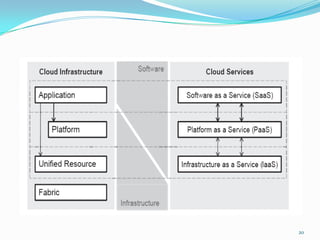
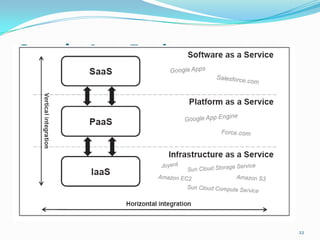
SPI Model
 Cloud Infrastructure as a Service (IaaS)
 Cloud Platform as a Service (PaaS)
 Cloud Software as a Service (SaaS)
12
2) Cloud Service Models
a. Infrastructure as a Service (IaaS)
 The capability provided to the consumer is to provision
processing, storage, networks, and other fundamental
computing resources.
 Consumer is able to deploy and run arbitrary software,
which can include operating systems and applications.
 The consumer does not manage or control the underlying
cloud infrastructure but has control over operating
systems, storage, deployed applications, and possibly
limited control of select networking components (e.g., host
firewalls).
13
b. Platform as a Service (PaaS)
 The capability provided to the consumer is to deploy onto the
cloud infrastructure consumer created or acquired applications
created using programming languages and tools supported by
the provider.
 The consumer does not manage or control the underlying cloud
infrastructure including network, servers, operating systems, or
storage, but has control over the deployed applications and
possibly application hosting environment configurations.
14
c. Software as a Service (SaaS)
 The capability provided to the consumer is to use the provider’s
applications running on a cloud infrastructure.
 The applications are accessible from various client devices through
a thin client interface such as a web browser (e.g., web-based
email).
 The consumer does not manage or control the underlying cloud
infrastructure including network, servers, operating systems,
storage, or even individual application capabilities, with the
possible exception of limited userspecific application
configuration settings.
15
3) Cloud Deployment Models
 Public Cloud.
 Private Cloud.
 Community Cloud.
 Hybrid Cloud.
16
Public Cloud:
The cloud infrastructure is made available to the general public or a large
industry group and is owned by an organization selling cloud services.
17
Private Cloud:
The cloud infrastructure is operated solely for a single organization.
It may be managed by the organization or a third party, and may exist on-
premises or off-premises.
Community Cloud:
The cloud infrastructure is shared by several organizations and supports a
specific community that has shared concerns (e.g., mission, security requirements,
policy, or compliance considerations). It may be managed by the organizations or a
third party and may exist on-premises or off-premises.
Hybrid Cloud:
The cloud infrastructure is a composition of two or more clouds (private,
community, or public) that remain unique entities but are bound together by
standardized or proprietary technology that enables data and application portability
(e.g., cloud bursting for load-balancing between clouds).
Cloud computing – Google Apps
 Email, chat.
 Google App Engine
 Create application
18
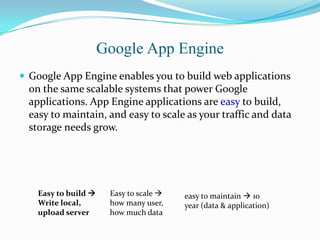
Google App Engine
 Google App Engine enables you to build web applications
on the same scalable systems that power Google
applications. App Engine applications are easy to build,
easy to maintain, and easy to scale as your traffic and data
storage needs grow.
Easy to build 
Write local,
upload server
Easy to scale 
how many user,
how much data
easy to maintain  10
year (data & application)
20
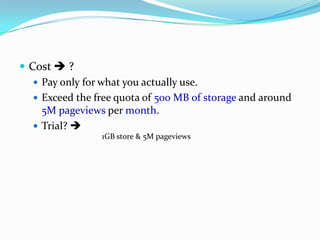
 Cost  ?
 Pay only for what you actually use.
 Exceed the free quota of 500 MB of storage and around
5M pageviews per month.
 Trial? 
1GB store & 5M pageviews
Google App Engine
22
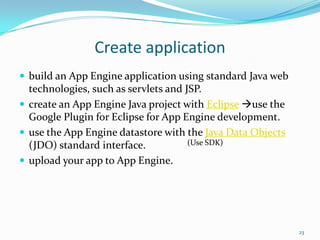
Create application
 build an App Engine application using standard Java web
technologies, such as servlets and JSP.
 create an App Engine Java project with Eclipse use the
Google Plugin for Eclipse for App Engine development.
 use the App Engine datastore with the Java Data Objects
(JDO) standard interface.
 upload your app to App Engine.
23
(Use SDK)
Grid computing vs Cloud computing
 Same
 Difference
24
Same
 Increase computing.
 Increase store.
25
Difference
 Business model
 Application.
26
1) Business model
 Cloud  consumption basis.
 Grid  project-oriented
27
Grid  academia
or government labs
Cloud  IBM,
Google, Microsoft …
TeraGrid : number
of service units
Hour, storage, view…
2) Application
 Grid Computing emerged in eScience to solve
scientific problems requiring HPC.
 Cloud Computing is rather oriented towards
applications that run permanently and have varying
demand for physical resources while running.
 the well-known CRM SaaS Salesforce.com.
28
Advantages of Cloud Computing
 Lower computer costs:
 You do not need a high-powered and high-priced computer to run
cloud computing's web-based applications.
 Improved performance:
 With few large programs hogging your computer's memory, you will
see better performance from your PC.
 Reduced software costs:
 Instead of purchasing expensive software applications, you can get
most of what you need for free-ish!
 most cloud computing applications today, such as the Google Docs suite.
29
 Instant software updates:
 Another advantage to cloud computing is that you are no longer
faced with choosing between obsolete software and high upgrade
costs.
 Improved document format compatibility.
 There are potentially no format incompatibilities when everyone is
sharing documents and applications in the cloud.
 Unlimited storage capacity:
 Cloud computing offers virtually limitless storage.
 Increased data reliability:
 Unlike desktop computing, in which if a hard disk crashes and
destroy all your valuable data, a computer crashing in the cloud
should not affect the storage of your data.
30
 Universal document access:
 That is not a problem with cloud computing, because you do not take
your documents with you.
 Latest version availability:
 When you edit a document at home, that edited version is what you
see when you access the document at work.
 Easier group collaboration:
 Sharing documents leads directly to better collaboration.
 Device independence.
 You are no longer tethered to a single computer or network.
31
Disadvantages of Cloud Computing
 Requires a constant Internet connection:
 Cloud computing is impossible if you cannot connect to the Internet.
 Does not work well with low-speed connections:
 Similarly, a low-speed Internet connection, such as that found with
dial-up services, makes cloud computing painful at best and often
impossible.
 Features might be limited:
 This situation is bound to change, but today many web-based
applications simply are not as full-featured as their desktop-based
applications.
 Can be slow:
 Even with a fast connection, web-based applications can sometimes
be slower than accessing a similar software program on your
desktop PC.
32
 Stored data might not be secure:
 Can unauthorised users gain access to your confidential data?
 Stored data can be lost:
 Theoretically, data stored in the cloud is safe, replicated across
multiple machines.
 But on the off chance that your data goes missing, you have no physical
or local backup.
33
Preparing for the Future
Sampling of IT skills likely to be in demand in the future
 Functional application development and support
 I.e. Oracle, SAP, SQL, linking hardware to software
 Leveraging data to make strategic business decisions
 I.e. Business Intelligence : Applying sales forecasts to inventory and manufacturing
decisions
 Mobile apps
 Android, iPhone, Windows Mobile
 WiFi engineers
 USF to include broadband communications (LTE replaces GSM/CDMA)
 Optical engineers
 Optical offers the highest bandwidth today (PON, CWDM, DWDM)
 Virtualization Specialists
 Economies of scale require virtualization (server, storage, client…)
 IP Engineers
 Network Security Specialists
 Web developers
 Social Media developers
 Business Intelligence application development and support
Conclusion
 Cloud Computing is outpacing the IT industry
 Real business value can be realized by customers of all sizes
 Cloud solutions are simple to acquire, don’t require long term contracts
and are easier to scale up and down as needed
 Proper planning and migration services are needed to ensure a
successful implementation
 Public and Private Clouds can be deployed together to leverage the best
of both
 Third party monitoring services ensure customer are getting the most
out of their cloud environment
 Security Compliance and Monitoring is achievable with careful
planning and analysis
Thank You

Cloud computing

  • 2.
    What is CloudComputing  Cloud computing is an emerging computing technology that uses the internet and central remote servers to maintain data and applications.  Cloud computing provides a variety of computing resources , from servers and storage to enterprise applications such as email, security, backup/DR, voice, all delivered over the Internet.  The Cloud delivers a hosting environment that is immediate, flexible, scalable, secure, and available – while saving corporations money, time and resources.
  • 3.
     Cloud computingproviders deliver applications via the internet, which are accessed from a Web browser, while the business software and data are stored on servers at a remote location.
  • 4.
    Why Cloud- Asbasic Business Scenarios  Fast Application Deployment  Hassle Free Maintenance  Better Resources Utilization  Platform Independent  Security  Scalability
  • 5.
  • 6.
    Google Apps: providesthe service of business applications such as Gmail, Google Talk, Google Calendar and Google Docs, etc.  Amazon Web Services: The services offered are the Amazon EC2 , Amazon S3, Simple DB , Amazon SQS .  Azure: Microsoft provides operating system services, hosting, systems development.  Rack space, a popular hosting company, Mosso is behind a company which offers a basic hosting package and from this scaled as needed (and not migrate servers). Rack space recently acquired Jungle Disk, a popular client for Amazon S3 and that future will be integrated with Cloud Files another Mosso service. Example of Cloud Computing
  • 7.
    NIST Visual Modelof Cloud Computing Definition 7 Architecture
  • 8.
    1) Essential Characteristics On-demand self-service.  A consumer can unilaterally provision computing capabilities such as server time and network storage as needed automatically, without requiring human interaction with a service provider.  Broad network access.  Capabilities are available over the network and accessed through standard mechanisms that promote use by heterogeneous thin or thick client platforms (e.g., mobile phones, laptops, and PDAs) as well as other traditional or cloudbased software services. 8
  • 9.
     Broad networkaccess.  Capabilities are available over the network and accessed through standard mechanisms that promote use by heterogeneous thin or thick client platforms (e.g., mobile phones, laptops, and PDAs) as well as other traditional or cloud based software services.  Resource pooling.  The provider’s computing resources are pooled to serve multiple consumers using a multi-tenant model, with different physical and virtual resources dynamically assigned and reassigned according to consumer demand. 9
  • 10.
     Resource pooling. The provider’s computing resources are pooled to serve multiple consumers using a multi-tenant model, with different physical and virtual resources dynamically assigned and reassigned according to consumer demand.  Rapid elasticity.  Capabilities can be rapidly and elastically provisioned - in some cases automatically - to quickly scale out; and rapidly released to quickly scale in.  To the consumer, the capabilities available for provisioning often appear to be unlimited and can be purchased in any quantity at any time. 10
  • 11.
     Measured service. Cloud systems automatically control and optimize resource usage by leveraging a metering capability at some level of abstraction appropriate to the type of service.  Resource usage can be monitored, controlled, and reported - providing transparency for both the provider and consumer of the service. 11
  • 12.
    SPI Model  CloudInfrastructure as a Service (IaaS)  Cloud Platform as a Service (PaaS)  Cloud Software as a Service (SaaS) 12 2) Cloud Service Models
  • 13.
    a. Infrastructure asa Service (IaaS)  The capability provided to the consumer is to provision processing, storage, networks, and other fundamental computing resources.  Consumer is able to deploy and run arbitrary software, which can include operating systems and applications.  The consumer does not manage or control the underlying cloud infrastructure but has control over operating systems, storage, deployed applications, and possibly limited control of select networking components (e.g., host firewalls). 13
  • 14.
    b. Platform asa Service (PaaS)  The capability provided to the consumer is to deploy onto the cloud infrastructure consumer created or acquired applications created using programming languages and tools supported by the provider.  The consumer does not manage or control the underlying cloud infrastructure including network, servers, operating systems, or storage, but has control over the deployed applications and possibly application hosting environment configurations. 14
  • 15.
    c. Software asa Service (SaaS)  The capability provided to the consumer is to use the provider’s applications running on a cloud infrastructure.  The applications are accessible from various client devices through a thin client interface such as a web browser (e.g., web-based email).  The consumer does not manage or control the underlying cloud infrastructure including network, servers, operating systems, storage, or even individual application capabilities, with the possible exception of limited userspecific application configuration settings. 15
  • 16.
    3) Cloud DeploymentModels  Public Cloud.  Private Cloud.  Community Cloud.  Hybrid Cloud. 16
  • 17.
    Public Cloud: The cloudinfrastructure is made available to the general public or a large industry group and is owned by an organization selling cloud services. 17 Private Cloud: The cloud infrastructure is operated solely for a single organization. It may be managed by the organization or a third party, and may exist on- premises or off-premises. Community Cloud: The cloud infrastructure is shared by several organizations and supports a specific community that has shared concerns (e.g., mission, security requirements, policy, or compliance considerations). It may be managed by the organizations or a third party and may exist on-premises or off-premises. Hybrid Cloud: The cloud infrastructure is a composition of two or more clouds (private, community, or public) that remain unique entities but are bound together by standardized or proprietary technology that enables data and application portability (e.g., cloud bursting for load-balancing between clouds).
  • 18.
    Cloud computing –Google Apps  Email, chat.  Google App Engine  Create application 18
  • 19.
    Google App Engine Google App Engine enables you to build web applications on the same scalable systems that power Google applications. App Engine applications are easy to build, easy to maintain, and easy to scale as your traffic and data storage needs grow. Easy to build  Write local, upload server Easy to scale  how many user, how much data easy to maintain  10 year (data & application)
  • 20.
  • 21.
     Cost ?  Pay only for what you actually use.  Exceed the free quota of 500 MB of storage and around 5M pageviews per month.  Trial?  1GB store & 5M pageviews
  • 22.
  • 23.
    Create application  buildan App Engine application using standard Java web technologies, such as servlets and JSP.  create an App Engine Java project with Eclipse use the Google Plugin for Eclipse for App Engine development.  use the App Engine datastore with the Java Data Objects (JDO) standard interface.  upload your app to App Engine. 23 (Use SDK)
  • 24.
    Grid computing vsCloud computing  Same  Difference 24
  • 25.
  • 26.
  • 27.
    1) Business model Cloud  consumption basis.  Grid  project-oriented 27 Grid  academia or government labs Cloud  IBM, Google, Microsoft … TeraGrid : number of service units Hour, storage, view…
  • 28.
    2) Application  GridComputing emerged in eScience to solve scientific problems requiring HPC.  Cloud Computing is rather oriented towards applications that run permanently and have varying demand for physical resources while running.  the well-known CRM SaaS Salesforce.com. 28
  • 29.
    Advantages of CloudComputing  Lower computer costs:  You do not need a high-powered and high-priced computer to run cloud computing's web-based applications.  Improved performance:  With few large programs hogging your computer's memory, you will see better performance from your PC.  Reduced software costs:  Instead of purchasing expensive software applications, you can get most of what you need for free-ish!  most cloud computing applications today, such as the Google Docs suite. 29
  • 30.
     Instant softwareupdates:  Another advantage to cloud computing is that you are no longer faced with choosing between obsolete software and high upgrade costs.  Improved document format compatibility.  There are potentially no format incompatibilities when everyone is sharing documents and applications in the cloud.  Unlimited storage capacity:  Cloud computing offers virtually limitless storage.  Increased data reliability:  Unlike desktop computing, in which if a hard disk crashes and destroy all your valuable data, a computer crashing in the cloud should not affect the storage of your data. 30
  • 31.
     Universal documentaccess:  That is not a problem with cloud computing, because you do not take your documents with you.  Latest version availability:  When you edit a document at home, that edited version is what you see when you access the document at work.  Easier group collaboration:  Sharing documents leads directly to better collaboration.  Device independence.  You are no longer tethered to a single computer or network. 31
  • 32.
    Disadvantages of CloudComputing  Requires a constant Internet connection:  Cloud computing is impossible if you cannot connect to the Internet.  Does not work well with low-speed connections:  Similarly, a low-speed Internet connection, such as that found with dial-up services, makes cloud computing painful at best and often impossible.  Features might be limited:  This situation is bound to change, but today many web-based applications simply are not as full-featured as their desktop-based applications.  Can be slow:  Even with a fast connection, web-based applications can sometimes be slower than accessing a similar software program on your desktop PC. 32
  • 33.
     Stored datamight not be secure:  Can unauthorised users gain access to your confidential data?  Stored data can be lost:  Theoretically, data stored in the cloud is safe, replicated across multiple machines.  But on the off chance that your data goes missing, you have no physical or local backup. 33
  • 34.
    Preparing for theFuture Sampling of IT skills likely to be in demand in the future  Functional application development and support  I.e. Oracle, SAP, SQL, linking hardware to software  Leveraging data to make strategic business decisions  I.e. Business Intelligence : Applying sales forecasts to inventory and manufacturing decisions  Mobile apps  Android, iPhone, Windows Mobile  WiFi engineers  USF to include broadband communications (LTE replaces GSM/CDMA)  Optical engineers  Optical offers the highest bandwidth today (PON, CWDM, DWDM)  Virtualization Specialists  Economies of scale require virtualization (server, storage, client…)  IP Engineers  Network Security Specialists  Web developers  Social Media developers  Business Intelligence application development and support
  • 35.
    Conclusion  Cloud Computingis outpacing the IT industry  Real business value can be realized by customers of all sizes  Cloud solutions are simple to acquire, don’t require long term contracts and are easier to scale up and down as needed  Proper planning and migration services are needed to ensure a successful implementation  Public and Private Clouds can be deployed together to leverage the best of both  Third party monitoring services ensure customer are getting the most out of their cloud environment  Security Compliance and Monitoring is achievable with careful planning and analysis
  • 36.