Cloud Fundamentals
By Deepika Pardeshi
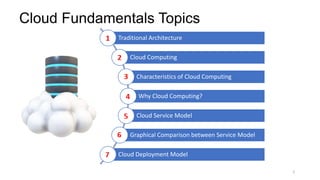
Cloud Fundamentals Topics
2
Traditional Architecture
Cloud Computing
Characteristics of Cloud Computing
Why Cloud Computing?
Cloud Service Model
Graphical Comparison between Service Model
Cloud Deployment Model
Traditional Architecture
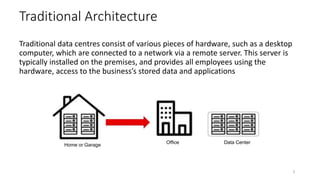
Traditional data centres consist of various pieces of hardware, such as a desktop
computer, which are connected to a network via a remote server. This server is
typically installed on the premises, and provides all employees using the
hardware, access to the business’s stored data and applications
3
Home or Garage
Office Data Center
Problem with Traditional Architecture
Pay the rent for the Data Center
Pay for Power Supply, Cooling & Maintenance
Adding and replacing Hardware takes time
Scaling is limited
Hire a team to monitor the Infrastructure
How to deal with disasters? (earthquake, power shutdown, fire)
4
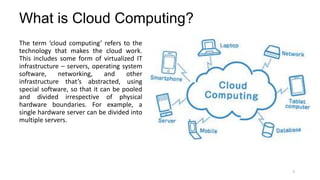
What is Cloud Computing?
The term ‘cloud computing’ refers to the
technology that makes the cloud work.
This includes some form of virtualized IT
infrastructure – servers, operating system
software, networking, and other
infrastructure that’s abstracted, using
special software, so that it can be pooled
and divided irrespective of physical
hardware boundaries. For example, a
single hardware server can be divided into
multiple servers.
5
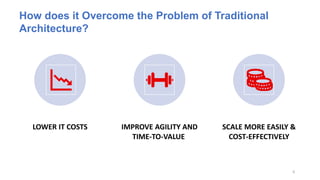
LOWER IT COSTS IMPROVE AGILITY AND
TIME-TO-VALUE
SCALE MORE EASILY &
COST-EFFECTIVELY
6
How does it Overcome the Problem of Traditional
Architecture?
7
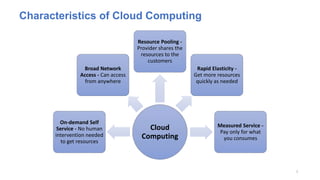
Characteristics of Cloud Computing
Cloud
Computing
On-demand Self
Service - No human
intervention needed
to get resources
Broad Network
Access - Can access
from anywhere
Resource Pooling -
Provider shares the
resources to the
customers
Rapid Elasticity -
Get more resources
quickly as needed
Measured Service -
Pay only for what
you consumes
8
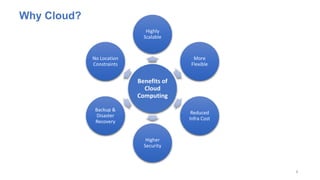
Benefits of
Cloud
Computing
Highly
Scalable
More
Flexible
Reduced
Infra Cost
Higher
Security
Backup &
Disaster
Recovery
No Location
Constraints
Why Cloud?
9
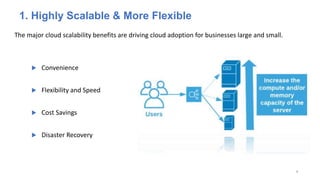
1. Highly Scalable & More Flexible
The major cloud scalability benefits are driving cloud adoption for businesses large and small.
 Convenience
 Flexibility and Speed
 Cost Savings
 Disaster Recovery
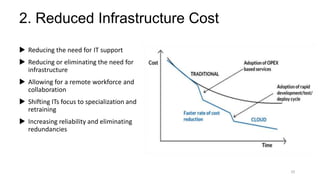
2. Reduced Infrastructure Cost
 Reducing the need for IT support
 Reducing or eliminating the need for
infrastructure
 Allowing for a remote workforce and
collaboration
 Shifting ITs focus to specialization and
retraining
 Increasing reliability and eliminating
redundancies
10
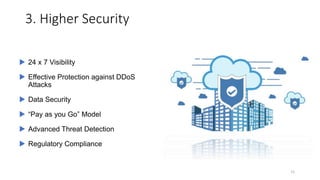
3. Higher Security
11
 24 x 7 Visibility
 Effective Protection against DDoS
Attacks
 Data Security
 “Pay as you Go” Model
 Advanced Threat Detection
 Regulatory Compliance
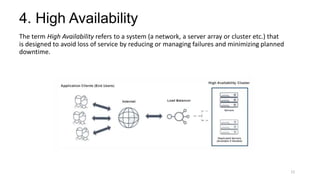
4. High Availability
The term High Availability refers to a system (a network, a server array or cluster etc.) that
is designed to avoid loss of service by reducing or managing failures and minimizing planned
downtime.
12
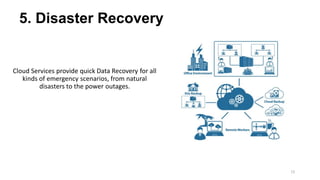
5. Disaster Recovery
Cloud Services provide quick Data Recovery for all
kinds of emergency scenarios, from natural
disasters to the power outages.
13
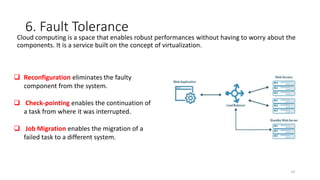
6. Fault Tolerance
Cloud computing is a space that enables robust performances without having to worry about the
components. It is a service built on the concept of virtualization.
14
 Reconfiguration eliminates the faulty
component from the system.
 Check-pointing enables the continuation of
a task from where it was interrupted.
 Job Migration enables the migration of a
failed task to a different system.
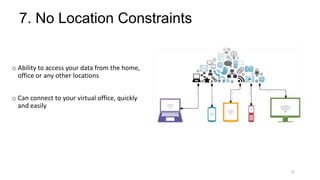
7. No Location Constraints
o Ability to access your data from the home,
office or any other locations
o Can connect to your virtual office, quickly
and easily
15
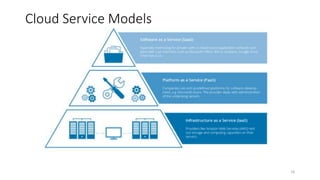
Cloud Service Models
16
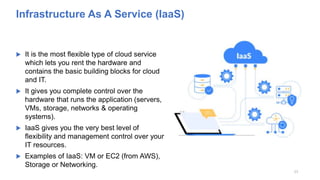
Infrastructure As A Service (IaaS)
 It is the most flexible type of cloud service
which lets you rent the hardware and
contains the basic building blocks for cloud
and IT.
 It gives you complete control over the
hardware that runs the application (servers,
VMs, storage, networks & operating
systems).
 IaaS gives you the very best level of
flexibility and management control over your
IT resources.
 Examples of IaaS: VM or EC2 (from AWS),
Storage or Networking.
17
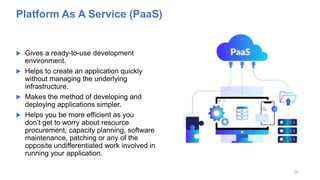
Platform As A Service (PaaS)
 Gives a ready-to-use development
environment.
 Helps to create an application quickly
without managing the underlying
infrastructure.
 Makes the method of developing and
deploying applications simpler.
 Helps you be more efficient as you
don’t get to worry about resource
procurement, capacity planning, software
maintenance, patching or any of the
opposite undifferentiated work involved in
running your application.
18
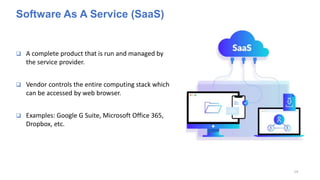
Software As A Service (SaaS)
 A complete product that is run and managed by
the service provider.
 Vendor controls the entire computing stack which
can be accessed by web browser.
 Examples: Google G Suite, Microsoft Office 365,
Dropbox, etc.
19
20
On Premises
Applications
Data
Run Time
Middleware
OS
Virtualization
Servers
Storage
Networking
Infrastructure
(as a service)
Applications
Data
Run Time
Middleware
OS
Virtualization
Servers
Storage
Networking
Platform
(as a service)
Applications
Data
Run Time
Middleware
OS
Virtualization
Servers
Storage
Networking
Software
(as a service)
Applications
Data
Run Time
Middleware
OS
Virtualization
Servers
Storage
Networking
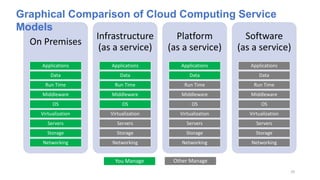
Graphical Comparison of Cloud Computing Service
Models
You Manage Other Manage
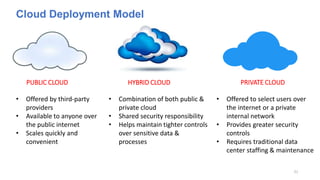
Cloud Deployment Model
21
PUBLIC CLOUD HYBRID CLOUD PRIVATE CLOUD
• Offered by third-party
providers
• Available to anyone over
the public internet
• Scales quickly and
convenient
• Combination of both public &
private cloud
• Shared security responsibility
• Helps maintain tighter controls
over sensitive data &
processes
• Offered to select users over
the internet or a private
internal network
• Provides greater security
controls
• Requires traditional data
center staffing & maintenance

Cloud Fundamentals PPT.pptx

  • 1.
  • 2.
    Cloud Fundamentals Topics 2 TraditionalArchitecture Cloud Computing Characteristics of Cloud Computing Why Cloud Computing? Cloud Service Model Graphical Comparison between Service Model Cloud Deployment Model
  • 3.
    Traditional Architecture Traditional datacentres consist of various pieces of hardware, such as a desktop computer, which are connected to a network via a remote server. This server is typically installed on the premises, and provides all employees using the hardware, access to the business’s stored data and applications 3 Home or Garage Office Data Center
  • 4.
    Problem with TraditionalArchitecture Pay the rent for the Data Center Pay for Power Supply, Cooling & Maintenance Adding and replacing Hardware takes time Scaling is limited Hire a team to monitor the Infrastructure How to deal with disasters? (earthquake, power shutdown, fire) 4
  • 5.
    What is CloudComputing? The term ‘cloud computing’ refers to the technology that makes the cloud work. This includes some form of virtualized IT infrastructure – servers, operating system software, networking, and other infrastructure that’s abstracted, using special software, so that it can be pooled and divided irrespective of physical hardware boundaries. For example, a single hardware server can be divided into multiple servers. 5
  • 6.
    LOWER IT COSTSIMPROVE AGILITY AND TIME-TO-VALUE SCALE MORE EASILY & COST-EFFECTIVELY 6 How does it Overcome the Problem of Traditional Architecture?
  • 7.
    7 Characteristics of CloudComputing Cloud Computing On-demand Self Service - No human intervention needed to get resources Broad Network Access - Can access from anywhere Resource Pooling - Provider shares the resources to the customers Rapid Elasticity - Get more resources quickly as needed Measured Service - Pay only for what you consumes
  • 8.
  • 9.
    9 1. Highly Scalable& More Flexible The major cloud scalability benefits are driving cloud adoption for businesses large and small.  Convenience  Flexibility and Speed  Cost Savings  Disaster Recovery
  • 10.
    2. Reduced InfrastructureCost  Reducing the need for IT support  Reducing or eliminating the need for infrastructure  Allowing for a remote workforce and collaboration  Shifting ITs focus to specialization and retraining  Increasing reliability and eliminating redundancies 10
  • 11.
    3. Higher Security 11 24 x 7 Visibility  Effective Protection against DDoS Attacks  Data Security  “Pay as you Go” Model  Advanced Threat Detection  Regulatory Compliance
  • 12.
    4. High Availability Theterm High Availability refers to a system (a network, a server array or cluster etc.) that is designed to avoid loss of service by reducing or managing failures and minimizing planned downtime. 12
  • 13.
    5. Disaster Recovery CloudServices provide quick Data Recovery for all kinds of emergency scenarios, from natural disasters to the power outages. 13
  • 14.
    6. Fault Tolerance Cloudcomputing is a space that enables robust performances without having to worry about the components. It is a service built on the concept of virtualization. 14  Reconfiguration eliminates the faulty component from the system.  Check-pointing enables the continuation of a task from where it was interrupted.  Job Migration enables the migration of a failed task to a different system.
  • 15.
    7. No LocationConstraints o Ability to access your data from the home, office or any other locations o Can connect to your virtual office, quickly and easily 15
  • 16.
  • 17.
    Infrastructure As AService (IaaS)  It is the most flexible type of cloud service which lets you rent the hardware and contains the basic building blocks for cloud and IT.  It gives you complete control over the hardware that runs the application (servers, VMs, storage, networks & operating systems).  IaaS gives you the very best level of flexibility and management control over your IT resources.  Examples of IaaS: VM or EC2 (from AWS), Storage or Networking. 17
  • 18.
    Platform As AService (PaaS)  Gives a ready-to-use development environment.  Helps to create an application quickly without managing the underlying infrastructure.  Makes the method of developing and deploying applications simpler.  Helps you be more efficient as you don’t get to worry about resource procurement, capacity planning, software maintenance, patching or any of the opposite undifferentiated work involved in running your application. 18
  • 19.
    Software As AService (SaaS)  A complete product that is run and managed by the service provider.  Vendor controls the entire computing stack which can be accessed by web browser.  Examples: Google G Suite, Microsoft Office 365, Dropbox, etc. 19
  • 20.
    20 On Premises Applications Data Run Time Middleware OS Virtualization Servers Storage Networking Infrastructure (asa service) Applications Data Run Time Middleware OS Virtualization Servers Storage Networking Platform (as a service) Applications Data Run Time Middleware OS Virtualization Servers Storage Networking Software (as a service) Applications Data Run Time Middleware OS Virtualization Servers Storage Networking Graphical Comparison of Cloud Computing Service Models You Manage Other Manage
  • 21.
    Cloud Deployment Model 21 PUBLICCLOUD HYBRID CLOUD PRIVATE CLOUD • Offered by third-party providers • Available to anyone over the public internet • Scales quickly and convenient • Combination of both public & private cloud • Shared security responsibility • Helps maintain tighter controls over sensitive data & processes • Offered to select users over the internet or a private internal network • Provides greater security controls • Requires traditional data center staffing & maintenance

Editor's Notes

  • #3 Agenda Type to be identified / highlighted Objective needs to contain information on what we are trying to seek in the end / what is our overall purpose Context/ Background – to provide a brief information on what were the previous discussions / any specific ask from parties within organization / deadlines for the decision needed information
  • #4 As is architecture
  • #5 Pro s and con s need to include cost view summary as well
  • #6 Total cost per options and recommended option to be highlighted – purpose is to have an overall view of total cost difference between the options Any information on cost requirements needs to be filled for each option If Not Available – comments and when we will have the cost to be added