1
n
SDLC Using Docker for Fun and Profit
SPO20149
n
Your Presenters Today…
2
Dan Elder
Linux Services Manager, Novacoast
delder@novacoast.com
800.949.9933 x1337
Ryan Trauntvein
Infrastructure and DevOps Lead
rtrauntvein@novacoast.com
+1 805.568.0171 x4805
n
Novacoast, Inc.
Who we are…
3
‣ IT Services & Development
‣ 4 Internal ops engineers
‣ 85 Field Engineers
‣ 40 Developers
‣ 45 Sales / Admin
‣ Internal User Base 170+
n
Novacoast, Inc.
internal infrastructure
4
‣ 3 Datacenters
‣ Managed Hosting
‣ Physical and Virtual
‣ 95% SLES
‣ 5% Windows / OSX
‣ 75+ internal apps
n
Pre-devops & Docker
5
‣Services setup manually
‣Each server is somewhat unique
‣Difficult to recreate a server
‣Long lead times
n
From a Novacoast Ops Team Perspective
Pre-Devops
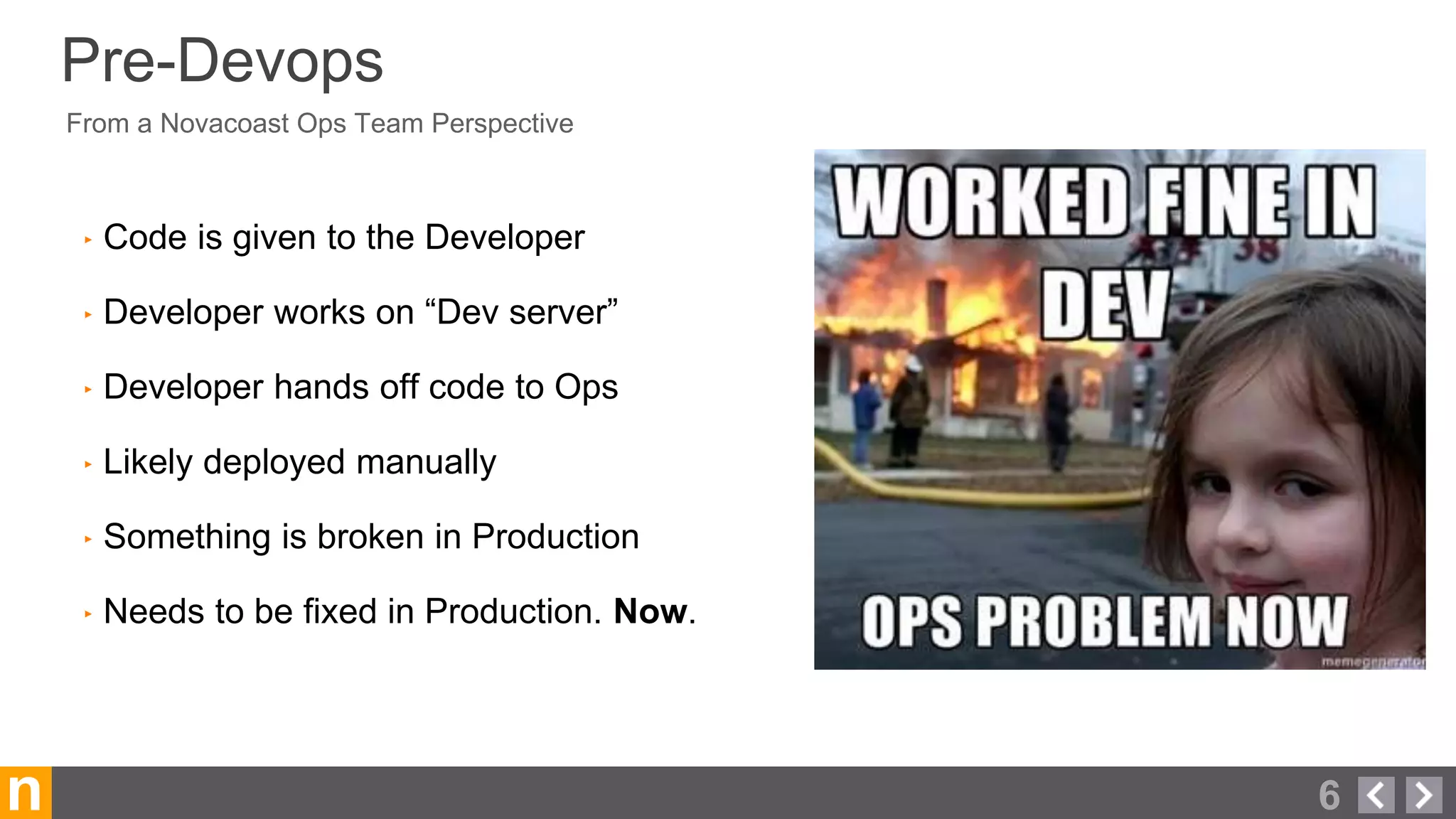
‣ Code is given to the Developer
‣ Developer works on “Dev server”
‣ Developer hands off code to Ops
‣ Likely deployed manually
‣ Something is broken in Production
‣ Needs to be fixed in Production. Now.
6
n
devops
7
‣ Continuous integration (CI)
‣ Getting changes to users quickly, reliably, and securely.
‣ Many releases per day or hour.
‣ More confidence due to automated testing
‣ Portability
‣ Reproducibility
‣ (Too) many tools to choose from
Communication, collaboration and integration
n 8
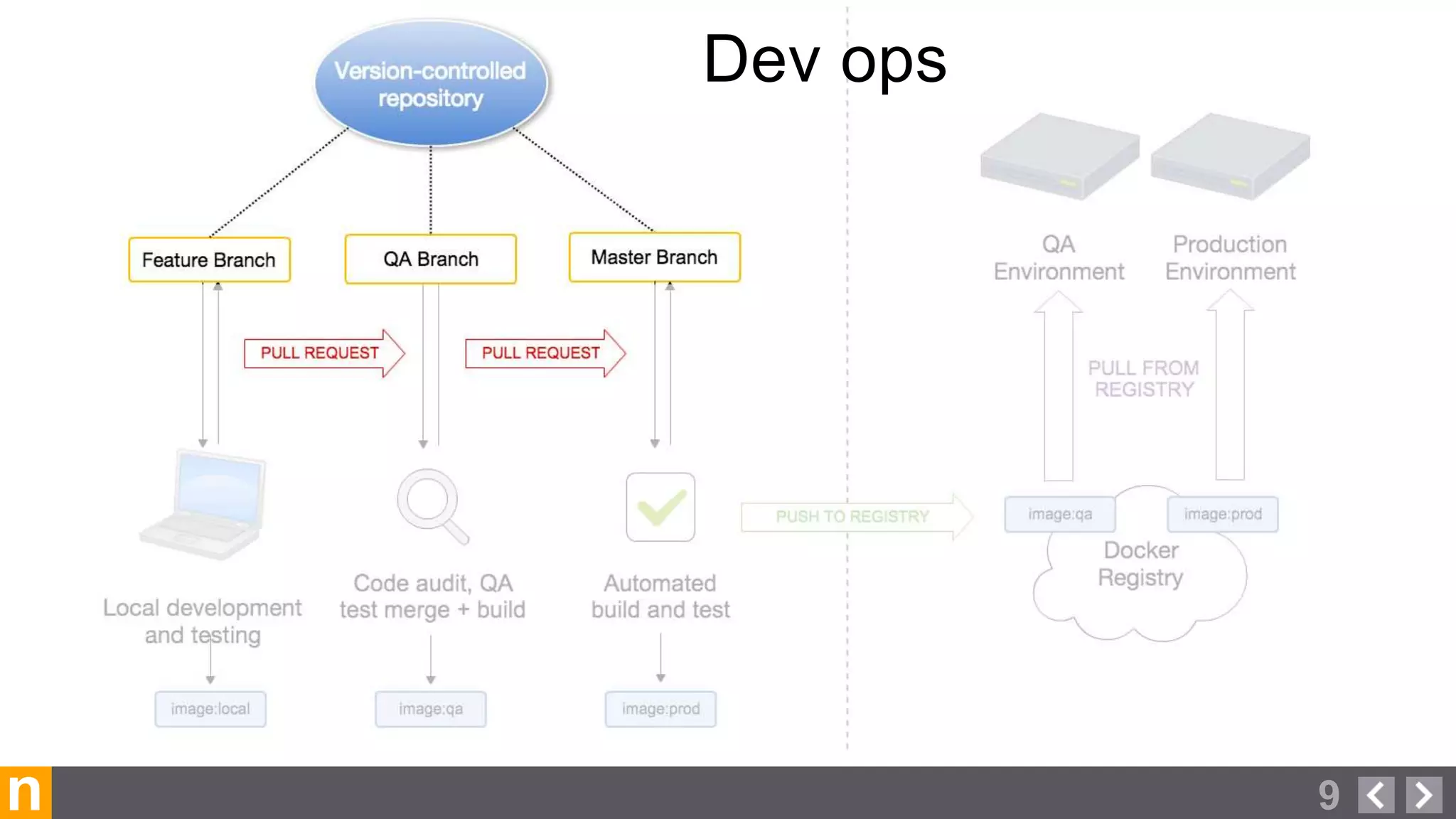
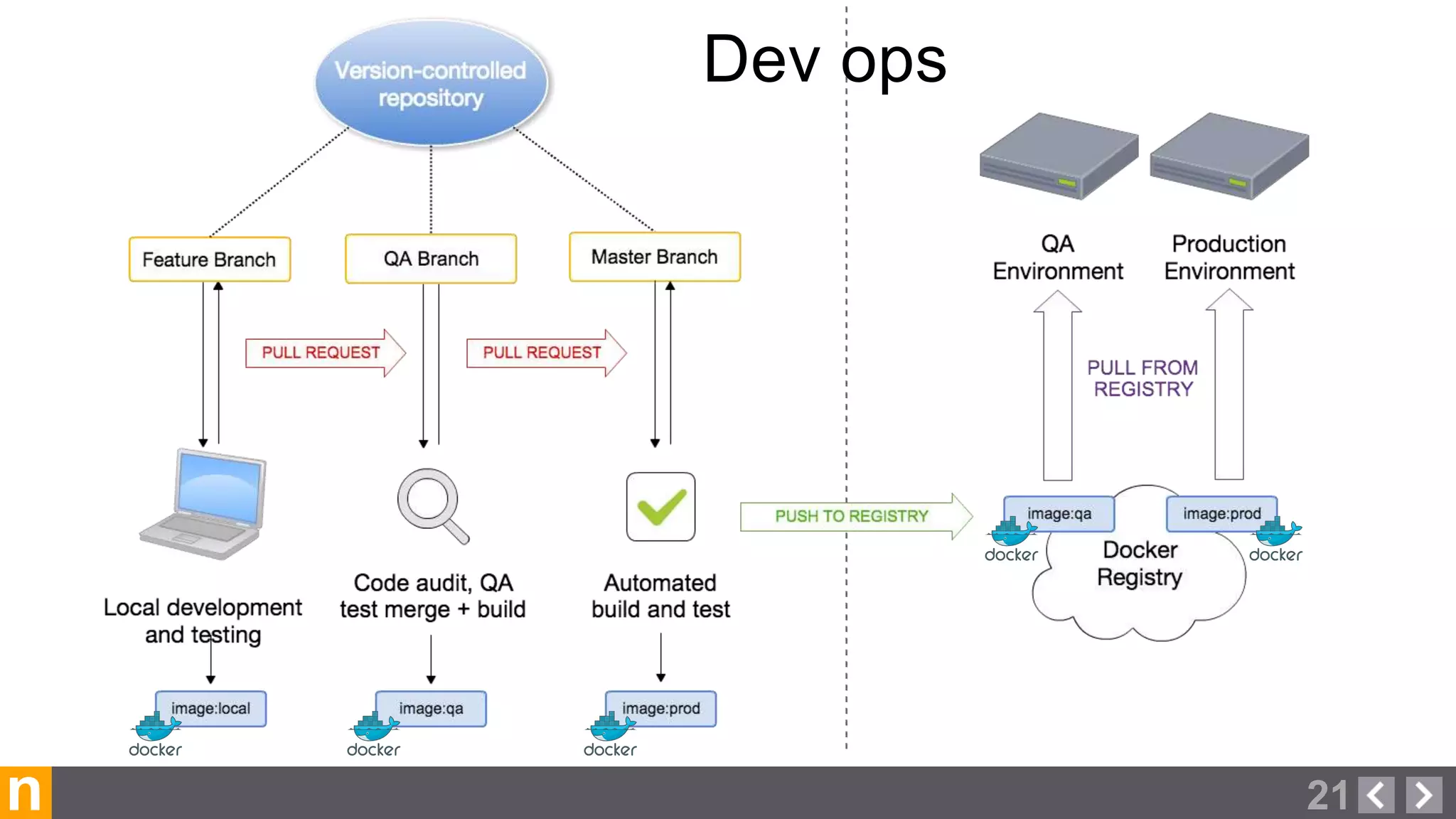
Dev ops
n 9
Dev ops
Version control & Pull requests
10n
‣GIT, SVN, BZR, HG, CVS
Things we wanted:
‣Issue tracking
‣Activity feeds
‣Protected Branches / Forking
‣Pull Requests / Code Reviews
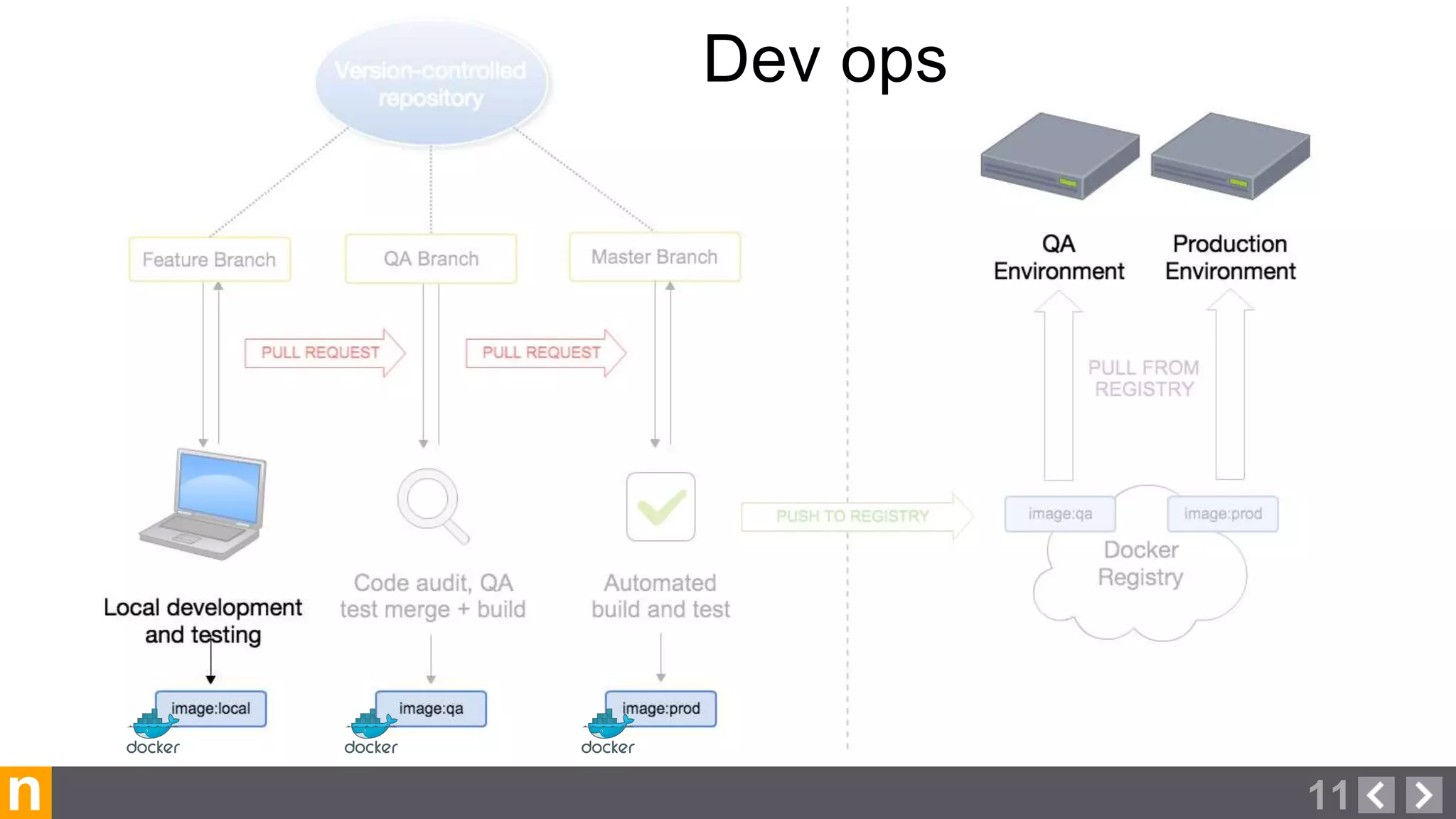
n 11
Dev ops
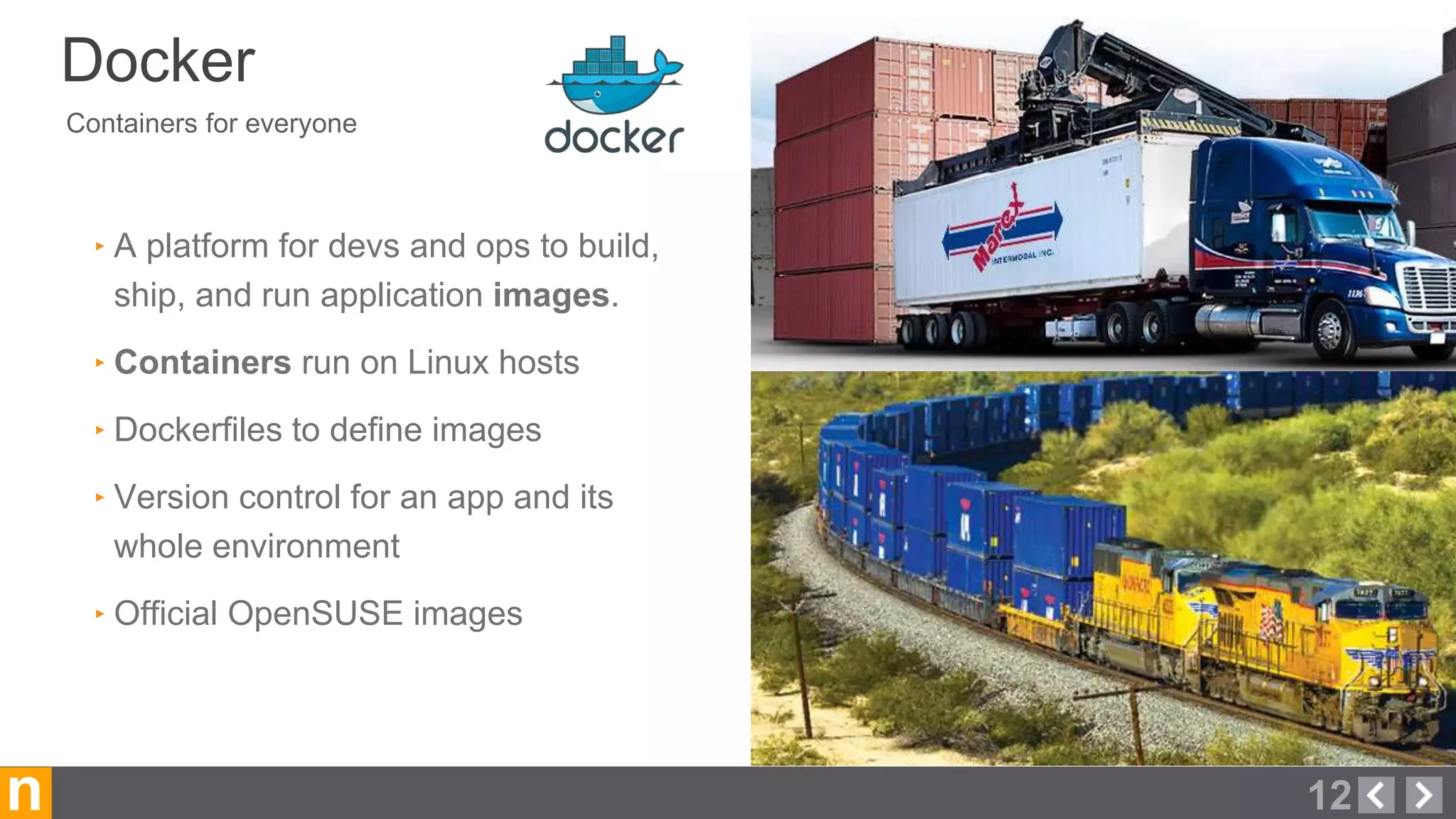
Containers for everyone
Docker
12n
‣ A platform for devs and ops to build,
ship, and run application images.
‣ Containers run on Linux hosts
‣ Dockerfiles to define images
‣ Version control for an app and its
whole environment
‣ Official OpenSUSE images
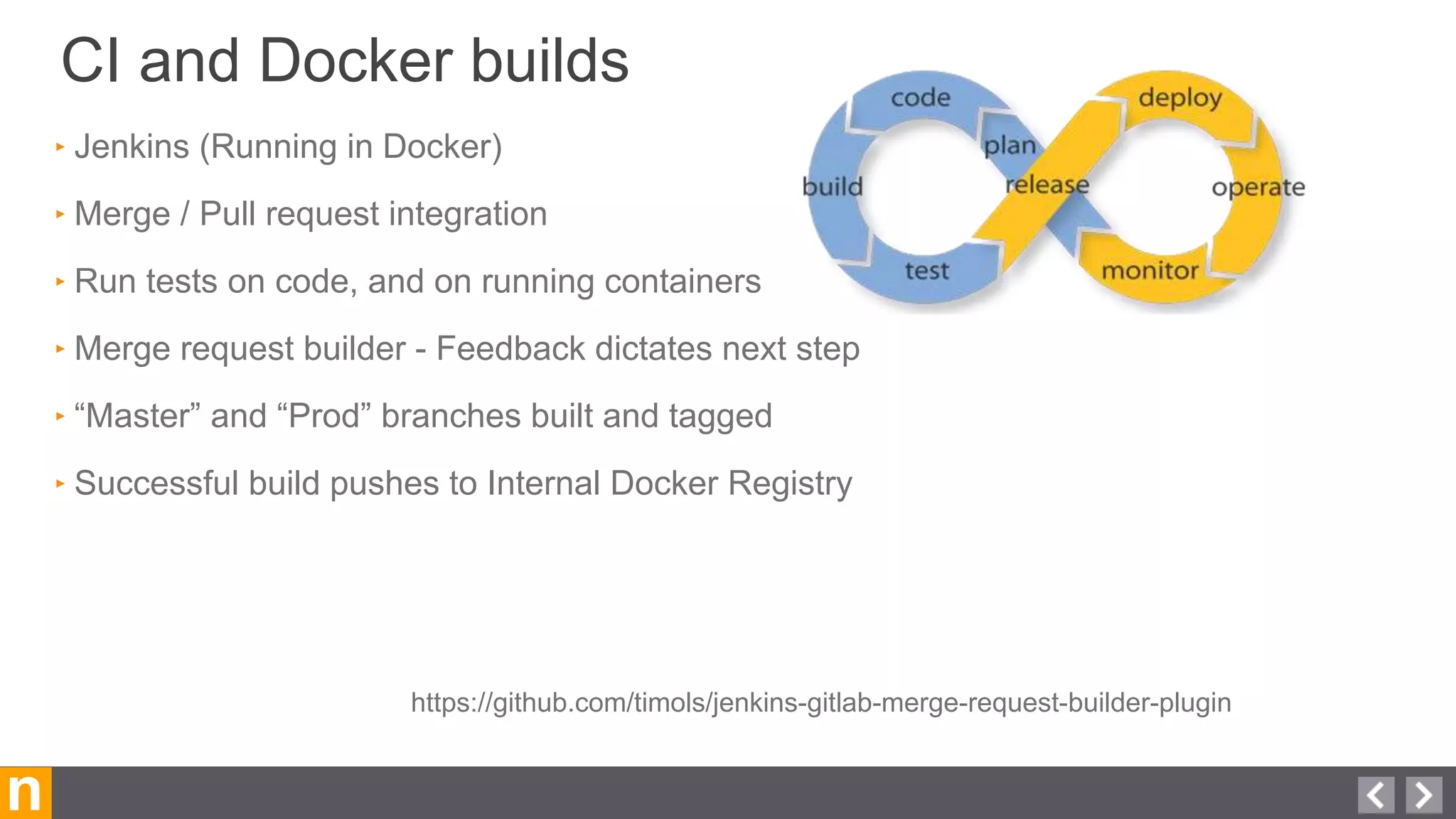
CI and Docker builds
n
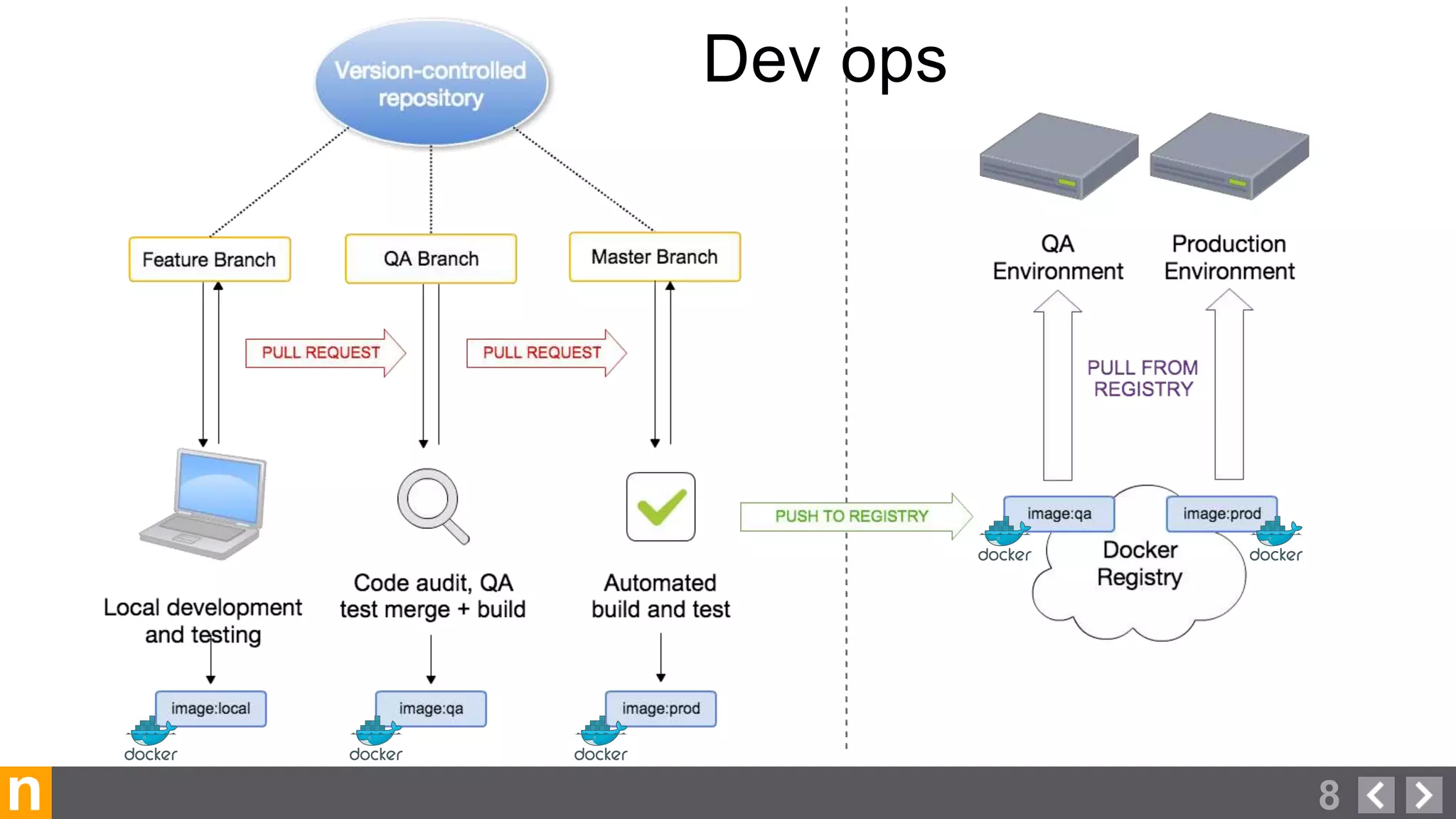
‣ Jenkins (Running in Docker)
‣ Merge / Pull request integration
‣ Run tests on code, and on running containers
‣ Merge request builder - Feedback dictates next step
‣ “Master” and “Prod” branches built and tagged
‣ Successful build pushes to Internal Docker Registry
https://github.com/timols/jenkins-gitlab-merge-request-builder-plugin
n
Deployment
‣ We chose to go with Chef
‣ Provisions Docker Hosts
‣ Provisions Docker Containers on hosts
‣ Re-deploy (update) Containers as needed
‣ Configures AppArmor, and docker-bench
‣ Runs on a schedule, or triggered
https://github.com/bflad/chef-docker
https://github.com/opscode-cookbooks/chef-client
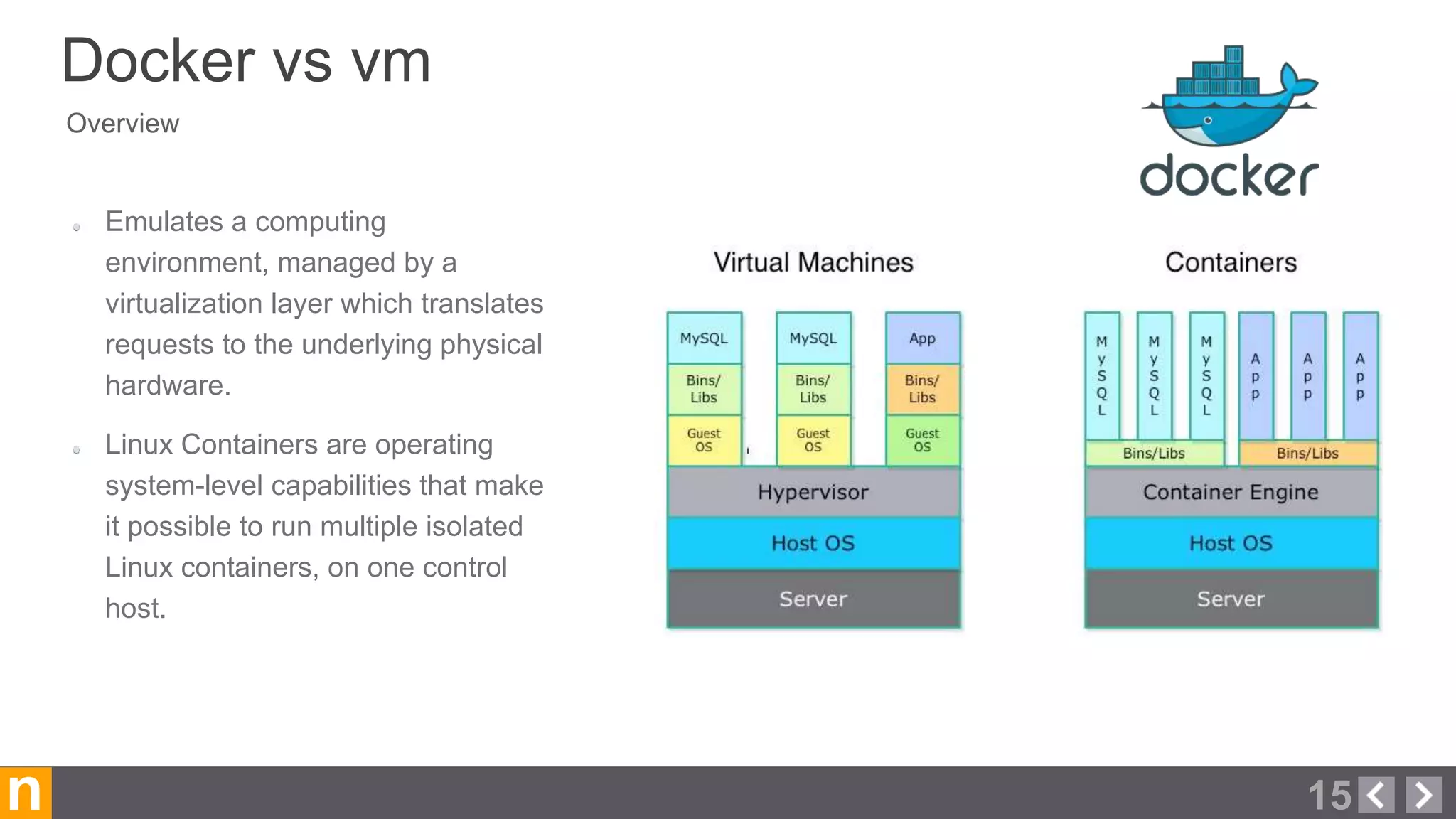
Overview
Docker vs vm
15n
Emulates a computing
environment, managed by a
virtualization layer which translates
requests to the underlying physical
hardware.
Linux Containers are operating
system-level capabilities that make
it possible to run multiple isolated
Linux containers, on one control
host.
n 16
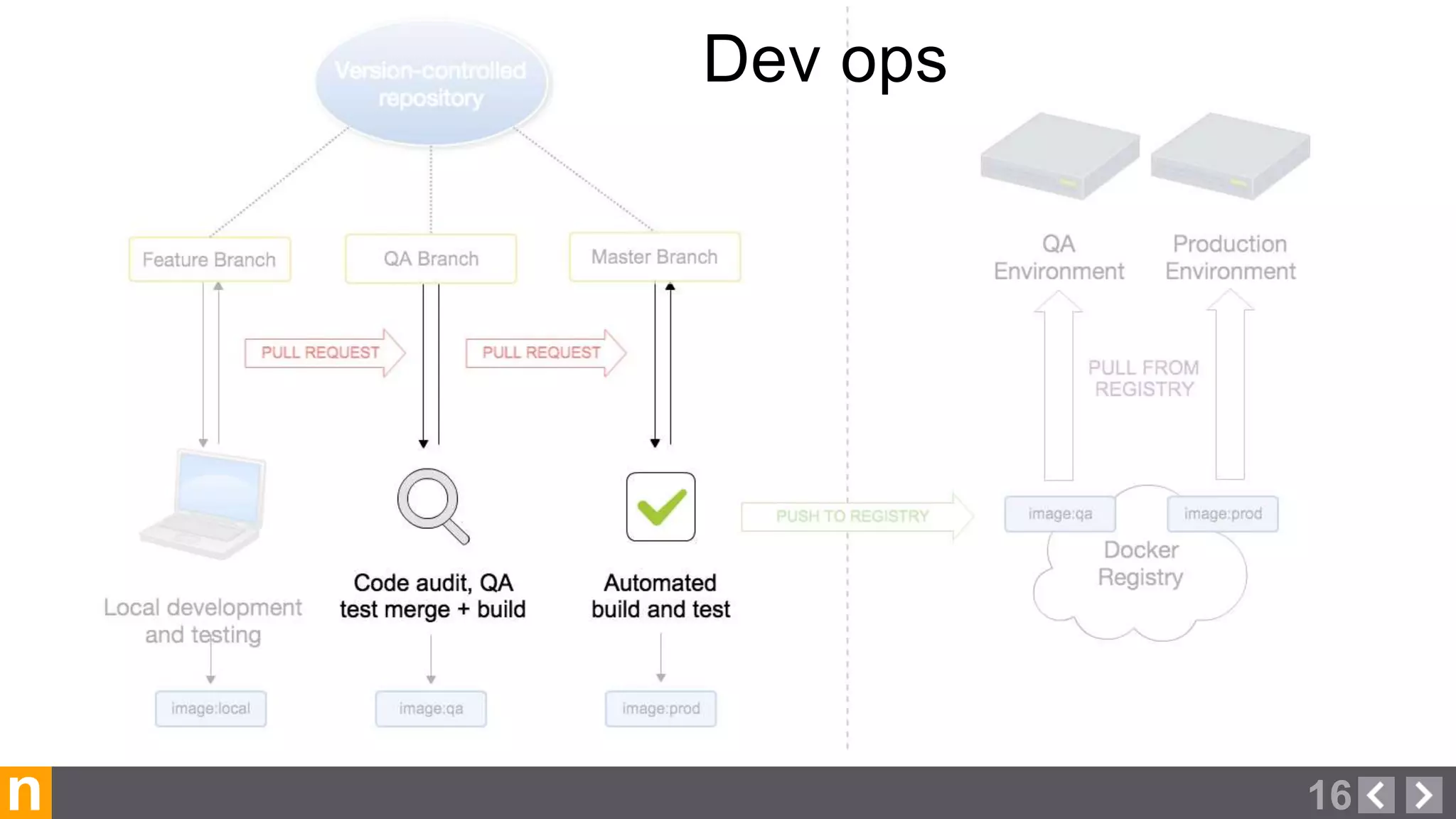
Dev ops
Stop bad code in its tracks
Automated Testing
17n
‣ Jenkins, Travis, Codeship, CircleCI
‣ Merge / Pull request integration
‣ Run tests on code
‣ Feedback dictates next steps
n 18
Dev ops
and The Docker Hub
Docker registry
19n
‣ Docker image version control
‣ Push & Pull Images
‣ Image Tags
‣ Self Hosted (Private): Portus by SUSE, or Docker’s own
‣ Private 3rd Party (quay.io)
‣ Public / Private Official + Trusted Builds: hub.docker.com
using the Docker Hub
Docker registry trusted build
20n
‣ Built on Docker’s servers
‣ Linked to Github or Bitbucket repository
‣ Dockerfile & Code audit visibility
‣ Per branch builds
‣ docker pull
‣ Web hooks
‣ Private repos for sale
n 21
Dev ops
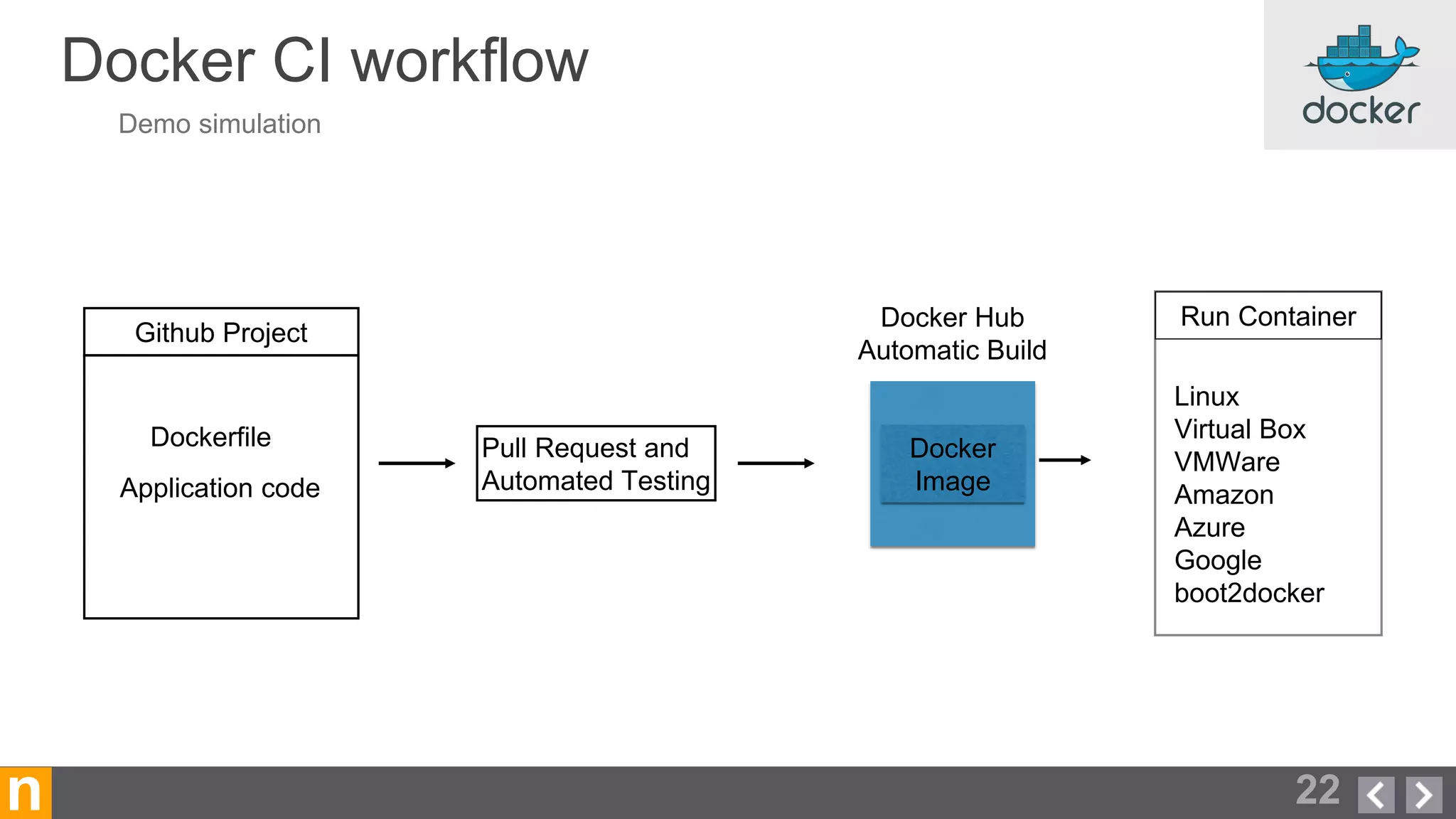
Docker CI workflow
22n
Application code
Dockerfile
Github Project
Linux
Virtual Box
VMWare
Amazon
Azure
Google
boot2docker
Run Container
Docker
Image
Docker Hub
Automatic Build
Demo simulation
Pull Request and
Automated Testing
n 23
n 24
n 26
n 27
n 28
n 29
n 30
n 31
n 32
n 33
n 34
n 35
Put it all together
n
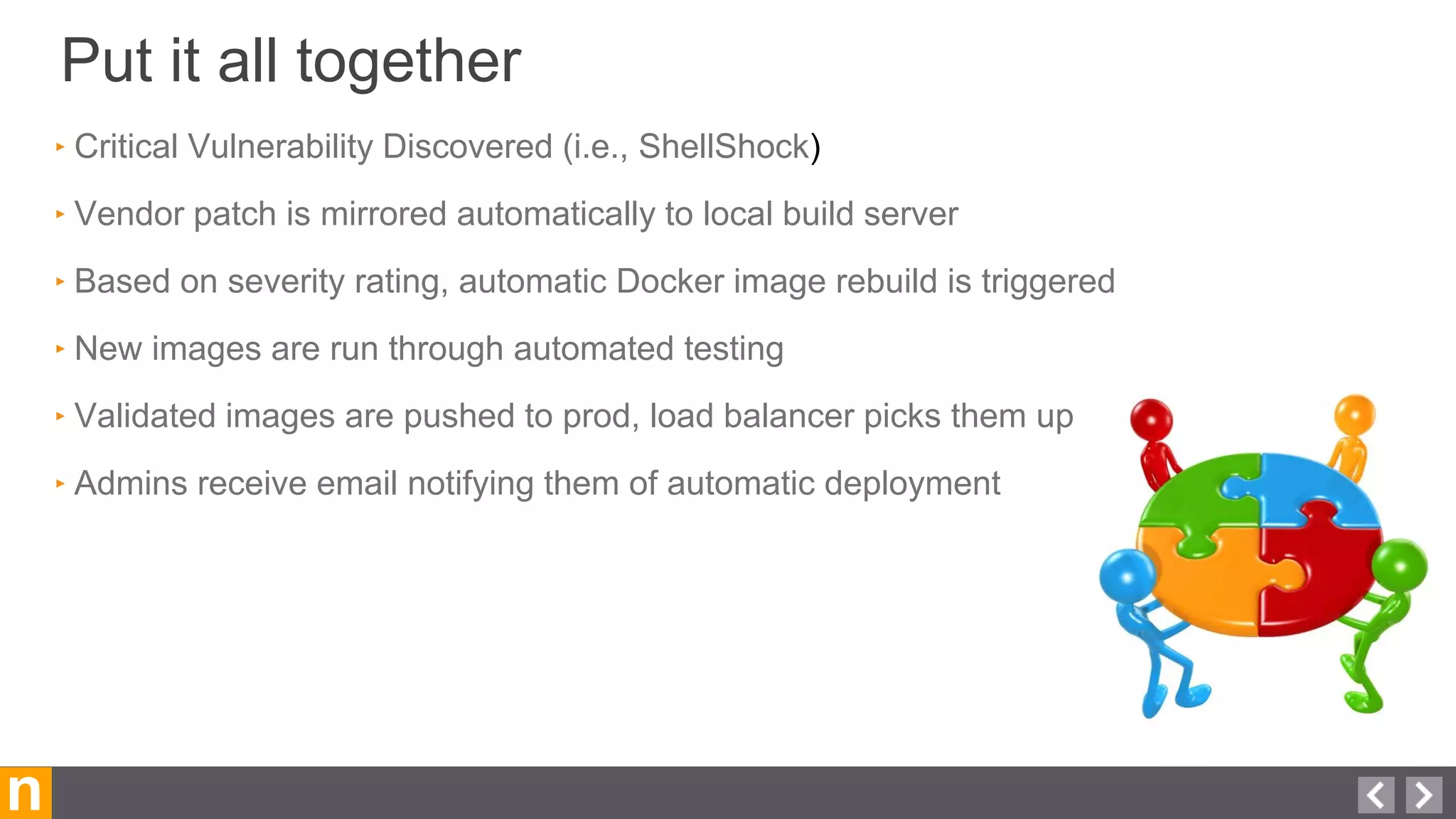
‣ Critical Vulnerability Discovered (i.e., ShellShock)
‣ Vendor patch is mirrored automatically to local build server
‣ Based on severity rating, automatic Docker image rebuild is triggered
‣ New images are run through automated testing
‣ Validated images are pushed to prod, load balancer picks them up
‣ Admins receive email notifying them of automatic deployment
Security Benefits of Docker and DevOps
n
‣ No access to production environment (SSH, CLI, etc…)
‣ Stateless nature of environment mitigates against APT
‣ Minimal images eliminate majority of attack vectors
‣ Deployment methodology allows rapid response to threats
‣ Full audit trail for entire lifecycle of deployment
‣ Breaks down communication barriers between Dev, Ops, and Security
‣ Automation ensures consistency and mitigates human error
‣ AppArmor and/or SELinux to confine applications at kernel level
Beyond the simple demo..
‣ Further automated or manual testing within the built image prior to deployment
‣ Automated Deployment / Clustering
‣ Using another set of VCS and CI tools
n
Other considerations
38
n 39
‣ Docker workflow consulting and training
‣ Private Registry configuration
‣ Application “Dockerization”
‣ Deployment, monitoring and mangement
how we can help
n
QUESTIONS????
40
docker.com/tryit/
Try our demo out at:
‣GitHub https://github.com/novacoast/opensuse-apache-docker
‣Docker https://registry.hub.docker.com/u/novacoast/opensuse-apache
n
Give it a Spin
41

SDLC Using Docker for Fun and Profit

  • 1.
    1 n SDLC Using Dockerfor Fun and Profit SPO20149
  • 2.
    n Your Presenters Today… 2 DanElder Linux Services Manager, Novacoast delder@novacoast.com 800.949.9933 x1337 Ryan Trauntvein Infrastructure and DevOps Lead rtrauntvein@novacoast.com +1 805.568.0171 x4805
  • 3.
    n Novacoast, Inc. Who weare… 3 ‣ IT Services & Development ‣ 4 Internal ops engineers ‣ 85 Field Engineers ‣ 40 Developers ‣ 45 Sales / Admin ‣ Internal User Base 170+
  • 4.
    n Novacoast, Inc. internal infrastructure 4 ‣3 Datacenters ‣ Managed Hosting ‣ Physical and Virtual ‣ 95% SLES ‣ 5% Windows / OSX ‣ 75+ internal apps
  • 5.
    n Pre-devops & Docker 5 ‣Servicessetup manually ‣Each server is somewhat unique ‣Difficult to recreate a server ‣Long lead times
  • 6.
    n From a NovacoastOps Team Perspective Pre-Devops ‣ Code is given to the Developer ‣ Developer works on “Dev server” ‣ Developer hands off code to Ops ‣ Likely deployed manually ‣ Something is broken in Production ‣ Needs to be fixed in Production. Now. 6
  • 7.
    n devops 7 ‣ Continuous integration(CI) ‣ Getting changes to users quickly, reliably, and securely. ‣ Many releases per day or hour. ‣ More confidence due to automated testing ‣ Portability ‣ Reproducibility ‣ (Too) many tools to choose from Communication, collaboration and integration
  • 8.
  • 9.
  • 10.
    Version control &Pull requests 10n ‣GIT, SVN, BZR, HG, CVS Things we wanted: ‣Issue tracking ‣Activity feeds ‣Protected Branches / Forking ‣Pull Requests / Code Reviews
  • 11.
  • 12.
    Containers for everyone Docker 12n ‣A platform for devs and ops to build, ship, and run application images. ‣ Containers run on Linux hosts ‣ Dockerfiles to define images ‣ Version control for an app and its whole environment ‣ Official OpenSUSE images
  • 13.
    CI and Dockerbuilds n ‣ Jenkins (Running in Docker) ‣ Merge / Pull request integration ‣ Run tests on code, and on running containers ‣ Merge request builder - Feedback dictates next step ‣ “Master” and “Prod” branches built and tagged ‣ Successful build pushes to Internal Docker Registry https://github.com/timols/jenkins-gitlab-merge-request-builder-plugin
  • 14.
    n Deployment ‣ We choseto go with Chef ‣ Provisions Docker Hosts ‣ Provisions Docker Containers on hosts ‣ Re-deploy (update) Containers as needed ‣ Configures AppArmor, and docker-bench ‣ Runs on a schedule, or triggered https://github.com/bflad/chef-docker https://github.com/opscode-cookbooks/chef-client
  • 15.
    Overview Docker vs vm 15n Emulatesa computing environment, managed by a virtualization layer which translates requests to the underlying physical hardware. Linux Containers are operating system-level capabilities that make it possible to run multiple isolated Linux containers, on one control host.
  • 16.
  • 17.
    Stop bad codein its tracks Automated Testing 17n ‣ Jenkins, Travis, Codeship, CircleCI ‣ Merge / Pull request integration ‣ Run tests on code ‣ Feedback dictates next steps
  • 18.
  • 19.
    and The DockerHub Docker registry 19n ‣ Docker image version control ‣ Push & Pull Images ‣ Image Tags ‣ Self Hosted (Private): Portus by SUSE, or Docker’s own ‣ Private 3rd Party (quay.io) ‣ Public / Private Official + Trusted Builds: hub.docker.com
  • 20.
    using the DockerHub Docker registry trusted build 20n ‣ Built on Docker’s servers ‣ Linked to Github or Bitbucket repository ‣ Dockerfile & Code audit visibility ‣ Per branch builds ‣ docker pull ‣ Web hooks ‣ Private repos for sale
  • 21.
  • 22.
    Docker CI workflow 22n Applicationcode Dockerfile Github Project Linux Virtual Box VMWare Amazon Azure Google boot2docker Run Container Docker Image Docker Hub Automatic Build Demo simulation Pull Request and Automated Testing
  • 23.
  • 24.
  • 26.
  • 27.
  • 28.
  • 29.
  • 30.
  • 31.
  • 32.
  • 33.
  • 34.
  • 35.
  • 36.
    Put it alltogether n ‣ Critical Vulnerability Discovered (i.e., ShellShock) ‣ Vendor patch is mirrored automatically to local build server ‣ Based on severity rating, automatic Docker image rebuild is triggered ‣ New images are run through automated testing ‣ Validated images are pushed to prod, load balancer picks them up ‣ Admins receive email notifying them of automatic deployment
  • 37.
    Security Benefits ofDocker and DevOps n ‣ No access to production environment (SSH, CLI, etc…) ‣ Stateless nature of environment mitigates against APT ‣ Minimal images eliminate majority of attack vectors ‣ Deployment methodology allows rapid response to threats ‣ Full audit trail for entire lifecycle of deployment ‣ Breaks down communication barriers between Dev, Ops, and Security ‣ Automation ensures consistency and mitigates human error ‣ AppArmor and/or SELinux to confine applications at kernel level
  • 38.
    Beyond the simpledemo.. ‣ Further automated or manual testing within the built image prior to deployment ‣ Automated Deployment / Clustering ‣ Using another set of VCS and CI tools n Other considerations 38
  • 39.
    n 39 ‣ Dockerworkflow consulting and training ‣ Private Registry configuration ‣ Application “Dockerization” ‣ Deployment, monitoring and mangement how we can help
  • 40.
  • 41.
    Try our demoout at: ‣GitHub https://github.com/novacoast/opensuse-apache-docker ‣Docker https://registry.hub.docker.com/u/novacoast/opensuse-apache n Give it a Spin 41

Editor's Notes

  • #4 Intro We want to share with you a bit of background on Novacoast, and how we came to use Docker in our production and development environment and workflows. Novacoast is an IT Professional services and product development company that is Headquartered in Santa Barbara. We are a long time partner of the Attachmate group, along with Novell, NetIQ, and SUSE. We manage and consult on large linux, identity management and security projects. This talk focuses on Docker and DevOps in Novacoast’s internal infrastructure. Our userbase is Novacoast Staff - broken into: Roughly 100 total technical staff - A Development team of 25, and about 75 field engineers / consultants nationwide. Sales and Administrative staff of about 40, also not listed are users from our Staffing services, which we also run internal apps for.
  • #5 For some context, here is a quick overview of our internal system breakdown by OS, translating to roughly 75+ or so services that we provide to our user base.
  • #6 Novacoast ops was very much the traditional IT shop. Manually building and maintaining ~100 servers for applications and services. Some servers around for years, built and updated manually. Black boxes at this point, there is no way for us to know all of the changes that have been made, who has had access, and how to rebuild it again the exact same way. This posed a problem for our developers, who had to resort to creative means to reproduce issues, and ultimately lead to the “It worked in dev, but is broken in production” problem One of the analogies in the DevOps community is that in the “old style” of IT, people make manual changes to their servers, and you end up with servers that are like special snowflakes.   Manually configuring systems, years down the road, re-creating the exact same server will be nearly impossible, just as no two snowflakes are alike.  And because it takes a miracle to really re-create a production server, you must do everything in your power to protect it from changes that can break it.
  • #7 *Developer may get access to version control, or sent a tarball *Kind of a combined dev environment & testing server, not managed well *Hopefully in version control, probably a tarball *Likely will be staying late after hours to deploy, schedule downtime *install, ssh to the system, run install docs if provided. Maybe a git pull if possible *Something broke because the dev or qa server is configured differently (a snowflake) *Now the app is live and receiving traffic, so need to fix it ASAP!
  • #8  Moving forward a few years, we started discussing and reading about this “DevOps” movement. Things like automation, rapid deployment, and configuration management & auditing were all things we wanted to improve upon. The ability to quickly, reliably, and accurately reproduce systems between dev and production was something we were not doing well. The ability to terminate a server with no fear of losing some undocumented configuration also stuck out to us on the ops team. CI is the practice, in software engineering, of merging all developer working copies with a shared mainline several times a day. The old “traditional” way of doing IT makes special snowflakes, this new method of DevOps IT help realize the goal of disposable, “carbon copy” systems.
  • #9 New DevOps tools come out every day, there are almost too many options. Define a process, then pick the right tools for the job. Just like building a house, you start with a blueprint, then select the correct materials and tools to build it the way you want. Let’s take a look at the components and how they fit into our blueprint.
  • #10 The first component, is version control. It is the focal point for collaboration, and is a building block for the rest of the workflow.
  • #11  * Many options here, use what you are comfortable and good at. We prefer Git. We felt it was important to have integrated issue tracking. Easy for anyone (technical or non-technical) to submit their issues. More visibility into what is changing and what needs attention, even if it’s not something we’re working on (better transparency). Allows open contributions without risk of merging mystery code that could potentially break things or be insecure. Protected branches and forking are useful because of pull requests. Control over master branch, code review can happen here.
  • #12 DOCKER - Now we’re going to talk about Docker, the one constant in this whole equation.
  • #13 The next piece, and the one constant in our equation. Docker containers are the intermodal shipping containers of the development world; they are standardized in a way that allows them to be shipped using any one of many different methods, but ultimately the contents of the container arrive at their destination in the same state or configuration as they started. What is Docker? Essentially a wrapper around Linux containers, which have existed for a while. Makes them easier to use. Like a very minimal Linux virtual machine with a focused purpose. * Dockerfile = Text document that contains commands to build a Docker image. * Image = The environment and application in a portable Docker format. * Container = A running (or exited) image. What are the advantages of using Docker? Version controlled - Ability to make and test an image locally, push to a central repository, then pull and run on another system. Run anywhere with the assurance that it will be the same on any platform. Only dependency is Docker.
  • #14 Hands-off, consistent approach to ensuring quality code while avoiding pitfalls of manual checks. Many options here, use what you are comfortable and good at. Again, go with what you are good at and provides the features you need. We went with Jenkis because it is flexible and an easy learning curve Works by triggering builds & tests when e.g. a merge request is submitted, and gives feedback. Can stop bugs or problems before they make it beyond the pull request. If it doesn’t pass tests, it won’t be accepted.
  • #15 Chef - Needed something that was agent based, as all hosts are two-factor enabled for ssh (requires a key + a token) One tool to handle Docker and non-docker (even Windows) Redeploy does a pull, then compares the images, if a new image is received, old one is stopped, and new is started Handles all security configuration, and distribution of secrets to containers at runtime
  • #16 Containers are scoped to an instance of Linux. It might be different flavors of Linux ( e.g. a Ubuntu container on a Centos host but it’s still Linux. ) Linux Containers serve as a lightweight alternative to VMs as they don’t require the hypervisors VM’s have a broader scope: windows, netware, etc.
  • #17 Moving on from docker, next, we’ll discuss automated building and testing.
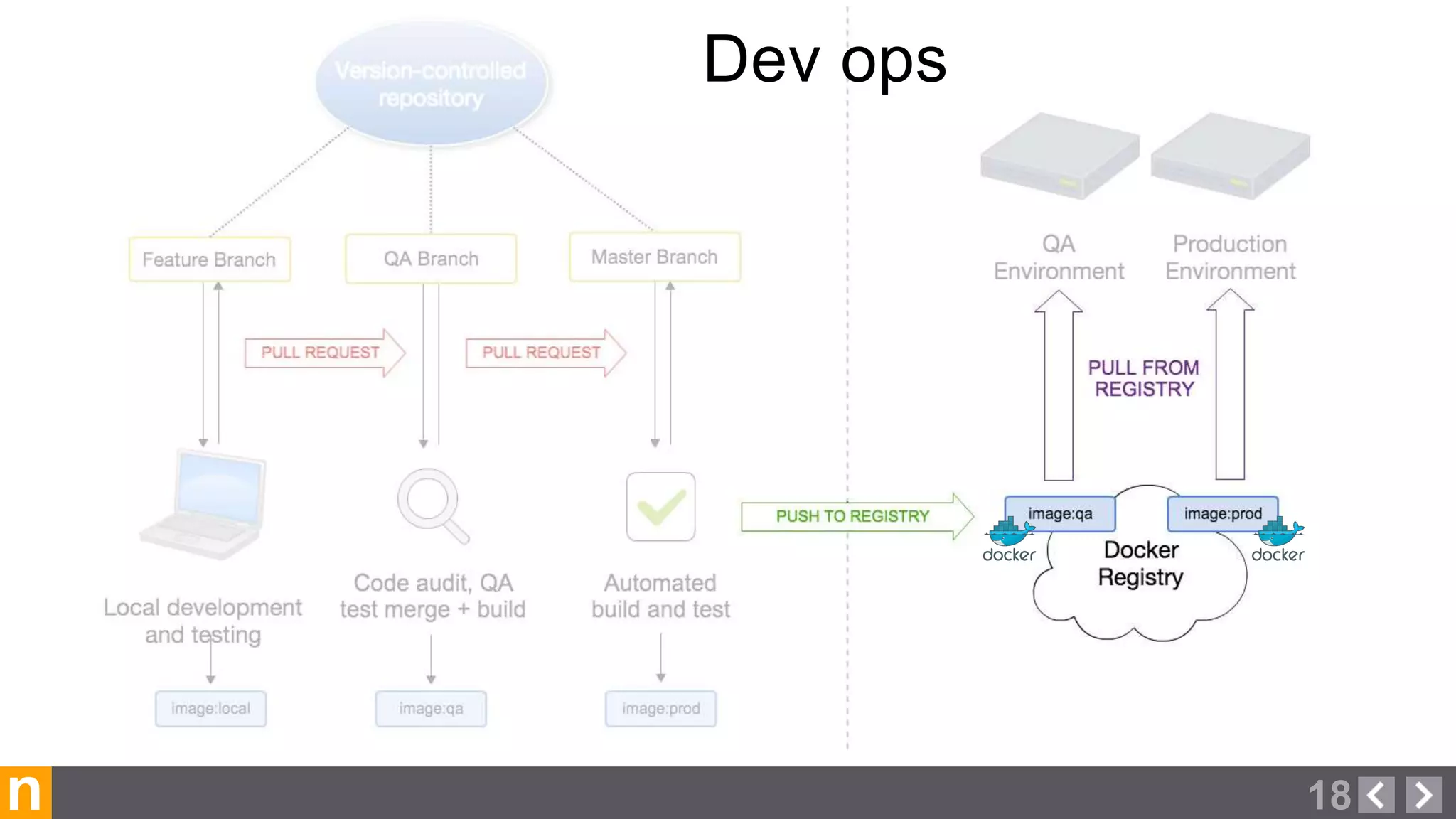
  • #18 Hands-off, consistent approach to ensuring quality code while avoiding pitfalls of manual checks. Many options here, use what you are comfortable and good at. Again, go with what you are good at and provides the features you need. Works by triggering builds & tests when e.g. a pull request is submitted, and gives feedback. * Can stop bugs or problems before they make it beyond the pull request. If it doesn’t pass tests, it won’t be accepted.
  • #19 DOCKER REGISTRY - Finally, we’re going to talk about using a Docker registry to hold and transport your images in a manner very similar to version control systems.
  • #20 A central repository for images Much like you use git or svn for versioning code, this is for tracking the entire docker image Easy to share images, and re-use images to make your own, single line in Dockerfile Tagging allows version releases, and can be used along side branches and tags in your version control system Different ways to achieve this, depending on your data security requirements. Public hub has special feature of “trusted builds” (segue to next slide)
  • #21 Feature of the official Docker registry Trusted builds: Are built on known, trusted infrastructure Can link to VCS to automate builds Allow tracking of everything that went into your container. Dockerfile Link back to VCS repository Can have different versions, which help facilitate releases Are available to anyone (if you wish) with a single line of code or a single command Can trigger other things when build completes Integrates into further testing of the image Private images
  • #22 As we mentioned, just about all of the pieces in the workflow are interchangeable. Our demo will utilize: Github, Codeship, the official Docker Hub, and a docker hosting provider, tutum.co. With exception of Tutum, these are essentially free for public projects. We chose these for this first demo due to their simplicity and public availability. It is quite easy to swap out pieces with self-hosted solutions such as: Gitlab, Jenkins, a Docker Registry container, and on-prem or cloud hosting. Now we will show a demo of this workflow. Talk to us after if you want more information about using some of these other options.
  • #23 Here is an example of a Docker workflow and a real world demo using free services. For this demo; We will be using Github, Codeship (CI), Docker Hub, and pulling and running on linux. Starting with a Github project containing a Dockerfile and our web application, we will go through a pull request workflow with automated testing, automated docker image builds, and then pull and run our newly modified image.
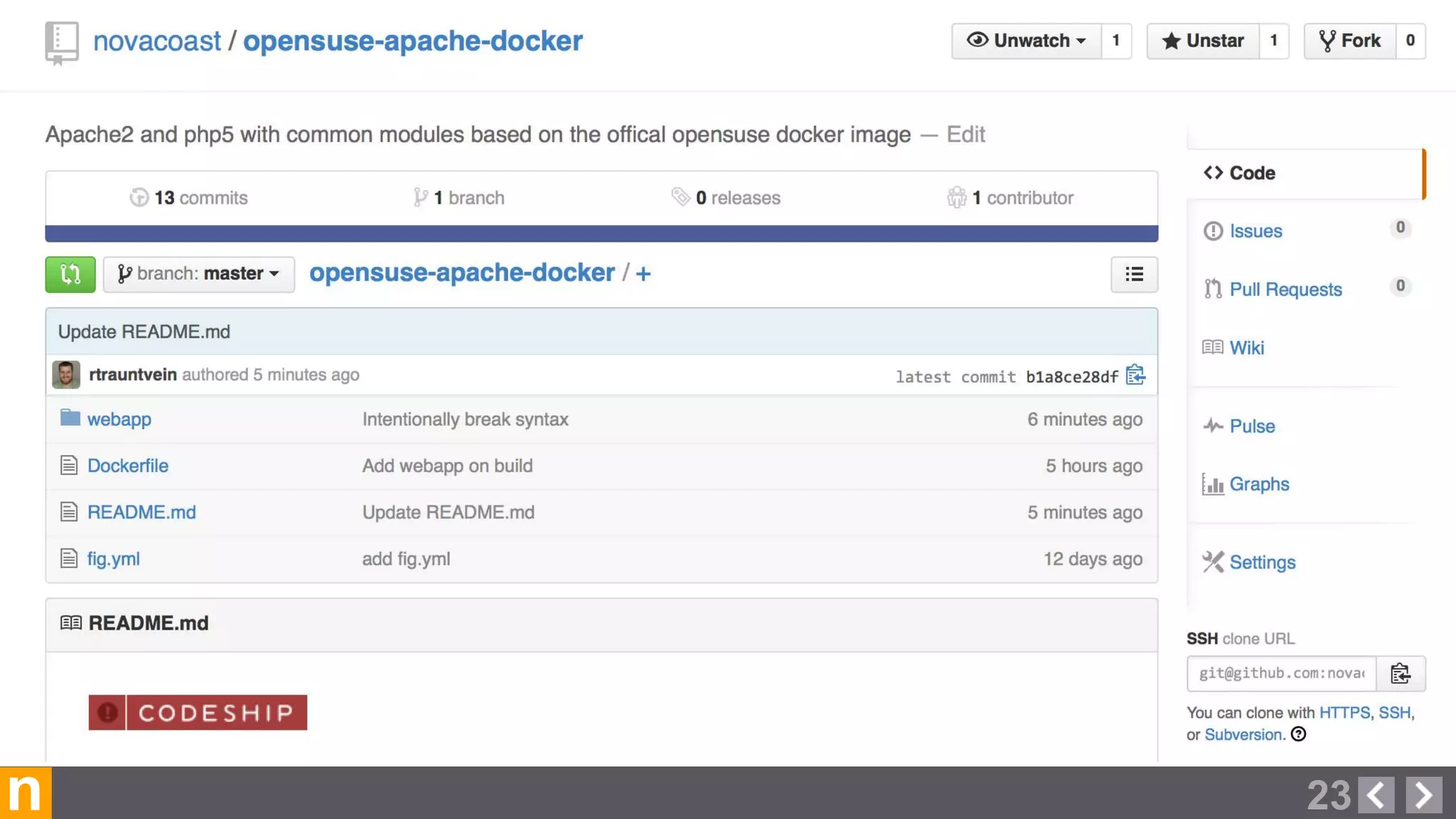
  • #24 Here we have our Github project containing our Dockerfile, and webapp code. Notice the Red “Failing” Codeship CI badge displayed on the page. In this demo we are going to make pull request to fix that issue, and then have automated testing run before we accept the pull request, triggering an automated build of our image on the Docker hub.
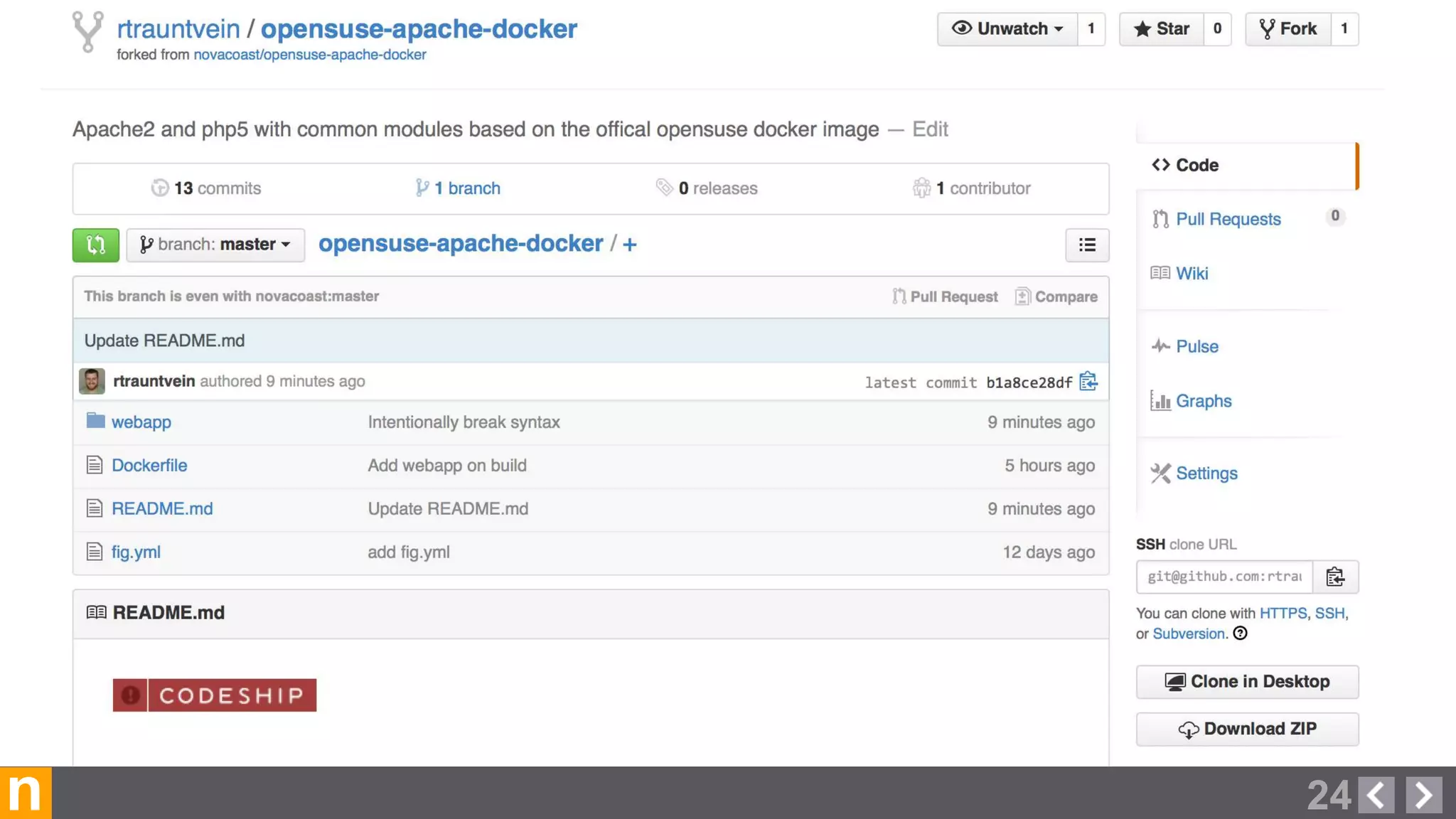
  • #25 We have now gone ahead and forked the upstream project (by pressing the “Fork” button on the upper right corner). You can see the namespace has changed from “novacoast/opensuse-apache-docker” to “rtrauntvein/opensuse-apache-docker”
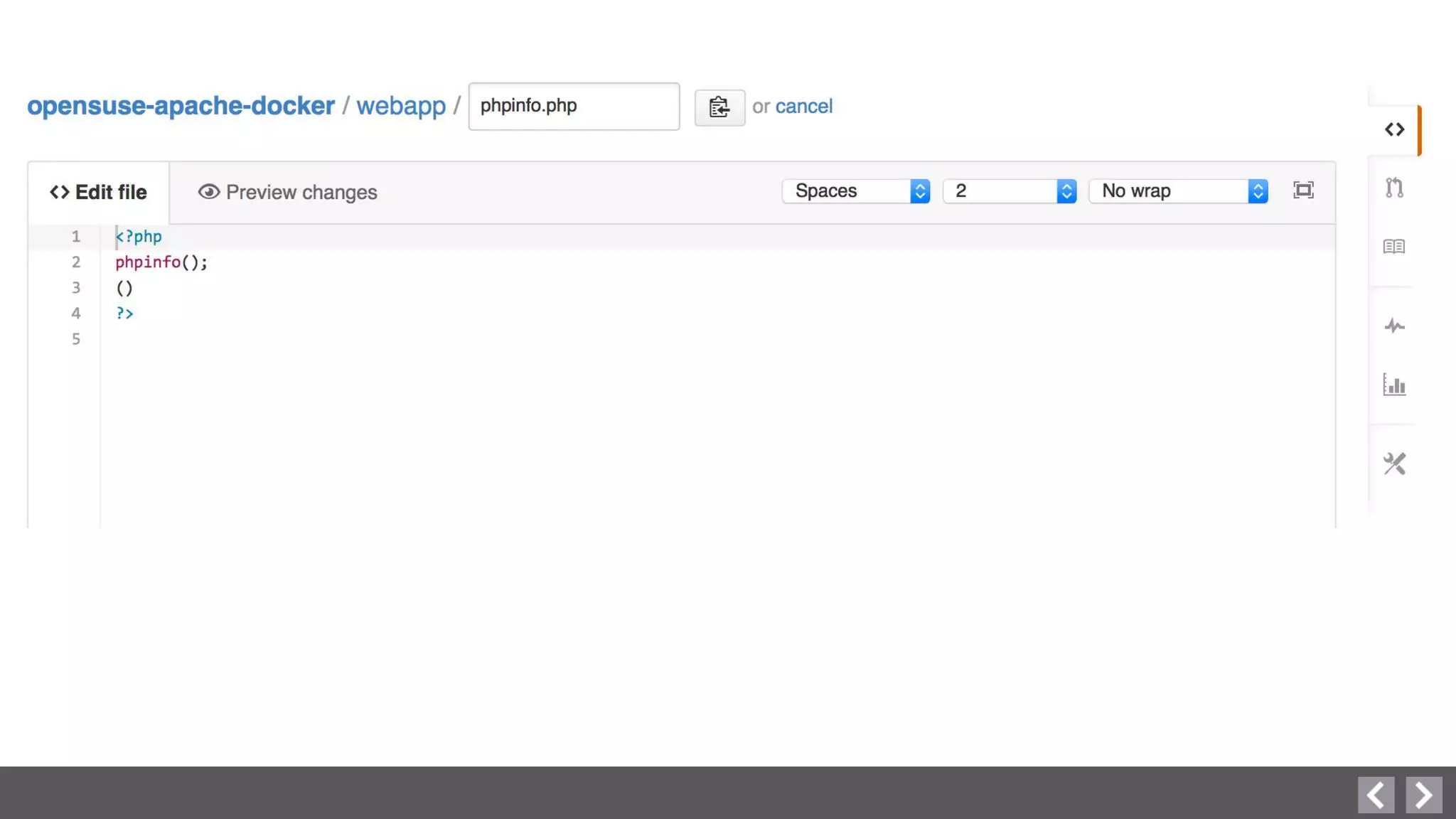
  • #26 We determined that the project’s Codeship test is failing a simple php lint test, due to an extra set of parenthesis.
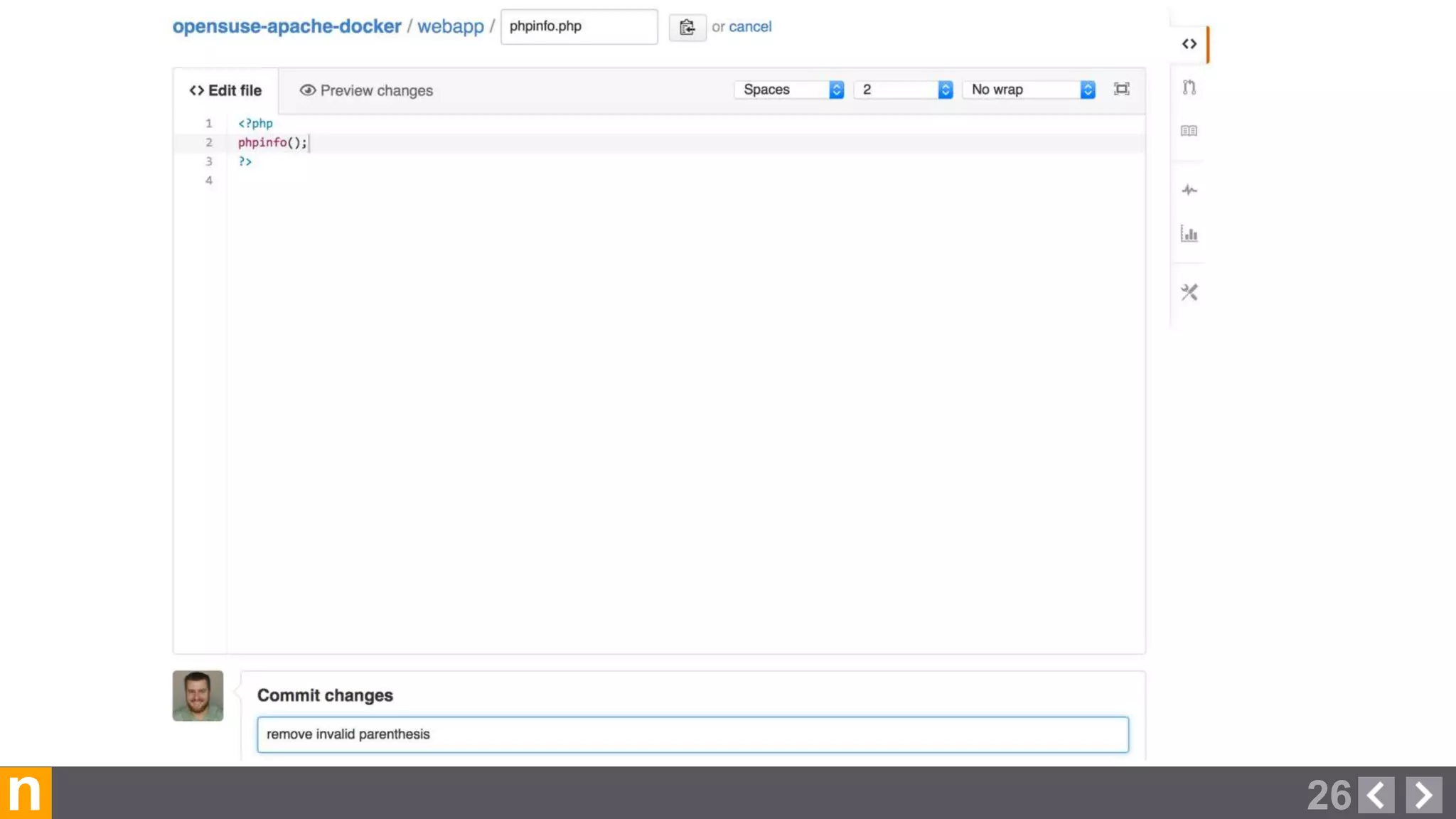
  • #27 Within our forked repository, we will go ahead and fix the syntax issue, and commit our changes.
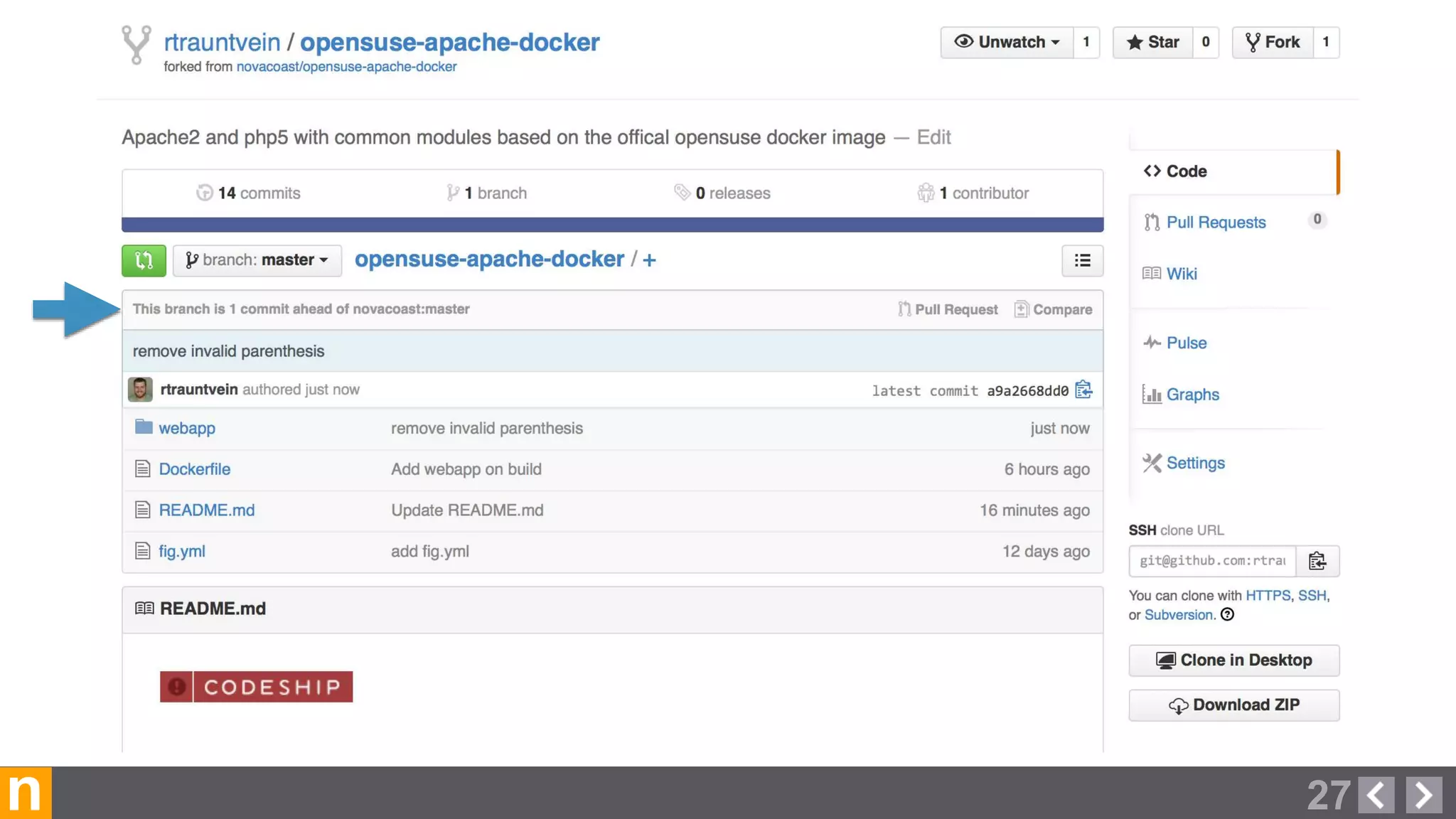
  • #28 Now our forked copy of the repository shows that we are one commit ahead of the upstream “novacoast:master” project.
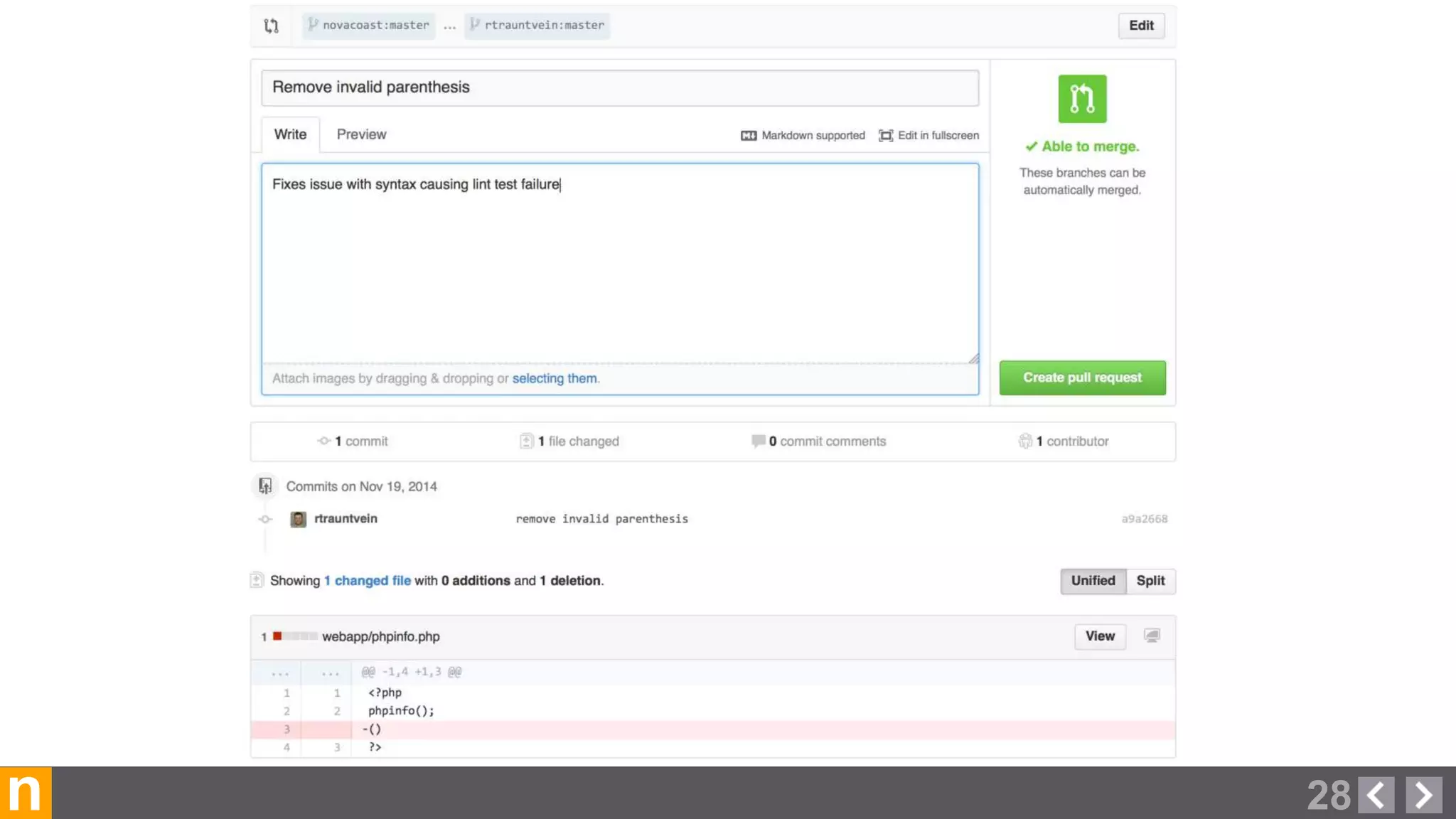
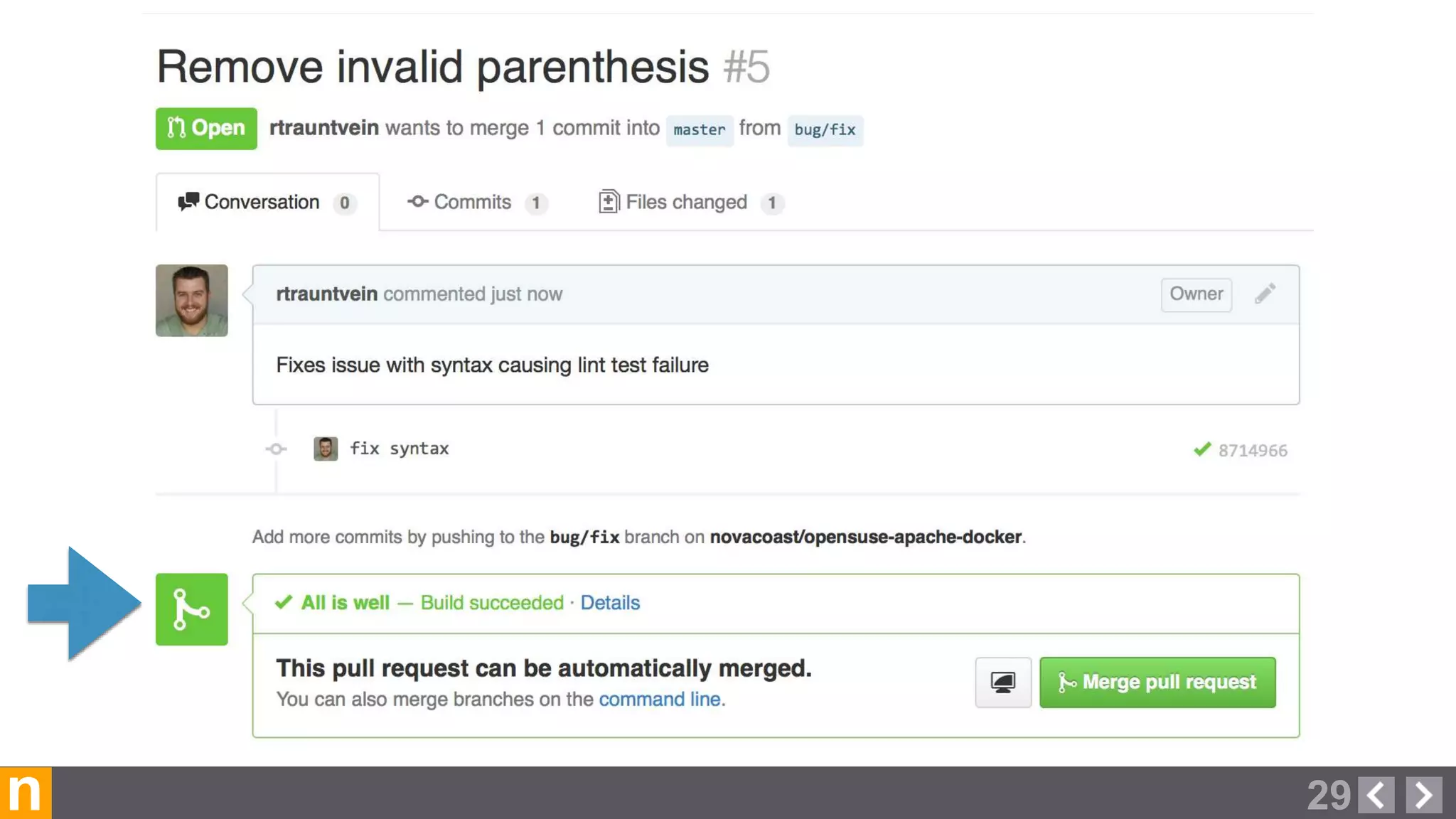
  • #29 We will now create a “Pull request” to request that our changes be merged into the upstream project. Here a submitter can explain what their commit is changing, and why it should be accepted into the upstream project.
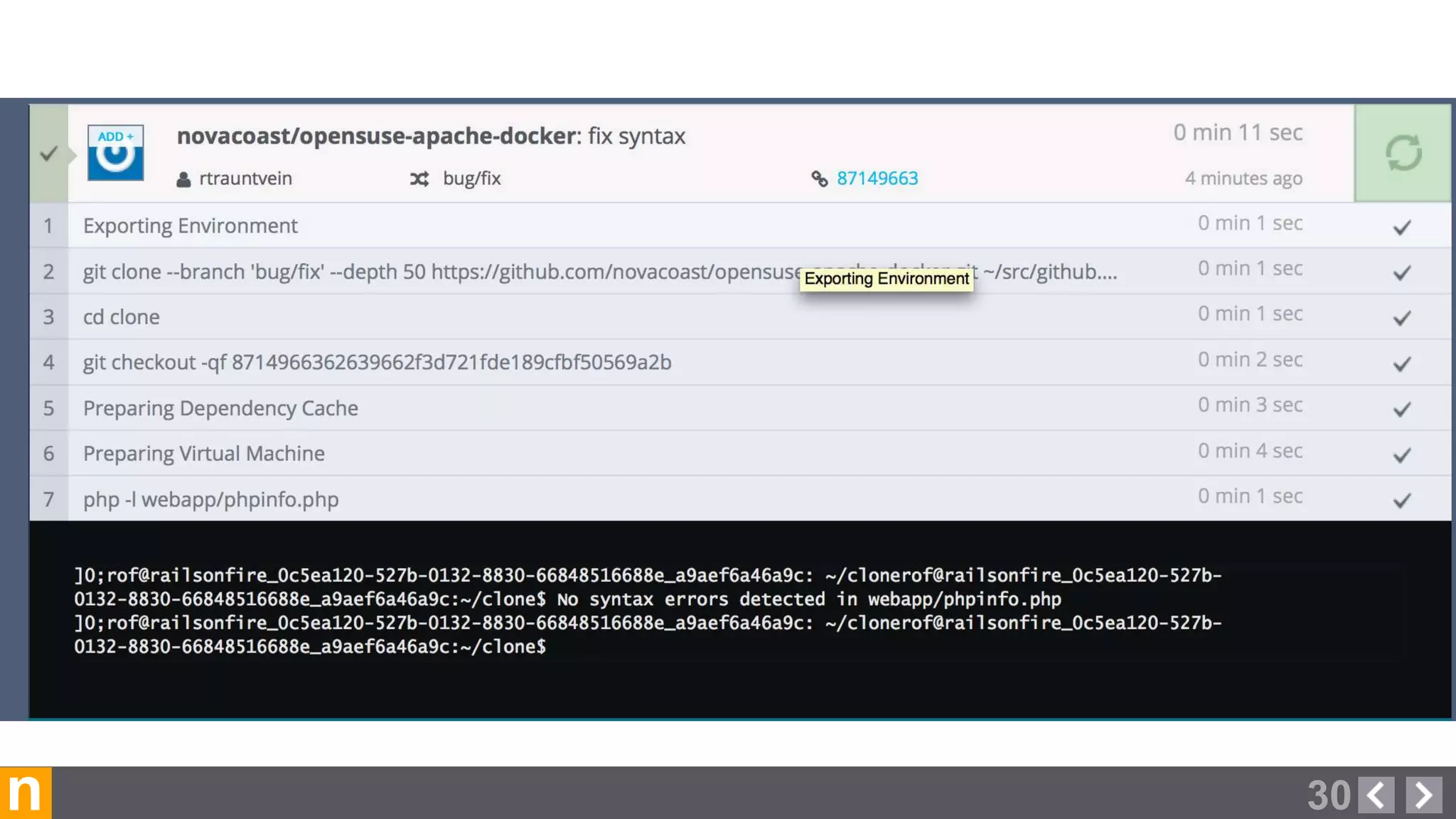
  • #30 Once we have submitted our pull request, Codeship will run a “build” which in our case is running the php lint checks again. We can click on the “Details” link to see our build status
  • #31 Here is the Codeship status for our test run, and we can see that no syntax errors have been detected.
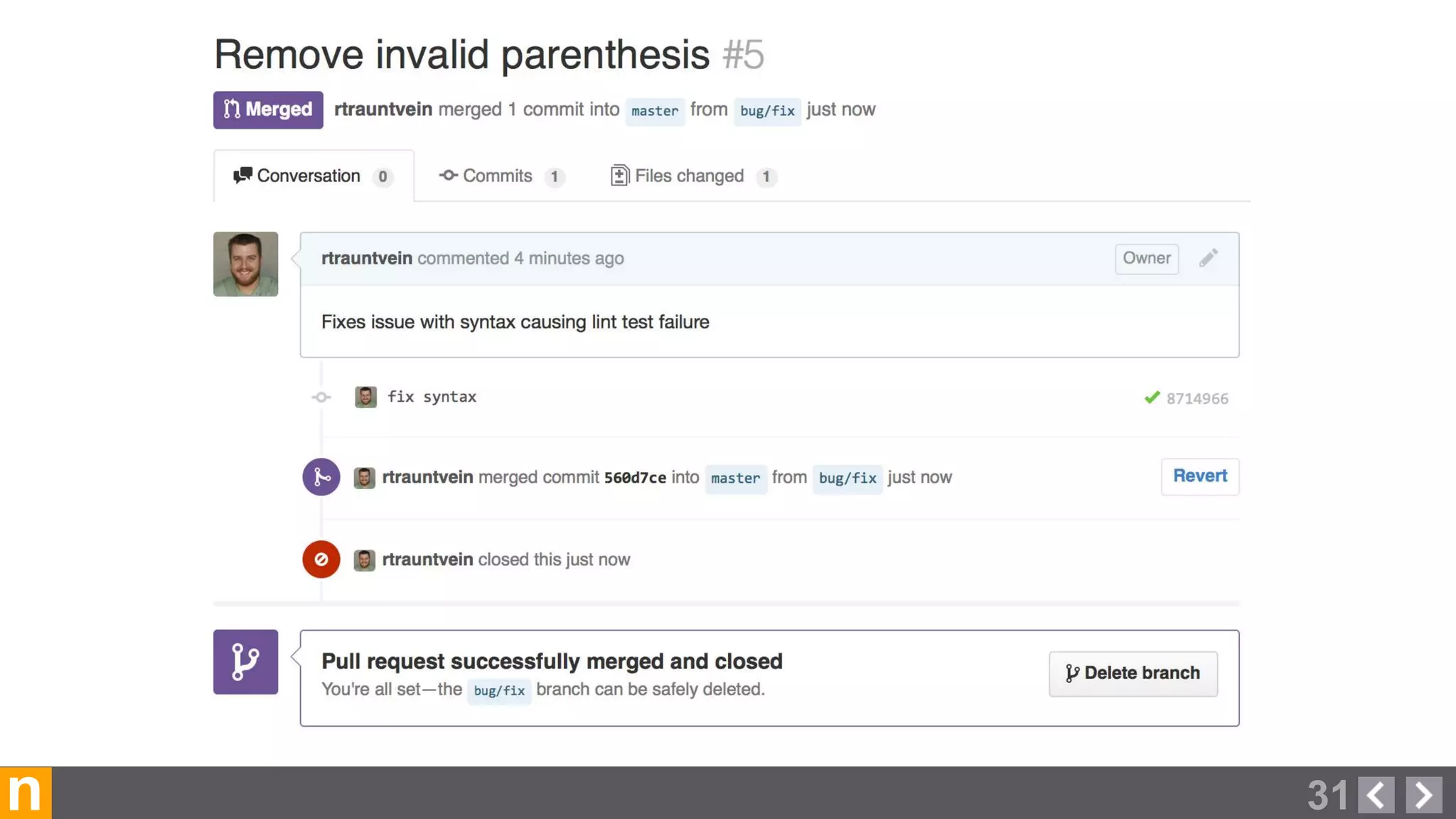
  • #32 Here we have gone ahead and accepted the pull request, which automatically merged our forked branch into the master branch of the upstream project.
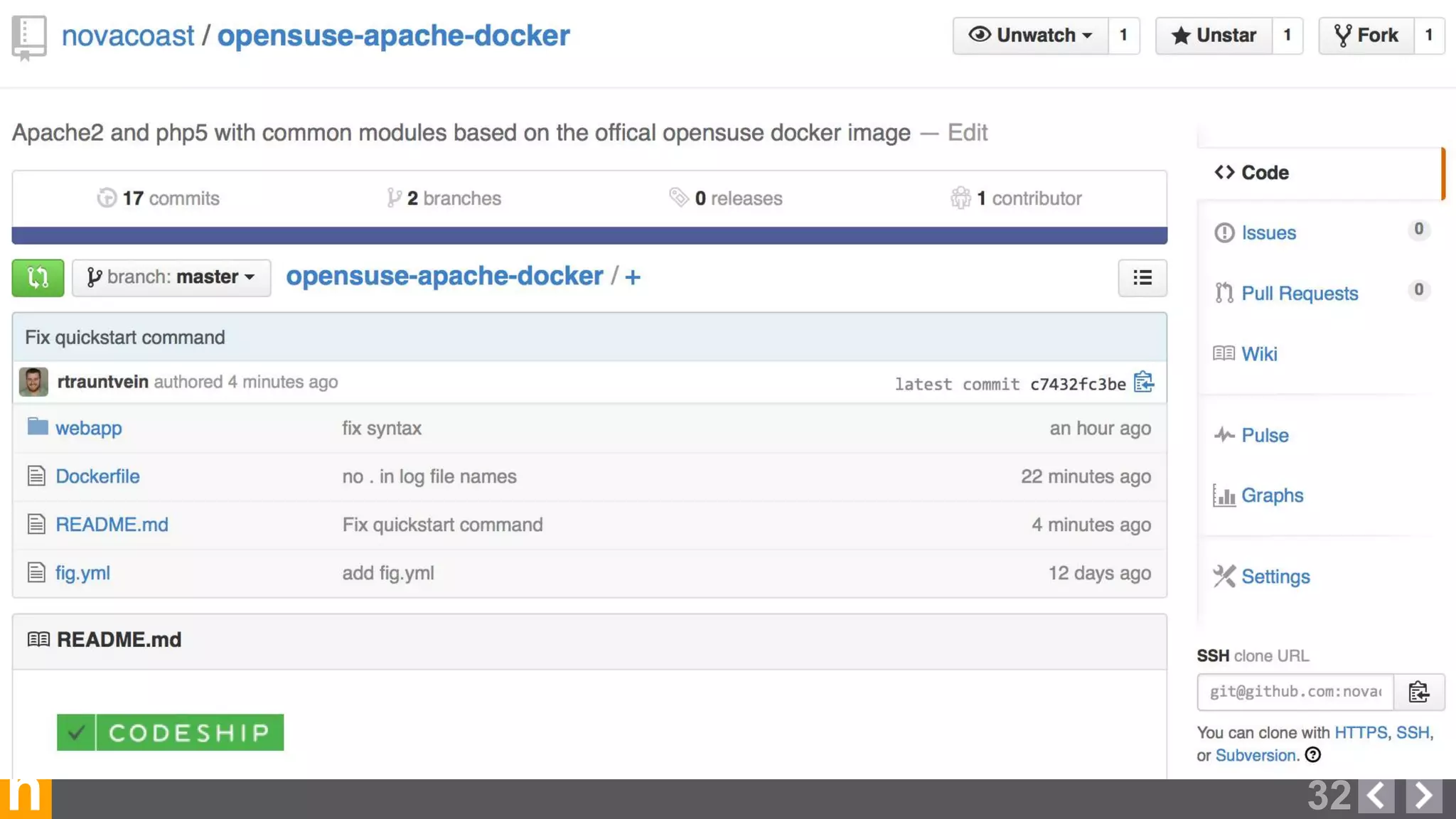
  • #33 Our Codeship status badge is now showing as green also!
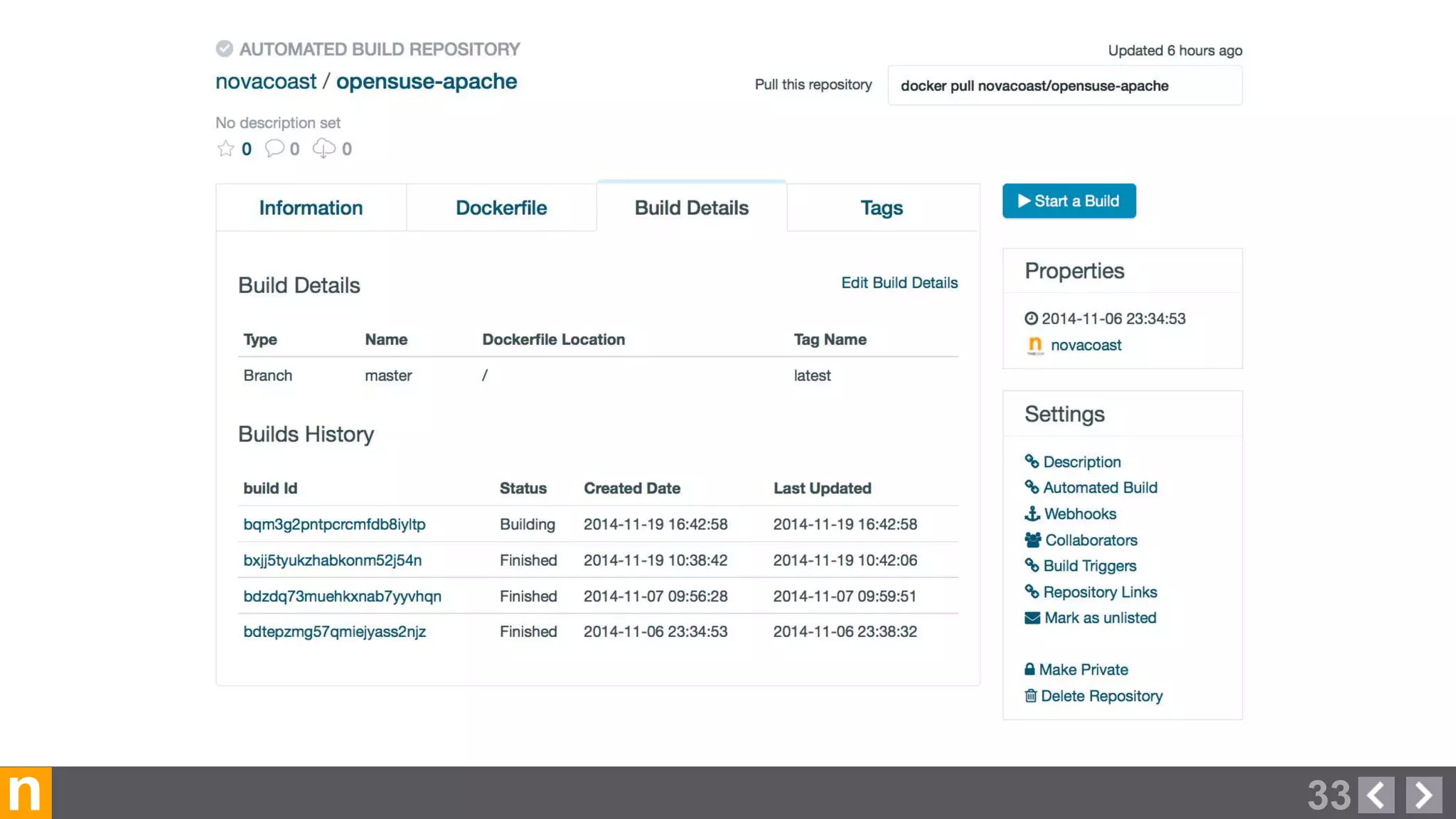
  • #34 Over on the official Docker Hub, we have a “Automated Build Repository” setup which is linked to the Github project. We have configured the build to trigger whenever a change is pushed to the master branch of our project. Clicking on a build ID will show the Dockerfile used, and the logging output for the build.
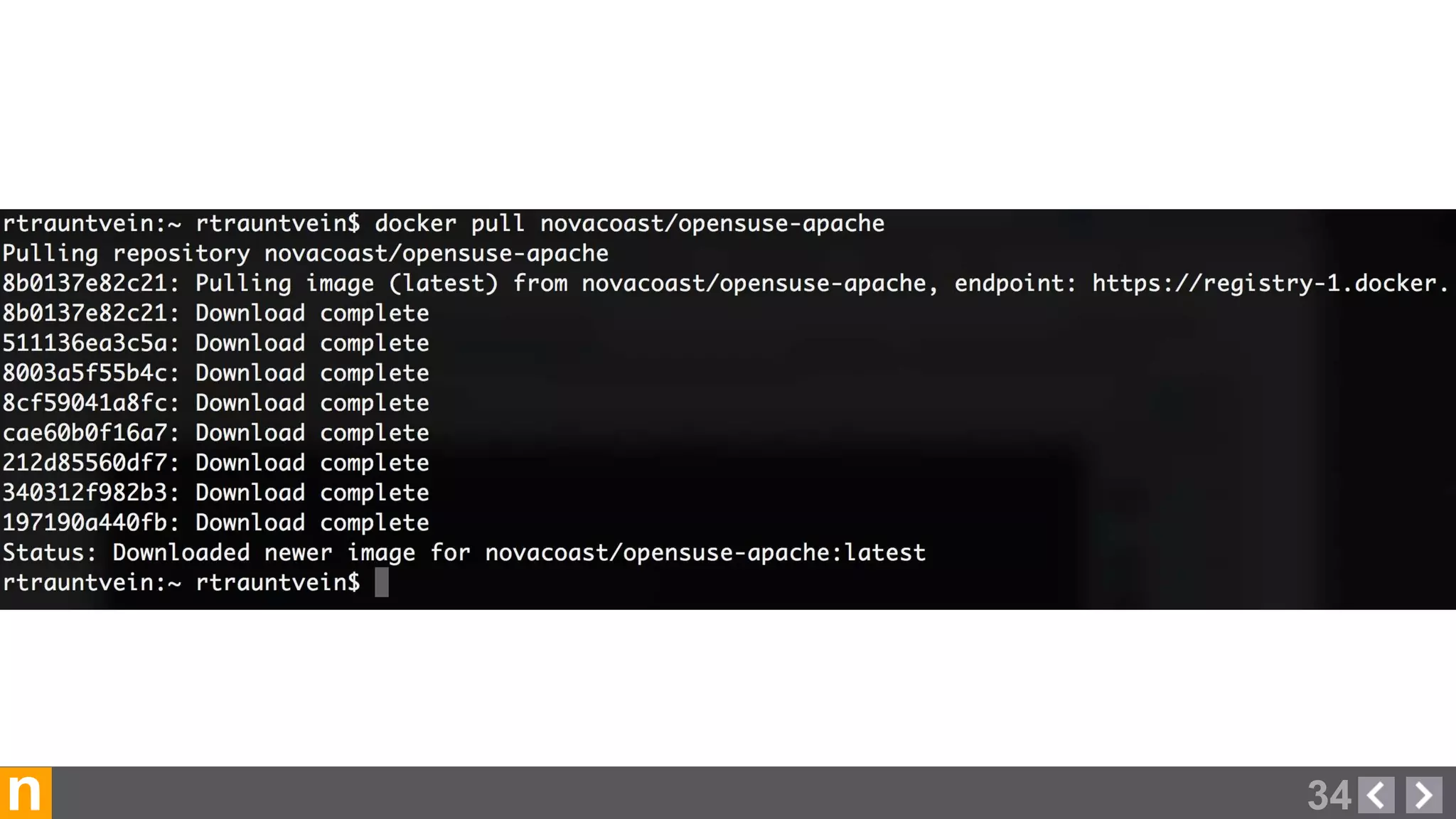
  • #35 Once the build completes, we are able to use the “docker pull” command to download the image.
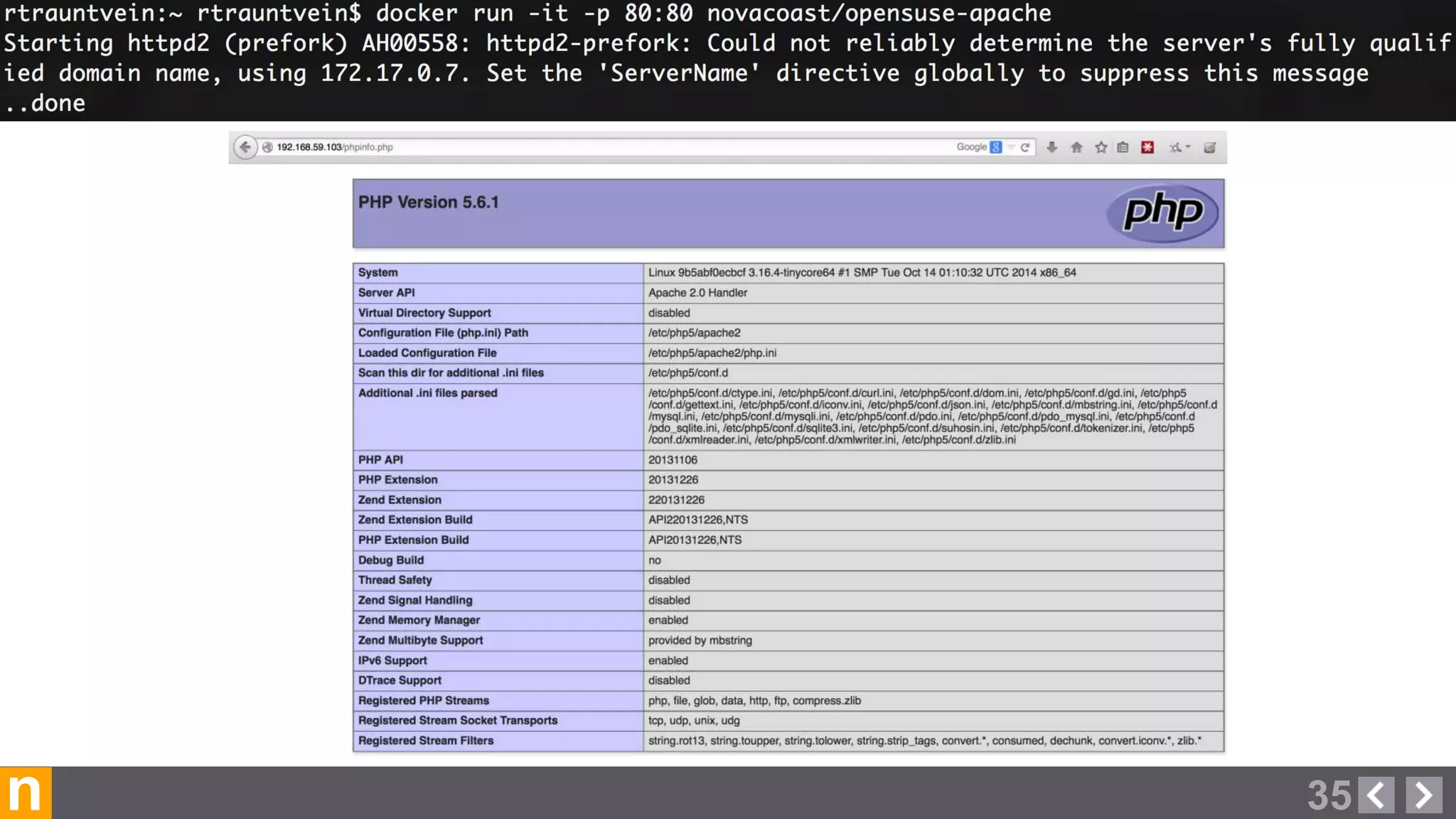
  • #36 Then we run the container from our image with the “docker run” command, exposing port 80 to the host’s networking stack. We are then able to browse to http://<docker host IP>/phpinfo.php and view our page
  • #39 Here are some other items that we don’t have time to demo, but are things to think about going beyond what we have showed. Unit tests / integration tests on the images after being built. Deploying using config management tools, or via a build system like Codeship or Jenkins We used Github, Codeship, and the Docker Hub registry to demo - Could just as easily use SVN, Jenkins, and a Privately hosted registry - Go with what meets your needs and strengths.