

Dell World User Forum
UFIL517: Scripting
Andrew Lubchansky, Senior Trainer
Erik Ragan, Senior Trainer
Dell World
User Forum
Dell World User Forum
Agenda
• K1000 Scripting Overview
• K2000 Scripting Overview
• Custom Scripts
Dell World User Forum
K1000 Scripting
Overview
Dell World User Forum
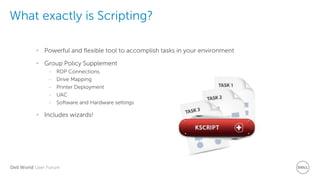
What exactly is Scripting?
• Powerful and flexible tool to accomplish tasks in your environment
• Group Policy Supplement
– RDP Connections
– Drive Mapping
– Printer Deployment
– UAC
– Software and Hardware settings
• Includes wizards!
Dell World User Forum
OK, so how exactly does Scripting work?
• Different types of scripts
– Online K-Script
– Offline K-Script
– Online Shell Script
• Can use labels, target different Operating Systems, run in different accounts, run
scheduled or on-demand, and use multiple dependencies
• Uses basic logical steps to control behavior
Dell World User Forum
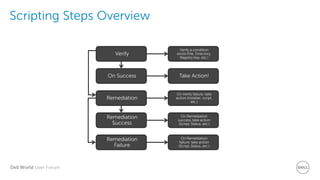
Scripting Steps Overview
Verify a condition
exists (File, Directory,
Registry Key, etc.)
Take Action!
On Verify failure, take
action (installer, script,
etc.)
On Remediation
success, take action
(Script, Status, etc.)
On Remediation
failure, take action
(Script, Status, etc.)
Verify
On Success
Remediation
Remediation
Success
Remediation
Failure
Dell World User Forum
Demo: Scripting
Walkthrough
Dell World User Forum
K2000 Scripting
Overview
Dell World User Forum
Task Engine Changes
• Things to remove
– start /wait (for .EXE/.MSI)
– DOS commands in Application tasks
– call (for bat)
– “quotes”
• Things to add
– cscript.exe (prior to .VBS)
– Reboot Required checkbox
• Need some assistance
– K2 Advisor – Scan/Identify tasks that need to be changed
Dell World User Forum
Working with PowerShell
• PowerShell commands no longer run as direct command lines
• New process
– Save .ps1 file
– Create .bat script with PowerShell commands
– ZIP .ps1 and .bat script together
– Upload as Application task
– Command line is name of .bat
Dell World User Forum
Demo: Join Domain
and OU
Dell World User Forum
Custom Scripts
Dell World User Forum
Custom Scripts
• Want the automation of Managed Installs with the power of Scripting?
• Want to force a full Inventory after a Managed Install?
• Automate with AutoIt!
Dell World User Forum
Demo: Create MI
with AutoIt
Dell World User Forum
Thank you.
Dell World User Forum
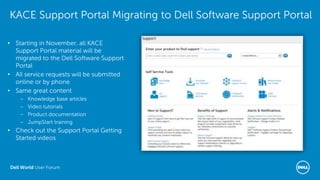
KACE Support Portal Migrating to Dell Software Support Portal
• Starting in November, all KACE
Support Portal material will be
migrated to the Dell Software Support
Portal
• All service requests will be submitted
online or by phone
• Same great content
– Knowledge base articles
– Video tutorials
– Product documentation
– JumpStart training
• Check out the Support Portal Getting
Started videos

Scripting

  • 1.
    Dell World UserForum UFIL517: Scripting Andrew Lubchansky, Senior Trainer Erik Ragan, Senior Trainer Dell World User Forum
  • 2.
    Dell World UserForum Agenda • K1000 Scripting Overview • K2000 Scripting Overview • Custom Scripts
  • 3.
    Dell World UserForum K1000 Scripting Overview
  • 4.
    Dell World UserForum What exactly is Scripting? • Powerful and flexible tool to accomplish tasks in your environment • Group Policy Supplement – RDP Connections – Drive Mapping – Printer Deployment – UAC – Software and Hardware settings • Includes wizards!
  • 5.
    Dell World UserForum OK, so how exactly does Scripting work? • Different types of scripts – Online K-Script – Offline K-Script – Online Shell Script • Can use labels, target different Operating Systems, run in different accounts, run scheduled or on-demand, and use multiple dependencies • Uses basic logical steps to control behavior
  • 6.
    Dell World UserForum Scripting Steps Overview Verify a condition exists (File, Directory, Registry Key, etc.) Take Action! On Verify failure, take action (installer, script, etc.) On Remediation success, take action (Script, Status, etc.) On Remediation failure, take action (Script, Status, etc.) Verify On Success Remediation Remediation Success Remediation Failure
  • 7.
    Dell World UserForum Demo: Scripting Walkthrough
  • 8.
    Dell World UserForum K2000 Scripting Overview
  • 9.
    Dell World UserForum Task Engine Changes • Things to remove – start /wait (for .EXE/.MSI) – DOS commands in Application tasks – call (for bat) – “quotes” • Things to add – cscript.exe (prior to .VBS) – Reboot Required checkbox • Need some assistance – K2 Advisor – Scan/Identify tasks that need to be changed
  • 10.
    Dell World UserForum Working with PowerShell • PowerShell commands no longer run as direct command lines • New process – Save .ps1 file – Create .bat script with PowerShell commands – ZIP .ps1 and .bat script together – Upload as Application task – Command line is name of .bat
  • 11.
    Dell World UserForum Demo: Join Domain and OU
  • 12.
    Dell World UserForum Custom Scripts
  • 13.
    Dell World UserForum Custom Scripts • Want the automation of Managed Installs with the power of Scripting? • Want to force a full Inventory after a Managed Install? • Automate with AutoIt!
  • 14.
    Dell World UserForum Demo: Create MI with AutoIt
  • 15.
    Dell World UserForum Thank you.
  • 16.
    Dell World UserForum KACE Support Portal Migrating to Dell Software Support Portal • Starting in November, all KACE Support Portal material will be migrated to the Dell Software Support Portal • All service requests will be submitted online or by phone • Same great content – Knowledge base articles – Video tutorials – Product documentation – JumpStart training • Check out the Support Portal Getting Started videos

Editor's Notes

  • #8 Show where the wizards are (not details) Create a new script and walk through: Script Types Online Kscript Offline Kscript Online Shell Script Deploy Options OS Options Windows Run-As Select a Windows OS above Notify Options Schedule Options Dependencies Tasks
  • #12 Create powershell script: $domain= "DOMAIN.COM" $password= "PASSWORD" | ConvertTo-SecureString -asPlainText -Force $user= "$domain\USER" $cred= New-Object System.Management.Automation.PSCredential($user,$password) $oupath = "OU=Computers,DC=DOMAIN,DC=COM" Add-Computer -domainname $domain -oupath $oupath -Credential $cred -ErrorAction silentlycontinue Add-Computer -DomainName $domain -Credential $cred   Remove-ItemProperty -path "HKLM:\SOFTWARE\Microsoft\Windows NT\CurrentVersion\Winlogon" -name DefaultPassword Set-ItemProperty -path "HKLM:\SOFTWARE\Microsoft\Windows NT\CurrentVersion\Winlogon" -name AutoAdminLogon -value 0 Create BAT file powershell.exe -nologo -executionpolicy bypass -noprofile -file joindomain.ps1 ZIP up scripts Upload as PO task.
  • #15 Show AutoIt JAVA Script Explain functionality basics Log File Process Ending JAVA Uninstall Records – Pause and show where to get these in K1000 JAVA Install – Talk about how to get MSI and CAB file Modify Registry Force complete Inventory update ZIP MSI, CAB, and Script Find new (or correct version) JAVA record in Software Inventory Upload ZIP to JAVA Software Inventory Record Create Managed Installation for above JAVA record Create SMART Label for JAVA for ALL other version but above version Force TEST to check-in Profit!
  • #16 TIME PERMITTING
  • #17 TIME PERMITTING In K1000, create Software Inventory record for USMT Show BAT Script and what it is going to do In K2000 go and download a MIG file Explain moving USMT and MIG file to shared location Upload BAT script to USMT Software Inventory record and choose Supported Windows OSes Add to user console library with install option of BAT script name
  • #19 Portal: http://www.software.dell.com/support Ticket Entry: https://support.software.dell.com/create-service-request Videos: https://support.software.dell.com/essentials/getting-started