From OverTheWallOps to
DevOps
Using OpenShift for SysOps and Engineering
April 17th, 2019 – DevOpsDays Houston
Shaun Ladewig, Systems Architect
Robert Stone, Advisory Engineering
Endurance International Group
Overview
• Infrastructure (Ops)
• Why OpenShift?
• Parts of OpenShift
• Planning your cluster
• Maintenance
• Troubleshooting Common Issues
• OpenShift Usage (Dev)
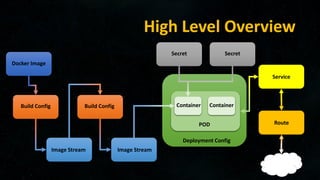
• High Level Overview
• How the Pieces Fit Together
• Step by Step
• Components in Depth
• Real World
• Migrating from Existing to “The New Hotness”
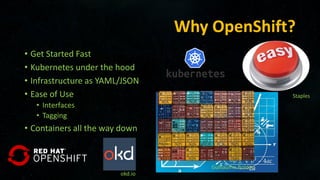
Why OpenShift?
• Get Started Fast
• Kubernetes under the hood
• Infrastructure as YAML/JSON
• Ease of Use
• Interfaces
• Tagging
• Containers all the way down
okd.io
Staples
Guillaume Bolduc
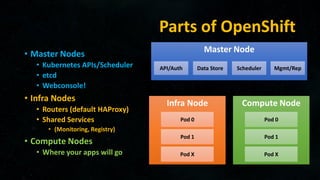
Parts of OpenShift
• Master Nodes
• Kubernetes APIs/Scheduler
• etcd
• Webconsole!
• Infra Nodes
• Routers (default HAProxy)
• Shared Services
• (Monitoring, Registry)
• Compute Nodes
• Where your apps will go
Master Node
Infra Node
API/Auth
Pod 0
Data Store Scheduler Mgmt/Rep
Pod 1
Pod X
Compute Node
Pod 0
Pod 1
Pod X
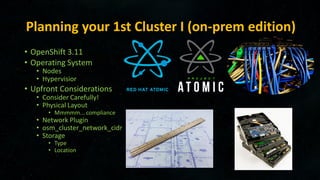
Planning your 1st Cluster I (on-prem edition)
• OpenShift 3.11
• Operating System
• Nodes
• Hypervisior
• Upfront Considerations
• Consider Carefully!
• Physical Layout
• Mmmmm... compliance
• Network Plugin
• osm_cluster_network_cidr
• Storage
• Type
• Location
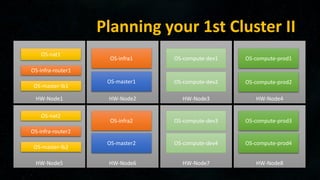
Planning your 1st Cluster II
HW-Node1
OS-nat1
OS-infra-router1
HW-Node2
OS-infra1
OS-master1
HW-Node3 HW-Node4
OS-compute-dev1
OS-compute-dev2
HW-Node5 HW-Node6 HW-Node7 HW-Node8
OS-master2
OS-infra2
OS-nat2
OS-infra-router2
OS-compute-dev3
OS-compute-dev4
OS-compute-prod1
OS-compute-prod2
OS-compute-prod3
OS-compute-prod4
OS-master-lb1
OS-master-lb2
Maintenance
• Cleanup / Pruning
• Registry
• Projects
• Backups
• etcd node
• configs
• Monitoring
• Alerts sent somewhere YOU WILL WATCH!
• Upgrading nodes
• If using ansible, git pull branch, and run upgrade
Troubleshooting Common Issues
• The Events Page
• First place to look
• Cattle not Pets
• If you used atomic, and the node is dead…
• Delete the node, reload, and scale-up
• GlusterFS
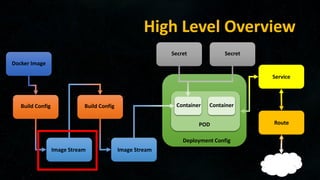
High Level Overview
Docker Image
Build Config Build Config
Image Stream Image Stream
Secret Secret
Container Container
Deployment Config
POD
Service
Route
High Level Overview
Docker Image
Build Config Build Config
Image Stream Image Stream
Secret Secret
Container Container
Deployment Config
POD
Service
Route
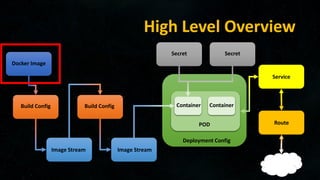
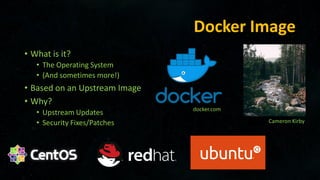
Docker Image
• What is it?
• The Operating System
• (And sometimes more!)
• Based on an Upstream Image
• Why?
• Upstream Updates
• Security Fixes/Patches
docker.com
Cameron Kirby
High Level Overview
Docker Image
Build Config Build Config
Image Stream Image Stream
Secret Secret
Container Container
Deployment Config
POD
Service
Route
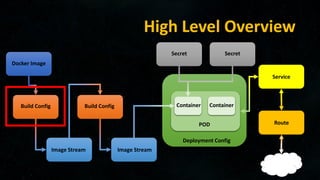
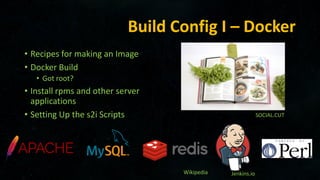
Build Config I – Docker
• Recipes for making an Image
• Docker Build
• Got root?
• Install rpms and other server
applications
• Setting Up the s2i Scripts SOCIAL.CUT
Wikipedia Jenkins.io
High Level Overview
Docker Image
Build Config Build Config
Image Stream Image Stream
Secret Secret
Container Container
Deployment Config
POD
Service
Route
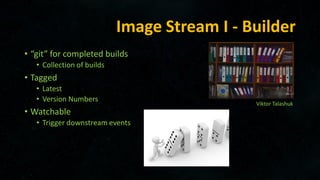
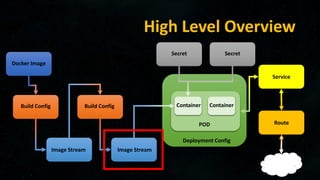
Image Stream I - Builder
• “git” for completed builds
• Collection of builds
• Tagged
• Latest
• Version Numbers
• Watchable
• Trigger downstream events
Viktor Talashuk
High Level Overview
Docker Image
Build Config Build Config
Image Stream Image Stream
Secret Secret
Container Container
Deployment Config
POD
Service
Route
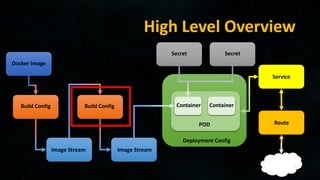
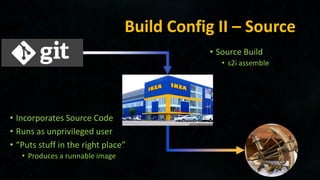
Build Config II – Source
• Source Build
• s2i assemble
• Incorporates Source Code
• Runs as unprivileged user
• “Puts stuff in the right place”
• Produces a runnable image
High Level Overview
Docker Image
Build Config Build Config
Image Stream Image Stream
Secret Secret
Container Container
Deployment Config
POD
Service
Route
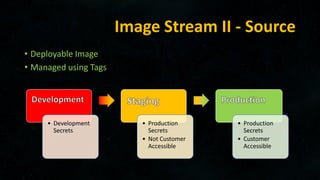
Image Stream II - Source
• Deployable Image
• Managed using Tags
• Development
Secrets
• Production
Secrets
• Not Customer
Accessible
• Production
Secrets
• Customer
Accessible
High Level Overview
Docker Image
Build Config Build Config
Image Stream Image Stream
Secret Secret
Container Container
Deployment Config
POD
Service
Route
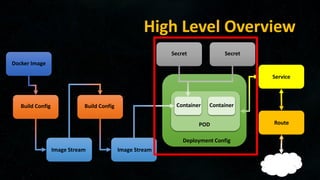
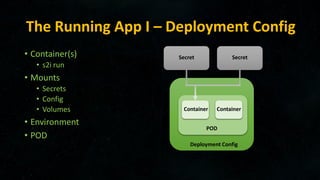
The Running App I – Deployment Config
• Container(s)
• s2i run
• Mounts
• Secrets
• Config
• Volumes
• Environment
• POD
Secret Secret
Container Container
Deployment Config
POD
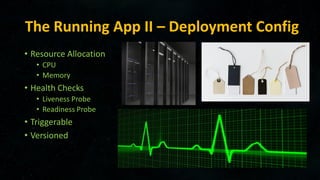
The Running App II – Deployment Config
• Resource Allocation
• CPU
• Memory
• Health Checks
• Liveness Probe
• Readiness Probe
• Triggerable
• Versioned
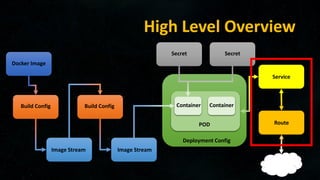
High Level Overview
Docker Image
Build Config Build Config
Image Stream Image Stream
Secret Secret
Container Container
Deployment Config
POD
Service
Route
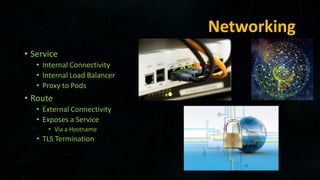
Networking
• Service
• Internal Connectivity
• Internal Load Balancer
• Proxy to Pods
• Route
• External Connectivity
• Exposes a Service
• Via a Hostname
• TLS Termination
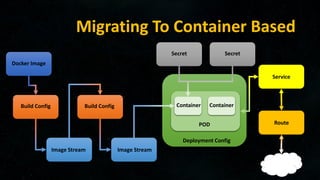
Migrating To Container Based
Docker Image
Build Config Build Config
Image Stream Image Stream
Secret Secret
Container Container
Deployment Config
POD
Service
Route

DevOpsDays Houston 2019 - Shaun Ladewig, Robert Stone - From OverTheWallOps to DevOps, Using OpenShift for SysOps and Engineering

  • 1.
    From OverTheWallOps to DevOps UsingOpenShift for SysOps and Engineering April 17th, 2019 – DevOpsDays Houston Shaun Ladewig, Systems Architect Robert Stone, Advisory Engineering Endurance International Group
  • 2.
    Overview • Infrastructure (Ops) •Why OpenShift? • Parts of OpenShift • Planning your cluster • Maintenance • Troubleshooting Common Issues • OpenShift Usage (Dev) • High Level Overview • How the Pieces Fit Together • Step by Step • Components in Depth • Real World • Migrating from Existing to “The New Hotness”
  • 3.
    Why OpenShift? • GetStarted Fast • Kubernetes under the hood • Infrastructure as YAML/JSON • Ease of Use • Interfaces • Tagging • Containers all the way down okd.io Staples Guillaume Bolduc
  • 4.
    Parts of OpenShift •Master Nodes • Kubernetes APIs/Scheduler • etcd • Webconsole! • Infra Nodes • Routers (default HAProxy) • Shared Services • (Monitoring, Registry) • Compute Nodes • Where your apps will go Master Node Infra Node API/Auth Pod 0 Data Store Scheduler Mgmt/Rep Pod 1 Pod X Compute Node Pod 0 Pod 1 Pod X
  • 5.
    Planning your 1stCluster I (on-prem edition) • OpenShift 3.11 • Operating System • Nodes • Hypervisior • Upfront Considerations • Consider Carefully! • Physical Layout • Mmmmm... compliance • Network Plugin • osm_cluster_network_cidr • Storage • Type • Location
  • 6.
    Planning your 1stCluster II HW-Node1 OS-nat1 OS-infra-router1 HW-Node2 OS-infra1 OS-master1 HW-Node3 HW-Node4 OS-compute-dev1 OS-compute-dev2 HW-Node5 HW-Node6 HW-Node7 HW-Node8 OS-master2 OS-infra2 OS-nat2 OS-infra-router2 OS-compute-dev3 OS-compute-dev4 OS-compute-prod1 OS-compute-prod2 OS-compute-prod3 OS-compute-prod4 OS-master-lb1 OS-master-lb2
  • 7.
    Maintenance • Cleanup /Pruning • Registry • Projects • Backups • etcd node • configs • Monitoring • Alerts sent somewhere YOU WILL WATCH! • Upgrading nodes • If using ansible, git pull branch, and run upgrade
  • 8.
    Troubleshooting Common Issues •The Events Page • First place to look • Cattle not Pets • If you used atomic, and the node is dead… • Delete the node, reload, and scale-up • GlusterFS
  • 9.
    High Level Overview DockerImage Build Config Build Config Image Stream Image Stream Secret Secret Container Container Deployment Config POD Service Route
  • 10.
    High Level Overview DockerImage Build Config Build Config Image Stream Image Stream Secret Secret Container Container Deployment Config POD Service Route
  • 11.
    Docker Image • Whatis it? • The Operating System • (And sometimes more!) • Based on an Upstream Image • Why? • Upstream Updates • Security Fixes/Patches docker.com Cameron Kirby
  • 12.
    High Level Overview DockerImage Build Config Build Config Image Stream Image Stream Secret Secret Container Container Deployment Config POD Service Route
  • 13.
    Build Config I– Docker • Recipes for making an Image • Docker Build • Got root? • Install rpms and other server applications • Setting Up the s2i Scripts SOCIAL.CUT Wikipedia Jenkins.io
  • 14.
    High Level Overview DockerImage Build Config Build Config Image Stream Image Stream Secret Secret Container Container Deployment Config POD Service Route
  • 15.
    Image Stream I- Builder • “git” for completed builds • Collection of builds • Tagged • Latest • Version Numbers • Watchable • Trigger downstream events Viktor Talashuk
  • 16.
    High Level Overview DockerImage Build Config Build Config Image Stream Image Stream Secret Secret Container Container Deployment Config POD Service Route
  • 17.
    Build Config II– Source • Source Build • s2i assemble • Incorporates Source Code • Runs as unprivileged user • “Puts stuff in the right place” • Produces a runnable image
  • 18.
    High Level Overview DockerImage Build Config Build Config Image Stream Image Stream Secret Secret Container Container Deployment Config POD Service Route
  • 19.
    Image Stream II- Source • Deployable Image • Managed using Tags • Development Secrets • Production Secrets • Not Customer Accessible • Production Secrets • Customer Accessible
  • 20.
    High Level Overview DockerImage Build Config Build Config Image Stream Image Stream Secret Secret Container Container Deployment Config POD Service Route
  • 21.
    The Running AppI – Deployment Config • Container(s) • s2i run • Mounts • Secrets • Config • Volumes • Environment • POD Secret Secret Container Container Deployment Config POD
  • 22.
    The Running AppII – Deployment Config • Resource Allocation • CPU • Memory • Health Checks • Liveness Probe • Readiness Probe • Triggerable • Versioned
  • 23.
    High Level Overview DockerImage Build Config Build Config Image Stream Image Stream Secret Secret Container Container Deployment Config POD Service Route
  • 24.
    Networking • Service • InternalConnectivity • Internal Load Balancer • Proxy to Pods • Route • External Connectivity • Exposes a Service • Via a Hostname • TLS Termination
  • 25.
    Migrating To ContainerBased Docker Image Build Config Build Config Image Stream Image Stream Secret Secret Container Container Deployment Config POD Service Route