





Script Writing
Formatting
The Elements
L . Sands
2017/18
Formatting in
Celtx for
Professional
standards
Scripts are bound by some of the
strictest formatting guidelines of
any written medium. Think of them
like legal documents –
discrepancies can render them
inadmissible. Coverage readers
(the people who review spec scripts
that are submitted to production
companies) are likely to toss a
script in the garbage if there’s
spelling or grammar mistakes on
the first page. You can imagine
what they’d think of an improperly
formatted scene heading.
2
Screenplay formatting is not
arbitrary. Scripts as we read
them today a product of
decades of development and
fine tuning. The objective of
screenplay formatting is to
ensure that the information that
is critical to conceptualizing
how the film will be shot is
displayed prominently and
clearly on the page, as well as
making the content of your
story easy to parse and isolate
for editing.
Using a Script editor
Celtx
○Celtx’s is fully featured, free, and integrated with a suite of planning tools that
make writing, editing, and expanding your script into a production a fast and fluid
process. Celtx’s script editor handles the formatting automatically, and will
intuitively guide you to the next logical element position on the page.
○However, just because something is done automatically doesn’t mean that it’s
not worth understanding. It’s crucial to know what each formatting element
means, and understand how they can be manipulated to write more complex
scenes. The following will break down the basics and show you a few different
alternative approaches that you can use to make your script read properly.
3
1.Scene Heading
Scene headings denote the
time and place where a
scene takes place.
“
The first part of a scene heading specifies whether it is inside
our outside, written as ‘INT’. or ‘EXT.’ (Interior or Exterior). If a
scene is taking place both inside and outside, you can write
‘INT. / EXT.’. The second part of your scene heading will refer
to the setting – a house, a plane, a farm, whatever. Just make
sure its capitalized. The third part will specify time of day,
usually in relation to the prevailing lighting conditions that you
envision. ‘DAY’ and ‘NIGHT’ are the most common, but you
can use more specific words, i.e. ‘AFTERNOON’ or ‘DUSK’.
5
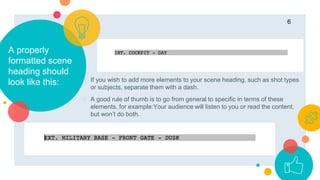
A properly
formatted scene
heading should
look like this: ○ If you wish to add more elements to your scene heading, such as shot types
or subjects, separate them with a dash.
○ A good rule of thumb is to go from general to specific in terms of these
elements, for example:Your audience will listen to you or read the content,
but won’t do both.
6
SHOTS
The shot element allows you to specify
a subject within your scene, guiding the
reader’s perspective.
7
SHOTSARE
CAPITALIZED
8
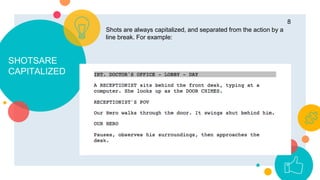
Shots are always capitalized, and separated from the action by a
line break. For example:
Being More
Specific is OK
9
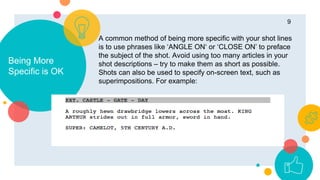
A common method of being more specific with your shot lines
is to use phrases like ‘ANGLE ON‘ or ‘CLOSE ON’ to preface
the subject of the shot. Avoid using too many articles in your
shot descriptions – try to make them as short as possible.
Shots can also be used to specify on-screen text, such as
superimpositions. For example:
Want big
impact?
Use ACTION.
10
ACTION
A picture is worth
a thousand
words
The meat of your script,
action describes everything
that is happening within a
scene outside of dialog.
Action is written in standard
paragraphical format, albeit
with a few quirks. The most
important quirks are the
rules surrounding
capitalization.
11
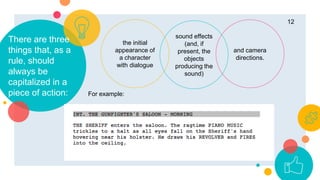
There are three
things that, as a
rule, should
always be
capitalized in a
piece of action:
the initial
appearance of
a character
with dialogue
and camera
directions.
sound effects
(and, if
present, the
objects
producing the
sound)
12
For example:
CHARACTERS
13
The character’s
name should
always be
capitalized.
14
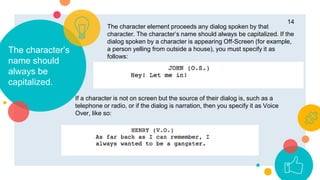
The character element proceeds any dialog spoken by that
character. The character’s name should always be capitalized. If the
dialog spoken by a character is appearing Off-Screen (for example,
a person yelling from outside a house), you must specify it as
follows:
If a character is not on screen but the source of their dialog is, such as a
telephone or radio, or if the dialog is narration, then you specify it as Voice
Over, like so:
PARENTHETICALS
Parenthetical direction is inserted into
dialog to describe what a character is
doing while they speak, or how they
are speaking.
15
16
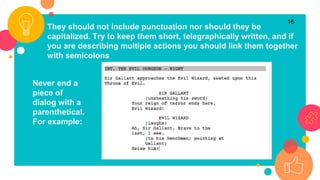
They should not include punctuation nor should they be
capitalized. Try to keep them short, telegraphically written, and if
you are describing multiple actions you should link them together
with semicolons
Never end a
piece of
dialog with a
parenthetical.
For example:
TRANSITIONS
OR CUTS
Transitions describe how each scene leads into the next. We all
know the standard ‘FADE IN:’ and ‘FADE OUT’. These kinds of
transitions are largely anachronistic in contemporary
screenwriting. Describing cuts, however, are not.
17
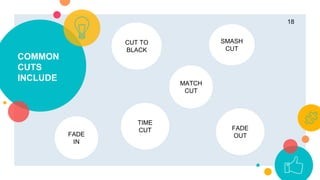
SMASH
CUT
TIME
CUT
CUT TO
BLACK
COMMON
CUTS
INCLUDE
18
MATCH
CUT
FADE
IN
FADE
OUT
Place your screenshot here
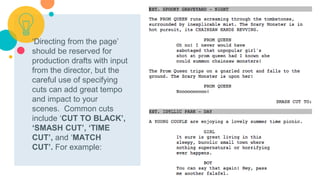
‘Directing from the page’
should be reserved for
production drafts with input
from the director, but the
careful use of specifying
cuts can add great tempo
and impact to your
scenes. Common cuts
include ‘CUT TO BLACK’,
‘SMASH CUT’, ‘TIME
CUT’, and ‘MATCH
CUT’. For example:
19
Remember, there’s much more to
screenplay formatting than is described
here, but these basics provide a solid
foundation. The best way to study the full
complexity of formatting is to read some
scripts yourselves.
The Black List’s official blog currently hosts
some great resources in this department,
including the most recent round of
nominated screenplays from the 2016
Oscars.
✋👆👉👍👤👦👧👨👩👪💃🏃
💑❤😂😉😋😒😭👶😸🐟🍒🍔
💣📌📖🔨🎃🎈🎨🏈🏰🌏🔌🔑
and many more...
😉
21
EMOJI TIME

Script writing with Celtx Lecture 2

  • 1.
  • 2.
    Formatting in Celtx for Professional standards Scriptsare bound by some of the strictest formatting guidelines of any written medium. Think of them like legal documents – discrepancies can render them inadmissible. Coverage readers (the people who review spec scripts that are submitted to production companies) are likely to toss a script in the garbage if there’s spelling or grammar mistakes on the first page. You can imagine what they’d think of an improperly formatted scene heading. 2 Screenplay formatting is not arbitrary. Scripts as we read them today a product of decades of development and fine tuning. The objective of screenplay formatting is to ensure that the information that is critical to conceptualizing how the film will be shot is displayed prominently and clearly on the page, as well as making the content of your story easy to parse and isolate for editing.
  • 3.
    Using a Scripteditor Celtx ○Celtx’s is fully featured, free, and integrated with a suite of planning tools that make writing, editing, and expanding your script into a production a fast and fluid process. Celtx’s script editor handles the formatting automatically, and will intuitively guide you to the next logical element position on the page. ○However, just because something is done automatically doesn’t mean that it’s not worth understanding. It’s crucial to know what each formatting element means, and understand how they can be manipulated to write more complex scenes. The following will break down the basics and show you a few different alternative approaches that you can use to make your script read properly. 3
  • 4.
    1.Scene Heading Scene headingsdenote the time and place where a scene takes place.
  • 5.
    “ The first partof a scene heading specifies whether it is inside our outside, written as ‘INT’. or ‘EXT.’ (Interior or Exterior). If a scene is taking place both inside and outside, you can write ‘INT. / EXT.’. The second part of your scene heading will refer to the setting – a house, a plane, a farm, whatever. Just make sure its capitalized. The third part will specify time of day, usually in relation to the prevailing lighting conditions that you envision. ‘DAY’ and ‘NIGHT’ are the most common, but you can use more specific words, i.e. ‘AFTERNOON’ or ‘DUSK’. 5
  • 6.
    A properly formatted scene headingshould look like this: ○ If you wish to add more elements to your scene heading, such as shot types or subjects, separate them with a dash. ○ A good rule of thumb is to go from general to specific in terms of these elements, for example:Your audience will listen to you or read the content, but won’t do both. 6
  • 7.
    SHOTS The shot elementallows you to specify a subject within your scene, guiding the reader’s perspective. 7
  • 8.
    SHOTSARE CAPITALIZED 8 Shots are alwayscapitalized, and separated from the action by a line break. For example:
  • 9.
    Being More Specific isOK 9 A common method of being more specific with your shot lines is to use phrases like ‘ANGLE ON‘ or ‘CLOSE ON’ to preface the subject of the shot. Avoid using too many articles in your shot descriptions – try to make them as short as possible. Shots can also be used to specify on-screen text, such as superimpositions. For example:
  • 10.
  • 11.
    ACTION A picture isworth a thousand words The meat of your script, action describes everything that is happening within a scene outside of dialog. Action is written in standard paragraphical format, albeit with a few quirks. The most important quirks are the rules surrounding capitalization. 11
  • 12.
    There are three thingsthat, as a rule, should always be capitalized in a piece of action: the initial appearance of a character with dialogue and camera directions. sound effects (and, if present, the objects producing the sound) 12 For example:
  • 13.
  • 14.
    The character’s name should alwaysbe capitalized. 14 The character element proceeds any dialog spoken by that character. The character’s name should always be capitalized. If the dialog spoken by a character is appearing Off-Screen (for example, a person yelling from outside a house), you must specify it as follows: If a character is not on screen but the source of their dialog is, such as a telephone or radio, or if the dialog is narration, then you specify it as Voice Over, like so:
  • 15.
    PARENTHETICALS Parenthetical direction isinserted into dialog to describe what a character is doing while they speak, or how they are speaking. 15
  • 16.
    16 They should notinclude punctuation nor should they be capitalized. Try to keep them short, telegraphically written, and if you are describing multiple actions you should link them together with semicolons Never end a piece of dialog with a parenthetical. For example:
  • 17.
    TRANSITIONS OR CUTS Transitions describehow each scene leads into the next. We all know the standard ‘FADE IN:’ and ‘FADE OUT’. These kinds of transitions are largely anachronistic in contemporary screenwriting. Describing cuts, however, are not. 17
  • 18.
  • 19.
    Place your screenshothere ‘Directing from the page’ should be reserved for production drafts with input from the director, but the careful use of specifying cuts can add great tempo and impact to your scenes. Common cuts include ‘CUT TO BLACK’, ‘SMASH CUT’, ‘TIME CUT’, and ‘MATCH CUT’. For example: 19
  • 20.
    Remember, there’s muchmore to screenplay formatting than is described here, but these basics provide a solid foundation. The best way to study the full complexity of formatting is to read some scripts yourselves. The Black List’s official blog currently hosts some great resources in this department, including the most recent round of nominated screenplays from the 2016 Oscars.
  • 21.