




Raheescv
raheescv1992@gmail.com
www.facebook.com/raheescv
twitter.com/raheescv
in.linkedin.com/in/raheescv
09633155669
SCOPE OF VARIABLES IN C
Disclaimer: This presentation is prepared by trainees of
baabtra as a part of mentoring program. This is not official
document of baabtra –Mentoring Partner
Baabtra-Mentoring Partner is the mentoring division of baabte System Technologies Pvt . Ltd
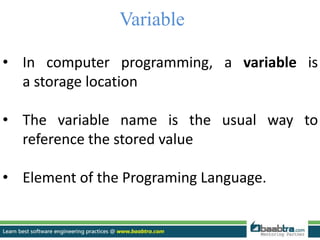
Variable
• In computer programming, a variable is
a storage location
• The variable name is the usual way to
reference the stored value
• Element of the Programing Language.
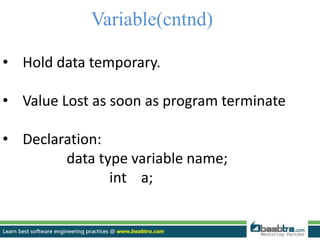
Variable(cntnd)
• Hold data temporary.
• Value Lost as soon as program terminate
• Declaration:
data type variable name;
int a;
Scope
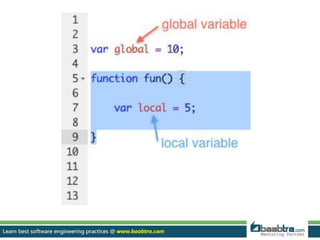
• The scope of a variable is the block of code where
the variable is valid for use
• If declaration is made outside the bodies of all functions and
outside the main program is called global variable
• A local declaration is one that is made inside the body of a function
• It is possible to declare the same identifier name in different parts
of the program
Scope(cntnd)
• Undisciplined use of global variables may lead to confusion and
debugging difficulties
• The use of global variable is not encouraged due to the lack of
protection of data
Scope of Variables
• Scope refers to the visibility of variables.
• 3 places where variables can be declared in C
programming language:
 Inside a function or a block
 -local variables
 Outside of all functions
 - global variables
 In the definition of function parameters
 -formal parameters.
Local variables
• Declared inside a function or Block.
• They are unknown to other functions and to the main
program
• They are recreated each time a function is executed or
called.
• They can be used only by statements that are inside that
function or block of code.
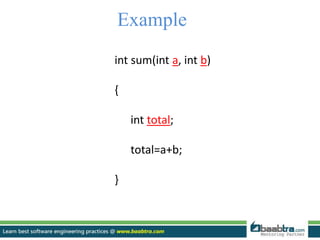
Example
int sum(int a, int b)
{
int total;
total=a+b;
}
Global variable
• Declared out side of all Functions used within the program
• A global variable can be accessed by any function.
• They remains in the memory as long as the program is
executing.
• They do not get recreated if the function is recalled.
• i.e. a global variable is available for use throughout
your entire program after its declaration.
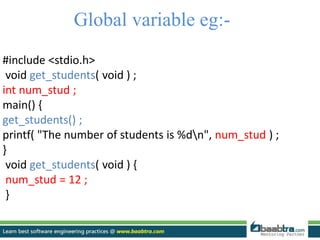
Global variable eg:-
#include <stdio.h>
void get_students( void ) ;
int num_stud ;
main() {
get_students() ;
printf( "The number of students is %dn", num_stud ) ;
}
void get_students( void ) {
num_stud = 12 ;
}
LOCAL VARIABLES Vs
GLOBAL VARIABLES
Using local variables allows to focus attention on smaller more
manageable pieces of the program. Globals forces to keep track
of how they're being used throughout the entire system.
While working with other people, you must coordinate who's
creating which global variables. It is not valid to create two
globals of the same name.
The effects of algorithm steps reduces the cases of unexpected
behavior.
Localizing the effects of algorithm steps makes the program
easier for others to understand.
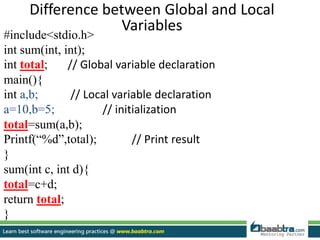
Difference between Global and Local
Variables
#include<stdio.h>
int sum(int, int);
int total; // Global variable declaration
main(){
int a,b; // Local variable declaration
a=10,b=5; // initialization
total=sum(a,b);
Printf(“%d”,total); // Print result
}
sum(int c, int d){
total=c+d;
return total;
}
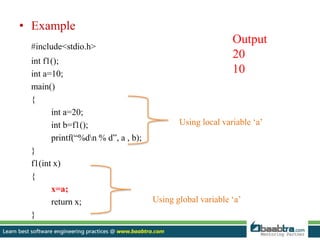
• Example
#include<stdio.h>
int f1();
int a=10;
main()
{
int a=20;
int b=f1();
printf(“%dn % d”, a , b);
}
f1(int x)
{
x=a;
return x;
}
Using local variable ‘a’
Using global variable ‘a’
Output
20
10
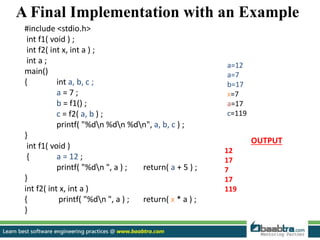
A Final Implementation with an Example
#include <stdio.h>
int f1( void ) ;
int f2( int x, int a ) ;
int a ;
main()
{ int a, b, c ;
a = 7 ;
b = f1() ;
c = f2( a, b ) ;
printf( "%dn %dn %dn", a, b, c ) ;
}
int f1( void )
{ a = 12 ;
printf( "%dn ", a ) ; return( a + 5 ) ;
}
int f2( int x, int a )
{ printf( "%dn ", a ) ; return( x * a ) ;
}
OUTPUT
12
17
7
17
119
a=12
a=7
b=17
x=7
a=17
c=119
 Thank you 
Want to learn more about programming or Looking to become a good programmer?
Are you wasting time on searching so many contents online?
Do you want to learn things quickly?
Tired of spending huge amount of money to become a Software professional?
Do an online course
@ baabtra.com
We put industry standards to practice. Our structured, activity based courses are so designed
to make a quick, good software professional out of anybody who holds a passion for coding.
Follow us @ twitter.com/baabtra
Like us @ facebook.com/baabtra
Subscribe to us @ youtube.com/baabtra
Become a follower @ slideshare.net/BaabtraMentoringPartner
Connect to us @ in.linkedin.com/in/baabtra
Give a feedback @ massbaab.com/baabtra
Thanks in advance
www.baabtra.com | www.massbaab.com |www.baabte.com
Emarald Mall (Big Bazar Building)
Mavoor Road, Kozhikode,
Kerala, India.
Ph: + 91 – 495 40 25 550
NC Complex, Near Bus Stand
Mukkam, Kozhikode,
Kerala, India.
Ph: + 91 – 495 40 25 550
Cafit Square,
Hilite Business Park,
Near Pantheerankavu,
Kozhikode
Start up Village
Eranakulam,
Kerala, India.
Email: info@baabtra.com
Contact Us

Scope of variables

  • 2.
  • 3.
    Disclaimer: This presentationis prepared by trainees of baabtra as a part of mentoring program. This is not official document of baabtra –Mentoring Partner Baabtra-Mentoring Partner is the mentoring division of baabte System Technologies Pvt . Ltd
  • 4.
    Variable • In computerprogramming, a variable is a storage location • The variable name is the usual way to reference the stored value • Element of the Programing Language.
  • 5.
    Variable(cntnd) • Hold datatemporary. • Value Lost as soon as program terminate • Declaration: data type variable name; int a;
  • 6.
    Scope • The scopeof a variable is the block of code where the variable is valid for use • If declaration is made outside the bodies of all functions and outside the main program is called global variable • A local declaration is one that is made inside the body of a function • It is possible to declare the same identifier name in different parts of the program
  • 7.
    Scope(cntnd) • Undisciplined useof global variables may lead to confusion and debugging difficulties • The use of global variable is not encouraged due to the lack of protection of data
  • 8.
    Scope of Variables •Scope refers to the visibility of variables. • 3 places where variables can be declared in C programming language:  Inside a function or a block  -local variables  Outside of all functions  - global variables  In the definition of function parameters  -formal parameters.
  • 9.
    Local variables • Declaredinside a function or Block. • They are unknown to other functions and to the main program • They are recreated each time a function is executed or called. • They can be used only by statements that are inside that function or block of code.
  • 10.
    Example int sum(int a,int b) { int total; total=a+b; }
  • 11.
    Global variable • Declaredout side of all Functions used within the program • A global variable can be accessed by any function. • They remains in the memory as long as the program is executing. • They do not get recreated if the function is recalled. • i.e. a global variable is available for use throughout your entire program after its declaration.
  • 12.
    Global variable eg:- #include<stdio.h> void get_students( void ) ; int num_stud ; main() { get_students() ; printf( "The number of students is %dn", num_stud ) ; } void get_students( void ) { num_stud = 12 ; }
  • 13.
    LOCAL VARIABLES Vs GLOBALVARIABLES Using local variables allows to focus attention on smaller more manageable pieces of the program. Globals forces to keep track of how they're being used throughout the entire system. While working with other people, you must coordinate who's creating which global variables. It is not valid to create two globals of the same name. The effects of algorithm steps reduces the cases of unexpected behavior. Localizing the effects of algorithm steps makes the program easier for others to understand.
  • 14.
    Difference between Globaland Local Variables #include<stdio.h> int sum(int, int); int total; // Global variable declaration main(){ int a,b; // Local variable declaration a=10,b=5; // initialization total=sum(a,b); Printf(“%d”,total); // Print result } sum(int c, int d){ total=c+d; return total; }
  • 15.
    • Example #include<stdio.h> int f1(); inta=10; main() { int a=20; int b=f1(); printf(“%dn % d”, a , b); } f1(int x) { x=a; return x; } Using local variable ‘a’ Using global variable ‘a’ Output 20 10
  • 17.
    A Final Implementationwith an Example #include <stdio.h> int f1( void ) ; int f2( int x, int a ) ; int a ; main() { int a, b, c ; a = 7 ; b = f1() ; c = f2( a, b ) ; printf( "%dn %dn %dn", a, b, c ) ; } int f1( void ) { a = 12 ; printf( "%dn ", a ) ; return( a + 5 ) ; } int f2( int x, int a ) { printf( "%dn ", a ) ; return( x * a ) ; } OUTPUT 12 17 7 17 119 a=12 a=7 b=17 x=7 a=17 c=119
  • 18.
  • 19.
    Want to learnmore about programming or Looking to become a good programmer? Are you wasting time on searching so many contents online? Do you want to learn things quickly? Tired of spending huge amount of money to become a Software professional? Do an online course @ baabtra.com We put industry standards to practice. Our structured, activity based courses are so designed to make a quick, good software professional out of anybody who holds a passion for coding.
  • 20.
    Follow us @twitter.com/baabtra Like us @ facebook.com/baabtra Subscribe to us @ youtube.com/baabtra Become a follower @ slideshare.net/BaabtraMentoringPartner Connect to us @ in.linkedin.com/in/baabtra Give a feedback @ massbaab.com/baabtra Thanks in advance www.baabtra.com | www.massbaab.com |www.baabte.com
  • 21.
    Emarald Mall (BigBazar Building) Mavoor Road, Kozhikode, Kerala, India. Ph: + 91 – 495 40 25 550 NC Complex, Near Bus Stand Mukkam, Kozhikode, Kerala, India. Ph: + 91 – 495 40 25 550 Cafit Square, Hilite Business Park, Near Pantheerankavu, Kozhikode Start up Village Eranakulam, Kerala, India. Email: info@baabtra.com Contact Us