By Marcel Caraciolo http://mobideia.blogspot.com Chapter 09–  Generic Connection Framework (GCF) SCMAD Certification  45mm 61mm
Agenda CLDC - GCF Generic Connection Framework Connector Connection, InputConnection, OutputConnection StreamConnection, ContentConnection DatagramConnection Datagram StreamConnectionNotifier Exceptions
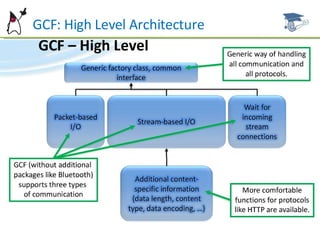
Generic Connection Framework Package  java.io  is incomplete and  java.net  is missing from CLDC. Communications are done using “Generic Connection Framework”. Package:  javax.microedition.io Based on Connection interface.  Every connection extends this interface No protocol  implementation is defined, only interfaces are specified.
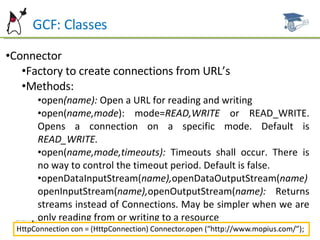
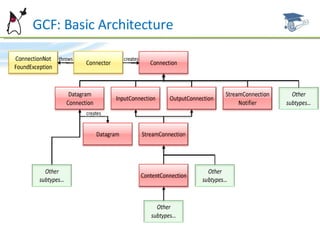
GCF: Classes Connector Factory to create connections from URL’s Methods: open (name):  Open a URL for reading and writing open( name,mode ): mode= READ,WRITE  or READ_WRITE. Opens a connection on a specific mode. Default is  READ_WRITE. open( name,mode,timeouts):  Timeouts shall occur. There is no way to control the timeout period. Default is false. openDataInputStream( name), openDataOutputStream( name)  openInputStream( name), openOutputStream( name):  Returns streams instead of Connections. May be simpler when we are only reading from or writing to a resource
GCF: Classes Connection All other interfaces extends this one, Only defines “close” operation InputConnection Connection that allows reading from streams Methods: openInputStream(), openDataInputStream(): Open read-only streams. OutputConnection: Connection that allows writing to streams Methods: openOutputStream(),openDataOutputStream(): Open write-only streams
Interfaces StreamConnection Defines no methods. Simply extends InputConnection and OutputConnection defining a connection that allows both writing and reading to streams(e.g. TCP Socket). ContentConnection Extends StreamConnection. Allows reading, writing and is also content-oriented (e.g.HTTP) Methods: getType(): Type of the requested object getEnconding(): Content encoding getLength(): Size of the requested object
GCF: High Level Architecture
GCF: Basic Architecture
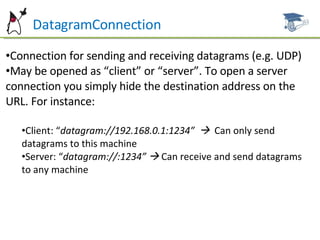
DatagramConnection Connection for sending and receiving datagrams (e.g. UDP) May be opened as “client” or “server”. To open a server connection you simply hide the destination address on the URL. For instance: Client: “ datagram://192.168.0.1:1234”     Can only send datagrams to this machine Server: “ datagram://:1234”     Can receive and send datagrams to any machine
DatagramConnection getMaximumLength(): Maximum size a datagram may have, in bytes newDatagram(size): Creates a new datagram with the specified size newDatagram (size,address):  Creates a datagram addressed to the specified destination newDatagram( buffer[],size):  Creates a datagram with the specified payload newDatagram( buffer[], size, address ): Creates a datagram with specified address and payload
DatagramConnection: Methods send (datagram):  Send the datagram. The object must have destination address and payload set receive( datagram):  Blocks until a datagram is received. Data from this message is written on the datagram passed as parameter. If the datagram is smaller than the received message, data is lost (the array is  truncated).
Datagram Represents a datagram was received, or a datagram to be sent. It has address and payload. Extends DataInput and DataOutput, so the payload may be managed directly by writeXXX() and readXXX()methods Instances  may be used for sending and receiving, changing only the required parts(payload, size, address)
Datagram: methods getAddress(): Destination or origin address getData(): Payload setData( buffer[],offset,length ): Sets the payload getLength(): Payload size setLength( length ): Changes the payload size setAddress( address):  Sets the address setAddress( datagram):  Copies the address from the parameter reset(): Resets DataInput and DataOutput pointers, returning the message to its original state
StreamConnectionNotifier Wait for stream connections (e.g. TCP socket) Method: acceptAndOpen(): Blocks until a connection is received
Exceptions ConnectionNotFoundException: Throws when a protocol is not supported
MIDP: Generic Connection Framework Implements protocol over CLDC’s GCF Required protocols: HTTP and HTTPS    This does not mean that TCP-IP must be supported. HTTP may be “tunneled” over any other protocol Optional protocols: TCP Sockets, SSL Sockets, COMM, UDP
MIDP: Generic Connection Framework Portable applications shall rely only on HTTP and HTTPS availability. You shall remember that mobile phones usually are not inside TCP-IP networks and that network usage is billed to the user Network communications are slow operations, and therefore they shall never be called on the application’s thread. Separate threads shall ALWAYS be used when calling the network Classes at  javax.microedition.io  package
HttpConnection Extends ContentConnection, accesses  HTTP  resources Opened with Connector.open(“ http://...”) Can be on one of the following states: setup:  It was opened, but the request was not sent yet. Request parameters must be set at this state connected:  Request header was sent. It switches to this state when any method that asks for response information is called. closed:  Finished. Switches to it when close is called.
HttpConnection You cannot request more than one resource through the same connection ( HTTP 1.1).  After a resource is requested, the connection must be closed and another one must be created if the new resource is to be loaded To use authentication, the APPLICATION itself must set the “Authorization””header with the username and password values coded in  Base64 ( there is no support on the platform to perform this enconding) Methods that may only be called at “ setup”  state: setRequestMethod( method):  GET,POST or HEAD. Default is  GET. setRequestProperty( key,value):  Sets a request property
HttpConnection: Methods (Connected) openInputStream, openOutputStream,  openDataInputStream, openDataOutputStream: Inherited from StreamConnection. Gets an input or output stream(OutputStream: only valid for POST. Content-length parameter must be sent. Cannot be used after InputStream has been used) getLength(), getType(), getEnconding(): Inherited from ContentConnection. Return the content-length, content-type and content-enconding header values getHeaderField( name ): Gets a header value from its name
HttpConnection: Methods (Connected) getHeaderFieldInt( name,def), getHeaderFieldDate( name,def):  Returns the header value in the desired format. A default value is passed as parameter, and it’s returned if the field is not available  or is malformed. getHeaderField( n ), getHeaderFieldKey( n ): Return the name or value of the  nth  field getResponseCode(): Response status code(e.g. 200,404,etc). getResponseMessage(): Response status message (e.g. “OK”, “Not Found”, etc) getExpiration(),getDate(), getLastModified(): Value of the expires, date and last- modified headers
HttpConnection: Methods (Any time) getURL():Connection URL, defined when the connection is create getProtocol(): Connection protocol (e.g.  http, https) getHost(), getPort(): Host and port (e.g. 192.168.0.1/8080) getFile(): Requested “file” (e.g.  page.html) getRef(): URL reference (part after “#”) getQuery(): URL’s query(parameters, part after the question  mark). getRequestMethod(): Request method( HEAD, GET or POST) getRequestProperty(key): Value from a request property
Ht  HttpsConnection Extends HttpConnection. Access safe HTTP resources (HTTP over TLS) Opened with Connector.open(“ https://...”“) Has a very similar API to HTTP, adds only one method to return SecurityInfo (this changes the connection to “connected” state) SecurityInfo: Details about a safe connection (server certificate, protocol)
Ht  SocketConnection Extends StreamConnection. Defines TCP socket CLIENTS Opened with Connector.open(“ socket://host: port...”“) Adds methods to set socket options and to check local and remote addresses.
Ht  ServerSocketConnection Extends StreamConnectionNotifier. Defines TCP socket SERVERS Opened with Connector.open(“ socket://: port...”“) (Host is omitted) Defines methods for checking the local host and port. If the port is not passed on the URL, an arbitrary port is chosen by the system Method acceptAndOpen returns SocketConnection
Ht  SecureConnection Extends SocketConnection, and provide access to SSL sockets (TLS) Opened with Connector.open(“ ssl:// …”) Similar API to Socket’s, adds only one method to return a SecurityInfo
Ht  UDPDatagramConnection Extends DatagramConnection. Sends and receives UDP datagrams Adds methods to check the local port and address Opened with Connector.open(“ datagram: // …”)
Ht  CommConnection Extends StreamConnection, adding methods to configure Baud Rate  Accesses serial and infra-red ports Opened with Connector.open(“ comm: …”) .  E.g. Connector.open(“ comm: com0; baudrate = 9600”) Configuration parameters:  baudrate, bitsperchar, stopbits, parity, etc.
Ht  CommConnection To check all available ports, you can check the “ microedition.commports”  system parameter. Ports are comma-separated. Naming conventions: RS – 232 ports: COM# IrDA IRCOMM ports: IR#
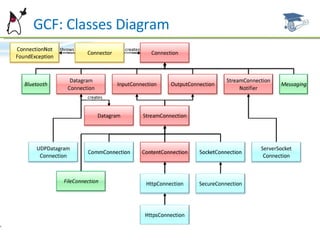
Ht  GCF: Classes Diagram
Example Codes Some examples and MIDlets samples are available for reference and studying  at this link: http://www.dsc.upe.br/~mpc/chapter9.rar The source codes include: HttpMIDlet SocketMIDlet UDPMidlet
Future Work Next Chapter: WMA Wireless Messaging API Message Connection Message Types Classes Permissions
References ALVES F. Eduardo. SCMAD Study Guide,  27/04/2008.  JAKL Andreas, Java Platform, Micro Edition Part  01 slides, 12/2007. Sun Certification Mobile Application Developer  Website:  [http://www.sun.com/training/certification/java/scmad.xml].

Scmad Chapter09

  • 1.
    By Marcel Caraciolohttp://mobideia.blogspot.com Chapter 09– Generic Connection Framework (GCF) SCMAD Certification 45mm 61mm
  • 2.
    Agenda CLDC -GCF Generic Connection Framework Connector Connection, InputConnection, OutputConnection StreamConnection, ContentConnection DatagramConnection Datagram StreamConnectionNotifier Exceptions
  • 3.
    Generic Connection FrameworkPackage java.io is incomplete and java.net is missing from CLDC. Communications are done using “Generic Connection Framework”. Package: javax.microedition.io Based on Connection interface. Every connection extends this interface No protocol implementation is defined, only interfaces are specified.
  • 4.
    GCF: Classes ConnectorFactory to create connections from URL’s Methods: open (name): Open a URL for reading and writing open( name,mode ): mode= READ,WRITE or READ_WRITE. Opens a connection on a specific mode. Default is READ_WRITE. open( name,mode,timeouts): Timeouts shall occur. There is no way to control the timeout period. Default is false. openDataInputStream( name), openDataOutputStream( name) openInputStream( name), openOutputStream( name): Returns streams instead of Connections. May be simpler when we are only reading from or writing to a resource
  • 5.
    GCF: Classes ConnectionAll other interfaces extends this one, Only defines “close” operation InputConnection Connection that allows reading from streams Methods: openInputStream(), openDataInputStream(): Open read-only streams. OutputConnection: Connection that allows writing to streams Methods: openOutputStream(),openDataOutputStream(): Open write-only streams
  • 6.
    Interfaces StreamConnection Definesno methods. Simply extends InputConnection and OutputConnection defining a connection that allows both writing and reading to streams(e.g. TCP Socket). ContentConnection Extends StreamConnection. Allows reading, writing and is also content-oriented (e.g.HTTP) Methods: getType(): Type of the requested object getEnconding(): Content encoding getLength(): Size of the requested object
  • 7.
    GCF: High LevelArchitecture
  • 8.
  • 9.
    DatagramConnection Connection forsending and receiving datagrams (e.g. UDP) May be opened as “client” or “server”. To open a server connection you simply hide the destination address on the URL. For instance: Client: “ datagram://192.168.0.1:1234”  Can only send datagrams to this machine Server: “ datagram://:1234”  Can receive and send datagrams to any machine
  • 10.
    DatagramConnection getMaximumLength(): Maximumsize a datagram may have, in bytes newDatagram(size): Creates a new datagram with the specified size newDatagram (size,address): Creates a datagram addressed to the specified destination newDatagram( buffer[],size): Creates a datagram with the specified payload newDatagram( buffer[], size, address ): Creates a datagram with specified address and payload
  • 11.
    DatagramConnection: Methods send(datagram): Send the datagram. The object must have destination address and payload set receive( datagram): Blocks until a datagram is received. Data from this message is written on the datagram passed as parameter. If the datagram is smaller than the received message, data is lost (the array is truncated).
  • 12.
    Datagram Represents adatagram was received, or a datagram to be sent. It has address and payload. Extends DataInput and DataOutput, so the payload may be managed directly by writeXXX() and readXXX()methods Instances may be used for sending and receiving, changing only the required parts(payload, size, address)
  • 13.
    Datagram: methods getAddress():Destination or origin address getData(): Payload setData( buffer[],offset,length ): Sets the payload getLength(): Payload size setLength( length ): Changes the payload size setAddress( address): Sets the address setAddress( datagram): Copies the address from the parameter reset(): Resets DataInput and DataOutput pointers, returning the message to its original state
  • 14.
    StreamConnectionNotifier Wait forstream connections (e.g. TCP socket) Method: acceptAndOpen(): Blocks until a connection is received
  • 15.
    Exceptions ConnectionNotFoundException: Throwswhen a protocol is not supported
  • 16.
    MIDP: Generic ConnectionFramework Implements protocol over CLDC’s GCF Required protocols: HTTP and HTTPS  This does not mean that TCP-IP must be supported. HTTP may be “tunneled” over any other protocol Optional protocols: TCP Sockets, SSL Sockets, COMM, UDP
  • 17.
    MIDP: Generic ConnectionFramework Portable applications shall rely only on HTTP and HTTPS availability. You shall remember that mobile phones usually are not inside TCP-IP networks and that network usage is billed to the user Network communications are slow operations, and therefore they shall never be called on the application’s thread. Separate threads shall ALWAYS be used when calling the network Classes at javax.microedition.io package
  • 18.
    HttpConnection Extends ContentConnection,accesses HTTP resources Opened with Connector.open(“ http://...”) Can be on one of the following states: setup: It was opened, but the request was not sent yet. Request parameters must be set at this state connected: Request header was sent. It switches to this state when any method that asks for response information is called. closed: Finished. Switches to it when close is called.
  • 19.
    HttpConnection You cannotrequest more than one resource through the same connection ( HTTP 1.1). After a resource is requested, the connection must be closed and another one must be created if the new resource is to be loaded To use authentication, the APPLICATION itself must set the “Authorization””header with the username and password values coded in Base64 ( there is no support on the platform to perform this enconding) Methods that may only be called at “ setup” state: setRequestMethod( method): GET,POST or HEAD. Default is GET. setRequestProperty( key,value): Sets a request property
  • 20.
    HttpConnection: Methods (Connected)openInputStream, openOutputStream, openDataInputStream, openDataOutputStream: Inherited from StreamConnection. Gets an input or output stream(OutputStream: only valid for POST. Content-length parameter must be sent. Cannot be used after InputStream has been used) getLength(), getType(), getEnconding(): Inherited from ContentConnection. Return the content-length, content-type and content-enconding header values getHeaderField( name ): Gets a header value from its name
  • 21.
    HttpConnection: Methods (Connected)getHeaderFieldInt( name,def), getHeaderFieldDate( name,def): Returns the header value in the desired format. A default value is passed as parameter, and it’s returned if the field is not available or is malformed. getHeaderField( n ), getHeaderFieldKey( n ): Return the name or value of the nth field getResponseCode(): Response status code(e.g. 200,404,etc). getResponseMessage(): Response status message (e.g. “OK”, “Not Found”, etc) getExpiration(),getDate(), getLastModified(): Value of the expires, date and last- modified headers
  • 22.
    HttpConnection: Methods (Anytime) getURL():Connection URL, defined when the connection is create getProtocol(): Connection protocol (e.g. http, https) getHost(), getPort(): Host and port (e.g. 192.168.0.1/8080) getFile(): Requested “file” (e.g. page.html) getRef(): URL reference (part after “#”) getQuery(): URL’s query(parameters, part after the question mark). getRequestMethod(): Request method( HEAD, GET or POST) getRequestProperty(key): Value from a request property
  • 23.
    Ht HttpsConnectionExtends HttpConnection. Access safe HTTP resources (HTTP over TLS) Opened with Connector.open(“ https://...”“) Has a very similar API to HTTP, adds only one method to return SecurityInfo (this changes the connection to “connected” state) SecurityInfo: Details about a safe connection (server certificate, protocol)
  • 24.
    Ht SocketConnectionExtends StreamConnection. Defines TCP socket CLIENTS Opened with Connector.open(“ socket://host: port...”“) Adds methods to set socket options and to check local and remote addresses.
  • 25.
    Ht ServerSocketConnectionExtends StreamConnectionNotifier. Defines TCP socket SERVERS Opened with Connector.open(“ socket://: port...”“) (Host is omitted) Defines methods for checking the local host and port. If the port is not passed on the URL, an arbitrary port is chosen by the system Method acceptAndOpen returns SocketConnection
  • 26.
    Ht SecureConnectionExtends SocketConnection, and provide access to SSL sockets (TLS) Opened with Connector.open(“ ssl:// …”) Similar API to Socket’s, adds only one method to return a SecurityInfo
  • 27.
    Ht UDPDatagramConnectionExtends DatagramConnection. Sends and receives UDP datagrams Adds methods to check the local port and address Opened with Connector.open(“ datagram: // …”)
  • 28.
    Ht CommConnectionExtends StreamConnection, adding methods to configure Baud Rate Accesses serial and infra-red ports Opened with Connector.open(“ comm: …”) . E.g. Connector.open(“ comm: com0; baudrate = 9600”) Configuration parameters: baudrate, bitsperchar, stopbits, parity, etc.
  • 29.
    Ht CommConnectionTo check all available ports, you can check the “ microedition.commports” system parameter. Ports are comma-separated. Naming conventions: RS – 232 ports: COM# IrDA IRCOMM ports: IR#
  • 30.
    Ht GCF:Classes Diagram
  • 31.
    Example Codes Someexamples and MIDlets samples are available for reference and studying at this link: http://www.dsc.upe.br/~mpc/chapter9.rar The source codes include: HttpMIDlet SocketMIDlet UDPMidlet
  • 32.
    Future Work NextChapter: WMA Wireless Messaging API Message Connection Message Types Classes Permissions
  • 33.
    References ALVES F.Eduardo. SCMAD Study Guide, 27/04/2008. JAKL Andreas, Java Platform, Micro Edition Part 01 slides, 12/2007. Sun Certification Mobile Application Developer Website: [http://www.sun.com/training/certification/java/scmad.xml].