Outline-session 12 (21-April-2009) >> GCF(Generic Connection Framework) -Connection Hierarchy -HTTP Connection -Creating a Connection -Client Request -Server Response -Connection Information -Get and POST with JavaServlet and JDBC.
Connection Hierarchy >> Weighing in at nearly 200 kilobytes, the 100+ classes and interfaces in J2SE java.io and java.net will exceed the resources available on many mobile devices. >> To provide an extensible framework for i/o and networking, the GCF was developed. >> one class, the Connector, that can create any type of connection >> file, http, datagram, and so forth >> open method has the following form. Connector.Open("protocol:address;parameters") Examples: >>Connector.Open("http://www.some_web_address.com"); >>Connector.Open("socket://someaddress:1234"); >>Connector.Open("file://testdata.txt");
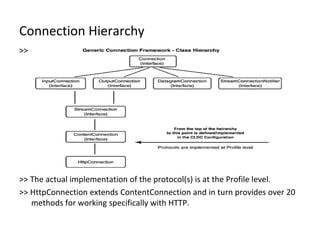
Connection Hierarchy >> How the protocols are resolved is where the flexibility of the GCF comes into play. >> At runtime,Connector looks for the appropriate class that implements the requested protocol. >> This is done using Class.forName() >> file, http, datagram, and so forth >> A request to open a HTTP connection in J2ME Class.forName("com.sun.midp.io.j2me.http.Protocol");  >> an object is returned that implements a Connection interface >> The Connector class and Connection interfaces are defined in CLDC
Connection Hierarchy >> >> The actual implementation of the protocol(s) is at the Profile level. >> HttpConnection extends ContentConnection and in turn provides over 20 methods for working specifically with HTTP.
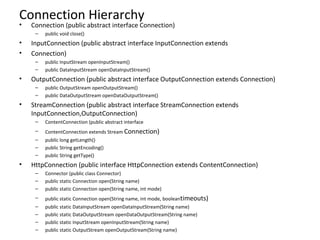
Connection Hierarchy  Connection (public abstract interface Connection) public void close() InputConnection (public abstract interface InputConnection extends Connection) public InputStream openInputStream() public DataInputStream openDataInputStream() OutputConnection (public abstract interface OutputConnection extends Connection) public OutputStream openOutputStream() public DataOutputStream openDataOutputStream() StreamConnection (public abstract interface StreamConnection extends InputConnection,OutputConnection) ContentConnection (public abstract interface ContentConnection extends Stream  Connection) public long getLength() public String getEncoding() public String getType() HttpConnection (public interface HttpConnection extends ContentConnection) Connector (public class Connector) public static Connection open(String name) public static Connection open(String name, int mode) public static Connection open(String name, int mode, boolean timeouts) public static DataInputStream openDataInputStream(String name) public static DataOutputStream openDataOutputStream(String name) public static InputStream openInputStream(String name) public static OutputStream openOutputStream(String name)
HTTP Connection >>   In MIDP 1.0 the only protocol that is guaranteed to be implemented is http >> Through the class HttpConnection you can communicate with a web server or any remote device that supports HTTP >>HTTP Operation: -HTTP is Known as Request/Response Protocol -A client Initiate the request ,send to the server with an address specified as a Uniform Resource Locater -Server send the response back.
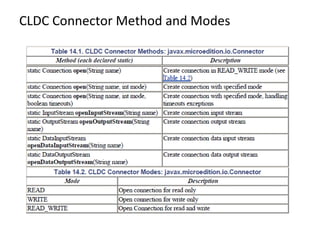
Creating Connection >>Connecter method has seven method to create connection with a server. >>There are three variation of methods. The first requires only the address of the server second method accepts a mode for reading/writing The third option includes a Boolean flag that indicates if the caller of the method can manage timeout exceptions The remaining methods open various input and output streams. >>Implementation // Create a ContentConnection String url = "http://www.corej2me.com" ContentConnection  connection =(ContentConnection) Connector.open(url); InputStream iStrm = connection.openInputStream();int length = (int) connection.getLength(); if (length > 0){byte imageData[] = new byte[length];// Read the data into an array iStrm.read(imageData);}
CLDC Connector Method and Modes
CLDC Connector Method and Modes >>  Sample ViewPng.java –using ContentConnection >> Sample ViewPng2.java- Using InputStream
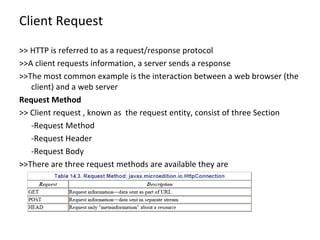
Client Request >> HTTP is referred to as a request/response protocol >>A client requests information, a server sends a response >>The most common example is the interaction between a web browser (the client) and a web server Request Method >> Client request , known as  the request entity, consist of three Section -Request Method -Request Header -Request Body >>There are three request methods are available they are -Get
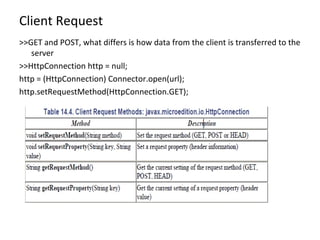
Client Request >>GET and POST, what differs is how data from the client is transferred to the server >>HttpConnection http = null; http = (HttpConnection) Connector.open(url); http.setRequestMethod(HttpConnection.GET);
Client Request Using GET >>Using GET, the body (data) of the request becomes part of the URL >>URL Form  http://www.corej2me.com/formscript?userColor=blue&userFont=courier >>Notice the "?" after the URL. This signifies the end of the URL and start of the form data. All information is sent through "key-value" pairs such as userColor=blue, userFont=courier. [5]Multiple key-value pairs are separated with "&". Using POST >>Data submitted using POST is sent separately from the call to the URL. >>The request to open a connection to a URL is sent as one stream, any data is sent as a separate stream >>There are two major benefits of POST over GET POST has no limit to the amount of data that can be sent POST sends data as a separate stream; therefore, the contents are not visible as part of the URL.
Client Request Header Information >> The second part of a client request is header information >> The HTTP protocol defines over 40 header fields >> Some of the more common are Accept, Cache-Control, Content-Type, Expires, If-Modified-Since and User-Agent >> Headers are set by calling setRequestProperty(). HttpConnection http = null;http = (HttpConnection) Connector.open(url); http.setRequestMethod(HttpConnection.GET); http.setRequestProperty("If-Modified-Since“, "Mon, 16 Jul 2001 22:54:26 GMT"); Body >>  Data to be transferred from the client to the server is referred to as the body of the request >> GET sends the body as part of the URL. POST sends the body in a separate stream
Server Response >>Once a client has packaged together the request method, header and body, and sent it over the network >>it is now up to the server to interpret the request and generate a response known as the response entity >>client request, a server response consists of three sections status line, header and  Body Status Line >>The status line indicates the outcome of the client request >>For HttpConnection, there are over 35 status codes reported >>HTTP divides the codes into three broad categories based on the numeric value mapped to the code
Server Response Status Line 1xx—information 2xx—success 3xx—redirection 4xx—client errors 5xx—server errors >>When sending a response, a server includes the protocol version number along with the status code. HTTP/1.1 200 OK HTTP/1.1 400 Bad Request HTTP/1.1 500 Internal Server Error >>http.getResponseMessage(); >>http.getResponseCode();
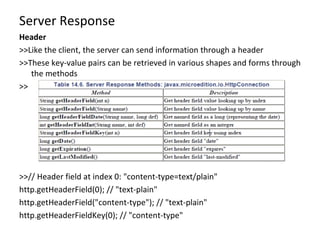
Server Response Header  >>Like the client, the server can send information through a header >>These key-value pairs can be retrieved in various shapes and forms through the methods >> >>// Header field at index 0: "content-type=text/plain" http.getHeaderField(0); // "text-plain" http.getHeaderField("content-type"); // "text-plain" http.getHeaderFieldKey(0); // "content-type"
Server Response Body >>The body is the data sent from the server to the client >>There are no methods defined in HttpConnection for reading the body >>The most common means to obtain the body is through a stream >> Example: Download a File url = http://www.corej2me.com/midpbook_v1e1/ch14/getHeaderInfo.txt"; HttpConnection http = null;…// Create the connection http = (HttpConnection) Connector.open(url); The client request is straightforward: //----------------// Client Request//---------------- // 1) Send request method http.setRequestMethod(HttpConnection.GET); // 2) Send header information (this header is optional) http.setRequestProperty("User-Agent", "Profile/MIDP-1.0 Configuration/CLDC-1.0"); // 3) Send body/data - No data for this request
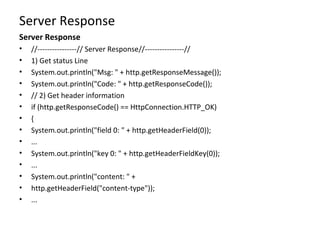
Server Response Server Response //----------------// Server Response//----------------//  1) Get status Line System.out.println("Msg: " + http.getResponseMessage()); System.out.println("Code: " + http.getResponseCode()); // 2) Get header information if (http.getResponseCode() == HttpConnection.HTTP_OK) { System.out.println("field 0: " + http.getHeaderField(0)); ... System.out.println("key 0: " + http.getHeaderFieldKey(0)); ... System.out.println("content: " + http.getHeaderField("content-type")); ...
Server Response Server Response 3) Get data (show the file contents) String str;iStrm = http.openInputStream();int length = (int) http.getLength();if (length != -1){// Read data in one chunkbyte serverData[] = new byte[length]; iStrm.read(serverData);str = new String(serverData);} else // Length not available... { ByteArrayOutputStream bStrm = new ByteArrayOutputStream(); // Read data one character at a time int ch; while ((ch = iStrm.read()) != -1) bStrm.write(ch); str = new String(bStrm.toByteArray()); bStrm.close(); }System.out.println("File Contents: " + str);}
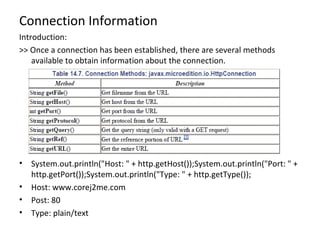
Connection Information Introduction: >> Once a connection has been established, there are several methods available to obtain information about the connection. System.out.println("Host: " + http.getHost());System.out.println("Port: " + http.getPort());System.out.println("Type: " + http.getType()); Host: www.corej2me.com Post: 80 Type: plain/text
Get and POST to Java Servlet and JDBC Introduction: >> Constructing a client request using GET and POST are different enough to warrant an example >> will connect with a Java servlet to look up a bank account balance Client Request >> The main Form will hold two TextFields, an account number and password >> Once the form has been completed and the user chooses the "Menu" option, there will be a choice as to the request method for sending the data >> The account information will be stored in a database, named acctInfo, located on the same machine as the servlet. >> The database, acctInfo,will contain three columns (account, password, balance)
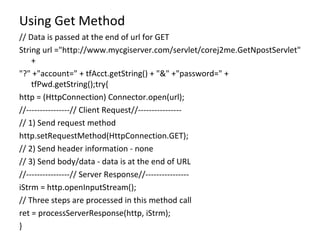
Using Get Method // Data is passed at the end of url for GET String url ="http://www.mycgiserver.com/servlet/corej2me.GetNpostServlet" + "?" +"account=" + tfAcct.getString() + "&" +"password=" + tfPwd.getString();try{ http = (HttpConnection) Connector.open(url); //----------------// Client Request//---------------- // 1) Send request method http.setRequestMethod(HttpConnection.GET); // 2) Send header information - none // 3) Send body/data - data is at the end of URL //----------------// Server Response//---------------- iStrm = http.openInputStream(); // Three steps are processed in this method call ret = processServerResponse(http, iStrm); }
Using POST Method // Data is passed as a separate stream for POST (below) String url ="http://www.mycgiserver.com/servlet/corej2me.GetNpostServlet"; Try{http = (HttpConnection) Connector.open(url);oStrm = http.openOutputStream();//----------------// Client Request // 1) Send request type http.setRequestMethod(HttpConnection.POST); // 2) Send header information. Required for POST to work http.setRequestProperty("Content-Type", "application/x-www-form-urlencoded"); // 3) Send data // Write account number byte data[] = ("account=" + tfAcct.getString()).getBytes(); oStrm.write(data); // Write password data = ("&password=" + tfPwd.getString()).getBytes(); oStrm.write(data); oStrm.flush(); //----------------// Server Response//---------------- iStrm = http.openInputStream(); // Three steps are processed in this method call ret = processServerResponse(http, iStrm); } -
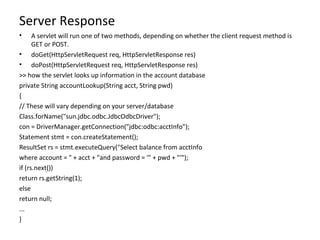
Server Response A servlet will run one of two methods, depending on whether the client request method is GET or POST. doGet(HttpServletRequest req, HttpServletResponse res) doPost(HttpServletRequest req, HttpServletResponse res) >> how the servlet looks up information in the account database private String accountLookup(String acct, String pwd) { // These will vary depending on your server/database Class.forName("sun.jdbc.odbc.JdbcOdbcDriver"); con = DriverManager.getConnection("jdbc:odbc:acctInfo"); Statement stmt = con.createStatement(); ResultSet rs = stmt.executeQuery("Select balance from acctInfo where account = " + acct + "and password = '" + pwd + "'"); if (rs.next()) return rs.getString(1); else return null; ... } -
Updating the Client Now that the client has sent a request and the server has responded, the MIDlet needs to interpret the server reply and update the display with the account balance. processServerResponse(HttpConnection http, InputStream iStrm) { //Reset error messageerrorMsg = null;// 1) Get status Lineif (http.getResponseCode() == HttpConnection.HTTP_OK) { // 2) Get header information - none // 3) Get body (data)int length = (int) http.getLength(); if (length > 0) {byte servletData[] = new byte[length];iStrm.read(servletData); // Update the string item on the displaysiBalance.setText(new String(servletData)); return true;} else errorMsg = new String("Unable to read data"); } else // Use message from the servlet errorMsg = new String(http.getResponseMessage()); return false; } -

Session12 J2ME Generic Connection Framework

  • 1.
    Outline-session 12 (21-April-2009)>> GCF(Generic Connection Framework) -Connection Hierarchy -HTTP Connection -Creating a Connection -Client Request -Server Response -Connection Information -Get and POST with JavaServlet and JDBC.
  • 2.
    Connection Hierarchy >>Weighing in at nearly 200 kilobytes, the 100+ classes and interfaces in J2SE java.io and java.net will exceed the resources available on many mobile devices. >> To provide an extensible framework for i/o and networking, the GCF was developed. >> one class, the Connector, that can create any type of connection >> file, http, datagram, and so forth >> open method has the following form. Connector.Open("protocol:address;parameters") Examples: >>Connector.Open("http://www.some_web_address.com"); >>Connector.Open("socket://someaddress:1234"); >>Connector.Open("file://testdata.txt");
  • 3.
    Connection Hierarchy >>How the protocols are resolved is where the flexibility of the GCF comes into play. >> At runtime,Connector looks for the appropriate class that implements the requested protocol. >> This is done using Class.forName() >> file, http, datagram, and so forth >> A request to open a HTTP connection in J2ME Class.forName("com.sun.midp.io.j2me.http.Protocol"); >> an object is returned that implements a Connection interface >> The Connector class and Connection interfaces are defined in CLDC
  • 4.
    Connection Hierarchy >>>> The actual implementation of the protocol(s) is at the Profile level. >> HttpConnection extends ContentConnection and in turn provides over 20 methods for working specifically with HTTP.
  • 5.
    Connection Hierarchy Connection (public abstract interface Connection) public void close() InputConnection (public abstract interface InputConnection extends Connection) public InputStream openInputStream() public DataInputStream openDataInputStream() OutputConnection (public abstract interface OutputConnection extends Connection) public OutputStream openOutputStream() public DataOutputStream openDataOutputStream() StreamConnection (public abstract interface StreamConnection extends InputConnection,OutputConnection) ContentConnection (public abstract interface ContentConnection extends Stream Connection) public long getLength() public String getEncoding() public String getType() HttpConnection (public interface HttpConnection extends ContentConnection) Connector (public class Connector) public static Connection open(String name) public static Connection open(String name, int mode) public static Connection open(String name, int mode, boolean timeouts) public static DataInputStream openDataInputStream(String name) public static DataOutputStream openDataOutputStream(String name) public static InputStream openInputStream(String name) public static OutputStream openOutputStream(String name)
  • 6.
    HTTP Connection >> In MIDP 1.0 the only protocol that is guaranteed to be implemented is http >> Through the class HttpConnection you can communicate with a web server or any remote device that supports HTTP >>HTTP Operation: -HTTP is Known as Request/Response Protocol -A client Initiate the request ,send to the server with an address specified as a Uniform Resource Locater -Server send the response back.
  • 7.
    Creating Connection >>Connectermethod has seven method to create connection with a server. >>There are three variation of methods. The first requires only the address of the server second method accepts a mode for reading/writing The third option includes a Boolean flag that indicates if the caller of the method can manage timeout exceptions The remaining methods open various input and output streams. >>Implementation // Create a ContentConnection String url = "http://www.corej2me.com" ContentConnection connection =(ContentConnection) Connector.open(url); InputStream iStrm = connection.openInputStream();int length = (int) connection.getLength(); if (length > 0){byte imageData[] = new byte[length];// Read the data into an array iStrm.read(imageData);}
  • 8.
  • 9.
    CLDC Connector Methodand Modes >> Sample ViewPng.java –using ContentConnection >> Sample ViewPng2.java- Using InputStream
  • 10.
    Client Request >>HTTP is referred to as a request/response protocol >>A client requests information, a server sends a response >>The most common example is the interaction between a web browser (the client) and a web server Request Method >> Client request , known as the request entity, consist of three Section -Request Method -Request Header -Request Body >>There are three request methods are available they are -Get
  • 11.
    Client Request >>GETand POST, what differs is how data from the client is transferred to the server >>HttpConnection http = null; http = (HttpConnection) Connector.open(url); http.setRequestMethod(HttpConnection.GET);
  • 12.
    Client Request UsingGET >>Using GET, the body (data) of the request becomes part of the URL >>URL Form http://www.corej2me.com/formscript?userColor=blue&userFont=courier >>Notice the "?" after the URL. This signifies the end of the URL and start of the form data. All information is sent through "key-value" pairs such as userColor=blue, userFont=courier. [5]Multiple key-value pairs are separated with "&". Using POST >>Data submitted using POST is sent separately from the call to the URL. >>The request to open a connection to a URL is sent as one stream, any data is sent as a separate stream >>There are two major benefits of POST over GET POST has no limit to the amount of data that can be sent POST sends data as a separate stream; therefore, the contents are not visible as part of the URL.
  • 13.
    Client Request HeaderInformation >> The second part of a client request is header information >> The HTTP protocol defines over 40 header fields >> Some of the more common are Accept, Cache-Control, Content-Type, Expires, If-Modified-Since and User-Agent >> Headers are set by calling setRequestProperty(). HttpConnection http = null;http = (HttpConnection) Connector.open(url); http.setRequestMethod(HttpConnection.GET); http.setRequestProperty("If-Modified-Since“, "Mon, 16 Jul 2001 22:54:26 GMT"); Body >> Data to be transferred from the client to the server is referred to as the body of the request >> GET sends the body as part of the URL. POST sends the body in a separate stream
  • 14.
    Server Response >>Oncea client has packaged together the request method, header and body, and sent it over the network >>it is now up to the server to interpret the request and generate a response known as the response entity >>client request, a server response consists of three sections status line, header and Body Status Line >>The status line indicates the outcome of the client request >>For HttpConnection, there are over 35 status codes reported >>HTTP divides the codes into three broad categories based on the numeric value mapped to the code
  • 15.
    Server Response StatusLine 1xx—information 2xx—success 3xx—redirection 4xx—client errors 5xx—server errors >>When sending a response, a server includes the protocol version number along with the status code. HTTP/1.1 200 OK HTTP/1.1 400 Bad Request HTTP/1.1 500 Internal Server Error >>http.getResponseMessage(); >>http.getResponseCode();
  • 16.
    Server Response Header >>Like the client, the server can send information through a header >>These key-value pairs can be retrieved in various shapes and forms through the methods >> >>// Header field at index 0: "content-type=text/plain" http.getHeaderField(0); // "text-plain" http.getHeaderField("content-type"); // "text-plain" http.getHeaderFieldKey(0); // "content-type"
  • 17.
    Server Response Body>>The body is the data sent from the server to the client >>There are no methods defined in HttpConnection for reading the body >>The most common means to obtain the body is through a stream >> Example: Download a File url = http://www.corej2me.com/midpbook_v1e1/ch14/getHeaderInfo.txt"; HttpConnection http = null;…// Create the connection http = (HttpConnection) Connector.open(url); The client request is straightforward: //----------------// Client Request//---------------- // 1) Send request method http.setRequestMethod(HttpConnection.GET); // 2) Send header information (this header is optional) http.setRequestProperty("User-Agent", "Profile/MIDP-1.0 Configuration/CLDC-1.0"); // 3) Send body/data - No data for this request
  • 18.
    Server Response ServerResponse //----------------// Server Response//----------------// 1) Get status Line System.out.println("Msg: " + http.getResponseMessage()); System.out.println("Code: " + http.getResponseCode()); // 2) Get header information if (http.getResponseCode() == HttpConnection.HTTP_OK) { System.out.println("field 0: " + http.getHeaderField(0)); ... System.out.println("key 0: " + http.getHeaderFieldKey(0)); ... System.out.println("content: " + http.getHeaderField("content-type")); ...
  • 19.
    Server Response ServerResponse 3) Get data (show the file contents) String str;iStrm = http.openInputStream();int length = (int) http.getLength();if (length != -1){// Read data in one chunkbyte serverData[] = new byte[length]; iStrm.read(serverData);str = new String(serverData);} else // Length not available... { ByteArrayOutputStream bStrm = new ByteArrayOutputStream(); // Read data one character at a time int ch; while ((ch = iStrm.read()) != -1) bStrm.write(ch); str = new String(bStrm.toByteArray()); bStrm.close(); }System.out.println("File Contents: " + str);}
  • 20.
    Connection Information Introduction:>> Once a connection has been established, there are several methods available to obtain information about the connection. System.out.println("Host: " + http.getHost());System.out.println("Port: " + http.getPort());System.out.println("Type: " + http.getType()); Host: www.corej2me.com Post: 80 Type: plain/text
  • 21.
    Get and POSTto Java Servlet and JDBC Introduction: >> Constructing a client request using GET and POST are different enough to warrant an example >> will connect with a Java servlet to look up a bank account balance Client Request >> The main Form will hold two TextFields, an account number and password >> Once the form has been completed and the user chooses the "Menu" option, there will be a choice as to the request method for sending the data >> The account information will be stored in a database, named acctInfo, located on the same machine as the servlet. >> The database, acctInfo,will contain three columns (account, password, balance)
  • 22.
    Using Get Method// Data is passed at the end of url for GET String url ="http://www.mycgiserver.com/servlet/corej2me.GetNpostServlet" + "?" +"account=" + tfAcct.getString() + "&" +"password=" + tfPwd.getString();try{ http = (HttpConnection) Connector.open(url); //----------------// Client Request//---------------- // 1) Send request method http.setRequestMethod(HttpConnection.GET); // 2) Send header information - none // 3) Send body/data - data is at the end of URL //----------------// Server Response//---------------- iStrm = http.openInputStream(); // Three steps are processed in this method call ret = processServerResponse(http, iStrm); }
  • 23.
    Using POST Method// Data is passed as a separate stream for POST (below) String url ="http://www.mycgiserver.com/servlet/corej2me.GetNpostServlet"; Try{http = (HttpConnection) Connector.open(url);oStrm = http.openOutputStream();//----------------// Client Request // 1) Send request type http.setRequestMethod(HttpConnection.POST); // 2) Send header information. Required for POST to work http.setRequestProperty("Content-Type", "application/x-www-form-urlencoded"); // 3) Send data // Write account number byte data[] = ("account=" + tfAcct.getString()).getBytes(); oStrm.write(data); // Write password data = ("&password=" + tfPwd.getString()).getBytes(); oStrm.write(data); oStrm.flush(); //----------------// Server Response//---------------- iStrm = http.openInputStream(); // Three steps are processed in this method call ret = processServerResponse(http, iStrm); } -
  • 24.
    Server Response Aservlet will run one of two methods, depending on whether the client request method is GET or POST. doGet(HttpServletRequest req, HttpServletResponse res) doPost(HttpServletRequest req, HttpServletResponse res) >> how the servlet looks up information in the account database private String accountLookup(String acct, String pwd) { // These will vary depending on your server/database Class.forName("sun.jdbc.odbc.JdbcOdbcDriver"); con = DriverManager.getConnection("jdbc:odbc:acctInfo"); Statement stmt = con.createStatement(); ResultSet rs = stmt.executeQuery("Select balance from acctInfo where account = " + acct + "and password = '" + pwd + "'"); if (rs.next()) return rs.getString(1); else return null; ... } -
  • 25.
    Updating the ClientNow that the client has sent a request and the server has responded, the MIDlet needs to interpret the server reply and update the display with the account balance. processServerResponse(HttpConnection http, InputStream iStrm) { //Reset error messageerrorMsg = null;// 1) Get status Lineif (http.getResponseCode() == HttpConnection.HTTP_OK) { // 2) Get header information - none // 3) Get body (data)int length = (int) http.getLength(); if (length > 0) {byte servletData[] = new byte[length];iStrm.read(servletData); // Update the string item on the displaysiBalance.setText(new String(servletData)); return true;} else errorMsg = new String("Unable to read data"); } else // Use message from the servlet errorMsg = new String(http.getResponseMessage()); return false; } -