Apache Beam, IOs ?
JB Onofré
<jbonofre@apache.org> <jbonofre@talend.com>
Who am I ?
JB Onofré <jbonofre@apache.org> <jbonofre@talend.com>
@jbonofre
● Fellow at Talend
● Member of the Apache Software Foundation
● PMC/Committer on ~ 20 Apache projects from container and integration (Karaf, Camel,
ActiveMQ, Aries, …) to big data (Beam, CarbonData, Livy, Gearpump, …)
● Mentor during Apache Beam incubation
● PMC member for Apache Beam
Agenda
● What’s Beam ?
● Beam parts
● Beam Programming Model
● SDKs & DSLs
● IOs & Filesystems
● Runners
● Apache TLP since May 2017 (incubation since December 2016)
● Coming from Google Cloud Dataflow SDK
● Data processing APIs:
○ Unified (batch & streaming, same code)
○ Portable (several execution engines, same code)
○ Extensible (custom extensions)
What is Beam ?
Beam parts
● Apache Beam:
○ An unified programming model
○ SDKs & DSLs to implement the programming model
○ Convenient extensions (connectors, functions, …)
○ Runners to “translate” the user code to an execution engine (Beam doesn’t provide the
engine)
Programming
Model
SDKs
DSLs
User Pipeline
Extensions
Runner Execution Engine
PTransform
1.PTransform are operations that transform data
2.Receive one or multiple PCollections and produce one or multiple PCollections
3.They must be Serializable
4.Should be thread-compatible (if you create your threads you must sync them)
IO & Filesystem
● Connectors and extensions as Read & Write PTransforms
● Support bounded and/or unbounded PCollections
● Not using the execution engines connectors: features & portability !
● From simple to advanced features (watermark, timestamp, dedup, splitting, …)
IO Write: a DoFn !
1.Write PTransform<PCollection<?>, PDone> wrapping a DoFn (sink is deprecated)
2.Leverage the DoFn annotations
3.Supports both bounded and unbounded PCollections (process by element)
4.Can support batching related to the bundles (runner)
5.Available on multiple workers thanks to ParDo
IO Write: Elasticsearch simple example
public abstract static class Write extends PTransform<PCollection<String>, PDone> {
public PDone expand(PCollection<String> input) {
input.apply(ParDo.of(new WriteFn()));
return PDone.in(input.getPipeline());
}
static class WriteFn extends DoFn<String, PDone> {
private RestClient restClient;
@Setup
public void setup() throws Exception {
restClient = RestClient.builder(new HttpHost[]{ new HttpHost("localhost", 9200)}).build();
}
@ProcessElement
public void processElement(ProcessContext context) throws Exception {
String document = context.element();
HttpEntity request = new NStringEntity(document, ContentType.APPLICATION_JSON);
restClient.performRequest("POST", "/my_index/beam_type", Collections.singletonMap("refresh", "true"), request);
}
@Teardown
public void closeClient() throws Exception {
if (restClient != null) {
restClient.close();
}
}
}
}
IO Write: Elasticsearch adding batching
public abstract static class Write extends PTransform<PCollection<String>, PDone> {
public PDone expand(PCollection<String> input) {
input.apply(ParDo.of(new WriteFn()));
return PDone.in(input.getPipeline());
}
static class WriteFn extends DoFn<String, PDone> {
private final static long BATCH_SIZE = 1024;
private RestClient restClient;
private ArrayList<String> batch;
private long currentBatchSizeBytes;
@Setup
public void setup() throws Exception {
restClient = RestClient.builder(new HttpHost[]{ new HttpHost("localhost", 9200)}).build();
}
@StartBundle
public void startBundle(StartBundleContext context) throws Exception {
batch = new ArrayList<>();
currentBatchSizeBytes = 0;
}
@ProcessElement
public void processElement(ProcessContext context) throws Exception {
String document = context.element();
batch.add(String.format("{ "index" : {} }%n%s%n", document));
currentBatchSizeBytes += document.getBytes(StandardCharsets.UTF_8).length;
if (batch.size() >= BATCH_SIZE
|| currentBatchSizeBytes >= BATCH_SIZE) {
flushBatch();
}
}
@FinishBundle
public void finishBundle(FinishBundleContext context) throws Exception {
flushBatch();
}
private void flushBatch() throws IOException {
if (batch.isEmpty()) {
return;
}
StringBuilder bulkRequest = new StringBuilder();
for (String json : batch) {
bulkRequest.append(json);
}
batch.clear();
currentBatchSizeBytes = 0;
Response response;
HttpEntity requestBody = new NStringEntity(bulkRequest.toString(),
ContentType.APPLICATION_JSON);
restClient.performRequest("POST", "/my_index/beam_type", Collections.<String,
String>emptyMap(), requestBody);
}
@Teardown
public void closeClient() throws Exception {
if (restClient != null) {
restClient.close();
}
}
}
IO Simplest Read: a DoFn !
1.Write PTransform<PBegin, PCollection<?>> wrapping a DoFn
2.Leverage the DoFn annotations
3.Executed on a single worker
4.No splitting or estimated size
5.Only produce bounded PCollections
IO Read: JDBC simple example
public static class Read extends PTransform<PBegin, PCollection<String>> {
DataSource dataSource;
private Read(DataSource dataSource) {
this.dataSource = dataSource;
}
public static Read withDataSource(DataSource dataSource) {
return new Read(dataSource);
}
public PCollection<String> expand(PBegin begin) {
return begin.apply(Create.of((Void) null))
.apply(ParDo.of(new ReadFn(this)));
}
private static class ReadFn extends DoFn<Void, String> {
private Read spec;
private Connection connection;
public ReadFn(Read spec) {
this.spec = spec;
}
@Setup
public void setup() throws Exception {
this.connection = spec.dataSource.getConnection();
}
@ProcessElement
public void processElement(ProcessContext processContext) throws Exception
{
try (PreparedStatement statement = connection.prepareStatement("select foo
from bar")) {
try (ResultSet resultSet = statement.executeQuery()) {
while (resultSet.next()) {
processContext.output(resultSet.getString("foo"));
}
}
}
}
@Teardown
public void teardown() throws Exception {
connection.close();
}
}
}
IO Read: a Bounded Source
1.Write PTransform<PBegin, PCollection<?>> wrapping a bounded source
2.Support advanced features like:
a.Splitting (chunk the read with several sources)
b.Estimated size (used by the runner for the scaling)
3.Sources create readers. The reader is on a specific split, moving forward on the records
IO Read: bounded source skeletonpublic static class Read extends PTransform<PBegin, PCollection<?>> {
@Override
public PCollection<?> expand(PBegin input) {
return input.apply(org.apache.beam.sdk.io.Read.from(new CustomSource()));
}
}
public static class CustomSource extends BoundedSource<?> {
private String splitPredicate;
@Override public List<CustomSource> split(long desiredBundleSizeBytes, PipelineOptions
options) throws Exception {
// here we create a list of sources, each source will be on a worker reading chunk of data
// That's why we have a split predicate.
// NB: a runner can move a source from a worker to another, that's why a source has to
serializable.
return Collections.singletonList(this);
}
@Override public long getEstimatedSizeBytes(PipelineOptions options) throws Exception {
// here we compute the size of the read data. The runner can use this value for:
// - bootstrap the required resources & workers (no-op execution engines like DataFlow)
// - define the size of the data bundles
return 0;
}
@Override public CustomReader createReader(PipelineOptions options) throws IOException {
// create the reader for this source
return new CustomReader(this);
}
}
// A reader is created by a source on a worker. It's "linked" to the source to read only the expected
// chunk of data. A reader is local to a worker and never change, it doesn't have to be serializable.
public static class CustomReader extends BoundedSource.BoundedReader<?> {
private CustomSource source;
private ? current;
public CustomReader(CustomSource source) {
this.source = source;
}
@Override public boolean start() throws IOException {
// it's where the reader init the resources (client, ...) and call the advance()
// method to read the first record
return advance();
}
@Override public boolean advance() throws IOException {
// here we actually read the records and update the current record.
if (something to read){
this.current = ....
return true;
} else {
return false;
}
}
@Override public ? getCurrent() throws NoSuchElementException {
if (current == null) {
throw new NoSuchElementException();
}
return current;
}
@Override public void close() throws IOException {
// close the resources created by the reader.
}
@Override public BoundedSource<?> getCurrentSource() {
return this.source;
}
}
IO Read: an Unbounded Source
1.Write PTransform<PBegin, PCollection<?>> wrapping an unbounded source
2.Support advanced features like:
a.Splitting (multiple sources all active receiving messages for instance)
b.Timestamp & watermark (event processing time and event time)
c.Checkpoint mark (to deal with read failure and avoid a re-read)
d.Dedup (can deal dedup using a record ID)
3.Sources create readers. The reader is on a specific split, moving forward on the events,
always active.
IO Read: unbounded source skeleton
public static class Read extends PTransform<PBegin, PCollection<?>> {
public PCollection<?> expand(PBegin begin) {
return begin.apply(org.apache.beam.sdk.io.Read.from(new CustomSource()));
}
}
public static class CustomSource extends UnboundedSource<?, CustomCheckpointMark> {
@Override public List<? extends UnboundedSource<?, CustomCheckpointMark>> split(
int desiredNumSplits, PipelineOptions options) throws Exception {
// like for bounded, we can split read on multiple workers
return Collections.singletonList(this);
}
@Override public UnboundedReader<?> createReader(PipelineOptions options,
@Nullable CustomCheckpointMark checkpointMark) throws IOException {
return new CustomReader(this);
}
@Override public Coder<CustomCheckpointMark> getCheckpointMarkCoder() {
// as checkpoint are shared by all sources, it has to be serializable (machine to machine)
// using a coder
}
}
public static class CustomCheckpointMark implements UnboundedSource.CheckpointMark {
// here we maintain a map of "pending" events, not yet fully read
@Override public void finalizeCheckpoint() throws IOException {
// this callback method is called by the runner when the events have been fully read
// and can be ack
}
}
public static class CustomReader extends UnboundedSource.UnboundedReader<?> {
private CustomSource source;
public CustomReader(CustomSource source) {
this.source = source;
}
@Override public boolean start() throws IOException {
// like for bounded, init the resources (client, ...) and call advance()
return advance();
}
@Override public boolean advance() throws IOException {
// read or receive event to update current, timestamp and watermark
// return true if a event has been received, false else
}
@Override public ? getCurrent() throws NoSuchElementException {
if (current == null) {
throw new NoSuchElementException();
}
return current;
}
@Override public Instant getCurrentTimestamp() throws NoSuchElementException {
// return the current timestamp using the event content or backend system
}
@Override public void close() throws IOException {
// close the reader and release resources
}
@Override public Instant getWatermark() {
// return the watermark (the timestamp of the oldest records).
// the watermark is timestamp before or at the timestamps of all future elements read by this reader.
// it can be estimated or using the ACK & checkpoint
}
@Override public UnboundedSource.CheckpointMark getCheckpointMark() {
// the current checkpoint mark for this reader
}
@Override public UnboundedSource<?, ?> getCurrentSource() {
return source;
}
}
IO Read: the SplittableDoFn
1.Write PTransform<PBegin, PCollection<?>> wrapping a SplittableDoFn
2.Limit the boilerplate, limit the errors, easier to write.
3.Does not distinguish between bounded and unbounded like sources.
4.Basically: it’s a DoFn supporting splitting. It’s a regular DoFn, just processElement
method takes a tracker.
5.Tracker and restriction to split and read chunks
IO Read: SplittableDoFn example
class CountFn<T> extends DoFn<KV<T, Long>, KV<T, Long>> {
@ProcessElement
public void process(ProcessContext c, OffsetRangeTracker tracker) {
for (long i = tracker.currentRestriction().getFrom(); tracker.tryClaim(i); ++i) {
c.output(KV.of(c.element().getKey(), i));
}
}
@GetInitialRestriction
public OffsetRange getInitialRange(KV<T, Long> element) {
return new OffsetRange(0L, element.getValue());
}
}
PCollection<KV<String, Long>> input = …;
PCollection<KV<String, Long>> output = input.apply(
ParDo.of(new CountFn<String>());
IO Read: current status of SplittableDoFn
1.API is already part of the Beam core.
2.Supported by runners
IOs & Filesystems
Filesystems
HDFS
Google Storage
S3 (WIP)
ADLS (WIP)
IOs
AMQP
Cassandra
Elasticsearch
Google PubSub
Google BigTable
Google BigQuery
HBase
HCatalog
JDBC
JMS
Kafka
Kinesis
MongoDB
MQTT
RabbitMQ (WIP)
Redis
Solr
Tika
XML
Using IOs: IoT Use Case
● Abstract: cars send location via MQTT. We want to check the cars in a given location in
real time.
● Streaming pipeline using Unbounded IO
○ Read an unbounded collection of data, live forever
○ Splitting (several readers)
○ Watermark (distinguish event time and event processing time, allowing for downstream
parts of the pipeline to know up to what point in time the data is complete)
○ Checkpointing (to avoid to re-read the same data again in case of failure)
○ Deduplication
IoT Use Case
Let’s start with a simple Maven project:
<?xml version="1.0" encoding="UTF-8"?>
<project xmlns="http://maven.apache.org/POM/4.0.0" xmlns:xsi="http://www.w3.org/2001/XMLSchema-instance" xsi:schemaLocation="http://maven.apache.org/POM/4.0.0 http://maven.apache.org/xsd/maven-4.0.0.xsd">
<modelVersion>4.0.0</modelVersion>
<groupId>strata</groupId>
<artifactId>strata</artifactId>
<version>1.0-SNAPSHOT</version>
<dependencies>
<!-- Beam SDK -->
<dependency>
<groupId>org.apache.beam</groupId>
<artifactId>beam-sdks-java-core</artifactId>
</dependency>
<!-- IOs -->
<dependency>
<groupId>org.apache.beam</groupId>
<artifactId>beam-sdks-java-io-mqtt</artifactId>
</dependency>
<!-- hdfs -->
<dependency>
<groupId>org.apache.beam</groupId>
<artifactId>beam-sdks-java-io-hadoop-file-system</artifactId>
</dependency>
<dependency>
<groupId>org.apache.hadoop</groupId>
<artifactId>hadoop-client</artifactId>
</dependency>
</dependencies>
</project>
Java SDK
MQTT IO - will be used for source
HDFS filesystem (and dependency) - will be used for sink
IoT Use Case
An “option” interface describing the pipeline options
private interface Options extends PipelineOptions {
@Description("Fixed window duration, in seconds")
@Default.Integer(WINDOW_SIZE)
Integer getWindowSize();
void setWindowSize(Integer value);
@Description("Maximum coordinate value (axis X)")
@Default.Integer(COORD_X)
Integer getCoordX();
void setCoordX(Integer value);
@Description("Maximum coordinate value (axis Y)")
@Default.Integer(COORD_Y)
Integer getCoordY();
void setCoordY(Integer value);
@Description("Output Path")
@Default.String(OUTPUT_PATH)
String getOutput();
void setOutput(String value);
}
Annotations describing the option and defining the default value
Simple getter/setter for the option
IoT Use Case
Implementing the filter as a SerializableFunction
private static class FilterObjectsByCoordinates implements SerializableFunction<String, Boolean> {
private Integer maxCoordX;
private Integer maxCoordY;
public FilterObjectsByCoordinates(Integer maxCoordX, Integer maxCoordY) {
this.maxCoordX = maxCoordX;
this.maxCoordY = maxCoordY;
}
@Override
public Boolean apply(String input) {
String[] split = input.split(",");
if (split.length < 3) {
return null;
}
Integer coordX = Integer.valueOf(split[1]);
Integer coordY = Integer.valueOf(split[2]);
return (coordX >= 0 && coordX < this.maxCoordX
&& coordY >= 0 && coordY < this.maxCoordY);
}
}
A function that computes an output value of type Boolean from a
input value of type String and is Serializable (in order to be
executed in parallel on different workers)
Returns the result of invoking this function on the given input
IoT Use Case
Create the pipeline
public final static void main(String[] args) throws Exception {
final Options options = PipelineOptionsFactory.fromArgs(args).withValidation().as(Options.class);
Pipeline pipeline = Pipeline.create(options);
Wrapped as a main to be directly executable
Load the options using the corresponding factory
Create the pipeline using the options
IoT Use Case
Reading messages from MQTT and converting to PCollection<String>
pipeline
.apply("MQTT Source", MqttIO.read()
.withConnectionConfiguration(MqttIO.ConnectionConfiguration.create("tcp://localhost:1883", "CAR")))
.apply("Byte To String Converter", ParDo.of(new DoFn<byte[], String>() {
@ProcessElement
public void processElement(ProcessContext processContext) {
byte[] element = processContext.element();
processContext.output(new String(element));
}
}))
Connect and receive message from the MQTT broker
As MQTT IO provides a PCollection<byte[]>, we use a
ParDo/DoFn to convert as a PCollection<String>
IoT Use Case
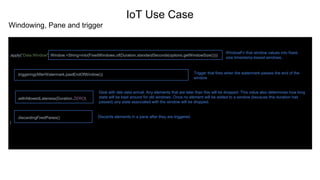
Windowing, Pane and trigger
.apply("Data Window", Window.<String>into(FixedWindows.of(Duration.standardSeconds(options.getWindowSize())))
.triggering(AfterWatermark.pastEndOfWindow())
.withAllowedLateness(Duration.ZERO)
.discardingFiredPanes()
)
WindowFn that window values into fixed-
size timestamp-based windows.
Trigger that fires when the watermark passes the end of the
window
Deal with late data arrival. Any elements that are later than this will be dropped. This value also determines how long
state will be kept around for old windows. Once no element will be added to a window (because this duration has
passed) any state associated with the window will be dropped.
Discards elements in a pane after they are triggered.
IoT Use Case
● In streaming mode, to get results, we have to window elements.
● Elements has a timestamp (event time) and a watermark, which is the timestamp of the
oldest work not yet completed (processing time). The source sets both timestamp and
watermark.
● The trigger decides at what time we fire the result on a window based on the watermark.
● Accumulation allows to refine the results.
IoT Use Case
First execution: local using the Direct Runner
Building
Executing
<!-- Direct runner -->
<dependency>
<groupId>org.apache.beam</groupId>
<artifactId>beam-runners-core-java</artifactId>
</dependency>
We add the direct runner in our Maven dependencies
$ mvn clean install
...
...
[INFO] ------------------------------------------------------------------------
[INFO] BUILD SUCCESS
[INFO] ------------------------------------------------------------------------
$ java -cp ….. strata.Main
IoT Use Case
We see the pipeline connected on ActiveMQ (MQTT)
The results are generated at the trigger.
IoT Use Case
Dec 02, 2017 7:24:51 AM org.apache.beam.sdk.io.FileBasedSink$Writer open
INFO: Opening temporary file /tmp/beam/.temp-beam-2017-12-02_06-23-46-0/a6b214e6-2931-42f4-a2df-91b2e736a9fc with MIME type text/plain to write destination null
shard 0 window [2017-12-02T06:23:50.000Z..2017-12-02T06:24:00.000Z) pane PaneInfo{isFirst=true, isLast=true, timing=ON_TIME, index=0, onTimeIndex=0}
Dec 02, 2017 7:24:51 AM org.apache.beam.sdk.io.FileBasedSink$Writer close
INFO: Successfully wrote temporary file /tmp/beam/.temp-beam-2017-12-02_06-23-46-0/a6b214e6-2931-42f4-a2df-91b2e736a9fc
Dec 02, 2017 7:24:51 AM org.apache.beam.sdk.io.WriteFiles$FinalizeWindowedFn finishBundle
INFO: Will finalize 1 files
Dec 02, 2017 7:24:51 AM org.apache.beam.sdk.io.FileBasedSink$WriteOperation copyToOutputFiles
INFO: Will copy temporary file /tmp/beam/.temp-beam-2017-12-02_06-23-46-0/a6b214e6-2931-42f4-a2df-91b2e736a9fc to final location /tmp/beam/cars_report2017-12-
02T06:23:50.000Z-2017-12-02T06:24:00.000Z-pane-0-last-00000-of-00001
Dec 02, 2017 7:24:51 AM org.apache.beam.sdk.io.FileBasedSink$WriteOperation removeTemporaryFiles
INFO: Will remove known temporary file /tmp/beam/.temp-beam-2017-12-02_06-23-46-0/a6b214e6-2931-42f4-a2df-91b2e736a9fc
$ cat cars_report2017-12-02T06:23:50.000Z-2017-12-02T06:24:00.000Z-pane-0-last-00000-of-00001
{“1”}
IoT Use Case
Now, let’s run on Spark. First, we add the Spark runner in the project:
<!-- Spark runner -->
<dependency>
<groupId>org.apache.beam</groupId>
<artifactId>beam-runners-spark</artifactId>
</dependency>
We add the Spark runner
IoT Use Case
For convenience, we do a shade jar (embedding the dependencies):
<build>
<plugins>
<plugin>
<groupId>org.apache.maven.plugins</groupId>
<artifactId>maven-shade-plugin</artifactId>
<version>3.1.0</version>
<executions>
<execution>
<phase>package</phase>
<goals>
<goal>shade</goal>
</goals>
</execution>
</executions>
</plugin>
</plugins>
</build>
IoT Use Case
Executing with “regular” spark-submit:
$ bin/spark-submit --class strata.Main --master spark://localhost:7077 /home/jbonofre/strata-1.0-SNAPSHOT.jar --runner=SparkRunner
…
2017-12-03 06:33:05,272 | INFO | her-event-loop-5 | BlockManagerInfo | Added broadcast_0_piece0 in memory on 127.0.0.1:39202 (size: 4.0 KB, free: 511.1
MB)
2017-12-03 06:33:05,273 | INFO | duler-event-loop | SparkContext | Created broadcast 0 from broadcast at DAGScheduler.scala:1006
2017-12-03 06:33:05,275 | INFO | duler-event-loop | DAGScheduler | Submitting 1 missing tasks from ResultStage 2 (MapPartitionsRDD[9] at map at
SparkUnboundedSource.java:110)
2017-12-03 06:33:05,276 | INFO | duler-event-loop | TaskSchedulerImpl | Adding task set 2.0 with 1 tasks
2017-12-03 06:33:05,795 | INFO | her-event-loop-4 | SparkDeploySchedulerBackend | Registered executor NettyRpcEndpointRef(null) (localhost.localdomain:48780)
with ID 0
2017-12-03 06:33:05,817 | INFO | her-event-loop-4 | TaskSetManager | Starting task 0.0 in stage 2.0 (TID 0, localhost.localdomain, partition
0,PROCESS_LOCAL, 3677 bytes)
2017-12-03 06:33:05,872 | INFO | her-event-loop-0 | BlockManagerMasterEndpoint | Registering block manager localhost.localdomain:33358 with 511.1 MB RAM,
BlockManagerId(0, localhost.localdomain, 33358)
2017-12-03 06:33:06,368 | INFO | her-event-loop-6 | BlockManagerInfo | Added broadcast_0_piece0 in memory on localhost.localdomain:33358 (size: 4.0 KB,
free: 511.1 MB)
2017-12-03 06:33:06,851 | INFO | her-event-loop-4 | MapOutputTrackerMasterEndpoint | Asked to send map output locations for shuffle 1 to
localhost.localdomain:48780
2017-12-03 06:33:06,853 | INFO | her-event-loop-4 | MapOutputTrackerMaster | Size of output statuses for shuffle 1 is 82 bytes
2017-12-03 06:33:06,874 | INFO | her-event-loop-0 | MapOutputTrackerMasterEndpoint | Asked to send map output locations for shuffle 0 to
localhost.localdomain:48780
2017-12-03 06:33:06,875 | INFO | her-event-loop-0 | MapOutputTrackerMaster | Size of output statuses for shuffle 0 is 82 bytes
IoT Use Case
We can see the application on master
IoT Use Case
We can see the job corresponding to the pipeline
IoT Use Case
We can see the DAG corresponding to the pipeline
IoT Use Case
Running on Flink. Like for Spark, let’s add the Flink runner:
<!-- Spark runner -->
<dependency>
<groupId>org.apache.beam</groupId>
<artifactId>beam-runners-flink_2.10</artifactId>
</dependency>
We add the Flink runner
IoT Use Case
Upload the pipeline jar to Flink
IoT Use Case
We can see the plan (DAG) in the dashboard
IoT Use Case
We can run the pipeline, either with the web UI
IoT Use Case
IoT Use Case
… or the command line
$ bin/flink run -c strata.Main -p 1 /home/jbonofre/strata-1.0-SNAPSHOT.jar --runner=FlinkRunner
Cluster configuration: Standalone cluster with JobManager at localhost/127.0.0.1:6123
Using address localhost:6123 to connect to JobManager.
JobManager web interface address http://localhost:8081
Starting execution of program
Submitting job with JobID: 518a04a576222e0fba7f317718d5d4e5. Waiting for job completion.
Connected to JobManager at Actor[akka.tcp://flink@localhost:6123/user/jobmanager#-927633151] with leader session id 00000000-0000-0000-0000-000000000000.
12/03/2017 07:51:17 Job execution switched to status RUNNING.
12/03/2017 07:51:17 Source: Read(UnboundedMqttSource) -> Flat Map -> ParMultiDo(Anonymous) -> ParMultiDo(Anonymous) -> Window/Window.Assign.out ->
ParMultiDo(Anonymous) -> ParMultiDo(Anonymous) -> ToKeyedWorkItem(1/1) switched to SCHEDULED
12/03/2017 07:51:17 Combine.perKey(Count) -> ParMultiDo(Anonymous) -> ParMultiDo(Anonymous) -> ParMultiDo(ApplyShardingKey) -> ToKeyedWorkItem(1/1)
switched to SCHEDULED
12/03/2017 07:51:17 GroupByKey -> ParMultiDo(WriteShardedBundles) -> ParMultiDo(Anonymous) -> Writing
Output/WriteFiles/Reshuffle/Window.Into()/Window.Assign.out -> ParMultiDo(Anonymous) -> ToKeyedWorkItem(1/1) switched to SCHEDULED
12/03/2017 07:51:17 GroupByKey -> ParMultiDo(Anonymous) -> ParMultiDo(Anonymous) -> ParMultiDo(Anonymous) -> ParMultiDo(Anonymous) ->
ParMultiDo(FinalizeWindowed)(1/1) switched to SCHEDULED
12/03/2017 07:51:17 Source: Read(UnboundedMqttSource) -> Flat Map -> ParMultiDo(Anonymous) -> ParMultiDo(Anonymous) -> Window/Window.Assign.out ->
ParMultiDo(Anonymous) -> ParMultiDo(Anonymous) -> ToKeyedWorkItem(1/1) switched to DEPLOYING
12/03/2017 07:51:17 Combine.perKey(Count) -> ParMultiDo(Anonymous) -> ParMultiDo(Anonymous) -> ParMultiDo(ApplyShardingKey) -> ToKeyedWorkItem(1/1)
switched to DEPLOYING
12/03/2017 07:51:17 GroupByKey -> ParMultiDo(WriteShardedBundles) -> ParMultiDo(Anonymous) -> Writing
Output/WriteFiles/Reshuffle/Window.Into()/Window.Assign.out -> ParMultiDo(Anonymous) -> ToKeyedWorkItem(1/1) switched to DEPLOYING
12/03/2017 07:51:17 GroupByKey -> ParMultiDo(Anonymous) -> ParMultiDo(Anonymous) -> ParMultiDo(Anonymous) -> ParMultiDo(Anonymous) ->
ParMultiDo(FinalizeWindowed)(1/1) switched to DEPLOYING
12/03/2017 07:51:17 GroupByKey -> ParMultiDo(Anonymous) -> ParMultiDo(Anonymous) -> ParMultiDo(Anonymous) -> ParMultiDo(Anonymous) ->
ParMultiDo(FinalizeWindowed)(1/1) switched to RUNNING
...
Summary
1.Unified model for both batch and streaming, supporting features like watermark,
triggering, accumulation, …
2.Large set of IOs, filesystems and extensions
3.Agnostic of the execution engine (you don’t change your code) or the platform (on
premise or cloud)
4.Extensible (IOs, runners, DSLs)
Apache Beam can be the glue in your ecosystem, very flexible to match most
of your use cases, and optimize enterprise workload.
http://beam.apache.org
@ApacheBeam
@jbonofre <jbonofre@apache.org>
Q&A
https://www.eventbrite.com/e/beam-summit-europe-2019-tickets-57933472576

Apache Beam de A à Z

  • 1.
    Apache Beam, IOs? JB Onofré <jbonofre@apache.org> <jbonofre@talend.com>
  • 2.
    Who am I? JB Onofré <jbonofre@apache.org> <jbonofre@talend.com> @jbonofre ● Fellow at Talend ● Member of the Apache Software Foundation ● PMC/Committer on ~ 20 Apache projects from container and integration (Karaf, Camel, ActiveMQ, Aries, …) to big data (Beam, CarbonData, Livy, Gearpump, …) ● Mentor during Apache Beam incubation ● PMC member for Apache Beam
  • 3.
    Agenda ● What’s Beam? ● Beam parts ● Beam Programming Model ● SDKs & DSLs ● IOs & Filesystems ● Runners
  • 4.
    ● Apache TLPsince May 2017 (incubation since December 2016) ● Coming from Google Cloud Dataflow SDK ● Data processing APIs: ○ Unified (batch & streaming, same code) ○ Portable (several execution engines, same code) ○ Extensible (custom extensions) What is Beam ?
  • 5.
    Beam parts ● ApacheBeam: ○ An unified programming model ○ SDKs & DSLs to implement the programming model ○ Convenient extensions (connectors, functions, …) ○ Runners to “translate” the user code to an execution engine (Beam doesn’t provide the engine) Programming Model SDKs DSLs User Pipeline Extensions Runner Execution Engine
  • 6.
    PTransform 1.PTransform are operationsthat transform data 2.Receive one or multiple PCollections and produce one or multiple PCollections 3.They must be Serializable 4.Should be thread-compatible (if you create your threads you must sync them)
  • 7.
    IO & Filesystem ●Connectors and extensions as Read & Write PTransforms ● Support bounded and/or unbounded PCollections ● Not using the execution engines connectors: features & portability ! ● From simple to advanced features (watermark, timestamp, dedup, splitting, …)
  • 8.
    IO Write: aDoFn ! 1.Write PTransform<PCollection<?>, PDone> wrapping a DoFn (sink is deprecated) 2.Leverage the DoFn annotations 3.Supports both bounded and unbounded PCollections (process by element) 4.Can support batching related to the bundles (runner) 5.Available on multiple workers thanks to ParDo
  • 9.
    IO Write: Elasticsearchsimple example public abstract static class Write extends PTransform<PCollection<String>, PDone> { public PDone expand(PCollection<String> input) { input.apply(ParDo.of(new WriteFn())); return PDone.in(input.getPipeline()); } static class WriteFn extends DoFn<String, PDone> { private RestClient restClient; @Setup public void setup() throws Exception { restClient = RestClient.builder(new HttpHost[]{ new HttpHost("localhost", 9200)}).build(); } @ProcessElement public void processElement(ProcessContext context) throws Exception { String document = context.element(); HttpEntity request = new NStringEntity(document, ContentType.APPLICATION_JSON); restClient.performRequest("POST", "/my_index/beam_type", Collections.singletonMap("refresh", "true"), request); } @Teardown public void closeClient() throws Exception { if (restClient != null) { restClient.close(); } } } }
  • 10.
    IO Write: Elasticsearchadding batching public abstract static class Write extends PTransform<PCollection<String>, PDone> { public PDone expand(PCollection<String> input) { input.apply(ParDo.of(new WriteFn())); return PDone.in(input.getPipeline()); } static class WriteFn extends DoFn<String, PDone> { private final static long BATCH_SIZE = 1024; private RestClient restClient; private ArrayList<String> batch; private long currentBatchSizeBytes; @Setup public void setup() throws Exception { restClient = RestClient.builder(new HttpHost[]{ new HttpHost("localhost", 9200)}).build(); } @StartBundle public void startBundle(StartBundleContext context) throws Exception { batch = new ArrayList<>(); currentBatchSizeBytes = 0; } @ProcessElement public void processElement(ProcessContext context) throws Exception { String document = context.element(); batch.add(String.format("{ "index" : {} }%n%s%n", document)); currentBatchSizeBytes += document.getBytes(StandardCharsets.UTF_8).length; if (batch.size() >= BATCH_SIZE || currentBatchSizeBytes >= BATCH_SIZE) { flushBatch(); } } @FinishBundle public void finishBundle(FinishBundleContext context) throws Exception { flushBatch(); } private void flushBatch() throws IOException { if (batch.isEmpty()) { return; } StringBuilder bulkRequest = new StringBuilder(); for (String json : batch) { bulkRequest.append(json); } batch.clear(); currentBatchSizeBytes = 0; Response response; HttpEntity requestBody = new NStringEntity(bulkRequest.toString(), ContentType.APPLICATION_JSON); restClient.performRequest("POST", "/my_index/beam_type", Collections.<String, String>emptyMap(), requestBody); } @Teardown public void closeClient() throws Exception { if (restClient != null) { restClient.close(); } } }
  • 11.
    IO Simplest Read:a DoFn ! 1.Write PTransform<PBegin, PCollection<?>> wrapping a DoFn 2.Leverage the DoFn annotations 3.Executed on a single worker 4.No splitting or estimated size 5.Only produce bounded PCollections
  • 12.
    IO Read: JDBCsimple example public static class Read extends PTransform<PBegin, PCollection<String>> { DataSource dataSource; private Read(DataSource dataSource) { this.dataSource = dataSource; } public static Read withDataSource(DataSource dataSource) { return new Read(dataSource); } public PCollection<String> expand(PBegin begin) { return begin.apply(Create.of((Void) null)) .apply(ParDo.of(new ReadFn(this))); } private static class ReadFn extends DoFn<Void, String> { private Read spec; private Connection connection; public ReadFn(Read spec) { this.spec = spec; } @Setup public void setup() throws Exception { this.connection = spec.dataSource.getConnection(); } @ProcessElement public void processElement(ProcessContext processContext) throws Exception { try (PreparedStatement statement = connection.prepareStatement("select foo from bar")) { try (ResultSet resultSet = statement.executeQuery()) { while (resultSet.next()) { processContext.output(resultSet.getString("foo")); } } } } @Teardown public void teardown() throws Exception { connection.close(); } } }
  • 13.
    IO Read: aBounded Source 1.Write PTransform<PBegin, PCollection<?>> wrapping a bounded source 2.Support advanced features like: a.Splitting (chunk the read with several sources) b.Estimated size (used by the runner for the scaling) 3.Sources create readers. The reader is on a specific split, moving forward on the records
  • 14.
    IO Read: boundedsource skeletonpublic static class Read extends PTransform<PBegin, PCollection<?>> { @Override public PCollection<?> expand(PBegin input) { return input.apply(org.apache.beam.sdk.io.Read.from(new CustomSource())); } } public static class CustomSource extends BoundedSource<?> { private String splitPredicate; @Override public List<CustomSource> split(long desiredBundleSizeBytes, PipelineOptions options) throws Exception { // here we create a list of sources, each source will be on a worker reading chunk of data // That's why we have a split predicate. // NB: a runner can move a source from a worker to another, that's why a source has to serializable. return Collections.singletonList(this); } @Override public long getEstimatedSizeBytes(PipelineOptions options) throws Exception { // here we compute the size of the read data. The runner can use this value for: // - bootstrap the required resources & workers (no-op execution engines like DataFlow) // - define the size of the data bundles return 0; } @Override public CustomReader createReader(PipelineOptions options) throws IOException { // create the reader for this source return new CustomReader(this); } } // A reader is created by a source on a worker. It's "linked" to the source to read only the expected // chunk of data. A reader is local to a worker and never change, it doesn't have to be serializable. public static class CustomReader extends BoundedSource.BoundedReader<?> { private CustomSource source; private ? current; public CustomReader(CustomSource source) { this.source = source; } @Override public boolean start() throws IOException { // it's where the reader init the resources (client, ...) and call the advance() // method to read the first record return advance(); } @Override public boolean advance() throws IOException { // here we actually read the records and update the current record. if (something to read){ this.current = .... return true; } else { return false; } } @Override public ? getCurrent() throws NoSuchElementException { if (current == null) { throw new NoSuchElementException(); } return current; } @Override public void close() throws IOException { // close the resources created by the reader. } @Override public BoundedSource<?> getCurrentSource() { return this.source; } }
  • 15.
    IO Read: anUnbounded Source 1.Write PTransform<PBegin, PCollection<?>> wrapping an unbounded source 2.Support advanced features like: a.Splitting (multiple sources all active receiving messages for instance) b.Timestamp & watermark (event processing time and event time) c.Checkpoint mark (to deal with read failure and avoid a re-read) d.Dedup (can deal dedup using a record ID) 3.Sources create readers. The reader is on a specific split, moving forward on the events, always active.
  • 16.
    IO Read: unboundedsource skeleton public static class Read extends PTransform<PBegin, PCollection<?>> { public PCollection<?> expand(PBegin begin) { return begin.apply(org.apache.beam.sdk.io.Read.from(new CustomSource())); } } public static class CustomSource extends UnboundedSource<?, CustomCheckpointMark> { @Override public List<? extends UnboundedSource<?, CustomCheckpointMark>> split( int desiredNumSplits, PipelineOptions options) throws Exception { // like for bounded, we can split read on multiple workers return Collections.singletonList(this); } @Override public UnboundedReader<?> createReader(PipelineOptions options, @Nullable CustomCheckpointMark checkpointMark) throws IOException { return new CustomReader(this); } @Override public Coder<CustomCheckpointMark> getCheckpointMarkCoder() { // as checkpoint are shared by all sources, it has to be serializable (machine to machine) // using a coder } } public static class CustomCheckpointMark implements UnboundedSource.CheckpointMark { // here we maintain a map of "pending" events, not yet fully read @Override public void finalizeCheckpoint() throws IOException { // this callback method is called by the runner when the events have been fully read // and can be ack } } public static class CustomReader extends UnboundedSource.UnboundedReader<?> { private CustomSource source; public CustomReader(CustomSource source) { this.source = source; } @Override public boolean start() throws IOException { // like for bounded, init the resources (client, ...) and call advance() return advance(); } @Override public boolean advance() throws IOException { // read or receive event to update current, timestamp and watermark // return true if a event has been received, false else } @Override public ? getCurrent() throws NoSuchElementException { if (current == null) { throw new NoSuchElementException(); } return current; } @Override public Instant getCurrentTimestamp() throws NoSuchElementException { // return the current timestamp using the event content or backend system } @Override public void close() throws IOException { // close the reader and release resources } @Override public Instant getWatermark() { // return the watermark (the timestamp of the oldest records). // the watermark is timestamp before or at the timestamps of all future elements read by this reader. // it can be estimated or using the ACK & checkpoint } @Override public UnboundedSource.CheckpointMark getCheckpointMark() { // the current checkpoint mark for this reader } @Override public UnboundedSource<?, ?> getCurrentSource() { return source; } }
  • 17.
    IO Read: theSplittableDoFn 1.Write PTransform<PBegin, PCollection<?>> wrapping a SplittableDoFn 2.Limit the boilerplate, limit the errors, easier to write. 3.Does not distinguish between bounded and unbounded like sources. 4.Basically: it’s a DoFn supporting splitting. It’s a regular DoFn, just processElement method takes a tracker. 5.Tracker and restriction to split and read chunks
  • 18.
    IO Read: SplittableDoFnexample class CountFn<T> extends DoFn<KV<T, Long>, KV<T, Long>> { @ProcessElement public void process(ProcessContext c, OffsetRangeTracker tracker) { for (long i = tracker.currentRestriction().getFrom(); tracker.tryClaim(i); ++i) { c.output(KV.of(c.element().getKey(), i)); } } @GetInitialRestriction public OffsetRange getInitialRange(KV<T, Long> element) { return new OffsetRange(0L, element.getValue()); } } PCollection<KV<String, Long>> input = …; PCollection<KV<String, Long>> output = input.apply( ParDo.of(new CountFn<String>());
  • 19.
    IO Read: currentstatus of SplittableDoFn 1.API is already part of the Beam core. 2.Supported by runners
  • 20.
    IOs & Filesystems Filesystems HDFS GoogleStorage S3 (WIP) ADLS (WIP) IOs AMQP Cassandra Elasticsearch Google PubSub Google BigTable Google BigQuery HBase HCatalog JDBC JMS Kafka Kinesis MongoDB MQTT RabbitMQ (WIP) Redis Solr Tika XML
  • 21.
    Using IOs: IoTUse Case ● Abstract: cars send location via MQTT. We want to check the cars in a given location in real time. ● Streaming pipeline using Unbounded IO ○ Read an unbounded collection of data, live forever ○ Splitting (several readers) ○ Watermark (distinguish event time and event processing time, allowing for downstream parts of the pipeline to know up to what point in time the data is complete) ○ Checkpointing (to avoid to re-read the same data again in case of failure) ○ Deduplication
  • 22.
    IoT Use Case Let’sstart with a simple Maven project: <?xml version="1.0" encoding="UTF-8"?> <project xmlns="http://maven.apache.org/POM/4.0.0" xmlns:xsi="http://www.w3.org/2001/XMLSchema-instance" xsi:schemaLocation="http://maven.apache.org/POM/4.0.0 http://maven.apache.org/xsd/maven-4.0.0.xsd"> <modelVersion>4.0.0</modelVersion> <groupId>strata</groupId> <artifactId>strata</artifactId> <version>1.0-SNAPSHOT</version> <dependencies> <!-- Beam SDK --> <dependency> <groupId>org.apache.beam</groupId> <artifactId>beam-sdks-java-core</artifactId> </dependency> <!-- IOs --> <dependency> <groupId>org.apache.beam</groupId> <artifactId>beam-sdks-java-io-mqtt</artifactId> </dependency> <!-- hdfs --> <dependency> <groupId>org.apache.beam</groupId> <artifactId>beam-sdks-java-io-hadoop-file-system</artifactId> </dependency> <dependency> <groupId>org.apache.hadoop</groupId> <artifactId>hadoop-client</artifactId> </dependency> </dependencies> </project> Java SDK MQTT IO - will be used for source HDFS filesystem (and dependency) - will be used for sink
  • 23.
    IoT Use Case An“option” interface describing the pipeline options private interface Options extends PipelineOptions { @Description("Fixed window duration, in seconds") @Default.Integer(WINDOW_SIZE) Integer getWindowSize(); void setWindowSize(Integer value); @Description("Maximum coordinate value (axis X)") @Default.Integer(COORD_X) Integer getCoordX(); void setCoordX(Integer value); @Description("Maximum coordinate value (axis Y)") @Default.Integer(COORD_Y) Integer getCoordY(); void setCoordY(Integer value); @Description("Output Path") @Default.String(OUTPUT_PATH) String getOutput(); void setOutput(String value); } Annotations describing the option and defining the default value Simple getter/setter for the option
  • 24.
    IoT Use Case Implementingthe filter as a SerializableFunction private static class FilterObjectsByCoordinates implements SerializableFunction<String, Boolean> { private Integer maxCoordX; private Integer maxCoordY; public FilterObjectsByCoordinates(Integer maxCoordX, Integer maxCoordY) { this.maxCoordX = maxCoordX; this.maxCoordY = maxCoordY; } @Override public Boolean apply(String input) { String[] split = input.split(","); if (split.length < 3) { return null; } Integer coordX = Integer.valueOf(split[1]); Integer coordY = Integer.valueOf(split[2]); return (coordX >= 0 && coordX < this.maxCoordX && coordY >= 0 && coordY < this.maxCoordY); } } A function that computes an output value of type Boolean from a input value of type String and is Serializable (in order to be executed in parallel on different workers) Returns the result of invoking this function on the given input
  • 25.
    IoT Use Case Createthe pipeline public final static void main(String[] args) throws Exception { final Options options = PipelineOptionsFactory.fromArgs(args).withValidation().as(Options.class); Pipeline pipeline = Pipeline.create(options); Wrapped as a main to be directly executable Load the options using the corresponding factory Create the pipeline using the options
  • 26.
    IoT Use Case Readingmessages from MQTT and converting to PCollection<String> pipeline .apply("MQTT Source", MqttIO.read() .withConnectionConfiguration(MqttIO.ConnectionConfiguration.create("tcp://localhost:1883", "CAR"))) .apply("Byte To String Converter", ParDo.of(new DoFn<byte[], String>() { @ProcessElement public void processElement(ProcessContext processContext) { byte[] element = processContext.element(); processContext.output(new String(element)); } })) Connect and receive message from the MQTT broker As MQTT IO provides a PCollection<byte[]>, we use a ParDo/DoFn to convert as a PCollection<String>
  • 27.
    IoT Use Case Windowing,Pane and trigger .apply("Data Window", Window.<String>into(FixedWindows.of(Duration.standardSeconds(options.getWindowSize()))) .triggering(AfterWatermark.pastEndOfWindow()) .withAllowedLateness(Duration.ZERO) .discardingFiredPanes() ) WindowFn that window values into fixed- size timestamp-based windows. Trigger that fires when the watermark passes the end of the window Deal with late data arrival. Any elements that are later than this will be dropped. This value also determines how long state will be kept around for old windows. Once no element will be added to a window (because this duration has passed) any state associated with the window will be dropped. Discards elements in a pane after they are triggered.
  • 28.
    IoT Use Case ●In streaming mode, to get results, we have to window elements. ● Elements has a timestamp (event time) and a watermark, which is the timestamp of the oldest work not yet completed (processing time). The source sets both timestamp and watermark. ● The trigger decides at what time we fire the result on a window based on the watermark. ● Accumulation allows to refine the results.
  • 29.
    IoT Use Case Firstexecution: local using the Direct Runner Building Executing <!-- Direct runner --> <dependency> <groupId>org.apache.beam</groupId> <artifactId>beam-runners-core-java</artifactId> </dependency> We add the direct runner in our Maven dependencies $ mvn clean install ... ... [INFO] ------------------------------------------------------------------------ [INFO] BUILD SUCCESS [INFO] ------------------------------------------------------------------------ $ java -cp ….. strata.Main
  • 30.
    IoT Use Case Wesee the pipeline connected on ActiveMQ (MQTT)
  • 31.
    The results aregenerated at the trigger. IoT Use Case Dec 02, 2017 7:24:51 AM org.apache.beam.sdk.io.FileBasedSink$Writer open INFO: Opening temporary file /tmp/beam/.temp-beam-2017-12-02_06-23-46-0/a6b214e6-2931-42f4-a2df-91b2e736a9fc with MIME type text/plain to write destination null shard 0 window [2017-12-02T06:23:50.000Z..2017-12-02T06:24:00.000Z) pane PaneInfo{isFirst=true, isLast=true, timing=ON_TIME, index=0, onTimeIndex=0} Dec 02, 2017 7:24:51 AM org.apache.beam.sdk.io.FileBasedSink$Writer close INFO: Successfully wrote temporary file /tmp/beam/.temp-beam-2017-12-02_06-23-46-0/a6b214e6-2931-42f4-a2df-91b2e736a9fc Dec 02, 2017 7:24:51 AM org.apache.beam.sdk.io.WriteFiles$FinalizeWindowedFn finishBundle INFO: Will finalize 1 files Dec 02, 2017 7:24:51 AM org.apache.beam.sdk.io.FileBasedSink$WriteOperation copyToOutputFiles INFO: Will copy temporary file /tmp/beam/.temp-beam-2017-12-02_06-23-46-0/a6b214e6-2931-42f4-a2df-91b2e736a9fc to final location /tmp/beam/cars_report2017-12- 02T06:23:50.000Z-2017-12-02T06:24:00.000Z-pane-0-last-00000-of-00001 Dec 02, 2017 7:24:51 AM org.apache.beam.sdk.io.FileBasedSink$WriteOperation removeTemporaryFiles INFO: Will remove known temporary file /tmp/beam/.temp-beam-2017-12-02_06-23-46-0/a6b214e6-2931-42f4-a2df-91b2e736a9fc $ cat cars_report2017-12-02T06:23:50.000Z-2017-12-02T06:24:00.000Z-pane-0-last-00000-of-00001 {“1”}
  • 32.
    IoT Use Case Now,let’s run on Spark. First, we add the Spark runner in the project: <!-- Spark runner --> <dependency> <groupId>org.apache.beam</groupId> <artifactId>beam-runners-spark</artifactId> </dependency> We add the Spark runner
  • 33.
    IoT Use Case Forconvenience, we do a shade jar (embedding the dependencies): <build> <plugins> <plugin> <groupId>org.apache.maven.plugins</groupId> <artifactId>maven-shade-plugin</artifactId> <version>3.1.0</version> <executions> <execution> <phase>package</phase> <goals> <goal>shade</goal> </goals> </execution> </executions> </plugin> </plugins> </build>
  • 34.
    IoT Use Case Executingwith “regular” spark-submit: $ bin/spark-submit --class strata.Main --master spark://localhost:7077 /home/jbonofre/strata-1.0-SNAPSHOT.jar --runner=SparkRunner … 2017-12-03 06:33:05,272 | INFO | her-event-loop-5 | BlockManagerInfo | Added broadcast_0_piece0 in memory on 127.0.0.1:39202 (size: 4.0 KB, free: 511.1 MB) 2017-12-03 06:33:05,273 | INFO | duler-event-loop | SparkContext | Created broadcast 0 from broadcast at DAGScheduler.scala:1006 2017-12-03 06:33:05,275 | INFO | duler-event-loop | DAGScheduler | Submitting 1 missing tasks from ResultStage 2 (MapPartitionsRDD[9] at map at SparkUnboundedSource.java:110) 2017-12-03 06:33:05,276 | INFO | duler-event-loop | TaskSchedulerImpl | Adding task set 2.0 with 1 tasks 2017-12-03 06:33:05,795 | INFO | her-event-loop-4 | SparkDeploySchedulerBackend | Registered executor NettyRpcEndpointRef(null) (localhost.localdomain:48780) with ID 0 2017-12-03 06:33:05,817 | INFO | her-event-loop-4 | TaskSetManager | Starting task 0.0 in stage 2.0 (TID 0, localhost.localdomain, partition 0,PROCESS_LOCAL, 3677 bytes) 2017-12-03 06:33:05,872 | INFO | her-event-loop-0 | BlockManagerMasterEndpoint | Registering block manager localhost.localdomain:33358 with 511.1 MB RAM, BlockManagerId(0, localhost.localdomain, 33358) 2017-12-03 06:33:06,368 | INFO | her-event-loop-6 | BlockManagerInfo | Added broadcast_0_piece0 in memory on localhost.localdomain:33358 (size: 4.0 KB, free: 511.1 MB) 2017-12-03 06:33:06,851 | INFO | her-event-loop-4 | MapOutputTrackerMasterEndpoint | Asked to send map output locations for shuffle 1 to localhost.localdomain:48780 2017-12-03 06:33:06,853 | INFO | her-event-loop-4 | MapOutputTrackerMaster | Size of output statuses for shuffle 1 is 82 bytes 2017-12-03 06:33:06,874 | INFO | her-event-loop-0 | MapOutputTrackerMasterEndpoint | Asked to send map output locations for shuffle 0 to localhost.localdomain:48780 2017-12-03 06:33:06,875 | INFO | her-event-loop-0 | MapOutputTrackerMaster | Size of output statuses for shuffle 0 is 82 bytes
  • 35.
    IoT Use Case Wecan see the application on master
  • 36.
    IoT Use Case Wecan see the job corresponding to the pipeline
  • 37.
    IoT Use Case Wecan see the DAG corresponding to the pipeline
  • 38.
    IoT Use Case Runningon Flink. Like for Spark, let’s add the Flink runner: <!-- Spark runner --> <dependency> <groupId>org.apache.beam</groupId> <artifactId>beam-runners-flink_2.10</artifactId> </dependency> We add the Flink runner
  • 39.
    IoT Use Case Uploadthe pipeline jar to Flink
  • 40.
    IoT Use Case Wecan see the plan (DAG) in the dashboard
  • 41.
    IoT Use Case Wecan run the pipeline, either with the web UI
  • 42.
  • 43.
    IoT Use Case …or the command line $ bin/flink run -c strata.Main -p 1 /home/jbonofre/strata-1.0-SNAPSHOT.jar --runner=FlinkRunner Cluster configuration: Standalone cluster with JobManager at localhost/127.0.0.1:6123 Using address localhost:6123 to connect to JobManager. JobManager web interface address http://localhost:8081 Starting execution of program Submitting job with JobID: 518a04a576222e0fba7f317718d5d4e5. Waiting for job completion. Connected to JobManager at Actor[akka.tcp://flink@localhost:6123/user/jobmanager#-927633151] with leader session id 00000000-0000-0000-0000-000000000000. 12/03/2017 07:51:17 Job execution switched to status RUNNING. 12/03/2017 07:51:17 Source: Read(UnboundedMqttSource) -> Flat Map -> ParMultiDo(Anonymous) -> ParMultiDo(Anonymous) -> Window/Window.Assign.out -> ParMultiDo(Anonymous) -> ParMultiDo(Anonymous) -> ToKeyedWorkItem(1/1) switched to SCHEDULED 12/03/2017 07:51:17 Combine.perKey(Count) -> ParMultiDo(Anonymous) -> ParMultiDo(Anonymous) -> ParMultiDo(ApplyShardingKey) -> ToKeyedWorkItem(1/1) switched to SCHEDULED 12/03/2017 07:51:17 GroupByKey -> ParMultiDo(WriteShardedBundles) -> ParMultiDo(Anonymous) -> Writing Output/WriteFiles/Reshuffle/Window.Into()/Window.Assign.out -> ParMultiDo(Anonymous) -> ToKeyedWorkItem(1/1) switched to SCHEDULED 12/03/2017 07:51:17 GroupByKey -> ParMultiDo(Anonymous) -> ParMultiDo(Anonymous) -> ParMultiDo(Anonymous) -> ParMultiDo(Anonymous) -> ParMultiDo(FinalizeWindowed)(1/1) switched to SCHEDULED 12/03/2017 07:51:17 Source: Read(UnboundedMqttSource) -> Flat Map -> ParMultiDo(Anonymous) -> ParMultiDo(Anonymous) -> Window/Window.Assign.out -> ParMultiDo(Anonymous) -> ParMultiDo(Anonymous) -> ToKeyedWorkItem(1/1) switched to DEPLOYING 12/03/2017 07:51:17 Combine.perKey(Count) -> ParMultiDo(Anonymous) -> ParMultiDo(Anonymous) -> ParMultiDo(ApplyShardingKey) -> ToKeyedWorkItem(1/1) switched to DEPLOYING 12/03/2017 07:51:17 GroupByKey -> ParMultiDo(WriteShardedBundles) -> ParMultiDo(Anonymous) -> Writing Output/WriteFiles/Reshuffle/Window.Into()/Window.Assign.out -> ParMultiDo(Anonymous) -> ToKeyedWorkItem(1/1) switched to DEPLOYING 12/03/2017 07:51:17 GroupByKey -> ParMultiDo(Anonymous) -> ParMultiDo(Anonymous) -> ParMultiDo(Anonymous) -> ParMultiDo(Anonymous) -> ParMultiDo(FinalizeWindowed)(1/1) switched to DEPLOYING 12/03/2017 07:51:17 GroupByKey -> ParMultiDo(Anonymous) -> ParMultiDo(Anonymous) -> ParMultiDo(Anonymous) -> ParMultiDo(Anonymous) -> ParMultiDo(FinalizeWindowed)(1/1) switched to RUNNING ...
  • 44.
    Summary 1.Unified model forboth batch and streaming, supporting features like watermark, triggering, accumulation, … 2.Large set of IOs, filesystems and extensions 3.Agnostic of the execution engine (you don’t change your code) or the platform (on premise or cloud) 4.Extensible (IOs, runners, DSLs) Apache Beam can be the glue in your ecosystem, very flexible to match most of your use cases, and optimize enterprise workload.
  • 45.
  • 46.
  • 47.