Core Java

Debasish Pratihari

Event Handling :


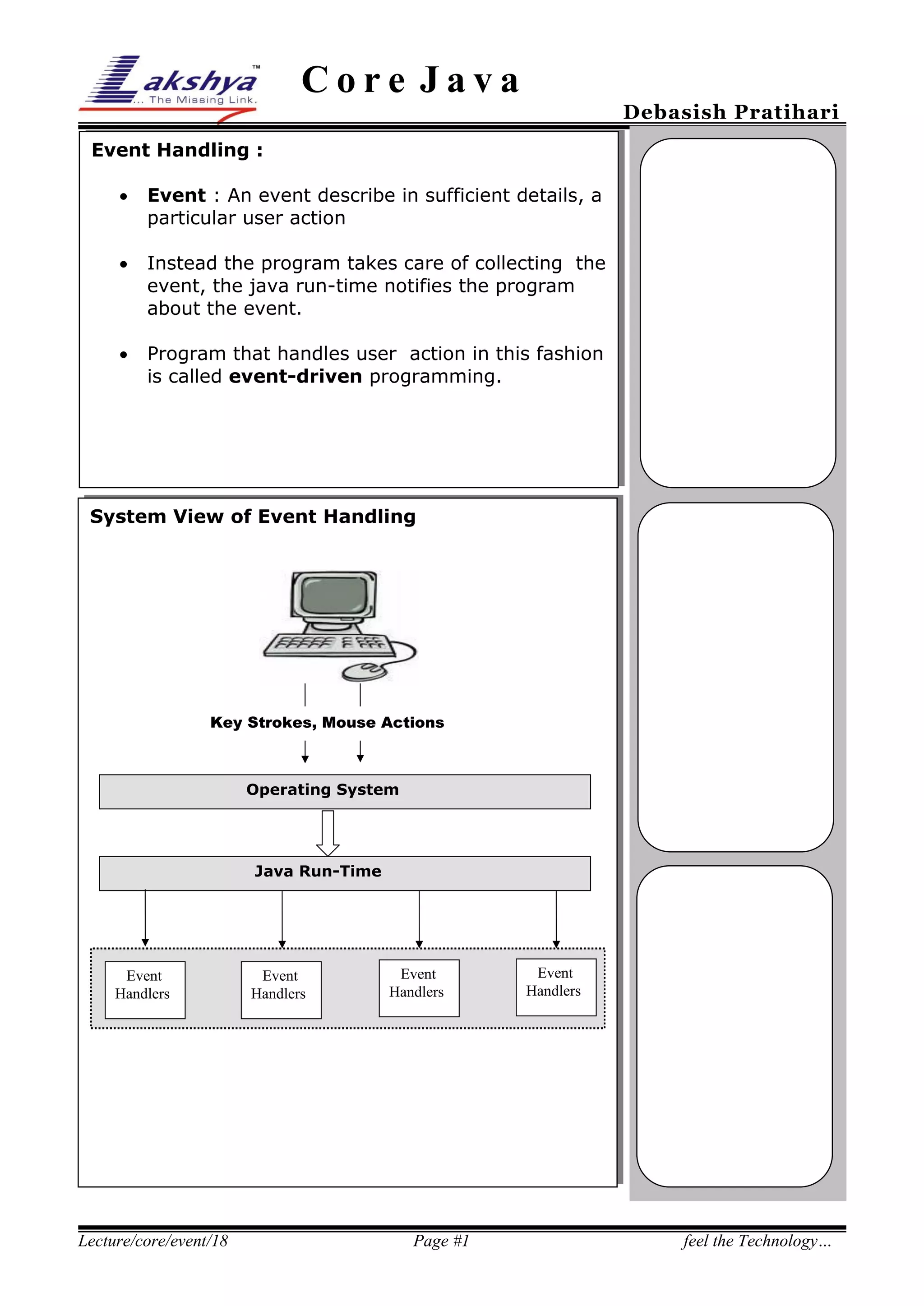
Event : An event describe in sufficient details, a
particular user action



Instead the program takes care of collecting the
event, the java run-time notifies the program
about the event.



Program that handles user action in this fashion
is called event-driven programming.

System View of Event Handling

Key Strokes, Mouse Actions

Operating System

Java Run-Time

Event
Handlers

Lecture/core/event/18

Event
Handlers

Event
Handlers

Page #1

Event
Handlers

feel the Technology…
Core Java

Debasish Pratihari

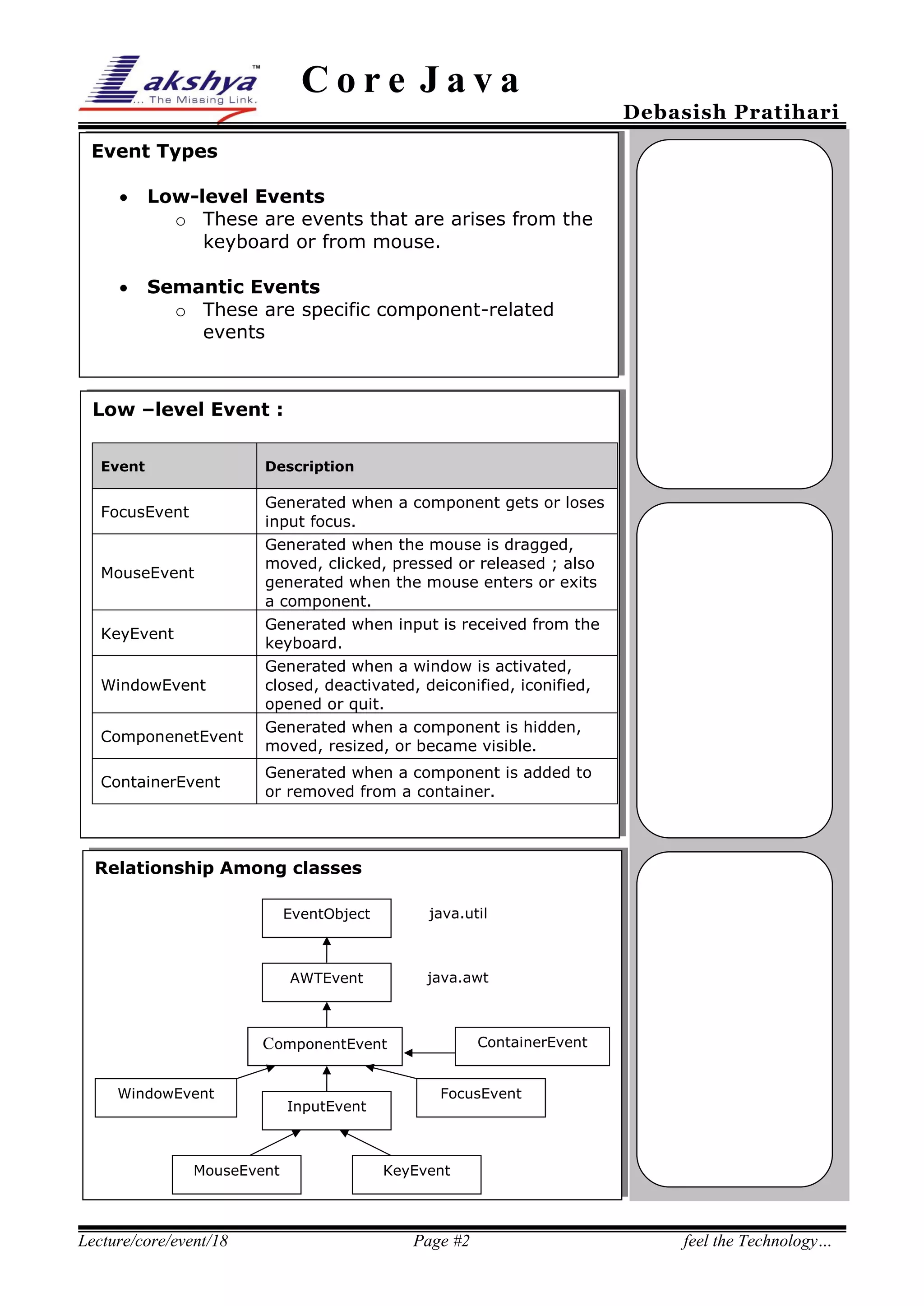
Event Types


Low-level Events
o These are events that are arises from the
keyboard or from mouse.



Semantic Events
o These are specific component-related
events

Low –level Event :
Event

Description

FocusEvent

MouseEvent

KeyEvent
WindowEvent
ComponenetEvent
ContainerEvent

Generated when a component gets or loses
input focus.
Generated when the mouse is dragged,
moved, clicked, pressed or released ; also
generated when the mouse enters or exits
a component.
Generated when input is received from the
keyboard.
Generated when a window is activated,
closed, deactivated, deiconified, iconified,
opened or quit.
Generated when a component is hidden,
moved, resized, or became visible.
Generated when a component is added to
or removed from a container.

Relationship Among classes
EventObject

java.util

AWTEvent

java.awt

ContainerEvent

ComponentEvent
WindowEvent

MouseEvent

Lecture/core/event/18

InputEvent

FocusEvent

KeyEvent

Page #2

feel the Technology…
Core Java

Debasish Pratihari

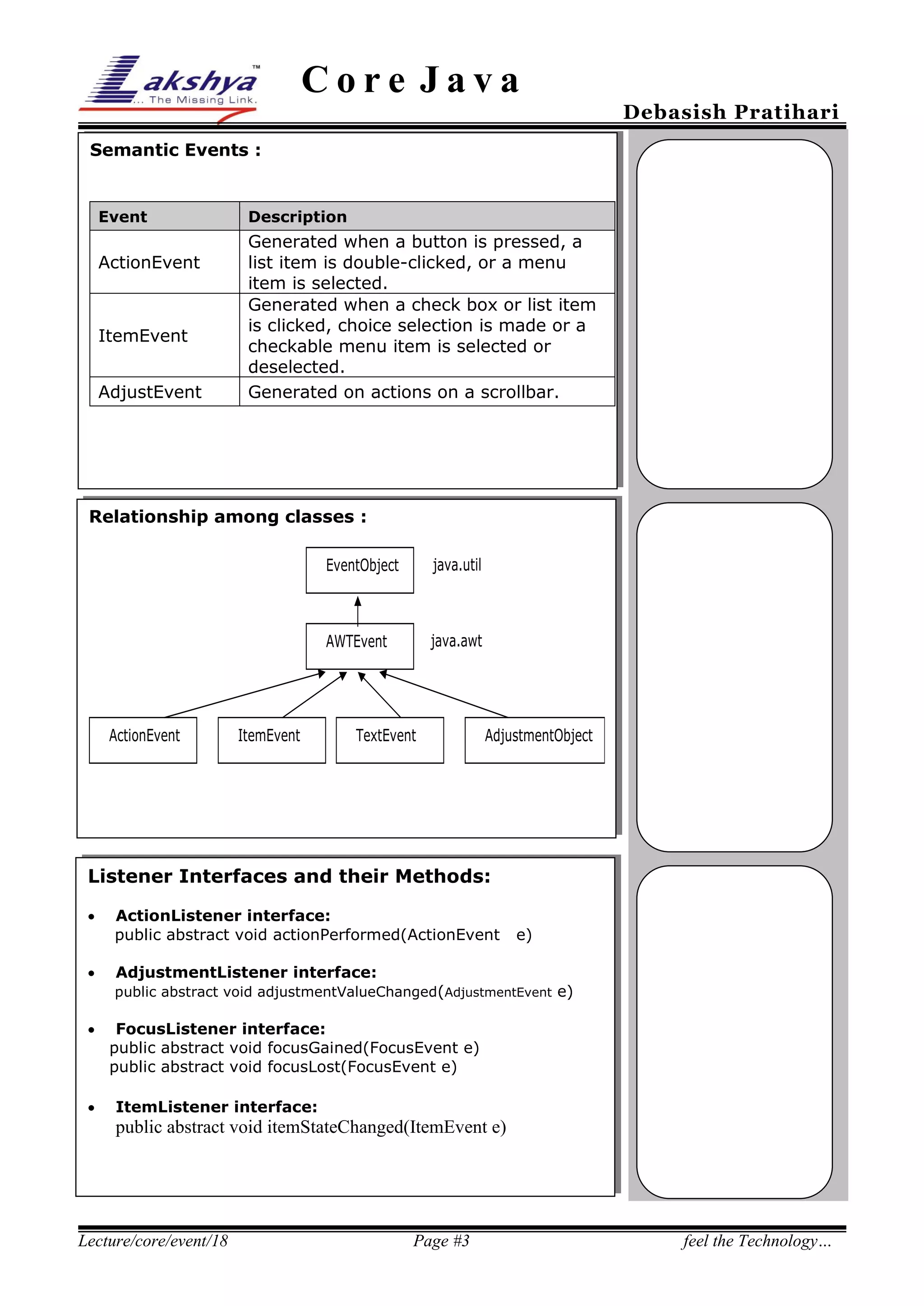
Semantic Events :

Event

ActionEvent

ItemEvent
AdjustEvent

Description

Generated when a button is pressed, a
list item is double-clicked, or a menu
item is selected.
Generated when a check box or list item
is clicked, choice selection is made or a
checkable menu item is selected or
deselected.
Generated on actions on a scrollbar.

Relationship among classes :
EventObject

AWTEvent

ActionEvent

ItemEvent

java.util

java.awt

TextEvent

AdjustmentObject

Listener Interfaces and their Methods:



ActionListener interface:
public abstract void actionPerformed(ActionEvent

e)

AdjustmentListener interface:
public abstract void adjustmentValueChanged(AdjustmentEvent e)





FocusListener interface:
public abstract void focusGained(FocusEvent e)
public abstract void focusLost(FocusEvent e)
ItemListener interface:

public abstract void itemStateChanged(ItemEvent e)

Lecture/core/event/18

Page #3

feel the Technology…
Core Java


Debasish Pratihari

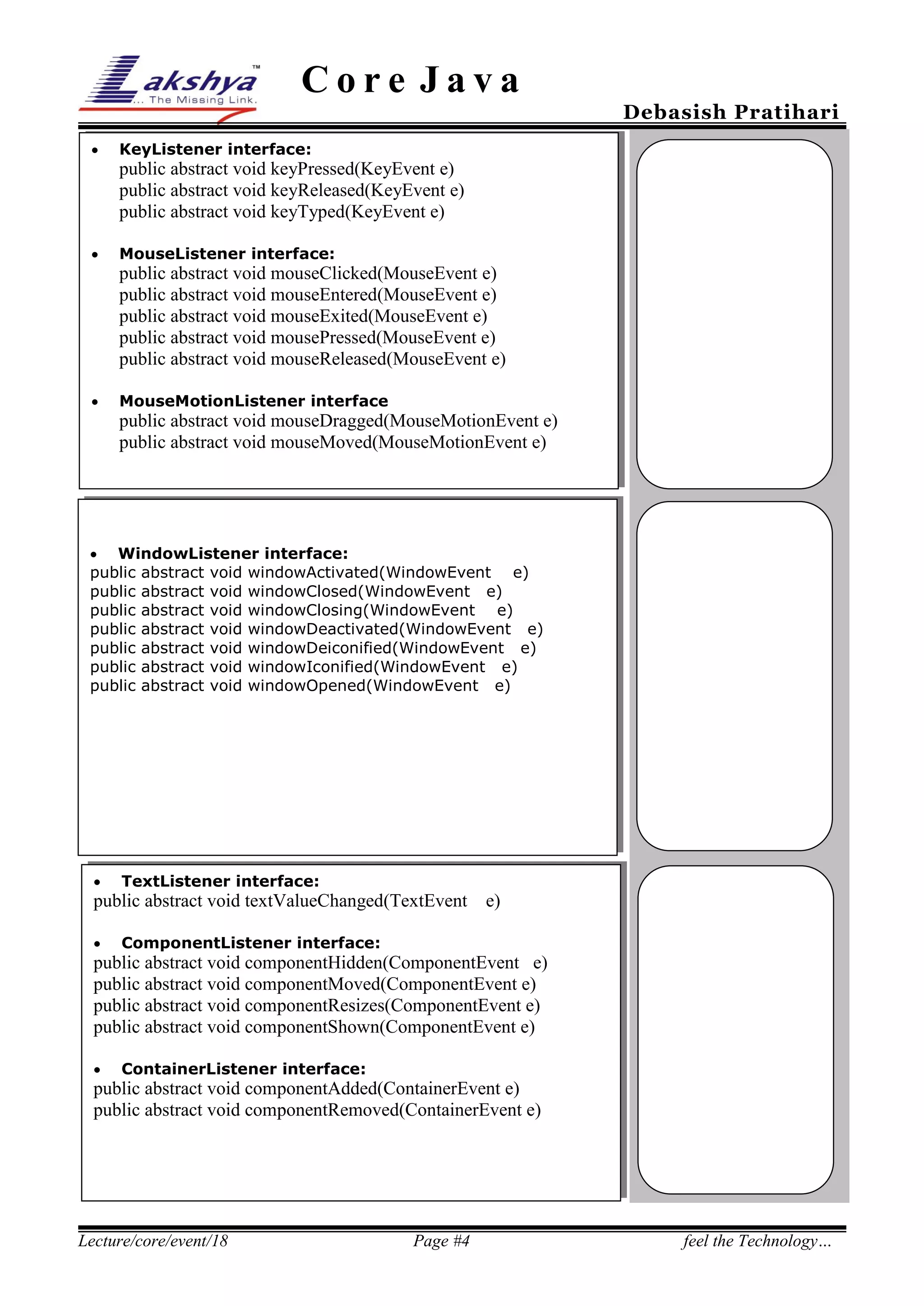
KeyListener interface:

public abstract void keyPressed(KeyEvent e)
public abstract void keyReleased(KeyEvent e)
public abstract void keyTyped(KeyEvent e)


MouseListener interface:

public abstract void mouseClicked(MouseEvent e)
public abstract void mouseEntered(MouseEvent e)
public abstract void mouseExited(MouseEvent e)
public abstract void mousePressed(MouseEvent e)
public abstract void mouseReleased(MouseEvent e)


MouseMotionListener interface

public abstract void mouseDragged(MouseMotionEvent e)
public abstract void mouseMoved(MouseMotionEvent e)



WindowListener interface:

25%
public abstract void windowActivated(WindowEvent
public
public
public
public
public
public



abstract
abstract
abstract
abstract
abstract
abstract

void
void
void
void
void
void

e)
windowClosed(WindowEvent e)
windowClosing(WindowEvent e)
windowDeactivated(WindowEvent e)
windowDeiconified(WindowEvent e)
windowIconified(WindowEvent e)
windowOpened(WindowEvent e)

TextListener interface:

public abstract void textValueChanged(TextEvent


e)

ComponentListener interface:

public abstract void componentHidden(ComponentEvent e)
public abstract void componentMoved(ComponentEvent e)
public abstract void componentResizes(ComponentEvent e)
public abstract void componentShown(ComponentEvent e)


ContainerListener interface:

public abstract void componentAdded(ContainerEvent e)
public abstract void componentRemoved(ContainerEvent e)

Lecture/core/event/18

Page #4

feel the Technology…

Lecture 18

  • 1.
    Core Java Debasish Pratihari EventHandling :  Event : An event describe in sufficient details, a particular user action  Instead the program takes care of collecting the event, the java run-time notifies the program about the event.  Program that handles user action in this fashion is called event-driven programming. System View of Event Handling Key Strokes, Mouse Actions Operating System Java Run-Time Event Handlers Lecture/core/event/18 Event Handlers Event Handlers Page #1 Event Handlers feel the Technology…
  • 2.
    Core Java Debasish Pratihari EventTypes  Low-level Events o These are events that are arises from the keyboard or from mouse.  Semantic Events o These are specific component-related events Low –level Event : Event Description FocusEvent MouseEvent KeyEvent WindowEvent ComponenetEvent ContainerEvent Generated when a component gets or loses input focus. Generated when the mouse is dragged, moved, clicked, pressed or released ; also generated when the mouse enters or exits a component. Generated when input is received from the keyboard. Generated when a window is activated, closed, deactivated, deiconified, iconified, opened or quit. Generated when a component is hidden, moved, resized, or became visible. Generated when a component is added to or removed from a container. Relationship Among classes EventObject java.util AWTEvent java.awt ContainerEvent ComponentEvent WindowEvent MouseEvent Lecture/core/event/18 InputEvent FocusEvent KeyEvent Page #2 feel the Technology…
  • 3.
    Core Java Debasish Pratihari SemanticEvents : Event ActionEvent ItemEvent AdjustEvent Description Generated when a button is pressed, a list item is double-clicked, or a menu item is selected. Generated when a check box or list item is clicked, choice selection is made or a checkable menu item is selected or deselected. Generated on actions on a scrollbar. Relationship among classes : EventObject AWTEvent ActionEvent ItemEvent java.util java.awt TextEvent AdjustmentObject Listener Interfaces and their Methods:   ActionListener interface: public abstract void actionPerformed(ActionEvent e) AdjustmentListener interface: public abstract void adjustmentValueChanged(AdjustmentEvent e)   FocusListener interface: public abstract void focusGained(FocusEvent e) public abstract void focusLost(FocusEvent e) ItemListener interface: public abstract void itemStateChanged(ItemEvent e) Lecture/core/event/18 Page #3 feel the Technology…
  • 4.
    Core Java  Debasish Pratihari KeyListenerinterface: public abstract void keyPressed(KeyEvent e) public abstract void keyReleased(KeyEvent e) public abstract void keyTyped(KeyEvent e)  MouseListener interface: public abstract void mouseClicked(MouseEvent e) public abstract void mouseEntered(MouseEvent e) public abstract void mouseExited(MouseEvent e) public abstract void mousePressed(MouseEvent e) public abstract void mouseReleased(MouseEvent e)  MouseMotionListener interface public abstract void mouseDragged(MouseMotionEvent e) public abstract void mouseMoved(MouseMotionEvent e)  WindowListener interface: 25% public abstract void windowActivated(WindowEvent public public public public public public  abstract abstract abstract abstract abstract abstract void void void void void void e) windowClosed(WindowEvent e) windowClosing(WindowEvent e) windowDeactivated(WindowEvent e) windowDeiconified(WindowEvent e) windowIconified(WindowEvent e) windowOpened(WindowEvent e) TextListener interface: public abstract void textValueChanged(TextEvent  e) ComponentListener interface: public abstract void componentHidden(ComponentEvent e) public abstract void componentMoved(ComponentEvent e) public abstract void componentResizes(ComponentEvent e) public abstract void componentShown(ComponentEvent e)  ContainerListener interface: public abstract void componentAdded(ContainerEvent e) public abstract void componentRemoved(ContainerEvent e) Lecture/core/event/18 Page #4 feel the Technology…