




Benchy
Lightweight performing benchmark framework for
                  Python scripts


 Marcel Caraciolo
 @marcelcaraciolo
 Developer, Cientist, contributor to the Crab recsys project,
 works with Python for 6 years, interested at mobile,
 education, machine learning and dataaaaa!
 Recife, Brazil - http://aimotion.blogspot.com
About me
Co-founder of Crab - Python recsys library
Cientist Chief at Atepassar, e-learning social network
Co-Founder and Instructor of PyCursos, teaching Python on-line
Co-Founder of Pingmind, on-line infrastructure for MOOC’s

Interested at Python, mobile, e-learning and machine learning!
Why do we test ?
Freedom from fear
Testing for
performance
What made my
code slower ?
me
Solutions ?
In	
  [1]:	
  def	
  f(x):


  ...:	


  return	
  x*x


  ...:	
  

In	
  [2]:	
  %timeit	
  for	
  x	
  in	
  range
(100):	
  f(x)
100000	
  loops,	
  best	
  of	
  3:	
  20.3	
  us	
  
per	
  loop
Stop. Help is near
     https://github.com/python-recsys/benchy

Performance benchmarks to compare several python code
                    alternatives

         Generates graphs using matplotlib

  Memory consumption, Performance timing available
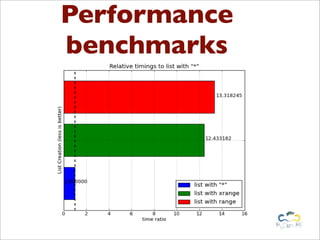
Performance
benchmarks
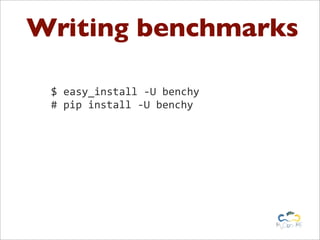
Writing benchmarks

 $	
  easy_install	
  -­‐U	
  benchy	
  
 #	
  pip	
  install	
  -­‐U	
  benchy
Writing benchmarks
from	
  benchy.api	
  import	
  Benchmark

common_setup	
  =	
  ""
statement	
  =	
  "lst	
  =	
  ['i'	
  for	
  x	
  in	
  range(100000)]"
benchmark1	
  =	
  Benchmark(statement,	
  common_setup,	
  name=	
  "range")

statement	
  =	
  "lst	
  =	
  ['i'	
  for	
  x	
  in	
  xrange(100000)]"
benchmark2	
  =	
  Benchmark(statement,	
  common_setup,	
  name=	
  "xrange")

statement	
  =	
  "lst	
  =	
  ['i']	
  *	
  100000"
benchmark3	
  =	
  Benchmark(statement,	
  common_setup,	
  name=	
  "range")
Use them in your
    workflow
[1]:	
  print	
  benchmark1.run()

{'memory':	
  {'repeat':	
  3,


  'success':	
  True,


  'units':	
  'MB',


  'usage':	
  2.97265625},
	
  'runtime':	
  {'loops':	
  100,


  'repeat':	
  3,


  'success':	
  True,


  'timing':	
  7.5653696060180664,


  'units':	
  'ms'}}


                                                    Same code as %timeit
                                                       and %memit
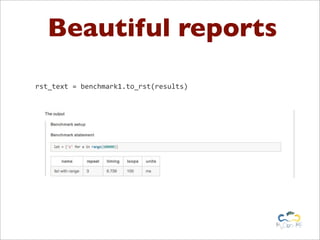
Beautiful reports

rst_text	
  =	
  benchmark1.to_rst(results)
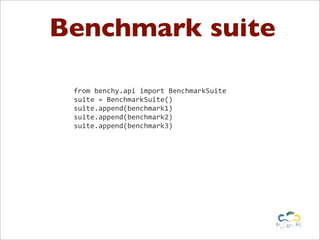
Benchmark suite

 from	
  benchy.api	
  import	
  BenchmarkSuite
 suite	
  =	
  BenchmarkSuite()
 suite.append(benchmark1)
 suite.append(benchmark2)
 suite.append(benchmark3)
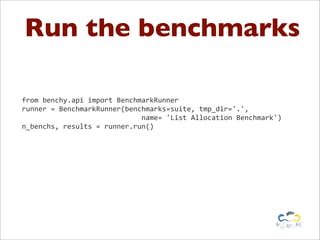
Run the benchmarks

from	
  benchy.api	
  import	
  BenchmarkRunner
runner	
  =	
  BenchmarkRunner(benchmarks=suite,	
  tmp_dir='.',	


  name=	
  'List	
  Allocation	
  Benchmark')
n_benchs,	
  results	
  =	
  runner.run()
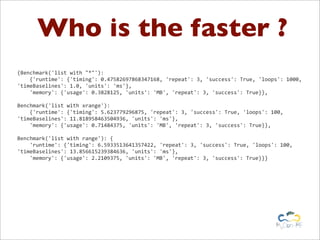
Who is the faster ?
{Benchmark('list	
  with	
  "*"'):


  {'runtime':	
  {'timing':	
  0.47582697868347168,	
  'repeat':	
  3,	
  'success':	
  True,	
  'loops':	
  1000,	
  
'timeBaselines':	
  1.0,	
  'units':	
  'ms'},


  'memory':	
  {'usage':	
  0.3828125,	
  'units':	
  'MB',	
  'repeat':	
  3,	
  'success':	
  True}},

Benchmark('list	
  with	
  xrange'):


  {'runtime':	
  {'timing':	
  5.623779296875,	
  'repeat':	
  3,	
  'success':	
  True,	
  'loops':	
  100,	
  
'timeBaselines':	
  11.818958463504936,	
  'units':	
  'ms'},


  'memory':	
  {'usage':	
  0.71484375,	
  'units':	
  'MB',	
  'repeat':	
  3,	
  'success':	
  True}},

Benchmark('list	
  with	
  range'):	
  {


  'runtime':	
  {'timing':	
  6.5933513641357422,	
  'repeat':	
  3,	
  'success':	
  True,	
  'loops':	
  100,	
  
'timeBaselines':	
  13.856615239384636,	
  'units':	
  'ms'},


  'memory':	
  {'usage':	
  2.2109375,	
  'units':	
  'MB',	
  'repeat':	
  3,	
  'success':	
  True}}}
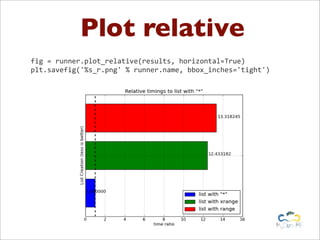
Plot relative
fig	
  =	
  runner.plot_relative(results,	
  horizontal=True)
plt.savefig('%s_r.png'	
  %	
  runner.name,	
  bbox_inches='tight')
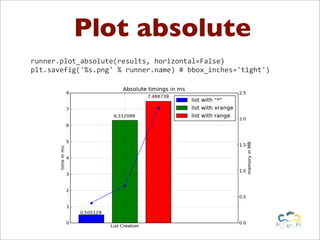
Plot absolute
runner.plot_absolute(results,	
  horizontal=False)
plt.savefig('%s.png'	
  %	
  runner.name)	
  #	
  bbox_inches='tight')
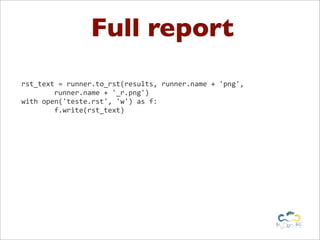
Full report
rst_text	
  =	
  runner.to_rst(results,	
  runner.name	
  +	
  'png',


  runner.name	
  +	
  '_r.png')
with	
  open('teste.rst',	
  'w')	
  as	
  f:


  f.write(rst_text)
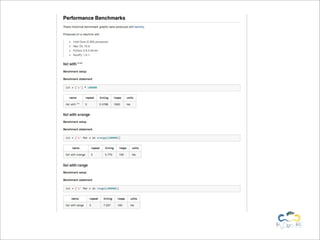
Full report
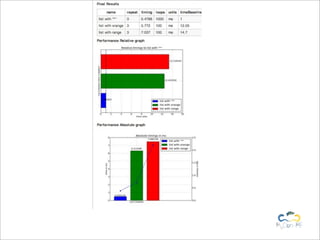
Full report
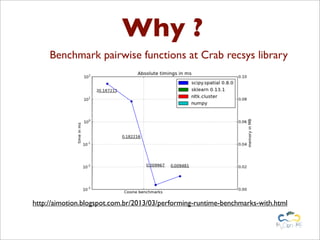
Why ?
     Benchmark pairwise functions at Crab recsys library


http://aimotion.blogspot.com.br/2013/03/performing-runtime-benchmarks-with.html
Get involved
            Create the benchmarks as TestCases

Check automatically for benchmark files and run like %nose.test()

                More setup and teardown control

              Group benchmarks at the same graph
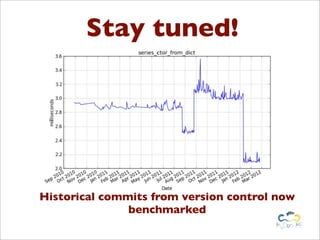
Stay tuned!


Historical commits from version control now
               benchmarked
https://github.com/python-recsys/benchy


     Forks and pull requests are welcomed!
Benchy
Lightweight performing benchmark framework for
                  Python scripts


 Marcel Caraciolo
 @marcelcaraciolo
 Developer, Cientist, contributor to the Crab recsys project,
 works with Python for 6 years, interested at mobile,
 education, machine learning and dataaaaa!
 Recife, Brazil - http://aimotion.blogspot.com

Benchy: Lightweight framework for Performance Benchmarks

  • 1.
    Benchy Lightweight performing benchmarkframework for Python scripts Marcel Caraciolo @marcelcaraciolo Developer, Cientist, contributor to the Crab recsys project, works with Python for 6 years, interested at mobile, education, machine learning and dataaaaa! Recife, Brazil - http://aimotion.blogspot.com
  • 2.
    About me Co-founder ofCrab - Python recsys library Cientist Chief at Atepassar, e-learning social network Co-Founder and Instructor of PyCursos, teaching Python on-line Co-Founder of Pingmind, on-line infrastructure for MOOC’s Interested at Python, mobile, e-learning and machine learning!
  • 3.
    Why do wetest ?
  • 4.
  • 5.
  • 6.
  • 8.
  • 9.
    Solutions ? In  [1]:  def  f(x):      ...:          return  x*x      ...:   In  [2]:  %timeit  for  x  in  range (100):  f(x) 100000  loops,  best  of  3:  20.3  us   per  loop
  • 10.
    Stop. Help isnear https://github.com/python-recsys/benchy Performance benchmarks to compare several python code alternatives Generates graphs using matplotlib Memory consumption, Performance timing available
  • 11.
  • 12.
    Writing benchmarks $  easy_install  -­‐U  benchy   #  pip  install  -­‐U  benchy
  • 13.
    Writing benchmarks from  benchy.api  import  Benchmark common_setup  =  "" statement  =  "lst  =  ['i'  for  x  in  range(100000)]" benchmark1  =  Benchmark(statement,  common_setup,  name=  "range") statement  =  "lst  =  ['i'  for  x  in  xrange(100000)]" benchmark2  =  Benchmark(statement,  common_setup,  name=  "xrange") statement  =  "lst  =  ['i']  *  100000" benchmark3  =  Benchmark(statement,  common_setup,  name=  "range")
  • 14.
    Use them inyour workflow [1]:  print  benchmark1.run() {'memory':  {'repeat':  3,                        'success':  True,                        'units':  'MB',                        'usage':  2.97265625},  'runtime':  {'loops':  100,                          'repeat':  3,                          'success':  True,                          'timing':  7.5653696060180664,                          'units':  'ms'}} Same code as %timeit and %memit
  • 15.
    Beautiful reports rst_text  =  benchmark1.to_rst(results)
  • 16.
    Benchmark suite from  benchy.api  import  BenchmarkSuite suite  =  BenchmarkSuite() suite.append(benchmark1) suite.append(benchmark2) suite.append(benchmark3)
  • 17.
    Run the benchmarks from  benchy.api  import  BenchmarkRunner runner  =  BenchmarkRunner(benchmarks=suite,  tmp_dir='.',                                                            name=  'List  Allocation  Benchmark') n_benchs,  results  =  runner.run()
  • 18.
    Who is thefaster ? {Benchmark('list  with  "*"'):        {'runtime':  {'timing':  0.47582697868347168,  'repeat':  3,  'success':  True,  'loops':  1000,   'timeBaselines':  1.0,  'units':  'ms'},        'memory':  {'usage':  0.3828125,  'units':  'MB',  'repeat':  3,  'success':  True}}, Benchmark('list  with  xrange'):        {'runtime':  {'timing':  5.623779296875,  'repeat':  3,  'success':  True,  'loops':  100,   'timeBaselines':  11.818958463504936,  'units':  'ms'},        'memory':  {'usage':  0.71484375,  'units':  'MB',  'repeat':  3,  'success':  True}}, Benchmark('list  with  range'):  {        'runtime':  {'timing':  6.5933513641357422,  'repeat':  3,  'success':  True,  'loops':  100,   'timeBaselines':  13.856615239384636,  'units':  'ms'},        'memory':  {'usage':  2.2109375,  'units':  'MB',  'repeat':  3,  'success':  True}}}
  • 19.
    Plot relative fig  =  runner.plot_relative(results,  horizontal=True) plt.savefig('%s_r.png'  %  runner.name,  bbox_inches='tight')
  • 20.
  • 21.
    Full report rst_text  =  runner.to_rst(results,  runner.name  +  'png',                runner.name  +  '_r.png') with  open('teste.rst',  'w')  as  f:                f.write(rst_text)
  • 22.
  • 23.
  • 24.
    Why ? Benchmark pairwise functions at Crab recsys library http://aimotion.blogspot.com.br/2013/03/performing-runtime-benchmarks-with.html
  • 25.
    Get involved Create the benchmarks as TestCases Check automatically for benchmark files and run like %nose.test() More setup and teardown control Group benchmarks at the same graph
  • 26.
    Stay tuned! Historical commitsfrom version control now benchmarked
  • 27.
    https://github.com/python-recsys/benchy Forks and pull requests are welcomed!
  • 29.
    Benchy Lightweight performing benchmarkframework for Python scripts Marcel Caraciolo @marcelcaraciolo Developer, Cientist, contributor to the Crab recsys project, works with Python for 6 years, interested at mobile, education, machine learning and dataaaaa! Recife, Brazil - http://aimotion.blogspot.com