Clarify & DovetailSchema 101a webinarpresented by garyshermanMay 17, 2011
Medovetailsoftware.com/blog/gsherman
TopicsSchema ConceptsViewing your SchemaEditing Your SchemaToolsSchema CustomizationTipsQ&A
Schema concepts
Data ModelA data model explicitly determines the structure of data or structured data.http://en.wikipedia.org/wiki/Data_model
In Clarify, we use the term Data Model or Schema to refer to the definition of our database structure.
Database StructuresTables (Objects)Fields (Columns)RelationsIndexesViews	View Fields	Joins
Metadata“data about data”OR“data about the containers of data”http://en.wikipedia.org/wiki/Metadata#Database_management
Database MetadataEach relational database system has its own mechanisms for storing metadata. Examples of relational-database metadata include:Tables of all tables in a database, their names, sizes and number of rows in each table.Tables of columns in each database, what tables they are used in, and the type of data stored in each column.http://en.wikipedia.org/wiki/Metadata#Database_management
ADP (ADaPter) LayerMetadata defining the Clarify schemaSet of tables in the Clarify database which contain “data about the containers of data”These table names all start with adp_
ADP Data Used byClarify applicationsClarify ClientUI EditorCB Toolkitcbbatch…Clarify / Amdocs APIsC APIsClearBasicCBOs (Clarify Business Objects)
ADP Data Used byDovetail SDKDovetail Applications	Agent	Mobile	Rulemanager	Seeker	…
Database structures and ADP data must remain in sync!This is why we need schema editing tools.We’ll get into tools in just a bit.
Database Structures
TablesA Table	is an entity encompassing a single conceptHas many fields (columns)	which are the attributes of the entityCan have one or more relations	which link entities together
Table IndexesA TableCan have one or more indexes	which improve database performance	or defines uniquenessNote: Not all indexes are stored in the ADP tables.
Table - IDsA Table	Has a unique id number
Table - RowsEach row in a table	Has a unique key (objid). Unique within table.	May also have a GUID.
ViewsA View	is an “virtual table” composed of the result set of a queryHas many view fields (view columns)	which contain data from the table used in the queryCan have one or more joins	which combines rows from two tables
Theory is nice, but…In theory, the complexity and actual implementation of the schema is abstracted away from you. But, in reality – you’re gonna want to understand how it all works.
Viewing your schema
Viewing your schemaDatabase vendor tools (not so great)Clarify Data Dictionary GuideClarify Data Models Doc (ERDs)Clarify schema file (.sch or .xml)Report that generates a Data Dictionary GuideDovetail schema file (xml)Dovetail BOLT
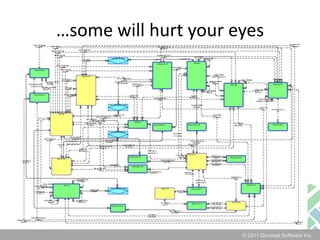
ERDsEntity-Relationship Diagrams can be useful.
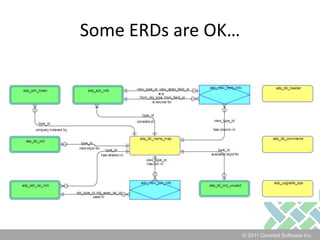
Some ERDs are OK…
…some will hurt your eyes
Dovetail BOLTA better way.Web application for real-time viewing of your schema.Never out of dateIncludes your customizations
Let’s take a quick look at BOLT
“I gotta get me some of that BOLT goodness”Download for free: http://bit.ly/getBOLT
EDITING your schema
Why do I need a schema tool?Recall from earlier:	Database structures and ADP data must remain in sync!So we need a tool that will do the right thing, and keep both in sync.
When adding a new column to  table:Physical ChangeAdd column to tableMetadata ChangeAdd data to ADP
Schema Editing ToolsClarify DD Editor (Data Dictionary Editor)Clarify ddcomp (Data Dictionary Compiler)Amdocs Schema ManagerDovetail SchemaEditor
Clarify DD Editor (DDE)User Interface – which some people likeBig differences depending on Clarify version
Clarify DD Editor (DDE)Older versions	add a new column or view column using UI	else, edit schema file, apply using DDELater versions	really just a UI wrapper for ddcomp
Clarify DD Editor (DDE)Not very good at telling you specifics if something is wrongInvalid syntax in schema fileValidation step failed during database validationError occurred when applying changes
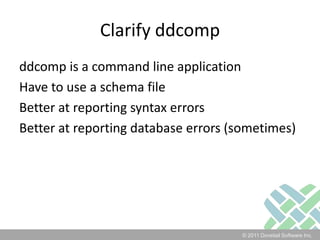
Clarify ddcompddcomp is a command line applicationHave to use a schema fileBetter at reporting syntax errorsBetter at reporting database errors (sometimes)
ddcomp vs. DD EditorMy recommendation: 	use ddcomp rather than DD Editor
Amdocs Schema ManagerIntroduced in Amdocs 6 (Clarify 13)Command line, Java applicationReplaces ddcompRequires CBO (Clarify Business Objects)Schema files are XML
Dovetail SchemaEditorCommand line, .NET applicationWorks with any Clarify versionSchema files are XMLIntellisense & Validation for your schema filesUser_Defined is the default
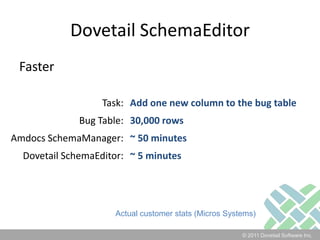
Dovetail SchemaEditorFaster“I have used both the Dovetail SchemaEditor and Amdocs SchemaManager to add one new field to the schema.Using our test database, Dovetail SchemaEditor took 5 minutes to complete, and Amdocs SchemaManager took 50 minutes.” 	- KS, Micros Systems
Dovetail SchemaEditorFaster
Dovetail SchemaEditorFasterActual customer stats (Micros Systems)
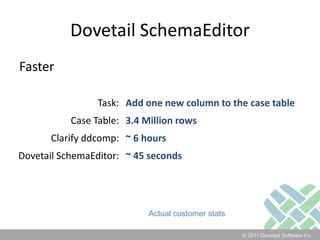
Dovetail SchemaEditorFasterActual customer stats
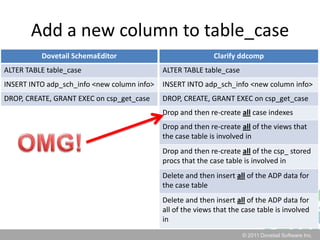
Dovetail SchemaEditorWhy is it Faster?It doesn’t do unnecessary work.
Add a new column to table_caseOMG!
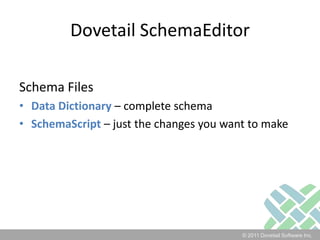
Dovetail SchemaEditorSchema FilesData Dictionary – complete schemaSchemaScript – just the changes you want to make
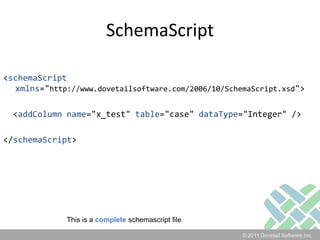
SchemaScript<schemaScriptxmlns="http://www.dovetailsoftware.com/2006/10/SchemaScript.xsd">  <addColumnname="x_test" table="case" dataType="Integer" /></schemaScript>This is a completeschemascript file
Customizing Your SchemaSchemaScript in Action
Let customize with Dovetail SchemaEditor and SchemaScript
Tips
A few big onesGive yourself a restore point!Preview changes before apply!Dev, then test, then production!
Table/View IDsThe valid range for new table and view ids is 430-571 and 2000-4999. This prevents any conflicts with existing or future Clarify defined id numbers.How do I know which ones are in use?BOLT will tell you: http://localhost/bolt/schema_id_info.asp
Custom FieldsUse of x_ prefixMy $0.02:Use x_prefix for custom fields on baseline tablesI don’t use x_ when adding custom view columnsI don’t use x_ for custom table names, but I do tend to use a customer/company prefix
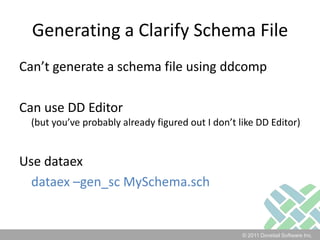
Generating a Clarify Schema FileCan’t generate a schema file using ddcompCan use DD Editor(but you’ve probably already figured out I don’t like DD Editor)Use dataexdataex –gen_sc MySchema.sch
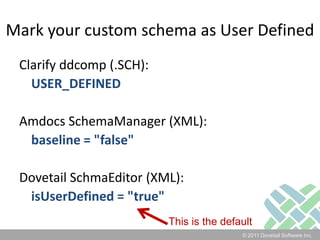
Mark your custom schema as User DefinedClarify ddcomp (.SCH):USER_DEFINEDAmdocs SchemaManager (XML):baseline = "false"Dovetail SchmaEditor (XML):isUserDefined = "true"This is the default
Schema FilesUse source code control for your schema files!
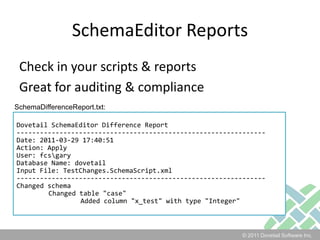
SchemaEditor ReportsCheck in your scripts & reportsGreat for auditing & complianceSchemaDifferenceReport.txt:Dovetail SchemaEditor Difference Report----------------------------------------------------------------Date: 2011-03-29 17:40:51Action: ApplyUser: fcs\garyDatabase Name: dovetailInput File: TestChanges.SchemaScript.xml----------------------------------------------------------------Changed schema	Changed table "case"		Added column "x_test" with type "Integer"
IndexesPerformance Indexes should be part of dbtune.sql – not the schema
Custom TablesAll objects are required to have an OBJID field, with GEN_FIELD_ID=3.
Additional Tips – Clarify schema filesCustomer Fields must appear after all Clarify Fields for that object.Do NOT swap around ordering of existing fields and relations in an object.Define custom tables and views at the end of the schema file.
Additional Tips – Clarify schema filesCustomer Relations must appear after all Clarify Relations for that object.All relations must have corresponding inverse relation on the target object.All inverse relations on a target object must be defined with the appropriate inverse cardinality.
</tips>
presentationdemonstrationpostludeq & adrink beer
PostludeMore Info on Dovetail SchemaEditorhttp://dovetal.es/dtSchema More Info (and free download) for Dovetail BOLThttp://dovetal.es/dtBoltFeel free to contact me:gary@dovetailsoftware.com	dovetailsoftware.com/blog/gsherman	512-610-5466	@gshermanThese slides 	will be available on my blog at dovetailsoftware.com
Interested in Schema 201?I’m considering doing a Schema 201 webinarSQL Views
Database Flags

Schema webinar

  • 1.
    Clarify & DovetailSchema101a webinarpresented by garyshermanMay 17, 2011
  • 2.
  • 3.
    TopicsSchema ConceptsViewing yourSchemaEditing Your SchemaToolsSchema CustomizationTipsQ&A
  • 4.
  • 5.
    Data ModelA datamodel explicitly determines the structure of data or structured data.http://en.wikipedia.org/wiki/Data_model
  • 6.
    In Clarify, weuse the term Data Model or Schema to refer to the definition of our database structure.
  • 7.
    Database StructuresTables (Objects)Fields(Columns)RelationsIndexesViews View Fields Joins
  • 8.
    Metadata“data about data”OR“dataabout the containers of data”http://en.wikipedia.org/wiki/Metadata#Database_management
  • 9.
    Database MetadataEach relational database systemhas its own mechanisms for storing metadata. Examples of relational-database metadata include:Tables of all tables in a database, their names, sizes and number of rows in each table.Tables of columns in each database, what tables they are used in, and the type of data stored in each column.http://en.wikipedia.org/wiki/Metadata#Database_management
  • 10.
    ADP (ADaPter) LayerMetadatadefining the Clarify schemaSet of tables in the Clarify database which contain “data about the containers of data”These table names all start with adp_
  • 11.
    ADP Data UsedbyClarify applicationsClarify ClientUI EditorCB Toolkitcbbatch…Clarify / Amdocs APIsC APIsClearBasicCBOs (Clarify Business Objects)
  • 12.
    ADP Data UsedbyDovetail SDKDovetail Applications Agent Mobile Rulemanager Seeker …
  • 13.
    Database structures andADP data must remain in sync!This is why we need schema editing tools.We’ll get into tools in just a bit.
  • 14.
  • 15.
    TablesA Table is anentity encompassing a single conceptHas many fields (columns) which are the attributes of the entityCan have one or more relations which link entities together
  • 16.
    Table IndexesA TableCanhave one or more indexes which improve database performance or defines uniquenessNote: Not all indexes are stored in the ADP tables.
  • 17.
    Table - IDsATable Has a unique id number
  • 18.
    Table - RowsEachrow in a table Has a unique key (objid). Unique within table. May also have a GUID.
  • 19.
    ViewsA View is an“virtual table” composed of the result set of a queryHas many view fields (view columns) which contain data from the table used in the queryCan have one or more joins which combines rows from two tables
  • 20.
    Theory is nice,but…In theory, the complexity and actual implementation of the schema is abstracted away from you. But, in reality – you’re gonna want to understand how it all works.
  • 21.
  • 22.
    Viewing your schemaDatabasevendor tools (not so great)Clarify Data Dictionary GuideClarify Data Models Doc (ERDs)Clarify schema file (.sch or .xml)Report that generates a Data Dictionary GuideDovetail schema file (xml)Dovetail BOLT
  • 23.
  • 24.
  • 25.
  • 26.
    Dovetail BOLTA betterway.Web application for real-time viewing of your schema.Never out of dateIncludes your customizations
  • 27.
    Let’s take aquick look at BOLT
  • 28.
    “I gotta getme some of that BOLT goodness”Download for free: http://bit.ly/getBOLT
  • 29.
  • 30.
    Why do Ineed a schema tool?Recall from earlier: Database structures and ADP data must remain in sync!So we need a tool that will do the right thing, and keep both in sync.
  • 31.
    When adding anew column to table:Physical ChangeAdd column to tableMetadata ChangeAdd data to ADP
  • 32.
    Schema Editing ToolsClarifyDD Editor (Data Dictionary Editor)Clarify ddcomp (Data Dictionary Compiler)Amdocs Schema ManagerDovetail SchemaEditor
  • 33.
    Clarify DD Editor(DDE)User Interface – which some people likeBig differences depending on Clarify version
  • 34.
    Clarify DD Editor(DDE)Older versions add a new column or view column using UI else, edit schema file, apply using DDELater versions really just a UI wrapper for ddcomp
  • 35.
    Clarify DD Editor(DDE)Not very good at telling you specifics if something is wrongInvalid syntax in schema fileValidation step failed during database validationError occurred when applying changes
  • 36.
    Clarify ddcompddcomp isa command line applicationHave to use a schema fileBetter at reporting syntax errorsBetter at reporting database errors (sometimes)
  • 37.
    ddcomp vs. DDEditorMy recommendation: use ddcomp rather than DD Editor
  • 38.
    Amdocs Schema ManagerIntroducedin Amdocs 6 (Clarify 13)Command line, Java applicationReplaces ddcompRequires CBO (Clarify Business Objects)Schema files are XML
  • 39.
    Dovetail SchemaEditorCommand line,.NET applicationWorks with any Clarify versionSchema files are XMLIntellisense & Validation for your schema filesUser_Defined is the default
  • 40.
    Dovetail SchemaEditorFaster“I haveused both the Dovetail SchemaEditor and Amdocs SchemaManager to add one new field to the schema.Using our test database, Dovetail SchemaEditor took 5 minutes to complete, and Amdocs SchemaManager took 50 minutes.” - KS, Micros Systems
  • 41.
  • 42.
  • 43.
  • 44.
    Dovetail SchemaEditorWhy isit Faster?It doesn’t do unnecessary work.
  • 45.
    Add a newcolumn to table_caseOMG!
  • 46.
    Dovetail SchemaEditorSchema FilesDataDictionary – complete schemaSchemaScript – just the changes you want to make
  • 47.
    SchemaScript<schemaScriptxmlns="http://www.dovetailsoftware.com/2006/10/SchemaScript.xsd"> <addColumnname="x_test"table="case" dataType="Integer" /></schemaScript>This is a completeschemascript file
  • 48.
  • 49.
    Let customize withDovetail SchemaEditor and SchemaScript
  • 50.
  • 51.
    A few bigonesGive yourself a restore point!Preview changes before apply!Dev, then test, then production!
  • 52.
    Table/View IDsThe validrange for new table and view ids is 430-571 and 2000-4999. This prevents any conflicts with existing or future Clarify defined id numbers.How do I know which ones are in use?BOLT will tell you: http://localhost/bolt/schema_id_info.asp
  • 53.
    Custom FieldsUse ofx_ prefixMy $0.02:Use x_prefix for custom fields on baseline tablesI don’t use x_ when adding custom view columnsI don’t use x_ for custom table names, but I do tend to use a customer/company prefix
  • 54.
    Generating a ClarifySchema FileCan’t generate a schema file using ddcompCan use DD Editor(but you’ve probably already figured out I don’t like DD Editor)Use dataexdataex –gen_sc MySchema.sch
  • 55.
    Mark your customschema as User DefinedClarify ddcomp (.SCH):USER_DEFINEDAmdocs SchemaManager (XML):baseline = "false"Dovetail SchmaEditor (XML):isUserDefined = "true"This is the default
  • 56.
    Schema FilesUse sourcecode control for your schema files!
  • 57.
    SchemaEditor ReportsCheck inyour scripts & reportsGreat for auditing & complianceSchemaDifferenceReport.txt:Dovetail SchemaEditor Difference Report----------------------------------------------------------------Date: 2011-03-29 17:40:51Action: ApplyUser: fcs\garyDatabase Name: dovetailInput File: TestChanges.SchemaScript.xml----------------------------------------------------------------Changed schema Changed table "case" Added column "x_test" with type "Integer"
  • 58.
    IndexesPerformance Indexes shouldbe part of dbtune.sql – not the schema
  • 59.
    Custom TablesAll objectsare required to have an OBJID field, with GEN_FIELD_ID=3.
  • 60.
    Additional Tips –Clarify schema filesCustomer Fields must appear after all Clarify Fields for that object.Do NOT swap around ordering of existing fields and relations in an object.Define custom tables and views at the end of the schema file.
  • 61.
    Additional Tips –Clarify schema filesCustomer Relations must appear after all Clarify Relations for that object.All relations must have corresponding inverse relation on the target object.All inverse relations on a target object must be defined with the appropriate inverse cardinality.
  • 62.
  • 63.
  • 64.
    PostludeMore Info onDovetail SchemaEditorhttp://dovetal.es/dtSchema More Info (and free download) for Dovetail BOLThttp://dovetal.es/dtBoltFeel free to contact me:gary@dovetailsoftware.com dovetailsoftware.com/blog/gsherman 512-610-5466 @gshermanThese slides will be available on my blog at dovetailsoftware.com
  • 65.
    Interested in Schema201?I’m considering doing a Schema 201 webinarSQL Views
  • 66.

Editor's Notes

  • #3 I am the VP of productsWorking in Clarify for 15 years2 years as a customer, 4 years at Clarify as a Principal Consultant, 9 years here at DovetailI love sharing my knowledge of all things ClarifyMy blog at dovetailsoftware.comI actively participate in the Clarify forum on IT Toolbox
  • #9 For the Clarify schema, we’re really talking about the 2nd: “data about the containers of data”
  • #16 Clarify used to refer to tables as Objects. Fine in 1990. Not so good when we got into OO development.
  • #17 Case_creation_time = non-unique, performance indexcase_index = id_number (case object).name_index = first_name:last_name:phone (contact object).Typically only unique indexes which affect application behavior are stored in ADP. Not perf indexes.
  • #18 It is used internally by the Clarify meta data.It is also used by some database objects to describe which object is being referenced (prop_name).Clarify uses object numbers in the range 0 - 429, and 5000 - 9999.The range of legal numbers for customer-defined objects is 430 - 511, and 2000 - 4999.POMS orders table access in transactions using the object number in order to prevent deadlocks. Always access the condition object first.
  • #19 GUID – are present in newer Amdocs versions, such as 7.5GUID = Globally unique identifierGUIDS arent actually globally unique in Amdocs. Blurg.
  • #20 Views can provide advantages over tables:Views can represent a subset of the data contained in a tableViews can join and simplify multiple tables into a single virtual tableViews can act as aggregated tables, where the database engine aggregates data (sum, average etc.) and presents the calculated results as part of the dataViews can hide the complexity of data; for example a view could appear as Sales2000 or Sales2001, transparently partitioning the actual underlying tableViews take very little space to store; the database contains only the definition of a view, not a copy of all the data it presentsDepending on the SQL engine used, views can provide extra securityViews can limit the degree of exposure of a table or tables to the outer worldhttp://en.wikipedia.org/wiki/Database_view
  • #21 Why? Reporting, interfaces, debugging
  • #22 Db admin tool – shows you the physical, but not the ADP infoData Dictionary Guide is out of dateSchema file is difficult to navigate Report – may or may not be currentDovetail XML file – good for computers – not for humansBOLT is the clear winner here. And it’s free!
  • #24 ADP ERD
  • #25 Account manager ERD
  • #31 There’s other minor stuff:Drop/create/grant csp_get_{table} stored procedureMay need to initialize the column
  • #33 Still have to use a schema file for many changes (add a join, add a table, add a relation)
  • #36 Command line = good for automationI’ve seen some versions where db errors bubble up as “(null) (null)”
  • #37 differences in actual processing and results between DDE and ddcomp
  • #38 Command line = good for automationMore efficient than ddcomp
  • #39 Command line = good for automationschemaEditor files are all written as valid XML. This means that industry standard tools and editors can be used for editing these files. Dovetail provides XSD (XML Schema Definition) files, which allows schema files to be validated for proper syntax before any database connection is even made. In addition, XSD files can be used with XML editors to provide intellisense, making editing schema files easy for developers. All of this results in improved developer productivity.
  • #41 Let me give you a couple specific examples
  • #44 Only necessary changes to the database are applied, and changes are made using native syntax that is optimal for the database platform in use. As an example of this, when adding a column using other tools, a temp table is often created, all of the data is moved to this temp table, the original table is dropped, then re-created with the new column, the data is copied back into the new table, and then the temp table is dropped. All of this is highly inefficient and can require substantial storage for all of the moving around of the data. SchemaEditor simply performs an “alter table” command, which adds a new column in-place, without moving data. This results in quicker changes, less downtime, and fewer concerns about running out of space in your database.Index PreservationA common issue with other schema-editing tools is their unanticipated side effects. For example, it’s common that database indexes are mysteriously dropped when making schema changes. In most cases, this isn’t known or discovered until users report poor performance from the application, and forces developers to investigate. All of this results in wasted time and productivity. Dovetail SchemaEditor preserves existing indexes, eliminating this wasteful scenario.
  • #46 I’ll show an example using schemascript
  • #47 SchemaScript is a capability only found in Dovetail SchemaEditor. SchemaScript is a simple, imperative way of specifying the changes to be made to the database schema. A complete Clarify schema file, because of its size and complexity, can quickly become unwieldy and cumbersome to work with. SchemaScript simplifies the process of schema changes by allowing a user to specify only the changes to be made, as opposed to the complete schema.The simple, intuitive style of SchemaScript improves developer productivity and reduces the time to craft schema edits.
  • #49 Break to demo here
  • #51 Restore point: DB backup, point-in-time recovery, flashback recovery, etc. Your DBA should be able to offer guidance as to the easiest/quickest way to get you back to that point.
  • #55 This becomes important for Clarify upgrades.Fields, Relations, TablesIt also is useful to “extract” custom schema. Reverse SchemaScript.
  • #59 Generic Field IDs are something we’ll cover in Schema 201Discuss: just last week, ran into a customer’s schema that had a custom table w/out an objid column. Not good.
  • #62 Lets checkpoint where we are
  • #67 Thanks!