Teradata Basics 
After completing this module, you will be able to: 
· List and describe the major components of the Teradata 
architecture. 
· Describe how the components interact to manage incoming 
and outgoing data. 
· List 5 types of Teradata database objects.
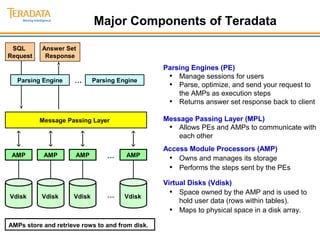
Major Components of Teradata 
Answer Set 
Response 
SQL 
Request 
Parsing Engine 
Message Passing Layer 
AMPs store and retrieve rows to and from disk. 
Parsing Engines (PE) 
• Manage sessions for users 
• Parse, optimize, and send your request to 
the AMPs as execution steps 
• Returns answer set response back to client 
Message Passing Layer (MPL) 
• Allows PEs and AMPs to communicate with 
each other 
Access Module Processors (AMP) 
• Owns and manages its storage 
• Performs the steps sent by the PEs 
Virtual Disks (Vdisk) 
• Space owned by the AMP and is used to 
hold user data (rows within tables). 
• Maps to physical space in a disk array. 
… Parsing Engine 
… 
… 
AMP 
Vdisk 
AMP 
Vdisk 
AMP 
Vdisk 
AMP 
Vdisk
Teradata Storage Architecture 
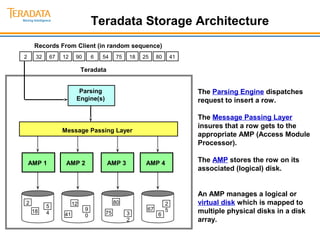
The Parsing Engine dispatches 
request to insert a row. 
The Message Passing Layer 
insures that a row gets to the 
appropriate AMP (Access Module 
Processor). 
The AMP stores the row on its 
associated (logical) disk. 
An AMP manages a logical or 
virtual disk which is mapped to 
multiple physical disks in a disk 
array. 
Teradata 
Parsing 
Engine(s) 
Message Passing Layer 
AMP 1 AMP 2 AMP 3 AMP 4 
2 54 
18 
41 
12 
90 
75 
80 
32 
6 
67 
25 
Records From Client (in random sequence) 
2 32 67 12 90 6 54 75 18 25 80 41
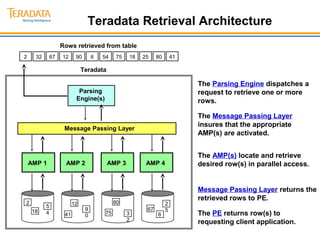
Teradata Retrieval Architecture 
The Parsing Engine dispatches a 
request to retrieve one or more 
rows. 
The Message Passing Layer 
insures that the appropriate 
AMP(s) are activated. 
The AMP(s) locate and retrieve 
desired row(s) in parallel access. 
Message Passing Layer returns the 
retrieved rows to PE. 
The PE returns row(s) to 
requesting client application. 
Teradata 
Parsing 
Engine(s) 
Message Passing Layer 
AMP 1 AMP 2 AMP 3 AMP 4 
2 54 
18 
41 
12 
90 
75 
80 
32 
6 
67 
25 
Rows retrieved from table 
2 32 67 12 90 6 54 75 18 25 80 41
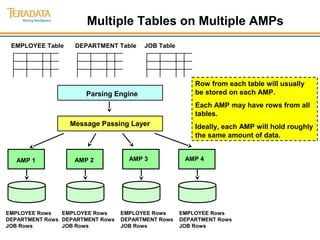
Multiple Tables on Multiple AMPs 
EMPLOYEE Table DEPARTMENT Table JOB Table 
EMPLOYEE Rows 
DEPARTMENT Rows 
JOB Rows 
Parsing Engine 
Message Passing Layer 
Row from each table will usually 
be stored on each AMP. 
Each AMP may have rows from all 
tables. 
Ideally, each AMP will hold roughly 
the same amount of data. 
AMP 1 AMP 2 AMP 3 AMP 4 
EMPLOYEE Rows 
DEPARTMENT Rows 
JOB Rows 
EMPLOYEE Rows 
DEPARTMENT Rows 
JOB Rows 
EMPLOYEE Rows 
DEPARTMENT Rows 
JOB Rows
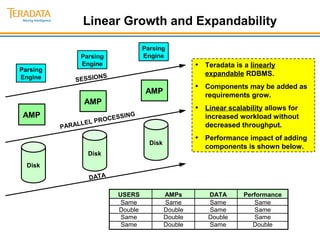
Linear Growth and Expandability 
Parsing 
Engine 
AMP 
SESSIONS 
PARALLEL PROCESSING 
DATA 
Disk 
• Teradata is a linearly 
expandable RDBMS. 
• Components may be added as 
requirements grow. 
• Linear scalability allows for 
increased workload without 
decreased throughput. 
• Performance impact of adding 
components is shown below. 
USERS AMPs DATA Performance 
Same Same Same Same 
Double Double Same Same 
Same Double Double Same 
Same Double Same Double 
Parsing 
Engine 
Parsing 
Engine 
Disk 
Disk 
AMP 
AMP
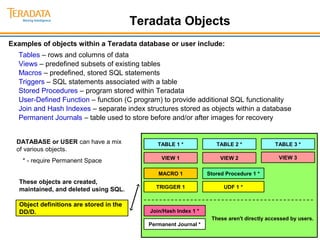
Teradata Objects 
Examples of objects within a Teradata database or user include: 
Tables – rows and columns of data 
Views – predefined subsets of existing tables 
Macros – predefined, stored SQL statements 
Triggers – SQL statements associated with a table 
Stored Procedures – program stored within Teradata 
User-Defined Function – function (C program) to provide additional SQL functionality 
Join and Hash Indexes – separate index structures stored as objects within a database 
Permanent Journals – table used to store before and/or after images for recovery 
DATABASE or USER can have a mix 
of various objects. 
* - require Permanent Space 
These objects are created, 
maintained, and deleted using SQL. 
Object definitions are stored in the 
DD/D. 
TABLE 1 * TABLE 2 * TABLE 3 * 
VIEW 1 VIEW 2 
MACRO 1 
TRIGGER 1 
Stored Procedure 1 * 
Join/Hash Index 1 * 
Permanent Journal * 
UDF 1 * 
VIEW 3 
These aren't directly accessed by users.
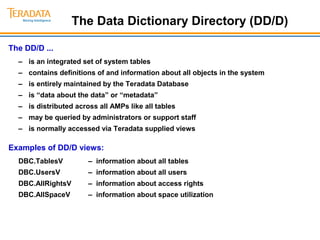
The Data Dictionary Directory (DD/D) 
The DD/D ... 
– is an integrated set of system tables 
– contains definitions of and information about all objects in the system 
– is entirely maintained by the Teradata Database 
– is “data about the data” or “metadata” 
– is distributed across all AMPs like all tables 
– may be queried by administrators or support staff 
– is normally accessed via Teradata supplied views 
Examples of DD/D views: 
DBC.TablesV – information about all tables 
DBC.UsersV – information about all users 
DBC.AllRightsV – information about access rights 
DBC.AllSpaceV – information about space utilization
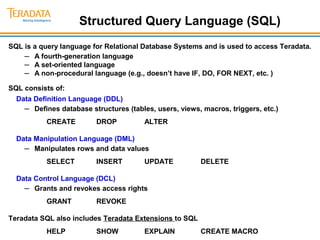
Structured Query Language (SQL) 
SQL is a query language for Relational Database Systems and is used to access Teradata. 
– A fourth-generation language 
– A set-oriented language 
– A non-procedural language (e.g., doesn’t have IF, DO, FOR NEXT, etc. ) 
SQL consists of: 
Data Definition Language (DDL) 
– Defines database structures (tables, users, views, macros, triggers, etc.) 
CREATE DROP ALTER 
Data Manipulation Language (DML) 
– Manipulates rows and data values 
SELECT INSERT UPDATE DELETE 
Data Control Language (DCL) 
– Grants and revokes access rights 
GRANT REVOKE 
Teradata SQL also includes Teradata Extensions to SQL 
HELP SHOW EXPLAIN CREATE MACRO
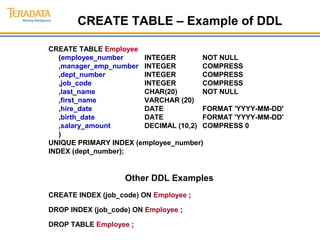
CREATE TABLE – Example of DDL 
CREATE TABLE Employee 
(employee_number INTEGER NOT NULL 
,manager_emp_number INTEGER COMPRESS 
,dept_number INTEGER COMPRESS 
,job_code INTEGER COMPRESS 
,last_name CHAR(20) NOT NULL 
,first_name VARCHAR (20) 
,hire_date DATE FORMAT 'YYYY-MM-DD' 
,birth_date DATE FORMAT 'YYYY-MM-DD' 
,salary_amount DECIMAL (10,2) COMPRESS 0 
) 
UNIQUE PRIMARY INDEX (employee_number) 
INDEX (dept_number); 
Other DDL Examples 
CREATE INDEX (job_code) ON Employee ; 
DROP INDEX (job_code) ON Employee ; 
DROP TABLE Employee ;
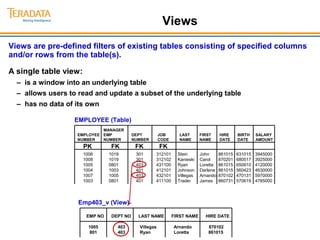
Views 
Views are pre-defined filters of existing tables consisting of specified columns 
and/or rows from the table(s). 
A single table view: 
– is a window into an underlying table 
– allows users to read and update a subset of the underlying table 
– has no data of its own 
EMPLOYEE (Table) 
MANAGER 
EMPLOYEE EMP DEPT JOB LAST FIRST HIRE BIRTH SALARY 
NUMBER NUMBER NUMBER CODE NAME NAME DATE DATE AMOUNT 
PK FK FK FK 
1006 1019 301 312101 Stein John 861015 631015 3945000 
1008 1019 301 312102 Kanieski Carol 870201 680517 3925000 
1005 0801 403 431100 Ryan Loretta 861015 650910 4120000 
1004 1003 401 412101 Johnson Darlene 861015 560423 4630000 
1007 1005 403 432101 Villegas Arnando 870102 470131 5970000 
1003 0801 401 411100 Trader James 860731 570619 4785000 
Emp403_v (View) 
EMP NO DEPT NO LAST NAME FIRST NAME HIRE DATE 
1005 403 Villegas Arnando 870102 
801 403 Ryan Loretta 861015
Multi-Table Views 
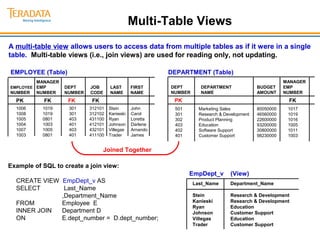
A multi-table view allows users to access data from multiple tables as if it were in a single 
table. Multi-table views (i.e., join views) are used for reading only, not updating. 
EMPLOYEE (Table) 
MANAGER 
EMPLOYEE EMP DEPT JOB LAST FIRST 
NUMBER NUMBER NUMBER CODE NAME NAME 
PK FK FK FK 
1006 1019 301 312101 Stein John 
1008 1019 301 312102 Kanieski Carol 
1005 0801 403 431100 Ryan Loretta 
1004 1003 401 412101 Johnson Darlene 
1007 1005 403 432101 Villegas Arnando 
1003 0801 401 411100 Trader James 
MANAGER 
DEPARTMENT (Table) 
DEPT DEPARTMENT BUDGET EMP 
NUMBER NAME AMOUNT NUMBER 
PK FK 
501 Marketing Sales 80050000 1017 
301 Research & Development 46560000 1019 
302 Product Planning 22600000 1016 
403 Education 93200000 1005 
402 Software Support 30800000 1011 
401 Customer Support 98230000 1003 
EmpDept_v (View) 
Last_Name Department_Name 
Stein Research & Development 
Kanieski Research & Development 
Ryan Education 
Johnson Customer Support 
Villegas Education 
Trader Customer Support 
Joined Together 
Example of SQL to create a join view: 
CREATE VIEW EmpDept_v AS 
SELECT Last_Name 
,Department_Name 
FROM Employee E 
INNER JOIN Department D 
ON E.dept_number = D.dept_number;
Macros 
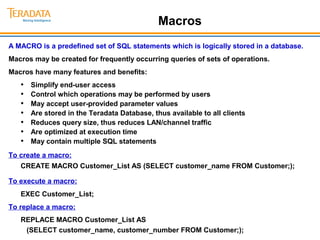
A MACRO is a predefined set of SQL statements which is logically stored in a database. 
Macros may be created for frequently occurring queries of sets of operations. 
Macros have many features and benefits: 
• Simplify end-user access 
• Control which operations may be performed by users 
• May accept user-provided parameter values 
• Are stored in the Teradata Database, thus available to all clients 
• Reduces query size, thus reduces LAN/channel traffic 
• Are optimized at execution time 
• May contain multiple SQL statements 
To create a macro: 
CREATE MACRO Customer_List AS (SELECT customer_name FROM Customer;); 
To execute a macro: 
EXEC Customer_List; 
To replace a macro: 
REPLACE MACRO Customer_List AS 
(SELECT customer_name, customer_number FROM Customer;);
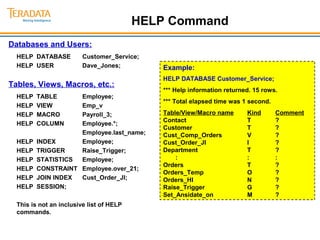
HELP Command 
Databases and Users: 
HELP DATABASE Customer_Service; 
HELP USER Dave_Jones; 
Tables, Views, Macros, etc.: 
HELP TABLE Employee; 
HELP VIEW Emp_v 
HELP MACRO Payroll_3; 
HELP COLUMN Employee.*; 
Employee.last_name; 
HELP INDEX Employee; 
HELP TRIGGER Raise_Trigger; 
HELP STATISTICS Employee; 
HELP CONSTRAINT Employee.over_21; 
HELP JOIN INDEX Cust_Order_JI; 
HELP SESSION; 
This is not an inclusive list of HELP 
commands. 
Example: 
HELP DATABASE Customer_Service; 
*** Help information returned. 15 rows. 
*** Total elapsed time was 1 second. 
Table/View/Macro name Kind Comment 
Contact T ? 
Customer T ? 
Cust_Comp_Orders V ? 
Cust_Order_JI I ? 
Department T ? 
: : : 
Orders T ? 
Orders_Temp O ? 
Orders_HI N ? 
Raise_Trigger G ? 
Set_Ansidate_on M ?
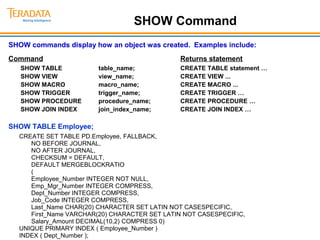
SHOW Command 
SHOW commands display how an object was created. Examples include: 
Command Returns statement 
SHOW TABLE table_name; CREATE TABLE statement … 
SHOW VIEW view_name; CREATE VIEW ... 
SHOW MACRO macro_name; CREATE MACRO ... 
SHOW TRIGGER trigger_name; CREATE TRIGGER … 
SHOW PROCEDURE procedure_name; CREATE PROCEDURE … 
SHOW JOIN INDEX join_index_name; CREATE JOIN INDEX … 
SHOW TABLE Employee; 
CREATE SET TABLE PD.Employee, FALLBACK, 
NO BEFORE JOURNAL, 
NO AFTER JOURNAL, 
CHECKSUM = DEFAULT, 
DEFAULT MERGEBLOCKRATIO 
( 
Employee_Number INTEGER NOT NULL, 
Emp_Mgr_Number INTEGER COMPRESS, 
Dept_Number INTEGER COMPRESS, 
Job_Code INTEGER COMPRESS, 
Last_Name CHAR(20) CHARACTER SET LATIN NOT CASESPECIFIC, 
First_Name VARCHAR(20) CHARACTER SET LATIN NOT CASESPECIFIC, 
Salary_Amount DECIMAL(10,2) COMPRESS 0) 
UNIQUE PRIMARY INDEX ( Employee_Number ) 
INDEX ( Dept_Number );
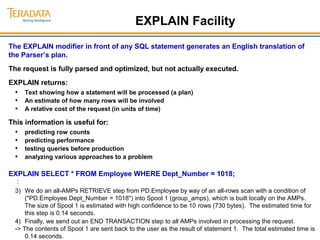
EXPLAIN Facility 
The EXPLAIN modifier in front of any SQL statement generates an English translation of 
the Parser’s plan. 
The request is fully parsed and optimized, but not actually executed. 
EXPLAIN returns: 
• Text showing how a statement will be processed (a plan) 
• An estimate of how many rows will be involved 
• A relative cost of the request (in units of time) 
This information is useful for: 
• predicting row counts 
• predicting performance 
• testing queries before production 
• analyzing various approaches to a problem 
EXPLAIN SELECT * FROM Employee WHERE Dept_Number = 1018; 
: 
3) We do an all-AMPs RETRIEVE step from PD.Employee by way of an all-rows scan with a condition of 
("PD.Employee.Dept_Number = 1018") into Spool 1 (group_amps), which is built locally on the AMPs. 
The size of Spool 1 is estimated with high confidence to be 10 rows (730 bytes). The estimated time for 
this step is 0.14 seconds. 
4) Finally, we send out an END TRANSACTION step to all AMPs involved in processing the request. 
-> The contents of Spool 1 are sent back to the user as the result of statement 1. The total estimated time is 
0.14 seconds.
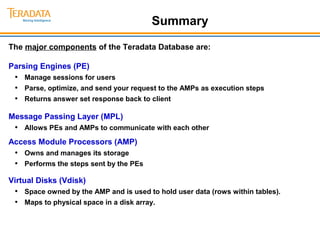
Summary 
The major components of the Teradata Database are: 
Parsing Engines (PE) 
• Manage sessions for users 
• Parse, optimize, and send your request to the AMPs as execution steps 
• Returns answer set response back to client 
Message Passing Layer (MPL) 
• Allows PEs and AMPs to communicate with each other 
Access Module Processors (AMP) 
• Owns and manages its storage 
• Performs the steps sent by the PEs 
Virtual Disks (Vdisk) 
• Space owned by the AMP and is used to hold user data (rows within tables). 
• Maps to physical space in a disk array.
Design and Developed by: 
Noor Alam, 
DW Architect & Project Manager, BI Solutions 
Data edge limited 
Mobile: 8801841320998 
Email: alambd@gmail.com 
Skype: alam.ict

Module 02 teradata basics

  • 1.
    Teradata Basics Aftercompleting this module, you will be able to: · List and describe the major components of the Teradata architecture. · Describe how the components interact to manage incoming and outgoing data. · List 5 types of Teradata database objects.
  • 2.
    Major Components ofTeradata Answer Set Response SQL Request Parsing Engine Message Passing Layer AMPs store and retrieve rows to and from disk. Parsing Engines (PE) • Manage sessions for users • Parse, optimize, and send your request to the AMPs as execution steps • Returns answer set response back to client Message Passing Layer (MPL) • Allows PEs and AMPs to communicate with each other Access Module Processors (AMP) • Owns and manages its storage • Performs the steps sent by the PEs Virtual Disks (Vdisk) • Space owned by the AMP and is used to hold user data (rows within tables). • Maps to physical space in a disk array. … Parsing Engine … … AMP Vdisk AMP Vdisk AMP Vdisk AMP Vdisk
  • 3.
    Teradata Storage Architecture The Parsing Engine dispatches request to insert a row. The Message Passing Layer insures that a row gets to the appropriate AMP (Access Module Processor). The AMP stores the row on its associated (logical) disk. An AMP manages a logical or virtual disk which is mapped to multiple physical disks in a disk array. Teradata Parsing Engine(s) Message Passing Layer AMP 1 AMP 2 AMP 3 AMP 4 2 54 18 41 12 90 75 80 32 6 67 25 Records From Client (in random sequence) 2 32 67 12 90 6 54 75 18 25 80 41
  • 4.
    Teradata Retrieval Architecture The Parsing Engine dispatches a request to retrieve one or more rows. The Message Passing Layer insures that the appropriate AMP(s) are activated. The AMP(s) locate and retrieve desired row(s) in parallel access. Message Passing Layer returns the retrieved rows to PE. The PE returns row(s) to requesting client application. Teradata Parsing Engine(s) Message Passing Layer AMP 1 AMP 2 AMP 3 AMP 4 2 54 18 41 12 90 75 80 32 6 67 25 Rows retrieved from table 2 32 67 12 90 6 54 75 18 25 80 41
  • 5.
    Multiple Tables onMultiple AMPs EMPLOYEE Table DEPARTMENT Table JOB Table EMPLOYEE Rows DEPARTMENT Rows JOB Rows Parsing Engine Message Passing Layer Row from each table will usually be stored on each AMP. Each AMP may have rows from all tables. Ideally, each AMP will hold roughly the same amount of data. AMP 1 AMP 2 AMP 3 AMP 4 EMPLOYEE Rows DEPARTMENT Rows JOB Rows EMPLOYEE Rows DEPARTMENT Rows JOB Rows EMPLOYEE Rows DEPARTMENT Rows JOB Rows
  • 6.
    Linear Growth andExpandability Parsing Engine AMP SESSIONS PARALLEL PROCESSING DATA Disk • Teradata is a linearly expandable RDBMS. • Components may be added as requirements grow. • Linear scalability allows for increased workload without decreased throughput. • Performance impact of adding components is shown below. USERS AMPs DATA Performance Same Same Same Same Double Double Same Same Same Double Double Same Same Double Same Double Parsing Engine Parsing Engine Disk Disk AMP AMP
  • 7.
    Teradata Objects Examplesof objects within a Teradata database or user include: Tables – rows and columns of data Views – predefined subsets of existing tables Macros – predefined, stored SQL statements Triggers – SQL statements associated with a table Stored Procedures – program stored within Teradata User-Defined Function – function (C program) to provide additional SQL functionality Join and Hash Indexes – separate index structures stored as objects within a database Permanent Journals – table used to store before and/or after images for recovery DATABASE or USER can have a mix of various objects. * - require Permanent Space These objects are created, maintained, and deleted using SQL. Object definitions are stored in the DD/D. TABLE 1 * TABLE 2 * TABLE 3 * VIEW 1 VIEW 2 MACRO 1 TRIGGER 1 Stored Procedure 1 * Join/Hash Index 1 * Permanent Journal * UDF 1 * VIEW 3 These aren't directly accessed by users.
  • 8.
    The Data DictionaryDirectory (DD/D) The DD/D ... – is an integrated set of system tables – contains definitions of and information about all objects in the system – is entirely maintained by the Teradata Database – is “data about the data” or “metadata” – is distributed across all AMPs like all tables – may be queried by administrators or support staff – is normally accessed via Teradata supplied views Examples of DD/D views: DBC.TablesV – information about all tables DBC.UsersV – information about all users DBC.AllRightsV – information about access rights DBC.AllSpaceV – information about space utilization
  • 9.
    Structured Query Language(SQL) SQL is a query language for Relational Database Systems and is used to access Teradata. – A fourth-generation language – A set-oriented language – A non-procedural language (e.g., doesn’t have IF, DO, FOR NEXT, etc. ) SQL consists of: Data Definition Language (DDL) – Defines database structures (tables, users, views, macros, triggers, etc.) CREATE DROP ALTER Data Manipulation Language (DML) – Manipulates rows and data values SELECT INSERT UPDATE DELETE Data Control Language (DCL) – Grants and revokes access rights GRANT REVOKE Teradata SQL also includes Teradata Extensions to SQL HELP SHOW EXPLAIN CREATE MACRO
  • 10.
    CREATE TABLE –Example of DDL CREATE TABLE Employee (employee_number INTEGER NOT NULL ,manager_emp_number INTEGER COMPRESS ,dept_number INTEGER COMPRESS ,job_code INTEGER COMPRESS ,last_name CHAR(20) NOT NULL ,first_name VARCHAR (20) ,hire_date DATE FORMAT 'YYYY-MM-DD' ,birth_date DATE FORMAT 'YYYY-MM-DD' ,salary_amount DECIMAL (10,2) COMPRESS 0 ) UNIQUE PRIMARY INDEX (employee_number) INDEX (dept_number); Other DDL Examples CREATE INDEX (job_code) ON Employee ; DROP INDEX (job_code) ON Employee ; DROP TABLE Employee ;
  • 11.
    Views Views arepre-defined filters of existing tables consisting of specified columns and/or rows from the table(s). A single table view: – is a window into an underlying table – allows users to read and update a subset of the underlying table – has no data of its own EMPLOYEE (Table) MANAGER EMPLOYEE EMP DEPT JOB LAST FIRST HIRE BIRTH SALARY NUMBER NUMBER NUMBER CODE NAME NAME DATE DATE AMOUNT PK FK FK FK 1006 1019 301 312101 Stein John 861015 631015 3945000 1008 1019 301 312102 Kanieski Carol 870201 680517 3925000 1005 0801 403 431100 Ryan Loretta 861015 650910 4120000 1004 1003 401 412101 Johnson Darlene 861015 560423 4630000 1007 1005 403 432101 Villegas Arnando 870102 470131 5970000 1003 0801 401 411100 Trader James 860731 570619 4785000 Emp403_v (View) EMP NO DEPT NO LAST NAME FIRST NAME HIRE DATE 1005 403 Villegas Arnando 870102 801 403 Ryan Loretta 861015
  • 12.
    Multi-Table Views Amulti-table view allows users to access data from multiple tables as if it were in a single table. Multi-table views (i.e., join views) are used for reading only, not updating. EMPLOYEE (Table) MANAGER EMPLOYEE EMP DEPT JOB LAST FIRST NUMBER NUMBER NUMBER CODE NAME NAME PK FK FK FK 1006 1019 301 312101 Stein John 1008 1019 301 312102 Kanieski Carol 1005 0801 403 431100 Ryan Loretta 1004 1003 401 412101 Johnson Darlene 1007 1005 403 432101 Villegas Arnando 1003 0801 401 411100 Trader James MANAGER DEPARTMENT (Table) DEPT DEPARTMENT BUDGET EMP NUMBER NAME AMOUNT NUMBER PK FK 501 Marketing Sales 80050000 1017 301 Research & Development 46560000 1019 302 Product Planning 22600000 1016 403 Education 93200000 1005 402 Software Support 30800000 1011 401 Customer Support 98230000 1003 EmpDept_v (View) Last_Name Department_Name Stein Research & Development Kanieski Research & Development Ryan Education Johnson Customer Support Villegas Education Trader Customer Support Joined Together Example of SQL to create a join view: CREATE VIEW EmpDept_v AS SELECT Last_Name ,Department_Name FROM Employee E INNER JOIN Department D ON E.dept_number = D.dept_number;
  • 13.
    Macros A MACROis a predefined set of SQL statements which is logically stored in a database. Macros may be created for frequently occurring queries of sets of operations. Macros have many features and benefits: • Simplify end-user access • Control which operations may be performed by users • May accept user-provided parameter values • Are stored in the Teradata Database, thus available to all clients • Reduces query size, thus reduces LAN/channel traffic • Are optimized at execution time • May contain multiple SQL statements To create a macro: CREATE MACRO Customer_List AS (SELECT customer_name FROM Customer;); To execute a macro: EXEC Customer_List; To replace a macro: REPLACE MACRO Customer_List AS (SELECT customer_name, customer_number FROM Customer;);
  • 14.
    HELP Command Databasesand Users: HELP DATABASE Customer_Service; HELP USER Dave_Jones; Tables, Views, Macros, etc.: HELP TABLE Employee; HELP VIEW Emp_v HELP MACRO Payroll_3; HELP COLUMN Employee.*; Employee.last_name; HELP INDEX Employee; HELP TRIGGER Raise_Trigger; HELP STATISTICS Employee; HELP CONSTRAINT Employee.over_21; HELP JOIN INDEX Cust_Order_JI; HELP SESSION; This is not an inclusive list of HELP commands. Example: HELP DATABASE Customer_Service; *** Help information returned. 15 rows. *** Total elapsed time was 1 second. Table/View/Macro name Kind Comment Contact T ? Customer T ? Cust_Comp_Orders V ? Cust_Order_JI I ? Department T ? : : : Orders T ? Orders_Temp O ? Orders_HI N ? Raise_Trigger G ? Set_Ansidate_on M ?
  • 15.
    SHOW Command SHOWcommands display how an object was created. Examples include: Command Returns statement SHOW TABLE table_name; CREATE TABLE statement … SHOW VIEW view_name; CREATE VIEW ... SHOW MACRO macro_name; CREATE MACRO ... SHOW TRIGGER trigger_name; CREATE TRIGGER … SHOW PROCEDURE procedure_name; CREATE PROCEDURE … SHOW JOIN INDEX join_index_name; CREATE JOIN INDEX … SHOW TABLE Employee; CREATE SET TABLE PD.Employee, FALLBACK, NO BEFORE JOURNAL, NO AFTER JOURNAL, CHECKSUM = DEFAULT, DEFAULT MERGEBLOCKRATIO ( Employee_Number INTEGER NOT NULL, Emp_Mgr_Number INTEGER COMPRESS, Dept_Number INTEGER COMPRESS, Job_Code INTEGER COMPRESS, Last_Name CHAR(20) CHARACTER SET LATIN NOT CASESPECIFIC, First_Name VARCHAR(20) CHARACTER SET LATIN NOT CASESPECIFIC, Salary_Amount DECIMAL(10,2) COMPRESS 0) UNIQUE PRIMARY INDEX ( Employee_Number ) INDEX ( Dept_Number );
  • 16.
    EXPLAIN Facility TheEXPLAIN modifier in front of any SQL statement generates an English translation of the Parser’s plan. The request is fully parsed and optimized, but not actually executed. EXPLAIN returns: • Text showing how a statement will be processed (a plan) • An estimate of how many rows will be involved • A relative cost of the request (in units of time) This information is useful for: • predicting row counts • predicting performance • testing queries before production • analyzing various approaches to a problem EXPLAIN SELECT * FROM Employee WHERE Dept_Number = 1018; : 3) We do an all-AMPs RETRIEVE step from PD.Employee by way of an all-rows scan with a condition of ("PD.Employee.Dept_Number = 1018") into Spool 1 (group_amps), which is built locally on the AMPs. The size of Spool 1 is estimated with high confidence to be 10 rows (730 bytes). The estimated time for this step is 0.14 seconds. 4) Finally, we send out an END TRANSACTION step to all AMPs involved in processing the request. -> The contents of Spool 1 are sent back to the user as the result of statement 1. The total estimated time is 0.14 seconds.
  • 17.
    Summary The majorcomponents of the Teradata Database are: Parsing Engines (PE) • Manage sessions for users • Parse, optimize, and send your request to the AMPs as execution steps • Returns answer set response back to client Message Passing Layer (MPL) • Allows PEs and AMPs to communicate with each other Access Module Processors (AMP) • Owns and manages its storage • Performs the steps sent by the PEs Virtual Disks (Vdisk) • Space owned by the AMP and is used to hold user data (rows within tables). • Maps to physical space in a disk array.
  • 18.
    Design and Developedby: Noor Alam, DW Architect & Project Manager, BI Solutions Data edge limited Mobile: 8801841320998 Email: alambd@gmail.com Skype: alam.ict