Dynamic Websites
PHP with Oracle DB   By Belal Arfa
What is Relational DB?


A Database is a “Special Data Container” in
which the computer stores large
amounts of data.
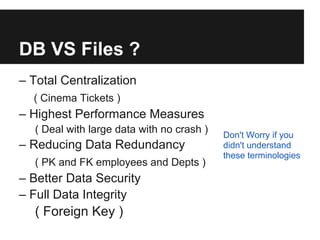
DB VS Files ?
– Total Centralization
  ( Cinema Tickets )
– Highest Performance Measures
  ( Deal with large data with no crash )   Don't Worry if you
– Reducing Data Redundancy                 didn't understand
                                           these terminologies
  ( PK and FK employees and Depts )
– Better Data Security
– Full Data Integrity
  ( Foreign Key )
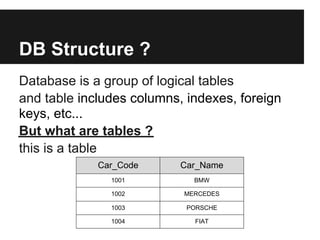
DB Structure ?
Database is a group of logical tables
and table includes columns, indexes, foreign
keys, etc...
But what are tables ?
this is a table
             Car_Code      Car_Name
               1001          BMW

               1002        MERCEDES

               1003         PORSCHE

               1004          FIAT
Tables

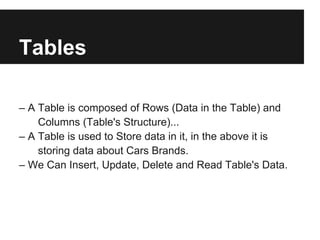
– A Table is composed of Rows (Data in the Table) and
    Columns (Table's Structure)...
– A Table is used to Store data in it, in the above it is
    storing data about Cars Brands.
– We Can Insert, Update, Delete and Read Table's Data.
Tables
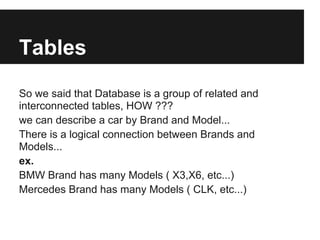
So we said that Database is a group of related and
interconnected tables, HOW ???
we can describe a car by Brand and Model...
There is a logical connection between Brands and
Models...
ex.
BMW Brand has many Models ( X3,X6, etc...)
Mercedes Brand has many Models ( CLK, etc...)
Tables
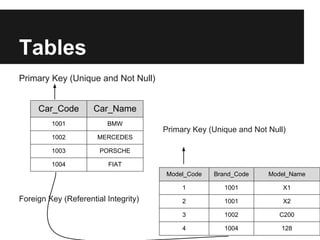
Primary Key (Unique and Not Null)


     Car_Code        Car_Name
         1001            BMW
                                      Primary Key (Unique and Not Null)
         1002         MERCEDES

         1003          PORSCHE

         1004             FIAT
                                      Model_Code   Brand_Code     Model_Name

                                           1          1001            X1
Foreign Key (Referential Integrity)        2          1001            X2

                                           3          1002           C200

                                           4          1004           128
Tables
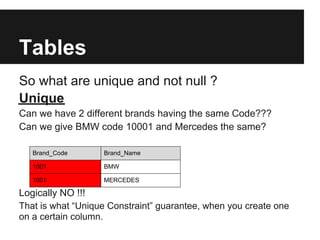
So what are unique and not null ?
Unique
Can we have 2 different brands having the same Code???
Can we give BMW code 10001 and Mercedes the same?

   Brand_Code      Brand_Name

   1001            BMW

   1001            MERCEDES

Logically NO !!!
That is what “Unique Constraint” guarantee, when you create one
on a certain column.
Tables
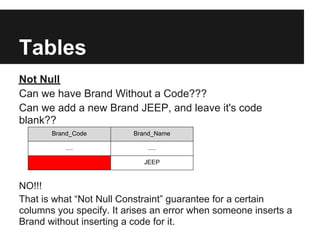
Not Null
Can we have Brand Without a Code???
Can we add a new Brand JEEP, and leave it's code
blank??
       Brand_Code         Brand_Name

           ....              .....

                            JEEP


NO!!!
That is what “Not Null Constraint” guarantee for a certain
columns you specify. It arises an error when someone inserts a
Brand without inserting a code for it.
Tables

Unique constraint + Not Null Constraint = Primary Key
Column(s) potentially having both constraints are
candidates for us to specify them as the “Primary Key”
of the table. Pk combines both constraints, it uniquely
identifies each Row.
Tables
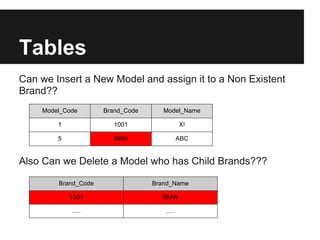
Can we Insert a New Model and assign it to a Non Existent
Brand??
    Model_Code       Brand_Code      Model_Name

        1               1001                 X!

        5               9999                 ABC


Also Can we Delete a Model who has Child Brands???

        Brand_Code                Brand_Name

            1001                    BMW

            .....                    .....
Tables
Certainly NO!!
And This is “Data Integrity”!!!
You Remember the Database Advantages we Mentioned
before???
This is the “Referential Integrity” we gain by adding a
“Foreign Key” constraint on certain Column(s), and
choosing their parents.
FK guarantees child records can't be assigned to non-
existent parents, and parents can't be deleted as long as
they have children.
Tables
From the beginning why we made a Code for each Brand??
Also Why we made a Code Column for each Model???
Why don't we depend on NAMES??
First Because we can have the same name for different
Brands/Models.
Ex Fiat produced F128 model, and VOLX produced F128
model...
We have to distinguish between them!!!
Like the ID of a person,
2 people named AbdelRahaman Omar Mohamed but they have
different Ids.Second, using numbers while relating tables
together minimizes “Redundancy”, we just assign the parent's
code to the child records.
Designing The Database
Now that we understand Database concepts, Many companies
developed “Relational Database Management System”,
which is the Software platform we are going to implement our
“Schema” on.
Oracle, MySQL and Microsoft SQL Server are such RDBMS...
So to implement the Schema which is the set of table we will
create, we are going to use Oracle Database Engine.
You can Implement the same by using different engines with
very slight difference!!!!
All RDBMS Implement the same functionality with slight
difference in code syntax.
Designing The Database

To interact with the DB engine you will write “Structured Query
Language”.
“SQL” is the programming language used to interact with a DB
Engine. With SQL code, we can
Create, Modify (Alter) and Drop the Database Structure (DDL)....
CRUD: Create, Read, Update, Delete Data (DML)...
Designing The Database
We will Learn SQL by Example...
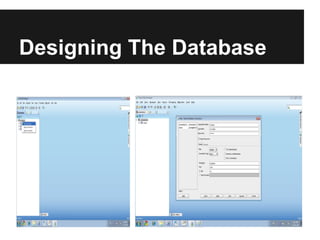
You should install Oracle Express Edition..
Also you should open the SQL Developer, create a new
connection with the User-name system and the password you
specified during installation as illustrated.
Host Name refers to the server the Oracle Database Engine is
installed at.
In our case it's localhost (the same computer), else insert the ip
of the server you installed Oracle at.
SID is xe (Express Edition), else if you installed an Oracle
Standard/Enterprise usually it would be orcl.
Designing The Database
DDL

DDL
Create, Drop and Alter( Modify ) tables.
Before creating a table take care of:
1- Table Name
2- Columns Names
3- Columns Types
4- Which Column will be PK
Example
Create Table Persons
(
    P_Id           number(20),
    LastName       varchar2(50)  NOT NULL,
    FirstName      varchar2(50),
    Address        varchar2(50),
    CONSTRAINT PERSON_PK PRIMARY KEY (p_id)
)

Drop Table
Drop Table Persons;
Alter Table ( Add Column )
     Alter Table Persons Add weight number(20,10);
Remove Column
     Alter Table Persons Drop column weight ;
DML

DML
CRUD Create, Read, Update and Delete.
   ●   INSERT INTO - Create new data into a database.
   ●   SELECT - Read data from a database.
   ●   UPDATE - Updates data in a database.
   ●   DELETE - Deletes data from a database.
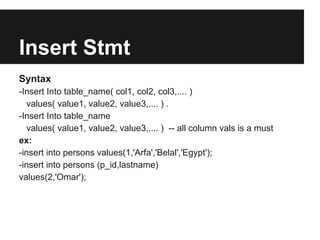
Insert Stmt
Syntax
-Insert Into table_name( col1, col2, col3,.... )
  values( value1, value2, value3,.... ) .
-Insert Into table_name
  values( value1, value2, value3,.... ) -- all column vals is a must
ex:
-insert into persons values(1,'Arfa','Belal','Egypt');
-insert into persons (p_id,lastname)
values(2,'Omar');
Select Stmt
Syntax
SELECT [all|distinct] column_name(s) FROM table_name
WHERE search_condition
ex
- Select * from persons;
- Select firstname, lastname from persons;
- Select Distinct address from persons;
- Select * from persons WHERE address='Egypt';
- Select * from persons where weight > 50;
Select Stmt
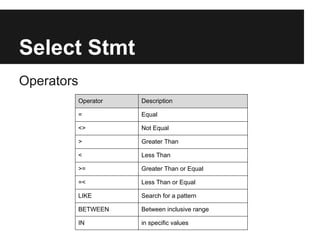
Operators
            Operator   Description

            =          Equal

            <>         Not Equal

            >          Greater Than

            <          Less Than

            >=         Greater Than or Equal

            =<         Less Than or Equal

            LIKE       Search for a pattern

            BETWEEN    Between inclusive range

            IN         in specific values
Select Stmt
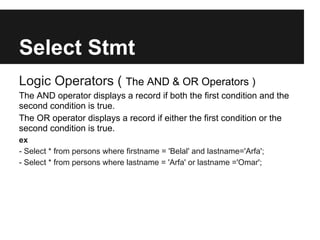
Logic Operators ( The AND & OR Operators )
The AND operator displays a record if both the first condition and the
second condition is true.
The OR operator displays a record if either the first condition or the
second condition is true.
ex
- Select * from persons where firstname = 'Belal' and lastname='Arfa';
- Select * from persons where lastname = 'Arfa' or lastname ='Omar';
Order By Clause
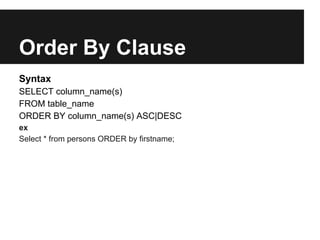
Syntax
SELECT column_name(s)
FROM table_name
ORDER BY column_name(s) ASC|DESC
ex
Select * from persons ORDER by firstname;
Update Stmt
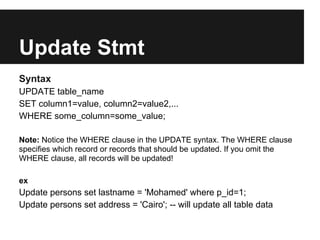
Syntax
UPDATE table_name
SET column1=value, column2=value2,...
WHERE some_column=some_value;

Note: Notice the WHERE clause in the UPDATE syntax. The WHERE clause
specifies which record or records that should be updated. If you omit the
WHERE clause, all records will be updated!

ex
Update persons set lastname = 'Mohamed' where p_id=1;
Update persons set address = 'Cairo'; -- will update all table data
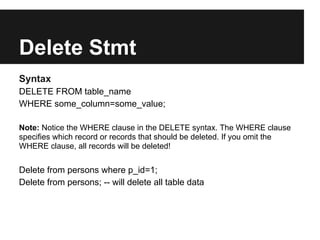
Delete Stmt
Syntax
DELETE FROM table_name
WHERE some_column=some_value;

Note: Notice the WHERE clause in the DELETE syntax. The WHERE clause
specifies which record or records that should be deleted. If you omit the
WHERE clause, all records will be deleted!


Delete from persons where p_id=1;
Delete from persons; -- will delete all table data
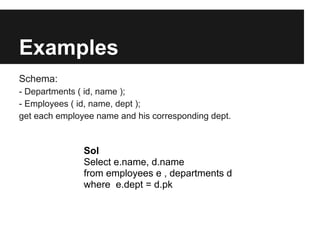
Examples
Schema:
- Departments ( id, name );
- Employees ( id, name, dept );
get each employee name and his corresponding dept.


               Sol
               Select e.name, d.name
               from employees e , departments d
               where e.dept = d.pk
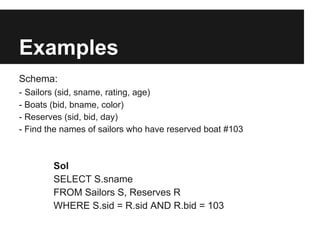
Examples
Schema:
- Sailors (sid, sname, rating, age)
- Boats (bid, bname, color)
- Reserves (sid, bid, day)
- Find the names of sailors who have reserved boat #103


        Sol
        SELECT S.sname
        FROM Sailors S, Reserves R
        WHERE S.sid = R.sid AND R.bid = 103
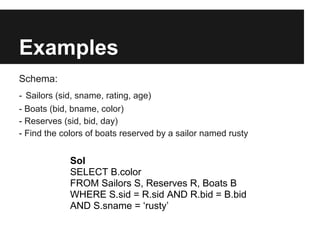
Examples
Schema:
- Sailors (sid, sname, rating, age)
- Boats (bid, bname, color)
- Reserves (sid, bid, day)
- Find the colors of boats reserved by a sailor named rusty


             Sol
             SELECT B.color
             FROM Sailors S, Reserves R, Boats B
             WHERE S.sid = R.sid AND R.bid = B.bid
             AND S.sname = ‘rusty’
Examples
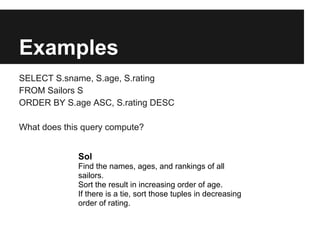
SELECT S.sname, S.age, S.rating
FROM Sailors S
ORDER BY S.age ASC, S.rating DESC

What does this query compute?


             Sol
             Find the names, ages, and rankings of all
             sailors.
             Sort the result in increasing order of age.
             If there is a tie, sort those tuples in decreasing
             order of rating.
Examples
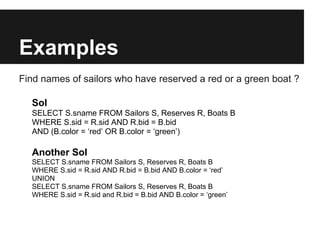
Find names of sailors who have reserved a red or a green boat ?

  Sol
  SELECT S.sname FROM Sailors S, Reserves R, Boats B
  WHERE S.sid = R.sid AND R.bid = B.bid
  AND (B.color = ‘red’ OR B.color = ‘green’)

  Another Sol
  SELECT S.sname FROM Sailors S, Reserves R, Boats B
  WHERE S.sid = R.sid AND R.bid = B.bid AND B.color = ‘red’
  UNION
  SELECT S.sname FROM Sailors S, Reserves R, Boats B
  WHERE S.sid = R.sid and R.bid = B.bid AND B.color = ‘green’
Examples
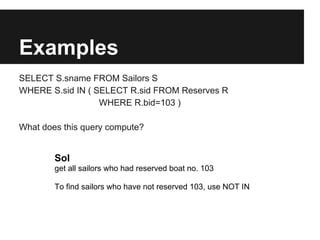
SELECT S.sname FROM Sailors S
WHERE S.sid IN ( SELECT R.sid FROM Reserves R
                  WHERE R.bid=103 )

What does this query compute?


        Sol
        get all sailors who had reserved boat no. 103

        To find sailors who have not reserved 103, use NOT IN
Examples
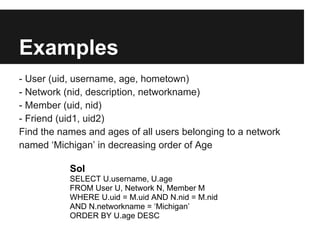
- User (uid, username, age, hometown)
- Network (nid, description, networkname)
- Member (uid, nid)
- Friend (uid1, uid2)
Find the names and ages of all users belonging to a network
named ‘Michigan’ in decreasing order of Age

           Sol
           SELECT U.username, U.age
           FROM User U, Network N, Member M
           WHERE U.uid = M.uid AND N.nid = M.nid
           AND N.networkname = ‘Michigan’
           ORDER BY U.age DESC
Examples
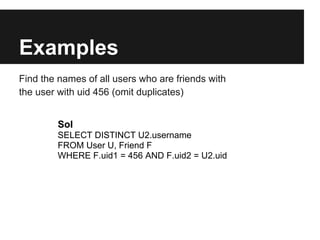
Find the names of all users who are friends with
the user with uid 456 (omit duplicates)


        Sol
        SELECT DISTINCT U2.username
        FROM User U, Friend F
        WHERE F.uid1 = 456 AND F.uid2 = U2.uid
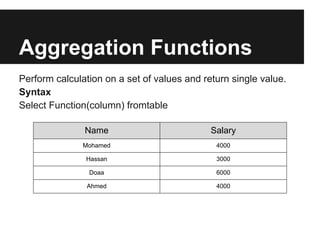
Aggregation Functions
Perform calculation on a set of values and return single value.
Syntax
Select Function(column) fromtable

               Name                          Salary
               Mohamed                        4000

               Hassan                         3000

                Doaa                          6000

                Ahmed                         4000
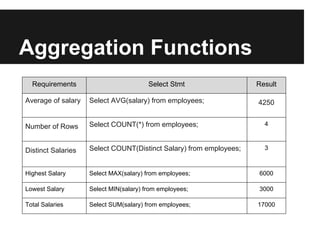
Aggregation Functions
  Requirements                          Select Stmt                 Result

Average of salary   Select AVG(salary) from employees;              4250


Number of Rows      Select COUNT(*) from employees;                   4


Distinct Salaries   Select COUNT(Distinct Salary) from employees;     3


Highest Salary      Select MAX(salary) from employees;              6000

Lowest Salary       Select MIN(salary) from employees;              3000

Total Salaries      Select SUM(salary) from employees;              17000
To Do

Search for Agg functions.
Search for Group By clause.
Search for Having clause.
Thank You

Dynamic websites(lec1)

  • 1.
    Dynamic Websites PHP withOracle DB By Belal Arfa
  • 2.
    What is RelationalDB? A Database is a “Special Data Container” in which the computer stores large amounts of data.
  • 3.
    DB VS Files? – Total Centralization ( Cinema Tickets ) – Highest Performance Measures ( Deal with large data with no crash ) Don't Worry if you – Reducing Data Redundancy didn't understand these terminologies ( PK and FK employees and Depts ) – Better Data Security – Full Data Integrity ( Foreign Key )
  • 4.
    DB Structure ? Databaseis a group of logical tables and table includes columns, indexes, foreign keys, etc... But what are tables ? this is a table Car_Code Car_Name 1001 BMW 1002 MERCEDES 1003 PORSCHE 1004 FIAT
  • 5.
    Tables – A Tableis composed of Rows (Data in the Table) and Columns (Table's Structure)... – A Table is used to Store data in it, in the above it is storing data about Cars Brands. – We Can Insert, Update, Delete and Read Table's Data.
  • 6.
    Tables So we saidthat Database is a group of related and interconnected tables, HOW ??? we can describe a car by Brand and Model... There is a logical connection between Brands and Models... ex. BMW Brand has many Models ( X3,X6, etc...) Mercedes Brand has many Models ( CLK, etc...)
  • 7.
    Tables Primary Key (Uniqueand Not Null) Car_Code Car_Name 1001 BMW Primary Key (Unique and Not Null) 1002 MERCEDES 1003 PORSCHE 1004 FIAT Model_Code Brand_Code Model_Name 1 1001 X1 Foreign Key (Referential Integrity) 2 1001 X2 3 1002 C200 4 1004 128
  • 8.
    Tables So what areunique and not null ? Unique Can we have 2 different brands having the same Code??? Can we give BMW code 10001 and Mercedes the same? Brand_Code Brand_Name 1001 BMW 1001 MERCEDES Logically NO !!! That is what “Unique Constraint” guarantee, when you create one on a certain column.
  • 9.
    Tables Not Null Can wehave Brand Without a Code??? Can we add a new Brand JEEP, and leave it's code blank?? Brand_Code Brand_Name .... ..... JEEP NO!!! That is what “Not Null Constraint” guarantee for a certain columns you specify. It arises an error when someone inserts a Brand without inserting a code for it.
  • 10.
    Tables Unique constraint +Not Null Constraint = Primary Key Column(s) potentially having both constraints are candidates for us to specify them as the “Primary Key” of the table. Pk combines both constraints, it uniquely identifies each Row.
  • 11.
    Tables Can we Inserta New Model and assign it to a Non Existent Brand?? Model_Code Brand_Code Model_Name 1 1001 X! 5 9999 ABC Also Can we Delete a Model who has Child Brands??? Brand_Code Brand_Name 1001 BMW ..... .....
  • 12.
    Tables Certainly NO!! And Thisis “Data Integrity”!!! You Remember the Database Advantages we Mentioned before??? This is the “Referential Integrity” we gain by adding a “Foreign Key” constraint on certain Column(s), and choosing their parents. FK guarantees child records can't be assigned to non- existent parents, and parents can't be deleted as long as they have children.
  • 13.
    Tables From the beginningwhy we made a Code for each Brand?? Also Why we made a Code Column for each Model??? Why don't we depend on NAMES?? First Because we can have the same name for different Brands/Models. Ex Fiat produced F128 model, and VOLX produced F128 model... We have to distinguish between them!!! Like the ID of a person, 2 people named AbdelRahaman Omar Mohamed but they have different Ids.Second, using numbers while relating tables together minimizes “Redundancy”, we just assign the parent's code to the child records.
  • 14.
    Designing The Database Nowthat we understand Database concepts, Many companies developed “Relational Database Management System”, which is the Software platform we are going to implement our “Schema” on. Oracle, MySQL and Microsoft SQL Server are such RDBMS... So to implement the Schema which is the set of table we will create, we are going to use Oracle Database Engine. You can Implement the same by using different engines with very slight difference!!!! All RDBMS Implement the same functionality with slight difference in code syntax.
  • 15.
    Designing The Database Tointeract with the DB engine you will write “Structured Query Language”. “SQL” is the programming language used to interact with a DB Engine. With SQL code, we can Create, Modify (Alter) and Drop the Database Structure (DDL).... CRUD: Create, Read, Update, Delete Data (DML)...
  • 16.
    Designing The Database Wewill Learn SQL by Example... You should install Oracle Express Edition.. Also you should open the SQL Developer, create a new connection with the User-name system and the password you specified during installation as illustrated. Host Name refers to the server the Oracle Database Engine is installed at. In our case it's localhost (the same computer), else insert the ip of the server you installed Oracle at. SID is xe (Express Edition), else if you installed an Oracle Standard/Enterprise usually it would be orcl.
  • 17.
  • 18.
    DDL DDL Create, Drop andAlter( Modify ) tables. Before creating a table take care of: 1- Table Name 2- Columns Names 3- Columns Types 4- Which Column will be PK
  • 19.
    Example Create Table Persons ( P_Id number(20), LastName varchar2(50) NOT NULL, FirstName varchar2(50), Address varchar2(50), CONSTRAINT PERSON_PK PRIMARY KEY (p_id) ) Drop Table Drop Table Persons; Alter Table ( Add Column ) Alter Table Persons Add weight number(20,10); Remove Column Alter Table Persons Drop column weight ;
  • 20.
    DML DML CRUD Create, Read,Update and Delete. ● INSERT INTO - Create new data into a database. ● SELECT - Read data from a database. ● UPDATE - Updates data in a database. ● DELETE - Deletes data from a database.
  • 21.
    Insert Stmt Syntax -Insert Intotable_name( col1, col2, col3,.... ) values( value1, value2, value3,.... ) . -Insert Into table_name values( value1, value2, value3,.... ) -- all column vals is a must ex: -insert into persons values(1,'Arfa','Belal','Egypt'); -insert into persons (p_id,lastname) values(2,'Omar');
  • 22.
    Select Stmt Syntax SELECT [all|distinct]column_name(s) FROM table_name WHERE search_condition ex - Select * from persons; - Select firstname, lastname from persons; - Select Distinct address from persons; - Select * from persons WHERE address='Egypt'; - Select * from persons where weight > 50;
  • 23.
    Select Stmt Operators Operator Description = Equal <> Not Equal > Greater Than < Less Than >= Greater Than or Equal =< Less Than or Equal LIKE Search for a pattern BETWEEN Between inclusive range IN in specific values
  • 24.
    Select Stmt Logic Operators( The AND & OR Operators ) The AND operator displays a record if both the first condition and the second condition is true. The OR operator displays a record if either the first condition or the second condition is true. ex - Select * from persons where firstname = 'Belal' and lastname='Arfa'; - Select * from persons where lastname = 'Arfa' or lastname ='Omar';
  • 25.
    Order By Clause Syntax SELECTcolumn_name(s) FROM table_name ORDER BY column_name(s) ASC|DESC ex Select * from persons ORDER by firstname;
  • 26.
    Update Stmt Syntax UPDATE table_name SETcolumn1=value, column2=value2,... WHERE some_column=some_value; Note: Notice the WHERE clause in the UPDATE syntax. The WHERE clause specifies which record or records that should be updated. If you omit the WHERE clause, all records will be updated! ex Update persons set lastname = 'Mohamed' where p_id=1; Update persons set address = 'Cairo'; -- will update all table data
  • 27.
    Delete Stmt Syntax DELETE FROMtable_name WHERE some_column=some_value; Note: Notice the WHERE clause in the DELETE syntax. The WHERE clause specifies which record or records that should be deleted. If you omit the WHERE clause, all records will be deleted! Delete from persons where p_id=1; Delete from persons; -- will delete all table data
  • 28.
    Examples Schema: - Departments (id, name ); - Employees ( id, name, dept ); get each employee name and his corresponding dept. Sol Select e.name, d.name from employees e , departments d where e.dept = d.pk
  • 29.
    Examples Schema: - Sailors (sid,sname, rating, age) - Boats (bid, bname, color) - Reserves (sid, bid, day) - Find the names of sailors who have reserved boat #103 Sol SELECT S.sname FROM Sailors S, Reserves R WHERE S.sid = R.sid AND R.bid = 103
  • 30.
    Examples Schema: - Sailors (sid,sname, rating, age) - Boats (bid, bname, color) - Reserves (sid, bid, day) - Find the colors of boats reserved by a sailor named rusty Sol SELECT B.color FROM Sailors S, Reserves R, Boats B WHERE S.sid = R.sid AND R.bid = B.bid AND S.sname = ‘rusty’
  • 31.
    Examples SELECT S.sname, S.age,S.rating FROM Sailors S ORDER BY S.age ASC, S.rating DESC What does this query compute? Sol Find the names, ages, and rankings of all sailors. Sort the result in increasing order of age. If there is a tie, sort those tuples in decreasing order of rating.
  • 32.
    Examples Find names ofsailors who have reserved a red or a green boat ? Sol SELECT S.sname FROM Sailors S, Reserves R, Boats B WHERE S.sid = R.sid AND R.bid = B.bid AND (B.color = ‘red’ OR B.color = ‘green’) Another Sol SELECT S.sname FROM Sailors S, Reserves R, Boats B WHERE S.sid = R.sid AND R.bid = B.bid AND B.color = ‘red’ UNION SELECT S.sname FROM Sailors S, Reserves R, Boats B WHERE S.sid = R.sid and R.bid = B.bid AND B.color = ‘green’
  • 33.
    Examples SELECT S.sname FROMSailors S WHERE S.sid IN ( SELECT R.sid FROM Reserves R WHERE R.bid=103 ) What does this query compute? Sol get all sailors who had reserved boat no. 103 To find sailors who have not reserved 103, use NOT IN
  • 34.
    Examples - User (uid,username, age, hometown) - Network (nid, description, networkname) - Member (uid, nid) - Friend (uid1, uid2) Find the names and ages of all users belonging to a network named ‘Michigan’ in decreasing order of Age Sol SELECT U.username, U.age FROM User U, Network N, Member M WHERE U.uid = M.uid AND N.nid = M.nid AND N.networkname = ‘Michigan’ ORDER BY U.age DESC
  • 35.
    Examples Find the namesof all users who are friends with the user with uid 456 (omit duplicates) Sol SELECT DISTINCT U2.username FROM User U, Friend F WHERE F.uid1 = 456 AND F.uid2 = U2.uid
  • 36.
    Aggregation Functions Perform calculationon a set of values and return single value. Syntax Select Function(column) fromtable Name Salary Mohamed 4000 Hassan 3000 Doaa 6000 Ahmed 4000
  • 37.
    Aggregation Functions Requirements Select Stmt Result Average of salary Select AVG(salary) from employees; 4250 Number of Rows Select COUNT(*) from employees; 4 Distinct Salaries Select COUNT(Distinct Salary) from employees; 3 Highest Salary Select MAX(salary) from employees; 6000 Lowest Salary Select MIN(salary) from employees; 3000 Total Salaries Select SUM(salary) from employees; 17000
  • 38.
    To Do Search forAgg functions. Search for Group By clause. Search for Having clause.
  • 39.