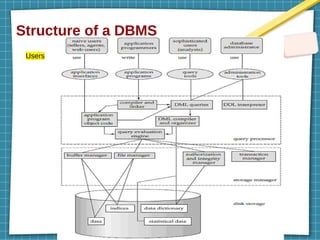
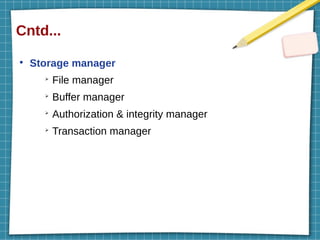
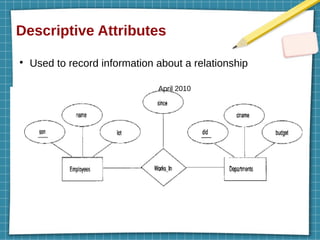
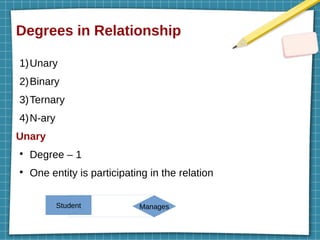
Introduction
●
Data : anyfact that can be recorded – text, numbers, images,
videos
●
Database : collection of related data (Student –
rollno,name,class,collegename,address,phn no, photo,marks
etc)
➢
Traditional DB – text & num
➢
Multimedia DB – videos, pics
➢
Geographical information system – images
➢
Realtime DB – day to day data
➢
Data warehouse – kind of DB which stores hue & historical
data
4.
Cntd...
●
Database Management System(DBMS) : software
or programs that helps to define, construct, manipulate
DB.
●
DB + DBMS --> DBS (Database System)
5.
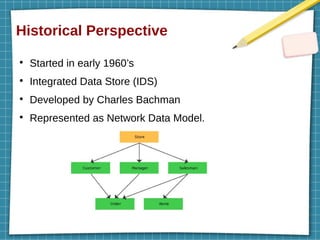
Historical Perspective
●
Started inearly 1960’s
●
Integrated Data Store (IDS)
●
Developed by Charles Bachman
●
Represented as Network Data Model.
Cntd...
●
1980’s
●
SQL (structured querylanguage) query language –
developed as part of IBM’s system R project
●
Standard query language
●
1980-1990’s – advances (DB2, Oracle 8, Datawarehoue
etc)
●
2020 – MySQL, MongoDB, Microsoft SQL server etc
9.
File System versusA DBMS
●
What was before DBMS? - file systems
●
Drawbacks of previous system
●
Benefits of DBMS
●
Before DBMS – file system
●
File system – store files in an individual system
(hierarchical model) – associated OS
●
Drive (c,d,e,f) – folder – sub folder – sub folder - document
10.
Drawbacks of filesystems
●
Storing data as an Operating system files
1)Huge main memory required to store data (>500gb)
2)Need programs to identify all data items - complexity
3)Couldn’t work with client – server architecture – 1 server
with n number of clients
4)Inconsistent changes – complexity
5)Not flexible to apply security policies
11.
Why we needto use DBMS? (Advantages)
●
Data Independence – data represent & storage individually
●
Efficient Data Access – store & retrieve data efficiently
●
Data Integrity and Security
●
Data Administration
●
Concurrent Access and Crash Recovery
●
Reduced Application Development Time
12.
Storing data ina DBMS – Data Model
●
DBMS – store data in terms of a data model
●
Data model – describes & organize data
➢ Introduce data abstraction (hide irrelevant details)
➢ Standardize how data relate to each other (sname,sid)
➢ Eg: Network data model, hierarchical data model, relational
data model, semantic data model etc.
Relational model
●
Stores data in form of relations (tables)
●
Table – columns & rows
13.
Cntd...
●
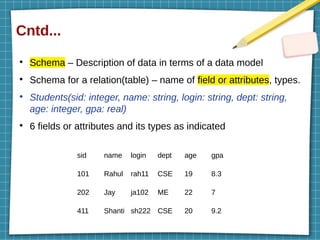
Schema – Descriptionof data in terms of a data model
●
Schema for a relation(table) – name of field or attributes, types.
●
Students(sid: integer, name: string, login: string, dept: string,
age: integer, gpa: real)
●
6 fields or attributes and its types as indicated
sid name login dept age gpa
101 Rahul rah11 CSE 19 8.3
202 Jay ja102 ME 22 7
411 Shanti sh222 CSE 20 9.2
14.
Cntd...
●
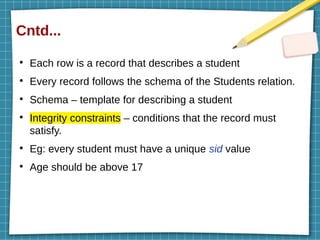
Each row isa record that describes a student
●
Every record follows the schema of the Students relation.
●
Schema – template for describing a student
●
Integrity constraints – conditions that the record must
satisfy.
●
Eg: every student must have a unique sid value
●
Age should be above 17
15.
Levels of Abstraction
●
Hidingirrelevant details from user – Data abstraction.
●
3 levels of abstraction :
➢
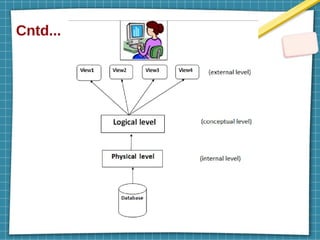
Physical level (Physical schema,internal
schema)
➢
Logical level (Conceptual schema)
➢
View level (external schema)
Cntd...
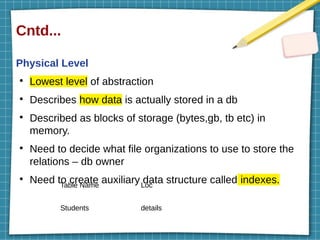
Physical Level
●
Lowest levelof abstraction
●
Describes how data is actually stored in a db
●
Described as blocks of storage (bytes,gb, tb etc) in
memory.
●
Need to decide what file organizations to use to store the
relations – db owner
●
Need to create auxiliary data structure called indexes.
Table Name Loc
Students details
18.
Cntd...
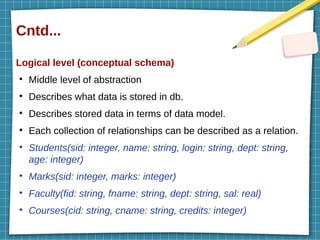
Logical level (conceptualschema)
●
Middle level of abstraction
●
Describes what data is stored in db.
●
Describes stored data in terms of data model.
●
Each collection of relationships can be described as a relation.
●
Students(sid: integer, name: string, login: string, dept: string,
age: integer)
●
Marks(sid: integer, marks: integer)
●
Faculty(fid: string, fname: string, dept: string, sal: real)
●
Courses(cid: string, cname: string, credits: integer)
19.
Cntd...
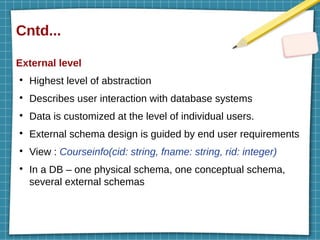
External level
●
Highest levelof abstraction
●
Describes user interaction with database systems
●
Data is customized at the level of individual users.
●
External schema design is guided by end user requirements
●
View : Courseinfo(cid: string, fname: string, rid: integer)
●
In a DB – one physical schema, one conceptual schema,
several external schemas
20.
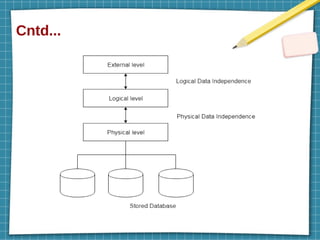
Data Independence
●
Modify schemain one level without altering another
level
●
2 types:
➢
Logical data independence
➢
Physical data independence
Cntd...
Logical data independence
●
changingconceptual schema without changing external schema
●
Due to Logical independence, any of the below change will not
affect the external layer.
➢
Add/Modify/Delete a new attribute, entity or
relationship is possible without a rewrite of existing
application programs
➢
Merging two records into one
➢
Breaking an existing record into two or more records
23.
Cntd...
Physical data independence
●
changinginternal schema without changing conceptual schema
●
easy to achieve physical data independence.
●
Due to Physical independence, any of the below change will not affect
the conceptual layer.
➢
Using a new storage device like Hard Drive or
Magnetic Tapes
➢
Modifying the file organization technique in the
Database
➢
Switching to different data structures.
➢
Modifying indexes.
➢
Change of Location of Database
24.
Queries
●
How many studentsare enrolled in CSE?
●
What is the average salary of professors who teach the course ME?
●
Questions involving the data stored in a DBMS – Queries
●
Query language – query can be posed
●
Data Manipulation Language (DML) – insert, update, delete
●
Data definition language (DDL) – create, drop, alter, truncate,
comment, rename
●
Data Query language (DQL) – select
●
Data control language (DCL) – grant and revoke
●
These are collectively referred as data sublanguage when
embedded within a host language (Java, C, C++ etc)
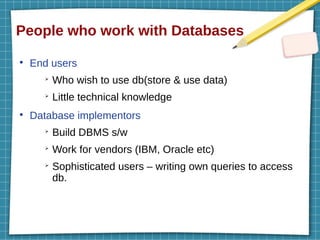
People who workwith Databases
●
End users
➢
Who wish to use db(store & use data)
➢
Little technical knowledge
●
Database implementors
➢
Build DBMS s/w
➢
Work for vendors (IBM, Oracle etc)
➢
Sophisticated users – writing own queries to access
db.
31.
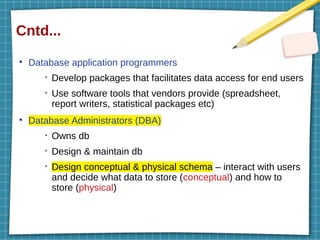
Cntd...
●
Database application programmers
➢
Developpackages that facilitates data access for end users
➢
Use software tools that vendors provide (spreadsheet,
report writers, statistical packages etc)
●
Database Administrators (DBA)
➢
Owns db
➢
Design & maintain db
➢
Design conceptual & physical schema – interact with users
and decide what data to store (conceptual) and how to
store (physical)
32.
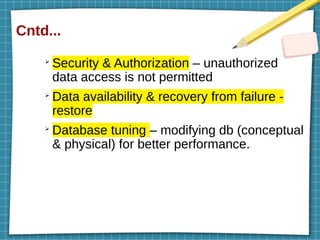
Cntd...
➢
Security & Authorization– unauthorized
data access is not permitted
➢
Data availability & recovery from failure -
restore
➢
Database tuning – modifying db (conceptual
& physical) for better performance.
33.
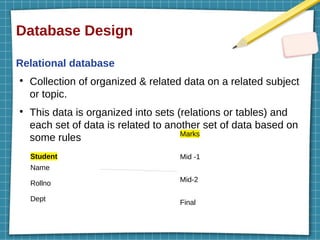
Database Design
Relational database
●
Collectionof organized & related data on a related subject
or topic.
●
This data is organized into sets (relations or tables) and
each set of data is related to another set of data based on
some rules
Student
Name
Rollno
Dept
Marks
Mid -1
Mid-2
Final
34.
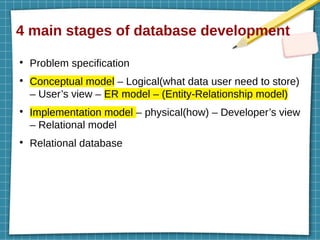
4 main stagesof database development
●
Problem specification
●
Conceptual model – Logical(what data user need to store)
– User’s view – ER model – (Entity-Relationship model)
●
Implementation model – physical(how) – Developer’s view
– Relational model
●
Relational database
35.
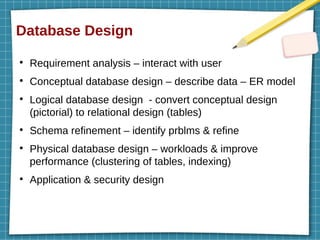
Database Design
●
Requirement analysis– interact with user
●
Conceptual database design – describe data – ER model
●
Logical database design - convert conceptual design
(pictorial) to relational design (tables)
●
Schema refinement – identify prblms & refine
●
Physical database design – workloads & improve
performance (clustering of tables, indexing)
●
Application & security design
36.
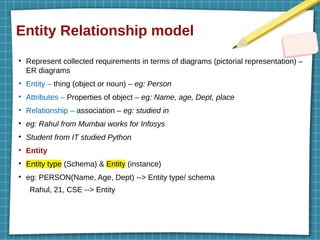
Entity Relationship model
●
Representcollected requirements in terms of diagrams (pictorial representation) –
ER diagrams
●
Entity – thing (object or noun) – eg: Person
●
Attributes – Properties of object – eg: Name, age, Dept, place
●
Relationship – association – eg: studied in
●
eg: Rahul from Mumbai works for Infosys
●
Student from IT studied Python
●
Entity
●
Entity type (Schema) & Entity (instance)
●
eg: PERSON(Name, Age, Dept) --> Entity type/ schema
Rahul, 21, CSE --> Entity
37.
Cntd...
●
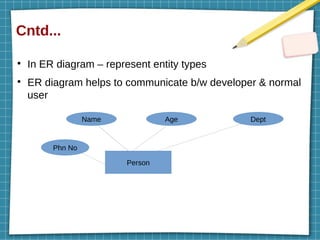
In ER diagram– represent entity types
●
ER diagram helps to communicate b/w developer & normal
user
Person
Name Age Dept
Phn No
38.
Cntd...
Attributes
●
Describes entities
●
More attributes– more information will get about an entity
●
Types:
➢Composite vs Simple attributes
➢Single valued vs multi valued attributes
➢Stored vs derived attributes
➢Complex attributes
39.
Cntd...
●
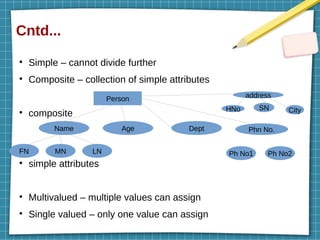
Simple – cannotdivide further
●
Composite – collection of simple attributes
●
composite
●
simple attributes
●
Multivalued – multiple values can assign
●
Single valued – only one value can assign
Person
Name Age Dept
FN LN
MN
Phn No.
Ph No2
Ph No1
address
HNo SN City
40.
Cntd...
●
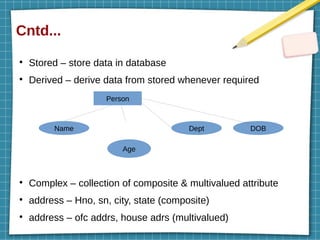
Stored – storedata in database
●
Derived – derive data from stored whenever required
●
Complex – collection of composite & multivalued attribute
●
address – Hno, sn, city, state (composite)
●
address – ofc addrs, house adrs (multivalued)
Person
Name Dept DOB
Age
41.
Cntd...
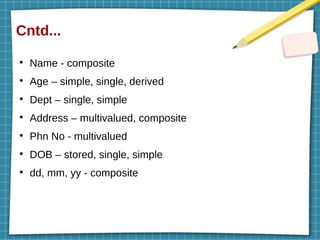
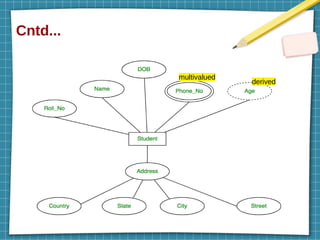
●
Name - composite
●
Age– simple, single, derived
●
Dept – single, simple
●
Address – multivalued, composite
●
Phn No - multivalued
●
DOB – stored, single, simple
●
dd, mm, yy - composite
Practice Qs
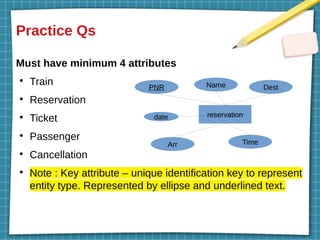
Must haveminimum 4 attributes
●
Train
●
Reservation
●
Ticket
●
Passenger
●
Cancellation
●
Note : Key attribute – unique identification key to represent
entity type. Represented by ellipse and underlined text.
reservation
PNR Name Dest
Arr Time
date
Cntd...
●
Types
➢
One to onerelationship (1:1)
➢
One to many relationship (1:N)
➢
Many to many relationship (M:N)
46.
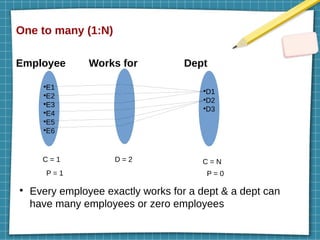
One to many(1:N)
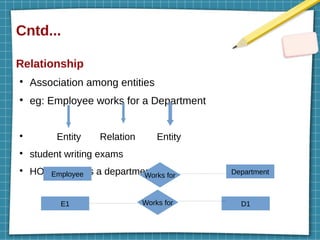
Employee Works for Dept
●
Every employee exactly works for a dept & a dept can
have many employees or zero employees
●
E1
●
E2
●
E3
●
E4
●
E5
●
E6
●
D1
●
D2
●
D3
D = 2
C = 1 C = N
P = 1 P = 0
47.
Cntd...
●
Degree : numberof participants in a relation
●
Cardinality ratio : maximum number of relationships in
which an entity can participate
●
Participation / existence (minimum cardinality) : minimum
number of relationships an entity can participate
●
Structural constraints – cardinality ratio & participation
48.
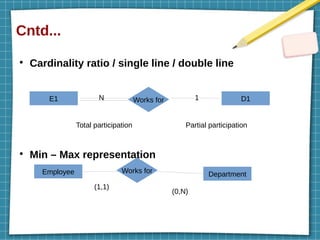
Cntd...
●
Cardinality ratio /single line / double line
●
Min – Max representation
E1 Works for D1
Employee Works for Department
N 1
Total participation Partial participation
(1,1)
(0,N)
49.
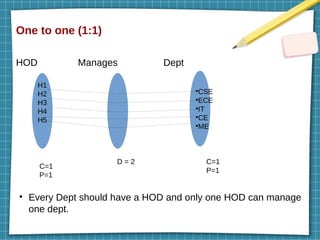
One to one(1:1)
HOD Manages Dept
●
Every Dept should have a HOD and only one HOD can manage
one dept.
H1
H2
H3
H4
H5
●
CSE
●
ECE
●
IT
●
CE
●
ME
D = 2
C=1
P=1
C=1
P=1
50.
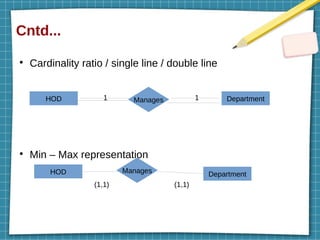
Cntd...
●
Cardinality ratio /single line / double line
●
Min – Max representation
HOD Manages Department
HOD Manages Department
1 1
(1,1) (1,1)
51.
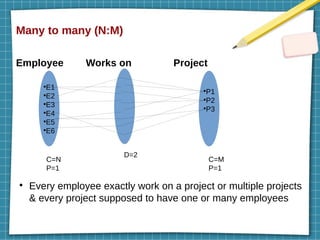
Many to many(N:M)
Employee Works on Project
●
Every employee exactly work on a project or multiple projects
& every project supposed to have one or many employees
●
E1
●
E2
●
E3
●
E4
●
E5
●
E6
●
P1
●
P2
●
P3
D=2
C=N
P=1
C=M
P=1
52.
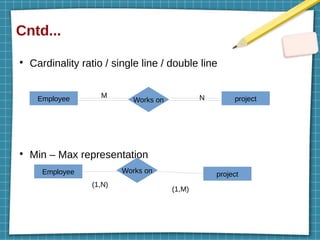
Cntd...
●
Cardinality ratio /single line / double line
●
Min – Max representation
Employee Works on project
Employee Works on project
M N
(1,N)
(1,M)
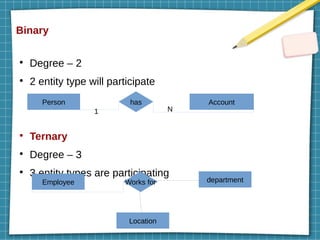
Binary
●
Degree – 2
●
2entity type will participate
●
Ternary
●
Degree – 3
●
3 entity types are participating
Person Account
has
1 N
Employee department
Location
Works for
56.
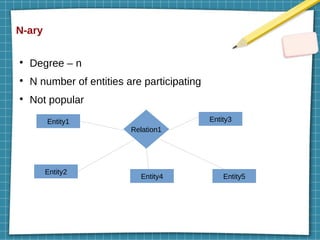
N-ary
●
Degree – n
●
Nnumber of entities are participating
●
Not popular
Entity1 Entity3
Entity2
Entity4 Entity5
Relation1
57.
Additional features ofthe ER Model
●
Key constraints
●
Participation constraints
●
Weak entities
●
Class hierarchies
●
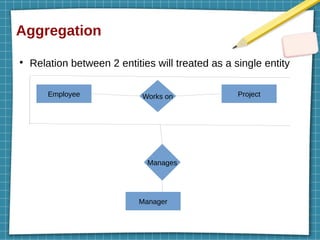
Aggregation
58.
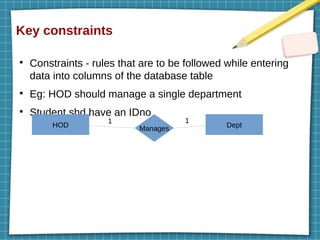
Key constraints
●
Constraints -rules that are to be followed while entering
data into columns of the database table
●
Eg: HOD should manage a single department
●
Student shd have an IDno
HOD Dept
Manages
1 1
59.
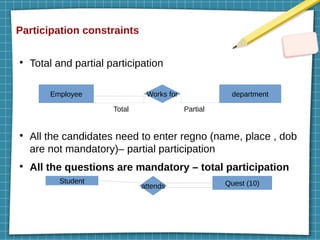
Participation constraints
●
Total andpartial participation
●
All the candidates need to enter regno (name, place , dob
are not mandatory)– partial participation
●
All the questions are mandatory – total participation
Employee Works for department
Total Partial
Student Quest (10)
attends
60.
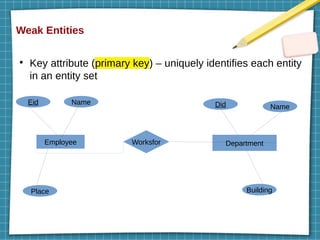
Weak Entities
●
Key attribute(primary key) – uniquely identifies each entity
in an entity set
Employee Worksfor Department
Eid Name
Place
Did Name
Building
61.
Cntd...
●
The entity setswhich do not have sufficient attributes to form a
primary key are known as weak entity sets
●
Strong entity - entity sets which have a primary key (eg:
employee & department)
●
Weak entity – cannot be identified by their own, always
depends on strong entity
●
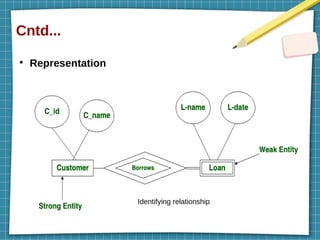
Weak entities make a relation with strong entities through
Identifying relationship
●
Weak entities always show total participation with identifying
relationship
Class hierarchies
●
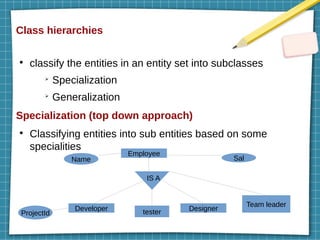
classify theentities in an entity set into subclasses
➢
Specialization
➢
Generalization
Specialization (top down approach)
●
Classifying entities into sub entities based on some
specialities
Employee
Developer Designer
Name Sal
ProjectId
IS A
tester
Team leader
64.
Cntd...
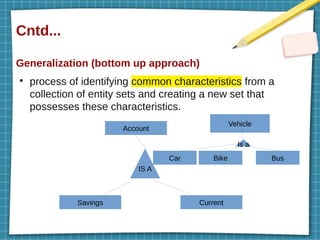
Generalization (bottom upapproach)
●
process of identifying common characteristics from a
collection of entity sets and creating a new set that
possesses these characteristics.
Account
Savings Current
IS A
Bike Bus
Car
Vehicle
Is a
Conceptual Design withthe ER Model
●
Entity versus Attribute
●
Entity versus Relationship
●
Binary versus Ternary Relationships
●
Aggregation versus Ternary Relationships
67.
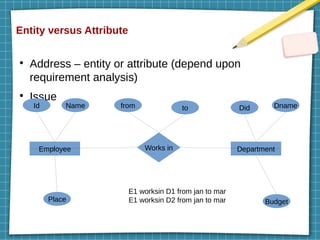
Entity versus Attribute
●
Address– entity or attribute (depend upon
requirement analysis)
●
Issue
Employee Department
Id Name
Place
from to Did Dname
Budget
Works in
E1 worksin D1 from jan to mar
E1 worksin D2 from jan to mar
68.
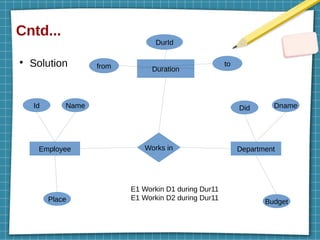
Cntd...
●
Solution
Employee Works inDepartment
Id Name
Place
Did Dname
Budget
Duration
from to
DurId
E1 Workin D1 during Dur11
E1 Workin D2 during Dur11
69.
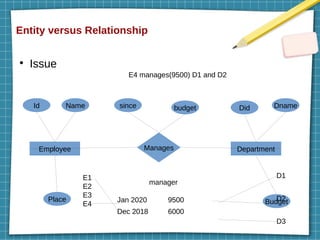
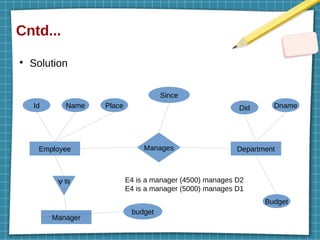
Entity versus Relationship
●
Issue
EmployeeDepartment
Id Name
Place
since budget Did Dname
Budget
Manages
manager
E1
E2
E3
E4
D1
D2
D3
Jan 2020 9500
Dec 2018 6000
E4 manages(9500) D1 and D2