© 2016, Amazon Web Services, Inc. or its Affiliates. All rights reserved.
Alex Smola
AWS Machine Learning
Scalable Deep Learning Using MXNet
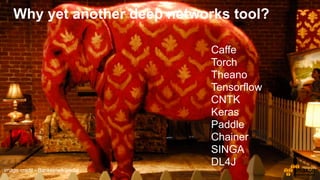
Caffe
Torch
Theano
Tensorflow
CNTK
Keras
Paddle
Chainer
SINGA
DL4J
image credit - Banksy/wikipedia
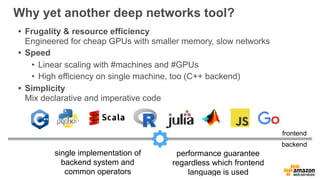
Why yet another deep networks tool?
• Frugality & resource efficiency

Engineered for cheap GPUs with smaller memory, slow networks
• Speed
• Linear scaling with #machines and #GPUs
• High efficiency on single machine, too (C++ backend)
• Simplicity

Mix declarative and imperative code
single implementation of
backend system and
common operators
performance guarantee
regardless which frontend
language is used
frontend
backend
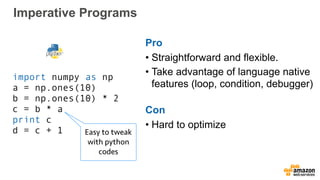
Imperative Programs
import numpy as np
a = np.ones(10)
b = np.ones(10) * 2
c = b * a
print c
d = c + 1 Easy to tweak
with python
codes
Pro
• Straightforward and flexible.
• Take advantage of language native
features (loop, condition, debugger)
Con
• Hard to optimize
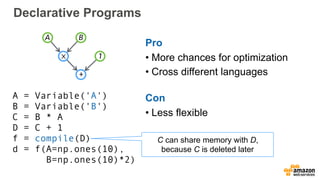
Declarative Programs
A = Variable('A')
B = Variable('B')
C = B * A
D = C + 1
f = compile(D)
d = f(A=np.ones(10),
B=np.ones(10)*2)
Pro
• More chances for optimization
• Cross different languages
Con
• Less flexible
A B
1
+
⨉
C can share memory with D,
because C is deleted later
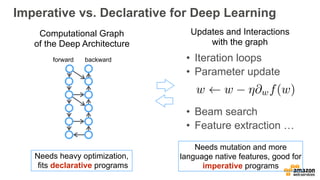
Imperative vs. Declarative for Deep Learning
Computational Graph
of the Deep Architecture
forward backward
Needs heavy optimization,
fits declarative programs
Needs mutation and more
language native features, good for
imperative programs
Updates and Interactions
with the graph
• Iteration loops
• Parameter update

• Beam search
• Feature extraction …
w w ⌘@wf(w)
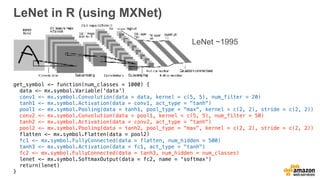
LeNet in R (using MXNet)
get_symbol <- function(num_classes = 1000) {
data <- mx.symbol.Variable('data')
conv1 <- mx.symbol.Convolution(data = data, kernel = c(5, 5), num_filter = 20)
tanh1 <- mx.symbol.Activation(data = conv1, act_type = "tanh")
pool1 <- mx.symbol.Pooling(data = tanh1, pool_type = "max", kernel = c(2, 2), stride = c(2, 2))
conv2 <- mx.symbol.Convolution(data = pool1, kernel = c(5, 5), num_filter = 50)
tanh2 <- mx.symbol.Activation(data = conv2, act_type = "tanh")
pool2 <- mx.symbol.Pooling(data = tanh2, pool_type = "max", kernel = c(2, 2), stride = c(2, 2))
flatten <- mx.symbol.Flatten(data = pool2)
fc1 <- mx.symbol.FullyConnected(data = flatten, num_hidden = 500)
tanh3 <- mx.symbol.Activation(data = fc1, act_type = "tanh")
fc2 <- mx.symbol.FullyConnected(data = tanh3, num_hidden = num_classes)
lenet <- mx.symbol.SoftmaxOutput(data = fc2, name = 'softmax')
return(lenet)
}
LeNet ~1995
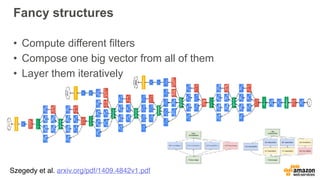
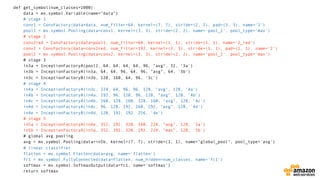
Fancy structures
• Compute different filters
• Compose one big vector from all of them
• Layer them iteratively
Szegedy et al. arxiv.org/pdf/1409.4842v1.pdf
def get_symbol(num_classes=1000):
data = mx.symbol.Variable(name="data")
# stage 1
conv1 = ConvFactory(data=data, num_filter=64, kernel=(7, 7), stride=(2, 2), pad=(3, 3), name='1')
pool1 = mx.symbol.Pooling(data=conv1, kernel=(3, 3), stride=(2, 2), name='pool_1', pool_type='max')
# stage 2
conv2red = ConvFactory(data=pool1, num_filter=64, kernel=(1, 1), stride=(1, 1), name='2_red')
conv2 = ConvFactory(data=conv2red, num_filter=192, kernel=(3, 3), stride=(1, 1), pad=(1, 1), name='2')
pool2 = mx.symbol.Pooling(data=conv2, kernel=(3, 3), stride=(2, 2), name='pool_2', pool_type='max')
# stage 3
in3a = InceptionFactoryA(pool2, 64, 64, 64, 64, 96, "avg", 32, '3a')
in3b = InceptionFactoryA(in3a, 64, 64, 96, 64, 96, "avg", 64, '3b')
in3c = InceptionFactoryB(in3b, 128, 160, 64, 96, '3c')
# stage 4
in4a = InceptionFactoryA(in3c, 224, 64, 96, 96, 128, "avg", 128, '4a')
in4b = InceptionFactoryA(in4a, 192, 96, 128, 96, 128, "avg", 128, '4b')
in4c = InceptionFactoryA(in4b, 160, 128, 160, 128, 160, "avg", 128, '4c')
in4d = InceptionFactoryA(in4c, 96, 128, 192, 160, 192, "avg", 128, '4d')
in4e = InceptionFactoryB(in4d, 128, 192, 192, 256, '4e')
# stage 5
in5a = InceptionFactoryA(in4e, 352, 192, 320, 160, 224, "avg", 128, '5a')
in5b = InceptionFactoryA(in5a, 352, 192, 320, 192, 224, "max", 128, '5b')
# global avg pooling
avg = mx.symbol.Pooling(data=in5b, kernel=(7, 7), stride=(1, 1), name="global_pool", pool_type='avg')
# linear classifier
flatten = mx.symbol.Flatten(data=avg, name='flatten')
fc1 = mx.symbol.FullyConnected(data=flatten, num_hidden=num_classes, name='fc1')
softmax = mx.symbol.SoftmaxOutput(data=fc1, name='softmax')
return softmax
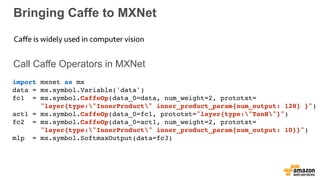
Bringing Caffe to MXNet
Call Caffe Operators in MXNet
Caffe is widely used in computer vision
import mxnet as mx
data = mx.symbol.Variable('data')
fc1 = mx.symbol.CaffeOp(data_0=data, num_weight=2, prototxt=

"layer{type:"InnerProduct" inner_product_param{num_output: 128} }")
act1 = mx.symbol.CaffeOp(data_0=fc1, prototxt="layer{type:"TanH"}")
fc2 = mx.symbol.CaffeOp(data_0=act1, num_weight=2, prototxt=

"layer{type:"InnerProduct" inner_product_param{num_output: 10}}")
mlp = mx.symbol.SoftmaxOutput(data=fc3)
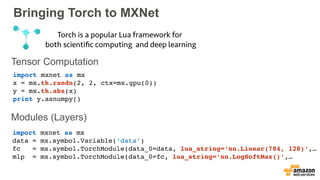
Bringing Torch to MXNet
Tensor Computation
Modules (Layers)
Torch is a popular Lua framework for
both scientific computing and deep learning
import mxnet as mx
x = mx.th.randn(2, 2, ctx=mx.gpu(0))
y = mx.th.abs(x)
print y.asnumpy()
import mxnet as mx
data = mx.symbol.Variable(‘data’)
fc = mx.symbol.TorchModule(data_0=data, lua_string=‘nn.Linear(784, 128)’,…
mlp = mx.symbol.TorchModule(data_0=fc, lua_string=‘nn.LogSoftMax()’,…
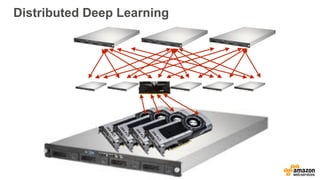
Distributed Deep Learning
## train
num_gpus = 4
gpus = [mx.gpu(i) for i in range(num_gpus)]
model = mx.model.FeedForward(
ctx = gpus,
symbol = softmax,
num_round = 20,
learning_rate = 0.01,
momentum = 0.9,
wd = 0.00001)
model.fit(X = train, eval_data = val, batch_end_callback = mx.callback.Speedometer(batch_size=batch_size))
2 lines for multi GPU
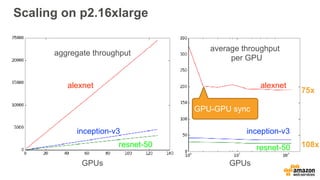
Scaling on p2.16xlarge
alexnet
inception-v3
resnet-50
GPUs GPUs
average throughput
per GPU
aggregate throughput
GPU-GPU sync
alexnet
inception-v3
resnet-50 108x
75x
AMIs, Cloud Formation and DL Frameworks
image credit - publicdomainpibtures
• Amazon Machine Images (AMI)
• Deep Learning Frameworks
• Cloud Formation Templates
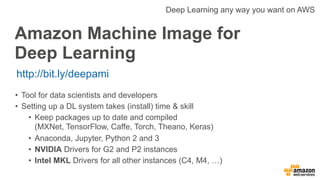
Amazon Machine Image for
Deep Learning
http://bit.ly/deepami
Deep Learning any way you want on AWS
• Tool for data scientists and developers
• Setting up a DL system takes (install) time & skill
• Keep packages up to date and compiled 

(MXNet, TensorFlow, Caffe, Torch, Theano, Keras)
• Anaconda, Jupyter, Python 2 and 3
• NVIDIA Drivers for G2 and P2 instances
• Intel MKL Drivers for all other instances (C4, M4, …)
Getting started
acbc32cf4de3:image-classification smola$ ssh ec2-user@54.210.246.140
Last login: Fri Nov 11 05:58:58 2016 from 72-21-196-69.amazon.com
=============================================================================
__| __|_ )
_| ( / Deep Learning AMI for Amazon Linux
___|___|___|
This is beta version of the Deep Learning AMI for Amazon Linux.
The README file for the AMI ➜➜➜➜➜➜➜➜➜➜➜➜➜➜➜➜➜➜➜➜ /home/ec2-user/src/README.md
Tests for deep learning frameworks ➜➜➜➜➜➜➜➜➜➜➜➜ /home/ec2-user/src/bin
=============================================================================
7 package(s) needed for security, out of 75 available
Run "sudo yum update" to apply all updates.
Amazon Linux version 2016.09 is available.
[ec2-user@ip-172-31-55-21 ~]$ cd src/
[ec2-user@ip-172-31-55-21 src]$ ls
anaconda2 bazel caffe cntk keras mxnet OpenBLAS README.md Theano
anaconda3 bin caffe3 demos logs Nvidia_Cloud_EULA.pdf opencv tensorflow torch
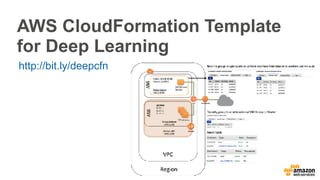
AWS CloudFormation Template
for Deep Learning
http://bit.ly/deepcfn
AWS CloudFormation Components
• VPC in the customer account.
• The requested number of worker instances in an Auto Scaling
group within the VPC. Workers are launched in a private subnet.
• Master instance in a separate Auto Scaling group that acts as a
proxy to enable connectivity to the cluster via SSH.
• Two security groups that open ports on the private subnet for
communication between the master and workers.
• IAM role that allows users to access and query Auto Scaling
groups and the private IP addresses of the EC2 instances.
• NAT gateway used by instances within the VPC to talk to the
outside.
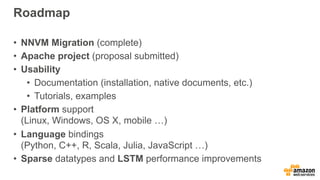
Roadmap
• NNVM Migration (complete)
• Apache project (proposal submitted)
• Usability
• Documentation (installation, native documents, etc.)
• Tutorials, examples
• Platform support

(Linux, Windows, OS X, mobile …)
• Language bindings

(Python, C++, R, Scala, Julia, JavaScript …)
• Sparse datatypes and LSTM performance improvements
We are hiring!
{smola, spisakj, mli}@amazon.com

Alex Smola at AI Frontiers: Scalable Deep Learning Using MXNet

  • 1.
    © 2016, AmazonWeb Services, Inc. or its Affiliates. All rights reserved. Alex Smola AWS Machine Learning Scalable Deep Learning Using MXNet
  • 2.
  • 3.
    Why yet anotherdeep networks tool? • Frugality & resource efficiency
 Engineered for cheap GPUs with smaller memory, slow networks • Speed • Linear scaling with #machines and #GPUs • High efficiency on single machine, too (C++ backend) • Simplicity
 Mix declarative and imperative code single implementation of backend system and common operators performance guarantee regardless which frontend language is used frontend backend
  • 4.
    Imperative Programs import numpyas np a = np.ones(10) b = np.ones(10) * 2 c = b * a print c d = c + 1 Easy to tweak with python codes Pro • Straightforward and flexible. • Take advantage of language native features (loop, condition, debugger) Con • Hard to optimize
  • 5.
    Declarative Programs A =Variable('A') B = Variable('B') C = B * A D = C + 1 f = compile(D) d = f(A=np.ones(10), B=np.ones(10)*2) Pro • More chances for optimization • Cross different languages Con • Less flexible A B 1 + ⨉ C can share memory with D, because C is deleted later
  • 6.
    Imperative vs. Declarativefor Deep Learning Computational Graph of the Deep Architecture forward backward Needs heavy optimization, fits declarative programs Needs mutation and more language native features, good for imperative programs Updates and Interactions with the graph • Iteration loops • Parameter update
 • Beam search • Feature extraction … w w ⌘@wf(w)
  • 7.
    LeNet in R(using MXNet) get_symbol <- function(num_classes = 1000) { data <- mx.symbol.Variable('data') conv1 <- mx.symbol.Convolution(data = data, kernel = c(5, 5), num_filter = 20) tanh1 <- mx.symbol.Activation(data = conv1, act_type = "tanh") pool1 <- mx.symbol.Pooling(data = tanh1, pool_type = "max", kernel = c(2, 2), stride = c(2, 2)) conv2 <- mx.symbol.Convolution(data = pool1, kernel = c(5, 5), num_filter = 50) tanh2 <- mx.symbol.Activation(data = conv2, act_type = "tanh") pool2 <- mx.symbol.Pooling(data = tanh2, pool_type = "max", kernel = c(2, 2), stride = c(2, 2)) flatten <- mx.symbol.Flatten(data = pool2) fc1 <- mx.symbol.FullyConnected(data = flatten, num_hidden = 500) tanh3 <- mx.symbol.Activation(data = fc1, act_type = "tanh") fc2 <- mx.symbol.FullyConnected(data = tanh3, num_hidden = num_classes) lenet <- mx.symbol.SoftmaxOutput(data = fc2, name = 'softmax') return(lenet) } LeNet ~1995
  • 8.
    Fancy structures • Computedifferent filters • Compose one big vector from all of them • Layer them iteratively Szegedy et al. arxiv.org/pdf/1409.4842v1.pdf
  • 9.
    def get_symbol(num_classes=1000): data =mx.symbol.Variable(name="data") # stage 1 conv1 = ConvFactory(data=data, num_filter=64, kernel=(7, 7), stride=(2, 2), pad=(3, 3), name='1') pool1 = mx.symbol.Pooling(data=conv1, kernel=(3, 3), stride=(2, 2), name='pool_1', pool_type='max') # stage 2 conv2red = ConvFactory(data=pool1, num_filter=64, kernel=(1, 1), stride=(1, 1), name='2_red') conv2 = ConvFactory(data=conv2red, num_filter=192, kernel=(3, 3), stride=(1, 1), pad=(1, 1), name='2') pool2 = mx.symbol.Pooling(data=conv2, kernel=(3, 3), stride=(2, 2), name='pool_2', pool_type='max') # stage 3 in3a = InceptionFactoryA(pool2, 64, 64, 64, 64, 96, "avg", 32, '3a') in3b = InceptionFactoryA(in3a, 64, 64, 96, 64, 96, "avg", 64, '3b') in3c = InceptionFactoryB(in3b, 128, 160, 64, 96, '3c') # stage 4 in4a = InceptionFactoryA(in3c, 224, 64, 96, 96, 128, "avg", 128, '4a') in4b = InceptionFactoryA(in4a, 192, 96, 128, 96, 128, "avg", 128, '4b') in4c = InceptionFactoryA(in4b, 160, 128, 160, 128, 160, "avg", 128, '4c') in4d = InceptionFactoryA(in4c, 96, 128, 192, 160, 192, "avg", 128, '4d') in4e = InceptionFactoryB(in4d, 128, 192, 192, 256, '4e') # stage 5 in5a = InceptionFactoryA(in4e, 352, 192, 320, 160, 224, "avg", 128, '5a') in5b = InceptionFactoryA(in5a, 352, 192, 320, 192, 224, "max", 128, '5b') # global avg pooling avg = mx.symbol.Pooling(data=in5b, kernel=(7, 7), stride=(1, 1), name="global_pool", pool_type='avg') # linear classifier flatten = mx.symbol.Flatten(data=avg, name='flatten') fc1 = mx.symbol.FullyConnected(data=flatten, num_hidden=num_classes, name='fc1') softmax = mx.symbol.SoftmaxOutput(data=fc1, name='softmax') return softmax
  • 10.
    Bringing Caffe toMXNet Call Caffe Operators in MXNet Caffe is widely used in computer vision import mxnet as mx data = mx.symbol.Variable('data') fc1 = mx.symbol.CaffeOp(data_0=data, num_weight=2, prototxt=
 "layer{type:"InnerProduct" inner_product_param{num_output: 128} }") act1 = mx.symbol.CaffeOp(data_0=fc1, prototxt="layer{type:"TanH"}") fc2 = mx.symbol.CaffeOp(data_0=act1, num_weight=2, prototxt=
 "layer{type:"InnerProduct" inner_product_param{num_output: 10}}") mlp = mx.symbol.SoftmaxOutput(data=fc3)
  • 11.
    Bringing Torch toMXNet Tensor Computation Modules (Layers) Torch is a popular Lua framework for both scientific computing and deep learning import mxnet as mx x = mx.th.randn(2, 2, ctx=mx.gpu(0)) y = mx.th.abs(x) print y.asnumpy() import mxnet as mx data = mx.symbol.Variable(‘data’) fc = mx.symbol.TorchModule(data_0=data, lua_string=‘nn.Linear(784, 128)’,… mlp = mx.symbol.TorchModule(data_0=fc, lua_string=‘nn.LogSoftMax()’,…
  • 12.
  • 13.
    Distributed Deep Learning ##train num_gpus = 4 gpus = [mx.gpu(i) for i in range(num_gpus)] model = mx.model.FeedForward( ctx = gpus, symbol = softmax, num_round = 20, learning_rate = 0.01, momentum = 0.9, wd = 0.00001) model.fit(X = train, eval_data = val, batch_end_callback = mx.callback.Speedometer(batch_size=batch_size)) 2 lines for multi GPU
  • 14.
    Scaling on p2.16xlarge alexnet inception-v3 resnet-50 GPUsGPUs average throughput per GPU aggregate throughput GPU-GPU sync alexnet inception-v3 resnet-50 108x 75x
  • 15.
    AMIs, Cloud Formationand DL Frameworks image credit - publicdomainpibtures • Amazon Machine Images (AMI) • Deep Learning Frameworks • Cloud Formation Templates
  • 16.
    Amazon Machine Imagefor Deep Learning http://bit.ly/deepami Deep Learning any way you want on AWS • Tool for data scientists and developers • Setting up a DL system takes (install) time & skill • Keep packages up to date and compiled 
 (MXNet, TensorFlow, Caffe, Torch, Theano, Keras) • Anaconda, Jupyter, Python 2 and 3 • NVIDIA Drivers for G2 and P2 instances • Intel MKL Drivers for all other instances (C4, M4, …)
  • 17.
    Getting started acbc32cf4de3:image-classification smola$ssh ec2-user@54.210.246.140 Last login: Fri Nov 11 05:58:58 2016 from 72-21-196-69.amazon.com ============================================================================= __| __|_ ) _| ( / Deep Learning AMI for Amazon Linux ___|___|___| This is beta version of the Deep Learning AMI for Amazon Linux. The README file for the AMI ➜➜➜➜➜➜➜➜➜➜➜➜➜➜➜➜➜➜➜➜ /home/ec2-user/src/README.md Tests for deep learning frameworks ➜➜➜➜➜➜➜➜➜➜➜➜ /home/ec2-user/src/bin ============================================================================= 7 package(s) needed for security, out of 75 available Run "sudo yum update" to apply all updates. Amazon Linux version 2016.09 is available. [ec2-user@ip-172-31-55-21 ~]$ cd src/ [ec2-user@ip-172-31-55-21 src]$ ls anaconda2 bazel caffe cntk keras mxnet OpenBLAS README.md Theano anaconda3 bin caffe3 demos logs Nvidia_Cloud_EULA.pdf opencv tensorflow torch
  • 18.
    AWS CloudFormation Template forDeep Learning http://bit.ly/deepcfn
  • 19.
    AWS CloudFormation Components •VPC in the customer account. • The requested number of worker instances in an Auto Scaling group within the VPC. Workers are launched in a private subnet. • Master instance in a separate Auto Scaling group that acts as a proxy to enable connectivity to the cluster via SSH. • Two security groups that open ports on the private subnet for communication between the master and workers. • IAM role that allows users to access and query Auto Scaling groups and the private IP addresses of the EC2 instances. • NAT gateway used by instances within the VPC to talk to the outside.
  • 20.
    Roadmap • NNVM Migration(complete) • Apache project (proposal submitted) • Usability • Documentation (installation, native documents, etc.) • Tutorials, examples • Platform support
 (Linux, Windows, OS X, mobile …) • Language bindings
 (Python, C++, R, Scala, Julia, JavaScript …) • Sparse datatypes and LSTM performance improvements
  • 21.
    We are hiring! {smola,spisakj, mli}@amazon.com