TensorFlow 101
Ashish Bansal, Snr Dir, Data Science @ Capital One
@ash_bans | linkedin.com/in/bansalashish
1
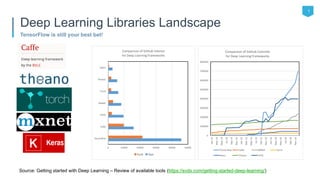
TensorFlow is still your best bet!
Deep Learning Libraries Landscape
Source: Getting started with Deep Learning – Review of available tools (https://svds.com/getting-started-deep-learning/)
2
What and Why?
• Machine Learning Library
• Built for Neural Networks
• Nascent support for other models
• Developed by Google, released
as open source in Nov. 2015
• Python & C++ APIs
• Multi-platform:
• Mac, Linux, Windows, iOS, Android
• Support for CPU + GPU and
Distributed Computation
• Active Community
• Built for Research and
Production
TensorFlow
3
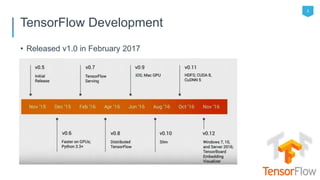
• Released v1.0 in February 2017
TensorFlow Development
4
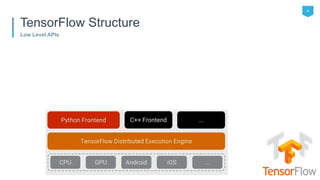
Low Level APIs
TensorFlow Structure
5
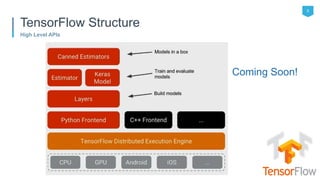
High Level APIs
TensorFlow Structure
Coming Soon!
6
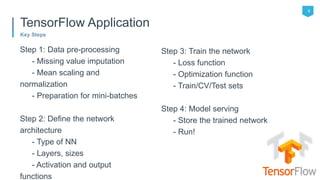
Key Steps
Step 1: Data pre-processing
- Missing value imputation
- Mean scaling and
normalization
- Preparation for mini-batches
Step 2: Define the network
architecture
- Type of NN
- Layers, sizes
- Activation and output
functions
Step 3: Train the network
- Loss function
- Optimization function
- Train/CV/Test sets
Step 4: Model serving
- Store the trained network
- Run!
TensorFlow Application
7
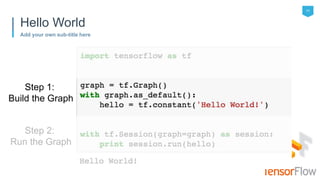
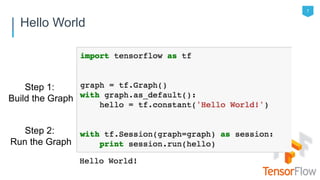
Hello World
Step 1:
Build the Graph
Step 2:
Run the Graph
Step 1: Build the Graph
TensorFlow 101
9
Graph == Nodes (Ops) through which Tensors “flow”
Building the Graph
[ 1 2 3 ]Rank 1:
Rank 2:
1 2 3 4
5 6 7 8
Rank 3: …
Rank 0: [ 2 ]
Tensors Nodes
Constant/Variable/Placeholder
Add/Subtract
Matrix Multiplication
SoftMax
ReLU
Loss Functions
Optimization Functions
…
Tensors have type, shape, and value
Also known as “Ops”
10
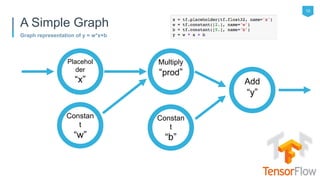
Graph representation of y = w*x+b
A Simple Graph
Add
“y”
Placehol
der
“x”
Constan
t
“w”
Constan
t
“b”
Multiply
“prod”
11
Add your own sub-title here
Hello World
Step 1:
Build the Graph
Step 2:
Run the Graph
Step 2: Run the Graph
TensorFlow 101
• Session.run([y]) will return the Tensor output of node “y” after
evaluating all other nodes in this graph
13
Sessions are used to evaluate node outputs
Running the Graph
Add
“y”
Placehol
der
“x”
Constan
t
“w”
Constan
t
“b”
Multiply
“prod”
14
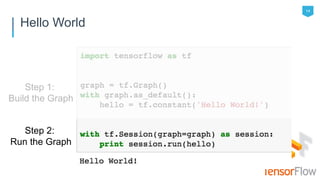
Hello World
Step 1:
Build the Graph
Step 2:
Run the Graph
15
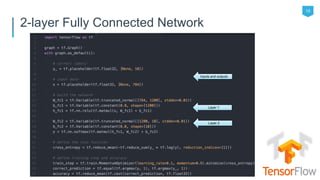
2-layer Fully Connected Network
Inputs and outputs
Layer 1
Layer 2
Thank you!
Ashish Bansal, Snr Dir, Data Science @ Capital One
@ash_bans | linkedin.com/in/bansalashish
TensorFlow APIs
TensorFlow 101
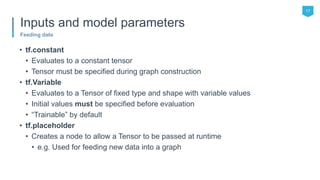
• tf.constant
• Evaluates to a constant tensor
• Tensor must be specified during graph construction
• tf.Variable
• Evaluates to a Tensor of fixed type and shape with variable values
• Initial values must be specified before evaluation
• “Trainable” by default
• tf.placeholder
• Creates a node to allow a Tensor to be passed at runtime
• e.g. Used for feeding new data into a graph
17
Feeding data
Inputs and model parameters
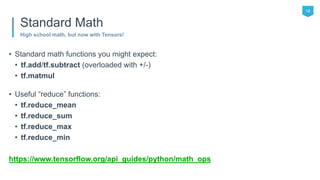
• Standard math functions you might expect:
• tf.add/tf.subtract (overloaded with +/-)
• tf.matmul
• Useful “reduce” functions:
• tf.reduce_mean
• tf.reduce_sum
• tf.reduce_max
• tf.reduce_min
https://www.tensorflow.org/api_guides/python/math_ops
18
High school math, but now with Tensors!
Standard Math
• Activation Functions:
• tf.sigmoid
• tf.tanh
• tf.nn.relu
• Classification Functions:
• tf.nn.softmax
• Alternative NN Architectures:
• tf.nn.conv* (many convolution Ops)
• tf.nn.pool
More info at: https://www.tensorflow.org/versions/r1.0/api_docs/python/nn/
19
Functions to build up neural networks
Neural Network Functions
• Loss Functions:
• tf.nn.l2_loss
• tf.nn.softmax_cross_entropy_with_logits
• Optimizers:
• tf.train.GradientDescentOptimizer
• tf.train.AdamOptimizer
• tf.train.AdagradOptimizer
• Note: Automatic gradient calculation based on the Graph!
20
How well is the model doing? And how can it get better?
Loss Functions and Optimizers

Tensorflow 101 @ Machine Learning Innovation Summit SF June 6, 2017

  • 1.
    TensorFlow 101 Ashish Bansal,Snr Dir, Data Science @ Capital One @ash_bans | linkedin.com/in/bansalashish
  • 2.
    1 TensorFlow is stillyour best bet! Deep Learning Libraries Landscape Source: Getting started with Deep Learning – Review of available tools (https://svds.com/getting-started-deep-learning/)
  • 3.
    2 What and Why? •Machine Learning Library • Built for Neural Networks • Nascent support for other models • Developed by Google, released as open source in Nov. 2015 • Python & C++ APIs • Multi-platform: • Mac, Linux, Windows, iOS, Android • Support for CPU + GPU and Distributed Computation • Active Community • Built for Research and Production TensorFlow
  • 4.
    3 • Released v1.0in February 2017 TensorFlow Development
  • 5.
  • 6.
    5 High Level APIs TensorFlowStructure Coming Soon!
  • 7.
    6 Key Steps Step 1:Data pre-processing - Missing value imputation - Mean scaling and normalization - Preparation for mini-batches Step 2: Define the network architecture - Type of NN - Layers, sizes - Activation and output functions Step 3: Train the network - Loss function - Optimization function - Train/CV/Test sets Step 4: Model serving - Store the trained network - Run! TensorFlow Application
  • 8.
    7 Hello World Step 1: Buildthe Graph Step 2: Run the Graph
  • 9.
    Step 1: Buildthe Graph TensorFlow 101
  • 10.
    9 Graph == Nodes(Ops) through which Tensors “flow” Building the Graph [ 1 2 3 ]Rank 1: Rank 2: 1 2 3 4 5 6 7 8 Rank 3: … Rank 0: [ 2 ] Tensors Nodes Constant/Variable/Placeholder Add/Subtract Matrix Multiplication SoftMax ReLU Loss Functions Optimization Functions … Tensors have type, shape, and value Also known as “Ops”
  • 11.
    10 Graph representation ofy = w*x+b A Simple Graph Add “y” Placehol der “x” Constan t “w” Constan t “b” Multiply “prod”
  • 12.
    11 Add your ownsub-title here Hello World Step 1: Build the Graph Step 2: Run the Graph
  • 13.
    Step 2: Runthe Graph TensorFlow 101
  • 14.
    • Session.run([y]) willreturn the Tensor output of node “y” after evaluating all other nodes in this graph 13 Sessions are used to evaluate node outputs Running the Graph Add “y” Placehol der “x” Constan t “w” Constan t “b” Multiply “prod”
  • 15.
    14 Hello World Step 1: Buildthe Graph Step 2: Run the Graph
  • 16.
    15 2-layer Fully ConnectedNetwork Inputs and outputs Layer 1 Layer 2
  • 17.
    Thank you! Ashish Bansal,Snr Dir, Data Science @ Capital One @ash_bans | linkedin.com/in/bansalashish
  • 18.
  • 19.
    • tf.constant • Evaluatesto a constant tensor • Tensor must be specified during graph construction • tf.Variable • Evaluates to a Tensor of fixed type and shape with variable values • Initial values must be specified before evaluation • “Trainable” by default • tf.placeholder • Creates a node to allow a Tensor to be passed at runtime • e.g. Used for feeding new data into a graph 17 Feeding data Inputs and model parameters
  • 20.
    • Standard mathfunctions you might expect: • tf.add/tf.subtract (overloaded with +/-) • tf.matmul • Useful “reduce” functions: • tf.reduce_mean • tf.reduce_sum • tf.reduce_max • tf.reduce_min https://www.tensorflow.org/api_guides/python/math_ops 18 High school math, but now with Tensors! Standard Math
  • 21.
    • Activation Functions: •tf.sigmoid • tf.tanh • tf.nn.relu • Classification Functions: • tf.nn.softmax • Alternative NN Architectures: • tf.nn.conv* (many convolution Ops) • tf.nn.pool More info at: https://www.tensorflow.org/versions/r1.0/api_docs/python/nn/ 19 Functions to build up neural networks Neural Network Functions
  • 22.
    • Loss Functions: •tf.nn.l2_loss • tf.nn.softmax_cross_entropy_with_logits • Optimizers: • tf.train.GradientDescentOptimizer • tf.train.AdamOptimizer • tf.train.AdagradOptimizer • Note: Automatic gradient calculation based on the Graph! 20 How well is the model doing? And how can it get better? Loss Functions and Optimizers

Editor's Notes

  • #2 When adding an image to the background adjust transparency to 25%
  • #3 Deep learning 4J Keras is a high level wrapper on top of TF or Theano Torch is Lua based
  • #10 When adding an image to the background adjust transparency to 25%
  • #12 When adding an image to the background adjust transparency to 25%
  • #14 When adding an image to the background adjust transparency to 25%
  • #18 When adding an image to the background adjust transparency to 25%
  • #19 When adding an image to the background adjust transparency to 25%